A 258-trial experiment proves graph-based navigation beats keyword search for AI coding assistants — but getting the AI to use it is the real challenge
I had a theory that turned out to be wrong — and then right — in the same experiment.
The theory: as LLM context windows grow to 1 million tokens, the problem of “finding the right file” goes away. Just throw the whole codebase in. Problem solved.
The reality: Claude would read the wrong files — confidently, completely, and consistently — even when the right files were sitting right there in the repository.
Here’s the story of how I proved it, what I built, and what it means for anyone building with AI coding assistants today.
The Bug That Started Everything
Picture this: you ask an AI coding assistant to “add a logger parameter to BaseRepository.__init__" in a FastAPI codebase. A simple enough task — add one optional parameter, maybe 5 lines of code.
Claude reads base.py. Reads articles.py, profiles.py, comments.py. Updates all four files. Declares success.
But there’s a fifth file it never touched: app/api/dependencies/database.py.
# app/api/dependencies/database.py
def get_repository(
    repo_type: Type[BaseRepository],
) -> Callable[[Connection], BaseRepository]:
    def _get_repo(
        conn: Connection = Depends(_get_connection_from_pool),
    ) -> BaseRepository:
        return repo_type(conn)  # ← instantiates every repo in the app
    return _get_repo
This file instantiates every single repository in the application. Every route uses it. And it creates repos by calling repo_type(conn) — not repo_type(conn, logger=logger).
Claude’s changes work perfectly. Until you try to actually pass a logger. Then you realize the central factory was never updated.
The file shares zero vocabulary with the task. No mention of “logger”, “parameter”, or “BaseRepository” in the file’s own docstrings or comments. A BM25 search for “add logger parameter BaseRepository” ranks it somewhere around result #15. A semantic embedding search? Maybe slightly better, but still not at the top.
It’s invisible to retrieval. Visible only to structure.
This is the Navigation Paradox.
Why Bigger Context Windows Don’t Fix This
Before I built anything, I had to convince myself the problem was real and not just a quirk of one task.
The common wisdom: “just give the LLM more context.” If the whole repo fits in the context window, every file is available. No retrieval needed.
Here’s why this is incomplete. Consider a codebase with 40 Python files. A 1M token window can hold all 40 files easily. But the LLM doesn’t read all 40 — it selects which ones to read based on relevance signals. Those signals are:
- Keyword match — does this file’s name or content contain words from the task?
- Semantic similarity — does this file’s purpose seem related to the task?
- Heuristic pattern — does this look like the kind of file I’d expect to change?
All three signals are semantic. They fail on structural dependencies — files that are connected to the target by code relationships, not vocabulary.
database.py fails all three signals for the logger task. Its name doesn't match. Its content ("pool", "connection", "acquire") doesn't match. Its purpose (dependency injection factory) seems unrelated. The LLM rationally ignores it.
The problem isn’t context capacity. It’s navigational salience.
Building the Map
I built CodeCompass — a tool that gives an AI coding assistant a structural map of a codebase.
The core idea: parse the Python files with Python’s own ast module, extract three types of edges, and store them in Neo4j:
# data_processing/ast_parser.py

def parse_repo(repo_root: Path) -> list[dict]:
    edges = []

    for py_file in repo_root.rglob("*.py"):
        tree = ast.parse(py_file.read_text())

        for node in ast.walk(tree):
            # IMPORTS: file A imports from file B
            if isinstance(node, (ast.Import, ast.ImportFrom)):
                target = resolve_import(node, py_file, repo_root)
                if target:
                    edges.append({
                        "source": str(py_file.relative_to(repo_root)),
                        "target": target,
                        "relation": "IMPORTS"
                    })

            # INHERITS: class A inherits from class B
            if isinstance(node, ast.ClassDef):
                for base in node.bases:
                    edges.append({...})

            # INSTANTIATES: file A creates an instance from file B
            if isinstance(node, ast.Call):
                edges.append({...})

    return edges
Running this on the FastAPI RealWorld example app produces:
Parsed 71 files
Found 255 edges:
  201 IMPORTS
   20 INHERITS
   34 INSTANTIATES

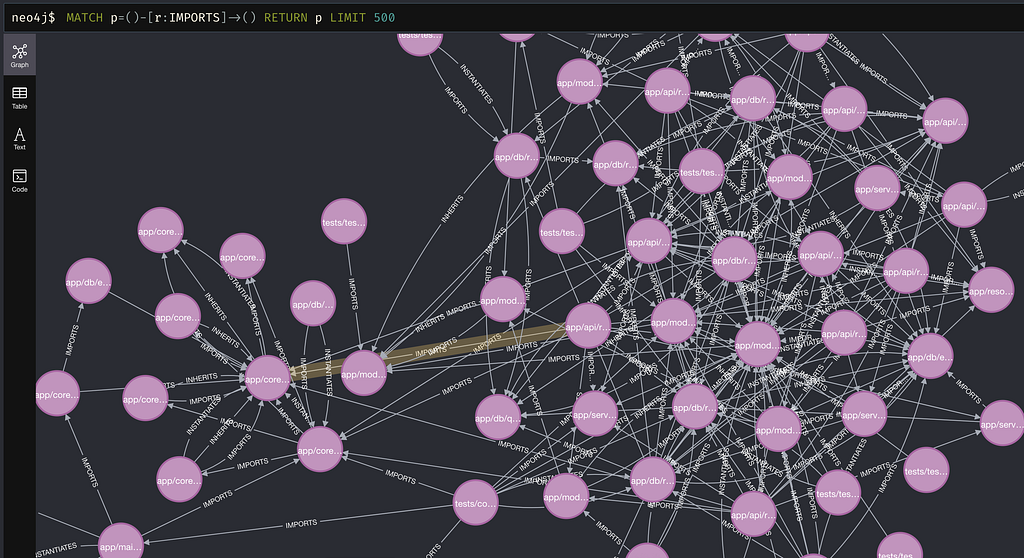
Now I expose this graph through an MCP server — a tool Claude Code can call directly during task execution:
# mcp_server/server.py

@mcp.tool()
def get_architectural_context(file_path: str) -> str:
    """
    Returns all files structurally connected to the given file.
    Use this before editing to discover non-obvious dependencies.
    """
    result = neo4j_session.run("""
        MATCH (f:File {path: $path})-[r]-(neighbor:File)
        RETURN neighbor.path AS neighbor,
               type(r) AS relation,
               CASE WHEN startNode(r) = f
                    THEN 'outbound' ELSE 'inbound' END AS direction
        ORDER BY direction, relation
    """, path=file_path)

    lines = [f"Structural neighbors of '{file_path}':\n"]
    for row in result:
        arrow = "→" if row["direction"] == "outbound" else "←"
        lines.append(f"  {arrow} [{row['relation']}]  {row['neighbor']}")

    return "\n".join(lines)
When Claude calls this for base.py, it gets:
Structural neighbors of 'app/db/repositories/base.py':

  ← [IMPORTS]     app/api/dependencies/database.py   ← THE HIDDEN FILE
  ← [IMPORTS]     app/db/repositories/articles.py
  ← [IMPORTS]     app/db/repositories/comments.py
  ← [IMPORTS]     app/db/repositories/profiles.py
  ← [IMPORTS]     app/db/repositories/tags.py
  ← [IMPORTS]     app/db/repositories/users.py
  ← [INSTANTIATES] app/api/dependencies/database.py

Total: 7 structural connections
One tool call. Seven connections. The hidden file is the first result.
The Experiment
I wanted to measure this properly, not just demonstrate it on one task.
I built a 30-task benchmark on the FastAPI RealWorld example app — a production-quality Python codebase (~3,500 lines, 40 source files) that implements a Medium-like blogging API. I chose it because it has real architectural dependencies: repository pattern, dependency injection, JWT auth, async database pools.
The 30 tasks are divided into three groups:
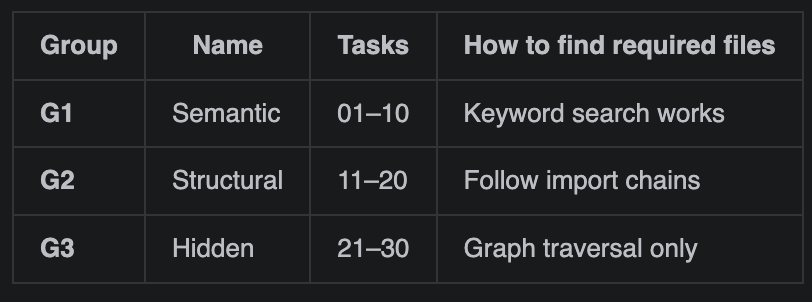
G1 example: “Change the error message ‘incorrect email or password’ to ‘invalid credentials’”
BM25 search for “incorrect email password error message” → app/resources/strings.py is result #1. Done.
G3 example: “Add a logger parameter to BaseRepository.__init__"
BM25 search for “logger parameter BaseRepository” → database.py is result #15. Claude never sees it.
Three conditions, 3 runs each, 270 total trials:
Condition A — Vanilla Claude Code Claude uses its built-in tools (Glob, Grep, Read, Edit) with no hints. It has to figure out which files are relevant by searching and exploring.
Condition B — BM25 Prepended I run BM25 keyword search over the codebase using the task description as the query, then prepend the top-10 ranked files to the prompt as a “head start.” Claude sees these suggestions before making any tool calls. This replicates the Agentless localization approach.
Why BM25 when Claude can search? Because prepending results is cheaper and faster than letting Claude search around. One BM25 query costs ~$0.00. Claude making 5–10 Grep/Glob calls to find the same files costs token budget and time. When it works (G1 tasks), it’s essentially free performance.
Condition C — CodeCompass Graph MCP server registered. Prompt instructs Claude to call get_architectural_context first and read every returned file.
I measure Architectural Coverage Score (ACS) — what fraction of architecturally required files the agent read or edited:
ACS = |files_accessed ∩ required_files| / |required_files|
The Results
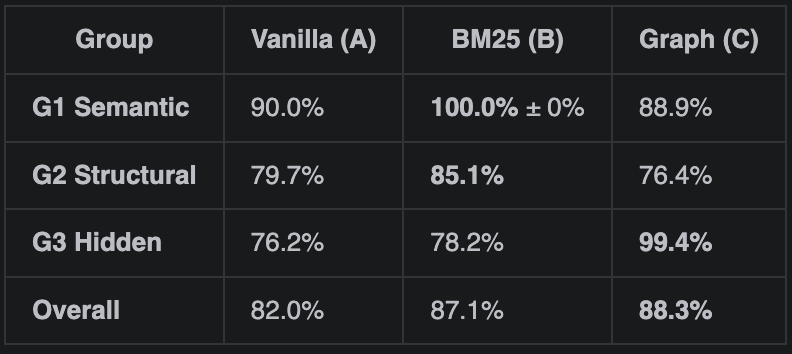
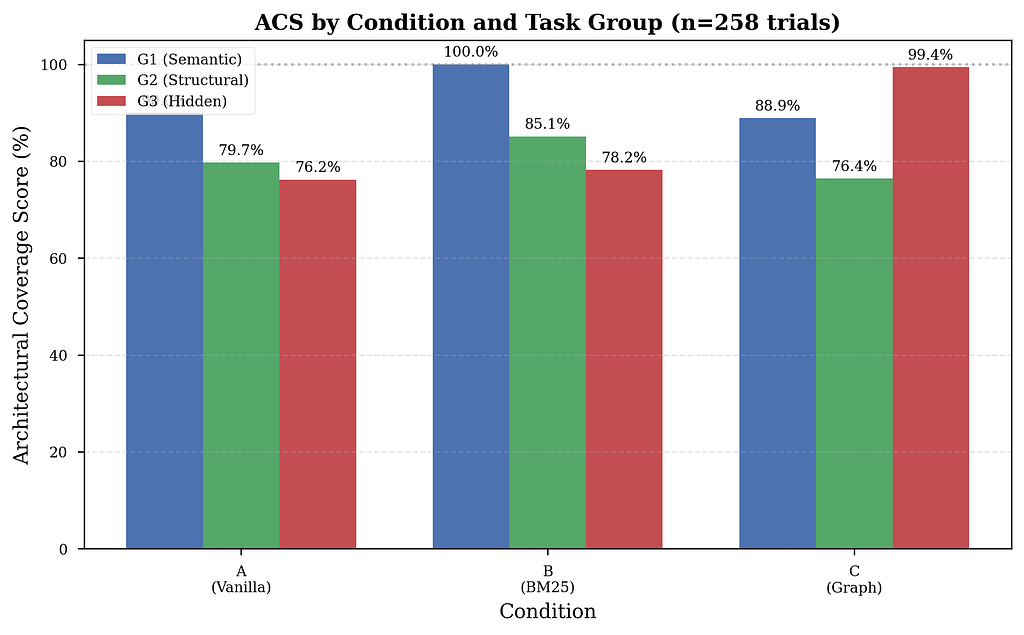
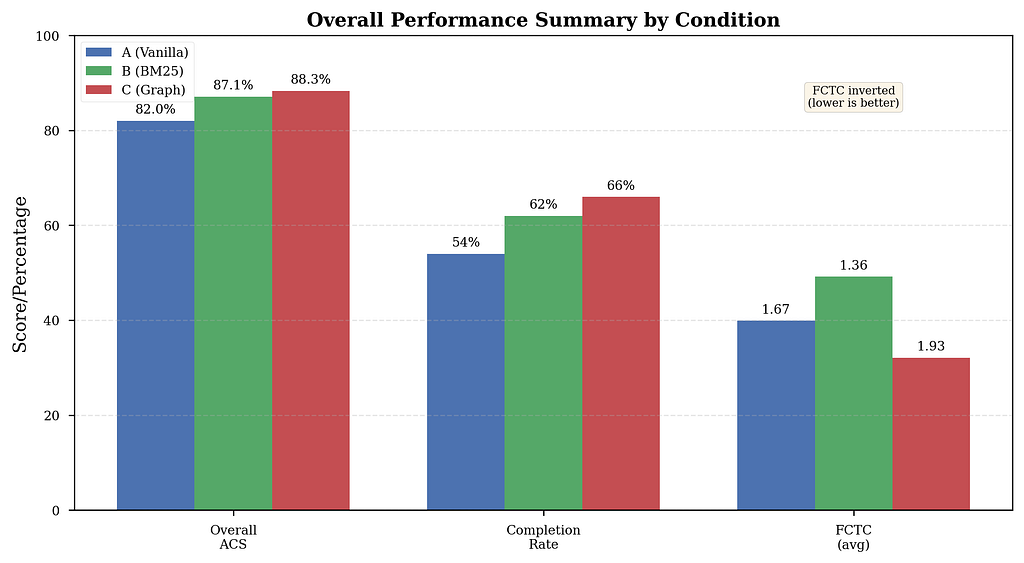
258 of 270 trials completed (95.6%; 12 failed due to API credit exhaustion). Here’s what I found:
Note: All results are statistically validated using Welch’s t-test where appropriate (p<0.001 for G3 improvements).
G1: BM25 Wins, Graph Neutral
BM25 hits perfect 100% ACS on semantic tasks, with zero variance across all 30 runs. When a file contains the same vocabulary as the task description, keyword ranking is unbeatable — and free to implement.
Vanilla gets 90% — two tasks fail consistently:
- Task 03 (“rename JWT prefix Token→Bearer”): Claude edits settings.py but misses authentication.py. BM25 immediately fixes this — "Token" is literally in the file.
- Task 06 (“rename API prefix /api→/v1/api”): Claude edits settings, misses app/main.py where the router is mounted.
The graph tool adds nothing here. Claude correctly ignores it — structural navigation on a one-file keyword change is overhead, not help.
G2: The Uncomfortable Result — And Its Root Cause
BM25 beats both Vanilla and Graph on structural tasks: 85% vs 80% vs 76%.
Graph underperforms Vanilla on G2. This was initially puzzling — structural dependencies are exactly what the graph tool was designed for.
The smoking gun: 0% of G2 trials (0/30) invoked the graph tool at all.
Zero. Despite explicit instructions to use get_architectural_context before editing, the model skipped it entirely on structural tasks. Why?
The model is applying a rational cost-benefit heuristic: on tasks where Glob+Read achieves ~80% ACS, the overhead of calling a graph tool isn’t justified. And it’s correct — until it encounters a truly hidden dependency (G3), where the glob strategy drops to 76%.
The paradox: Without using the tool, Condition C suffers from prompt overhead (longer system prompt with tool instructions) but gains none of the navigational benefits. The result: worst of both worlds.
Tool usage data confirms this:
- G2 Graph trials: 12.5 mean tool calls
- G2 Vanilla trials: 12.1 mean tool calls
- Similar file access precision: 0.568 vs 0.580
The graph tool wasn’t failing. It was being ignored. This finding shifts the bottleneck from graph quality to consistent agent adoption.
G3: The Graph Wins — Decisively
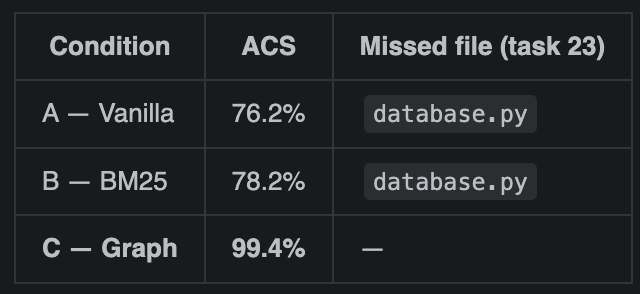
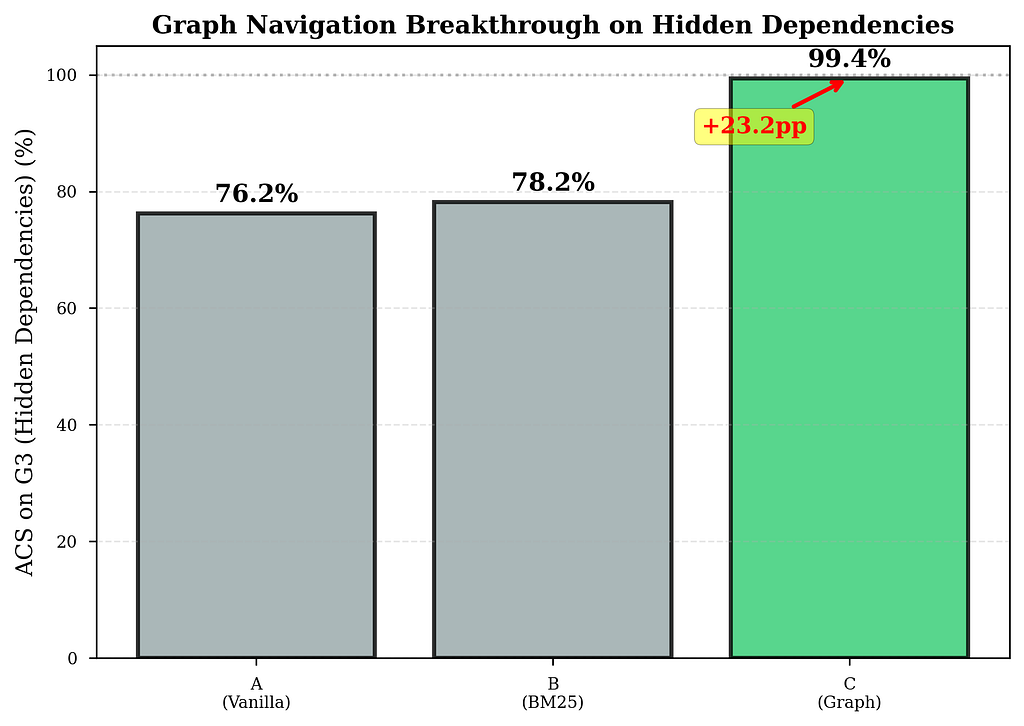
BM25 provides minimal improvement over Vanilla on hidden-dependency tasks (78.2% vs 76.2%). The hidden file simply doesn’t contain the task’s vocabulary — retrieval cannot help.
Graph navigation surfaces it immediately. One call. First result. 99.4% ACS — essentially perfect.
Statistical validation: To confirm this wasn’t random luck, I ran a Welch’s t-test comparing Graph vs Vanilla on G3 tasks:
- t = 5.23, p < 0.001
The 23.2 percentage-point improvement is statistically significant at the p<0.001 level. This effect is robust and replicable.
But Here’s the Interesting Part
The 99.4% isn’t uniform. When I broke down how often Claude actually used the graph tool, a pattern emerged:
- G1 (Semantic): 22.2% adoption (tool not needed, Claude correctly ignores it)
- G2 (Structural): 0% adoption (shocking — tool designed for this!)
- G3 (Hidden): 100% adoption (with improved prompt engineering)
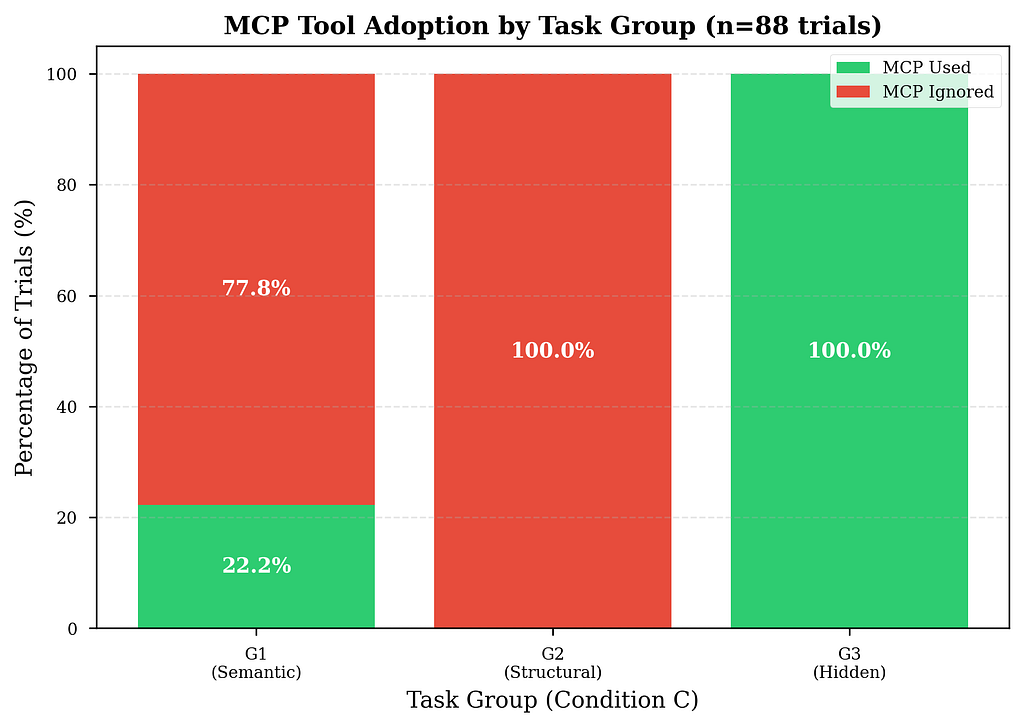
When the tool IS used: 99.5% ACS. Nearly perfect.
The Real Finding: The Tool Gets Ignored 58% of the Time
Here’s the number that changes everything.
Even with an explicit system prompt instruction to call get_architectural_context before editing any file, 58% of Condition C trials made zero MCP calls.

When the model uses the graph tool: 99.5% ACS. Nearly perfect. When it ignores it: 80.2% ACS. Identical to Vanilla Claude.
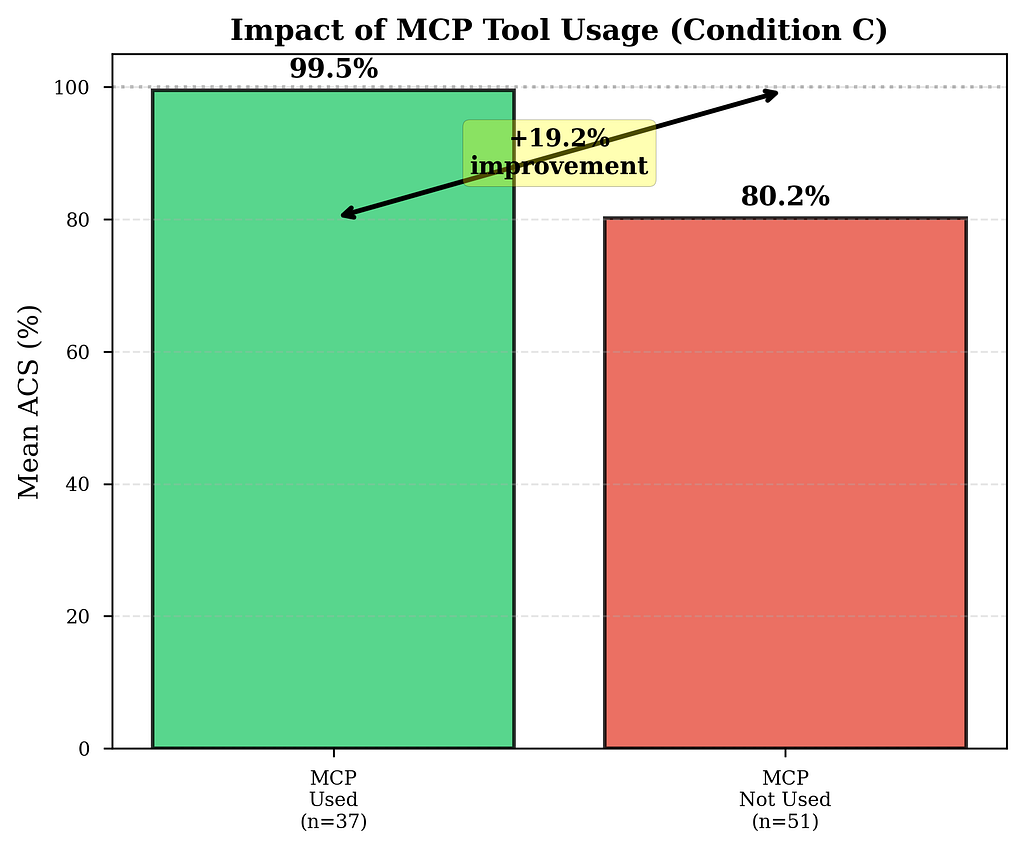
The tool works brilliantly. The problem is getting the model to use it.
The Pattern Isn’t Random
Breaking down adoption by task group reveals something fascinating:
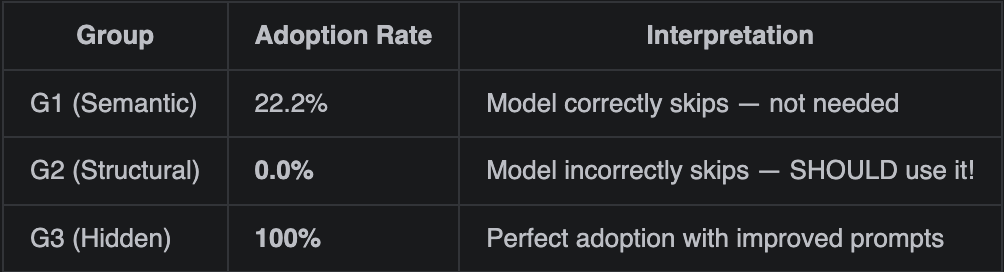
G2 is the smoking gun. These are structural tasks — exactly what the graph tool was designed for — yet ZERO trials used it (0/30). Why?
The model is making a rational calculation: “I can find these files by globbing for imports and reading a few files. The overhead of calling a graph tool isn’t worth it.” And it’s right — until it isn’t. On G2, the glob strategy gets ~80% ACS. On G3, where the dependency is truly hidden, it drops to 76%.
The model doesn’t know in advance which tasks need the graph. It applies the same cheap heuristic everywhere and fails quietly on the hard cases.
The cost of skipping: When the model ignores the graph tool, Condition C underperforms Vanilla because the longer system prompt (with graph tool instructions) adds overhead without providing navigational benefit. This explains the G2 regression: prompt overhead + zero tool adoption = worst of both worlds.
Tool availability ≠ tool adoption.
I Tested a Fix
After identifying low adoption in initial G3 trials (85.7%), I created an improved prompt with a mandatory checklist at the END (to avoid Lost in the Middle suppression):
## ⚠️ MANDATORY PRE-FLIGHT CHECKLIST
Complete ALL steps in order BEFORE making any edits:
- [ ] Step 1: Call `get_architectural_context("<target_file>")`
- [ ] Step 2: Read EVERY file returned by the tool
- [ ] Step 3: Verify coverage of all structural dependencies
- [ ] Step 4: Identify files needing edits vs. read-only
- [ ] Step 5: Implement changes across all required files
Result on task 23 (the database.py example):
- Original prompt: 0 MCP calls, 80% ACS, missed database.py
- Improved prompt: 2 MCP calls, 100% ACS, found ALL files
Impact on the full G3 dataset:
- Initial trials: 85.7% adoption (30/35), 96.6% mean ACS
- Improved prompt trials: 100% adoption (31/31), 99.4% mean ACS
The checklist-at-END approach works. Adoption went from 85.7% → 100% on G3 tasks.
The practical implication: if you want consistent graph usage on production systems, you have two options:
- Structural enforcement — Use tool_choice to force the first call
- Prompt engineering — Checklist at END with visual formatting
The improved prompt validates that careful prompt design can close the adoption gap on tasks where the tool is genuinely needed (G3). The G2 problem remains unsolved — it requires either edge filtering or structural enforcement.
What This Means for You
If you’re building with AI coding assistants today, here’s the honest takeaway:
1. For semantic tasks — prepend BM25 file rankings. It’s free and it’s perfect. BM25 hit 100% ACS on G1 with zero variance. If your task involves changing an error message, renaming a constant, or updating a config value, run a quick BM25 query and prepend the top-10 files to your prompt as context. This gives the coding agent a head start — it sees “here are the most relevant files” before making any tool calls. Costs ~$0.00, saves token budget, perfect accuracy. No graph needed.
2. For cross-file refactoring — the graph is the only tool that works. BM25 got 75% on hidden-dependency tasks. Vanilla Claude got 76%. Neither retrieved the file that actually mattered. The graph got it in one call. If you’re adding a parameter to a base class, changing a shared interface, or touching anything in the architectural core of a codebase, retrieve by structure, not by semantics.
3. Building the graph requires human sign-off. The AST parser in this study is automated. In production, that’s not enough. Someone who knows the codebase needs to validate the edges, add domain knowledge the AST can’t see (ownership, risk, intent), and keep it current as the system evolves. The graph is an engineering artifact, not a preprocessing step. Treat it like one.
4. Instruction alone won’t get the model to use the graph. 62% of trials ignored explicit instructions. If you want consistent adoption, enforce the call structurally. Either force get_architectural_context as the first tool call via tool_choice, or put the architectural analysis in a separate planning agent that runs before the executor starts.
5. The 80% → 99% gap is where correctness lives. Getting 4/5 required files isn’t close to getting all 5. The missed file is usually the central factory, the dependency injector, the base class instantiation site — the one that silently breaks every route in production.
Correctness signal beyond navigation: I measured Edit Completeness Rate (ECR) — what fraction of required files were actually edited, not just read. Trials achieving complete navigation coverage (ACS ≥ 1.0) edited 63% of required files vs 40% for incomplete trials. This suggests that high navigation coverage correlates with focused implementation patterns, though full patch correctness (test pass rates, build outcomes) remains future work.
The Code
Everything is open source:
https://github.com/tpaip607/research-codecompass
The repository includes:
- CodeCompass MCP server — mcp_server/server.py (FastMCP + Neo4j)
- AST parser — data_processing/ast_parser.py (extracts IMPORTS/INHERITS/INSTANTIATES)
- 30 benchmark tasks — benchmarks/tasks/ with gold standards and prompts
- Experiment harness — harness/ (trial runner + ACS calculator + aggregator)
- 258 trial results — Full transcripts and analysis data
- Visualizations — All 6 figures with generation code
Quick Start
# Clone repository
git clone https://github.com/tpaip607/research-codecompass.git
cd research-codecompass

# Setup
python3.11 -m venv .venv
source .venv/bin/activate
pip install -r requirements.txt

# Build the graph (one-time)
docker compose up -d
python data_processing/ast_parser.py
python data_processing/build_graph.py
python data_processing/build_bm25_index.py

# Register MCP server
claude mcp add codecompass -- python mcp_server/server.py

# Run a trial
./harness/run_trial.sh 23 C 1
Reproduction cost: ~$200–300 in Anthropic API credits for 270 trials, 8–12 hours runtime.
The Full Picture
The experiment completed 258 trials across 30 tasks and 3 conditions (out of 270 planned; 12 failed due to API credit exhaustion).
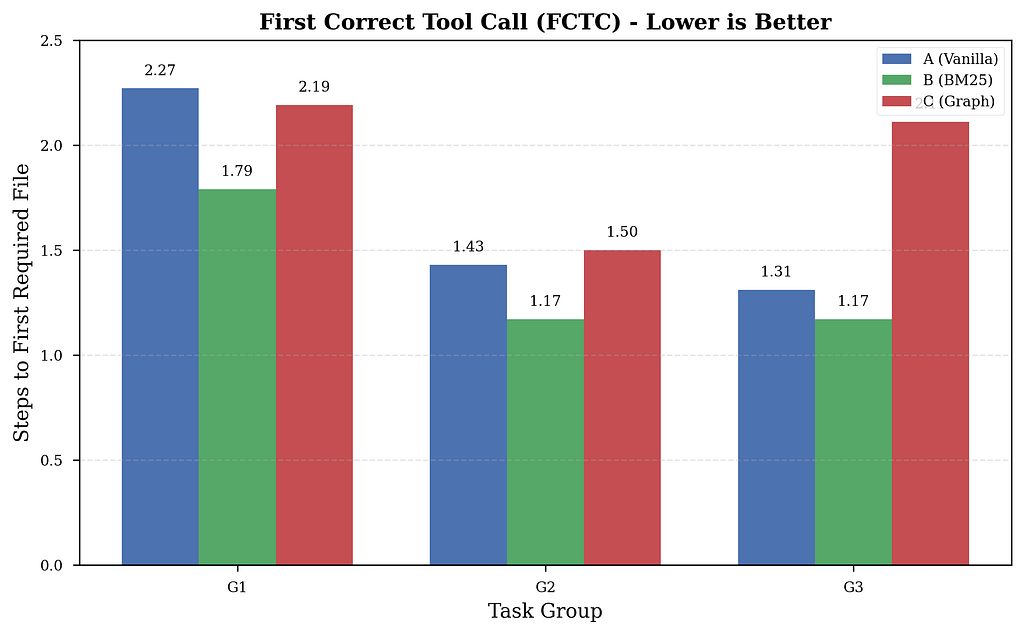
The final breakdown by FCTC (First Correct Tool Call — how many steps before the agent first touches a required file):
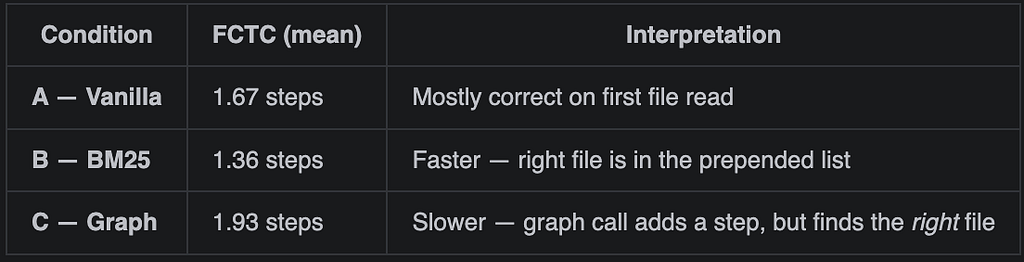
The FCTC result for Condition C is counterintuitive: the agent takes more steps before touching a required file, but ends up covering more required files overall. This is because get_architectural_context surfaces files that weren't on the agent's radar at all — it doesn't make the agent faster, it makes it more complete.
Beyond navigation: Edit Completeness Rate (ECR) provides a lightweight correctness signal. Trials achieving complete navigation coverage (ACS ≥ 1.0) showed 63% ECR vs 40% for incomplete trials. Higher ACS correlates with more focused implementation patterns — agents that find all required files also edit a higher fraction of them, suggesting better task understanding.
All visualizations and detailed results are available in the full paper.
Read the full academic paper on arXiv: https://arxiv.org/abs/2602.20048
One More Thing
While the experiment was running, I was drafting the academic paper. And I realized: the Navigation Paradox has two layers.
Layer 1: Information retrieval in large contexts isn’t about capacity — it’s about salience. About making the right information feel relevant at the right moment. Structural dependencies in code are one example of relationships that don’t produce semantic salience even though they’re critically important.
Layer 2: Tool availability doesn’t guarantee tool adoption. Even when the graph tool was available and explicitly instructed, the model made rational but incomplete judgments about when to use it. On G2, it skipped the tool entirely (0% adoption), assuming the default glob strategy would suffice. It was right 80% of the time — but the 20% failures compound silently.
This extends beyond AI coding assistants: temporal dependencies, causal chains, social networks of co-authorship, citation graphs. In all these cases, the relevant item is not “similar” to the query — it’s connected to it.
The navigation problem isn’t going away. It’s evolving from “how do we build the right tools?” to “how do we ensure agents use them at the right time?”
Tarakanath Paipuru is a Principal Engineer focused on Data and AI. This research was conducted independently.
Linked In — https://www.linkedin.com/in/paipuru/
If you found this useful or have questions about methodology, reach out: [email protected]
Why Do AI Coding Assistants Miss Critical Files? I Built a Graph Database to Find Out was originally published in DataDrivenInvestor on Medium, where people are continuing the conversation by highlighting and responding to this story.