Volume Profile: How to Get Better Trade Entries
 Beirmancapital17 min read·Just now
--
Learn how to use Volume Profile for better trade entries. Discover POC, VAH, VAL, HVN, LVN strategies used by professional traders to time the market with precision.
What Is Volume Profile and Why Does It Matter?
Here’s the simplest way to explain it.
Volume Profile is a charting tool that plots how much trading volume occurred at each price level over a specified period — not over time, but at price.
Traditional volume bars sit at the bottom of your chart and show you how much was traded when. Volume Profile flips that concept entirely. It shows you where the market traded the most and least revealing price levels that actually mean something to institutional players.
Think of it as an X-ray of the market’s activity.
When professional traders, algorithms, and institutions want to accumulate or distribute large positions, they need liquidity. Lots of it. And all that activity leaves fingerprints — visible in Volume Profile as thick horizontal bars clustered at specific price zones.
Why should you care? Because price behaves predictably around these zones. Markets tend to:
- Stall or reverse at high-volume areas (resistance/support)
- Accelerate through low-volume areas with very little friction
- Return to high-volume nodes when value is perceived
This is not theory. It’s market structure backed by auction market theory, which forms the intellectual foundation for how modern exchanges work.
Home
Beirman Capital offers leverage & security for Forex, Stocks, Crypto & Currency Trading. Join best brokers and maximize…
beirmancapital.com
How Volume Profile Works: The Core Mechanics
Before diving into entries, you need to understand the underlying logic.
Volume Profile is rooted in Auction Market Theory (AMT) — the idea that markets are constantly searching for fair value through a two-sided auction. When buyers and sellers agree on price, volume accumulates. When they don’t, price moves quickly to find the next area of agreement.
This creates a distribution of volume across price levels that looks similar to a bell curve under normal market conditions.
The Bell Curve Logic
In a trending, balanced market session, volume tends to be highest in the middle range of the day’s activity and thinnest at the extremes. This creates:
- A fat middle (high volume, fair value)
- Thin tails at the top and bottom (rejected price extremes)
When price moves away from high-volume areas, it’s moving away from fair value. When it returns to those zones, it’s returning to where the market previously found agreement — and that’s your opportunity.
What Makes Volume Profile Different from Standard Volume
FeatureStandard VolumeVolume ProfileMeasurement axisTime-basedPrice-basedWhat it showsVolume per candleVolume per price levelPrimary useTrend confirmationSupport/resistance identificationEdge typeMomentum cluesStructural price levelsTrader typeMost tradersProfessional/institutional
Standard volume tells you when the market was active. Volume Profile tells you where the market built conviction. Both are useful — but for precise entries, Volume Profile wins every time.
Blogs
Beirman Capital has multiple blogs on forex, commodities, stocks, indices, and others. Get well-versed in the trading…
beirmancapital.com
Key Volume Profile Components Every Trader Must Know
This is the section most guides rush through. Don’t. These components are your trade setup.
1. Point of Control (POC)
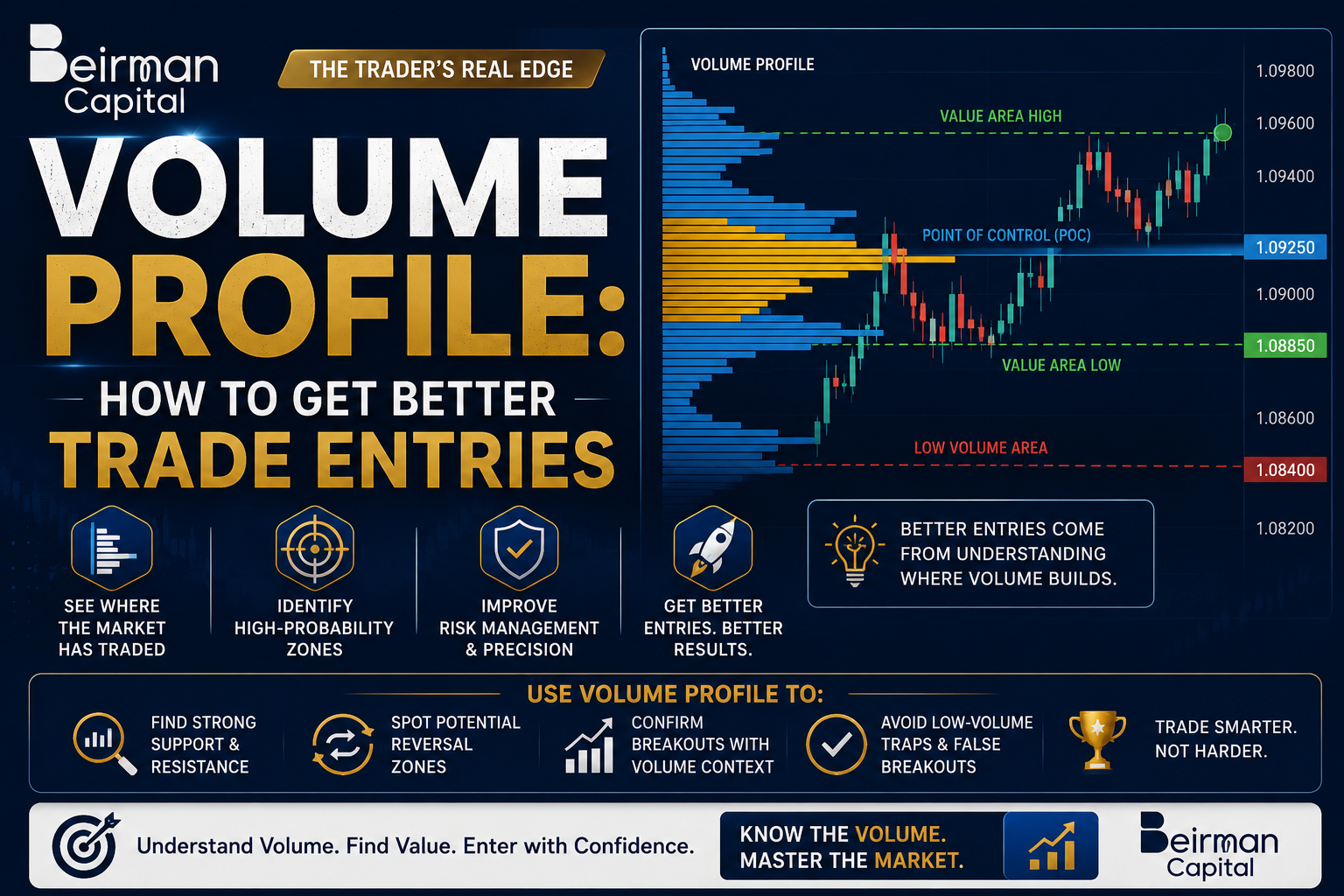
The POC is the single price level with the highest traded volume in the selected period.
Think of it as the market’s “fairest” price — the level where buyers and sellers were most in agreement. Price gravitates toward the POC like a magnet, especially during ranging conditions.
How to trade it:
- Price often returns to POC after moving away from it
- POC acts as support on the way back down and resistance on the way back up
- A POC break with momentum signals trend continuation
2. Value Area (VA)
The Value Area is the price range containing 70% of the total volume traded during a given period. It derives from the statistical concept of one standard deviation — capturing where most of the “fair” trading happened.
It has two boundaries:
- Value Area High (VAH): The upper boundary of the value area
- Value Area Low (VAL): The lower boundary of the value area
The key rule most traders don’t know: Price that moves outside the value area has an 80% probability of rotating back inside it. This “80% rule” is one of the most powerful frameworks in volume-based trading, and it gives you a clear directional bias on gap opens and breakout tests.
3. High Volume Nodes (HVNs)
HVNs are price levels with significantly higher volume than surrounding areas. They appear as wide horizontal bars on your profile.
These zones represent strong price acceptance — the market spent a lot of time and energy here. As a result, HVNs act as:
- Strong support and resistance levels
- Magnets that slow price movement down
- Consolidation zones in trending markets
4. Low Volume Nodes (LVNs)
LVNs are price levels with significantly lower volume than surrounding areas. They appear as narrow horizontal bars — thin gaps in the profile.
These are price rejection zones. The market moved through them quickly, indicating no agreement. As a result, LVNs:
- Act as price acceleration zones (price blows through them fast)
- Mark potential breakout targets
- Identify areas where orders are thin — once price enters an LVN, stops trigger fast
5. Volume Profile Shape Patterns
ShapeWhat It SignalsNormal (bell curve)Balanced market, range conditionsP-Shape (top heavy)Late short covering, potential reversal upb-Shape (bottom heavy)Late long liquidation, potential reversal downBimodal (twin peaks)Two areas of accepted value, strong levelsThin/ElongatedTrending market, directional movement
Types of Volume Profile: VPVR, VPSV, VPSD Explained
Not all Volume Profiles are the same. Different profile types serve different analytical purposes.
VPVR — Volume Profile Visible Range
This profiles all the volume visible on your current chart. As you scroll left or right, it adjusts dynamically.
Best for: Getting a quick overview of the most important price levels currently on screen. Great for beginners.
VPSV — Volume Profile Session Volume
This creates a separate volume profile for each individual trading session (day, week, etc.).
Best for: Day traders who want to see where the previous day’s value area was. Helps identify gaps and overnight inventory positions.
VPSD — Volume Profile Specific Date Range
This lets you manually define the exact date range you want to profile. Most customizable option.
Best for: Analyzing specific market cycles, earnings events, post-FOMC periods, or custom time windows that matter to your strategy.
Fixed Range Volume Profile (FRVP)
You manually drag this over a specific section of the chart — any range you choose.
Best for: Analyzing consolidation zones, breakout bases, or any custom chart section you want to study.
Which Should You Use?
Trader TypeRecommended Profile TypeDay TraderVPSV (Session)Swing TraderVPVR + VPSDPosition TraderVPSD (custom date range)ScalperVPSV on lower timeframes
How to Read a Volume Profile Chart
Reading a Volume Profile sounds intimidating. It isn’t.
Here’s the step-by-step process:
Step 1: Identify the POC Look for the longest horizontal bar — that’s your POC. Price will treat this as a magnet. Note whether current price is above or below it.
Step 2: Draw Your Value Area Identify VAH and VAL. These create your primary trading range for the session or selected period. Price above VAH = premium zone. Price below VAL = discount zone.
Step 3: Find HVNs and LVNs Scan the profile for thick clusters (HVNs) and thin gaps (LVNs). Mark them on your chart. LVNs are where your stop-loss risk is lowest; HVNs are where your trades complete (target levels).
Step 4: Determine Market Context Is price inside the value area? That suggests range behavior — fade the extremes, target the POC.
Is price outside the value area? That suggests directional movement — look for value area re-entry trades or continuation through LVNs.
Step 5: Plan Your Entry Based on the above, your entry zones become clear:
- Long at VAL or POC from below
- Short at VAH or POC from above
- Breakout long above HVN after LVN acceleration
- Reversal short at P-shaped profile peaks
How to Use Volume Profile for Better Trade Entries
This is the core of everything — the practical application you came here for.
Entry Strategy 1: The Value Area Re-Entry Trade (The 80% Rule)
This is arguably the highest-probability trade Volume Profile provides.
The Setup: Price opens or moves outside the Value Area — either above VAH or below VAL — and then fails to sustain that move.
The Logic: If price cannot establish itself outside the value area, the 80% rule states it will rotate back through the entire value area — from VAH all the way to VAL, or vice versa.
Entry Rules:
- Price breaks outside the value area (above VAH or below VAL)
- Price fails to make progress — forms a rejection candle, doji, or weak close
- Price re-enters the value area
- Enter at the value area boundary on re-entry (VAH short, VAL long)
- Target: POC initially, then the opposite VA boundary
- Stop: Above/below the failed breakout high/low
Example: ES Futures (S&P 500) opens above the previous day’s VAH at 5,280. Price prints a bearish engulfing candle and drops back below 5,280. You enter short at 5,280. Target: Previous day’s POC at 5,260. Stop: 5,285 (above the failed breakout).
That’s a roughly 1:4 risk-reward setup using nothing but Volume Profile.
Entry Strategy 2: POC Reversion Trade
The Setup: Price moves away from the POC and then returns to test it as support or resistance.
The Logic: The POC is the market’s “most accepted” price. Like gravitational pull, price consistently returns to it — especially during low-volatility periods or after a news spike fades.
Entry Rules:
- Identify the session or range POC
- Wait for price to move at least 0.5% away from the POC
- When price returns to the POC level, look for a reaction candle (pin bar, inside bar, or confluence with moving average)
- Enter at the POC with a 1:2 or 1:3 risk-reward target
- Stop: 3–5 ticks / pips below/above the POC based on asset volatility
Pro tip: POC reversion trades work especially well in the first 30–60 minutes after a market open, when price is “discovering” fair value for the session.
Entry Strategy 3: LVN Breakout Trade
Low Volume Nodes are where orders are thin and price moves fast. That’s exactly what trend traders want.
The Setup: Price is trending and consolidates just below a Low Volume Node. Volume Profile shows thin volume just above the current consolidation zone.
The Logic: When price enters an LVN, there’s very little resistance. Stops above the LVN trigger quickly, adding momentum. Price tends to run until it hits the next HVN.
Entry Rules:
- Identify an LVN above the current price in an uptrend (or below in a downtrend)
- Wait for price to consolidate at the base of the LVN
- Enter as price breaks into the LVN zone — don’t wait for confirmation since price moves fast
- Target: The next HVN above the LVN (where price will slow down)
- Stop: Below the consolidation base, just outside the HVN that price broke out of
This is one of the best breakout strategies available because you’re not chasing — you’re entering at a structurally defined acceleration zone.
Entry Strategy 4: HVN Support/Resistance Fade
High Volume Nodes create powerful magnetic zones that price repeatedly tests.
The Setup: Price pulls back to a prior HVN in an uptrend, or rallies back to a prior HVN in a downtrend.
Entry Rules:
- Identify a significant HVN from a previous session or weekly profile
- Wait for price to retrace to that level
- Look for confirmation: rejection candle, RSI divergence, or MACD hook
- Enter at the top of the HVN in a downtrend, bottom of HVN in an uptrend
- Stop: Beyond the HVN (if price closes through it, the level has failed)
- Target: Next LVN or next HVN in the direction of the trade
Entry Strategy 5: Gap and Developing POC Trade
This is specifically powerful for futures and stocks with overnight sessions.
Get Beirmancapital’s stories in your inbox
Join Medium for free to get updates from this writer.
Remember me for faster sign in
The Setup: Price opens with a gap, leaving an area of price with zero volume. The Developing POC (D-POC) — the POC that updates in real time during the session — shows where today’s value is building.
Entry Rules:
- Identify the overnight gap level
- Track where the Developing POC is forming relative to the gap
- If the D-POC builds above the gap, gap fill is unlikely — buy the D-POC retest
- If price gaps up but D-POC builds near the gap close level, expect gap fill — short into the gap close
- Enter at D-POC with tight stop once it stabilizes
Volume Profile Strategies for Different Trading Styles
Not everyone trades the same way. Here’s how to adapt Volume Profile to your timeframe.
Scalping (1–5 Minute Charts)
- Use Session Volume Profile to identify today’s POC and VA
- Fade moves to intraday VAH/VAL for 3–5 tick scalps
- Use LVNs as acceleration zones for momentum scalps
- Keep targets tight — you’re looking for the first reaction, not a swing
Day Trading (15–60 Minute Charts)
- Layer yesterday’s VA and POC on today’s chart
- Use the 80% rule aggressively on failed breakouts
- Track the Developing POC as your intraday anchor
- Target the opposite VA boundary for your primary daily trade
Swing Trading (Daily / Weekly Charts)
- Build weekly and monthly volume profiles
- POC and HVNs on the daily chart become major swing support/resistance
- LVNs on the weekly chart identify breakout zones for multi-day runs
- Combine with market structure (higher highs/lows) for directional bias
Position Trading (Weekly / Monthly Charts)
- Use custom VPSD for multi-month profiles
- Annual POC acts as a critical reference point for long-term bias
- Volume Profile helps identify “cheap” zones (below VAL) for accumulation
- Focus on major HVNs as long-term support in bull markets
Volume Profile vs. Traditional Support and Resistance
This question comes up constantly — and it deserves a direct answer.
Traditional horizontal support and resistance is based on where price touched and reversed — a visual pattern derived purely from price action.
Volume Profile support and resistance is based on where the most actual trading happened — derived from real transactional data.
FactorTraditional S/RVolume Profile S/RData sourcePrice action onlyActual volume dataSubjectivityHighly subjectiveMore objectiveSelf-fulfilling?Yes (widely watched)Yes + fundamentally soundIdentifies thin zonesNoYes (LVNs)Adapts to marketStatic until brokenUpdates with each sessionBest forContext, structurePrecise entries/exits
The best approach? Use both together.
Traditional S/R tells you the historical significance of a level. Volume Profile confirms whether real volume activity supports it. When a horizontal S/R line aligns with a Volume Profile HVN or POC — that’s a confluence zone. Those levels are powerful.
When a traditional S/R level sits inside an LVN? Treat it with skepticism. The lack of volume activity suggests the level may not hold under pressure.
Common Volume Profile Mistakes (And How to Avoid Them)
Even traders who understand Volume Profile often undermine themselves. Here’s what to watch out for.
Mistake 1: Using the Wrong Time Frame for Your Profile
If you’re a day trader using a monthly Volume Profile, your levels are too far apart to be actionable. Match your profile period to your trading timeframe.
Fix: Day traders use session/daily profiles. Swing traders use weekly. Position traders use monthly.
Mistake 2: Ignoring Market Context
Volume Profile is a tool, not a crystal ball. A POC reversion trade in a strong trending market is a low-probability trade no matter what the profile says.
Fix: Always determine the macro trend first. Use Volume Profile for entries within the trend, not against it unless you have strong confluence.
Mistake 3: Treating Every HVN as Equal
Not all High Volume Nodes carry the same weight. An HVN from three years ago matters less than one from last week in most contexts.
Fix: Weight recent HVNs more heavily. The more recent the volume cluster, the more relevant it is to current market participants.
Mistake 4: Ignoring the Developing POC
Many traders set their session profile and forget about it. The Developing POC updates throughout the day and tells you where today’s “fair value” is moving.
Fix: Track the D-POC on your watchlist. If it’s rising throughout the session, that confirms bullish internal strength — even if price looks choppy.
Mistake 5: Overlapping Too Many Profiles
Some traders stack 5–6 different profiles on a single chart. The result is analysis paralysis — too many lines, too much confusion.
Fix: Use a maximum of 2–3 profiles at once. Typically: current session + previous session + a broader weekly or monthly context profile.
Best Platforms for Volume Profile Trading
Not every platform offers Volume Profile — and the quality varies significantly.
TradingView
Best for: Retail traders, stocks, forex, crypto.
TradingView offers the Fixed Range Volume Profile (FRVP) and the Volume Profile Visible Range (VPVR) on its paid plans. The interface is clean, the tools are customizable, and the platform is accessible globally.
Limitation: Session-specific profiles require a Pro+ or Premium subscription.
Sierra Chart
Best for: Advanced futures traders who want the deepest Volume Profile customization.
Sierra Chart is the gold standard for professional Volume Profile analysis. It offers every profile type, customizable coloring, composite profiles, split profiles, and real-time D-POC tracking. The learning curve is steep — but the depth is unmatched.
NinjaTrader
Best for: U.S. futures and forex traders.
NinjaTrader has excellent native Volume Profile tools and an ecosystem of third-party add-ons that extend its capabilities. Works particularly well for CME futures products.
ThinkOrSwim (TD Ameritrade / Schwab)
Best for: U.S. stock and options traders already using the platform.
ToS has a capable Volume Profile tool within its Chart Studies. It’s not the most feature-rich option, but it’s free and functional for most retail needs.
Bookmap
Best for: Order flow traders wanting Volume Profile alongside DOM heatmaps and tape.
Bookmap combines Volume Profile with a Level 2 heatmap visualization, giving you a near real-time view of where orders are sitting relative to historical volume clusters.
Advanced Tips: Combining Volume Profile with Other Tools
Volume Profile is powerful alone. Combined with the right tools, it becomes exceptional.
Volume Profile + Order Flow (Footprint Charts)
Footprint charts show the buy vs. sell volume at each price level within each candle — giving you micro-level confirmation that a Volume Profile level is holding.
How to use: When price hits a POC or HVN, check the footprint for delta exhaustion (buyers drying up at resistance, sellers drying up at support). That’s your entry trigger.
Volume Profile + VWAP
VWAP (Volume-Weighted Average Price) is the institutional benchmark for intraday fair value.
When VWAP and your session POC converge at the same price level, that’s an exceptionally high-conviction zone. Institutional algorithms anchor to VWAP; Volume Profile confirms where volume actually printed. Double confirmation.
Volume Profile + Moving Averages
Use the 20 EMA or 50 EMA as a dynamic trend filter. When price pulls back to a POC or HVN and the 20 EMA aligns, the probability of a successful bounce trade increases significantly.
Volume Profile + Market Structure
Mark your swing highs and lows. When an LVN sits between the current price and a major swing high, you have a clear breakout target with little structural resistance in the way. Enter the breakout, target the swing high.
Volume Profile + RSI Divergence
When price reaches a VAH or HVN showing bearish RSI divergence, that’s a high-conviction reversal trade setup. You have both a structural reason (volume resistance) and a momentum reason (exhaustion) to fade the move.
Frequently Asked Questions (FAQ)
What is a Volume Profile in trading?
Volume Profile is a charting indicator that shows the amount of volume traded at each price level over a specified period. Unlike traditional volume bars that measure volume over time, Volume Profile measures volume at price — revealing where the market built consensus and where it didn’t.
What is the best Volume Profile strategy for beginners?
The best beginner strategy is the Value Area Re-Entry Trade using the 80% Rule. When price moves outside the value area and then fails to sustain that move, it typically rotates back through the entire value area. Enter at the value area boundary re-entry with a target at the POC.
What is the Point of Control (POC) in Volume Profile?
The Point of Control (POC) is the single price level with the highest traded volume within a given period. It represents the “fairest” price where buyers and sellers were most in agreement. The POC acts as a strong magnet for price, especially during sideways or mean-reverting market conditions.
How is Volume Profile different from volume bars?
Standard volume bars show how much was traded per time period (per candle). Volume Profile shows how much was traded at each price level, regardless of time. Volume Profile is more useful for identifying support, resistance, and entry zones because it maps activity to price — which is what actually triggers orders.
Does Volume Profile work in crypto trading?
Yes, Volume Profile works effectively in cryptocurrency markets, particularly on large-cap assets like Bitcoin and Ethereum with high liquidity. The key is using exchange-specific volume data (e.g., Binance, Coinbase) rather than aggregated data, as the aggregation can distort the profile.
What is a Low Volume Node (LVN)?
A Low Volume Node (LVN) is a price level with significantly less traded volume than surrounding areas. LVNs represent price rejection — the market moved through that zone quickly. They act as acceleration zones in the direction of the trend and can signal breakout targets where price will move rapidly.
Can I use Volume Profile on TradingView for free?
TradingView offers a basic Fixed Range Volume Profile on its free plan, but the full suite of Volume Profile tools — including VPVR and session profiles — requires a paid subscription (Pro or higher). For serious trading, the Pro plan is a worthwhile investment.
What timeframe is best for Volume Profile analysis?
The best timeframe depends on your trading style. Day traders use session profiles on 5–15 minute charts. Swing traders use weekly profiles on the daily chart. Position traders use monthly or annual profiles. The key is matching the profile period to your holding period.
What is the 80% rule in Volume Profile?
The 80% rule states that if price opens within the Value Area and stays there for two consecutive time periods (often 30 minutes), there is an approximately 80% probability it will trade to the other extreme of the Value Area. If price opens outside the Value Area and re-enters it, there is an 80% probability it will reach the POC and continue to the opposite VA boundary.
How do I find High Volume Nodes (HVNs)?
On your Volume Profile chart, High Volume Nodes appear as wide horizontal bars — visually thicker than surrounding areas. Most platforms allow you to set color thresholds so that HVNs appear in a distinct color for easy identification. Look for clusters where volume was 2–3 times higher than the average volume per price level.
Conclusion: Your Volume Profile Edge Starts Now
Here’s the truth about mastering how to use Volume Profile for better trade entries: it takes repetition, not complexity.
The concepts aren’t complicated. POC, VAH, VAL, HVNs, LVNs — once you spend a few sessions actively marking these levels and watching how price behaves around them, something clicks. You start seeing the market through a completely different lens.
You stop asking “will this level hold?” and start asking “does the volume data support this level?” That single shift in thinking separates amateur price watchers from traders who actually understand market structure.
Start simple. Use the Value Area Re-Entry trade and the POC Reversion trade until you’re profitable with them consistently. Then layer in LVN breakouts and order flow confirmation. Build the skill set methodically.
Most importantly — never treat Volume Profile as a standalone system. It’s a structural framework. Your job is to bring price action, market context, and risk management to the table alongside it.
Do that, and your entries will get sharper, your stops will get tighter, and your overall trade quality will improve measurably.
Call to Action (CTA)
Ready to put Volume Profile into practice?
Start by opening TradingView, applying the VPVR to any major index or currency pair, and marking the previous session’s POC, VAH, and VAL. Watch where price reacts over the next two or three sessions without placing any trades.
That observation alone will teach you more than any textbook.
When you’re ready for live execution, bookmark this guide and return to the specific strategy that matches your trading style.
Share this article with a fellow trader who’s still using just horizontal lines for support and resistance — they’ll thank you for it.
Social Trading
Smart Trading Starts Here Social Trading with Beirman Capital Copy, Learn & Earn Start Social Trading Shortcut To…
beirmancapital.com
Disclaimer: This article is for educational purposes only and does not constitute financial advice. Trading involves substantial risk of loss. Always conduct your own analysis and consult a qualified financial professional before making trading decisions.
A Message from InsiderFinance
Thanks for being a part of our community! Before you go:
- 👏 Clap for the story and follow the author 👉
- 📰 View more content in the InsiderFinance Wire
- 📚 Take our FREE Masterclass
- 📈 Discover Powerful Trading Tools