Why GitHub Copilot Agents Beat Open-Source AI Tools for Real Productivity

The terminal was blinking. The agent had just completed a multi-step file operation, printed a confident success message, and left me with the wrong kind of question. Not “did it work?” but “what exactly did it just do, what policy governed that action, and how would I explain this session to another engineer tomorrow?”
That is the situation many teams are entering now. AI coding tools are no longer novelty interfaces for autocomplete. They read repositories, run commands, spawn subagents, search the web, and modify source files. They are operational actors. The complication is that most tool evaluations still focus on model quality and ignore the system around the model: where instructions live, how permissions are enforced, how workflows are shared, and whether a team can reconstruct an agent session after the fact.
That is the wrong evaluation frame for organizations. The useful question is not “which tool feels most powerful in a solo session?” It is “which tool gives a team repeatable, auditable productivity without quietly creating a governance mess?” When you ask that question, the comparison changes. Open-source AI terminals such as OpenCode remain genuinely impressive. But for governed, team-scale productivity, GitHub Copilot custom agents inside VS Code are the stronger system.
This is not a post about model tribalism. Both ecosystems can reach strong models. This is a post about operating model, policy surface, and institutional memory. Those are the things that determine whether AI becomes leverage or liability.
The Open Terminal Case Is Stronger Than Critics Admit
Let me start with the part that deserves respect. OpenCode is not a toy shell wrapper with a prompt pasted on top. Its current documentation shows a real platform: project and global config, remote organizational defaults via .well-known/opencode, built-in primary and subagents, per-agent tool controls, rules through AGENTS.md, instruction file support, optional sharing, and an enterprise path with central config, SSO integration, and internal gateway routing.
That matters because the lazy critique of open-source terminals is already stale. The March 2026 OpenCode docs describe a system that can be configured seriously. A minimal project configuration can already enforce meaningful guardrails:
{
  "$schema": "https://opencode.ai/config.json",
  "permission": {
    "edit": "ask",
    "webfetch": "deny",
    "bash": {
      "*": "ask",
      "git diff *": "allow",
      "git log *": "allow"
    }
  },
  "share": "disabled",
  "instructions": [
    "docs/security-guidelines.md",
    "docs/review-standards.md"
  ]
}
That is real governance. It is versionable if you choose to commit it. It can disable sharing. It can constrain tools. It can load team instructions. OpenCode also supports Markdown-defined agents in .opencode/agents/ or global agent folders, which means you can create review-only or docs-only personas instead of running everything through one general-purpose assistant.
So the argument is not that terminal-native open tools are chaotic by definition. The better argument is narrower and more defensible: once you care about repeatable organizational workflows, GitHub Copilot agents give you a more natural governance surface because their controls are wired directly into the editor, the repository, and the session lifecycle.
Productivity Stops Being Personal the Moment a Team Shares It
The reason this distinction matters is simple. A personal workflow can survive on memory and convention. A team workflow cannot.
If one engineer has carefully tuned a local AI terminal with the right instructions, the right permissions, and the right command habits, that engineer may be extremely productive. But that productivity is only partially institutional. Another engineer joining the repository still has to discover the same settings, adopt the same habits, and trust the same unwritten guardrails.
GitHub Copilot’s customization model is explicitly built around making those choices shareable. The custom instructions docs define always-on repository instructions through .github/copilot-instructions.md, file-scoped rules through *.instructions.md, and organization-level instructions. The custom agents docs define .agent.md files that package instructions, tool access, model preferences, subagent availability, and handoffs into one reusable persona.
That architecture changes the unit of productivity. The unit is no longer “my session.” The unit becomes “our reusable workflow.”
A security review agent is not just a good prompt. It is a committed artifact that new team members inherit the moment they open the repository.
- -
name: Security Reviewer
description: Reviews code changes for vulnerabilities and policy violations.
tools: ['read', 'search']
user-invocable: true
disable-model-invocation: false
- -

You are a security-focused code reviewer.
Review code for:
- injection risks
- authentication and authorization flaws
- secret exposure
- unsafe deserialization
- permission boundary mistakes

You have read-only tools. Do not propose speculative issues.
Report only findings that you can tie to code in the repository.
---
That file lives in source control. It can be reviewed. It can be tightened. It can be reused as a subagent. The productivity gain does not disappear when the original author goes on vacation.
The Real Difference Is Not Permissions. It Is Lifecycle Control.
Once both tools are taken seriously, the decisive difference is not whether they have permissions. Both do. The decisive difference is whether the platform gives you deterministic control points before, during, and after agent actions.
OpenCode’s public docs emphasize permissions, rules, instructions, agents, project config, and central enterprise config. That is a meaningful governance stack. But the public governance surface is still centered on what tools are allowed, which instructions are loaded, and how sessions are configured.
GitHub Copilot adds a different category of control through agent hooks: executable commands that fire at specific lifecycle points such as SessionStart, UserPromptSubmit, PreToolUse, PostToolUse, SubagentStart, SubagentStop, PreCompact, and Stop.
That changes what “policy” can mean.
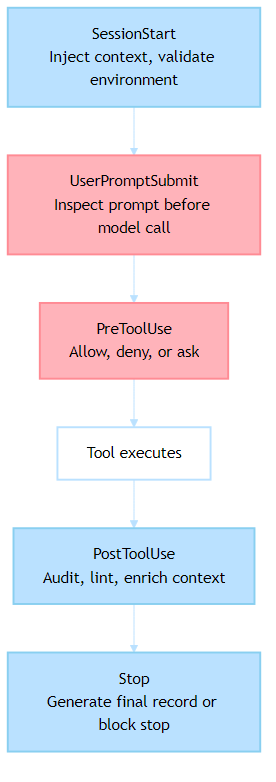
This is not just a nicer permission file. It is policy-as-code at the session boundary.
A UserPromptSubmit hook can scan a prompt before the model ever sees it. A PreToolUse hook can deny a dangerous operation or convert it into an approval step. A PostToolUse hook can ship an audit event, run a formatter, or annotate the conversation with validation results. A Stop hook can even keep the session alive until a required postcondition is satisfied. That is a qualitatively different governance surface from “the tool may ask before it runs bash.”
The Policy Example That Separates the Two
The easiest way to see the difference is to implement a real rule instead of discussing abstractions.
Suppose your organization has a non-negotiable policy: an agent must not run destructive SQL statements from a workstation session without approval and logging. Not “it would be nice if it asked.” Not “developers should remember not to do that.” An actual enforced rule.
With GitHub Copilot hooks, the policy can live in .github/hooks/ and travel with the repository:
{
  "hooks": {
    "PreToolUse": [
      {
        "type": "command",
        "command": "./scripts/validate-tool-use.sh",
        "timeout": 15
      }
    ],
    "PostToolUse": [
      {
        "type": "command",
        "command": "./scripts/audit-tool-use.sh",
        "timeout": 15
      }
    ]
  }
}
The validation script receives structured JSON over stdin. It can inspect the tool name, the tool input, and return a deny, ask, or allow decision.
#!/bin/bash
set -euo pipefail
INPUT="$(cat)"
TOOL_NAME="$(echo "$INPUT" | jq -r '.tool_name')"
COMMAND_TEXT="$(echo "$INPUT" | jq -r '.tool_input.command // empty')"
if [[ "$TOOL_NAME" == "runInTerminal" ]] && echo "$COMMAND_TEXT" | grep -Eiq 'drop table|truncate table'; then
 cat <<'JSON'
{
 "hookSpecificOutput": {
 "hookEventName": "PreToolUse",
 "permissionDecision": "deny",
 "permissionDecisionReason": "Destructive SQL requires approved DBA workflow."
 }
}
JSON
 exit 0
fi

cat <<’JSON’
{
 “hookSpecificOutput”: {
 “hookEventName”: “PreToolUse”,
 “permissionDecision”: “allow”
 }
}
The important part is not the shell script. It is the contract. The tool sends structured input. The hook returns structured output. The session behavior changes deterministically.
Could you approximate some of this with OpenCode using permissions, project config, AGENTS rules, plugins, or enterprise central config? In some cases, yes. The point is not that OpenCode has no answer. The point is that GitHub Copilot exposes this lifecycle control as a first-class, documented repository customization model. For teams trying to operationalize policy, that is easier to reason about and easier to standardize.
Auditability Is Where the Architecture Starts To Matter
Governance discussions become abstract until somebody asks for evidence. Then architecture matters immediately.
Imagine a platform team investigating a bad AI-assisted change from Tuesday afternoon. They want to know which files were touched, which agent was active, what tools ran, what the session context looked like, and whether the guardrails actually fired. If your answer is “we think the developer had the right local config,” you do not have governance. You have optimism.
VS Code hooks are unusually strong here because the same lifecycle model that enforces policy also produces a natural audit stream. The hooks docs define structured input fields such as timestamp, sessionId, toolname, toolinput, and tool_response for tool events. That means a PostToolUse hook can emit durable records without screen scraping or terminal history hacks.
#!/bin/bash
set -euo pipefail

INPUT="$(cat)"
TIMESTAMP="$(echo "$INPUT" | jq -r '.timestamp')"
SESSION_ID="$(echo "$INPUT" | jq -r '.sessionId')"
TOOL_NAME="$(echo "$INPUT" | jq -r '.tool_name')"

echo “$INPUT” | jq — arg ts “$TIMESTAMP” — arg sid “$SESSION_ID” — arg tool “$TOOL_NAME” \
 ‘. + {audit_timestamp: $ts, audit_session_id: $sid, audit_tool: $tool}’ \
 >> “./.audit/copilot-tool-usage.ndjson”#!/bin/bash
Now compare the operational outcome. The audit rule is version-controlled. The hook is shared with the repository. The event schema is consistent. The platform team can ship the stream to a SIEM, a data lake, or a governance dashboard without first inventing a collection mechanism.
OpenCode can share sessions manually, disable sharing, or support enterprise central config, and its docs make it clear that it is not shipping your code to its own servers by default. That is good. But the public documentation does not present the same built-in lifecycle event contract for repository-local auditing that VS Code hooks now provide. For organizations, that difference is substantial.
Structured Agents Also Change How Workflows Compound
The second reason Copilot agents win at team-scale productivity is that they turn tacit workflows into explicit orchestration.
The custom agents docs support handoffs. The subagents docs support context-isolated parallel work. The customization overview ties agents, instructions, hooks, prompts, and skills into one editor model.
That means a repository can encode a multi-step process instead of relying on a human to remember the prompt sequence.
A research agent can be limited to reading and fetching. A writing agent can edit only documentation targets. A reviewer agent can stay read-only. The handoff from one to the next is not a Slack message saying “copy this output into the other tool.” It is part of the workflow definition.
- -
name: Research Agent
description: Gather sources and produce a structured brief.
tools: ['fetch', 'search', 'read']
handoffs:
 - label: Draft the Article
 agent: columnist
 prompt: Use the research brief above to draft the article.
 send: false
 - -

You are a research specialist.
Gather recent sources, compare claims, and produce a structured brief.
Do not edit files.
---
That matters because reproducibility is a productivity feature. Once a workflow is encoded as agents plus handoffs plus instructions, a second engineer can run the same process without reconstructing it from tribal knowledge.
OpenCode absolutely supports agents, rules, and project initialization through AGENTS.md. It can also switch agents and invoke subagents. For an experienced terminal user, that can be fast and effective. But Copilot’s editor-integrated orchestration model is better suited to mixed teams because the workflow is visible where the work happens: in the repo, in the chat UI, and in the customization editor.
The Hidden Win Is Discoverability
People who live in terminals often underestimate this point because they are not the bottleneck. Teams are.
Once you move beyond a small group of power users, the ability to discover how AI is configured becomes part of productivity. If a tool hides its value behind local configuration literacy, only the already-converted will benefit. If the configuration is visible in source control and explorable through the editor UI, adoption gets easier and safer at the same time.
This is where the VS Code customization model is quietly strong. The Chat Customizations editor can surface agents, instructions, prompts, hooks, skills, and MCP servers in one place. The diagnostics view can show what loaded and where it came from. The docs also support organization-level agents and instructions that appear automatically when enabled.
That stack reduces the “works on my laptop” problem for AI practices. A new team member does not need to reverse-engineer how the senior engineer configured their assistant. They can inspect the repository and the customization UI and see the system.
OpenCode is improving here as well, especially with remote config and enterprise central config. But its primary experience is still shaped around a terminal-native user who is comfortable reading config docs, managing provider access, and building their own mental model of the system. That is a feature for some teams. It is friction for many others.
This Is Why Copilot Agents Beat Open Tools for Real Productivity
The title is intentionally stronger than “Copilot agents are also good.” So let me state the argument cleanly.
If your goal is raw personal freedom, fast experimentation, direct provider choice, and terminal-native control, open-source AI tools like OpenCode are excellent. They deserve serious attention, and in some solo or research-heavy environments they may be the right default.
If your goal is real productivity inside a governed team, GitHub Copilot custom agents win because they do three things together.
First, they make specialization reusable. .agent.md files package persona, tools, models, subagent rules, and handoffs into a shareable artifact.
Second, they make policy executable. Hooks run at deterministic lifecycle points, which means governance is not just guidance to the model. It is code that can block, log, enrich, and enforce.
Third, they make the whole system legible. Instructions, agents, hooks, prompt files, and diagnostics live inside the same editor experience that most teams already use, which makes rollout less fragile.
That combination is what turns AI from an impressive individual tool into an organizational capability.
The Best Test Is Still Practical
If you are evaluating these tools right now, skip the feature checklist for a moment and run a harder experiment.
Take one real policy your organization actually cares about. For example: “AI must not edit deployment files without approval.” Or: “All AI file edits must be logged with session metadata.” Or: “Prompts containing regulated identifiers must be blocked before model invocation.”
Implement that policy in both systems. Then ask four questions.
Can the rule be stored in the repository and reviewed like code?
Can a new developer inherit the rule without recreating local setup from memory?
Can the system produce an audit trail that your platform or security team can consume?
Can you explain the rule to another team without relying on a power user to translate it?
That test usually reveals more than a week of demo prompts.
The Strategic Choice Is About Operating Model
The reason this comparison matters is broader than coding assistants. It is a preview of how organizations will absorb AI everywhere.
One operating model says: give smart individuals powerful tools and trust them to configure their own constraints well. That model has real strengths. It is fast, flexible, and often where innovation begins.
The other says: encode specialized behavior, controls, and workflows into shared artifacts that the whole team inherits. That model is slower to set up and much stronger to scale.
GitHub Copilot agents sit closer to the second model. OpenCode sits closer to the first, even as its enterprise features continue to mature. For organizations, that difference is not cosmetic. It determines whether AI stays a collection of private superpowers or becomes part of the operating system of the team.
If you want to see the difference immediately, do not ask which tool feels smartest in a ten-minute session. Ask which one you would trust to support a hundred engineers, three compliance requirements, and a platform team that needs evidence instead of anecdotes.
That is where the terminal stops being a personal productivity playground and becomes a governance boundary.
Next Steps
If you are evaluating this space in a real team, run a policy test instead of another demo prompt. Pick one rule your platform or security group actually cares about, implement it in both systems, and compare how easy it is to share, enforce, and audit. That exercise usually reveals more than any feature matrix.
If you have built a workflow in OpenCode that closes this gap, I would genuinely like to see it. The category is moving fast, and serious counterexamples are more useful than brand loyalty. But if you are choosing a system for shared, auditable, policy-aware productivity today, the structured agent model in GitHub Copilot is the stronger foundation.
The Governance Problem in Your Terminal was originally published in Level Up Coding on Medium, where people are continuing the conversation by highlighting and responding to this story.