Now with a dashboard that tracks which client — Claude, Cursor, or phone — sent each request.
The Desktop Limitation
In the previous two articles, I built a 6-agent MCP system and validated it with three AI orchestrators: Claude Desktop, Cursor + GPT-4o, and Cursor + local Llama 3.1. The server code was identical across all three, with a 100% success rate across 27 calls.
But all three tests shared the same limitation: they required a desktop application installed on a PC. Claude Desktop is a native app. Cursor is an IDE. Neither works from a phone, tablet, or shared team browser.
The question I posed at the end of the last article: Can the same MCP server work from web and mobile apps — with zero server-side changes?
This article is the answer.
Why Google ADK?
Google’s Agent Development Kit (ADK) is an open-source framework for building AI agents. It comes with a built-in web UI (adk web) that runs in any browser. More importantly, ADK supports MCP connections natively through StreamableHTTPConnectionParams — connecting directly to an existing FastMCP server.
No REST API wrapper. No WebSocket bridge. ADK speaks MCP natively and calls the same run_email_agent, run_crm_agent, run_calendar_agent tools that Claude and Cursor already use.
Architecture: What Changed, What Didn’t
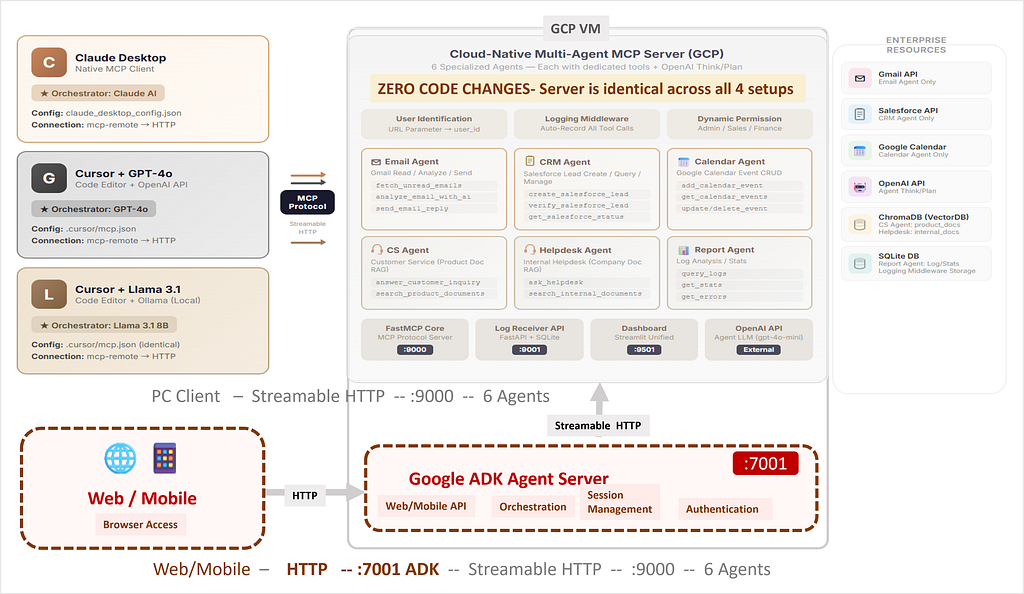
The MCP server (port 9000) is completely unchanged. The only addition: an ADK web orchestrator (port 7001), deployed as a separate Docker container on the same GCP VM. It connects to the MCP server via localhost within the same GCP VM. From the MCP protocol’s perspective, it’s a client just like any external client.
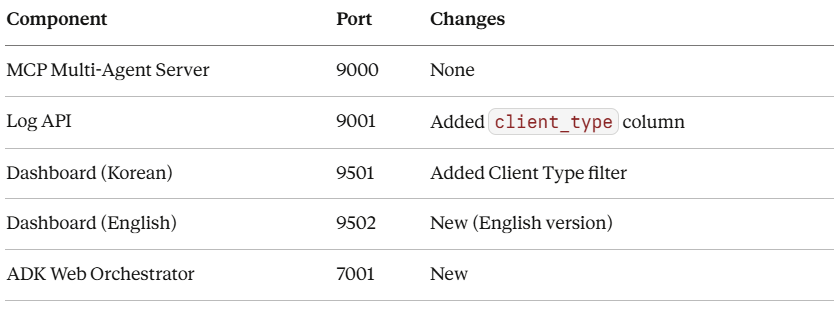
Key point: The ADK orchestrator is just another MCP client. From the server’s perspective, ADK requests look identical to Claude Desktop or Cursor requests. The server doesn’t know — and doesn’t need to know — whether the user is on a phone.

Same MCP server, same agents — now accessible from any browser or phone, no app install required. The user asks about Saturday appointments; Gemini routes to run_calendar_agent and returns the result. Full walkthrough on SunnyLab TV.
The Entire ADK Orchestrator Code: 30 Lines
The ADK web orchestrator is surprisingly simple. Here’s the core from agents/orchestrator/agent.py:
FASTMCP_URL = os.getenv(
    "FASTMCP_URL",
    "http://localhost:9000/mcp?user_id=admin&client_type=adk"
)

mcp_tools = MCPToolset(
    connection_params=StreamableHTTPConnectionParams(
        url=FASTMCP_URL,
    ),
)

root_agent = LlmAgent(
    model=os.getenv("ADK_MODEL", "gemini-2.5-pro"),
    name="orchestrator",
    instruction="""You are an enterprise AI assistant...
        Route to the appropriate agent based on the request.""",
    tools=[mcp_tools],
)
That’s it. MCPToolset connects to the FastMCP server via StreamableHTTPConnectionParams. LlmAgent uses Gemini 2.5 Pro as the orchestration AI. When a user types "check my unread emails" in the web UI, Gemini reads the MCP tool descriptions, picks run_email_agent, and the MCP server handles the rest.
Note the client_type=adk parameter in the URL. This is the only new addition — it's how the dashboard identifies this request as coming from a web/mobile client.
Deployment: One VM, Two Containers, Zero Conflicts
The ADK orchestrator runs as a separate Docker container alongside the existing MCP server container:
docker run -d \
  --name adk-web-orchestrator \
  --restart unless-stopped \
  --network host \
  -e FASTMCP_URL="http://localhost:9000/mcp?user_id=admin&client_type=adk" \
  -e ADK_MODEL="gemini-2.5-pro" \
  -e GOOGLE_API_KEY="${GOOGLE_API_KEY}" \
  adk-web-orchestrator:latest
--network host works well for this single-VM setup. In a production environment with stricter isolation requirements, consider Docker bridge networks or a reverse proxy. It lets the ADK container reach localhost:9000 (the MCP server) without Docker networking complexity. Both containers share the host network, so inter-service communication is simply localhost.
The Dockerfile is equally minimal:
FROM python:3.11-slim
WORKDIR /app
COPY requirements.txt .
RUN pip install --no-cache-dir -r requirements.txt
COPY agents/ ./agents/
EXPOSE 7001
CMD ["adk", "web", "--port", "7001", "--host", "0.0.0.0", "agents"]
The adk web command starts the built-in web UI. No React app needed, no frontend build step. ADK provides the chat interface, session management, and tool-call UI out of the box.
A New Dimension: Client Type Tracking
With four different clients now connecting to the same MCP server, a new question arises: which client sent each request? The existing dashboard could tell you run_email_agent was called, but couldn't distinguish whether it came from Claude Desktop, Cursor, or a mobile browser.
I added a 2-axis classification system to the middleware:
- source (where the tool executes): remote or local
- client_type (who sent the request): cursor, adk, mcp (default — including Claude Desktop)
Detection works via URL parameters. Cursor sends client_type=cursor, ADK sends client_type=adk. Clients that don't set an explicit parameter (including Claude Desktop) are recorded with the default value "mcp".
# Extract client_type from URL parameter
client_type = request.args.get("client_type", "mcp")
# cursor → "cursor", adk → "adk", all others → "mcp"
Cursor and ADK identify themselves via URL parameters. All other clients (including Claude Desktop) are recorded with the default value "mcp".
The database needed a new column. To avoid breaking existing deployments, the logging middleware auto-migrates at startup:
try:
    cursor.execute("SELECT client_type FROM tool_logs LIMIT 1")
except sqlite3.OperationalError:
    cursor.execute(
        "ALTER TABLE tool_logs ADD COLUMN client_type TEXT DEFAULT 'mcp'"
    )
Existing rows keep the default mcp. New rows from identified clients get the appropriate type. No manual migration scripts, no downtime.
Dashboard: One Screen, All Clients
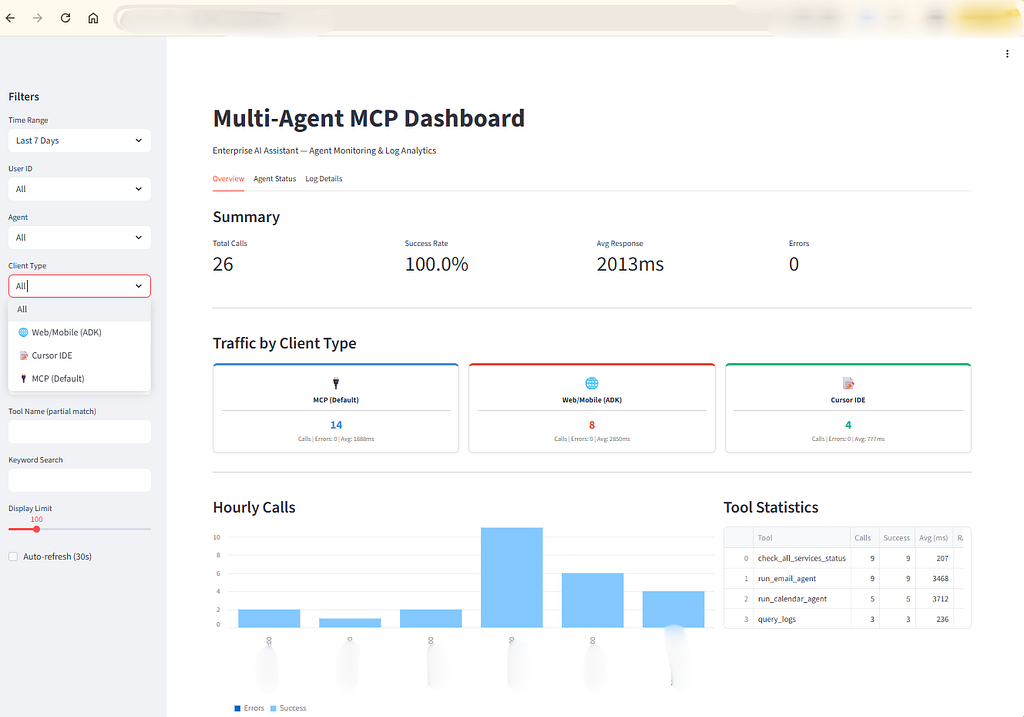
Multi-Agent MCP Dashboard — every request shows which client sent it, which agent handled it. The sidebar filter includes Client Type, letting you isolate traffic from specific clients. Want to see only mobile requests? Filter by “Web/Mobile (ADK)”. Want to compare MCP (Default) and Cursor performance? Filter each and compare response times.
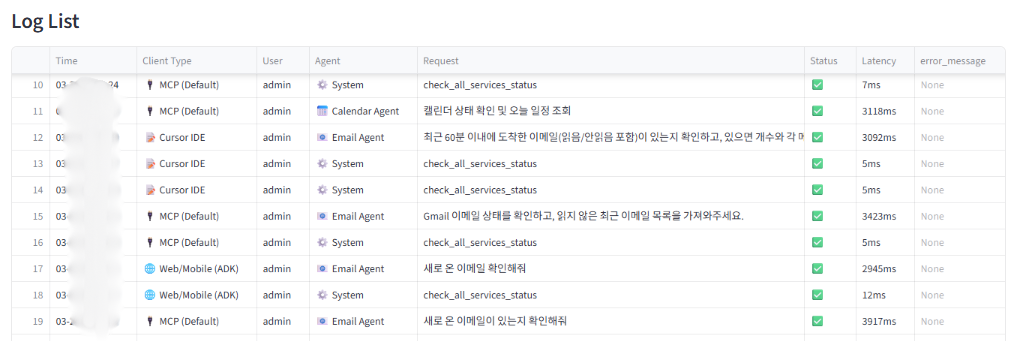
Web/Mobile (ADK) Email Agent at 2,945ms vs MCP (Default: Claude desktop) Email Agent at 3,423ms. Across 91 total calls with a 100% success rate, Web/Mobile (ADK) agent tasks averaged ~3,650ms vs MCP (Default) at ~3,500ms. Adding a new client didn’t degrade performance — the server treats every client equally.
The updated dashboard shows a Client Type column on every log entry. At a glance: Cursor IDE called the Email Agent, Web/Mobile (ADK) checked service status, and an MCP (Default : Claude desktop) client ran a Calendar event creation. Each client type gets a unique icon and color for instant visual identification.

Four Orchestrators, One Server
Here’s the full picture so far — four different AI orchestrators, four different entry points, all calling the same unchanged MCP server:
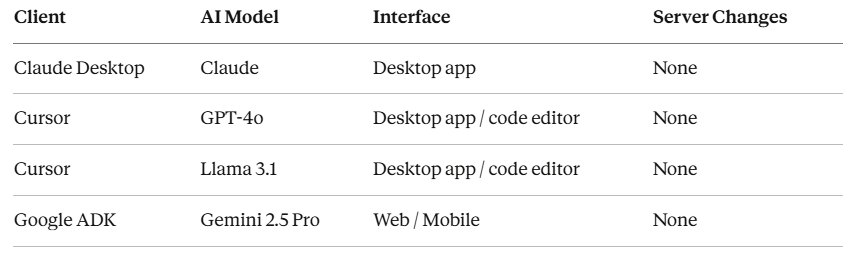
The MCP server has no client-specific branching. No if client == 'adk' conditionals, no client-specific endpoints. Every client calls the same run_email_agent tool with the same parameters and gets the same results. The only addition is client_type tracking in the middleware — and that's observability, not logic.
What This Proves
MCP works beyond desktop clients. The same server that supported Claude Desktop and Cursor now serves web browsers and mobile devices through Google ADK. No protocol translation, no API wrappers — ADK connects natively via Streamable HTTP.
The server truly doesn’t care who’s calling. Four orchestrators use four different AI models (Claude, GPT-4o, Llama 3.1, Gemini 2.5 Pro), yet all produce the same functional results. The MCP protocol fully abstracts the AI layer.
Adding a new client is trivial. The entire ADK integration is 30 lines of Python and 7 lines of Dockerfile. Compare that to building a custom REST API, WebSocket layer, authentication system, and frontend. ADK’s built-in web UI means web/mobile access works immediately with no separate frontend development.
Client diversity enables better observability. Tracking which client sent each request lets you compare response times across clients and identify how each entry point is actually being used.
What’s Next
The MCP server stays unchanged. Here’s the updated roadmap:
✅ Claude Desktop + Multi-Agent
✅ Cursor + GPT — Same MCP server, different client
✅ Cursor + Ollama/Llama — OpenSource AI, without paid APIs
✅ Google ADK + MCP Server — Same agents, called from web and mobile
- ⬚ LangGraph / CrewAI + MCP Server — Open-source orchestration frameworks with explicit graph-based workflows vs implicit orchestration
- ⬚ Server-side LLM swap — Replace agent-internal gpt-4o-mini with an open-source model. Is a fully model-independent stack possible?
Next up is LangGraph and CrewAI. In all experiments so far, orchestrator AIs like Claude/Gpt/Llama/Gemini decided on their own which agent to call. LangGraph and CrewAI are known to take a different approach — one where the developer explicitly designs the call sequence and workflow. The next experiment will test what difference that makes when connected to the same MCP server.
The core question remains the same: can any layer — client, AI, orchestration framework — be freely swapped without touching the MCP server? After four experiments, the answer is still “yes.”
The full implementation is demonstrated in the SunnyLab TV video. All code referenced in this article is a production MCP system running on GCP. Previous articles in the series are available on Medium.
Tags: MCP Server, Multi-Agent, Google ADK, Gemini, Web/Mobile AI, Claude, Cursor, Python, AI Architecture
How I Connected My 6-Agent MCP System to Web and Mobile with Google ADK — Zero Server Changes was originally published in Level Up Coding on Medium, where people are continuing the conversation by highlighting and responding to this story.