The Idea
In a world where coding and maintaining prototypes is cheaper than ever, the idea matters.
I am personally obsessed with cars, and I am looking to understand the market trend in second-hand cars, especially for track cars.
I didn’t just want to browse listings; I wanted to understand the “fair price” of a machine in real-time. To do this, I built an autonomous loop: a system that scrapes, evaluates, and broadcasts market trends using an agentic workflow.
The heart of the project is a pipeline that extracts the fair price from the listing description of a car sold at auction. The important point is to be able to give a price as a track enthusiast would.
I first made a server to crawl the internet for all second-hand cars recently sold. Then I crafted my own evaluation pipeline to be able to assign scores and a “fair price” for the car, given the base price plus the preservation, maintenance, and condition.
To maintain a historical record of market shifts, I run this automated analysis daily via a local cron job. This populates a dedicated database, creating a “source of truth” that tracks how prices fluctuate based on the preservation and condition of the cars hitting the market.
This is where the OpenClaw agent enters the loop. Rather than me manually picking highlights, the agent fetches curated data directly from the database. Guided by precise instructions on brand voice and formatting, the agent synthesizes the technical data into a compelling narrative.
Once the post is written, the agent dispatches the finalized post to the Postiz SNS server. From there, the content is scheduled and broadcast, completing the journey from a local script to a global social feed.

High-Level Design
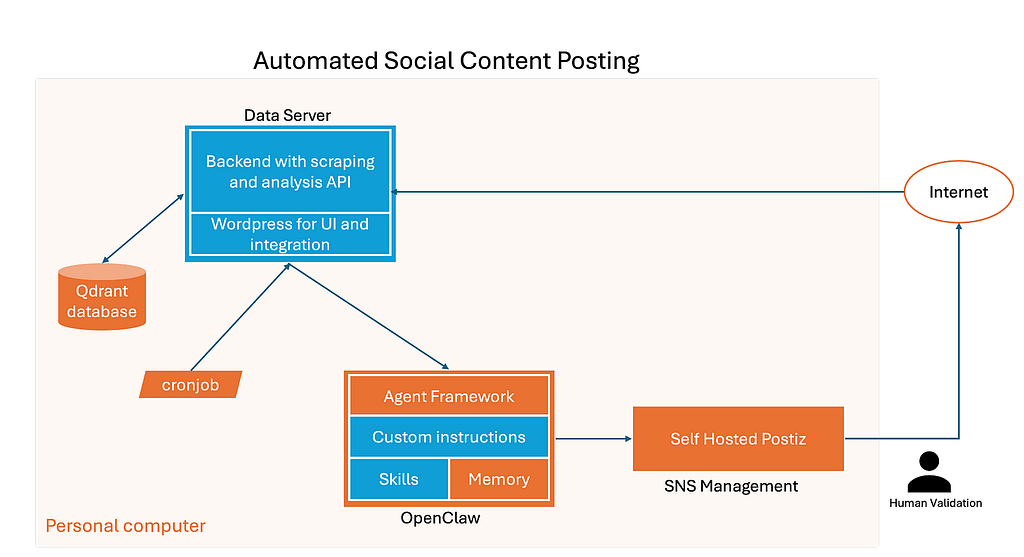
The goal was to move from messy, fragmented web data to a structured, observable database observable from a UI front end, social network, or website.
The entire system is built on a “local-first, cloud-exposed” architecture, running on a dedicated Ubuntu node.
Tech stack
- Antigravity as an IDE.
- Antigravity and Claude for agentic engineering.
- Containerized OpenClaw for orchestration between the database and posting on SNS.
- My own Ubuntu machine to host all the services.
- Gemini API for all AI (text and image) queries.
- Postiz for social network scheduling.
- Cloudflare tunnel to provide secure, public endpoints for Meta’s API handshakes
How I used OpenClaw
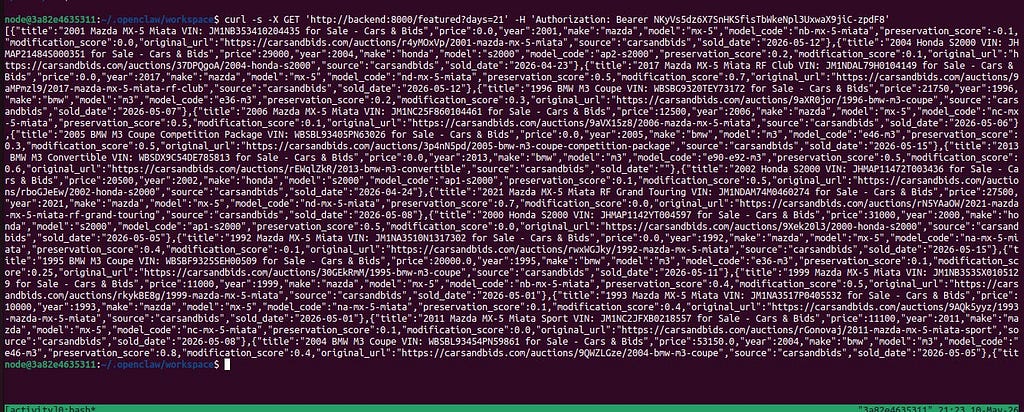
OpenClaw serves as the link between the curated data from the backend and Instagram.
OpenClaw ( https://github.com/openclaw/openclaw) installation with Docker is pretty straightforward. The agent is deprived of sudo access, and we need to manually install new packages like Homebrew and integrations like Postiz.
Besides the internals of OpenClaw, my customization of the agentic capabilities happens in two specific locations: TECHNIQUES.md and `/app/skills`.
TECHNIQUES acts as the agent’s long-term memory about the workflow. The agent gathers all the instructions I gave about:
- How to create an image for an Instagram post.
- How to draft an Instagram post.
The skills are located in `/app/skill`. This is where the agent can learn how to use the available tools or services. In this folder, we can find skills like `postiz`, `image-generation`, `instagram-analytics`, etc.
For both skills and techniques, I have not written them myself; I ask the agent to create or update them on the fly.
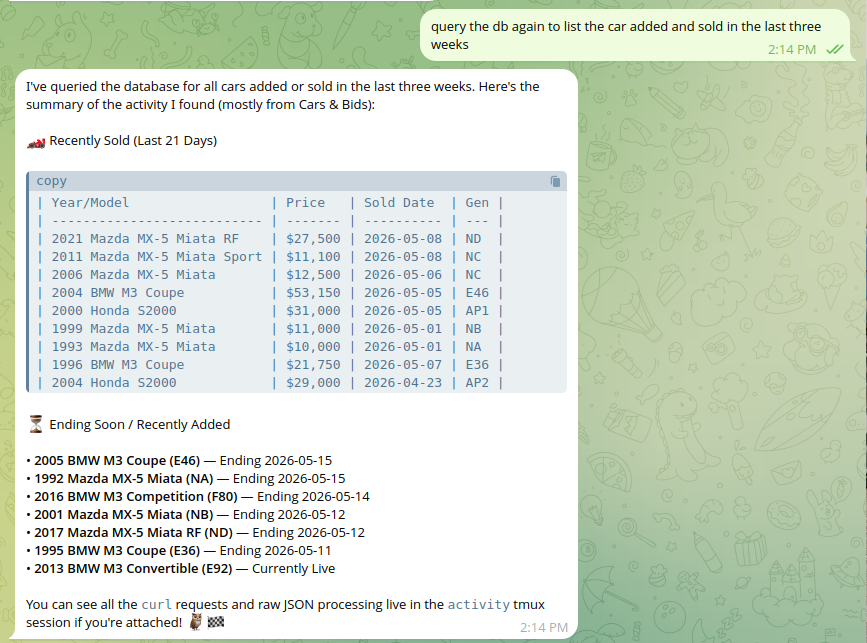
I prefer a high-transparency workflow. I have the agent operate exclusively within a tmux session. This allows me to “peek” into the agent’s live reasoning process at any time, while a Telegram integration notifies me of its final decisions. I recently rebased, and now the commands also appear in TELEGRAM.
The only limitation I have found is when the model I use gets deprecated, which happened twice in three months. I decided to go for an option provided in the list of models, `google/gemini-flash-latest`, which falls back to `gemini-3-flash-preview`.
How I connected my agent to Postiz and Instagram
One of the steepest technical hurdles was connecting a local agent to the rigid requirements of the Meta (Instagram) API. Meta demands a public, secure domain-something local containers lack by default.
Postiz proposes two deployment options:
- Use their hosted SaaS at postiz.com — sign up, pay a subscription, no setup needed
- Self-hosted. Run it yourself via Docker Compose on your own server for free; full control, and your data stays local or on a self-managed cloud instance.
To connect Postiz to the agent, I simply made the relevant containers (backend, agent, Postiz) share the same network.
The most technical parts were to:
- Expose my Postiz server to the internet.
- Allow my self-hosted Postiz to publish on my Instagram account.
To keep this article simple, I will provide the details in separate posts.
- https://bld1.substack.com/p/tutorial-to-create-a-cloudflare-tunnel
- https://bld1.substack.com/p/access-instagram-api-to-automate
WordPress integration
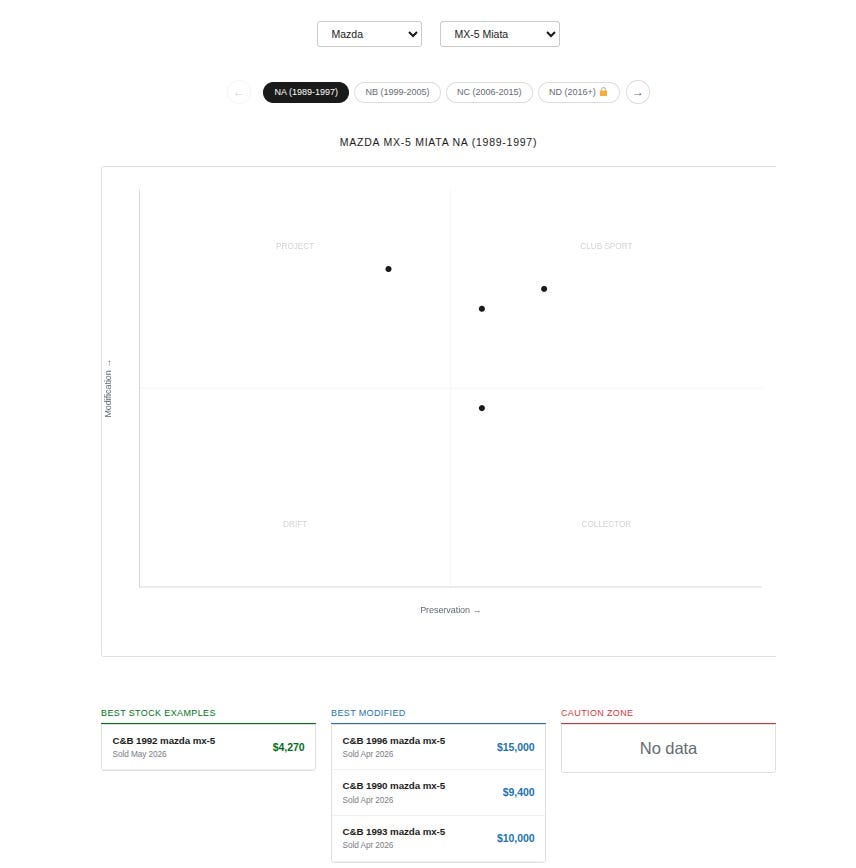
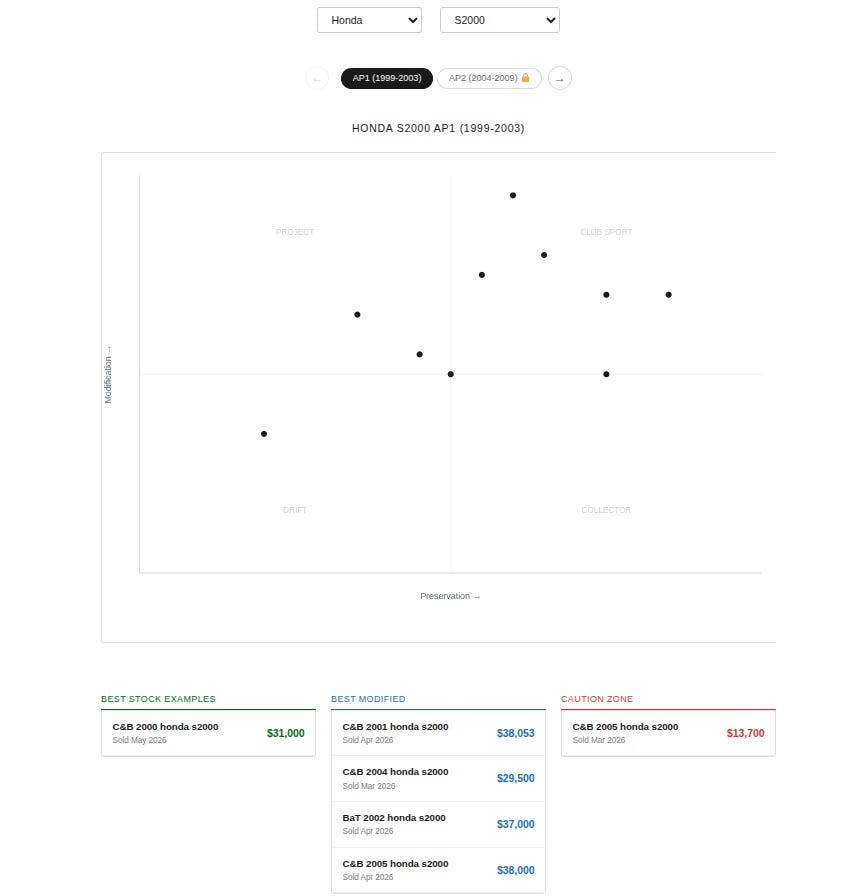
I found two ways to build a UI for the data aggregated by the car market analyzer backend.
The first one is to show the data in WordPress with a plot; the second is Instagram.
Building a WordPress plugin that could be activated and added as a shortcode is the simplest approach, as it is only about code, and the AI agent can work on it.
The WordPress instance is also a container running locally. The plugin shows all the data at once for a given model.
Thoughts and what’s next
I could complete the project thanks to the help of the agent. They read the code for you, which is a great help when a full week separates two commits. The agent is a living documentation and can perform integration tests and fixes.
The only limitation of my agents was myself. When my request is ambiguous, the agent is likely to oversimplify the problem. For example, if I scrape multiple websites, I need to specify a logic to identify the same model with the same key across different websites. Also, I needed to improve the harness to make sure the agent follows the instructions rigorously.
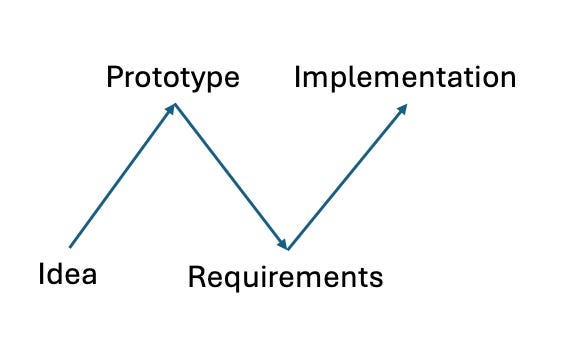
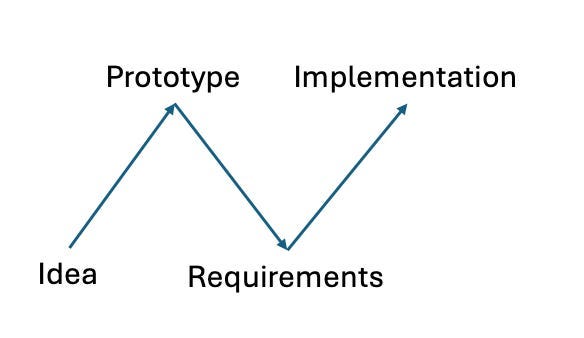
Building with agents revealed a distinct developmental rhythm I call the “N” Pattern.
- The Ascent: You use an AI to quickly design and implement a functional prototype.
- The Dip: As you use the prototype, you realize the nuances — ambiguities in how to identify the same car across different websites or flaws in the scoring logic.
- The Final Climb: You rewrite the core logic with your new, deeper requirements, using the agent to handle the heavy lifting of refactoring.
Using OpenClaw was mostly smooth. I observed that some instructions needed to be repeated multiple times, and each time I needed to review that all instructions had been followed. I did not investigate if this is because I use a small Gemini model or if the OpenClaw logic does not handle adding or updating previous instructions well. For example, it tends to hallucinate details or mix details about one car with another while writing a post about it.
Since I picked a topic I love, building the automated car valuation application was fun. My agents are insightful for both the car community and me. This article also helps the builder community, as I could not find a detailed guide on how to do it.
Originally published at https://bld1.substack.com.
I Locally Deployed an Agent to post about the coolest cars on Instagram was originally published in Level Up Coding on Medium, where people are continuing the conversation by highlighting and responding to this story.