We started with three developers on GitHub Copilot in November 2025. A month later we expanded to five. Four months in, I pulled the data — and the most important finding wasn’t in any metric I planned to track.
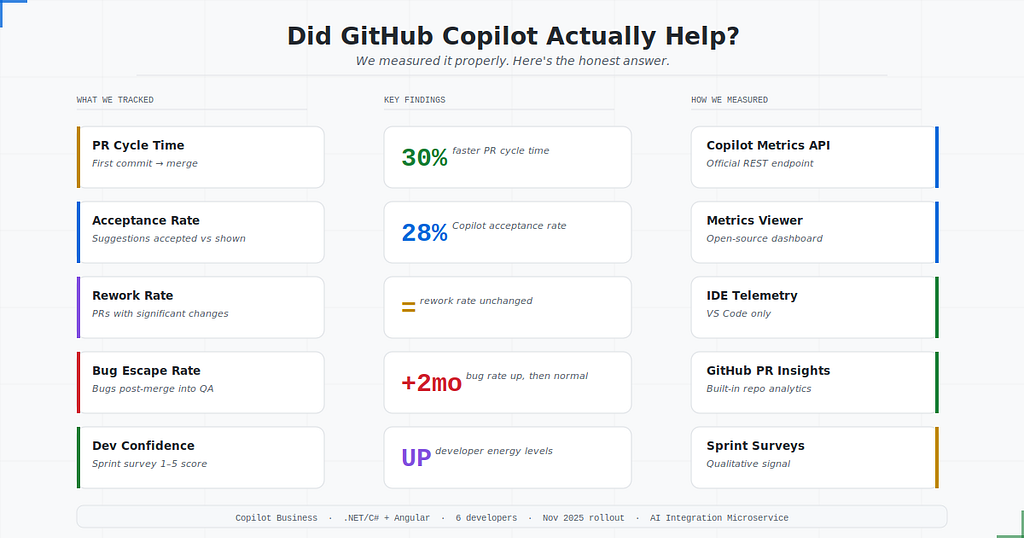
What we tracked, what we found, and how we measured it — 3-dev pilot in November 2025, expanded to 5 one month later.
There’s a lot of noise around AI productivity tools right now. Vendors promise 55% faster coding. Blog posts are full of glowing testimonials. LinkedIn is flooded with people saying Copilot “changed everything.”
I wanted to know what it actually changed — at our company, on our codebase, with our team.
So I measured it.
This isn’t a sponsored post. These are real numbers from a small engineering team at a B2B software company. The results were genuinely interesting — some better than expected, some more complicated than the marketing would suggest. And before I get to the numbers, I want to spend some time on the part most articles skip entirely: how we actually tracked usage in the first place.
A Little Context First
Our team builds enterprise software in .NET/C# , working within a larger EHS (Environment, Health and Safety) platform. My team specifically owns the AI integration microservice — the backbone that connects our application to external AI providers like OpenAI and Gemini. Every AI feature in the platform flows through this service. It handles provider routing (mapping each use case to the right AI provider), billing tracking per provider, and a full audit trail of AI usage across the application.
That context matters for what follows. This isn’t a team using Copilot to write CRUD screens. We’re using Copilot to build the infrastructure that governs other AI systems. Billing logic needs to be accurate. Audit trails need to be complete. Provider mappings need to behave predictably under load. There’s a certain irony in using one AI tool to build the system that manages all the others — and it raises the quality bar considerably.
We’re a six-person engineering team, and we rolled out GitHub Copilot Business starting in November 2025 — beginning with a three-developer pilot, then expanding to two more developers a month later. Five of the six are now active Copilot users. This article covers roughly four months of real usage data.
That phased approach turned out to be genuinely valuable. The first three developers became the informal reference point for the rest of the team. By the time the others onboarded a month later, there were already internal answers to “when does it actually help?” and “what do you do when the suggestion looks wrong?” You don’t get that knowledge transfer if you flip the switch for everyone on day one.
Before we started, I set up a simple baseline. I pulled historical data on PR counts, average PR cycle time, number of review comments, and post-merge bug reports. Nothing fancy — just enough to have something honest to compare against.
Then we turned Copilot on and waited.
What We Measured (and Why)
I deliberately avoided the metric everyone loves to cite: lines of code written. More lines of code is not a win. More code means more to maintain, more to test, and more surface area for bugs.
Instead, I focused on things that actually matter to the business:
- PR cycle time — how long from first commit to merge
- Rework rate — how often PRs came back with significant change requests
- Bug escape rate — bugs found in QA or production after a PR merged
- Developer self-reported confidence — a simple 1–5 survey question each sprint
How We Actually Tracked It (The Part Nobody Writes About)
This is the section I wish existed when I started. Most ROI write-ups say “we measured productivity” without explaining the machinery behind it. Here’s exactly what we used, what each tool gives you, and where each one falls short.
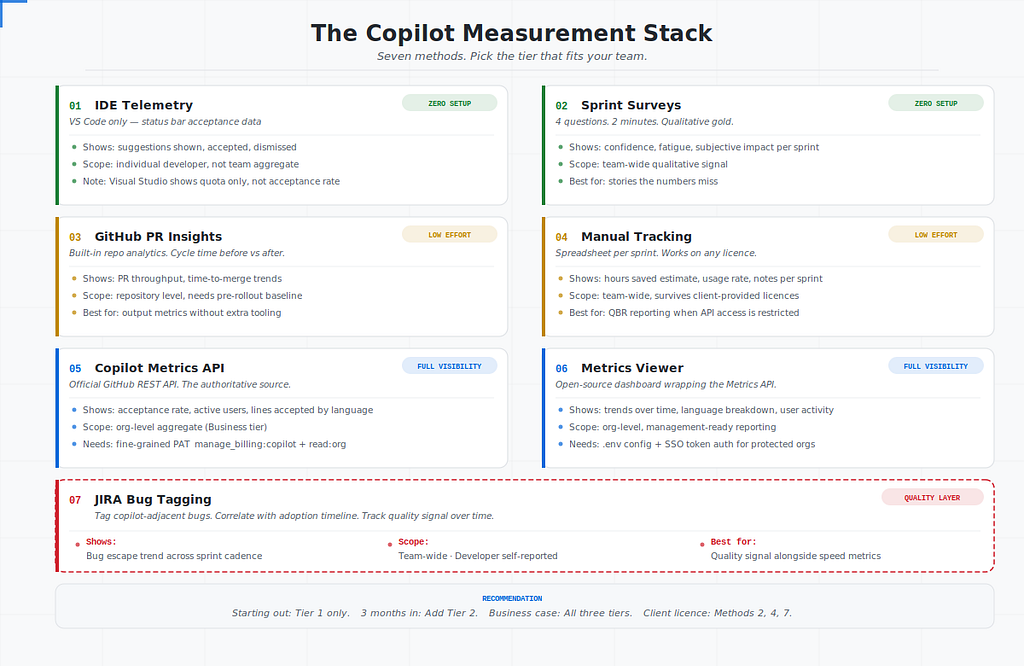
Seven tracking methods, tiered by setup effort. Pick the level that fits your team’s maturity.
Method 1 — GitHub Copilot Metrics API
This is the most direct source of truth for Copilot-specific data and it’s underused. GitHub exposes a REST API endpoint that gives you:
- Acceptance rate — percentage of suggestions accepted vs shown
- Active users — how many developers actually used Copilot in a given period
- Suggestions shown vs accepted — broken down by language and IDE
- Lines of code accepted — the one aggregate metric that’s genuinely useful here
The endpoint for organisation-level data looks like this:
GET https://api.github.com/orgs/{org}/copilot/metrics
Authorization: Bearer {token}
A few things to know before you try this. You need a fine-grained personal access token with manage_billing:copilot and read:org scopes at the organisation level. If you're on Copilot Business (not Enterprise), some endpoints return limited data — specifically, you won't get seat-level breakdowns by individual developer, only aggregate org-level stats. That's a real limitation if you want per-team or per-person analysis.
Also: the API requires Copilot metrics to be explicitly enabled in your GitHub organisation settings. It’s off by default. Go to Organisation Settings → Copilot → Policies and turn on “Allow GitHub to use my Copilot data for product improvements and usage metrics” — without this, the API returns empty results and you’ll spend lot of time wondering why.
Method 2 — GitHub Copilot Metrics Viewer (Open Source Dashboard)
Once you have the API working, the next step is making the data visible to people who aren’t going to curl an endpoint. The GitHub Copilot Metrics Viewer is an open-source dashboard that wraps the Metrics API in a clean UI. Acceptance rate trends, active user counts, language breakdowns — all in one place.
Setup is straightforward in theory. In practice, the .env file configuration is where most people get stuck. You need:
VITE_GITHUB_TOKEN=your_token_here
VITE_GITHUB_ORG=your-org-name
VITE_GITHUB_API_VERSION=2022-11-28
The token needs the same scopes as above. The org name is case-sensitive and must match exactly what appears in your GitHub organisation URL. If your org is rajansoftware in the URL, it needs to be rajansoftware in the env file — not RajanSoftware, not Rajan Software.
One gotcha we hit: if you’re running this locally and your token has SSO-protected org access, you need to authorize the token for SSO in GitHub’s token settings page before it will work. The error message you get without this (403: Resource protected by organization SAML enforcement) is not obvious about that being the fix.
This tool is best for management-facing reporting — weekly screenshots in a Slack/Teams channel or a monthly metrics email. It won’t replace deeper analysis but it makes the data visible, which is most of the battle.
Method 3 — IDE-Level Telemetry (Zero Setup)
This one comes with an important caveat depending on which IDE you’re using — and it’s worth being specific because the experience varies significantly.
In VS Code, Copilot surfaces per-session usage data in the status bar — suggestions shown, accepted, and dismissed — giving developers a real-time view of their personal acceptance rate. This is genuinely useful as a lightweight, zero-setup signal.
In Visual Studio 2022 and Visual Studio 2026, the picture is different. Clicking the Copilot icon in the top-right corner takes you to Copilot Consumptions, which shows your premium request quota — how many requests you’ve used and how many remain. That’s a billing view, not a productivity analytics view. There is no built-in per-session acceptance rate panel the way VS Code has one.
This matters if your team works primarily in Visual Studio for .NET/C# development (as ours does). The background telemetry from Visual Studio does feed into the Metrics API — so if you have API access, you’ll still see org-level acceptance data there. But if you’re on a client-provided license with no API access, Visual Studio won’t give you the session-level stats you might expect.
The practical workaround: pair sprint surveys (Method 5) with whatever your developers can observe naturally — did they tab-accept more than they rejected this sprint? That gut-check is less precise but still directionally useful, and it’s honest about what Visual Studio actually shows you.
No configuration required for any of this. It just works — with the caveat that “works” means something different in Visual Studio vs VS Code.
Method 4 — PR Cycle Time via GitHub Insights
GitHub’s built-in repository insights give you pull request throughput and cycle time trends out of the box. Go to Insights → Pulse or use the Traffic tab for a broader view. For more granular cycle time analysis, GitHub’s Deployment Frequency and Change Lead Time metrics in the Actions tab are worth checking if you have CI/CD set up.
The key here is establishing your baseline before rollout and using consistent date range windows for comparison after. We used the pre-November data as our baseline, then compared against the post-rollout period — skipping the first month deliberately, because the initial adoption chaos skews the data. The first three developers gave us an earlier signal; the two who joined a month later gave us a useful secondary data point on whether habits transferred.
This method requires no additional tools and costs nothing. Its weakness is that it measures output, not quality. A faster PR isn’t necessarily a better one.
Method 5 — Developer Surveys (The Qualitative Layer)
Numbers alone don’t tell you what’s actually changing. We ran a four-question survey at the end of each sprint, kept it simple enough that people would actually fill it in:
1. How often did you use Copilot this sprint? (1–5, Never to Constantly)
2. How much did it help? (1–5, Not at all to Significantly)
3. Did it save you time on tedious tasks? (Yes / No / Sometimes)
4. Any examples worth sharing? (open text, optional)
The open text answers were where the real insight lived. Developers flagged specific scenarios — “it’s great for writing test data builders” or “it suggested a deprecated API method twice this week” — that the quantitative data completely missed.
Run this every sprint for at least three months. The trend matters more than any single data point.
Method 6 — Bug Escape Rate via JIRA
This one is rough but honest. We tagged any post-merge bug in JIRA with a copilot-adjacent label if the code involved had significant Copilot involvement (developer's call, self-reported). We weren't trying to prove causation — just to see if any pattern emerged.
It’s imprecise. Developers aren’t always sure how much of the code was AI-generated vs written manually. But even imprecise data over time is more useful than no data, and having the label in JIRA meant we could look back at incidents and ask the right questions during post-mortems.
Method 7 — Manual Tracking (The Vendor Reality Method)
Here’s a scenario the other six methods don’t account for — and it’s more common than you’d think in B2B software teams.
Sometimes your Copilot licence comes from the client. They’ve provisioned it under their GitHub organisation, which means you’re operating inside their account, under their policies. You don’t have manage_billing:copilot scope. You can't call the Metrics API. The Metrics Viewer is off the table. And often, the client isn't interested in ROI tracking at all — from their perspective, they've given you a tool and that's the end of the conversation.
But you still need to demonstrate value. Quarterly Business Reviews happen. Leadership asks questions. You need numbers.
This is where manual tracking earns its place. It’s not glamorous, but it works, and it requires nothing you don’t already have.
What to track manually:
Keep a simple shared spreadsheet — one row per sprint, updated by each developer at the end of the sprint. Columns we use:

“Tasks Assisted” is a count of features, bug fixes, or PRs where Copilot meaningfully contributed. “Est. Time Saved” is a rough self-estimate — not scientific, but directionally honest over time. “Acceptance Feeling” replaces the IDE acceptance rate stat you’d get from the API: a 1–5 gut-check on whether the suggestions were actually useful that sprint, not just accepted.
The notes column is the most valuable. This is where developers log specific wins (“wrote entire DTO layer in 10 mins”) and specific misses (“suggested deprecated API method, had to override twice”). Over a quarter, these notes become the narrative content of your QBR report — the stories that make the numbers credible.
For QBR reporting, aggregate the spreadsheet monthly. You end up with:
- Active usage rate across the team (how many devs used it meaningfully vs sporadically)
- Estimated hours saved per sprint, trended over the quarter
- Qualitative improvement trend (is the 1–5 score going up as the team learns the tool?)
- A handful of concrete examples per quarter pulled from the notes column
This isn’t as clean as the Metrics API. But it’s yours — it doesn’t depend on org-level permissions, it survives license changes, and it gives you something to show in a QBR regardless of what the client controls.
One important note on this approach: be upfront with your team that this data is self-reported and directional, not precise. The value isn’t in the exact numbers — it’s in the trend and the narrative. A QBR slide that shows “estimated 12 hours saved per developer per sprint in Q1, up from 6 in the first month, with a 4.1/5 helpfulness score” tells a compelling story without pretending to be scientific.
Putting It Together: The Measurement Stack
You don’t need all seven of these. Here’s how I’d tier them based on your situation:
If you’re just starting out: IDE telemetry + sprint surveys. Zero setup, immediate signal.
If you’re three months in: Add GitHub Insights for PR cycle time. You now have quantitative + qualitative + output metrics.
If you’re making a business case to leadership: Add the Metrics API or Metrics Viewer. This gives you the official GitHub numbers that management will recognize and trust.
If you want the full picture: All of the above plus JIRA bug tagging. This is what we run now, and it’s maintainable — about two hours a month to pull together a coherent report.
If you’re working on a client-provided license with no API access: Skip Methods 1 and 2 entirely. Run IDE telemetry, sprint surveys, and the manual tracking spreadsheet. You won’t have the official GitHub numbers, but you’ll have a defensible, consistently maintained usage record that holds up in a QBR conversation. The notes column alone is worth more than a dashboard screenshot with no context behind it.
The Numbers
Let me be straight with you: some of these are estimates, not precise measurements. We’re a small team, not a research lab. But they’re honest estimates based on real data collected through the methods above.
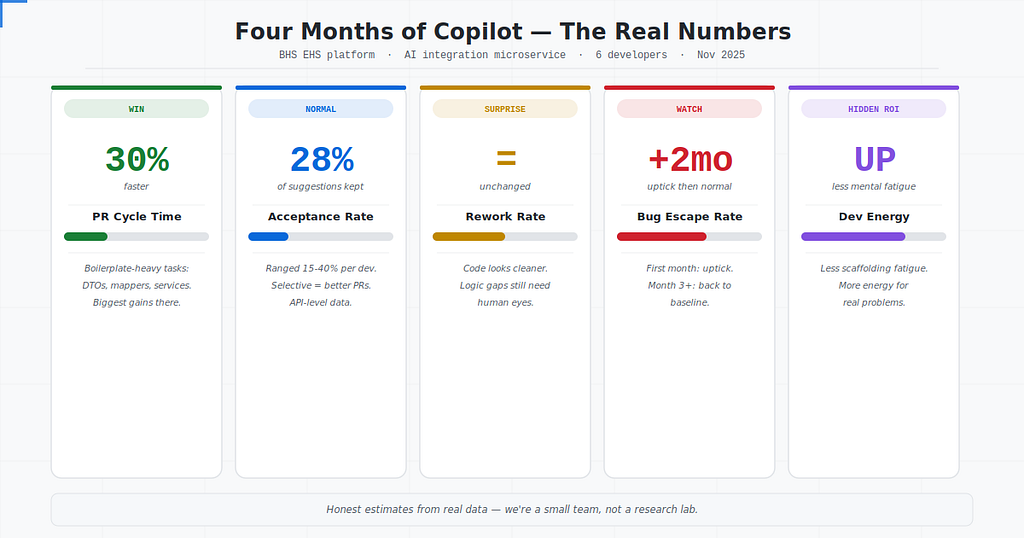
Five metrics. 3-dev pilot from November 2025, expanded to 5 a month later. The wins, the surprises, and the uncomfortable findings.
PR cycle time dropped by about 30%.
This was the most consistent and clean result. Tasks that used to take a developer two days were getting done in roughly a day and a half. Boilerplate-heavy work — writing DTOs, mapping classes, repetitive service methods — saw the biggest improvement. Copilot is genuinely excellent at code that follows a pattern it has seen before.
Acceptance rate settled at around 28%.
This came from the Metrics API. Industry averages sit somewhere between 25–35%, so we were in the normal range. More interestingly, the rate varied significantly by developer — some consistently accepted around 40%, others under 15%. That variation told us more about usage habits than the average did. The developers at the lower end weren’t using Copilot wrong; they were being more selective, which generally correlated with fewer rework comments in their PRs.
Rework rate stayed almost the same.
This one surprised me. I expected fewer review comments because the code would be “better.” Instead, reviewers were catching the same kinds of issues — logic gaps, missing edge cases, naming inconsistencies. The code looked cleaner (better formatting, consistent style) but the underlying thinking still needed human eyes. Copilot polishes the surface. It doesn’t replace thinking.
Bug escape rate went up slightly in the first two months, then normalized.
This was the uncomfortable finding. In the first month post-rollout, we saw a small uptick in bugs reaching QA. Our hypothesis: developers were accepting suggestions a little too quickly before they’d built good habits around reviewing AI output critically. By month three, once the team had internalized “trust but verify,” the rate came back to baseline.
If you read my previous article on the AsNoTracking race condition — that happened during this period. It was a reviewer (me) using Copilot Chat on a code fragment without the full context. The data captured it as a bug escape. The post-mortem explained why.
Developer confidence went up — but for the right reasons.
The survey responses were interesting. Developers didn’t say they felt more confident because the code was better. They said they felt less mentally exhausted. Copilot handled the tedious scaffolding, which freed up mental energy for the parts of the problem that actually required thinking. That’s a real and underrated benefit.
The Costs Nobody Talks About
The productivity gains were real. But so were the costs — and most Copilot ROI articles don’t mention them.
Review burden shifted, not disappeared. PRs got submitted faster, which meant reviewers were receiving more PRs. The total review load on the team increased. If you’re the person who does most of the code reviews, Copilot makes your life harder before it makes it easier.
Onboarding got trickier. Junior developers who learned with Copilot available from day one had a harder time explaining their own code in review sessions. They could produce correct output without fully understanding why it was correct. That’s a mentoring and growth problem we’re still working through.
License cost vs. productivity gain is team-size dependent. At six developers, the math requires more scrutiny than it would at a team of fifty. The gains are real but not dramatic at this scale — you need to be deliberate about measuring them, otherwise you’re just guessing whether the license cost is justified.
The metrics themselves take time to maintain. Setting up the Metrics Viewer, running surveys, tagging JIRA tickets — none of it is heavy, but it isn’t zero. Budget roughly two hours a month if you want to stay on top of it.
What I’d Tell Someone About to Roll This Out
Set up your measurement stack before day one. A baseline collected after rollout is already corrupted. You need three months of clean pre-Copilot data, and you need to know which tools you’ll use to compare against it.
Don’t treat it as a magic productivity button. It’s a force multiplier on developers who already know what they’re doing. For someone still learning the fundamentals, it can accelerate bad habits as easily as good ones.
Pair the rollout with your static analysis pipeline. Copilot and SonarQube are not either/or. We kept our quality gates tight — anything that failed our code health checks got flagged in CI regardless of whether a human or an AI wrote it. That was the right call.
Give it at least three months before drawing conclusions. The first month is chaotic. Developers are figuring out when to trust suggestions and when to reject them. The real signal shows up later.
The Honest Bottom Line
GitHub Copilot made our team measurably faster at the mechanical parts of software development. It did not make us better engineers. The judgment, the architecture decisions, the code review conversations — those still require people.
The ROI is real. It’s just more modest, more nuanced, and more dependent on your team’s habits than the marketing suggests.
The teams getting the most out of it aren’t the ones prompting the hardest. They’re the ones who built their measurement infrastructure first, held their quality gates firm, and gave the team time to develop the critical instinct that separates AI-Assisted development from AI-Unsupervised development.
The difference between those two things is worth measuring.
I Expected GitHub Copilot to Make Us Better Engineers. It Didn’t — But It Did Something Else. was originally published in Level Up Coding on Medium, where people are continuing the conversation by highlighting and responding to this story.