From 4/13 to 13/13 in a week — how we made DexPaprika agent-ready.
 Mateusz Sroka9 min read·Just now
--
What three DexPaprika subdomains taught us about Cloudflare’s new agent-readiness scanner, and the WebMCP argument I lost to our frontend dev along the way.
Two engineers shipped the same agent-readiness work on adjacent DexPaprika subdomains. One wrote 15 lines of JavaScript. The other wrote 107 HTML attributes. Both hit the same 13/13 Agent-Native score on Cloudflare’s new isitagentready.com scanner. Both were right.
That collision turned out to be the most interesting thing we learned in a week of racing the score. The rest of the story is few bugs, a spec argument I lost, and a framework for thinking about which tools your site should expose to AI agents.
Here’s how the week went.
The forcing event
Cloudflare shipped a scanner that grades sites on 13 open standards for AI-agent discoverability: RFC 8288 Link headers, RFC 9727 API catalogs, MCP server cards, WebMCP, Content Signals, A2A agent cards, OAuth discovery, and more. Levels run 0 “Not Ready” to 5 “Agent-Native.” Nobody is at Level 5.
I ran it against DexPaprika and got this:
dexpaprika.com          Level 1    4/13
agents.dexpaprika.com   Level 0    0/13
mcp.dexpaprika.com      Level 0    0/13
Four out of thirteen on the main site. Zero out of thirteen on the subdomain literally called agents.dexpaprika.com. Embarrassing doesn't cover it. DexPaprika's entire pitch is free data for AI agents, no API key required, and we were scoring Level 1 on a scanner that measures exactly that claim.
The work had to happen.
The scanner’s own homepage scores 10/13. Cloudflare’s developer docs score 7/13. Their engineering blog scores 5/13. The whole web is early on this. “We’re all early” isn’t a defense when your product is literally an AI-agent API.
First attempt, on a Cloudflare Worker
I started with agents.dexpaprika.com, a Vite + React site fronted by a Cloudflare Worker. The Worker already did markdown negotiation (serving text/markdown when asked for it), which was one of the 13 checks we passed from day one. For everything else, I wrote a route handler for each discovery file and dropped the JSON into TypeScript constants.
// Worker's fetch handler: new switch at the top of the request path
switch (url.pathname) {
  case "/robots.txt":
    return textResponse(ROBOTS_TXT);
  case "/.well-known/api-catalog":
    return jsonResponse(API_CATALOG, "application/linkset+json");
  case "/.well-known/mcp/server-card.json":
    return jsonResponse(MCP_SERVER_CARD);
  case "/.well-known/agent-skills/index.json":
    return jsonResponse(AGENT_SKILLS_INDEX);
  case "/.well-known/agent-card.json":
    return jsonResponse(A2A_AGENT_CARD);
  // …OAuth stubs, alias paths, etc
}
First deploy: Level 4, 9/13 passing. Three more iterations to reach 13/13. Each iteration surfaced a real gap.
The four things I got wrong
1. A2A agent card path. I assumed /.well-known/a2a/agent-card.json based on an earlier spec draft. The scanner expects /.well-known/agent-card.json without the subfolder. Both paths exist on our Worker now for compatibility across client vintages.
2. OAuth protected resource origin mismatch. RFC 9728 specifies that the resource field must match the origin hosting the metadata. I had written "resource": "https://api.dexpaprika.com" in a file served from agents.dexpaprika.com. Scanner flagged it correctly. The fix was trivial once I read the RFC line more carefully than the first time.
3. A2A card schema. Each skill entry needs an id field, not just a name. The card itself needs supportedInterfaces, not interfaces. I'd copied the shape from an older draft. Scanner validates against the current one.
4. OAuth discovery as a no-op. A public API has no auth server to advertise. My first attempt simply omitted /.well-known/openid-configuration and /.well-known/oauth-authorization-server entirely. Scanner marked both failed. Turns out a minimal RFC 8414 document with empty arrays for grant_types_supported, response_types_supported, and scopes_supported is valid metadata that truthfully declares "no flows supported." The scanner accepts that. Not every spec field has to be non-empty to count.
Four iterations, 13/13. I then applied the same Worker template to mcp.dexpaprika.com (our hosted MCP server) and hit 13/13 on the first deploy. Templates carried over cleanly.
Then our frontend dev shipped dexpaprika.com
The main marketing site wasn’t ours to fix directly. I filed a four-ticket epic for the frontend team with exact JSON contents, expected URLs, and RFC references. A week later the scanner reported Level 5, 13/13 PASS on dexpaprika.com.
I audited the implementation to check that it matched the ticket. Some of it did. Several things went past the ticket.
The argument I lost
My ticket told the dev to skip publishing /openapi.json. My reasoning was descriptive: Stripe doesn't publish OpenAPI at a well-known path, GitHub doesn't, CoinGecko doesn't, so we shouldn't either.
The dev published it anyway. Linked from the Link header as service-desc with application/openapi+json content-type. Their call was correct.
RFC 9727’s service-desc relation genuinely wants a machine-readable spec. Agents benefit from being able to fetch and parse the schema directly. My "industry norm" argument was an observation about what other APIs do, not an argument for why they do it. Describing what others do is a bad reason to skip something useful.
This is the kind of correction a senior reviewer gives a junior architect. Turnabout was fair.
The WebMCP collision
This is the part I didn’t expect.
The WebMCP check looks for navigator.modelContext.registerTool() calls on page load. On agents.dexpaprika.com I had written a standalone JavaScript file with 15 tool registrations, one per public DexPaprika REST endpoint. Drop-in, self-contained, ~20 KB.
navigator.modelContext.registerTool({
  name: "dexpaprika_getTokenDetails",
  description: "Get token metadata and summary metrics...",
  inputSchema: { /* JSON Schema */ },
  execute: async ({ network, token_address }) => {
    const r = await fetch(
      `https://api.dexpaprika.com/networks/${network}/tokens/${token_address}`
    );
    return r.json();
  },
});
// ...14 more
Our dev didn’t do that. They added tool-name="..." attributes directly to existing DOM elements: the star button on each pool row, the search form, the network selector, the hamburger menu. The scanner reports 107 tools via declarative_html on their site.
Initial read: they crushed it, my 15 looks anemic.
Actual read: the 107 is 9 unique actions with toggleFavorite repeated 99 times, once per pool row in the listings table. The scanner counts raw occurrences of tool-name attributes. Each toggleFavorite is functionally distinct because the DOM context determines which pool gets favorited, so it's not pure scanner gaming. But "107 tools" sounds more impressive than "9 actions, one attached to a repeated table row."
Both approaches are valid. They expose different things:
Declarative WebMCP (the dev’s approach)
- Exposes UI actions bound to DOM context
- Best for product UIs where clicking a button is the operation
- Footprint: tag existing elements, zero additional JS
- Maintenance: follows the UI
Imperative WebMCP (my approach)
- Exposes API calls
- Best for headless services where calling endpoints is the operation
- Footprint: one script file, ~20 KB
- Maintenance: follows the API
The dev made the right choice for dexpaprika.com, which is a product UI where the value is the interface. I made the right choice for agents.dexpaprika.com, which is an agent-facing subdomain where the backing service is a REST API.
Different surfaces. Different tools. Same score.
The framework that explains this
After three surfaces and two different implementations, we landed on a model we didn’t have at the start. It’s simple.
Each site exposes tools appropriate to its purpose. Purpose falls into four archetypes.
- Site-as-UI. Curated interface for browsing and acting on data. WebMCP approach: declarative,
tool-nameon UI elements. Example:dexpaprika.com. - Site-as-API. Programmatic access to data. WebMCP approach: none native. Expose via OpenAPI + api-catalog. Example:
api.dexpaprika.com. - Site-as-MCP. Persistent stateful protocol. WebMCP approach: minimal, scanner-only. Real interface is the MCP protocol itself. Example:
mcp.dexpaprika.com. - Site-as-directory. Onboarding and discovery. WebMCP approach: meta-tools and shortcuts. Example:
agents.dexpaprika.com.
A product UI should expose UI actions, because the UI is its value. An API should expose its schema, because the schema is its value. An MCP server should expose the MCP protocol, not duplicate it. A directory page should help agents pick the right destination.
Duplicating the same 15 REST tools across all four surfaces would be fake consistency. Real consistency comes from each surface saying “this is my thing” and linking to its siblings so agents can navigate between them.
Which is exactly the gap nobody had solved.
The cross-surface problem nobody is scoring
An agent landing on any DexPaprika URL needs to answer three questions:
- What is this site?
- What can I do here?
- Where do I go if my task fits somewhere else?
The scanner checks (1) and (2). Nobody checks (3). Neither does any RFC we found.
An agent on mcp.dexpaprika.com looking for a single token price should skip the MCP session handshake and hit api.dexpaprika.com/networks/{net}/tokens/{addr} instead. An agent on dexpaprika.com looking for multi-step analytics should connect to the MCP server. Without metadata telling them the ecosystem exists, agents either probe every subdomain or stick with whatever URL they landed on.
We added a custom relatedServices[] field to the A2A agent card on every subdomain. Six entries covering product-ui, rest-api, streaming-api, mcp-server, docs, and agents-front-door. Each has a role, a URL, and a one-sentence description explaining when an agent should prefer it.
"relatedServices": [
  {
    "role": "rest-api",
    "url": "https://api.dexpaprika.com",
    "description": "Public REST API. Best for stateless one-off queries. No auth, no rate limits."
  },
  {
    "role": "mcp-server",
    "url": "https://mcp.dexpaprika.com",
    "description": "Hosted MCP server with 16 tools. Best for multi-step agent workflows that benefit from a persistent session."
  }
  // …four more
]
Not a standard field. If the A2A spec adds an official one later, we rename. The value is that an agent fetching any of our /.well-known/agent-card.json files gets the full ecosystem map in one request, with guidance on which surface fits which task.
This is where the scanner stops being useful and the thinking starts. The checklist gives you 13/13 for filling in the slots. It doesn’t tell you whether your slots make sense together.
Results
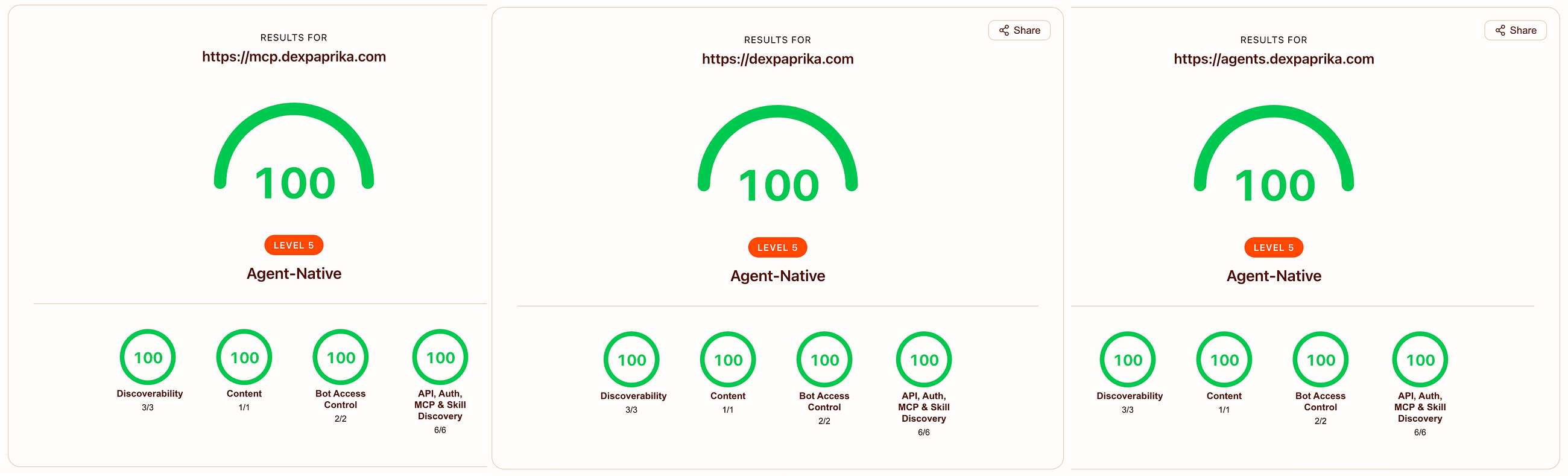
Three DexPaprika surfaces at 13/13:
dexpaprika.com          Level 5 Agent-Native    13/13    Declarative WebMCP
agents.dexpaprika.com   Level 5 Agent-Native    13/13    Imperative WebMCP
mcp.dexpaprika.com      Level 5 Agent-Native    13/13    Real MCP + scanner-facing WebMCP
For context on what “13/13” means:
isitagentready.com (scanner's own homepage)     Level 4    10/13
developers.cloudflare.com                       Level 4    7/13
blog.cloudflare.com                             Level 3    5/13
Hitting 13/13 on three services means we took the checklist seriously for a week. It doesn’t mean we’ve solved agent UX. The scanner’s own creators haven’t shipped OAuth discovery or A2A agent cards on their own site. The whole field is new.
What sticks
Six months from now half of this post’s specifics will be outdated. The declarative WebMCP attribute names might change. Content Signals is still an IETF draft. The relatedServices field we invented might be replaced by an official A2A one. The scanner itself will add new checks.
The framework outlasts the specifics.
- Each surface serves one role. Site-as-UI, site-as-API, site-as-MCP, or site-as-directory. Pick one. Don’t copy tools across surfaces just to feel consistent.
- Cross-surface navigation is its own problem. Agents need an ecosystem map, not just per-surface descriptions. No spec solves this yet. Publish metadata that does.
- Discovery files are load-bearing. If they’re wrong, agents don’t find you. If they’re honest, they do. Half-empty metadata is worse than none.
- Two engineers shipping the same checklist produce different answers. The scanner doesn’t pick winners between declarative and imperative. Both can hit 13/13. Pick the one that matches what your surface actually does.
- Scanner scores reveal engineering debt. The forcing function of wanting a clean score pulled three unrelated production bugs out we managed to patch. Run your own audit. Find your own mess.
The isitagentready scanner isn’t a vanity metric. It’s a forcing function that rewards whatever honest work you put in. The thinking about which tools to expose where is the interesting part.
DexPaprika is a free, public DEX analytics platform. 35+ blockchain networks, 29M+ tokens, 31M+ pools. No API key, no rate limits. The hosted MCP server and agent onboarding guide are the fastest ways to connect DexPaprika to Claude, Cursor, or any MCP-compatible client.
If you’re working on agent-readiness for your own API or site, the isitagentready.com scanner is the honest starting point.