Reproducing a 270 million parameter model for function calling, a fine-tuned version of Google’s Gemma-3 270M
Introduction
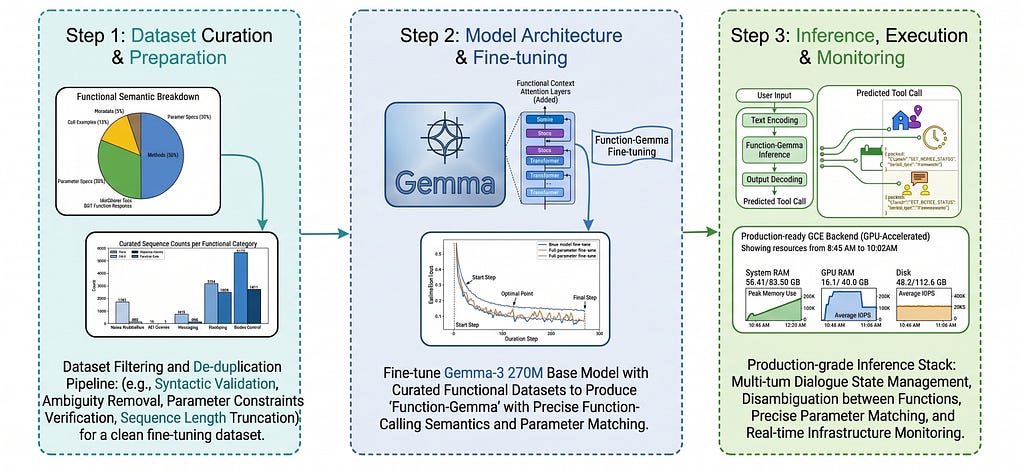
In this article I will walk you through the detailed steps on how to reproduce a Language Model capable of function calling, very similar to Google’s FunctionGemma. I am calling it ToolingGemma.
About Function Gemma: FunctionGemma is a specialized version of Gemma-3 270M model tuned for function calling. It is designed as a strong base for further training into custom, fast, private, local agents that translate natural language into executable API actions.
ToolingGemma is a 270 Million parameter open weights model that can be downloaded from HuggingFace. This article focuses on reproducing ToolingGemma, capable of function calling. Our model will take APIs / Functions documentation (structure) as an input from the user along with the user’s query and will perform Function Call with right arguments wherever needed.
Note: The Functions / APIs structure is generally provided as a part of the System Instructions.
An Example user-model communication will look like this:
SYSTEM: You are a helpful assistant with access to the following functions.
Use them if required -
{
    "name": "calculate_factorial",
    "description": "Calculate the factorial of a given number",
    "parameters": {
        "type": "object",
        "properties": {
            "number": {
                "type": "integer",
                "description": "The number to calculate factorial for"
            }
        },
        "required": [
            "number"
        ]
    }
}

USER: Hi, I need to calculate the factorial of 5. Can you help me with that?

ASSISTANT: <functioncall> {"name": "calculate_factorial", "arguments": '{"number": 5}'} <|endoftext|>

FUNCTION RESPONSE: {"result": 120}

ASSISTANT: The factorial of 5 is 120. <|endoftext|>
Dataset Preparation
I have picked the dataset glaiveai/glaive-function-calling-v2 from the HuggingFace dataset library for fine-tuning the Gemma-3 base model. The structure of the dataset is as follows:
- The dataset has ~113K rows with a total size of 271MB.
- Every row has two columns: system and chat.
- System: The column holds the System Instructions for the dataset. It holds all the function/API documentation for the model understanding.
- Chat: The column holds the chat between model and user. It holds multi-turn user model interactions along with responses received from the successful function call.
During the training process, I stressed on the data quality, to make sure we are capturing every scenario from the dataset and feeding to the base model. I explored around the dataset and it currently has the following scenarios:
Scenario 1: No access to external function provided.
SYSTEM: You are a helpful assistant, with no access to external functions.

USER: Provide an example of a sentence that illustrates the use of future
perfect tense.

ASSISTANT: I am a Function calling model, so you will have to provide
me with some external function. <|endoftext|>
Scenario 2: Irrelevant Function / User query doesn’t align with any provided functions / tool|s
SYSTEM: You are a helpful assistant with access to the following functions.
Use them if required -
{
    "name": "search_movie",
    "description": "Search for a movie by title",
    "parameters": {
        "type": "object",
        "properties": {
            "title": {
                "type": "string",
                "description": "The title of the movie to search for"
            }
        },
        "required": [
            "title"
        ]
    }
}

USER: Can you book a flight for me to New York?

ASSISTANT: I'm sorry, but as an AI, I don't have the capability to book
flights. My current function allows me to search for a movie by its title.
If you need information about a specific movie, feel free to ask!
<|endoftext|>
Scenario 3: Multi-User Turns
When user and agent chat with each other back to back.
SYSTEM: You are a helpful assistant with access to the following functions.
Use them if required -
{
    "name": "generate_username",
    "description": "Generate a unique username",
    "parameters": {}
}


USER: Hi, can you help me with something?

ASSISTANT: Of course! That's what I'm here for. What do you need help with?
<|endoftext|>

USER: I need you to book a flight for me from New York to London.

ASSISTANT: I'm sorry, but as an AI, I don't have the capability to book
flights or perform any external tasks. My current function allows me to
generate unique usernames. Is there anything else you need help with that's
within my capabilities? <|endoftext|>
Scenario 4: Multi-User Turn with Function Response
There are multiple user-agent interactions and addition to that the agent calls the function/tool, receives the response and reply back to the user accordingly.
SYSTEM: You are a helpful assistant with access to the following functions. Use them if required -
{
    "name": "create_contact",
    "description": "Create a new contact",
    "parameters": {
        "type": "object",
        "properties": {
            "name": {
                "type": "string",
                "description": "The name of the contact"
            },
            "email": {
                "type": "string",
                "description": "The email address of the contact"
            }
        },
        "required": [
            "name",
            "email"
        ]
    }
}


USER: I need to create a new contact for my friend John Doe. His email is
[email protected].

ASSISTANT: <functioncall> {"name": "create_contact", "arguments": '{"name": "John Doe", "email": "[email protected]"}'} <|endoftext|>

FUNCTION RESPONSE: {"status": "success", "message": "Contact for John Doe with email [email protected] has been created successfully."}

ASSISTANT: I have successfully created a new contact for your friend
John Doe with the email [email protected]. <|endoftext|>
The overall distribution of the above 4 scenarios in the dataset is visualized in the chart below.
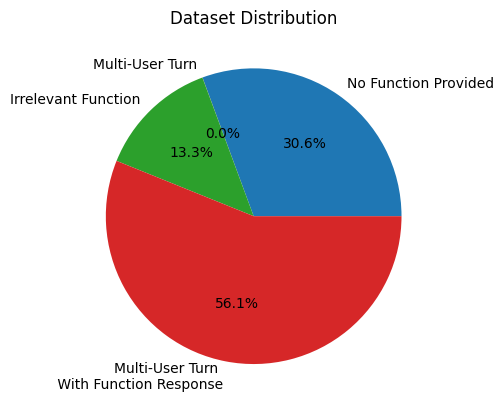
- Total rows: 112,960
- Scenario-1 | No access to external function provided: 34,598
- Scenario-2 | Irrelevant Function provided: 14,975
- Scenario-3 | Multi-User Turns: 11
- Scenario-4 | Multi-User Turn with Function Response: 63,376
For the Fine-Tuning process, I kept following amount of rows from each scenarios.
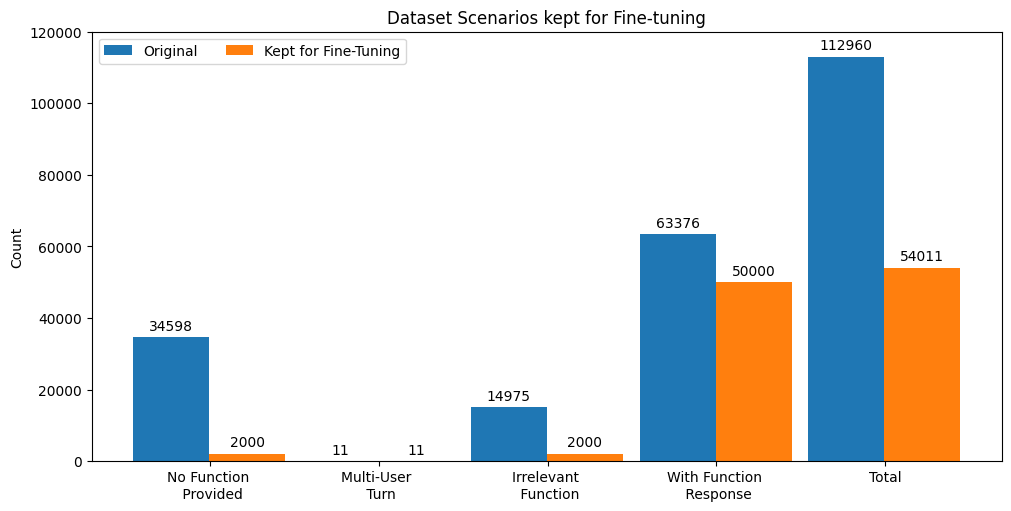
Rows Kept for Fine-tuning:
- Total rows: 54,011
- Scenario-1 | No access to external function provided: 2,000
- Scenario-2 | Irrelevant Function provided: 2,000
- Scenario-3 | Multi-User Turns: 11
- Scenario-4 | Multi-User Turn with Function Response: 50,000
Note: We kept only a small percentage from Scenario 1 & 2 since they presented same behavior throughout and hence providing a very small window for the model to learn.
Training / Fine-tuning
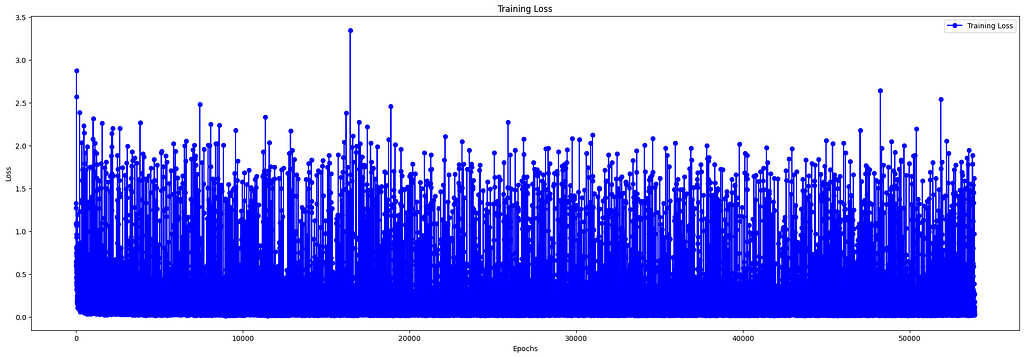
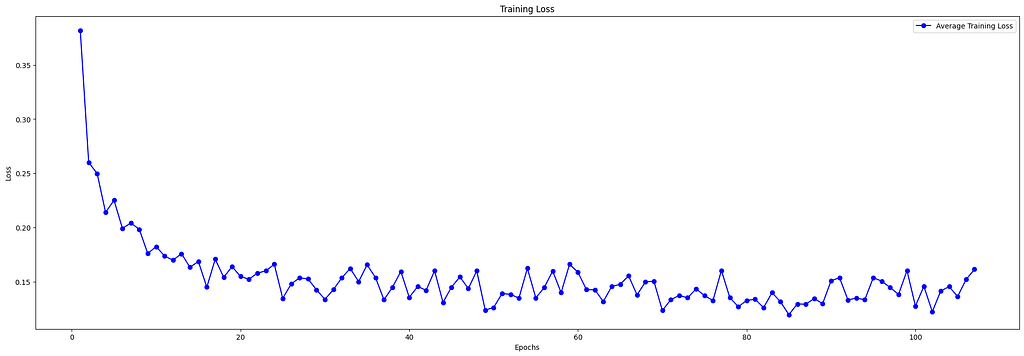
I trained the model for around 1 hour 52 minutes on an A100 GPU for the entire 54K rows and achieved a Loss of around 0.15.
The loss curve plotted for every 54K iteration looks too cluttered and hard to make sense. It’s highly noisy and volatile because each batch contains a unique set of samples, the gradient updates bounce around frequently.
The same loss curve plotted after averaging the loss of every 500 iterations makes much more sense. By smoothing out the high-frequency noise inherent in individual batch updates, this averaged visualization reveals the underlying convergence behavior. We can clearly see the loss going down as the fine-tuning (training) progresses, confirming that the ToolingGemma model is effectively learning to map natural language queries to their corresponding function calls.
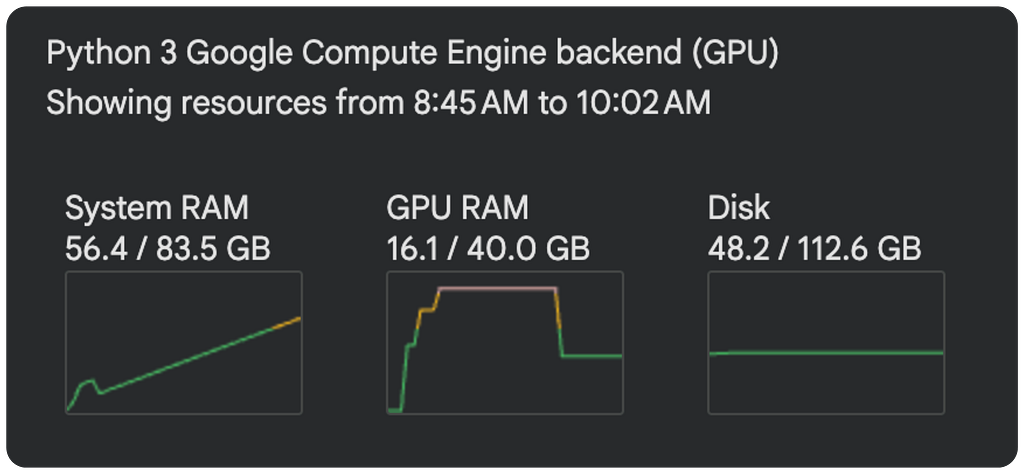
Below is the Compute graph showcasing the System RAM, GPU and Disk usage throughout the training process.
Inference
Once the model is fine-tuned, we can talk to the model. I will provide my tool/function documentation as a part of the system instructions to the model and will further ask a query to the model.
system_instructions = '''
SYSTEM: You are a helpful assistant with access to the following functions. Use them if required -
{
    "name": "calculate_discount",
    "description": "Calculate the discounted price of a product",
    "parameters": {
        "type": "object",
        "properties": {
            "original_price": {
                "type": "number",
                "description": "The original price of the product"
            },
            "discount_percentage": {
                "type": "number",
                "description": "The discount percentage"
            }
        },
        "required": [
            "original_price",
            "discount_percentage"
        ]
    }
}
'''

tooling_gemma_model = ToolingGemma(system_instructions=system_instructions)
agent_response = tooling_gemma_model.generate('Can you please book a flight for me from New York to London?')

print(agent_response)
This is the response I received from the model.
ASSISTANT: I'm sorry, but I'm unable to assist with booking flights.
My current capabilities are limited to calculating discounted prices
based on original price and discount percentage. If you need help with that,
feel free to ask! <|endoftext|>
Now, the model is able to understand that the tool provided as a part of the system instructions is not sufficient or capable to suffice the user query and hence it responds accordingly to the user.
I can further continue to talk to the model, since the user-model chat history is preserved.
agent_response = tooling_gemma_model.generate(
    'Calculate the discounted price for 100 dollars at a discount of 30%'
)
print(agent_response)
Model’s output.
ASSISTANT: <functioncall> {
    "name": "calculate_discount",
    "arguments": '{
        "original_price": 100,
        "discount_percentage": 30
    }'
}
<|endoftext|>
The full inference code can be referred here: Github
Conclusion
ToolingGemma represents a successful reproduction of a specialized function-calling model, leveraging the Gemma-3 270M base model and the Glaive dataset. By training for approximately 2 hours on an A100 GPU, the model achieved a remarkably low loss of 0.15.
During inference, ToolingGemma demonstrated a clear and sophisticated understanding of tool documentation, accurately determining when to trigger function calls or defer to natural language responses based on the provided system instructions.
This project highlights the efficiency of fine-tuning small-parameter models for high-precision, specialized tasks in local environments.
Reference
- ToolingGemma model training & inference source code: Github
- ToolingGemma 270M parameter model: HuggingFace
- Google’s FunctionGemma model documentation: Read
- Google’s FunctionGemma 270M mode: HuggingFace
- Glaive Function calling v2 dataset for fine-tuning: HuggingFace
- Google’s Gemma-3 270M base model: HuggingFace
Building ToolingGemma 270M | LLM for Function Calling was originally published in Level Up Coding on Medium, where people are continuing the conversation by highlighting and responding to this story.