Understanding how they work, how they differ, and what happens under the hood
Hi there 👋
Before you read
This article assumes you’re familiar with:
- Signals — Angular’s reactive primitive (signal, computed, effect). Learn more →
- Resource API — Angular’s reactive async data retrieval and management. Learn more →
- Signal-based Forms — Angular’s new signal-based form API using form(), FormField, and schema rules. Learn more →
If you’re comfortable with these three, you’re ready. Let’s go! 🚀
🍽️ Analogy
Imagine a restaurant. A waiter stands by a table, ready to take the order. The client keeps changing their mind: “Pizza… no wait, steak… actually, fish and chips.”
The waiter has a rule: wait for 5 seconds of silence before writing anything down. Every time the client speaks, the timer resets. Only when the client finally stops talking for a full 5 seconds does the waiter write “fish and chips” on a fresh notepad page and walk to the kitchen.
That’s debouncing.
🌉 If you’ve used RxJS, you already know debounceTime() pipe it onto an Observable, and you're done. But in a signal-based world, there are no Observables to pipe onto. Angular v21 and v22 introduce debouncing natively to signals, with two distinct APIs that serve different purposes.
⚠️ Note that all these APIs are still in experimental mode, which means that syntax or behavior might change before stabilization. So, it is not recommended to use them in production.
↔️ The Two APIs — Side by side
Angular doesn’t have one debounce API — it has two, for different jobs.
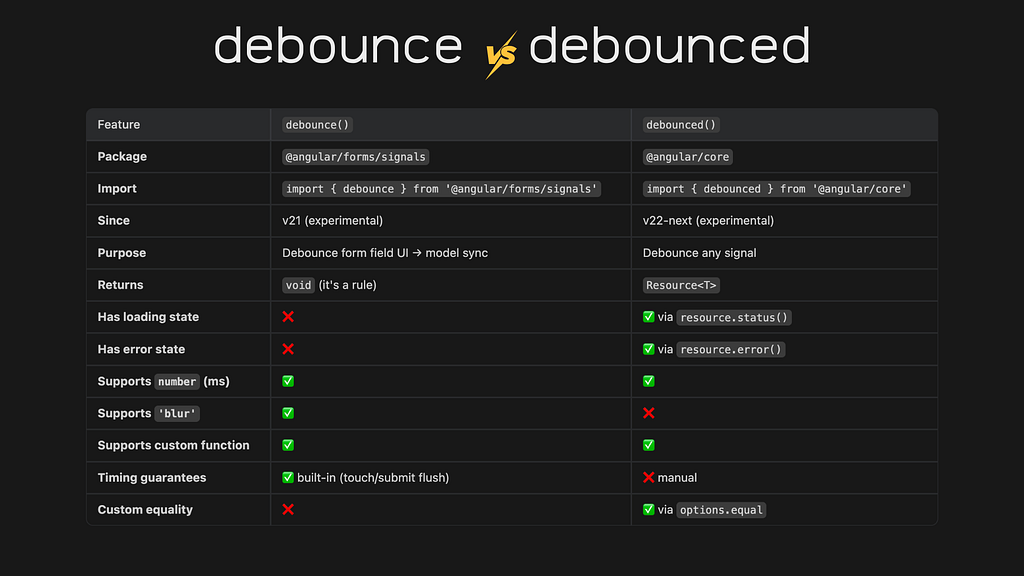
💡 Notice the names: debounce (verb, an action/rule) vs debounced (adjective, a thing). The naming tells you what they do. One applies debouncing to a form field, the other creates a debounced signal.
🔧 Under the hood — The cancellation pattern
This section dives into the internals. Skip ahead to the takeaway if you just want the practical rules.
Let’s start with debounced API:
function debounced<T>(
  source: () => T,         // the signal to debounce
  wait: number | ((value, lastSnapshot) => Promise<void> | void),  // delay rule
  options?: { injector?, equal? },  // optional config
): Resource<T>
The internals come down to three concepts:
1. How does it track changes? → through effect()(the waiter’s ears, always listening)
debounced() uses an effect() internally. Every time the source signal changes, the effect fires. But instead of updating the value immediately, it starts a wait.
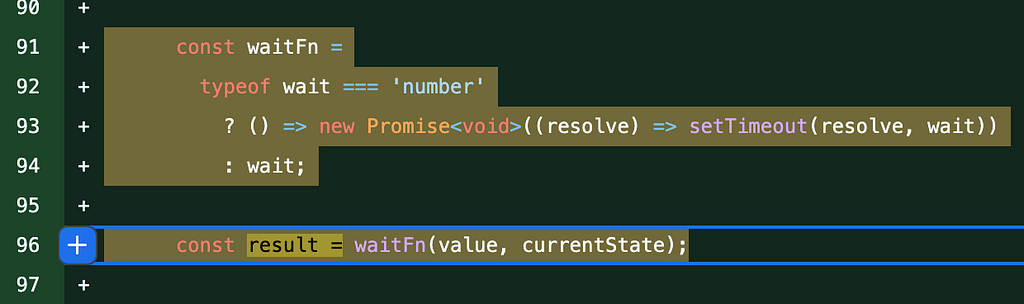
2. How does it delay? →
If wait is a number (e.g. 300), it's wrapped into a setTimeout inside a Promise:
() => new Promise(resolve => setTimeout(resolve, 300))
This pushes the resolve into the macrotask queue, creating a real time delay. The resource enters 'loading' state while waiting (the waiter is walking to the kitchen, order not served yet)
If wait is a function that returns void, the value updates immediately — no delay. A custom function can use this conditionally: resolve immediately for short inputs, return a Promise to delay for longer ones.
3. How does it cancel? → Promise identity (active === result)
Here’s the clever part. There’s no clearTimeout() anywhere. Instead, Angular stores the current Promise in a variable called active:
let active: Promise<void> | void | undefined;
active = result; // "this is the current wait"
When the wait resolves, it checks: “Am I still the active one?”
result.then(() => {
  if (active === result) { // still current? → update!
    state.set({status: 'resolved', value});
  }
  // not current? → do nothing, silently ignored
});
If the user typed again before the timer fired, active now points to a new Promise (the waiter rips out/strikethrough text in the notepad page and starts a fresh one). The old one resolves, checks active === result → false → ignored. No cancellation needed, just identity comparison.
Alright, what about the forms debounce API?
Under the hood, the forms debounce() uses the same cancellation pattern as debounced(). The key difference is the 'blur' mode: it creates a Promise that never self-resolves, only the AbortSignal (the browser’s standard cancellation mechanism, fired on blur or form submission) — can resolve it. This is also why submitting a form never loses debounced data: submission marks all fields as touched, which fires the abort signal, flushing every pending debounce instantly.
Quick recap through our kitchen lens 🔍️
- Signal changes → Client changing their mind
- effect() → Waiter listening
- active → Current notepad page
- Resource status → Order status board.
💡Pro Tip: If you want to deepen your understanding of how it works under the hood, check the feature commit source code specs.
Practical real-world examples
Now that you understand how both APIs work under the hood, the natural question is: “Where do I actually use this in my project?” I put together a separate article with real-world scenarios, each of these solves a different problem and uses a different debounce strategy👇
Meet Angular's Debounce & Debounced APIs in Action ⚡️🔥
🎯Key takeaway
Rule 1: Need to debounce a signal outside of forms? → debounced() from @angular/core
Rule 2: Need to debounce a form field? → debounce() from @angular/forms/signals
Rule 3: Partial values are meaningless (IBAN, coupon, username)? → 'blur'. Partial values are useful (search suggestions)? → number.
🧠 Quick Quiz
Q1 — The timer trap
A field has debounced(() => input(), 200). The user types:
0ms → ‘a’
100ms → ‘b’
400ms → ‘c’
500ms → ‘d’
How many times does the value resolve, and with what values?
Q2 — The cancellation question
There’s no clearTimeout() in the debounced() source code. How does Angular cancel a pending debounce?
Q3 — The submit question
A form field has debounce(schema.email, 5000). The user types their email and clicks Submit after 1 second. Does the form submit with an empty value?
Q4 — The trick question
What’s the difference between debounced(() => signal(), 0) and just reading signal() directly?
Share your answers in the comment 😉
That’s it for today!
I truly hope you discovered something valuable from this article! 😊 Your learning journey is important, and I’m excited for you to take what you’ve learned and put it into action!
Angular 22 — The Power Of Debounce and Debounced APIs 🔥 was originally published in Level Up Coding on Medium, where people are continuing the conversation by highlighting and responding to this story.