A Framework for Tactical Software in Excel VBA
Build whole universes with only a knife and string.

Don’t Hang Up
This is about a free programming framework for Excel VBA on Windows. Yes, the same VBA once ranked “Most Dreaded” on Stack Overflow’s annual developer survey. Hear me out.
VBA is the only runtime that ships forms, storage, a compiler, and distribution in one file. Code from 2005 runs perfectly today. It hides in plain sight — grandfathered into Office, beneath IT’s radar by default.
This article introduces the framework and shows one concrete use case: an LLM-driven expense classifier, built in Excel.
Goal
Provide a canvas for building software at work — expressive, addictive, and free. Trust individuals to invent ingenious ways to elevate their work.
Background
“To translate is to betray” — Ancient Proverb
The bottleneck in software isn’t scale — it’s expression. Modern language stacks put direct expression out of reach for most people, and hiring engineers to translate intent into code is slow and expensive. Excel+VBA sidesteps both problems.
Vibe-coding appears to solve expression. Except it doesn’t. LLMs are still constrained to producing web and desktop software — formats too rigid to absorb varied human work. Excel is flexible but raw VBA lacks frameworks to control complexity — business logic and infrastructure get tangled in messy macros.
This system adds the missing layer. It embraces objects (classes) and borrows patterns from Python and Django — moving beyond CRUD and ETL into behavior, constraints, and business modeling. Objects let improvements propagate instead of being recopied by hand.
Nobody builds serious software in raw Python. This is a framework for VBA.
Learning
This system is approachable for anyone — programmer or not. The surface area is small.
Technical Nutshell
You drive the Addin through a Ribbon menu and forms to define a schema (models and fields). The Addin converts that into pre-wired class modules. You write business logic on top of this “plumbing” code.

The whole program is sealed in a workbook. External data can be imported, but we never write back to outside databases. This keeps the “blast radius” of mistakes small.
At a high level, this framework bridges code and data. You can write x=student.birthday to read values or student.birthday=DateSerial(1991, 4, 21) to change them. This fluency brings a whole class of problems into attack range that just aren’t feasible with formulas or Power Query alone.
Python can approximate this — but not from inside the workbook, and not without complexity overhead that kills expression.
LLMs in Excel
Let’s look at three concepts — generic views, validation, and unit testing — through a staged AI example. We’ll build a prompt, inspect the response, then check sanity.
Prompt Interceptor — pictured below — was born of annoyance at slow prompt iteration. The left textbox holds the prompt (composed with code); the right shows the response. It’s built into the Addin:
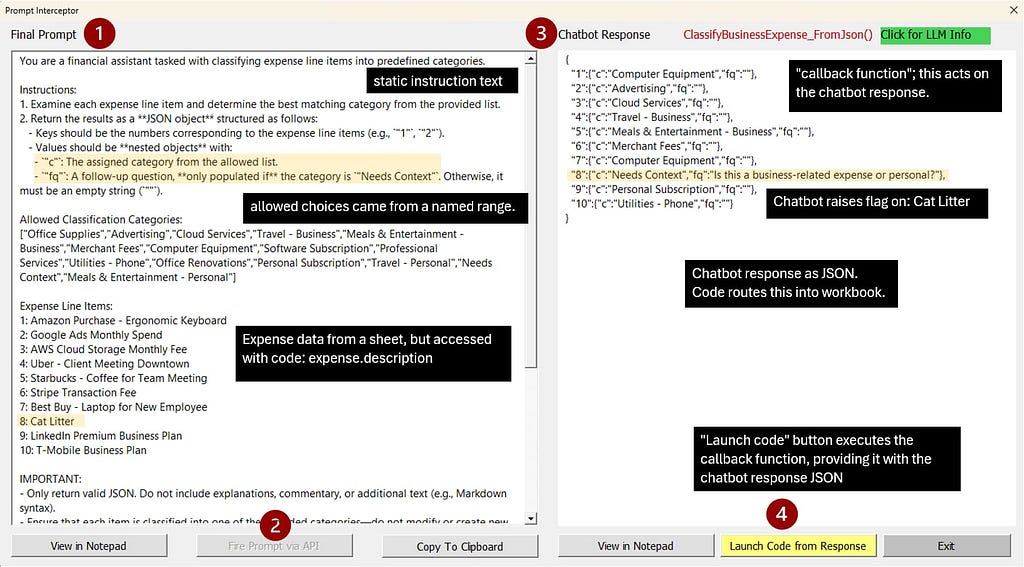
Prompt Interceptor is only for tuning; normally, data flows directly into the model. It needs two VBA functions: one writes the prompt; the other acts on the response. That second one — the callback — appears in red in the upper-right corner. It’s triggered by the yellow button.
Notice the cat litter expense highlighted yellow. I slipped that in to confuse the chatbot — which correctly raised a WTF flag (“Needs Context”).
Without guidance for ambiguity, models just guess. Prompt quality is the first line of defense.
The Generic ListView shows how the results propagate through the system:
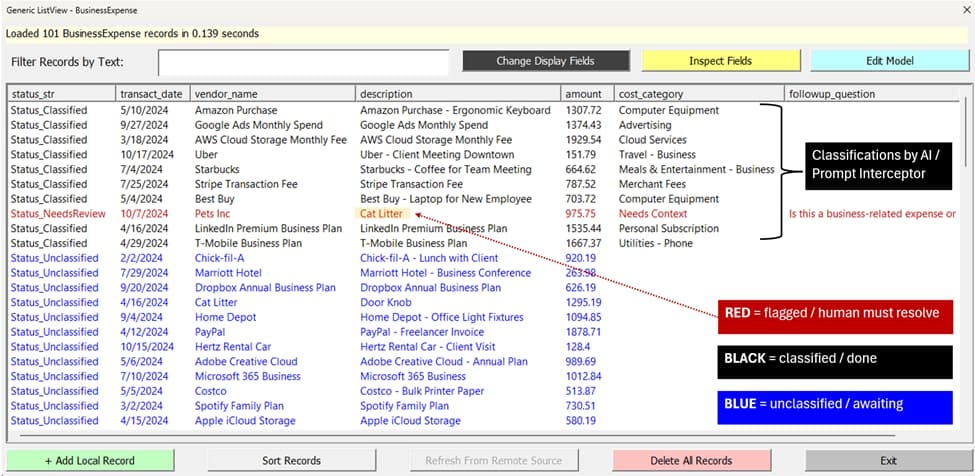
The red row is cat litter flagged by AI, which a human can fix using the Generic EditView (on the left):
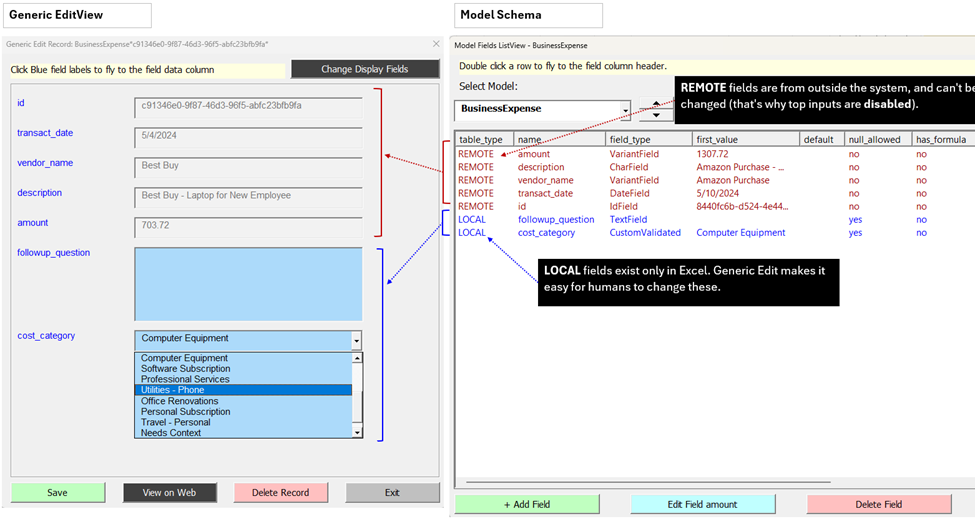
Generic forms work without code. They are immediate paths to create, edit, and inspect records. You can build richer forms with Excel’s drag-and-drop designer — something you won’t find in Python or JavaScript.
The second line of defense is validation — a mechanical way to catch bad decisions, no matter whether they are by LLMs or a sleepy intern.
To illustrate validation, assume “Personal Subscription” expenses can’t exceed $100. The code below enforces that (green comments explain):

Validation failure looks like so:
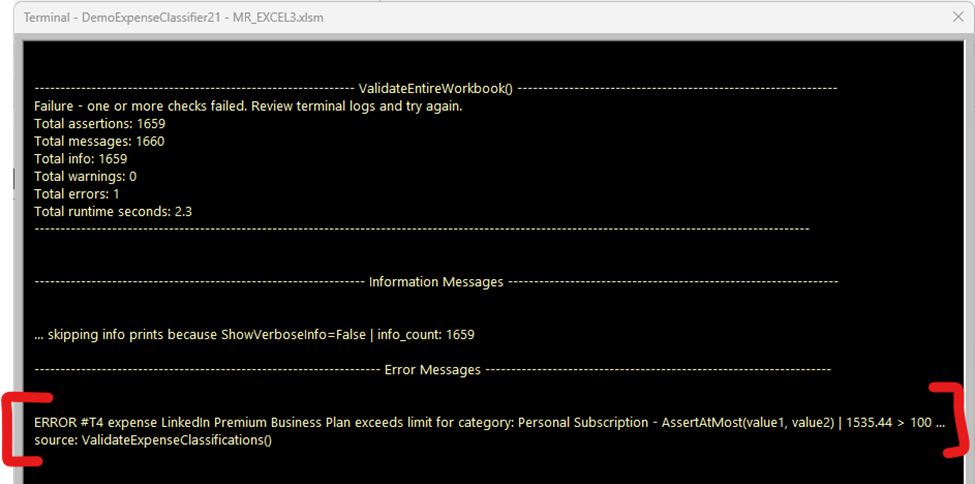
See that dollar amount (1,535.44) in the failure message? ErrorBank’s AssertAtMost captured it automatically. A basic AssertTrue a <= b would still fail, but it wouldn’t include the compared values.
Using the appropriate assertions spares thousands of lines. It makes code more readable and errors faster to resolve. VBA offers little in the way of assertions, so I provide many:
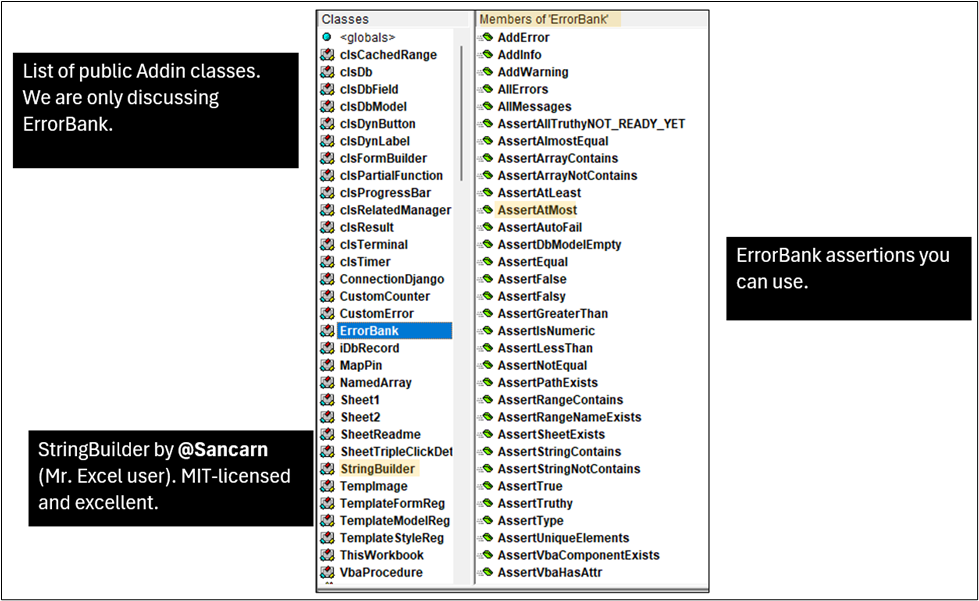
This makes coding ergonomic: say more with less code. Thanks to VBA’s autocomplete (IntelliSense), you just type `EB.Assert…` and choices appear. Nothing to memorize.
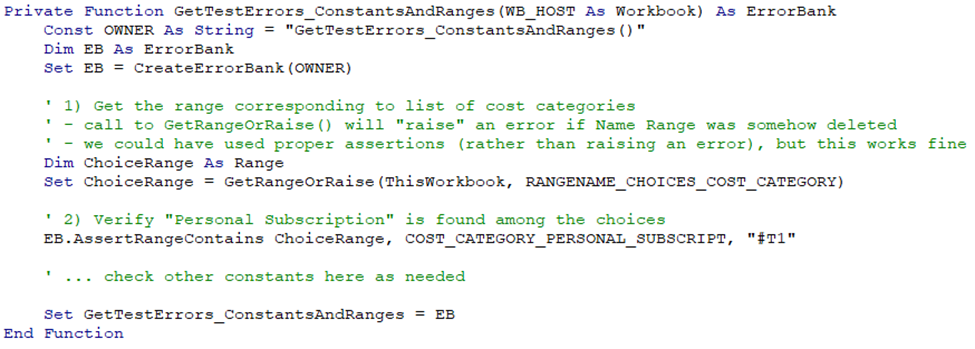
Lastly, unit testing. Imagine “Personal Subscription” is later renamed. Our $100 validation code won’t error — it’ll just keep checking for a category that no longer exists — that’s worse than an error. We want loud failure, which this unit test would deliver:
Test failure looks like so:

Tests verify code (run by programmers). Validation enforces business rules on data (run by users). Both are vital — but validation is where business shines brightest.
Validation produces tailored “why” messages (e.g., “discount rate can’t be below the 10-year Treasury”) capturing scattered human knowledge as executable checks. It’s a powerful way to catch mistakes early, encourage consistency, and teach new hires.
What’s Next
I’m a coder, not a marketer. I’ll get anyone from zero to a running workflow. Anything blocking you — code questions, import scripts, or bugs on my end (which I expect early on) — I’ll fix. Free.
This is a calculated bet. You pay nothing and keep what we build. I only prosper if your application becomes so useful your company broadly adopts it.
My parting thought is “action precedes insight” — write a little VBA today and see what happens.
Full details: Medium: Picking Up Money with Excel VBA
Quick start: My website
Mark Ceraldi — Austin, Texas — [email protected]
A Framework for Stealth Software in Excel VBA was originally published in Level Up Coding on Medium, where people are continuing the conversation by highlighting and responding to this story.