AI coding tools will happily build you an app riddled with security vulnerabilities. Use this checklist to catch them before they reach production.
Last year, I shipped a small library called JS-Blanket to support an ongoing observability project. The library is a service-agnostic, open-source PII scrubber for Node.js that strips sensitive data from exceptions in Node applications before they are sent to third-party services (e.g., Sentry, Rollbar).
Thanks to Claude Code, the build went flawlessly. It did exactly what it was supposed to do. The API was clean. We published the package and moved on. Happy times.
About a month later, a coworker from another team using the library in a web app raised a potential security issue that could be exploited in browser-based applications.
This brief Slack interaction led to a full security assessment that turned up the following threat categories: Prototype pollution, denial-of-service vectors via unbounded recursion, regex bypasses via the lastIndex state, code execution risks via toJSON methods, and mutable preset exports that downstream consumers could accidentally overwrite.
The fix PR was substantial: null-prototype objects, max-depth limits, frozen exports, and a CI audit step that should have been in place from day one.
Here’s the thing that stuck with me: Claude was perfectly happy to develop a fully functional, fully exploitable library for me without a single word of warning or consideration for how a user might “misuse” the code (which they do, like, all the time 🙄).
Ultimately, I own the code I ship, regardless of who wrote it, and nothing in my build process surfaced it. Not the test suite, not the linter, not the CI pipeline. And I’m a senior engineer who’s been shipping production code for 18 years.
Bottom line: every vibe-coded app that hasn’t had an intentional security pass is in the same state JS-Blanket was. Working perfectly. Wide open.
Why AI Doesn’t Tell You About Security Problems
The intuition most people have about AI coding tools is wrong. They assume the AI is reviewing their code holistically, as a senior engineer would on a PR. It isn’t. AI optimizes for the goal you stated, and that goal is almost always functional: “build a login page,” “add a payment form,” “create a REST API.” Security is a non-goal unless you make it one.
A Substack experiment by derivai demonstrated this with uncomfortable lucidity. They gave the same model the same prompts twice. The first run revealed three major vulnerabilities: a lack of session management or authorization checks, and a stored XSS vulnerability. The second run added a single change: a security-focused system prompt. The result: zero vulnerabilities.
The AI didn’t magically get smarter between runs. It was just asked to care.
A Stanford study by Perry et al. found something worse: developers using AI coding assistants wrote code with more security vulnerabilities than developers writing code by hand. And the AI-assisted developers were more confident in the security of their code. The tool didn’t make them careless. It made them feel covered when they weren’t.
This is the core problem. AI treats security the way a contractor treats permits. It’ll do the work if you ask, but it won’t volunteer it. And vibe coders, who rely on AI to fill knowledge gaps, are the least likely to know they should ask.
The Vibe Coder’s Security Check: 7 Things to Test Right Now
Spend 30 minutes running through this checklist before your next deploy. Each check takes 2–5 minutes. Any one of them can save you from the kind of incident that makes the front page of Hacker News.
1. Exposed Secrets
Search your codebase for credentials sitting in plaintext: API keys, tokens, database connection strings.
How to test: Run a search across your source files for common secret-related variable names and patterns. In your terminal:
# Search source files for common secret patterns
grep -rn "api_key\|secret_key\|database_url" \
  --include="*.js" --include="*.ts" --include="*.py" \
  --exclude-dir=node_modules --exclude-dir=.git .
Look for lines where the value is a literal string (like "sk-abc123...") rather than a reference to an environment variable (like process.env.MY_KEY). Also, check your git history. Removing a key from your code doesn't remove it from your commits:
git log -p --all -S 'sk-' --source
What bad looks like: Any match containing an actual credential value rather than an env reference. If you find one, it's been in every clone and fork of your repo since the commit it landed in. You will need to fix the issue and rotate these credentials immediately.
How to tell AI to fix it: “Move all hardcoded secrets to environment variables. Add a startup check that throws an error if any required env var is missing. Add .env to .gitignore.”
Better — block it at the source: Grepping catches secrets that are already in your code. To stop them from getting written in the first place, I maintain awesome-claude-hooks, an open-source set of Claude Code hooks. The secrets-check.sh hook runs as a PreToolUse hook on every Write, Edit, MultiEdit, and file-writing Bash command. It exits with code 2 — which blocks the operation entirely — when it detects:
2. Authentication Bypass
Open an incognito browser window and try to access pages and API endpoints that should require authentication.
How to test:
If your app has a dashboard at https://yourapp.com/dashboard, paste that URL into an incognito window. If you see the dashboard without logging in, authentication is broken.
For APIs, use curl:
# Try accessing a protected endpoint with no auth header
curl -i https://yourapp.com/api/users/me
# Try accessing another user's data (if you have a valid session)
curl -i https://yourapp.com/api/users/2 \
  -H "Authorization: Bearer YOUR_SESSION_HERE"
What bad looks like: Getting a 200 OK instead of 401 Unauthorized. Seeing another user's data when you request it by ID. Reaching admin pages without admin credentials.
How to tell AI to fix it: “Add authentication middleware that runs before every protected route. Return 401 for unauthenticated requests and 403 for requests where the user lacks permission. Never rely on client-side route guards alone.”
3. Input Injection
Type attack strings into every text field in your app and see what happens.
How to test:
Paste these into search boxes, forms, profile fields, comment boxes — anywhere your app accepts text input:
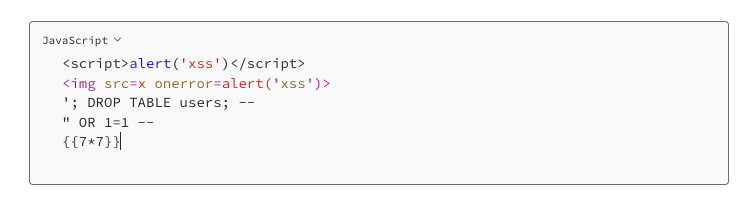
What bad looks like: If a JavaScript alert box pops up, your app has cross-site scripting (XSS), meaning an attacker can run arbitrary code in your users’ browsers. If any SQL-looking input changes behavior (like showing all users instead of search results), your app has SQL injection. If {{7*7}} renders as 49, you have a template injection vulnerability.
How to tell AI to fix it: “Sanitize all user inputs on the server side. Use parameterized queries for every database operation, never concatenate user input into SQL strings. HTML-encode all user-supplied data before rendering it in the browser.”
4. Error Message Leakage
Break things on purpose and look at what your app tells you.
How to test:
# Request a resource that doesn't exist
curl -i https://yourapp.com/api/users/99999999
# Send malformed data
curl -i https://yourapp.com/api/users \
  -H "Content-Type: application/json" \
  -d '{"email": "not-an-email"}'
# Hit an endpoint with the wrong HTTP method
curl -i -X DELETE https://yourapp.com/api/
What bad looks like: Error responses that include stack traces, database table names, file paths like /home/ubuntu/app/src/controllers/user.js, or raw SQL errors. Any of these tells an attacker exactly how your app is built and where to probe next.
How to tell AI to fix it: “Never expose internal error details to users. Return generic error messages in production. Log the full error details server-side only. Set NODE_ENV=production (or equivalent) in your deployment.”
5. Dependency Vulnerabilities
Check your third-party packages for known security issues.
How to test:
For JavaScript/Node.js projects:
npm audit
For Python projects:
pip audit
What bad looks like: Any result with high or critical severity. Here's how to read npm audit output:
# high severity
prototype-pollution in lodash  <4.17.21
fix available via `npm audit fix`
“High” and “critical” need fixing before you deploy. “Moderate” should be fixed when you can. “Low” is informational.
How to tell AI to fix it: “Update all dependencies with known high or critical vulnerabilities. If a dependency can’t be updated, find an alternative package or apply the recommended patch.”
6. HTTPS and Security Headers
Check whether your deployed app forces encrypted connections and sets basic security headers.
How to test:
Try loading your app with http:// instead of https://. If it loads over plain HTTP without redirecting, traffic between your users and your server is unencrypted. That means login credentials, session cookies, everything sent in the clear.
Then scan your headers:
curl -sI https://yourapp.com
Or visit securityheaders.com and paste your URL. You’re looking for:
- Strict-Transport-Security — forces HTTPS
- Content-Security-Policy — prevents XSS attacks
- X-Content-Type-Options: nosniff — prevents MIME type sniffing
- X-Frame-Options — prevents clickjacking
What bad looks like: A grade of D or F on securityheaders.com. Missing Strict-Transport-Security. No Content-Security-Policy at all. Your app loading over plain http:// without a redirect.
How to tell AI to fix it: “Configure the server to redirect all HTTP traffic to HTTPS. Add these security headers: Strict-Transport-Security, Content-Security-Policy, X-Content-Type-Options, X-Frame-Options. Show me the middleware or configuration needed for my framework.”
7. Exposed Admin and Debug Routes
Check if your app has hidden routes that are publicly accessible.
How to test:
# Try common admin and debug paths
curl -i https://yourapp.com/admin
curl -i https://yourapp.com/debug
curl -i https://yourapp.com/api/docs
curl -i https://yourapp.com/graphql
curl -i https://yourapp.com/_debug
curl -i https://yourapp.com/swagger
curl -i https://yourapp.com/.env
What bad looks like: Getting anything other than 404 Not Found for routes you didn't intentionally make public. A Swagger API docs page that shows every endpoint in your app. A debug panel with environment variables. A .env file that downloads with your database credentials in it.
How to tell AI to fix it: “Remove or restrict all debug routes in production. API documentation should require authentication. Add middleware that returns 404 for any route not explicitly defined. Ensure .env and other sensitive files are not served by your web server.”
What These Checks Actually Catch
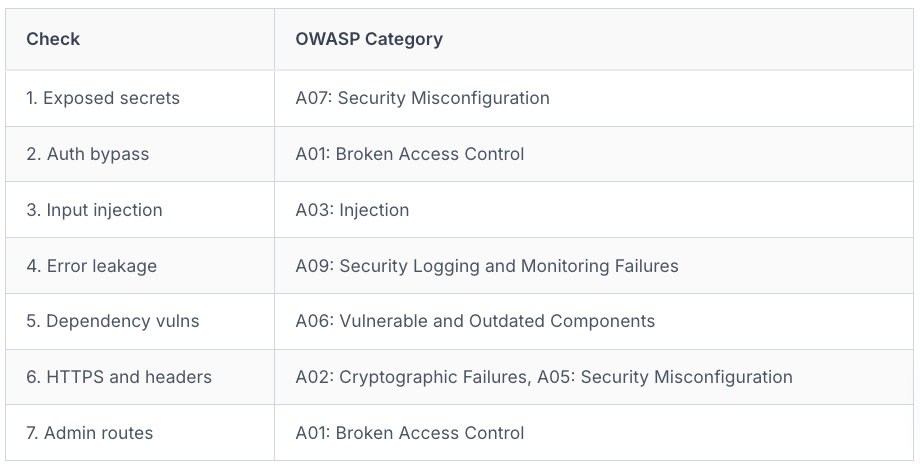
The 7 checks above map directly to the OWASP Top 10, the industry-standard ranking of the most critical web application security risks:
And it’s not limited to one model. Backslash Security tested multiple AI coding tools and found that even Claude 3.7 Sonnet, the best performer in their study, generated vulnerable code 40% of the time. GPT-4o hit 72%. The Moltbook incident showed what happens when nobody checks at all: an AI-built social network exposed 1.5 million API tokens and 35,000 email addresses within three days of launch. The founder had publicly said he didn’t write a single line of code. He didn’t review a single line either.
This checklist doesn’t make your app bulletproof. But it covers the six OWASP categories most likely to be exploited in a vibe-coded app. It’s the difference between a house with no locks and a house with locks on the doors. You’ll still want windows eventually. Doors first.
How to Make AI Do the Security Pass For You
Here’s the part that should make you feel better: the same AI that created your vulnerabilities can find most of them. You don’t need a separate tool or a security certification. You need one prompt.
After your feature is working, before you deploy, paste this into your AI coding tool:
Act as a senior security engineer reviewing this codebase for production
readiness. Check for OWASP Top 10 vulnerabilities, focusing on:

1. Hardcoded credentials or secrets
2. Missing authentication or authorization checks
3. SQL injection or XSS vulnerabilities
4. Exposed debug or admin routes
5. Missing security headers
6. Insecure direct object references
7. Verbose error messages leaking internal details
For each finding:
- Explain the risk in plain language (assume I'm not a security expert)
- Rate severity: critical / high / medium / low
- Provide the exact code fix
This works because of what the derivai experiment proved: AI already knows how to write secure code. It knows about injection attacks, authentication flaws, and header misconfigurations. It won’t apply that knowledge unprompted, but it responds well when asked directly.
Better Yet, Use a Structured Approach
The prompt above is a great start, but it only scratches the surface of what a real security review should cover. I packaged a more complete version of this workflow as a reusable Claude Code subagent in agent-workflow-kit, my open-source toolkit for installing and managing Claude Code agents. The agent — Sentinel — runs a structured threat-modeling pass: it catalogs your assets, maps data flows and trust boundaries, applies STRIDE analysis to each component, classifies findings by likelihood and impact, and produces concrete remediations mapped to OWASP categories.
Install with:
uv tool install agent-workflow-kit
agent-kit install
Then in any Claude Code session, invoke it directly:
@"SENTINEL (agent)" review this codebase for production readiness
The agent does the structured pass that the inline prompt above triggers manually. Useful when you want the same review applied consistently across projects, or when you want a security pass that follows a real methodology rather than a one-off checklist.
Enforce Security by Default
The OpenSSF’s Security-Focused Guide for AI Code Assistant Instructions takes this a step further. Their recommendation: create a permanent rules file (.cursorrules, CLAUDE.md, or your tool's equivalent) that enforces security by default on every generation, not as an afterthought. That way, every feature starts with security baked in rather than bolted on with a review prompt.
What To Do Right Now
- Run the 7-check list on your deployed app. Start with the bash script. It covers three checks in under a minute. The other four are manual but take 3–5 minutes each.
- Fix anything critical before your next deploy. Exposed secrets and authentication bypasses are stop-what-you’re-doing severity. Everything else can go in your next sprint.
- Add npm audit or pip audit to your CI pipeline today. This takes five minutes to set up and catches dependency vulnerabilities automatically on every build.
- After every new feature, run the security review prompt before you merge. Copy the prompt from the section above. Paste it into your AI tool with your code. Read what it finds. Fix what it flags. This adds 10 minutes to your workflow and catches most of what the OWASP Top 10 covers.
Closing Thoughts
The security issues in JS-Blanket were a close call. The code did its job, and the processes we had in place caught the issue before it was released to customers. The vulnerability is that now that we can build software faster than ever before, it’s easy to skip the part where you ask, “What could go wrong?”
If you’re building alone with an AI assistant, you don’t have a security team, other experienced software engineers reviewing your deploys, or a pentesting rotation. You do, however, have this checklist and the AI tool you’re already using. The question isn’t whether your app has security holes. It does. The question is whether you’ll find them before someone else does.
Need Some Extra Help?
I help solo builders and small teams that need a security or production-ready pass before they ship. Connect with me on LinkedIn to schedule an introductory call, and we’ll walk through your app, identify production gaps, and map out what you need to address before you deploy.
This is article 1 of a 5-part series on security for vibe-coded applications. Next up: the security rules file that tells your AI tool to write secure code by default.
Sources:
- derivai: Do security prompts make AI code safer?
- Perry et al., Stanford: Do Users Write More Insecure Code with AI Assistants?
- SoftwareMill: Vibe Coding Against OWASP Top 10
- Backslash Security: Can AI Vibe Coding Be Trusted?
- OpenSSF: Security-Focused Guide for AI Code Assistant Instructions
- OWASP Secure Coding Practices Quick Reference Guide
- JS-Blanket Security Fixes (PR #14)
- awesome-claude-hooks: User-level Claude Code hooks
Your Vibe-Coded App Almost Certainly Has Security Holes. Here’s How To Catch Them. was originally published in Level Up Coding on Medium, where people are continuing the conversation by highlighting and responding to this story.