How to use Notion, Obsidian, or Mintlify as a Second Brain for LLMs — and stop repeating yourself every single session.
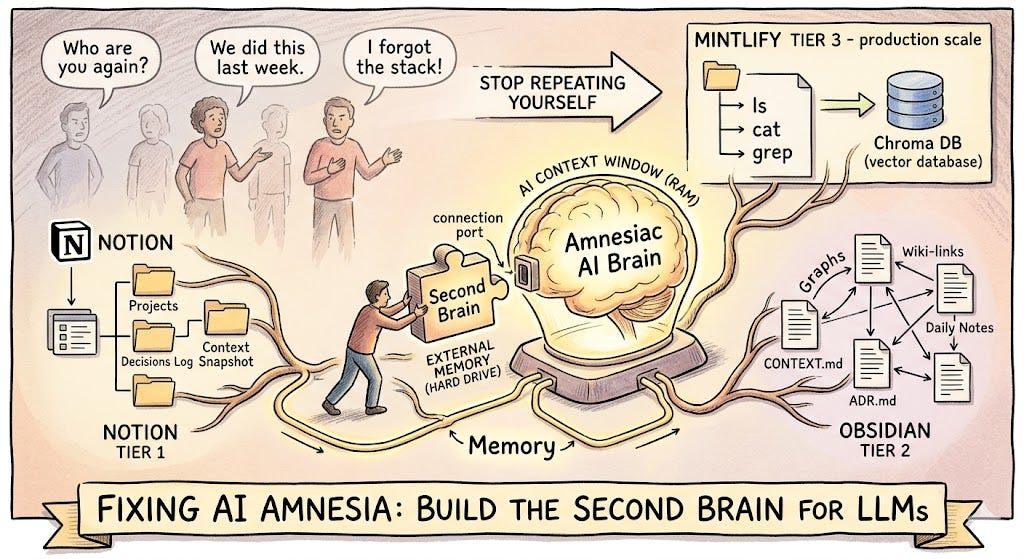
You’ve been here before.
You open Claude or ChatGPT. You spend the first five minutes re-explaining everything — who you are, what your project is, what you decided last week, why you took that approach. The AI listens patiently, nods (metaphorically), and helps you. The conversation ends. Tomorrow, you do it all over again.
Two months later, you ask the AI to help debug something. It has no idea you built the entire architecture in January. It starts suggesting things you already tried and already discarded. You feel a flicker of frustration — not at the AI, exactly, but at the situation. You know this. The AI just… doesn’t.
This is the amnesia problem. And it’s not a bug. It’s how LLMs fundamentally work.
But it doesn’t have to be your problem.
Why AI Forgets (And Why It’s Not Going to Stop)
Every conversation with an LLM starts fresh. There is no persistent memory. The model doesn’t carry anything from your last session into this one. What feels like “memory” in tools like Claude or ChatGPT is either a small, auto-summarized snippet from past chats (which frequently picks the wrong things) or a rolling context window that gets truncated the moment the conversation runs long.
Even when memory is enabled, it tends to:
- Overwrite old context with new context, losing two months of decisions
- Pick wrong signals — remembering your favourite colour but forgetting your entire tech stack
- Miss implicit knowledge — the why behind a decision, not just the what
The AI’s context window is like RAM. Powerful, fast, but volatile. It disappears the moment you close the tab.
What you need is a hard drive. A Second Brain — an external knowledge store that lives outside the AI, that you control, and that you can feed back into any conversation at any time.
What Is a Second Brain for LLMs?
The Second Brain concept, popularised by Tiago Forte, is the idea of offloading memory to an organised external system so your biological brain is free to think rather than remember. Apply that to AI, and the idea becomes: give your LLM a persistent, structured memory store that it can read from at the start of every session.
In practice, this means:
- A knowledge base where you log decisions, context, progress, and reasoning
- A consistent structure so the AI can quickly parse what’s relevant
- A habit of loading that context into every new conversation as a “briefing document”
The tools that make this practical fall into three tiers depending on your technical depth.
The Three Tiers
Tier 1 — Notion (For Everyone)
Notion is the easiest entry point. It’s visual, flexible, and most people already use it. The key is not to use Notion as a dumping ground for random notes — that’s how you end up with 400 pages and no idea where anything is.
Use it as a structured project journal, organised so you can paste the relevant section directly into your AI chat as context.
Recommended structure:
📁 Project: [Name]
├── 📄 Project Brief (What this is, what it does, current stack)
├── 📄 Decisions Log (Dated entries: what we decided and WHY)
├── 📄 Daily Progress (What was done, what's pending, blockers)
├── 📄 Known Issues & Fixes (Errors seen, root cause, solution applied)
└── 📄 Context Snapshot (A single "briefing" page you update weekly)
The Context Snapshot is the most important page. It’s a living document — no longer than one page — that summarises the current state of everything. What you’re building. What you’ve decided. What’s broken. What’s next. Before any AI session, you paste this snapshot into the conversation first.
What to write in your Decisions Log:
Don’t just write what you decided. Write why. Future you (and future AI) doesn’t care that you chose PostgreSQL. It cares that you chose PostgreSQL because you needed JSONB support and the team already had expertise, and you explicitly ruled out MongoDB because of transaction complexity. That reasoning is what prevents the AI from suggesting the thing you already evaluated and rejected.
For teams: Notion databases shine here. You can build a shared “AI Context” database where every team member contributes decisions, and the AI can be given access to the full team knowledge base, not just one person’s notes.
Tier 2 — Obsidian (For Power Users and Solo Developers)
Obsidian is where things get genuinely powerful. Unlike Notion, your Obsidian vault is plain Markdown files sitting on your local machine. This is the critical difference: any AI can read these files directly, without APIs, without export, without workarounds.
“What makes Obsidian particularly powerful for this setup is the direct file access. Notion stores your data in a format that isn’t cleanly accessible to external AI. With Obsidian, Claude reads your files directly — you and the AI work in the same folder simultaneously, with the same context.” — Noah Vincent, Substack
The vault structure for a developer working with AI looks like this:
📁 Vault Root
├── 📄 CONTEXT.md          ← Your master briefing file
├── 📄 memory.md           ← Running log of key decisions and facts
├── 📁 Projects/
│   ├── 📁 ProjectName/
│   │   ├── PRD.md         ← Product Requirements Document
│   │   ├── ADR.md         ← Architecture Decision Records
│   │   ├── BUGS.md        ← Known bugs, root causes, fixes
│   │   └── DAILY/
│   │       ├── 2025-04-07.md
│   │       └── 2025-04-06.md
└── 📁 Skills/             ← How-to guides the AI can reference
The CONTEXT.md file is your Second Brain’s front door. It’s what you paste — or what tools like Claude Code read automatically — at the start of every session. Keep it under 800 words. Be brutally concise. No fluff, only facts.
Daily Notes — the habit that changes everything:
This is the practice most people skip and later regret. A five-minute daily entry prevents a five-hour debugging session three months from now. The template:
## 2025-04-07
### What I Did
- Implemented the retry logic in refresh.service.ts
- Fixed the N+1 query in the dashboard loader### Why I Did It
- Retry logic: API calls were silently failing on 503s with no recovery
- N+1 fix: Dashboard was making 47 separate DB calls per load; now 1

## What's Pending
- Token refresh race condition still unresolved
- Need to test the Redis fallback path

### Errors Encountered
- `CREATE INDEX CONCURRENTLY` failed inside a transaction block
  Root cause: Prisma migrations wrap everything in a transaction
  Fix: Removed CONCURRENTLY keyword

### Tomorrow
- Tackle the race condition in token refresh
- Write tests for the retry path
This single habit gives you (and any AI you work with) a perfect forensic trail. If something breaks in June, you check the daily notes from when you built that feature. The AI can read these logs and say with confidence: “This error pattern matches what you described in your April 7th entry — the root cause is the same.”
Obsidian + Claude Code (Advanced):
Claude Code — Anthropic’s terminal-based agent — automatically reads a CLAUDE.md file and a memory.md file at the start of every session, before any prompt. This means your vault becomes Claude's persistent memory. Open Claude Code inside your Obsidian vault folder, and it instantly has full context about your project without you saying a word.
Pair this with the Obsidian Copilot plugin and you have an AI that:
- Knows your entire project history on day one of every session
- Writes its own session summaries back into your vault after each conversation
- Connects notes automatically using Obsidian’s wiki-link graph
- Detects patterns across months of daily entries that you’d never spot manually
Tier 3 — Mintlify (For Production-Grade Developer Workflows)
This is where it gets architectural.
Mintlify recently published how they built ChromaFs — a virtual filesystem for their AI assistant — and the insight it contains applies directly to anyone building developer tooling or documentation-heavy products.
The problem they solved: RAG (Retrieval Augmented Generation) is great until it isn’t. Standard RAG can only retrieve chunks that match a query. If the answer lives across multiple pages, or requires understanding the structure of a codebase rather than the content of any single chunk, RAG falls short.
Their solution: give the AI agent the illusion of a real filesystem. Every documentation page became a file. Every section became a directory. The agent could run ls, cat, grep, and find — the same commands it would run to explore a codebase — against a virtual filesystem backed by their existing Chroma vector database.
The result: Session creation dropped from ~46 seconds (real container boot) to ~100 milliseconds. Cost dropped from $0.0137 per conversation to effectively zero, by reusing infrastructure they already paid for.
What this means for you as a developer:
If you’re building AI-powered products — internal tools, customer-facing assistants, developer tooling — the Mintlify pattern is a blueprint for giving your AI persistent, structured, navigable context at production scale.
The core principles translate directly:
- Structure knowledge as files, not blobs. Your PRD is prd.md. Your architecture decisions are adr/001-chose-postgresql.md. Your daily progress is logs/2025-04-07.md. The AI can navigate this like a codebase.
- Build an index, not just a dump. Mintlify stored their entire file tree as a compressed JSON structure. Your equivalent is a CONTEXT.md or index.md that maps the shape of your knowledge base so the AI knows where to look without scanning everything.
- Make writes explicit. ChromaFs throws an error on any write operation — the agent can read everything but can’t mutate the knowledge base. In your setup, the AI suggests updates to your daily log, but you commit them. This keeps the system honest and prevents AI hallucination from corrupting your memory store.
- Use lazy loading for large assets. Mintlify registered “lazy file pointers” for large OpenAPI specs that only fetched content when the agent actually ran cat on them. Your equivalent: don't paste your entire codebase into context. Give the AI the index first, then let it ask for specific files.
The Developer Workflow: PRD → ADR → Daily Log → Bug Trail
For developers specifically, the Second Brain pays its biggest dividend through a specific four-document workflow. Here’s how it chains together:
1. PRD (Product Requirements Document)
One page. What you’re building, who it’s for, what success looks like, what you’re explicitly not building. Stays mostly stable. Update only when scope changes.
2. ADR (Architecture Decision Record)
One entry per significant decision. Short format:
## ADR-004: Use Upstash Redis over self-hosted Redis
**Date:** 2025-04-01
**Status:** Accepted
**Context:** Need a cache layer for Railway deployment. Self-hosted Redis requires managing persistence and failover.
**Decision:** Use Upstash Redis with HTTP API.
**Reasons:**
- Serverless-compatible, no persistent connection needed
- Railway environment doesn't support stateful Redis well
- Upstash free tier covers our current load
**Rejected Alternatives:**
- Self-hosted Redis: too much operational overhead
- In-memory cache: doesn't survive deploys
When you paste your ADR log to an AI in January and again in June, it will never suggest self-hosted Redis. It already knows why you ruled it out.
3. Daily Progress Log
As described above. Five minutes a day. Forensic by design.
4. Bug Trail
A dedicated file for errors — not just the fix, but the root cause and the context in which it appeared.
## BUG-017: Conversation summaries generating on every message
**Discovered:** 2025-03-15
**Feature:** Salesbot chat
**Symptom:** Token usage spiking; logs showed summary generation on every exchange
**Root Cause:** Condition checked `message.count > 5` but count was never being incremented after session init
**Fix:** Added increment to session.conversationCount in the message handler
**Commit:** abc1234
**Why It Matters for the Future:**
Any feature that relies on session counters must verify the increment is happening. This class of bug is invisible without token usage monitoring.
The last section — Why It Matters for the Future — is the piece most developers omit. It’s also the piece that prevents you from writing the same bug twice.
Context Loading: The Missing Habit
Having a Second Brain doesn’t help if you don’t actually use it. The missing habit is context loading — the thirty seconds at the start of every AI session where you paste or reference the relevant context before asking your first question.
For casual users (Notion): Keep your Context Snapshot open in a browser tab. Start every AI session with: “Here’s my current project context: [paste snapshot]. Now, my question is…”
For power users (Obsidian): Open Claude Code inside your vault. Your CLAUDE.md and memory.md are automatically read. Zero extra steps.
For teams / production (Mintlify pattern): Build context loading into your tooling. The AI should read the knowledge base before it answers, not after you’ve already gotten a hallucinated response.
A practical prompt template:
I'm working on [Project Name]. Here is my current context:
[PASTE: Context Snapshot or CONTEXT.md]
Recent relevant decisions:
[PASTE: Last 3-5 ADR entries]
Recent progress:
[PASTE: Last 3 daily log entries]
---
My question/task today: [Your actual question]
This takes two minutes. It saves two hours.
The Compounding Effect
Here’s the thing nobody tells you about Second Brain systems: the value compounds.
The first week, it feels like overhead. You’re writing things down that feel obvious. You’re logging decisions you’d never forget. The daily note feels like homework.
Then three months pass.
You’re debugging something that’s failing in a specific, weird way. You search your vault. Two entries from February describe a nearly identical failure mode — a different feature, same root pattern. Your past self already solved it. The AI reads those entries and immediately connects the dots.
Or: you hire a contractor. Instead of spending three days onboarding them verbally, you hand them your vault. They read the PRD, the ADRs, the bug trail. They’re productive in hours, not days.
Or: you pitch a new feature to a stakeholder. You have the entire decision history. You know exactly what you tried, what failed, and why the current approach is the right one. The conversation takes twenty minutes instead of two hours.
The Second Brain isn’t a productivity hack. It’s an asymmetric investment. The cost is small and daily. The return is enormous and compounding.
Quick Start: Choose Your Tier
If you are… Start with… Time to set up Anyone using ChatGPT / Claude casually Notion — Context Snapshot template 30 minutes Solo developer or power user Obsidian + CLAUDE.md + daily notes 2 hours Developer building AI products Mintlify pattern / virtual filesystem 1–2 days Team with shared AI workflows Obsidian with Git sync, or Notion team workspace Half a day
The Core Insight
Mintlify’s ChromaFs paper crystallised something important: agents are converging on filesystems as their primary interface. Not chat. Not queries. Filesystems. Because a filesystem has structure, hierarchy, navigation, and persistence — exactly what a single conversation window lacks.
Whether you use Notion, Obsidian, or a custom virtual filesystem, you’re doing the same thing at a fundamental level: giving your AI a hard drive. Replacing the volatile RAM of a single conversation window with something durable, organised, and navigable.
Your AI doesn’t need to remember everything. It just needs to be able to find everything when it matters.
Build the Second Brain. Load the context. Stop re-explaining yourself.
If this was useful, follow for more on AI-native development workflows, context engineering, and building smarter systems with less overhead.
Your AI Has Amnesia. Here’s How to Fix It. Part 1 was originally published in DataDrivenInvestor on Medium, where people are continuing the conversation by highlighting and responding to this story.