You don’t need to be a developer to write your own Nmap scripts. You just need 30 lines of Lua and something to automate.
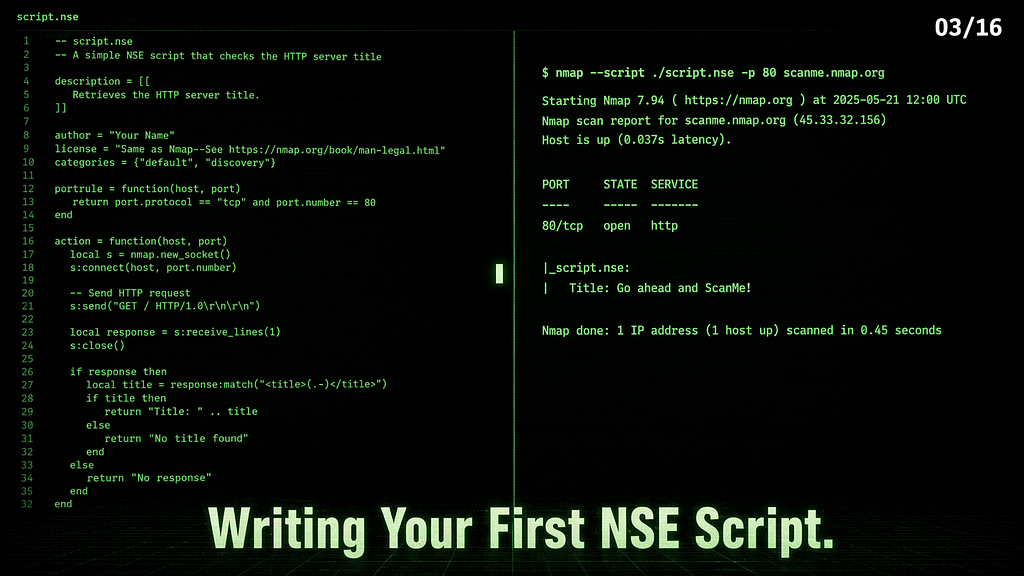
Series: Nmap — The Tool You Think You Know | Part 3 of 16
In Part 2, we ran the scripts that ship with Nmap. Every one of them is a plain text .nse file sitting on your disk. You can open them, read them, copy them, and modify them. And once you understand the structure — which takes about 20 minutes — you can write your own.
This article walks through exactly that. No prior programming experience required. We’ll cover the minimum Lua you need, the NSE API that gives your script access to Nmap’s internals, and a complete working script built from scratch. We’ll also cover how to use AI tools to write scripts faster without writing bad code you don’t understand.
Why Write Your Own Scripts
The scripts that ship with Nmap cover common services and known vulnerabilities. But real targets aren’t always standard. You’ll hit:
- A custom service on an unusual port with no existing script
- A check you run on every assessment that you keep doing manually
- A combination of actions that no single script performs
- A client-specific check that’s proprietary to your workflow
Writing a script takes 20–40 minutes once you know the structure. That’s faster than manually running the same check 50 times across a /24.
The Minimum Lua You Need
NSE scripts are written in Lua, a lightweight scripting language. You don’t need to learn all of Lua. You only need a small subset to start. Here’s what actually matters:
Variables:
local host = "target"           -- string
local port = 80                 -- number
local found = false             -- boolean
local results = {}              -- table (like a list)
Conditionals:
if port == 80 then
  print("HTTP found")
elseif port == 443 then
  print("HTTPS found")
else
  print("Other port")
end
Loops:
-- Iterate over a table
for i, item in ipairs(results) do
  print(i, item)
end
-- Count-based loop
for i = 1, 10 do
  print(i)
end
Functions:
local function check_banner(response)
  if response:match("Apache") then
    return "Apache detected"
  end
  return nil
end
String matching — the most useful operation in NSE:
local response = "Server: Apache/2.4.6"
if response:match("Apache") then
  -- found it
end
-- Extract a version number
local version = response:match("Apache/([%d%.]+)")
-- version = "2.4.6"
That’s it. Variables, conditionals, loops, functions, and string matching. You can look up the rest as needed.
The Structure of Most NSE Scripts
Open any script in /usr/share/nmap/scripts/ And you'll see a similar structure — five parts that appear in most scripts:
-- 1. METADATA
description = [[
  What this script does, in plain English.
  Used by --script-help.
]]
-- 2. CATEGORIES
categories = {"default", "safe"}
-- 3. IMPORTS
local nmap = require "nmap"
local stdnse = require "stdnse"
-- 4. RULE FUNCTION (when to run)
portrule = function(host, port)
  return port.state == "open" and port.number == 80
end
-- 5. ACTION FUNCTION (what to do)
action = function(host, port)
  return "Script ran successfully"
end
The rule function decides whether your script runs against a given host/port. If the rule matches, the script may run; if it does not, it is skipped.
The action function performs the script’s work and returns the result. The return value appears in Nmap’s output, usually as a string or table. Return nil If you do not want output.
That’s the core skeleton. Some scripts differ in metadata, dependencies, or how they handle execution — but this pattern covers the vast majority.
Three Script Types — Which One to Write
portrule scripts — run for ports that match the script's conditions, often open ports. This is the type you'll write most often. Use when your check needs a specific port.
portrule = function(host, port)
  return port.state == "open" and port.number == 21
end
hostrule scripts — run once per host when host-level conditions are met. Use when your check is host-level, not port-level (checking hostname, OS, host attributes).
hostrule = function(host)
  return host.os ~= nil  -- only run if OS was detected
end
prerule scripts — often used for broadcast or pre-scan tasks, running before any host scanning starts. No host or port info is available yet.
prerule = function()
  return true  -- always run
end
For your first script, write a portrule script. It's the most common, most useful, and easiest to test.
The NSE Library API
NSE gives your scripts access to Nmap’s network capabilities through two main libraries:
nmap — Core network operations
local nmap = require "nmap"
-- Create a socket
local socket = nmap.new_socket()
-- Connect to target (use host.ip and port.number, not the objects directly)
local status, err = socket:connect(host.ip, port.number)
-- Send data
local status, err = socket:send("GET / HTTP/1.0\r\n\r\n")
-- Receive response
local status, response = socket:receive()
-- Close
socket:close()
💡 Raw sockets are lower-level and more error-prone than using protocol libraries like http. For HTTP work, use the http library shown later in this article — it handles headers, redirects, and encoding for you.
stdnse — Helper utilities
local stdnse = require "stdnse"
-- Print debug output (only visible with -d flag)
stdnse.debug(1, "Connecting to %s:%d", host.ip, port.number)
-- Format output as a table
local output = stdnse.output_table()
output["version"] = "Apache/2.4.6"
output["finding"] = "TRACE enabled"
return output
-- Sleep (useful for rate limiting)
stdnse.sleep(1)
stdnse.output_table() helps format structured output for Nmap — cleaner than building strings manually.
Writing a Banner-Grabbing Script From Scratch
Banner grabbing — connecting to a service and reading what it sends back — is the simplest useful thing you can write. Here’s a complete working script:
-- banner-grab.nse
-- Grabs the raw banner from any open TCP port
description = [[
  Connects to an open port and reads the initial banner response.
  Useful for fingerprinting services that respond immediately on connect.
]]
categories = {"discovery", "safe"}local nmap = require "nmap"
local stdnse = require "stdnse"
-- Run against any open TCP port
portrule = function(host, port)
  return port.state == "open" and port.protocol == "tcp"
end
action = function(host, port)
  local socket = nmap.new_socket()
  -- Set timeout to 5 seconds
  socket:set_timeout(5000)
  -- Attempt connection
  local status, err = socket:connect(host.ip, port.number)
  if not status then
    return nil  -- connection failed, return nothing
  end
  -- Read the initial response if the service sends one
  local status, response = socket:receive()
  socket:close()
  if not status or not response then
    return nil
  end
  -- Clean up the response — remove control characters
  response = response:gsub("[%c]", " "):gsub("%s+", " ")
  -- Only return if there's something meaningful
  if #response > 3 then
    return "Banner: " .. response
  end
  return nil
end
Save this as banner-grab.nse in /usr/share/nmap/scripts/, run --script-updatedb, then:
nmap --script banner-grab -p 21,22,80 x.x.x.x
PORT   STATE    SERVICE
21/tcp open     ftp
|_banner-grab: Banner: 220 (vsFTPd 3.0.5)
22/tcp open     ssh
|_banner-grab: Banner: SSH-2.0-OpenSSH_8.2p1 Ubuntu-4ubuntu0.13
80/tcp filtered http
A working script. 30 lines. Attempts to read a banner from any open TCP port that sends one and returns it cleanly formatted.
Using AI to Write NSE Scripts
AI tools are useful here — not to write entire scripts blindly, but to handle the parts that would otherwise require deep Lua knowledge. The key is prompting correctly and verifying the output.
The right prompt structure:
I'm writing an NSE script for Nmap. It should:
- Run against open port [X] using portrule
- Connect to the service and [describe what to check]
- Return [describe what you want in the output]
- Use the nmap and stdnse libraries
- Be safe (no exploitation, no crashes)
Write only the action function and portrule first.
I'll handle the metadata myself.
What to ask AI for specifically:
- String parsing logic (regex patterns in Lua)
- Socket connection boilerplate
- Output formatting with stdnse.output_table()
- Error handling patterns
What to verify yourself:
- The portrule condition — does it actually match what you want?
- The socket:connect() call — is it using host.ip not host?
- The return value — is it returning a string, table, or nil correctly?
- Timeout handling — is there a socket:set_timeout() call?
What not to trust AI with blindly:
- Scripts in the intrusive or exploit category
- Scripts that write to disk or make external connections
- Scripts using libraries you have not verified in your Nmap install
One concrete test: after getting AI-generated code, open a real NSE script that does something similar (check /usr/share/nmap/scripts/) and compare the structure line by line. If the two scripts look structurally different, something is probably wrong.
A More Useful Script — HTTP Header Audit
Let’s build something that finds a real misconfiguration — missing security headers on HTTP services:
-- http-header-audit.nse
-- Checks for missing security headers on HTTP services
description = [[
  Checks whether common HTTP security headers are present.
  Missing headers like X-Frame-Options, CSP, and HSTS are
  common findings in web application security assessments.
]]
categories = {"discovery", "safe"}local http = require "http"
local stdnse = require "stdnse"
portrule = function(host, port)
  return port.state == "open" and
    (port.number == 80 or port.number == 443 or
     port.number == 8080 or port.number == 8443)
end
action = function(host, port)
  -- Make HTTP request using NSE's http library
  local response = http.get(host, port, "/")
  if not response or not response.header then
    return nil
  end
  local missing = {}
  local headers = response.header
-- Check for each security header
local checks = {
"x-frame-options",
"x-content-type-options",
"x-xss-protection",
"strict-transport-security",
"content-security-policy",
}
  for _, header in ipairs(checks) do
    if not headers[header] then
      table.insert(missing, header)
    end
  end
  if #missing == 0 then
    return "No missing security headers detected"
  end
  local output = stdnse.output_table()
  output["Missing Headers"] = table.concat(missing, ", ")
  output["Count"] = tostring(#missing) .. " missing"
  return output
end
This uses the http library, which handles HTTP logic better than raw sockets — including redirects, cookies, and encoding.
nmap --script http-header-audit -p 80,443 x.x.x.x
PORT   STATE SERVICE
80/tcp open  http
| http-header-audit:
|   Missing Headers: x-frame-options, x-content-type-options, x-xss-protection, strict-transport-security, content-security-policy
|_  Count: 5 missing
A cleanly formatted result from a script you wrote yourself.
Testing and Debugging
Test banner-grab against a local lab target:
nmap --script banner-grab -p 21,22,80 x.x.x.x

Test http-header-audit against localhost:
sudo service apache2 start
nmap --script http-header-audit -p 80 127.0.0.1
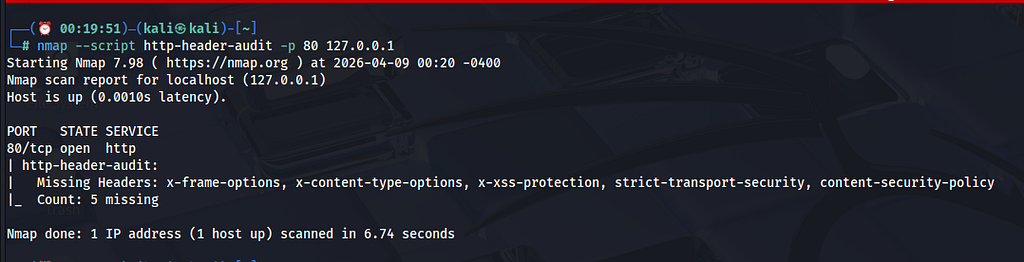
Apache’s default install often lacks common security headers, making it a useful local test target.
Use -d for debug output:
nmap --script banner-grab -p 22 x.x.x.x -d
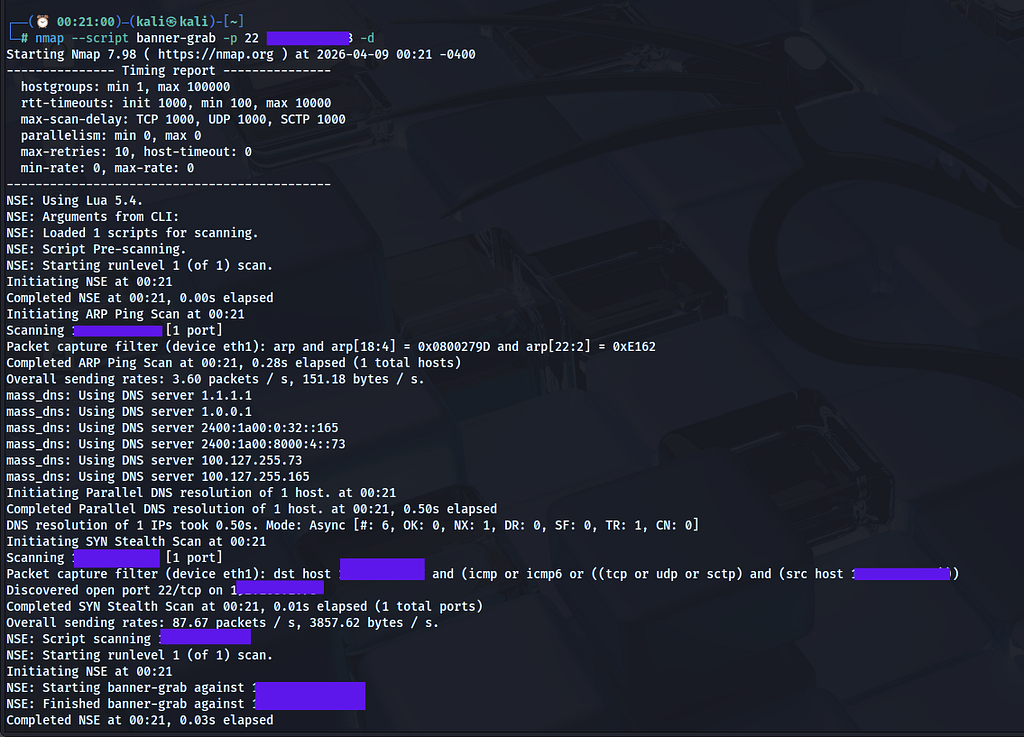
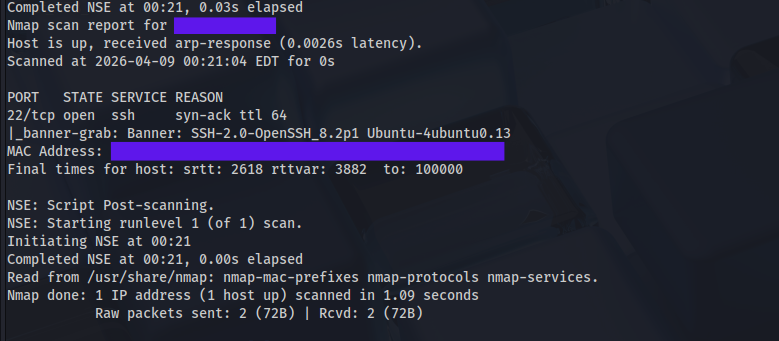
All stdnse.debug() calls become visible. Essential for understanding what's happening inside your script.
Use --script-trace to see raw network activity:
nmap --script http-header-audit -p 80 127.0.0.1 --script-trace 2>&1 | grep -E "NSE:|SEND|RCVD|GET|HTTP/"
NSE: TCP 127.0.0.1:52736 > 127.0.0.1:80 | CONNECT
NSE: TCP 127.0.0.1:52736 > 127.0.0.1:80 | SEND
NSE: TCP 127.0.0.1:52736 < 127.0.0.1:80 | HTTP/1.1 400 Bad Request
NSE: TCP 127.0.0.1:52736 > 127.0.0.1:80 | CLOSE
NSE: TCP 127.0.0.1:52748 > 127.0.0.1:80 | CONNECT
NSE: TCP 127.0.0.1:52748 > 127.0.0.1:80 | 00000000: 47 45 54 20 2f 20 48 54 54 50 2f 31 2e 31 0d 0a GET / HTTP/1.1
NSE: TCP 127.0.0.1:52748 > 127.0.0.1:80 | SEND
NSE: TCP 127.0.0.1:52748 < 127.0.0.1:80 | HTTP/1.1 200 OK
NSE: TCP 127.0.0.1:52748 > 127.0.0.1:80 | CLOSE

Two connections are visible. The first attempt results in 400 Bad Request — the http library may attempt different connection behavior depending on the target and port. The second sends a plain GET / HTTP/1.1 and gets 200 OK — That's the response the script reads headers from.
Common errors and fixes:
Error                          Cause                        Fix
-----------------------------  ---------------------------  ------------------------------------------
Script not found               Database not updated         sudo nmap --script-updatedb
attempt to index nil value     Variable is nil before use   Add: if not var then return nil end
Script runs but returns        return nil hit before        Add stdnse.debug() to trace execution
  nothing                        output
connect: connection refused    Port not open / wrong IP     Check host.ip not host in connect call
Script runs on wrong ports     Rule too broad               Tighten the portrule condition
Adding Your Script Properly
# Copy to scripts directory
sudo cp banner-grab.nse /usr/share/nmap/scripts/
sudo cp http-header-audit.nse /usr/share/nmap/scripts/
# Update the database
sudo nmap --script-updatedb
# Verify both are registered
grep "banner-grab\|http-header-audit" /usr/share/nmap/scripts/script.db

Once indexed, your script can be called by name like any built-in script. It shows up in --script-help, responds to category filters, and can be selected by category if it is categorized correctly.
Where to Find Community Scripts
The built-in scripts are not the only option. Two sources worth knowing:
GitHub: Search GitHub for Nmap NSE scripts — hundreds of community scripts exist for specific services, CVEs, and frameworks. Before running any community script:
- Read the full source — it’s plain text, Lua
- Check what it connects to and what it sends
- Run it against your own lab first
nmap-vulners: A widely used community script — as covered in Part 2, it cross-references service versions against CVE databases. Install:
sudo wget -O /usr/share/nmap/scripts/vulners.nse https://raw.githubusercontent.com/vulnersCom/nmap-vulners/master/vulners.nse
sudo nmap --script-updatedb
What’s Next
You now have the full NSE picture — how scripts work, how to read them, and how to write them. The banner grabber and header audit script you built here are useful on real assessments.
In Part 4, we apply all of this to the most common target you’ll hit — web servers. HTTP NSE scripts in depth: http-enum, http-shellshock, http-wordpress-enum, and a full chained HTTP recon workflow that takes a web server from "port 80 open" to a complete picture in one command.
Part 4← Link will be live once published
🔒 Legal reminder: Only scan systems you own or have written permission to test. scanme.nmap.org is Nmap's official test server — always legal to use for script testing. For everything else, stick to TryHackMe, HackTheBox, INE Labs, or your own machines.
Part of the series: Nmap — The Tool You Think You Know
Writing Your First NSE Script was originally published in Level Up Coding on Medium, where people are continuing the conversation by highlighting and responding to this story.