WorldQuant Brain — How to Apply the Simulation Environment Settings
 Steve Obasi7 min read·Just now
--
This article is a brief tutorial that explains the functions of each option in the WorldQuant Brain simulation platform and provides guidance on how to effectively configure them to achieve the desired results.
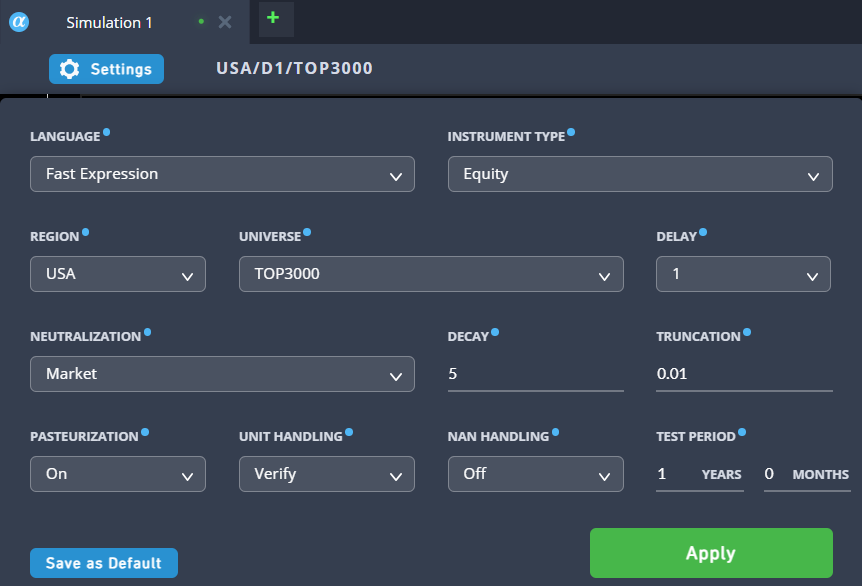
These settings control the environment, risk parameters, and data handling for your alpha simulation. To make them easier to digest, they are broken down into four logical categories: Core Setup, Signal Processing, Risk Management, and Data & Error Handling.
1. Core Setup
These options define what, where, and how you are trading.
Language (Fast Expression):
- What it does: Defines the syntax used to write your alpha. “Fast Expression” is WorldQuant’s proprietary language, optimized for evaluating matrix operations on massive time-series datasets.
- How to use: Keep this set to “Fast Expression” for standard alpha development.
Instrument Type:
- What it does: Defines the asset class your algorithm will trade.
- How to use: Set to “Equity” when trading stocks.
Region:
- What it does: Specifies the geographical financial market where the instruments are traded.
- How to use: Match this to the market you are analyzing (e.g., USA, EUR, ASI).
Universe:
- What it does: Determines the specific pool of tradable assets within your chosen region. “TOP3000” represents the 3,000 most liquid stocks in the US market.
- How to use: Use TOP3000 for standard broad-market strategies. You can narrow this (e.g TOP500) if your strategy relies strictly on highly liquid, large-cap stocks.
2. Signal Processing & Execution
These options control the timing and smoothness of your trading signals.
Delay:
- What it does: Sets the time lag between when your mathematical signal is generated and when the trade is actually executed in the market.
- How to use: Keep this at 1. A delay of 1 means if your formula generates a buy signal at the market close on Day 1, the system simulates entering the trade on Day 2. This prevents “look-ahead bias” (using data you wouldn’t possess in the real world at the time of the trade).
Decay:
- What it does: Applies a linear smoothing average to your alpha signal over the specified number of days. It reduces abrupt changes in your portfolio’s positions.
- How to use: Increase the decay (e.g., from 5 to 10) if your strategy’s Turnover (trading frequency) is too high. Decrease it if your strategy is designed to capture fast, short-term market reactions.
3. Risk Management
These options prevent your algorithm from taking on concentrated or unhedged risks.
Neutralization:
- What it does: Strips out broader market trends (Beta) from your strategy. It balances your long and short positions so that your strategy makes money based purely on your alpha’s edge, regardless of whether the overall stock market goes up or down.
- How to use: Leave as “Market” for standard dollar-neutral strategies. You can change it to “Sector” or “Industry” if you want to neutralize risks within specific economic sectors instead.
Truncation:
- What it does: A hard cap on the maximum weight (capital allocation) of any single asset in your portfolio. At 0.01, no single stock can make up more than 1% of your total portfolio.
- How to use: Use numbers between 0.01 and 0.10 to force diversification. This ensures a catastrophic drop in a single stock won’t destroy your entire portfolio’s performance.
4. Data & Error Handling
These options dictate how the simulator treats messy, real-world data.
Pasteurization:
- What it does: A WorldQuant data-cleaning process that automatically handles extreme price outliers, unusual spikes, or suspicious data points before they are fed into your formula.
- How to use: Generally, keep this “On” to protect your simulation from bad data artifacts that could artificially inflate your simulated returns.
Unit Handling:
- What it does: Checks your mathematical expression for dimensional consistency. For example, it prevents you from directly adding a stock price (dollars) to a trading volume (shares) without standardizing them first.
- How to use: Leave it on “Verify” to catch logical and mathematical errors in your code early.
NaN Handling:
- What it does: Determines how missing data (NaN, or “Not a Number”) is treated by the simulator.
- How to use: Leaving it “Off” is safest; it typically means assets missing data for a specific day receive a weight of 0 (no trade).
Test Period:
- What it does: The length of historical market data the simulator will test your formula against.
- How to use: Use shorter periods (like 1 to 2 years) for rapid prototyping and debugging. Once your alpha looks good, increase the test period to 5+ years to ensure the strategy is robust across different market cycles.
More Details oN Decay and Truncation
In WorldQuant BRAIN, Decay and Truncation act as your statistical filters. Adjusting them is a balancing act: you are essentially trading off raw returns for better risk management and lower execution costs. Here is how they directly impact your Turnover and Fitness scores.
1. The Impact of Decay
Decay controls how long your signal lives. If your alpha says “Buy AAPL” today, a Decay of 0 means it forgets that signal tomorrow. A Decay of 5 means it slowly fades that signal over five days.
Turnover (High Impact): Higher Decay, e.g 10 dramatically lowers turnover. Because the signal persists longer, the portfolio doesn’t need to sell and buy new stocks every single day. This saves on simulated transaction costs. A lower Decay eg 0 or 1, increases turnover. Your portfolio will be hyper-active, chasing every tiny price movement.
Fitness: Since the Fitness formula penalizes high turnover, increasing Decay often improves your Fitness score, provided the “smoothed” signal still predicts price movements accurately. However, if you set it too high, your signal becomes stale, and your returns (and thus Fitness) will drop.
2. The Impact of Truncation
Truncation is your diversification tool. It prevents you from putting “all your eggs in one basket” by capping the weight of any single stock (e.g 0.01 means no stock can exceed 1% of the portfolio).
Turnover (Low Impact): Truncation has a minimal direct effect on turnover. It mostly changes which stocks you hold and in what quantity, rather than how often you trade them.
Fitness (Medium Impact): Lower Truncation eg 0.01, generally improves Fitness by increasing the Sharpe Ratio. By forcing the model to hold 100+ stocks instead of just 5, you reduce the risk of one bad stock ruining your PnL. A stable, diversified PnL leads to a higher Sharpe, which multiplies your Fitness. Higher Truncation e.g 0.10, allows for concentration risk. While your returns might be higher if you pick a winner, your volatility will be much higher, likely lowering your Sharpe and your overall Fitness.
Summary Table
Recall that Fitness is calculated as:
Because Turnover is in the denominator, any setting (like Decay) that lowers Turnover will mathematically boost your Fitness, as long as it doesn’t hurt your Sharpe Ratio or Returns too severely.
How to Develop a Good Alpha
In the world of WorldQuant BRAIN, a good alpha isn’t just one that makes a lot of money — it achieves a high Fitness score by balancing returns, stability (Sharpe), and execution costs (Turnover).
To build a high-performing alpha, you generally follow a four-step pipeline: Idea → Mathematical Expression → Neutralization → Refinement.
1. The Strategy: Mean Reversion
A classic starting point is Mean Reversion. The logic is simple: stocks that have been pushed down too far relative to their peers tend to “snap back” to their average price.
To turn this into an alpha, we look for stocks with the lowest relative returns over a specific window (e.g 5 days) and bet on them rising.
2. The Mathematical Expression
In Fast Expression (the BRAIN language), we use functions like ts_rank to compare a stock's current behavior to its own history.
Example Formula:
-ts_rank(returns, 5)returns: The daily price change.5: The lookback window (one trading week).ts_rank: This converts the raw returns into a percentile (0 to 1). A "1" means today had the highest return of the last 5 days.- The Minus Sign (
-): It flips the signal. If a stock has a high rank (it went up a lot), the minus sign makes it a "Sell" signal. If it has a low rank (it crashed), it becomes a "Buy" signal.
3. Applying the Settings
Even a great formula will fail if your settings are wrong. To optimize the formula above, use these configurations based on our previous discussion:
- Neutralization: Industry. (Instead of just “Market,” neutralizing by Industry ensures you aren’t just betting against the whole tech sector, but rather finding the specific tech stocks that are oversold compared to other tech stocks).
- Decay: 4. This smooths out the “snap back” signal so you aren’t frantically trading every single day, which protects your Turnover.
- Truncation: 0.01. This ensures your alpha stays diversified across hundreds of stocks, which protects your Sharpe Ratio.
4. Refining for High Fitness
A good alpha often combines multiple sub-signals. For example, we can combine our Mean Reversion idea with Volume to ensure we only buy when there is high liquidity.
Improved Example:
-ts_rank(returns, 5) * ts_rank(volume, 10)- Logic: We want stocks that dropped (
-returns) AND have high trading interest (volume). This indicates a climax in selling, making the snap-back more likely.
The Resulting Metrics
If this alpha is successful, your simulation dashboard should show:
- Sharpe Ratio > 2.0: Indicating very consistent, low-volatility gains.
- Turnover < 30%: Meaning you aren’t losing all your profits to trading fees.
- Fitness > 1.0: The gold standard for submission on the BRAIN platform.