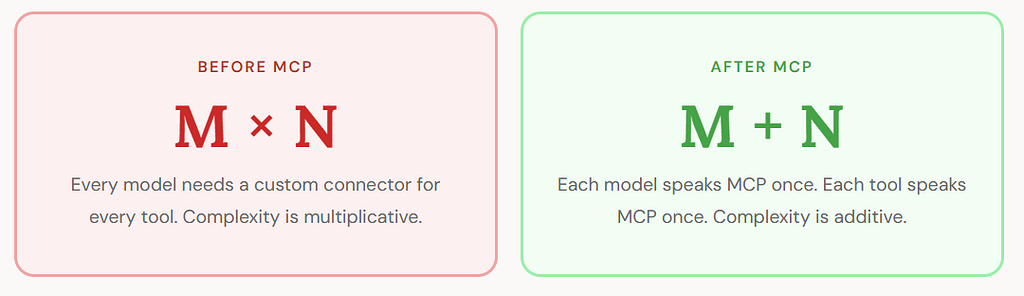
M Models, N Tools, M×N Headaches
Every integration you build is a form of technical debt, a bill you pay twice. First when you create it, and again every time the system around it shifts. In the fast‑moving world of large language models, that bill grows quickly. With M models and N external tools, you’re suddenly responsible for M×N one‑off connectors, each with its own quirks and maintenance cycle.
That’s the world we lived in until Anthropic introduced the Model Context Protocol (MCP) in November 2024. With MCP, the messy integration matrix collapses into something far more elegant: M+N standardized connections. Models integrate once. Tools integrate once. Everything else just works.
This article explores why the old approach buckled under scale, how MCP’s architecture simplifies the math, and why this shift matters for anyone building agentic systems. We’ll wrap with a complete Python example an MCP server, a client, and an agentic host coordinating real tool calls in a way that finally feels sane.
Section 1 — The Problem (The M×N Integration Explosion)
Long before MCP, AI practitioners discovered an uncomfortable truth: models are brilliant in isolation, but almost useless when disconnected from real-world systems. [1] Connecting them required bespoke “glue code”, custom adapters written for every model–tool pair.
The math is straightforward and brutal. Let’s imagine when operating three AI applications such as a chatbot, a RAG pipeline, and an autonomous agent, and you need each to talk to four systems: GitHub, a Postgres database, Slack, and an internal document store. You are now responsible for 3 × 4 = 12 distinct integrations. Add one new AI model and you immediately incur 4 more. Add one new data source and you incur 3 more. The integration count grows as a matrix, not a list. [2]
Below diagram gives you a clear understanding of models and tools matrix
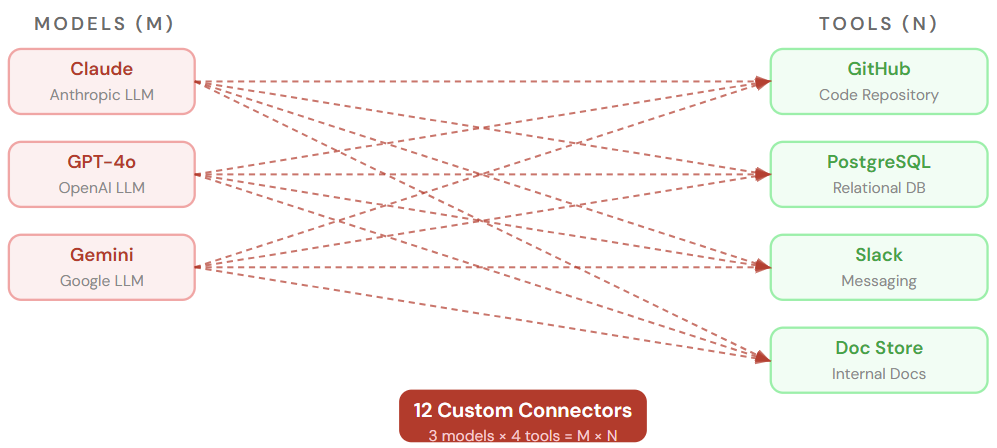
→ Each arrow = separate codebase, auth flow, maintenance burden
→ Without a standard, every model–tool pairing demands its own integration.
→ Adding M models or N tools multiplies which is never merely adds the work.
As Cloudsmith’s engineering team observed,[2] “as more models and tools enter the ecosystem, the integration load grows exponentially.” This is not hyperbole, it is the direct consequence of an uncoordinated ecosystem without a shared protocol.
Section 2 — The Cost of Chaos (What the M×N World Actually Cost You)
The integration explosion was not merely an inconvenience, it imposed compounding costs at every level of an engineering organization. [4]
The integration problem is not just about complexity, it is about isolation. A model without access to real-world data is all capability and no context, unable to reach the live information an organization actually needs. [4]
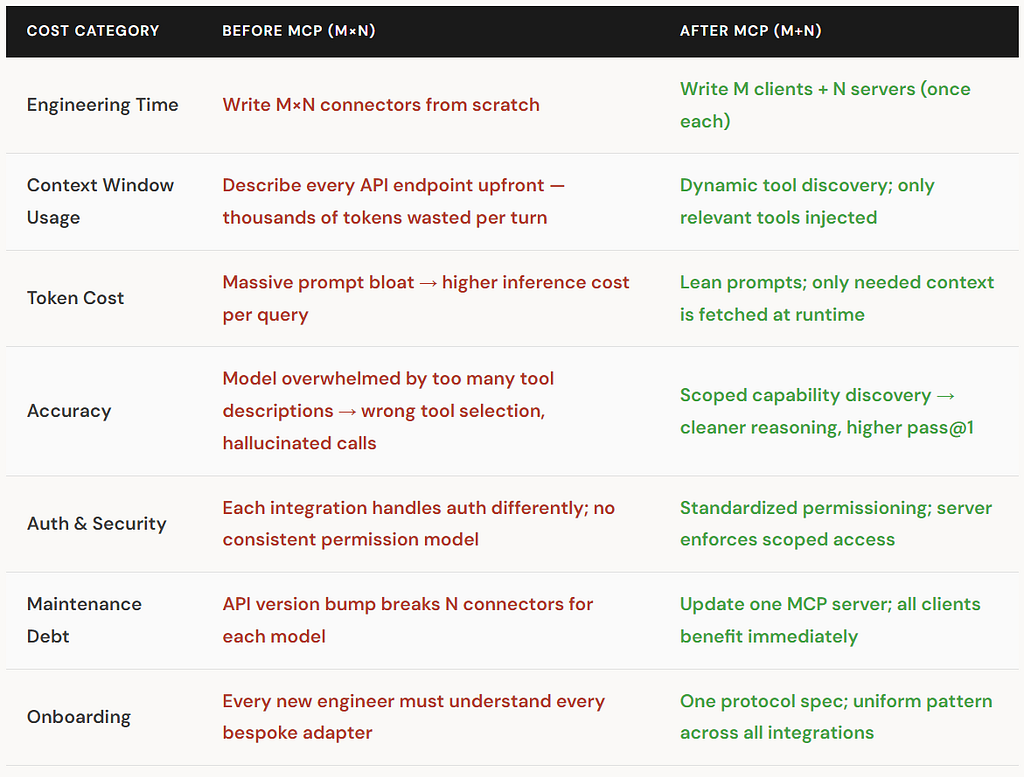
The Paradox of Choice
As Klavis AI researchers noted, “just like humans, LLMs can get confused when presented with too many options. A massive toolset can lead to lower accuracy, incorrect tool selection, and even hallucinated function calls.” [10] The pre-MCP practice of dumping entire API catalogs into the system prompt was simultaneously the most common and the most damaging pattern in production agentic systems.
Section 3 — The Solution (Enter MCP: The Universal AI USB Port)
Anthropic introduced the Model Context Protocol as an open standard in November 2024. Its premise is intentionally simple: when both sides of an integration speak the same language, you no longer need custom translators.
Practitioners often compare MCP to USB. Before USB standardized how peripherals connected, every device demanded its own port shape, driver, and protocol. USB replaced that chaos with a single contract, and the hardware ecosystem exploded with innovation. MCP aims to be that same universal connector, but for AI‑to‑tool communication.
The shift from M×N to M+N happens by inserting a standardized protocol layer between models and tools. Instead of wiring every model to every system individually, each integrates with MCP once. The protocol becomes the shared interface, and the integration matrix collapses into a clean line.
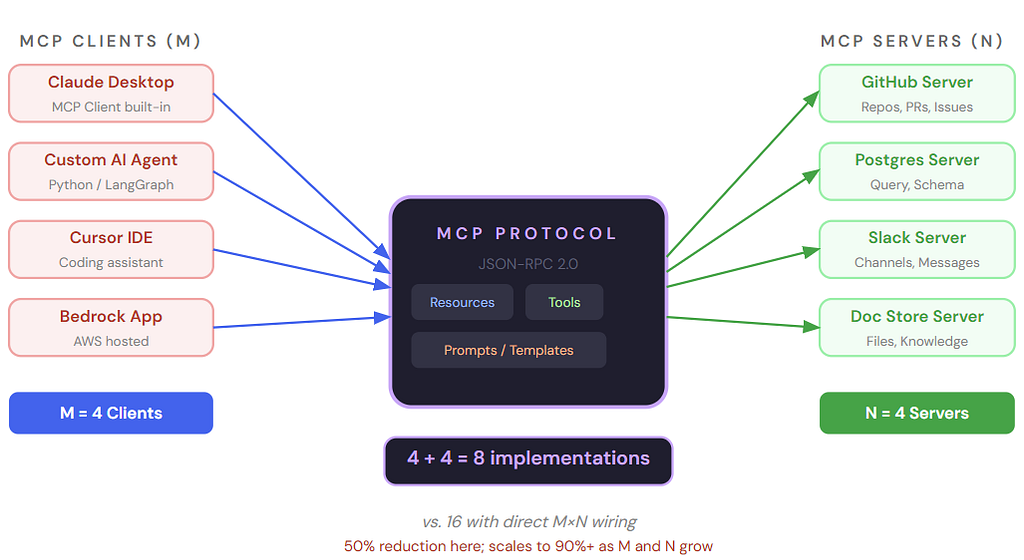
→ MCP acts as the universal adapter layer. Each client implements the protocol once; each server implements it once. No bespoke bridging code required.
The inspiration for MCP’s design comes directly from the Language Server Protocol (LSP), which solved an identical matrix problem for IDEs and programming languages. [6] Before LSP, a Go language feature required separate plugins for VS Code, JetBrains, and Neovim. LSP made any language server automatically compatible with any LSP-compliant editor. MCP applies the same architectural insight to AI. [6]
Section 4 — Architecture (Inside MCP: Hosts, Clients, Servers, and Primitives)
MCP defines three distinct roles and three core primitives. Understanding both is essential to implementing it correctly. [7]
The Three Roles
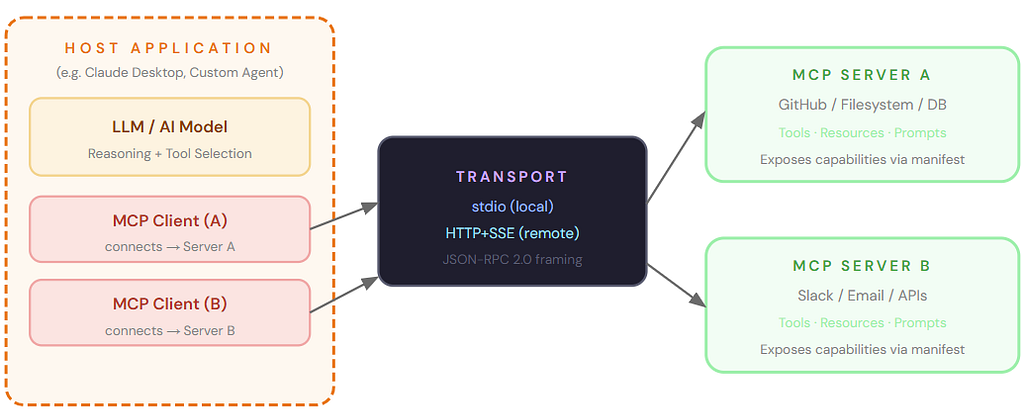
→ The Host contains both the LLM and one MCP Client per connected server. Each client maintains an isolated session. Transport can be local stdio or remote HTTP+SSE.
Host — The application the user interacts with directly. It manages the LLM lifecycle, spawns MCP clients, enforces permissions, and coordinates context. Examples: Claude Desktop, a custom LangGraph agent, Cursor IDE. [7]
Client — An in-process component inside the Host. Each client maintains a dedicated, isolated session with one MCP server. The client handles the JSON-RPC handshake, capability discovery, and invocation relay. [8]
Server — A process (local subprocess via stdio, or remote via HTTP+SSE) that wraps an external system. It declares its capabilities at startup and executes requests safely and consistently. [8]
The Three Primitives
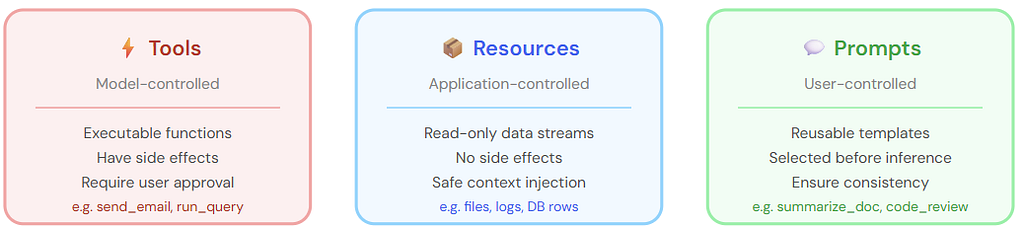
→ Each primitive has a distinct controller and trust model. Tools can mutate state; Resources are read-only; Prompts are workflow templates.
The Communication Lifecycle
Every MCP interaction follows a four-stage lifecycle defined by the JSON-RPC 2.0 wire protocol: [9]
4.1 Initialization Handshake: Client sends initialize; server responds with protocol version and capability manifest. Client acknowledges with initialized. Session is now live.
4.2 Capability Discovery: Client calls tools/list, resources/list, prompts/list. Server returns structured manifests with JSON Schema for every capability.
4.3 Tool Invocation: When the LLM decides it needs a tool, the Host directs the relevant Client to send a tools/call request. The server executes it against the real backend and returns a structured result.
4.4 Session Teardown: Client sends shutdown; server responds; client sends exit. The session closes cleanly, releasing all server-side state.
Section 5 — End-to-End Project
Project: AI Data Assistant via MCP
A complete Python implementation: an MCP server exposing a SQLite analytics database, an MCP client, and a Claude-powered agentic host. Demonstrates the M+N pattern in production code.
The project has four files. The server exposes two Tools (run_sql, list_tables) and one Resource (schema://sales). The client connects via stdio transport. The host uses the Anthropic SDK to orchestrate Claude’s reasoning over real data.
# MCP Python SDK (official Anthropic SDK)
mcp>=1.0.0
anthropic>=0.40.0
aiosqlite>=0.20.0
mcp_server.py — MCP Server exposing SQLite tools:
"""
mcp_server.py
MCP Server: exposes SQLite analytics tools via the MCP protocol.
Run as: python mcp_server.py
"""
import asyncio, sqlite3, json
from mcp.server import Server
from mcp.server.stdio import stdio_server
from mcp.types import (
    Tool, TextContent, Resource,
    CallToolResult, ListToolsResult,
    ListResourcesResult, ReadResourceResult,
)

# ─── Bootstrap database ───────────────────────────────────────────────────
def init_db(path: str = "sales.db") -> None:
    conn = sqlite3.connect(path)
    conn.executescript("""
        CREATE TABLE IF NOT EXISTS orders (
            id          INTEGER PRIMARY KEY,
            region      TEXT    NOT NULL,
            product     TEXT    NOT NULL,
            revenue     REAL    NOT NULL,
            order_date  TEXT    NOT NULL
        );
        INSERT OR IGNORE INTO orders VALUES
          (1,'North','Widget A', 4200.00,'2025-01-15'),
          (2,'South','Widget B', 3100.50,'2025-01-22'),
          (3,'North','Widget B', 5600.00,'2025-02-03'),
          (4,'West', 'Widget A', 2900.75,'2025-02-14'),
          (5,'East', 'Widget C', 7800.00,'2025-03-01'),
          (6,'South','Widget A', 3400.00,'2025-03-18'),
          (7,'West', 'Widget C', 6100.25,'2025-04-02'),
          (8,'North','Widget C', 9200.00,'2025-04-20');
    """)
    conn.commit(); conn.close()

# ─── MCP Server definition ────────────────────────────────────────────────
app = Server("sales-analytics-server")
DB_PATH = "sales.db"

@app.list_tools()
async def list_tools() -> ListToolsResult:
    return [
        Tool(
            name="run_sql",
            description="Execute a read-only SQL SELECT query on the sales database.",
            inputSchema={
                "type": "object",
                "properties": {
                    "query": {"type": "string", "description": "SQL SELECT statement"}
                },
                "required": ["query"]
            }
        ),
        Tool(
            name="list_tables",
            description="List all tables in the sales database.",
            inputSchema={"type": "object", "properties": {}}
        ),
    ]

@app.call_tool()
async def call_tool(name: str, arguments: dict) -> CallToolResult:
    conn = sqlite3.connect(DB_PATH)
    try:
        if name == "list_tables":
            tables = conn.execute(
                "SELECT name FROM sqlite_master WHERE type='table'"
            ).fetchall()
            result = ", ".join(row[0] for row in tables)
            return [TextContent(type="text", text=f"Tables: {result}")]

        elif name == "run_sql":
            query: str = arguments["query"]
            # Safety: only allow SELECT statements
            if not query.strip().upper().startswith("SELECT"):
                raise ValueError("Only SELECT queries are permitted.")
            cursor = conn.execute(query)
            cols = [d[0] for d in cursor.description]
            rows = cursor.fetchall()
            # Format as Markdown table
            lines = [" | ".join(cols)]
            lines.append(" | ".join(["---"] * len(cols)))
            for row in rows:
                lines.append(" | ".join(str(v) for v in row))
            return [TextContent(type="text", text="\n".join(lines))]
        else:
            raise ValueError(f"Unknown tool: {name}")
    finally:
        conn.close()

@app.list_resources()
async def list_resources() -> ListResourcesResult:
    return [
        Resource(
            uri="schema://sales",
            name="Sales DB Schema",
            description="Column definitions for all tables.",
            mimeType="text/plain",
        )
    ]

@app.read_resource()
async def read_resource(uri: str) -> ReadResourceResult:
    conn = sqlite3.connect(DB_PATH)
    try:
        tables = conn.execute(
            "SELECT name FROM sqlite_master WHERE type='table'"
        ).fetchall()
        schema_lines = []
        for (tbl,) in tables:
            cols = conn.execute(f"PRAGMA table_info({tbl})").fetchall()
            cols_str = ", ".join(f"{c[1]} {c[2]}" for c in cols)
            schema_lines.append(f"TABLE {tbl}: ({cols_str})")
        return [TextContent(type="text", text="\n".join(schema_lines))]
    finally:
        conn.close()

async def main():
    init_db(DB_PATH)
    async with stdio_server() as (read_stream, write_stream):
        await app.run(read_stream, write_stream, app.create_initialization_options())

if __name__ == "__main__":
    asyncio.run(main())
mcp_client.py — Low-level MCP Client (standalone test):
"""
mcp_client.py
Thin MCP client that connects to mcp_server.py via stdio,
discovers tools, and calls run_sql directly.
Useful for testing the server in isolation.
"""
import asyncio
from mcp import ClientSession
from mcp.client.stdio import stdio_client, StdioServerParameters

async def main():
    params = StdioServerParameters(
        command="python",
        args=["mcp_server.py"],
    )
    async with stdio_client(params) as (read, write):
        async with ClientSession(read, write) as session:
            await session.initialize()          # Stage 1: Handshake
            tools = await session.list_tools()   # Stage 2: Discovery

            print("Available tools:")
            for t in tools.tools:
                print(f"  • {t.name}: {t.description}")

            # Stage 3: Direct tool invocation
            result = await session.call_tool(
                "run_sql",
                arguments={"query": "SELECT region, SUM(revenue) as total FROM orders GROUP BY region ORDER BY total DESC"}
            )
            print("\nRevenue by region:\n")
            print(result.content[0].text)

            # Read schema resource
            schema = await session.read_resource("schema://sales")
            print("\nSchema:\n", schema.contents[0].text)

if __name__ == "__main__":
    asyncio.run(main())
mcp_host.py — Agentic Host: Claude + MCP (the M+N payoff):
"""
mcp_host.py
The HOST: connects Claude (via Anthropic SDK) to the MCP server.
Claude decides which tools to call; the host relays them via MCP.
This is the M+N architecture in action.

Usage:
    export ANTHROPIC_API_KEY=sk-...
    python mcp_host.py
"""
import asyncio, json, os
import anthropic
from mcp import ClientSession
from mcp.client.stdio import stdio_client, StdioServerParameters

def mcp_tool_to_anthropic(tool) -> dict:
    """Convert MCP tool manifest → Anthropic tool definition."""
    return {
        "name": tool.name,
        "description": tool.description,
        "input_schema": tool.inputSchema,
    }

async def run_agent(user_question: str):
    client = anthropic.Anthropic(api_key=os.environ["ANTHROPIC_API_KEY"])
    server_params = StdioServerParameters(command="python", args=["mcp_server.py"])

    async with stdio_client(server_params) as (read, write):
        async with ClientSession(read, write) as mcp_session:
            await mcp_session.initialize()

            # ── Discovery: fetch tools from MCP server ──────────────────
            tools_response = await mcp_session.list_tools()
            anthropic_tools = [mcp_tool_to_anthropic(t) for t in tools_response.tools]

            # ── Also inject DB schema as context ────────────────────────
            schema_resp = await mcp_session.read_resource("schema://sales")
            schema_text = schema_resp.contents[0].text

            system = f"""You are a data analyst assistant with access to a sales database.
Database schema:
{schema_text}

Use the available tools to answer questions accurately.
Always run a SQL query to retrieve live data before answering."""

            messages = [{"role": "user", "content": user_question}]

            # ── Agentic loop ─────────────────────────────────────────────
            while True:
                # Model string format: {family}-{version}-{training-date}
                # Check https://docs.anthropic.com/en/docs/about-claude/models for the latest
                response = client.messages.create(
                    model="claude-sonnet-4-20250514",
                    max_tokens=1024,
                    system=system,
                    tools=anthropic_tools,
                    messages=messages,
                )

                # Add assistant turn to history
                messages.append({"role": "assistant", "content": response.content})

                if response.stop_reason == "end_turn":
                    # Done — extract final text
                    for block in response.content:
                        if hasattr(block, "text"):
                            print("\n── Claude's Answer ──────────────────────────")
                            print(block.text)
                    break

                elif response.stop_reason == "tool_use":
                    tool_results = []
                    for block in response.content:
                        if block.type != "tool_use":
                            continue

                        print(f"\n── Tool call: {block.name}({json.dumps(block.input)})")

                        # ── Relay tool call via MCP client to server ────────────
                        mcp_result = await mcp_session.call_tool(
                            block.name, arguments=block.input
                        )
                        result_text = mcp_result.content[0].text
                        print(f"── Tool result preview:\n{result_text[:300]}")

                        tool_results.append({
                            "type": "tool_result",
                            "tool_use_id": block.id,
                            "content": result_text,
                        })

                    # Return tool results to Claude
                    messages.append({"role": "user", "content": tool_results})
                else:
                    break

async def main():
    questions = [
        "Which region generated the most revenue in Q1 2025?",
        "What is the best-selling product overall?",
        "Show me monthly revenue trends for 2025.",
    ]
    for q in questions:
        print(f"\n{'='*54}\nQ: {q}")
        await run_agent(q)

if __name__ == "__main__":
    asyncio.run(main())
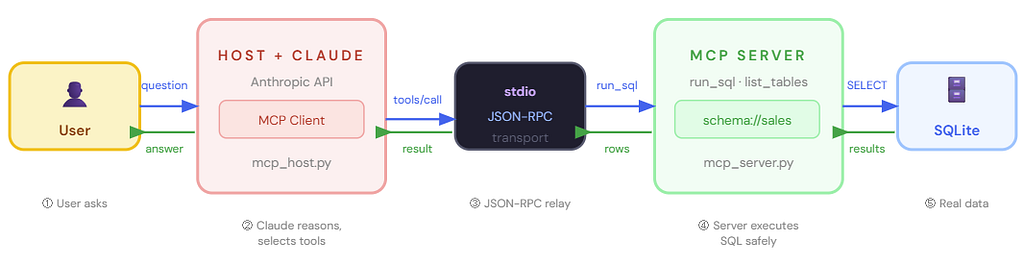
→ Blue arrows = request path. Green arrows = response path. Claude never touches the database directly, the MCP server enforces the safety boundary.
Expected terminal output
======================================================
Q: Which region generated the most revenue in Q1 2025?

── Tool call: run_sql({"query": "SELECT region, SUM(revenue) as total FROM orders WHERE order_date < '2025-04-01' GROUP BY region ORDER BY total DESC"})
── Tool result preview:
region | total
--- | ---
North | 9800.0
South | 6500.5
West  | 2900.75
East  | 7800.0

── Claude's Answer ──────────────────────────
The North region led Q1 2025 with $9,800 in revenue,
driven by strong Widget B sales in February. The East
region ($7,800) came second thanks to a large Widget C order.

======================================================
Q: What is the best-selling product overall?

── Tool call: run_sql({"query": "SELECT product, SUM(revenue) as total FROM orders GROUP BY product ORDER BY total DESC LIMIT 1"})
── Claude's Answer ──────────────────────────
Widget C is the best-selling product with total revenue
of $23,100.25 across three orders in Q1–Q2 2025.
How This Proves M+N
In the project above, Claude (M=1) connects to one MCP server (N=1). To add GPT-4o as a second model, you write one more host script, the mcp_server.py requires zero changes. To add a GitHub MCP server, you write one new server, the existing host requires zero changes. The coupling has been broken at the protocol boundary. This is the M+N payoff made concrete. [4]
Section 6 — Watch Out (MCP Pitfalls to Know Before Production)
MCP solves integration complexity, but introduces its own set of engineering considerations: [3, 5]
6.1 Identity & Authentication Sprawl: Multiple systems connected via MCP may use different auth mechanisms (OAuth 2.0, API keys, mTLS). Translating user permissions across organizational boundaries, especially in multi-tenant environments, it requires explicit mapping logic. MCP does not prescribe an auth standard; that responsibility stays with the server author. [3]
6.2 Tool Count and Context Budgeting: The paradox of choice does not disappear with MCP, it simply moves. Injecting 50+ tool manifests into the context window still wastes tokens and degrades model accuracy. Best practice: use dynamic tool discovery at runtime and inject only the subset of tools relevant to the current user intent. [10]
6.3 Server Trust Boundaries: An MCP server has direct access to the backend system it wraps. A misconfigured server can expose write operations as “tools” with no user confirmation. Always follow the principle of least privilege: Resources should be read-only; Tools that mutate state should require explicit user approval. [8]
6.4 Protocol Version Drift: As MCP evolves, clients and servers must negotiate compatible protocol versions during the initialization handshake. Pin MCP SDK versions in your requirements.txt and run integration tests on every server upgrade. The ecosystem is still young; breaking changes have occurred between minor versions. [5]
Closing Thoughts
The Equation That Changes Everything
The shift from M×N to M+N is not just an algebraic trick. It is a change in the fundamental unit of AI engineering effort. Before MCP, adding a new model to your organization meant negotiating with every tool vendor. Adding a new data source meant touching every model integration. The work scaled as a product.
After MCP, adding a model means writing one MCP client. Adding a data source means writing one MCP server. The work scales as a sum. As Torii’s engineering blog put it, [7] “instead of new models and tools multiplying complexity, they will add opportunity.”
That is the architecture worth building toward.
References
- EM360Tech. What is Model Context Protocol? Bridging the Gap Between AI and Enterprise Data. June 2025. em360tech.com
- Cloudsmith. Adding AI to Applications Using the Model Context Protocol (MCP). June 2025. cloudsmith.com
- Humanloop. Model Context Protocol (MCP) Explained. April 2025. humanloop.com
- AWS Machine Learning Blog. Unlocking the Power of Model Context Protocol (MCP) on AWS. June 2025. aws.amazon.com
- Codilime. Model Context Protocol (MCP) Explained: A Practical Technical Overview for Developers and Architects. February 2026. codilime.com
- DigitalOcean. MCP 101: An Introduction to Model Context Protocol. August 2025. digitalocean.com
- Torii. What is Model Context Protocol (MCP)? April 2025. toriihq.com
- Philschmid.de. Model Context Protocol (MCP) — An Overview. April 2025. philschmid.de
- Japhari Mbaru. Model Context Protocol — HuggingFace Course Companion. May 2025. japhari.github.io
- Klavis AI. Solving the N×M Integration Problem in AI: How MCP Connects Any Model to Any Application. October 2025. klavis.ai
Why You Should Build Your Own MCP Host: A Python Deep-Dive Into the Agentic Loop was originally published in Level Up Coding on Medium, where people are continuing the conversation by highlighting and responding to this story.