Why I stopped keeping credit cards and crypto wallets in my password manager (and what I built instead)
 Wilder Lopez8 min read·Just now
--
The 22-second checkout problem nobody talks about — and the broader pattern hiding behind it.
I pay for 1Password Family. I have for years. I have no plans to stop.
This isn’t a bash piece on password managers — 1Password is excellent at what it’s designed for, and so is Bitwarden, and so is Apple Passwords now that Apple finally took the feature seriously. If you’re using one and it works for you, keep using it.
But I noticed something over the past year: I was using Notes app for a small set of sensitive data that I knew belonged in 1Password but that I wasn’t actually putting there. Credit card numbers I needed to paste into checkout forms. Crypto wallet addresses friends had texted me. The corporate Amex for work that I needed three times a month.
When I caught myself debating between ”I’ll add this to 1Password later” and ”let me just save it in Notes for now” for the third time in one week, I started paying attention to why.
What I figured out is the reason for this post — and the reason I ended up building a separate iOS app for the long tail of “data I paste regularly that doesn’t belong in a password manager.”
The friction nobody talks about
Here’s what happens when I try to paste my credit card from 1Password into a checkout form on, say, an obscure online vendor that doesn’t support Apple Pay:
1. Switch to 1Password (cold-boot if it’s been a while: ~3 seconds)
2. Face ID prompt, wait for unlock (~1 second)
3. Tap into the search field, type “Visa” (~2 seconds)
4. Get 8 results because every site I’ve ever paid is tagged “Visa”
5. Find the right card, tap it (~2 seconds)
6. Tap the number field to copy (~1 second)
7. Switch back to Safari, paste (~2 seconds)
8. Switch back to 1Password to grab the expiry (~3 seconds)
9. Switch back, paste expiry
10. Repeat for CVV
I just timed myself doing this on a real checkout form: 22 seconds, eight context switches.
Now here’s the same flow with a card I’d saved as plain text in Notes:
1. Open Notes, tap into “Cards” folder (~2 seconds)
2. Long-press, copy whole block (~2 seconds)
3. Paste into the checkout, manually delete what doesn’t belong (~3 seconds)
7 seconds. And the number was just sitting there, unencrypted, syncing to iCloud, accessible to anyone who picked up my unlocked phone.
The Notes flow is three times faster and it’s also dramatically worse for security. That’s the whole problem in one sentence.
When I asked five friends — software engineers, all of whom use 1Password or Bitwarden — three of them admitted to some version of *”I also have a Notes folder for this kind of thing and I know I shouldn’t.”* The other two said they just retype the number off the physical card every time.
Nobody had a clean answer.
The workarounds I tried (each one worse than the last)
Before I built anything, I went through the standard playbook. None of them stuck.
1Password’s “secure note” feature. Same friction as a regular 1Password entry. Still 22 seconds. The “secure note” framing also messes with my mental model — I expect a secure note to be paragraph-style (“the WiFi password at my parents’ house is XYZ”) not a structured card record.
A text file in iCloud Drive. Marginally faster than 1Password. Same security profile as Notes (i.e. none).
A shared note with my partner. This was the moment I realized I was making bad decisions in a vicious cycle. Sharing card numbers in an unencrypted note with another iCloud account is genuinely worse than the original problem.
Just retyping from the physical card every time. Slowest of all. Also leaves the number in iOS autofill memory, which is technically a separate cache that other apps can sometimes read.
Each workaround optimized for one variable (speed, or sharing, or simplicity) and gave up another (security, or memory, or sanity).
The bigger pattern
Around this point I stopped trying to fix my personal flow and started thinking about the category.
Password managers are optimized for credentials. Login + password, maybe a 2FA seed, maybe a few related fields like recovery codes or security questions. The mental model is: when I’m on this site, I need this credential. The site-to-credential mapping is the whole point. It’s why autofill works at all.
But credit card numbers, crypto wallet addresses, frequently-pasted contact info, recurring URLs — these don’t have a stable site mapping. A single credit card might get pasted into 50 different checkout forms over its lifetime. A crypto wallet address might get sent to one friend in iMessage on Monday and used in MetaMask on Tuesday and shared with my accountant on Friday.
Trying to manage these in a password manager works, but the whole experience feels off:
- There’s no “site” field that makes sense, so you fake it (`generic.com`?) or leave it blank
- Autofill doesn’t trigger consistently because the trigger is the URL, and these don’t have one
- Search returns dozens of false matches because every checkout you’ve ever used is tagged “Visa”
- The tagging system is built for accounts, not for things you paste
This isn’t a flaw in 1Password or Bitwarden. It’s a design choice — they’re optimized for the credential pattern, and the credential pattern is the dominant use case. But it leaves a real gap for the long-tail data that doesn’t fit.
The framing that finally clicked for me: password managers are vaults of credentials. What I needed was a vault of paste-and-go data.
Different mental model. Different optimization. Different primitive.
What I built
I’m an iOS developer. I had this thought, sat on it for a few weeks to make sure it wasn’t just frustration talking, and then started building.
The result is ClipCard Pro. It’s currently on the App Store. Free tier covers 5 clips and basic types; the paid tier ($2.99/mo or $19.99/yr with a 2-week trial) opens up the rest.
A few specific design decisions worth surfacing here, because they came out of the password-manager-vs-paste-data pattern above:
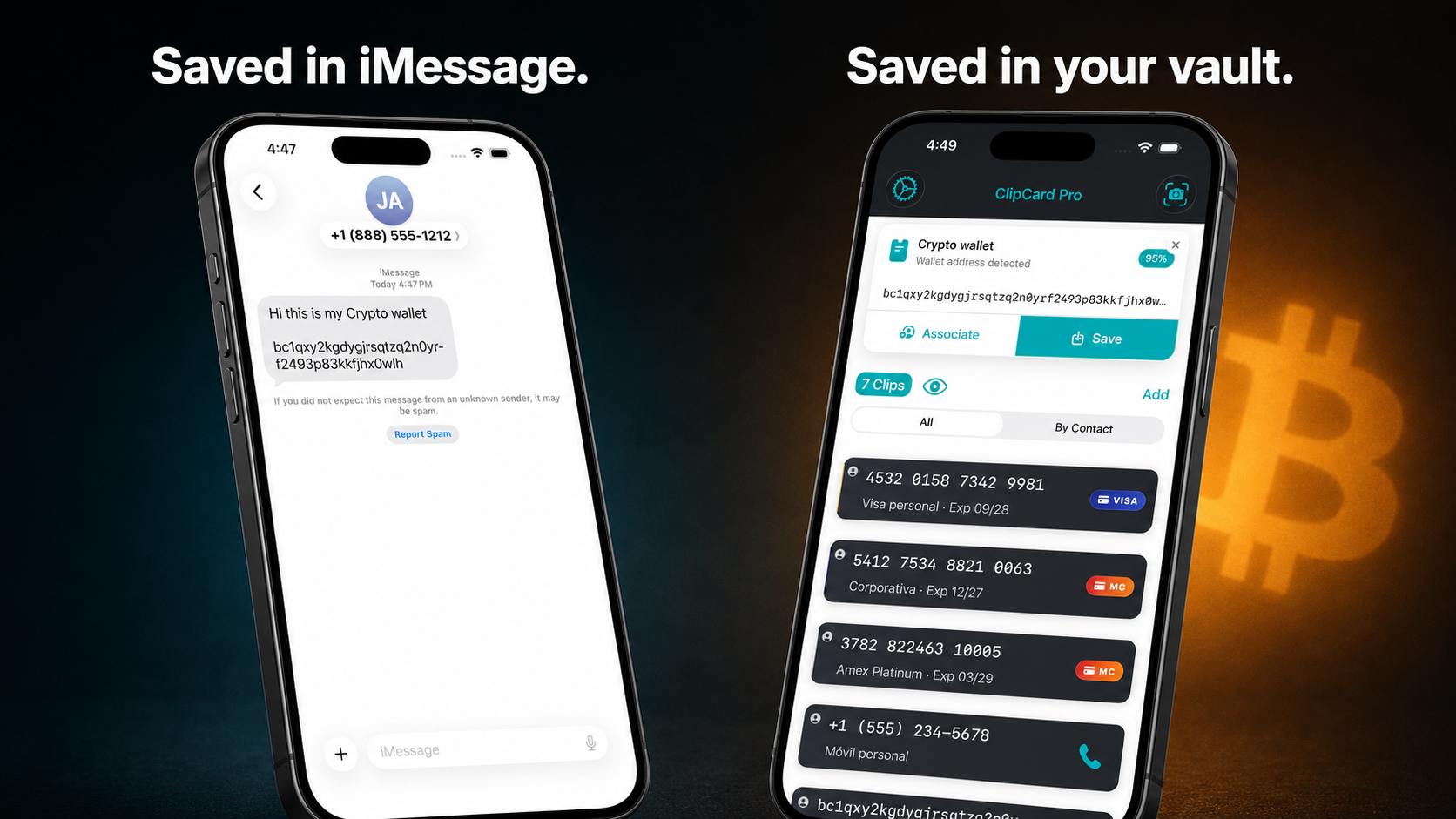
Auto-detection from the clipboard, not the URL. When you copy a credit card number anywhere on iOS, ClipCard Pro detects it from the clipboard’s content — it does Luhn validation, recognizes card-type prefixes, and tags it with confidence scoring. Same for crypto wallets (Bitcoin Legacy + SegWit, Ethereum, Solana, TRON), phone numbers, URLs. The “where you copied this from” doesn’t matter, because in this primitive it shouldn’t.
Tagged by contact, not by site. Because these data items don’t have stable URLs, the natural grouping is whose data is this? — your spouse’s Visa, your work corporate Amex, that crypto wallet your friend sent you. Apple has a privacy-preserving Contacts picker (you only grant access to specific contacts, not the whole address book) and that’s what I use.
Hidden by default in the list. This is the design choice I’m proudest of. Card numbers and wallet addresses are masked by default — `**** **** **** 9981` instead of the full number. You tap to reveal, and Face ID is required if the app has been backgrounded. The principle: at any given moment, the screen shouldn’t be showing data you don’t actively need to see right now.
Quick Fill: number → expiry → CVV in three taps. Each piece is a separate copy action, each one buffered into the clipboard with a 60-second auto-clear. So instead of one big “copy everything” mess, you tap copy-number, paste it, tap copy-expiry, paste it, tap copy-CVV, paste it. Each step takes about a second. No context switch back to a separate app between fields.
No third-party server. Sync is via your own iCloud (NSPersistentCloudKitContainer). I don’t have a backend. I don’t have your data. The only place your clips exist is on your device and in your iCloud account.
No telemetry, no analytics, no third-party SDKs. I’m one person. I don’t need to know what you’re doing inside the app. I have no business relationship with a tracking SDK. The app phones home for exactly one thing: StoreKit 2 receipt validation, which Apple handles.
For people who care about implementation details: AES-256-GCM with HKDF-SHA256 for the encrypted export feature. Keychain for the encryption keys (`kSecAttrAccessibleWhenUnlockedThisDeviceOnly`). NSFileProtectionComplete on the Core Data store, so the database is inaccessible when the device is locked. Privacy blur on the app switcher view. ITSAppUsesNonExemptEncryption=true declared.
What it isn’t
If I sold you the idea above and you go install it expecting a password manager replacement, you’ll be disappointed and rightly so.
ClipCard Pro doesn’t:
- Store passwords, login credentials, or 2FA seeds. Use 1Password, Bitwarden, or Apple Passwords for those.
- Support passkeys.
- Run on Windows, Android, or macOS. iOS only, iOS 17+.
- Replace browser autofill. It doesn’t integrate with Safari at the autofill layer; the flow is copy-paste, not autofill.
- Share clips between users. There’s no “family vault” concept. Everything is single-user.
- Try to be the only app you use. It’s a complement, not a replacement.
If 1Password’s flow already works for you, this app probably isn’t a meaningful upgrade. It’s specifically for the people who, like me, were maintaining a Notes folder for this kind of data because the password manager flow didn’t fit.
The hypothesis I’m testing
The reason this matters, even if you never install the app, is that the broader idea is what I’m actually betting on:
Paste-and-go sensitive data deserves its own primitive on the phone. Not a feature of a password manager. Not a folder in Notes. A separate place, with separate UX, optimized for the case where the data doesn’t have a “site” attached to it.
I’m one solo developer testing this hypothesis with one app. If it doesn’t work, it doesn’t work and I’ll learn something. If it does, I think there’s a real category here that the password manager incumbents haven’t filled because their core abstraction is the wrong shape for it.
Either way: stop saving credit cards and crypto wallets in Notes. The friction of doing it “the right way” in a password manager is real, but the security cost of Notes is bigger than most people realize. If my app isn’t the answer for you, find one that is.
ClipCard Pro on the App Store: https://apps.apple.com/app/id6757620270
If you have feedback, I’m in the Reddit threads where I’ve shared this. Or you can reach me at @wilderlopez_dev on X.
— Wilder Lopez