When Preprocessing Helps-and When It Hurts: Why Your Image Classification Model’s Accuracy Varies So Much
From 65% to 87% accuracy on CIFAR-10 using Convolutional Neural Networks — and what went wrong along the way.
Introduction — Purpose
When building image classification models, most attention is typically given to model architecture, hyperparameters, or training strategies. Yet, the quality and preparation of input data can have an equally — if not more — significant impact on model performance. In practice, the same model trained on the same dataset can produce vastly different results depending solely on how the data is preprocessed.
This raised an important question: How much does data preprocessing actually influence model performance?
To answer this, I designed a set of controlled experiments where I systematically applied different preprocessing techniques, and the results were striking. With only changes in preprocessing and training strategy, the model’s accuracy ranged from around 65% to over 87%, and in one case, dropped to nearly 20%. These observations challenged my initial assumptions and highlighted an often underestimated truth: preprocessing is not just a preliminary step, but a critical factor that can significantly shape model behavior.
Data Processing on Images — Why does it Matter?

1. Gradient Stability (Normalization):
This is the process of pixel scaling. Without scaling the pixels (0–255) to a smaller range (0–1 or Z-score), the computed gradients become too large. This causes the “Exploding Gradient” problem, in which the model’s weights oscillate wildly, preventing it from ever “settling” on a correct solution.
2. Generalization vs. Memorization (Augmentation):
Neural networks are “lazy” — they prefer to memorize specific pixel locations rather than learning what an object actually looks like. Data augmentation (flips, rotations) is the only way to force the model to learn features (like wheels or wings) instead of just “remembering” a particular image.
3. Feature Scaling Consistency (Standardization):
In a color image, the Red, Green and Blue channels might have different distributions. Standardization ensures that every input feature contributes equally to the final prediction. This prevents the model from being biased toward a specific color or brightness level.
4. Input Uniformity (Dimensionality):
Neural networks require a fixed-size input tensor (e.g., 32 * 32 * 3). Data processing ensures that every image, regardless of its original size or aspect ratio, is resized and padded correctly. Without this “alignment,” the matrix multiplications inside the CNN layers would be mathematically impossible.
Setup
All experiments in this study were conducted using Google Colab, which provides a convenient environment for training deep learning models with GPU acceleration. This allowed for faster experimentation and consistent training conditions across different preprocessing techniques.
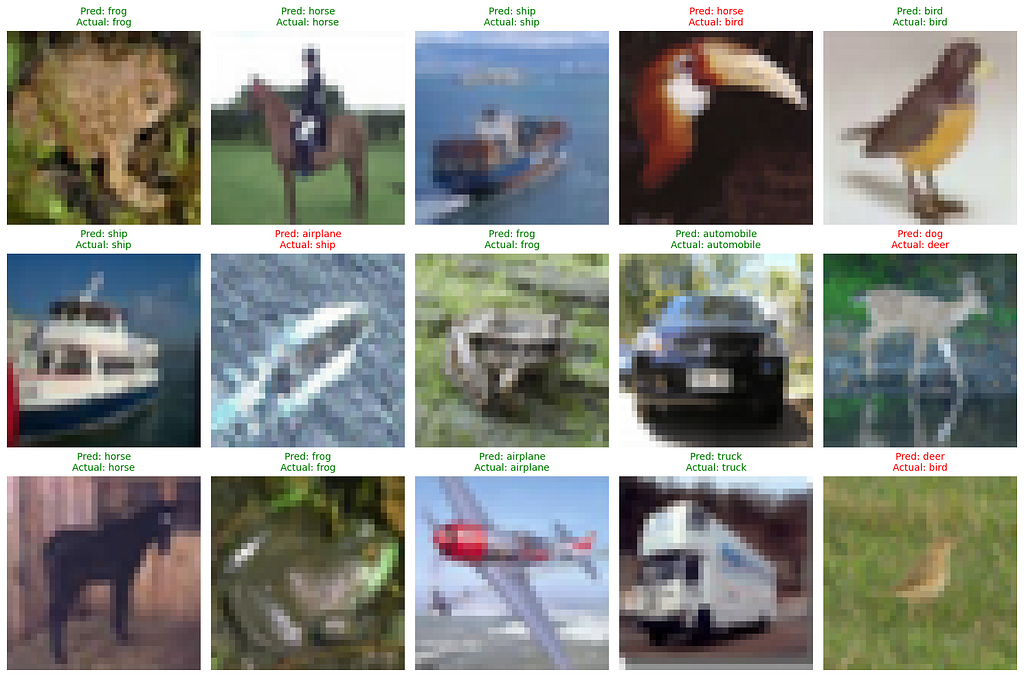
The dataset used throughout the experiments is CIFAR-10, a widely recognized benchmark in image classification. It consists of 60,000 color images of size 32×32 pixels, divided into 10 classes such as airplanes, automobiles, birds, cats, and ships. The dataset is split into 50,000 training images and 10,000 test images.
To ensure a fair comparison, I maintained the following conditions across most experiments:
- The same base Convolutional Neural Networks (CNN) architecture was used in the initial stages
- The optimizer was set to Adam with default parameters
- The loss function used was sparse categorical cross-entropy
- Performance was evaluated using test accuracy
Each experiment differed only in the preprocessing technique applied to the input data.
1. Establishing a Baseline: Training on Raw Data
To understand the true impact of preprocessing, I started with a simple question: How well does a model perform without any preprocessing at all?
Using the CIFAR-10 dataset, I trained a basic Convolutional Neural Network (CNN) model directly on raw pixel values. This means the images were fed into the model exactly as they were — without normalization, scaling, or any form of augmentation.
The model architecture was intentionally kept simple:
- Two convolutional layers followed by max-pooling
- A fully connected dense layer
- A softmax output layer for classification
This setup ensures that any performance differences observed later can be attributed primarily to preprocessing rather than model complexity.
# 1. LOAD DATA (Raw state: No scaling/normalization)
(X_train, y_train), (X_test, y_test) = datasets.cifar10.load_data()

class_names = ['airplane', 'automobile', 'bird', 'cat', 'deer',
               'dog', 'frog', 'horse', 'ship', 'truck']

# 2. BUILD BASIC CNN (Raw state: No Dropout)
model = models.Sequential([
    layers.Conv2D(32, (3,3), activation='relu', input_shape=(32,32,3)),
    layers.MaxPooling2D((2,2)),
    layers.Conv2D(64, (3,3), activation='relu'),
    layers.MaxPooling2D((2,2)),
    layers.Flatten(),
    layers.Dense(64, activation='relu'),
    layers.Dense(10, activation='softmax')
])

# 3. COMPILE
model.compile(optimizer='adam',
              loss='sparse_categorical_crossentropy',
              metrics=['accuracy'])

# 4. TRAIN (10 Epochs)
print("--- Starting Raw Training (10 Epochs) ---")
model.fit(X_train, y_train, epochs=10, batch_size=64, validation_data=(X_test, y_test))
After training the model for 10 epochs, the results were as follows:
Final Test Accuracy (Raw): 65.47%
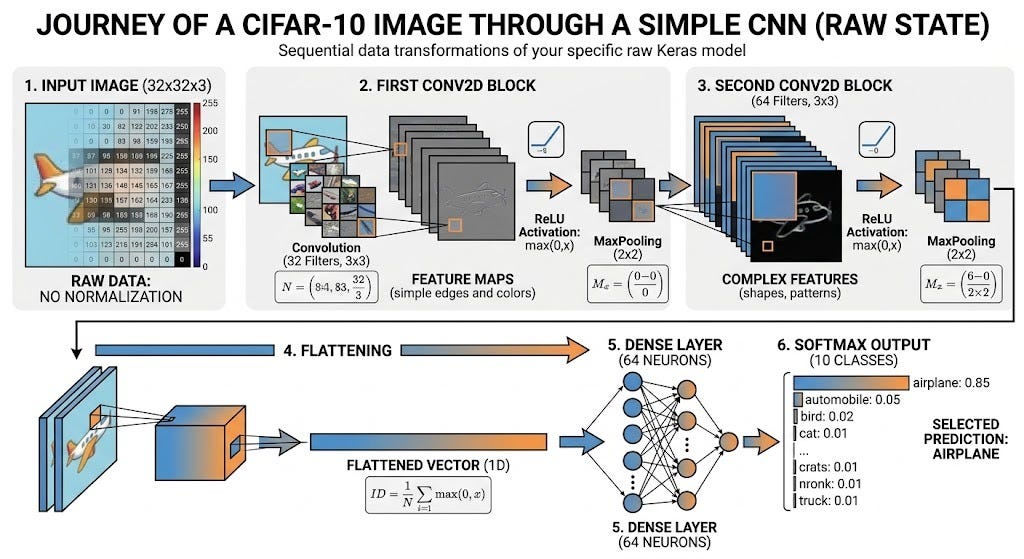
Data Transformation:
- The Raw Input images (32 * 32 * 3) enter the network in its original form (0–255). With zero preprocessing or normalization, the model must handle high-intensity values, which can lead to unstable mathematical gradients during backpropagation.
- A 3 * 3 kernel then slides over the raw image to create “Feature Maps” that capture basic edges and color gradients. A ReLU icon shows negative numbers turning to 0, followed by MaxPooling, which downsizes the data to focus on the most prominent features.
- A second layer of 64 filters works on these initial edge maps to identify complex shapes, such as the curve of an airplane wing or the roundness of a tire. Subsequent ReLU and MaxPooling steps further reduce complexity while preserving critical structural patterns.
- (Flattening): The 3D data block “unrolls” into a single, massive 1D Vector. This visual highlights the significant data expansion before the decision-making step.
- Dense (64 Neurons): This fully connected network learns which features are important. If it sees “wings” and “sky,” it assigns a very high weight to the “Airplane” probability.
- Softmax Output: This final layer converts the classifier’s raw scores into 10 clean probabilities that sum to 100%. In this case, it might show “Airplane: 85%” and “Bird: 5%,” leading to the np.argmax() final selection.
Without any data processing, the model achieved an accuracy of 65.47%. This baseline serves as a crucial reference point. Every improvement — or degradation — in performance in the following experiments will be measured against this initial result.
2. Improving Stability with Normalization

With a baseline accuracy established, the next step was to apply one of the most fundamental preprocessing techniques in Machine Learning: Normalization.
In this experiment, I scaled the pixel values of the CIFAR-10 images from their original range of [0, 255] to a normalized range of [0, 1] while the model architecture and training setup were kept the same as in the baseline experiment. This was done by simply dividing all pixel values by 255.0 before feeding them into the model.
# 2. Basic preprocessing: normalization (0–1 range)

X_train = X_train / 255.0
X_test = X_test / 255.0

# 3. Build CNN model

model = models.Sequential([
    layers.Conv2D(32, (3,3), activation='relu', input_shape=(32,32,3)),
    layers.MaxPooling2D((2,2)),
    layers.Conv2D(64, (3,3), activation='relu'),
    layers.MaxPooling2D((2,2)),
    layers.Flatten(),
    layers.Dense(64, activation='relu'),
    layers.Dense(10, activation='softmax')
])
Final Test Accuracy: 69.38%
1. The Transformation
Normalization (Min-Max Scaling) maps the original pixel values to a fixed range [0, 1]. For an image, the maximum pixel value is 255 and the minimum is 0.
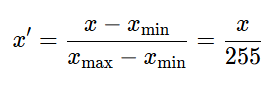
This ensures that the input feature x’ is always a fraction: 0 ≤ x’ ≤ 1.
2. The Gradient Stability Proof
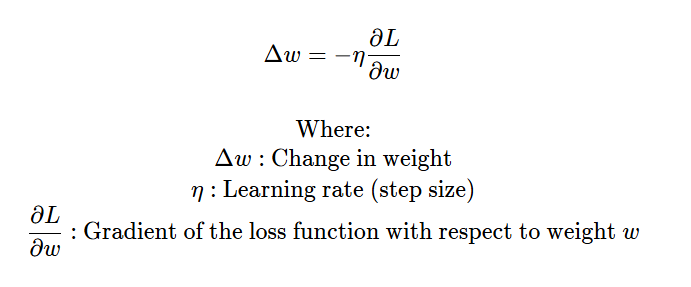
In a neural network, we update weights (w) by using Gradient Descent.
Using the Chain Rule, we can break down the gradient
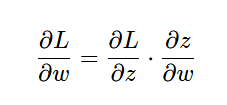
Since the output of a neuron is z = wx + b, the derivative ∂z/∂w is simply the input x:
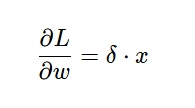
The Impact of Scaling:
- Raw Data (x = 255): The gradient ∂L/∂w becomes 255 × δ. A tiny error (δ) results in a massive weight update. This causes the optimizer to “overshoot” the minimum, leading to oscillations and instability.
- Normalized Data (x = 1.0): The gradient becomes 1 × δ. The weight updates are small, controlled, and proportional to the error, allowing for smooth convergence.
3. Exploring Generalization with Data Augmentation
After observing a clear improvement with normalization, I moved on to a more advanced preprocessing technique: data augmentation. Unlike normalization, which adjusts the scale of input data, augmentation artificially increases the diversity of the training dataset by applying random transformations to the images.
For this experiment, I applied a set of geometric transformations to the CIFAR-10 images, including:
- Random horizontal flips
- Small rotations
- Minor zoom variations
To accommodate the increased variability introduced by augmentation, I trained the model for 20 epochs instead of 10. Apart from this change, the core architecture remained the same as in previous experiments.
# 2. Normalize data
X_train = X_train / 255.0
X_test = X_test / 255.0

# 3. Data augmentation layer
data_augmentation = tf.keras.Sequential([
    layers.RandomFlip("horizontal"),
    layers.RandomRotation(0.1),
    layers.RandomZoom(0.1),
])
However, the results were somewhat unexpected:
Final Test Accuracy: 67.13%
How Data Augmentation Works?
To prove how data augmentation works mathematically, we have to look at it as a Coordinate Transformation function. When you “rotate” or “flip” an image, you are not just moving pixels; you are applying a linear algebra operation called an Affine Transformation.
1. Random Flip (Reflection Matrix)
A horizontal flip is a reflection across the vertical axis. For any pixel at coordinates (x, y), the transformation to (x’, y’) is:
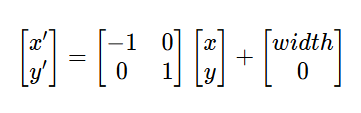
This tells the model that the features (like the tail of a bird) are valid whether they point left or right, effectively doubling your dataset’s variety for symmetrical objects.
2. Random Rotation (Rotation Matrix)
When your code uses layers.RandomRotation(0.1), it picks a random angle θ (up to 36°) and applies a rotation matrix:
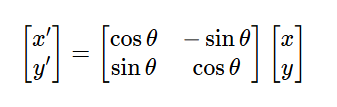
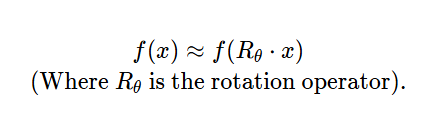
The Proof of Benefit: In a raw CNN, the kernels are sensitive to orientation. By rotating the input x by θ, you force the weights w to become Rotation Invariant. Mathematically, the network learns a function f such that:
3. Random Zoom (Scaling Matrix)
Zooming in or out is a scaling operation. If your zoom factor is s:
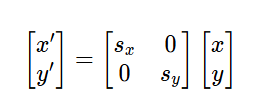
This proves to the model that the Size of the object (Scale Invariance) shouldn’t change the classification. Whether a “Car” takes up 50% of the frame or 80%, the label remains the same.
Conclusion of result for Data Augmentation
Despite the theoretical advantages of data augmentation, the performance was slightly lower than that of the normalized model. This highlights an important nuance: while augmentation can improve generalization, it does not guarantee immediate accuracy gains — especially when used with a relatively simple model or limited training setup.
One possible explanation is that the added variability made the learning task more challenging, requiring either a more powerful model or longer training to fully benefit from the augmented data.
4. When Preprocessing Goes Wrong: A Failure Case
Up to this point, the results suggested a clear trend: preprocessing generally helps improve model performance. But things changed as i introduced photometric augmentation on the CIFAR-10 dataset by randomly adjusting:
- Brightness
- Contrast
Unlike geometric transformations, which preserve the structure of objects, these changes directly alter the pixel intensity distribution of the images. The goal was to make the model more robust to lighting variations. However, this approach comes with risks if not carefully controlled.
# 2. Normalize
X_train = X_train / 255.0
X_test = X_test / 255.0

# 3. Augmentation (brightness + contrast)
data_augmentation = tf.keras.Sequential([
    layers.RandomBrightness(0.2),
    layers.RandomContrast(0.2),
])
Final Test Accuracy: 20.62%
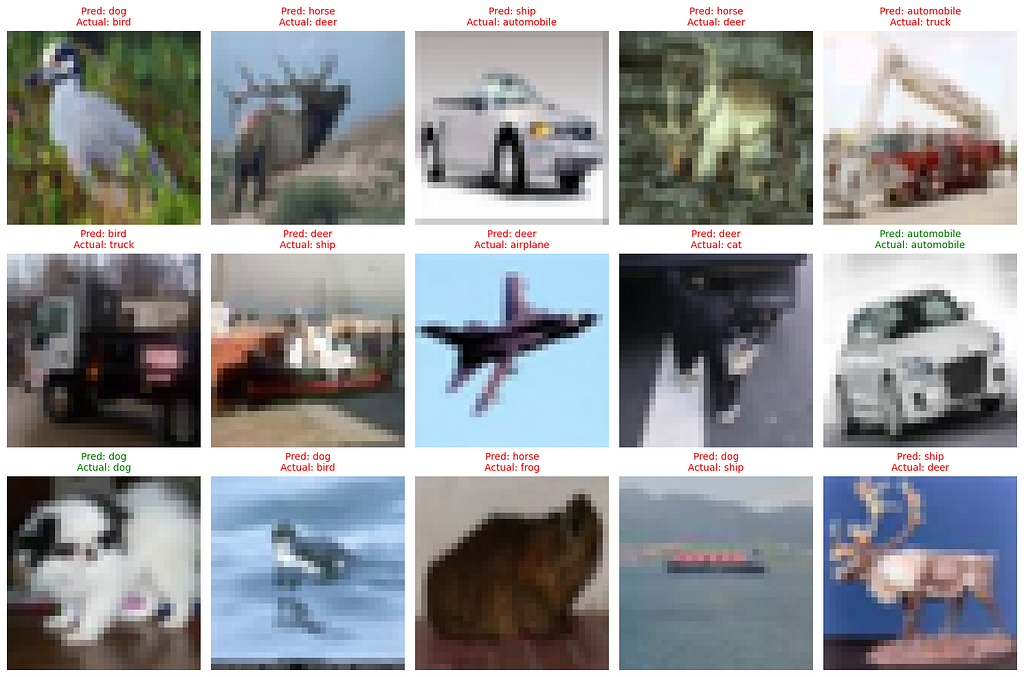
This was the most surprising result of the study.
This represents a dramatic drop in performance — even worse than random-like behavior for a 10-class classification problem.
Why did the accuracy fail?
The accuracy dropped likely due to Information Destruction.
1. Pixel Saturation (Clipping): Pixels must stay between [0, 1]. If I=0.9 and the andom brightness adds (0.2), the result is (1.1). TensorFlow must “clip” this back to (1.0).
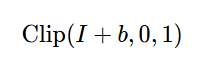
When many pixels are clipped to 1.0 (pure white) or 0.0 (pure black), the edges and textures disappear. The math literally deletes the wing of the airplane or the eye of the cat.
2. Low Resolution (CIFAR-10): CIFAR-10 images are only 32 * 32. They are already very blurry. When you add noise to the brightness and contrast of such tiny images, the Signal-to-Noise Ratio (SNR) becomes very poor. The model gets confused because the data is now too messy to find a pattern.
This highlights a crucial but often overlooked insight:
Not all preprocessing techniques are beneficial — some can severely degrade model performance if applied without proper understanding.
5. Normalization vs Standardization: Is More Complexity Better?

After observing both improvements and failures with different preprocessing techniques, I wanted to explore a slightly more advanced approach: standardization.
Unlike normalization, which scales pixel values to a fixed range of [0, 1], standardization transforms the data to have a mean of 0 and a standard deviation of 1. I applied Z-score standardization to the CIFAR-10 images by computing the mean and standard deviation across the training set and transforming each pixel accordingly.
# 2. STANDARDIZATION (Z-score)
X_train = X_train.astype('float32')
X_test = X_test.astype('float32')

# Compute mean and std per channel
mean = np.mean(X_train, axis=(0,1,2))
std = np.std(X_train, axis=(0,1,2))

# Apply standardization: (x - mean) / std
X_train = (X_train - mean) / std
X_test = (X_test - mean) / std
After training the model, the results were as follows:
Final Test Accuracy: 69.38%
Surprisingly, this is identical to the performance achieved with simple normalization.
How does standardization work?
The mathematical proof of Standardization (Z-score) explains how to transform any dataset so that it is centered at zero with a unit spread.
1. The Transformation Formula
Standardization transforms each pixel x into a new value z by subtracting the mean (μ) and dividing by the standard deviation (σ):
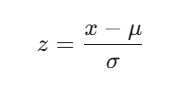
- Mean (μ): The average pixel intensity.
- Standard Deviation (σ): The measure of how much the pixel values vary from the average.
2. Proof: Why the Resulting Mean is Always 0
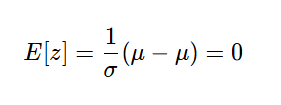
To prove the new mean E[z] is zero, we take the expected value of the transformation:
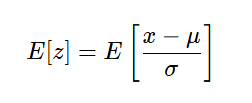
Since E is a linear operator and μ, σ are constants:
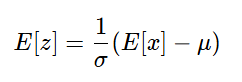
Because E[x] is by definition the mean(μ):
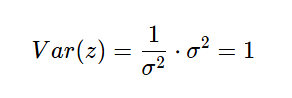
3. Proof: Why the Resulting Variance is Always 1
To prove the new variance Var(z) is one, we apply the property
Var(ax + b) = a²Var(x):

The constant μ/σ does not affect variance, so:
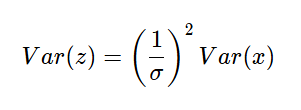
Since Var(x) = σ² by definition:
Despite the mathematical superiority, the result of the experiment highlights an important insight: while standardization is mathematically more sophisticated, it does not necessarily provide additional benefits for this particular task. In the context of image data — especially when using Convolutional Neural Networks — basic normalization is often sufficient to achieve stable and effective training.
In other words, increasing preprocessing complexity does not always translate to better performance.
6. Building an Effective Pipeline: Combining the Right Techniques

After exploring individual preprocessing techniques — some helpful, some neutral and others clearly harmful — the next step was to bring everything together into a carefully designed pipeline.
Instead of relying on a single method, I combined the most effective strategies observed in previous experiments:
- Standardization (Z-score normalization) for stable input distribution.
- Geometric data augmentation (flip, rotation, translation) for better generalization.
- A deeper CNN architecture to capture more complex patterns.
- Batch normalization and dropout to improve training stability and reduce overfitting.
In addition, I introduced a few training optimizations:
- One-hot encoding of labels.
- Label smoothing to prevent overconfidence.
- Early stopping and learning rate scheduling for efficient convergence.
# Standardization (Z-score)
X_train = X_train.astype('float32')
X_test = X_test.astype('float32')
mean = np.mean(X_train)
std = np.std(X_train)
X_train = (X_train - mean) / (std + 1e-7)
X_test = (X_test - mean) / (std + 1e-7)

# One-Hot Encoding
y_train_oh = utils.to_categorical(y_train, 10)
y_test_oh = utils.to_categorical(y_test, 10)

# 2. DATA AUGMENTATION
data_augmentation = tf.keras.Sequential([
    layers.RandomFlip("horizontal"),
    layers.RandomRotation(0.1),
    layers.RandomTranslation(0.1, 0.1),
])

# 3. HIGH-CAPACITY MODEL (Deep CNN)
model = models.Sequential([
    data_augmentation,

    # Block 1
    layers.Conv2D(64, (3, 3), padding='same', activation='relu', input_shape=(32, 32, 3)),
    layers.BatchNormalization(),
    layers.Conv2D(64, (3, 3), padding='same', activation='relu'),
    layers.BatchNormalization(),
    layers.MaxPooling2D((2, 2)),
    layers.Dropout(0.2),

    # Block 2
    layers.Conv2D(128, (3, 3), padding='same', activation='relu'),
    layers.BatchNormalization(),
    layers.Conv2D(128, (3, 3), padding='same', activation='relu'),
    layers.BatchNormalization(),
    layers.MaxPooling2D((2, 2)),
    layers.Dropout(0.3),

    # Block 3
    layers.Conv2D(256, (3, 3), padding='same', activation='relu'),
    layers.BatchNormalization(),
    layers.MaxPooling2D((2, 2)),
    layers.Dropout(0.4),

    # Fully Connected
    layers.Flatten(),
    layers.Dense(256, activation='relu'),
    layers.BatchNormalization(),
    layers.Dropout(0.5),
    layers.Dense(10, activation='softmax')
# 5. CALLBACKS
callbacks = [
    tf.keras.callbacks.EarlyStopping(monitor='val_accuracy', patience=8, restore_best_weights=True),
    tf.keras.callbacks.ReduceLROnPlateau(monitor='val_loss', factor=0.5, patience=3, verbose=1)
]
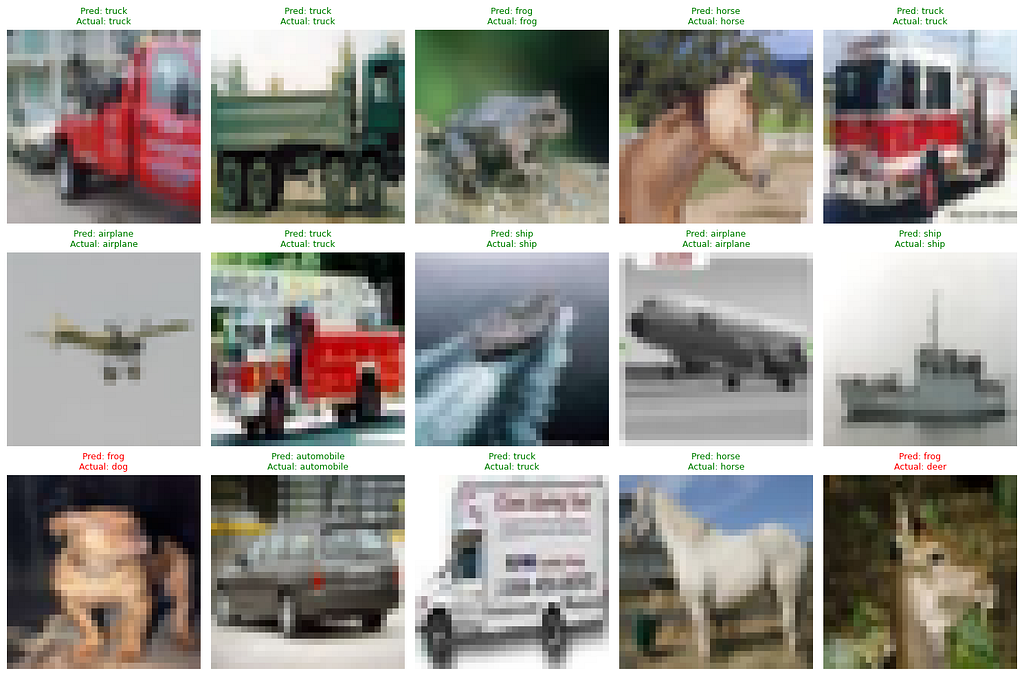
Final Test Accuracy: 87.32%
How does it work?
- Batch Normalization
Batch Normalization (BN) stabilizes the learning process by normalizing the activations of each layer.
The Mathematical Proof:
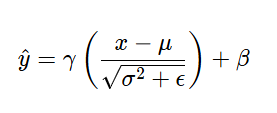
x (Input): The raw signal coming from the previous layer (e.g., a “feature map” of a bird’s wing).
μ(Mean): The average signal strength of all 128 images in the current batch. Subtraction centers the data at 0.
σ² (Variance): Measures how much the data “spreads out.” Division by the square root of variance scales the data to a standard size (1).
ε (Epsilon): A tiny “safety” number (like 10⁻⁷). It prevents the computer from crashing if it tries to divide by zero.
γ and β (Scale & Shift): These are the model’s “adjustable knobs.” If the model decides that pure normalization is too restrictive, it uses these to shift the data back to a range that works better for the next layer.
2. The Label Smoothing Formula
This formula prevents the model from being “too confident” (overfitting) by softening the targets.
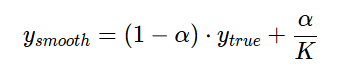
- y_true: The original Hard label (eg; 1 for Airplane, 0 for everything else).
- α (Alpha): The Smoothing Factor (0.1 in your code). This represents how much uncertainty we want to inject.
- K: The total number of classes (10 for CIFAR-10).
- α/K: This is the Uniform Noise. It gives a tiny bit of probability (0.01) to all the wrong classes, so the model learns that even if it’s sure it’s an airplane, it shouldn’t completely ignore the possibility of it being a bird.
The above experiment gets a substantial jump from the initial baseline of 65.47%, demonstrating how the combination of well-chosen preprocessing techniques and architectural improvements can dramatically boost performance.
This final result is not the outcome of a single technique, but rather the result of aligning preprocessing, model design, and training strategy. It highlights a crucial takeaway:
There is no single best preprocessing method — only the right combination for a given problem.
Key Takeaways and Final Insights
Before starting this study, I set out to answer a simple question: how much does data preprocessing really affect model performance? Through a series of controlled experiments on the CIFAR-10 using Convolutional Neural Networks, the answer became clear — far more than expected.
Model accuracy varied significantly, ranging from 65% to 87%, depending solely on how the data was preprocessed. While techniques like normalization improved performance, others — when applied incorrectly — led to drastic drops in accuracy.
These results highlight a key insight:
It’s not about using more preprocessing techniques, but about choosing and combining the right ones effectively. Ultimately, how you preprocess your data can matter just as much as the model you build.
References
- Deep Learning
Ian Goodfellow, Yoshua Bengio, Aaron Courville.
Deep Learning. MIT Press, 2016. - Pattern Recognition and Machine Learning
Christopher M. Bishop.
Pattern Recognition and Machine Learning. Springer, 2006. - Hands-On Machine Learning with Scikit-Learn, Keras, and TensorFlow
Aurélien Géron. Hands-On Machine Learning with Scikit-Learn, Keras, and TensorFlow. O’Reilly, 2019. - CIFAR-10
Developed by Alex Krizhevsky, CIFAR-10 is publicly available for research and educational use.
https://www.cs.toronto.edu/~kriz/cifar.html
When Preprocessing Helps — and When It Hurts: Why Your Image Classification Model’s Accuracy Varies was originally published in Level Up Coding on Medium, where people are continuing the conversation by highlighting and responding to this story.