
OLAP stands for Online Analytical Processing, a type of Database built specifically for running complex queries across large datasets.
In most business applications, When you are building a data backed application, one of the first decisions you face is choosing the right database for data architecture you mainly see two types of database systems are commonly used: OLTP and OLAP. To clearly understand OLAP, we first need to see what differentiates these two database systems.
In our daily routine, consider an e commerce website. When we browse products, add items to the cart, place an order, or write a review, the system needs to interact with the database very quickly.

If a product is purchased, its quantity is updated in the inventory. If a user adds a comment or review, a new record is inserted into the database. These operations involve simple queries, affect a small amount of data, and must be executed very fast. Systems that handle such day to day transactional operations are called OLTP (Online Transaction Processing) systems. Databases used for OLTP are optimized for fast inserts, updates, deletes, and single-row reads, with a strong focus on data consistency and low latency rather than complex query execution.
Examples of databases commonly used for OLTP include PostgreSQL, MySQL, and SQL Server.
On the other hand, we have OLAP systems, which are databases built specifically for running complex analytical queries over large datasets.
Let’s take the same e commerce platform as an example. Thousands or even millions of users purchase products and leave reviews every day. After 30 days, the system has accumulated a large amount of historical data. Now the business wants to answer questions like:
- Which products are selling the most?
- Which categories generate the highest revenue?
- Which regions of the world contribute the most sales?
Answering these questions requires scanning and aggregating large volumes of data. For a platform like Amazon, where sales data can grow into terabytes or even petabytes, this is not feasible with a traditional OLTP database. This is where OLAP databases come into play. They are designed with optimized architectures, such as columnar storage, advanced compression, and highly efficient query execution engines. These optimizations allow OLAP systems to generate analytical insights with low latency while efficiently managing memory and compute resources.
Let’s Start with OLAP, Formally
An OLAP database is designed to analyze historical data in order to identify patterns, calculate trends, and generate reports. Unlike OLTP systems, which focus on processing individual transactions, OLAP systems scan and process millions or even billions of rows to answer questions such as “What were our best-selling products last quarter?” or “How many users signed up each week over the past year?”
These queries take longer than typical OLTP operations often seconds or even minutes but they produce insights that directly support business and strategic decision-making.
Modern OLAP systems such as BigQuery, Snowflake, Redshift, and ClickHouse are optimized for:
- Scanning large volumes of data efficiently
- Performing set-based operations like aggregations, joins, and filters
- Operating on columns rather than individual rows
As a result, OLAP databases excel at questions like:
- “Give me counts, sums, and averages grouped by a dimension”
- “Join these tables and aggregate over millions of rows”
Why OLAP Is Not Suited for Row-Wise or Record-Wise Processing
If your workload requires per record processing after data retrieval, you are effectively bypassing the core strengths of an OLAP system. This does not mean OLAP databases cannot perform row wise operations, but the more complex your per record logic becomes, the slower and less efficient the workload will be.
rows = db.query("SELECT * FROM events WHERE date = '2026–01–01'")
for row in rows:
    result = complex_logic(row)
In this pattern, the database does the expensive work of scanning large datasets, only for the application layer to process each row individually. This negates the benefits of vectorized execution and columnar processing that OLAP engines are optimized for.
A useful rule of thumb is: OLAP rewards simplicity and punishes complexity. Keep your queries lean, declarative, and engine-friendly.
Best practices for OLAP queries:
- Filter early: Push filters as close to the data source as possible. Applying WHERE clauses before aggregations significantly reduces the amount of data that needs to be scanned.
- Avoid overfetching: Select only the columns you actually need. Fetching entire rows when you only require two columns wastes I/O and memory. While some systems like Apache Doris perform automatic column pruning, it’s best to be explicit.
- Use engine level aggregations: Leverage built-in aggregation functions such as SUM, COUNT, and AVG instead of computing them in your application code. These operations are heavily optimized inside OLAP query engines.
Common OLAP Query Patterns
OLAP systems perform best when the data structure is query friendly. They are designed to efficiently answer analytical questions that operate on large datasets rather than individual records.
Most OLAP workloads fall into three common query patterns:
- Aggregations: Computing sums, averages, counts, and other aggregate metrics
- Time series analysis: Analyzing trends over time, such as hourly, daily, or monthly metrics
- Multi dimensional slicing: Breaking down metrics by dimensions like region, product, device type, or user segment
These patterns are commonly seen in dashboards, business intelligence tools, and real-time analytics APIs, where users explore data interactively and expect fast responses.
How Data Storage Optimizations Improve OLAP Query Performance
Data storage layout plays a critical role in OLAP query performance. OLAP databases are designed around analytical access patterns, and their storage structures reflect that.
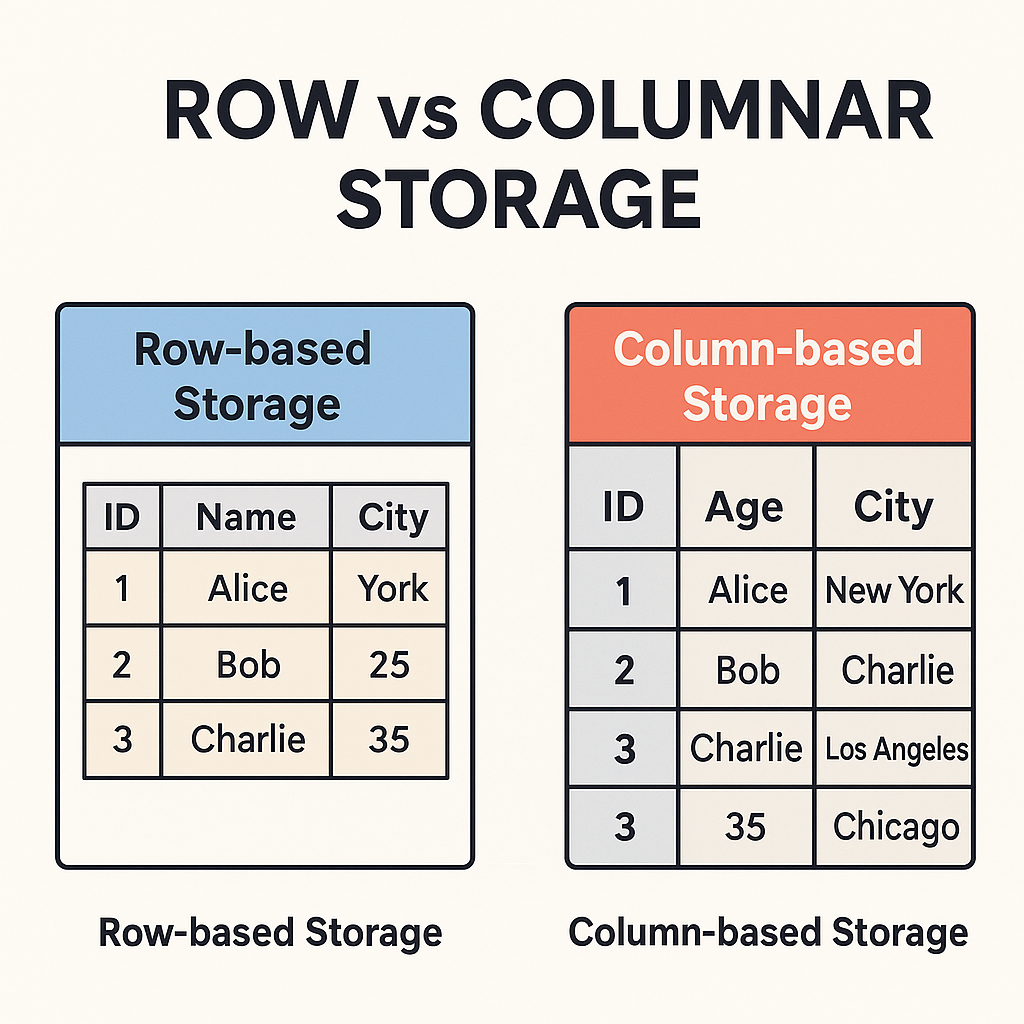
Columnar storage is one of the most important optimizations. Unlike OLTP systems, which store data in a row-oriented (record-wise) format, OLAP databases store data column by column. This allows the query engine to extract entire column vectors at once and perform operations on them efficiently, rather than fetching and processing individual records.
Another key optimization is denormalized data modeling. Unlike OLTP systems, OLAP databases favor denormalized schemas to minimize joins and runtime computations. Where possible, data is pre aggregated during ingestion. For example, if you frequently report daily sales, storing precomputed daily totals is far more efficient than recalculating them on every query.
To understand why this matters, imagine reading the revenue column from a table with a billion rows. In a row oriented database, the engine must scan every row even though you only care about a single field. In contrast, column oriented databases store all revenue values together in tightly compressed blocks, so scanning that column requires far less disk I/O and memory access.
SELECT AVG(price)
FROM orders
WHERE date > '2024-01-01';
only needs to read the price and date columns not customer names, addresses, or other unrelated fields. As a result, such queries can run in seconds instead of tens of seconds compared to traditional row-based systems.
JOIN Is Your Enemy
Joins in OLAP databases are like kryptonite for Superman: expensive, slow, and best avoided if your data is prepared correctly. The only joins that typically perform well are Fact → Dimension table joins in a star schema.
OLAP databases often denormalize data into wider tables that combine related information. For example, a sales fact table might include customer name, product category, and order details in the same row. This reduces the number of joins needed for analytical queries, trading some storage efficiency for much better query performance.
Best practices to handle joins in OLAP:
- Denormalize to avoid joins: Flatten your data during ingestion. If you are joining tables to generate a report, you are likely doing it the hard way. Pre-join data into a single table during ETL whenever possible.
- Use subqueries sparingly: If a join is unavoidable, subqueries can sometimes be faster than direct joins, especially in systems like Pinot or StarRocks, but they still add overhead.
- Leverage materialized views: Some OLAP databases, like ClickHouse, allow you to precompute joins or aggregations during ingestion using materialized views. This offloads join costs from query time to write time.
A good rule of thumb: if you are writing a query with a JOIN, ask yourself, “Can I denormalize this instead?” Nine times out of ten, the answer is yes.
Play with Indexes
Indexes in OLAP databases work differently than in OLTP systems. They are designed for large scale scans, not single row lookups. Used wisely, they can greatly improve query performance; used poorly, they can bloat storage or slow down data ingestion.
Common OLAP index types:
- Bitmap Indexes: Ideal for low cardinality columns, such as status flags or categories. Systems like Apache Druid and Pinot leverage bitmap indexes to accelerate filtering on these columns.
- Inverted Indexes: Useful for text search or high cardinality columns. For example, ClickHouse can use inverted indexes to speed up WHERE clauses on string fields, though this comes with additional storage overhead.
Think of indexes like spices in a recipe: too few, and your queries are bland; too many, and you overwhelm the system. Balance is key.
Scaling OLAP: Sharding and Partitioning
When it comes to scaling OLAP databases, sharding and partitioning are your best friends.
- Sharding distributes data across multiple nodes, enabling parallel query execution and horizontal scalability.
- Partitioning divides data within a node into smaller, manageable chunks often based on time or key ranges allowing queries to scan only relevant partitions.
Together, sharding and partitioning allow OLAP systems to handle massive datasets and high query concurrency without breaking a sweat.
Metrics, Observability, and Fine Tuning
You cannot optimize what you do not measure. OLAP databases require continuous monitoring to maintain performance and reliability.
Key areas to monitor and optimize:
- Query latency: Use built in monitoring tools such as Druid’s metrics or ClickHouse system tables to track query performance. Set alerts for queries that exceed your latency SLA.
- Resource usage: Monitor CPU, memory, and disk I/O. Overloaded nodes can lead to slow queries and unpredictable performance. Tools like Prometheus and Grafana integrate well with most OLAP systems for real-time observability.
- Configuration tuning: Adjust settings like cache sizes, thread pools, and segment sizes according to your workload. For example, increasing Pinot’s query thread pool can improve QPS but may put additional strain on memory.
- Iterate and experiment: Optimization is a continuous cycle. Measure results, adjust configurations, and run experiments. A/B test different indexing strategies, sharding schemes, or query patterns to find what works best for your workload.
Effective observability combined with careful tuning ensures your OLAP system runs efficiently even under high concurrency and large data volumes.
Decision Checklist for Engineers and Founders
Before committing to an OLAP database, it is essential to validate your choice against real requirements. Here’s a practical checklist:
Run a realistic benchmark dataset
- Use your actual data schema and query patterns not synthetic examples or documentation queries.
- Load a representative sample of your production data and run the queries your application will actually execute.
- Measure not only average query latency, but also p95 and p99 latency under concurrent load. Some databases handle simple queries well but struggle with complex joins or high concurrency.
Validate developer experience locally
- Install the database or managed service CLI and build a small data pipeline from scratch.
- Evaluate how long it takes to create tables, ingest data, write queries, and debug issues.
- Good developer experience includes clear error messages, comprehensive documentation, and local development tools that mirror production behavior.
Assess security and governance features
- Verify support for encryption at rest and in transit, role based access control, audit logging, and compliance certifications like SOC 2 or GDPR.
- For production workloads, check for features such as query quotas, resource isolation, and column- or row-level access controls.
Plan for observability and autoscaling
- Understand the metrics the database exposes and how you will monitor query performance, resource utilization, and errors in production.
- Managed services may provide dashboards and alerting out-of-the-box, while self-hosted solutions often require integration with tools like Prometheus and Grafana.
- Evaluate whether the database supports automatic scaling based on query load or if you must provision additional capacity manually.
Following this checklist ensures that your OLAP database choice aligns with performance, operational, and security requirements before you commit to production.
Conclusion
OLAP databases differ significantly from traditional relational systems like PostgreSQL. While PostgreSQL can handle small analytical workloads with moderate data volumes, it lacks columnar storage and vectorized execution, which are key features of specialized OLAP systems.
Modern OLAP databases, such as ClickHouse®, can handle multiple terabytes of data on a single node, depending on hardware specifications and query patterns. The exact limits depend on factors like compression ratio, query complexity, and whether storage uses SSDs or HDDs.
In short, OLAP databases are purpose-built for fast, large scale analytical queries, making them essential for organizations that need timely insights from massive datasets.
What is OLAP? Architecture, Use Cases, and How It Works in Data Warehousing was originally published in Level Up Coding on Medium, where people are continuing the conversation by highlighting and responding to this story.