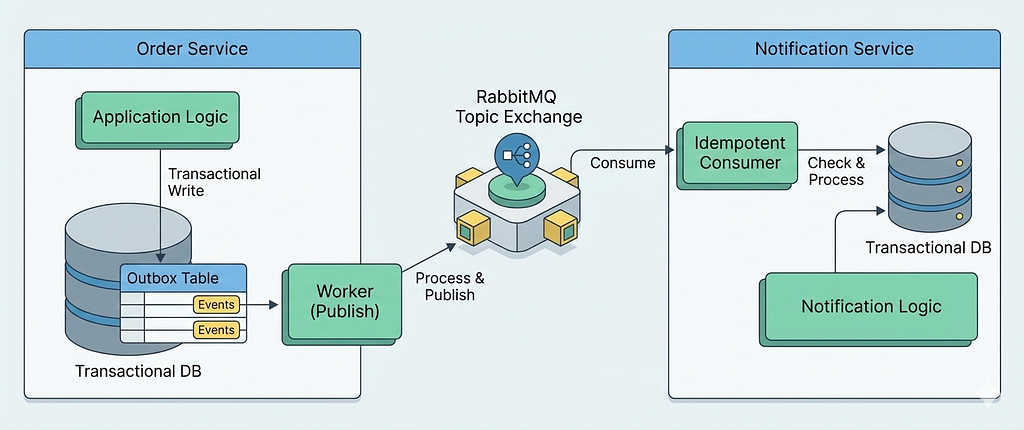
Publishing events directly to a message broker from an API handler is a common source of inconsistency in distributed systems. If the database transaction commits but the broker publish fails (or vice versa), the system ends up in a partially updated state: an order exists in the database, but downstream services never receive the event.
This problem cannot be solved reliably with retries alone. The database and the message broker are two independent systems with no shared transaction boundary, which makes atomic updates across both impossible.
The Transactional Outbox Pattern addresses this by storing domain events in a database table within the same transaction as the business operation. A separate background worker then publishes those events to the message broker asynchronously, ensuring consistency between state changes and event delivery.
In this article, we’ll build a minimal but production-oriented implementation of this pattern using Go, PostgreSQL, RabbitMQ, and Docker Compose. We’ll develop two microservices:
- Order Service — exposes a /orders endpoint, persists orders, and writes outbox events atomically
- Notification Service — consumes events and demonstrates exactly-once processing using consumer-side idempotency
To keep the focus on correctness and clarity, the outbox publisher uses a poll-based worker that queries the database every 1–2 seconds. This approach is simple, reliable, and sufficient for moderate-scale systems.
This is a two-part series:
- Part 1 (this article) focuses on core functionality: service setup, transactional outbox writes, poll-based publishing, consumer idempotency via a processed_messages table, essential metrics for SLOs, and trace context propagation across services.
- Part 2 extends the system with retries and exponential backoff for both publisher and consumer, dead-letter queues, observability dashboards, and a discussion of CDC-based outbox implementation using Debezium and Kafka.
Table of Contents
- System Overview
- Database Schema
- Order Service (transactional write)
- Outbox Worker (publisher)
- Using RabbitMQ Topic Exchange
- Notification Service (consumer)
- Consumer side Idempotency
- Deduplication with a Unique Constrait
- End-to-end test with Docker Compose
- What to Do with Published Outbox Events
- Operational Metrics
- Trace Propagation Through the Outbox
- What’s Next
- Conclusion
System Overview
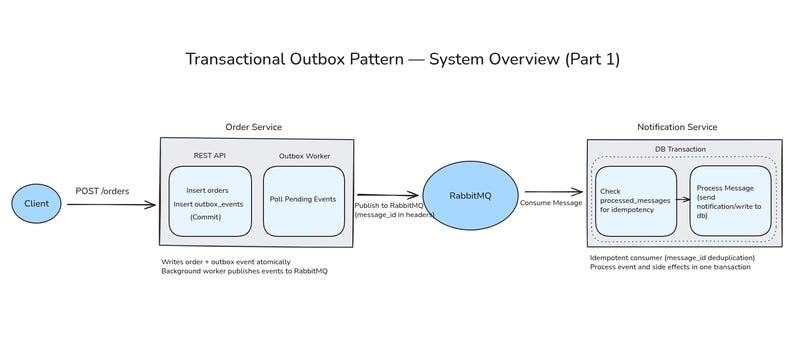
At a high level, the Order Service persists business state and records domain events atomically using the outbox pattern.
A background outbox worker polls the database, publishes pending events to RabbitMQ, and marks them as published.
Downstream services, such as the Notification Service, consume these events and ensure exactly-once processing using idempotency at the consumer side.
In production, outbox worker often runs as a separate process, for this article we keep it in the same binary to reduce operational complexity.
Database Schema
This section defines the database tables that enable reliable event publishing using the outbox pattern and exactly-once message processing on the consumer side.
outbox_events table
This table is the core of the outbox pattern. Every domain event is persisted here in the same transaction as the business operation, ensuring atomicity between state changes and event creation.
CREATE TYPE OutboxEventStatus AS ENUM (
  'pending',
  'in_progress',
  'published',
  'failed'
);

CREATE TABLE outbox_events (
  id UUID PRIMARY KEY,
  event_key VARCHAR(64) NOT NULL,
  payload JSONB NOT NULL,
  status OutboxEventStatus NOT NULL,
  locked_at TIMESTAMP DEFAULT NULL,
  locked_by VARCHAR(128) DEFAULT NULL,
  failure_reason TEXT DEFAULT NULL,
  failed_at TIMESTAMP DEFAULT NULL,
  created_at TIMESTAMP NOT NULL DEFAULT NOW()
);
Column breakdown
- id A UUID generated at event creation time. This value is reused as the message_id on the consumer side to implement idempotent processing.
- event_key The routing key used by RabbitMQ to determine which consumers should receive the event.
- payload The event body stored as JSON. In a real system this would typically contain identifiers and minimal state required by downstream services.
- status Tracks the lifecycle of the event:
– pending → created but not yet picked up
– in_progress → locked by a worker
– published → successfully sent to RabbitMQ
– failed → publishing failed - locked_at / locked_by
– Used to implement lease-based locking.
– When a worker picks up events, it acquires a lease by setting these fields. If a worker crashes mid-processing, the lease can expire (e.g. after 30 seconds), allowing another worker to safely reclaim and retry those events. - failure_reason / failed_at Capture error context when publishing fails, making retries and debugging easier.
Indexes
The outbox worker frequently queries events by status and creation time, and needs to efficiently detect expired leases. The following indexes support these access patterns:
CREATE INDEX idx_outbox_events_status_created_at
ON outbox_events (status, created_at);

CREATE INDEX idx_outbox_events_locked_at
ON outbox_events (locked_at)
WHERE locked_at IS NOT NULL;
We’ll look at the exact SQL used by the outbox worker in a later section.
orders table
This table represents a minimal business entity and exists solely to demonstrate an atomic business operation combined with outbox event creation.
CREATE TABLE orders (
  id BIGSERIAL PRIMARY KEY,
  status VARCHAR(10) NOT NULL,
  created_at TIMESTAMP NOT NULL DEFAULT NOW(),
);
processed_messages table
This table is used by the Notification Service (the RabbitMQ consumer) to enforce idempotency and achieve effectively-once processing.
CREATE TABLE processed_messages (
  message_id UUID PRIMARY KEY,
  processed_at TIMESTAMP NOT NULL DEFAULT NOW()
);
Each consumed message attempts to insert a row using its message_id.
If the insert fails due to a primary key conflict, the message has already been processed and can be safely ignored.
This pattern protects the consumer from:
- message redeliveries
- consumer restarts
- broker retries
Order Service (transactional write)
Let’s start with the Order Service. Below is the directory structure to give you a sense of how responsibilities are separated:
.
├── cmd
│   └── server
│       └── main.go
├── internal
│   ├── config
│   ├── database
│   │   └── model
│   │       ├── order.go
│   │       └── outbox_event.go
│   ├── http
│   │   └── handler
│   ├── outbox
│   ├── rabbitmq
│   └── service
│       ├── order.go
│       └── outbox_event.go
└── schema.sql
Boilerplate related to configuration, logging, database setup, and HTTP server wiring is intentionally omitted from the article to keep the focus on the outbox pattern. The complete, runnable code is available in the repository.
Application lifecycle and graceful shutdown
The Order Service runs two long-lived components:
- An HTTP server that handles /orders requests
- An outbox worker that continuously polls and publishes events
Both are started from main.go and share a common context.Context.
On shutdown (for example, SIGTERM in Kubernetes or Docker), the context is cancelled, which allows:
- The HTTP server to stop accepting new requests
- The outbox worker to stop polling
- In-flight event processing to complete before exit
This ensures that:
- No new outbox events are claimed during shutdown
- Already claimed events are either published or released safely
- The service can be terminated without corrupting outbox state
The full main.go and shutdown wiring are intentionally omitted here to keep the focus on the outbox pattern. You can find the complete implementation in the repository.
Atomic order creation + outbox write
The most important guarantee we want from the outbox pattern is this:
Either the order and its corresponding event are both persisted, or neither is.
To achieve this, we write the order row and the outbox event within the same database transaction. At this stage, we do not interact with RabbitMQ at all, publishing is handled later by a background worker.
Here’s the Order creation logic:
func (o *orderService) Create(ctx context.Context, req *CreateOrder) (*model.Order, error) {
    var order *model.Order

    err := withTransaction(ctx, o.db, func(tx *gorm.DB) error {
        order = &model.Order{
            Status: "pending",
        }

        if err := tx.Create(order).Error; err != nil {
            return err
        }

        outboxEvent := &model.OutboxEvent{
            ID:       uuid.NewString(),
            EventKey: "order.created",
            Payload: model.JSONB{
                "id":         order.ID,
                "product_id": req.ProductID,
                "quantity":   req.Quantity,
            },
            Status:      model.OutboxEventStatusPending,
        }

        if err := o.outboxEventService.Create(ctx, tx, outboxEvent); err != nil {
            return err
        }

        return nil
    })

    if err != nil {
        return nil, err
    }

    return order, nil
}
If the transaction commits, we are guaranteed that the event exists in the outbox table.
If it fails, neither the order nor the event is persisted.
Outbox Worker (Publisher)
Once events are written to the outbox_events table, a background worker is responsible for publishing them to RabbitMQ.
Each event follows a simple lifecycle:
pending → in_progress → published | failed
The key requirement is that multiple worker instances must be able to run concurrently without publishing the same event twice.
Claiming events safely
The outbox worker periodically queries the database and claims a batch of events for processing:
func (o *outboxEventService) ClaimEvents(
    ctx context.Context,
    workerID string,
    limit int,
) ([]*model.OutboxEvent, error) {
    var events []*model.OutboxEvent

    err := o.db.WithContext(ctx).
        Raw(`
        UPDATE outbox_events
        SET
                    status = ?,
                    locked_at = NOW(),
                    locked_by = ?
        WHERE id IN (
                    SELECT id
                    FROM outbox_events
                    WHERE
                            status = ?
                            OR (
                                status = ?
                                AND locked_at < NOW() - INTERVAL '30 seconds'
                            )
                    ORDER BY created_at
                    LIMIT ?
                    FOR UPDATE SKIP LOCKED
        )
        RETURNING *`,
            model.OutboxEventStatusInProgress,
            workerID,
            model.OutboxEventStatusPending,
            model.OutboxEventStatusInProgress,
            limit,
        ).
        Scan(&events).Error

    return events, err
}
This query does several important things atomically:
- Selects only events that are:
– pending, or
– in_progress but abandoned by a crashed worker (lease expired) - Orders events by creation time
- Limits the batch size
- Locks rows using FOR UPDATE SKIP LOCKED
- Updates their state to in_progress
- Returns the claimed rows in one round-trip
Because this is a single SQL statement, we avoid race conditions that would occur with a SELECT → UPDATE approach.
SKIP LOCKED ensures that if another worker has already claimed certain rows, they are skipped instead of blocking, allowing horizontal scaling without coordination.
Concurrent publishing with bounded workers
Once events are claimed, the worker publishes them concurrently using a bounded pool of goroutines:
func (o *Outbox) Start(ctx context.Context, workerID string) {
    o.log.Info("Outbox worker started")

    if err := o.initChannels(o.config.MaxConcurrency); err != nil {
        o.log.Error("Failed to initialize channels", logger.Field{Key: "error", Value: err.Error()})
        return
    }
    defer o.closeChannels()

    eventsCh := make(chan *model.OutboxEvent, o.config.MaxConcurrency)
    wg := sync.WaitGroup{}

    for i := 0; i < o.config.MaxConcurrency; i++ {
        wg.Add(1)
        go func(workerID int) {
            defer wg.Done()
            o.processEvents(ctx, workerID, o.channels[i], eventsCh)
        }(i)
    }

    ticker := time.NewTicker(o.config.MaxConcurrency)
    defer ticker.Stop()

    for {
        select {
        case <-ctx.Done():
            close(eventsCh)
            wg.Wait()
            return

        case <-ticker.C:
            o.dispatchPendingEvents(ctx, workerID, eventsCh)
        }
    }
}
Each goroutine uses its own RabbitMQ channel.
RabbitMQ channels are lightweight but not thread-safe, so the recommended pattern is one channel per goroutine while sharing a single TCP connection.
This design allows:
- Back-pressure via bounded concurrency
- Safe parallel publishing
- Independent scaling of outbox workers
This design allows:
- Back-pressure via bounded concurrency
- Safe parallel publishing
- Independent scaling of outbox workers
Publishing and failure handling
Each worker publishes the event and updates its state based on the outcome:
func (o *Outbox) processEvents(
    ctx context.Context,
    workerID int,
    ch *amqp091.Channel,
    events <-chan *model.OutboxEvent,
) {
    for event := range events {
        err := o.PublishEvent(ctx, ch, event)
        if err == nil {
            o.markPublished(ctx, event)
            continue
        }

        o.markFailed(ctx, event, err)
    }
}
In this first article, we intentionally keep failure handling simple:
- On success → mark event as published
- On error → mark event as failed
Retries, exponential backoff, and DLQs will be introduced in Part 2.
Propagating message identity for idempotency
Each outbox event has a globally unique identifier (outbox_events.id).
We reuse this identifier as the message ID when publishing to RabbitMQ.
Instead of embedding it in the payload, we attach it as a message header:
amqp091.Publishing{
    ContentType: "application/json",
    Body:        messageData,
    Headers: amqp091.Table{
        "message_id": messageID,
    },
}
This gives us a stable, explicit identity for every message that flows through the system.
Note
In the article-1 tag, the message ID is propagated using a custom message_id header. In later revisions, this was updated to use the native amqp091.Publishing.MessageId field instead. This is the default and recommended way to propagate message identity in AMQP, while preserving the same idempotency guarantees described here.
On the consumer side, this message_id is used as the primary key in the processed_messages table.
This approach gives us exactly-once processing semantics at the consumer, even though:
- Message delivery from RabbitMQ is at-least-once
- Publishers or consumers may crash and restart
- Messages may be redelivered
By propagating the outbox event ID all the way to the consumer, we create a single source of truth for message identity across services.
Using RabbitMQ Topic Exchanges
Events are published to a topic exchange, not directly to queues.
Each outbox event stores a routing key in outbox_events.event_key, for example:
order.created
Queues declare their interest by binding to specific routing keys.
In the Notification Service, the queue binds to order.created, so it automatically receives all order creation events.
This decouples publishers from consumers and allows multiple services to react to the same domain event independently.
Notification Service (Consumer)
The Notification Service is intentionally boring, and that’s a feature.
Its structure mirrors the Order Service, minus the outbox worker. Keeping both services shaped the same reduces cognitive overhead and lets us focus on behavior, not scaffolding.
.
├── cmd
│   └── server
│       └── main.go
├── internal
│   ├── config
│   ├── database
│   │   └── model
│   │       └── processed_message.go
│   ├── http
│   │   └── handler
│   ├── rabbitmq
│   └── service
│       └── processed_message.go
└── schema.sql
This service exists to demonstrate consumer-side idempotency.
Consumer-side Idempotency
Message handling and deduplication are performed inside a single database transaction.
The flow is simple:
- Receive a message from RabbitMQ
- Extract the message_id header
- Attempt to insert it into processed_messages
- Perform side effects only if the insert succeeds
If the message has already been processed, the insert is a no-op and the handler exits safely.
func (r *RabbitMQ) handleMessage(ctx context.Context, message amqp091.Delivery) (err error) {
    var body map[string]any
    if err = json.Unmarshal(message.Body, &body); err != nil {
        return err
    }

    messageID, ok := message.Headers["message_id"].(string)
    if !ok {
        return errors.New("invalid message id")
    }

    return service.WithTransaction(ctx, r.DB, func(tx *gorm.DB) error {
        inserted, err := r.ProcessedMessageService.TryInsert(
            ctx,
            tx,
            &model.ProcessedMessage{
                MessageID:   messageID,
                ProcessedAt: time.Now(),
            },
        )
        if err != nil {
            return err
        }

        // Idempotency: message already processed → commit & ack
        if !inserted {
            return nil
        }

        r.Log.Info(
            "Order email sent to customer",
            logger.Field{Key: "payload", Value: body},
        )

        return nil
    })
}
Deduplication with a Unique Constraint
The processed_messages table uses the message ID as a primary key.
Insertion relies on ON CONFLICT DO NOTHING, allowing us to detect duplicates without locking or coordination.
func (p *processedMessageService) TryInsert(
    ctx context.Context,
    tx *gorm.DB,
    row *model.ProcessedMessage,
) (bool, error) {

    query := `
        INSERT INTO processed_messages (message_id, processed_at)
        VALUES (?, ?)
        ON CONFLICT (message_id) DO NOTHING
    `

    res := tx.WithContext(ctx).Exec(
        query,
        row.MessageID,
        row.ProcessedAt,
    )

    if res.Error != nil {
        return false, res.Error
    }

    return res.RowsAffected > 0, nil
}
RowsAffected tells us whether this message was processed for the first time:
- > 0 → new message, proceed
- = 0 → duplicate delivery, skip
This pattern is cheap, deterministic, and works across restarts.
End-to-end test with Docker Compose
To validate the full flow, we run everything using Docker Compose.
The setup includes:
- Two services: Order and Notification
- Two isolated Postgres databases (one per service)
- A shared RabbitMQ broker
Each service:
- Owns its own schema
- Initializes its database at startup
- Waits for Postgres and RabbitMQ health checks before starting
There is no shared database between services.
Start the system:
docker compose up
Send a request to create an order:
curl -X POST \
  -H "Content-Type: application/json" \
  -d '{"product_id":"sku123","quantity":1}' \
  http://localhost:4000/orders | jq
A successful run shows the request flowing through every layer:
# HTTP request arrives
order-service         | {"level":"info","message":"Create Order Request Arrived"}

# Outbox worker picks up the event
order-service         | {"level":"info","count":1,"message":"Fetched outbox events"}
order-service         | {"level":"info","worker_id":2,"event_id":"a6f6d2df-f2f9-4a0f-98b7-73c99e96f75b","event_key":"order.created","message":"Worker processing event"}
order-service         | {"level":"info","routing_key":"order.created","message":"RabbitMQ message published"}

# Notification service consumes the message
notification-service  | {"level":"info","message":"Broker Message Arrived"}
notification-service  | {"level":"info","payload":{"id":5,"product_id":"sku123","quantity":1},"message":"Order email sent to customer"}
At this point, the basic outbox + consumer idempotency flow is complete.
Messages are:
- Written atomically to the database
- Published asynchronously
- Delivered at least once
- Processed exactly once
In Part 2, we’ll build on this foundation by adding retries, backoff, dead-letter queues, and more realistic failure handling, without changing the core model.
What to Do with Published Outbox Events
The outbox table is a coordination mechanism, not a long-term event store.
Once an event has been successfully published to the broker, it has reached a terminal state from the outbox’s perspective.
However, the pattern itself does not mandate what happens to rows after publication. This is a deliberate design choice left to the system owner.
Two common approaches are worth calling out.
Hard delete after publish
One option is to delete outbox rows immediately after a successful publish.
This keeps the system simple:
- the outbox table remains small
- polling queries stay fast and predictable
- there is no ambiguity about which events still require work
In this model, the message broker becomes the source of truth after publication, and observability (metrics, logs, traces) is used to understand what happened rather than inspecting historical rows.
This approach works well when:
- events are transient
- replay from the database is not required
- operational visibility is handled elsewhere
Retention window (delayed deletion)
Another option is to retain published events for a limited period before deleting them.
Typically:
- events are marked as published
- workers ignore published rows
- a background job periodically deletes rows older than a retention threshold
This provides:
- a short-lived audit trail
- easier post-incident inspection
- the ability to manually replay very recent events if necessary
The trade-off is added complexity:
- table growth over time
- cleanup jobs that must be maintained
- additional indexing considerations
Correctness boundary
Regardless of the approach chosen:
- only events in a terminal state should ever be deleted
- in-progress or retryable events must remain intact
- failed events should be handled explicitly (for example, via retries or a DLQ) before removal
Operational Metrics
Even a minimal outbox implementation needs some visibility. Without metrics, failures usually surface only when downstream consumers silently stop doing useful work.
For this article, we intentionally expose a small, high-signal set of Prometheus metrics, just enough to reason about correctness and system health, without turning this into an observability deep dive.
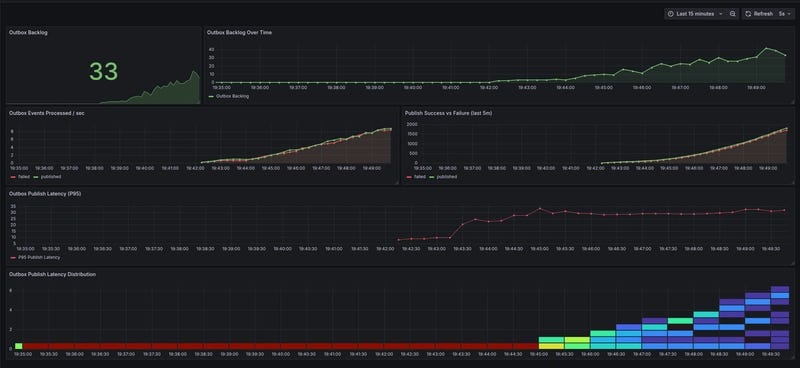
Outbox backlog
outbox_backlog
This gauge represents the number of outbox events waiting to be processed.
It answers the most important question in an outbox system:
Are events piling up faster than we can publish them?
A steadily growing backlog indicates one of the following:
- the outbox worker is down or stuck
- publishing to the broker is slow or failing
- worker concurrency is insufficient for the current load
In our implementation, the backlog is updated periodically (e.g. every 10 seconds) by counting pending events in the database.
func (o *outboxEventService) CountBacklog(ctx context.Context) (int64, error) {
    var count int64

    err := o.db.WithContext(ctx).
        Model(&model.OutboxEvent{}).
        Where(`
            status = ?
            OR (
                status = ?
                AND locked_at < NOW() - INTERVAL '30 seconds'
            )
        `,
            model.OutboxEventStatusPending,
            model.OutboxEventStatusInProgress,
        ).
        Count(&count).Error

    return count, err
}
This is typically the first metric you alert on.
Event outcomes
outbox_events_total{status="published|failed"}This counter tracks how many outbox events were successfully published versus how many failed.
It allows you to:
- spot spikes in publishing failures
- compute success/failure ratios over time
- distinguish “slow but working” from “actively broken”
In practice, an alert would trigger if:
- failures suddenly increase
- or failures exceed a small percentage of total events
Publish latency
outbox_publish_latency_seconds
This histogram measures the end-to-end delay from when an outbox event is written to the database to when it is successfully published to the broker.
It captures more than just RabbitMQ latency:
- database contention
- worker scheduling delays
- backpressure from limited concurrency
We record this latency only on successful publishes, using the event’s created_at timestamp as the starting point.
Sustained increases here usually correlate with a growing backlog and are an early signal that the system is under stress.
Recording metrics in the worker
Metrics like outbox_event_total and outbox_publish_latency_seconds are updated directly in the outbox worker during event publication:
func (o *Outbox) PublishEvent(
    ctx context.Context,
    ch *amqp091.Channel,
    event *model.OutboxEvent,
) error {
    err := o.rabbitmq.Publish(
        ctx,
        ch,
        event.EventKey,
        event.Payload,
        event.ID,
    )
    if err != nil {
        metrics.OutboxEventsTotal.WithLabelValues("failed").Inc()
        return err
    }

    metrics.OutboxPublishLatency.Observe(
        time.Since(event.CreatedAt).Seconds(),
    )
    metrics.OutboxEventsTotal.WithLabelValues("published").Inc()

    return nil
}
and outbox_backlog is updated via a separate goroutine:
func (o *Outbox) startBacklogReporter(ctx context.Context) {
    ticker := time.NewTicker(o.config.BacklogReportInterval)
    defer ticker.Stop()

    for {
        select {
        case <-ctx.Done():
            return
        case <-ticker.C:
            count, err := o.outboxEventService.CountBacklog(ctx)
            if err != nil {
                o.log.Error("Failed to count outbox backlog",
                    logger.Field{Key: "error", Value: err.Error()},
                )
                continue
            }
            metrics.OutboxBacklog.Set(float64(count))
        }
    }
}
Visualization
To make these metrics actionable, we’ve created a minimal Grafana dashboard for quick insight into system health:
Trace Propagation Through the Outbox
Outbox introduces an asynchronous boundary, which means trace context no longer flows automatically.
If we don’t handle this explicitly, traces will stop at the database commit.
For this article, we use a simple and common pattern:
- Capture the incoming trace context
- Persist it with the outbox event
- Rehydrate it when publishing and consuming messages
Capturing trace context
At the HTTP boundary, OpenTelemetry middleware attaches trace context to context.Context.
When creating an outbox event, we extract the W3C traceparent and store it alongside the event.
traceparent := tracing.ExtractTraceParent(ctx)

outboxEvent := &model.OutboxEvent{
    ID:          uuid.NewString(),
    EventKey:    "order.created",
    Payload:     payload,
    Traceparent: traceparent,
    Status:      model.OutboxEventStatusPending,
}
This keeps the outbox table self-contained and avoids relying on in-memory state.
Outbox worker spans
When the outbox worker publishes events, it reconstructs the trace context and starts a new span:
ctx := tracing.ContextFromTraceParent(event.Traceparent)
ctx, span := tracing.Tracer.Start(ctx, "outbox.publish")
defer span.End()
This links the publish operation back to the original request, even though it may happen seconds later and in a different process.
Consumer spans
On the consumer side, we extract trace headers from RabbitMQ message headers and start a span per message:
ctx = contextWithOtelHeaders(ctx, message.Headers)
ctx, span := tracing.Tracer.Start(ctx, "rabbitmq.consume")
defer span.End()
At this point, the trace is fully reconnected:
HTTP → Order Service → Outbox → RabbitMQ → Consumer.

Why this approach
- Works across process and time boundaries
- Requires no vendor-specific features
- Scales naturally with retries and worker restarts
- Easy to reason about during incidents
Other patterns exist (baggage, external context stores), but persisting trace context with the outbox event is simple and explicit.
What’s Next
This article focused on correctness, idempotency, and observability fundamentals. In the next part, we’ll extend this baseline toward real-world failure handling and making the system more resilient and production-ready:
- Producer-side retries: Bounded, delayed retries with exponential backoff for outbox events
- Dead Letter Queues (DLQs): Handling permanently failed events, microservice ownership, and routing
- Consumer-side retries: Using dead-letter exchanges and retry exchanges for safe message processing
- Observability: Richer metrics, dashboards, and tracing (Jaeger) with retry and DLQ awareness
- CDC-based outbox as an alternative: A brief overview of how change-data-capture can replace polling in some cases
Conclusion
In this article, we built a minimal and practical implementation of the transactional outbox pattern.
We started with the core problem, reliable event publishing across service boundaries, and worked through a concrete solution: persisting events alongside business data, publishing them asynchronously, and handling duplicates safely on the consumer side. Along the way, we added just enough observability, metrics and tracing, to make the system debuggable without overwhelming the design.
The goal wasn’t to build a perfect or fully hardened system, but to establish a correct and observable baseline that behaves predictably under failure. Once those fundamentals are in place, retries, DLQs, and scaling strategies become incremental improvements rather than emergency patches.
Thanks for reading! If you have any questions or insights, please leave a comment.
You can also explore the full working example on GitHub (article-1)
Transactional Outbox with RabbitMQ (Part 1): Building Reliable Event Publishing in Microservices was originally published in Level Up Coding on Medium, where people are continuing the conversation by highlighting and responding to this story.