Where Do You Actually Fall?
“I’m not a tech person.”
If you find yourself saying this, you may believe that there are people who are tech wizards and know everything there is to know about computers, and then there is you.
But technical competency is not a yes or no question. It is a spectrum. And someone who has more understanding of tech than you in one way may be just as clueless in another.
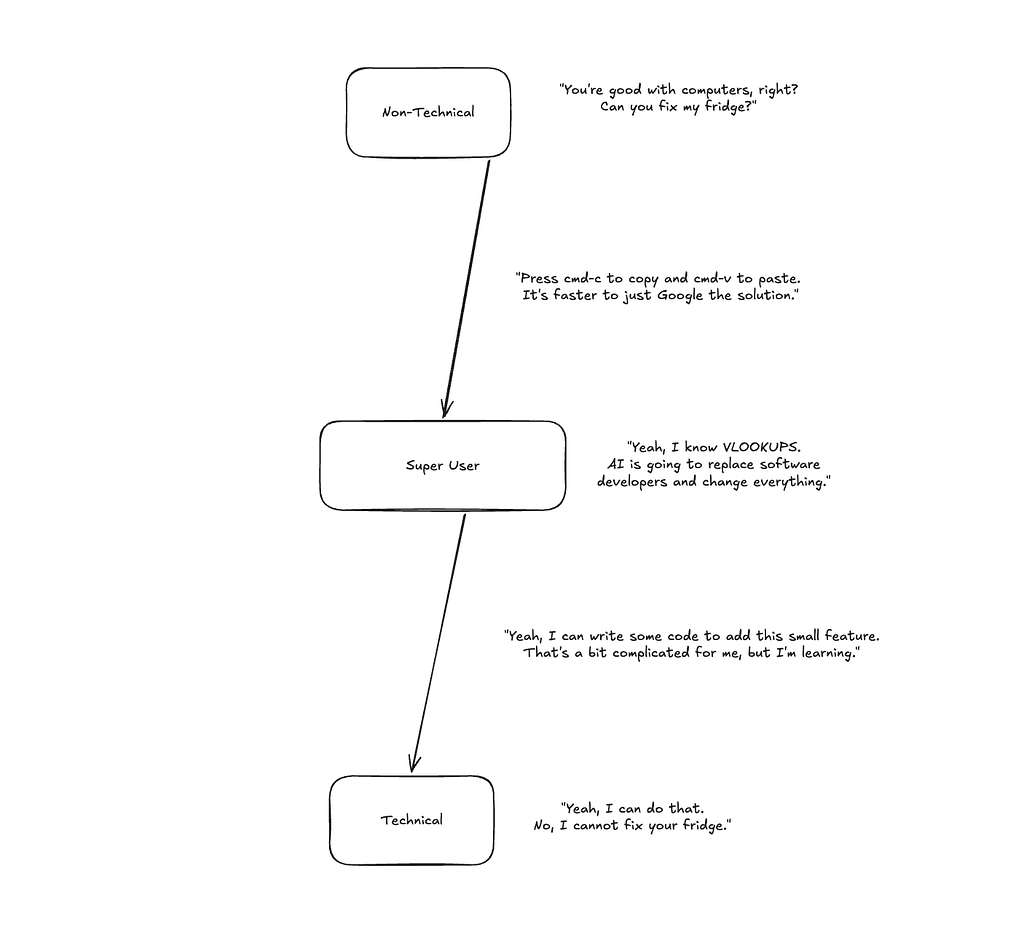
I classify technical competency under 3 categories:
- Beginner (or Non-Technical)
- Middle (or Super User)
- Advanced (or Technical)
Not only can people be strictly under one category, but they can also be somewhere between them.
Let’s start with the first category.
Non-Technical

This is where everyone begins.
At this level, if you’re met with a technical problem, your immediate instinct is to defer to someone with more knowledge.
Your computer won’t turn on? Call the tech guy.
You’re seeing a weird pop-up on the screen? Call the tech guy.
Your printer prints out black and white instead of color? Tech guy.
You may have some surface-level understanding of popular apps and websites.
You know how to make a post on Facebook, for instance.
But when it comes to things like settings and looking at unfamiliar screens with more than one button, you freeze, and your immediate instinct? Defer to the tech guy.
This can make you frustrating to work with if you run a company and handle giving orders to technical staff.
Because you don’t know anything, your orders most likely amount to: “Just fix the thing.”
This leaves your staff scratching their heads on what exactly it is you want done.
You may hire a CTO to handle that. Rather than a bunch of people receiving your vague instructions, one guy does this. And he knows you well enough to read in-between the lines when you ask for something vague. Or he most likely owns the entire technical side of the business himself and works on things without you having to say anything.
Either way, you don’t touch anything computer. Maybe you’re lucky enough to have people do that for you, or maybe you’re winging it on your own.
Thankfully, smartphones are most likely easier for you to work with. Speaking of…
“But I’m pretty good with my smartphone,” you say.
Sure. You know how to scroll endlessly through your Instagram feed that the engineers over at Meta have painstakingly designed to be as addictive as possible.
You know how to navigate around your iPhone that the engineers over at Apple have painstakingly worked to make as simple and intuitive as possible.
Can you find a file in the Downloads folder? Can you navigate across your file explorer on your computer to find a specific file?
How are you with your computer’s settings? And how are you with configuring the settings on your smartphone or your apps?
When it comes to security, you are more likely to either fall for a scam and get hacked or assume that everything is a scam and close yourself off the moment you see the slightest reddish flag.
You most likely use the same password for all your accounts, and you don’t have two-factor authentication set up on any of them. In fact, simply hearing the phrase “two-factor authentication” is giving you a headache.
With AI tools, you mainly treat them like Google. You might even use ChatGPT as a therapist, or as a girlfriend/boyfriend. You don’t really use it for anything other than an ideas or questions tool.
You have next to no understanding of its limitations and might be convinced you’re talking to an actual person.
AI-induced psychosis (an emerging non-clinical term describing cases where intense interaction with AI chatbots exacerbates or triggers psychotic symptoms like delusions, paranoia, or hallucinations) can hit you especially hard at this stage.
Between Non-Technical and Super User

Here, you still stick mainly to your comfort zone, but you have enough intellectual curiosity to venture out of it from time to time — especially if the situation demands it.
You learn reactively. If you can’t solve a problem, you ask questions of more advanced people.
You’re patient, and you know to raise your hand when you need things explained more clearly.
If you run a company, you can get away with interacting directly with your technical staff more.
You still give vague instructions from time to time, but you can speak their language when it comes to common problems, like “on what page of the website is the user experiencing this issue?”
You can navigate across your file system better. If you need to find a specific file or back it up to Google Drive, it’s not a task you need someone else to do for you.
You’re also a bit better with your security practices. You’re more likely to use a password manager to manage different passwords for different accounts. You’re also more likely to use two-factor authentication or passkeys if the option is available.
With AI tools, you’re starting to come out of the hype and see the cracks. You can still be subject to psychosis, but you’re also more likely to see the signs and know when to step away when your relationship with the technology is beginning to hurt rather than help you.
Super-User

Here, you can talk with techies more easily. You also can work with more complicated interfaces.
You would most likely have a better understanding of common keyboard shortcuts (like cmd+t to open a new tab on your browser on Mac), and you use them to great effect to enhance your workflow on your computer.
When met with a technical problem, you’re more likely to research a fix for it on Google before messaging someone more advanced to take a look at it.
You can work more easily with spreadsheets like Microsoft Excel or Google Sheets, and you may even do some light scripting from time to time.
If you want to engage in any kind of web development, you’re comfortable learning and using website builders (like Wordpress, Squarespace, Webflow, Wix, etc.)
Data, as a concept, stops being abstract. You see it clearly in spreadsheets. You might even have more of an understanding of relational databases.
You are not touching code or the terminal, but you do dip into programming concepts like if…else statements and loops. You might implement them in no-code or low-code tools like Apple Shortcuts or Zapier if there is a need.
It’s around this midpoint that people tend to be climbing out of the Dunning-Kruger trap. If they’re naturally curious about subjects, they receive more knowledge about what they do not know.
And when you know what you don’t know, you’re on the right track.
Security is optimal at this point. You’re following all the best practices, but you can still fall for phishing or malware, especially if you fall into the mindset that you’re so competent now, you would never fall for such a thing.
After all, overconfidence can often be more dangerous than ignorance.
Another thing that changes is your relationship with AI. Whereas before it was simply a questions and ideas tool, you are most likely exploring building things with it.
You might not look too deeply at the code it generates, but you feel more confident giving it a plan and letting it spin up a simple 80%-done website that you can then hand off to engineers to handle addressing the remaining 20%.
Between Super-User and Technical

Here, you are starting to learn more advanced technical concepts, like coding and the terminal.
You are most likely in the Hello World phase of programming. You don’t ship anything. You are just learning the ropes of how engineers turn text on the screen into software.
You don’t necessarily have a primary language, but if you’re like most people, you’re probably starting out in Python.
You are becoming more knowledgable about different components of software. Networks and cloud concepts enter into the picture if you’re looking into web development.
You may be looking more at the terminal and learning the command line. If you’re heavy into software development, you might start utilizing version control software like Git.
You most likely have created a GitHub account, but you haven’t really done much with it yet.
You are mainly a tourist at this point. To ship anything, you most likely need the okay from someone who has more experience. But once you get it, a whole new world opens up for you.
Security is mainly the same around here unless you start specializing in cybersecurity. At that point, you may be doing a whole host of things that the average technically competent individual neglects.
With AI, you’re not just using it as a tool for spinning up quick proof-of-concepts. You’re now using it to supplement your learning.
You frequently query it for different tools and technologies to compare between and ask what situation one is suited for over another.
You compare different patterns and coding languages and use AI as a research assistant for determining what fits better for one implementation over another.
You cross-examine with professionals and the actual source content when you have a chance to make sure that AI did not hallucinate answers and give you a false bias.
If you’re lucky, you have a mentor in your chosen technical field to be guiding you along with AI.
At this point, if AI delivers 80% of the product, you can start tackling 5–10% of the finishing touches and then hand off to a professional to tackle the remaining 10%.
Technical

Here, you can build real and usable things from code or understand technologies at a high enough level to deliver real value to businesses that use them.
Examples of real usable things in software include (note: you don’t necessarily have to know how to build all of these to reach this level. Just knowing one of these is enough):
- Web applications
- Mobile applications
- Desktop applications
- Data pipelines and infrastructures
- APIs
- Packages (e.g., NPM)
- Command line interfaces
- Browser extensions
Security practices tend to plateau here unless you’re focusing on cybersecurity.
Your AI usage differs depending on what technical field you specialize in. As a software developer, you would use it as a coding tool. You are also comfortable setting up your environment, hitting the terminal when needed, and AI can help speed up that process.
In other technical fields, like data analyst, you would most likely use it in data filtering or create infrastructure where business leaders can ask questions about their data in plain English.
If you are developing software, you no longer need to hand your app off to a professional to finish the rest of the 20%, because you are the professional at this point.
The only time that might not be the case is if the app is built with libraries or languages that are beyond your current scope of understanding, and the better option would be to hand it off to the specialist.
As far as you’ve come, you have to understand that this is the bare minimum of what’s expected of you if you want to have a start in any career with heavy technical requirements.
There is so much more ahead of you, but you’ve built a firm enough foundation. You can build off of it and learn faster than anyone else who has not yet reached this level.
Where Do You Land?

If, through reading these sections, you found one describes you more than the other, you’re most likely somewhere around that section.
This is especially true if reading the later sections felt like reading a foreign language.
“Okay, so how do I move up?”
Before asking this question, the preliminary question to ask is, “Do I even want to move up?”
If you’re completely non-technical and satisfied with where you are at, there is no need to advance even a step further.
For instance, elderly people who are completely tapped out of the job market and have young people to fix their Facebook don’t have much of an incentive to suddenly become computer wizards.
On the other hand, if you aren’t tapped out of the market, and you don’t have more technically competent people to lean on, then it gets more and more difficult to continue on without learning at least the fundamentals.
How much of the fundamentals you learn depends on what problems you’re consistently faced with.
At some point, you are going to end up somewhere between non-technical and super user.
The more super users and technical people you have to lean on, the less pressure there is for you to advance, so you will most likely be closer to non-technical and farther from super user.
On the other hand, the less people you have to lean on, the more likely you are to be closer to a super user and further from non-technical (whether you intended this or not).
If you decide that you don’t want to become a technical professional but be seen as extremely useful in your domain (e.g., marketing), you may become a super user with technology prevalent in your specific field.
It’s only if you decide to delve straight into a technical career like software development or database administration that going past the super user stage becomes a necessary decision.
Knowing where you stand, first and foremost, is the best way to know where you want to go.
The Technical Scale was originally published in Level Up Coding on Medium, where people are continuing the conversation by highlighting and responding to this story.