We were running a Go API with clients hitting it. Traffic was steady. We knew we needed rate limiting — not because we were under pressure from it, but because we had seen what happens when you don’t have it.

So we added it. We chose token bucket because it was simple to implement, well-documented, and the right choice.
Three months later, we were debugging at 4 am.
The setup that looked fine
We used golang.org/x/time/rate — the standard Go rate limiting library. We set a limit of 100 requests per minute per client, with a burst allowance of 20. It felt conservative.
limiter := rate.NewLimiter(rate.Every(time.Minute/100), 20)
For most clients, this worked without issue. Latency was good, the API felt smooth, and we moved on to other things.
What we missed about token bucket
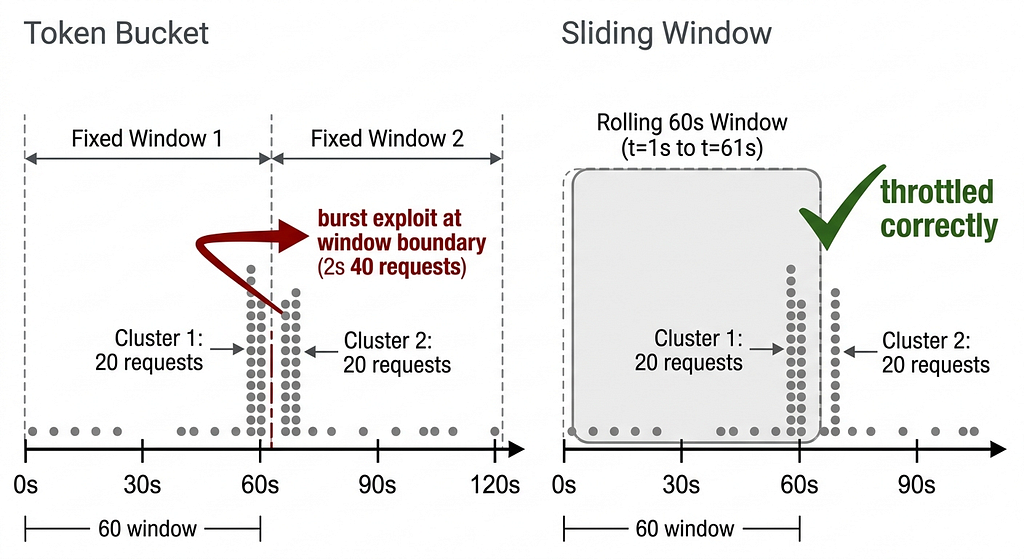
The token bucket refills at a fixed rate and allows bursting up to the bucket size. That is by design. But the problem is at the window boundary.
A client can send 20 requests at 11:59:59 and another 20 at 12:00:00. That is 40 requests in under a second, against a limit that was supposed to enforce 100 per minute. The bucket was full on both sides of the minute mark. The algorithm had no way to recognize that these two bursts were effectively the same.
Our 4 am client was not malicious. It was a retry loop that had gone wrong — a downstream service timing out and re-firing requests faster than we expected. But the burst hit simultaneously across multiple clients and caused cascading timeouts across the API. One broken client made the API look broken to everyone.
Sliding window closes the gap
We landed on a sliding window counter as the fix. Instead of tracking requests within a fixed time boundary, sliding window tracks requests within the last N seconds from right now. There is no boundary to exploit.
The implementation is more involved. For a production API, you need Redis to store per-client request counts across instances. But the behavior is what you actually want. A client that sends a burst and then tries to send another one three seconds later gets the right answer: you have already used most of your budget for this window.
A weighted sliding window counter is a reasonable middle ground if you want less Redis overhead. You track the current window count and the previous window count, then weight the previous count by how much of the current window has elapsed.
func isAllowed(clientID string, limit int, windowSecs int64) bool {
    now := time.Now().Unix()
    currentWindow := now / windowSecs
    prevWindow := currentWindow - 1
    elapsed := float64(now%windowSecs) / float64(windowSecs)
    prev := float64(getCount(clientID, prevWindow))
    current := float64(getCount(clientID, currentWindow))
    estimated := prev*(1-elapsed) + current
    return estimated < float64(limit)
}
Less memory than storing full timestamps per request. More accurate than the raw token bucket at window boundaries. We have been running this in production for six months without another 4 am call.
The lesson that sticks
We chose token bucket because it was simpler to reason about at implementation time. That was the wrong criterion.
Rate limiting is a contract with your clients about what traffic is acceptable. Token bucket’s burst allowance is part of that contract, and we had not thought through the implications. We were reasoning about the algorithm, not about the traffic pattern we were trying to allow.
The right question is not “which algorithm is easier to implement?” The right question is “which algorithm matches the behavior we actually want?”
For us, the answer was: requests should be distributed evenly over time, with no burst exploitation at window boundaries. Sliding window enforces that. Token bucket does not.
Every API pays this tax eventually. The question is whether you pay it at 4 am or before you ship.
The Rate Limiting Mistake That Cost Us a 4 am Call was originally published in Level Up Coding on Medium, where people are continuing the conversation by highlighting and responding to this story.