The Most Affordable NVIDIA H200 GPU in the Cloud: A Complete Guide to Ocean Network
--
How a decentralized compute network is offering H200 access at $2.16/hr and why it changes the math for AI builders
If you have spent any time recently trying to rent an NVIDIA H200 GPU, you already know the problem. AWS charges around $4.98 per GPU-hour when you normalize their 8-GPU bundle pricing. Azure’s Standard ND96isr H200 v5 comes in at roughly $10.60 per GPU-hour. Google Cloud’s on-demand H200 pricing is not even publicly listed yet. RunPod sits at approximately $3.99/hr for H200 access.
And then there is Ocean Network, which lists the same NVIDIA H200 SXM5 at $2.16/hr.
That is not a typo, a promotional rate, or a spot instance subject to sudden termination. It is the listed on-demand price for a verified H200 node on Ocean Network’s decentralized P2P compute marketplace and it comes with a workflow that is fundamentally different from anything AWS, Azure, or even RunPod offers.
This guide explains exactly what Ocean Network is, how it works technically, what the H200 node specification looks like, how it compares to the competition, and whether it is the right choice for your workload.
What Is Ocean Network?
Ocean Network is a decentralized, peer-to-peer (P2P) compute network designed for pay-per-use AI and machine learning jobs. Built on top of Ocean Protocol, it connects GPU node providers individuals, data centres, and hardware operators with AI builders, researchers, and developers who need compute on demand.
The core idea is straightforward: instead of renting capacity from a centralized cloud provider that owns and manages all the hardware, Ocean Network creates a marketplace where GPU owners list their hardware, and users select the node that matches their workload requirements. No forced bundling, no minimum commitments, no idle billing.
The network is currently in Beta, with GPU hardware from Aethir providing the initial supply of NVIDIA H200 nodes. This is a verified, enterprise-grade hardware partnership not a consumer GPU marketplace.
The NVIDIA H200 SXM5: Why This GPU Matters
Before diving into Ocean Network’s offering, it is worth understanding why the H200 has become the most sought-after data center GPU in 2025–2026.
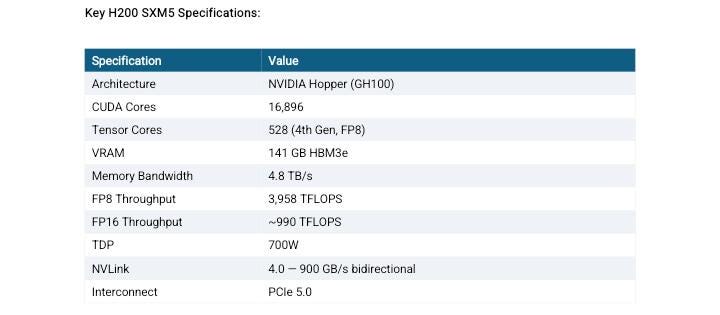
The NVIDIA H200 Tensor Core GPU is built on the Hopper architecture (GH100 die) and represents the most significant memory upgrade in NVIDIA’s data center lineup in years. Its defining feature is 141GB of HBM3e memory , nearly double the 80GB available on the H100 , delivered at 4.8 TB/s memory bandwidth, which is 43% faster than the H100 SXM5’s 3.35 TB/s.
The memory upgrade is what makes the H200 genuinely transformative for modern AI workloads. Running LLaMA 4 Maverick (400B parameters) on H100s requires two full 8-GPU nodes. With the H200, the same workload can run on a single 8-GPU node. For long-context inference, where KV cache size scales directly with sequence length, the extra VRAM directly extends the maximum context window a single GPU can handle without offloading.
The Intel Xeon Platinum 8460Y+ is a Sapphire Rapids-generation processor, a 40-core server CPU designed explicitly for AI and HPC workloads. Paired with 440GB of system RAM, this is a configuration that can handle the full preprocessing and data loading pipeline without creating a CPU-side bottleneck. The 1TB of NVMe storage is sufficient for most model weights, datasets, and intermediate checkpoints without requiring external storage mounting on every job.
The Workflow: How Ocean Network Actually Works
Most GPU cloud providers follow the same basic workflow: provision a virtual machine, SSH in, set up your environment, run your job, retrieve results. This process can take 10–30 minutes before any compute actually happens, and you are billed from the moment the instance starts, not from when your code runs.
Ocean Network takes a different approach through its Ocean Orchestrator tool.
Step 1: Browse Nodes in the Dashboard
You start at the Ocean Network dashboard, where live GPU environments are listed with specs, region, and pricing. You choose the node that fits your workload , H200 in East Asia, H200 in Frankfurt, without being forced into a bundle.
Step 2: Fund Your Escrow Wallet
Before the job starts, you fund an escrow wallet with your compute budget. The funds are locked in a smart contract and released only when the node marks your job as successfully completed. This is a structural protection that does not exist in traditional cloud compute: you cannot be billed for a failed job, and you cannot be charged for idle time.
Step 3: Open Ocean Orchestrator in Your Editor
Ocean Orchestrator is an IDE extension that works with VS Code, Cursor, Windsurf, and Antigravity. Once you have selected your resources in the dashboard, you open Ocean Orchestrator in your preferred editor, configure your containerized workload, and submit with one click. There is no SSH configuration, no Dockerfile deployment pipeline, no cloud console to switch between.
Step 4: Submit the Containerized Job
Ocean Network runs containerized compute jobs, meaning your workload is packaged as a container, submitted to the selected node, and executed in an isolated environment. This eliminates dependency conflicts, makes jobs reproducible, and means the same containerized job can be run on any compatible node.
Step 5: Results Land in Your Local Folder
When the job completes, outputs and logs are automatically saved to your local results folder. No manual retrieval from S3, no mounting remote storage, no additional egress charges. The results come to you.
Pricing Comparison: H200 Across Major Providers
The numbers below reflect on-demand, no-commitment pricing for a single H200 GPU as of May 2026. Providers that only offer 8-GPU bundles have been normalized to per-GPU pricing for a fair comparison.
Sources: JarvisLabs H200 Price Guide, ThunderCompute H200 Pricing (May 2026), Spheron GPU Cloud Pricing Comparison, provider pricing pages.
Ocean Network’s $2.16/hr is the lowest verified, on-demand, non-interruptible H200 rate currently publicly listed. The nearest competitor for single-GPU access is JarvisLabs at $3.80/hr, a 76% premium over Ocean Network’s price.
What Makes Ocean Network Different: A Feature Comparison
Beyond price, the structural differences between Ocean Network and traditional cloud providers are significant.
The escrow payment model deserves particular attention. When you submit a job to Ocean Network, your budget is locked before the compute starts. Payment is only released when the node explicitly marks the job as successful. If the node fails mid-run, the job can be restarted on the same node, and the escrow is not released until completion is confirmed. This is a materially different risk profile from traditional cloud compute, where a failed job at hour 8 of a 10-hour run still results in a full bill.
What Workloads Is This Built For?
Ocean Network’s pay-per-use containerized model is particularly well-suited to:
LLM Inference and Serving: The H200’s 141GB VRAM enables serving 70B–180B parameter models at full precision on a single GPU. For inference pipelines that run on demand rather than continuously, pay-per-use compute eliminates the cost of keeping a GPU instance live 24/7.
Batch Embedding Generation: Turning raw text corpora into vector embeddings for RAG systems, semantic search, or knowledge bases. These are high-throughput jobs with defined inputs and outputs, exactly what the containerized job model handles cleanly.
Fine-Tuning and Evaluation Loops: Running LoRA or QLoRA fine-tuning jobs on domain-specific datasets. The ability to rerun the same containerized job with different hyperparameters, pay only for actual runtime, and receive outputs locally makes iteration faster and cheaper.
Scientific Computing and Simulation: The H200’s 4.8TB/s memory bandwidth makes it competitive for memory-bound HPC workloads, molecular dynamics, fluid simulations, large-scale numerical methods, where bandwidth, not raw FLOPS, is the bottleneck.
Data Preprocessing at Scale: Cleaning, transforming, and structuring large datasets before training. These jobs are often bursty, run to completion, and do not require persistent infrastructure.
Getting Started: Three Options
Run a Free CPU Test: Ocean Network offers free CPU compute environments to validate your workflow before spending any GPU budget.
Claim $100 in Grant Tokens: New users can claim $100 in complimentary compute credits at dashboard.oncompute.ai/grant/details, which unlocks access to GPU environments including the H200.
Submit a Paid GPU Job: Browse live H200 environments at the Ocean Network dashboard, select your resources, fund escrow, and submit from Ocean Orchestrator in your editor.
Why This Matters for the GPU Compute Market
The pricing gap between Ocean Network and hyperscalers on H200 access is not a temporary promotional anomaly. It reflects a structural difference in how the two models work.
Traditional cloud providers carry the full cost of owning, operating, and maintaining their GPU fleets, power, cooling, depreciation, support, and profit margin, and pass all of that to users in the hourly rate. They also require minimum commitments and bundle GPUs in groups of 8, forcing you to pay for resources you may not need.
Ocean Network’s marketplace model connects existing hardware , GPUs that are underutilized or idle in data centers, with users who need compute. The overhead structure is different, and that difference flows directly into the per-hour price.
The result is that individual researchers, startups, and small teams who previously could not afford sustained H200 access at $4–10/hr can now run production-grade AI workloads at $2.16/hr, with no lock-in, no idle billing, and payment only released on success.
Considerations and Limitations
Hardware Availability: As a marketplace-based network still in Beta, node availability is not guaranteed to match hyperscaler infinite scaling. Ocean Network addresses this by listing live availability on the dashboard.
Job Rerouting: If a node fails, rerouting to a different node is handled by the user, not automatically by the platform. This aligns with Ocean Network’s design philosophy of giving users explicit control over which hardware their jobs run on.
Containerized Workloads Only: Ocean Network runs containerized jobs, meaning your code needs to be packaged in a container. For teams already working with Docker or container-based CI, this is standard.
Beta Status: The network is currently in Beta. Node supply and available regions are expanding, but the breadth of availability does not yet match a hyperscaler.
Conclusion
If your workload requires 141GB of HBM3e VRAM, large model inference, long-context generation, fine-tuning at the 70B+ parameter scale, or memory-bound scientific computing — the NVIDIA H200 is the GPU you need. The question has always been whether you can access it at a price that makes the economics work.
At $2.16/hr on Ocean Network, with pay-per-use billing, no minimum commitment, escrow-protected payments, and an editor-native workflow through Ocean Orchestrator, the answer is yes.
For researchers, startups, and builders who have been priced out of H200 access by hyperscaler bundles and 4–10x markups, Ocean Network is worth serious attention.
Sources and Further Reading
NVIDIA H200 Official Product Page: nvidia.com/en-us/data-center/h200
Ocean Network Dashboard: dashboard.oncompute.ai
Ocean Network Documentation: docs.oncompute.ai
Ocean Protocol Foundation: oceanprotocol.com
JarvisLabs H200 Price Guide, January 2026: jarvislabs.ai/blog/h200-price
ThunderCompute H200 Pricing Comparison, May 2026: thundercompute.com/blog/nvidia-h200-pricing
Spheron GPU Cloud Pricing Comparison 2026: spheron.network/blog/gpu-cloud-pricing-comparison-2026
RunPod NVIDIA H200 Technical Guide: runpod.io/articles/guides/nvidia-h200-gpu
Fluence NVIDIA H200 Deep Dive, 2026: fluence.network/blog/nvidia-h200-deep-dive
GetDeploying H200 Cloud Pricing, May 2026: getdeploying.com/gpus/nvidia-h200
Ocean Network Beta Launch Press Release, March 2026: chainwire.org
NVIDIA H200 Datasheet: megware.com/nvidia-h200-datasheet.pdf