The art of AI engineering is the skill of controlling LLM complexity.
Let’s be real. We’ve all done it.
You open up Cursor or Copilot, dump a chaotic, sleep-deprived paragraph of plain English into the prompt box, hit enter, and watch in awe as a fully functioning app materializes. You didn’t write the code. You didn’t even read the code. You just… felt it.

Welcome to the golden era of “vibe coding.”
And honestly? It is spectacular. It makes prototyping incredibly fun! If you’re building a weekend project, throwing together a quick Proof of Concept (POC), or just trying to see if an idea has legs, vibe coding is your absolute best friend.
But taking that weekend magic into enterprise production is a different story. Unpredictable AI outputs and messy edge cases quickly remind us that you can’t really debug a “vibe.”
“AI model performance matters, but for most of us, workflow design will matter more.” — Andrew Ng
To build systems that are truly scalable, we just need to start backing up those good vibes with actual architectural patterns. Anthropic recently highlighted five core workflow patterns you’ll need to build robust generative systems. Let’s break them down.
1. Prompt Chaining
Instead of “prompting and praying” with one massive wall of text, prompt Chaining breaks the task into a series of smaller, manageable steps.
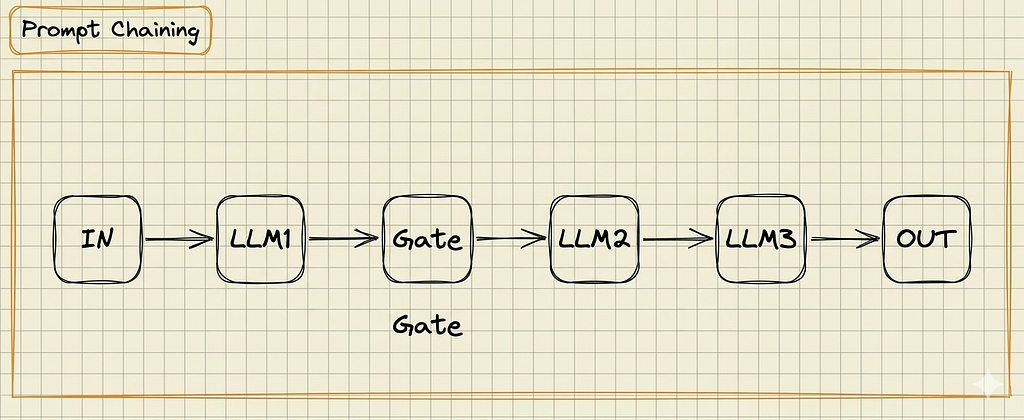
— How it works: You string API calls together. The output of your first call feeds directly into the second. You can inject standard code (like Python or Node.js) between steps to format or filter the data.
— Real-World Example: A YouTube-to-Blog pipeline. LLM 1 digests a messy transcript and extracts core concepts. Your code formats them into clean markdown. LLM 2 then takes that structured outline and writes a polished article.
— When to use it: Reach for this pattern when a task involves multiple distinct logical steps. If your single system prompt is getting massively long or the AI keeps failing at one specific part of a complex request, it’s time to break it down.
Use Cases by Complexity:
— Simple: YouTube-to-Blog content pipeline
— Intermediate: Multi-step document translation
— Advanced: Automated legacy code migration
2. Routing
Routing is the traffic cop of your AI architecture. It takes an incoming request, analyzes the intent, and dynamically directs it to the specific model best equipped to handle it.
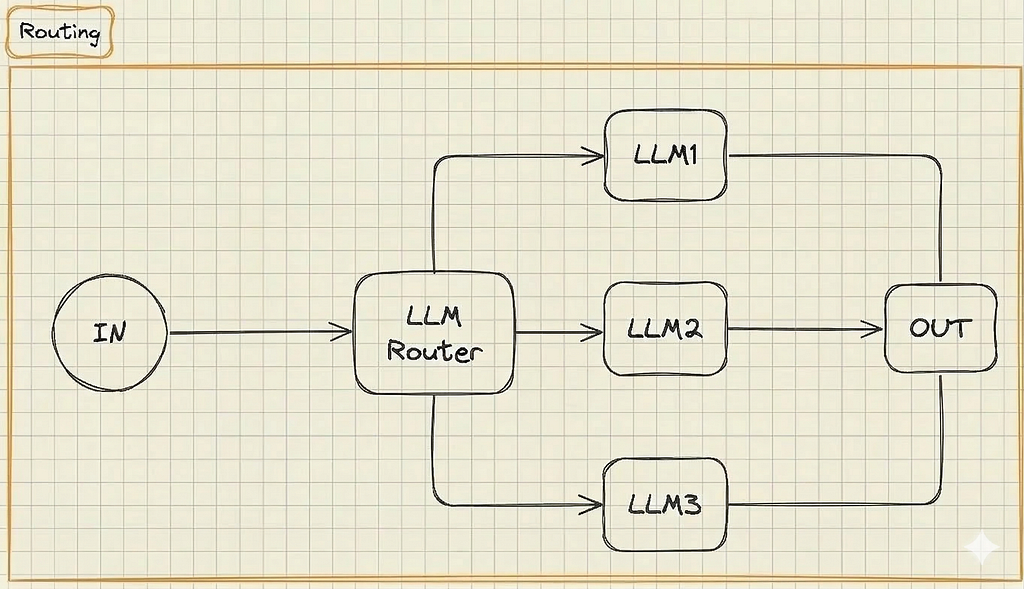
— How it works: An incoming request hits a Router LLM (or a fast, cheap classifier model), which looks at the prompt and forwards it down a predefined path.
— Real-World Example: A customer service bot. A user asks: “What are your store hours?” The router sends this to a cheap, fast model. A user asks: “Where is my package?” The router sends it to a specialized, secure model connected to your backend shipping database.
— When to use it: Implement a router when your application handles very different categories of user requests. It saves money by routing simple queries to cheap models while saving heavy-hitting models for complex tasks.
Use Cases by Complexity:
— Simple: Customer support triage
— Intermediate: Multi-department internal chatbot
— Advanced: AI Coding Assistant routing (e.g., routing basic autocomplete to a fast model, but complex tasks to a heavy model like Claude 3.5 Sonnet)
3. Parallelization
LLMs are inherently slow. If your application processes multiple independent sub-tasks, doing them sequentially is a UX nightmare. Parallelization executes multiple LLM calls simultaneously.
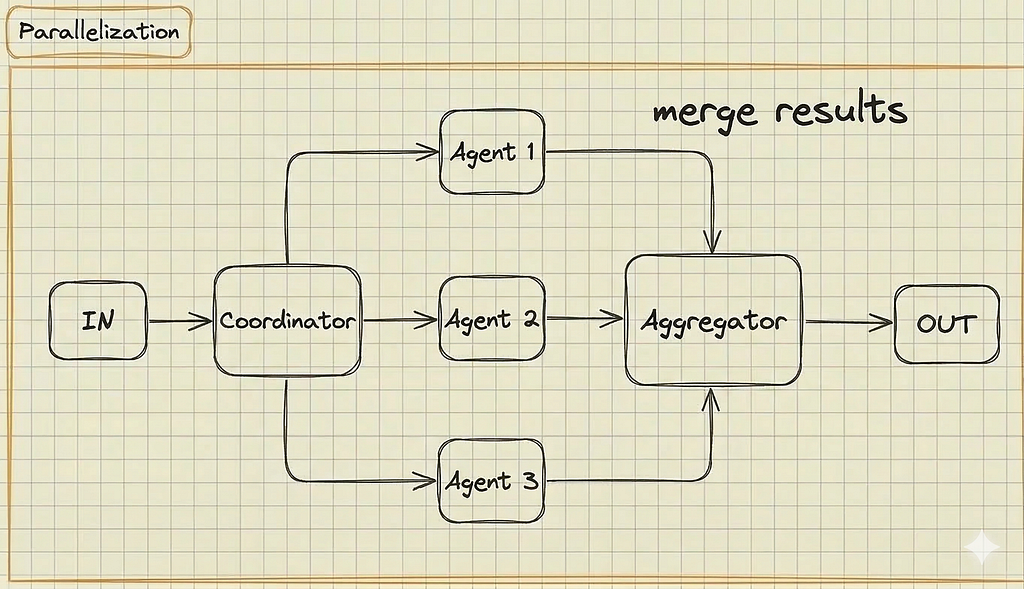
— How it works: Your standard code acts as the coordinator, firing off requests to multiple LLMs concurrently. An aggregator function then stitches the results together.
— Real-World Example: Writing a character bio for a game. You simultaneously ask three LLMs to write the backstory, physical description, and secret flaws, then merge the results together instantly at the end.
— When to use it: Use this when speed is critical and your sub-tasks don’t depend on each other. It’s also the go-to pattern when you need high confidence in an answer and want to run the exact same prompt across multiple models to find a consensus.
Use Cases by Complexity:
— Simple: Simultaneous multi-language translation
— Intermediate: Research bot simultaneously pulling data from multiple sources like CRM and Slack)
— Advanced: Running three different data-extraction tools at once and having an LLM vote on the most accurate output)
Those first three patterns are your rock-solid foundation for anything predictable. But when a user throws a request so chaotic that you can’t pre-plan the route, you have to take your hands off the wheel and let the AI drive. That’s when you bring in the Orchestrator-Worker.
4. Orchestrator-Worker
While the first three patterns rely on hard-coded paths, this pattern hands the steering wheel to the AI. A central “manager” LLM analyzes a complex goal and creates its own sub-tasks.
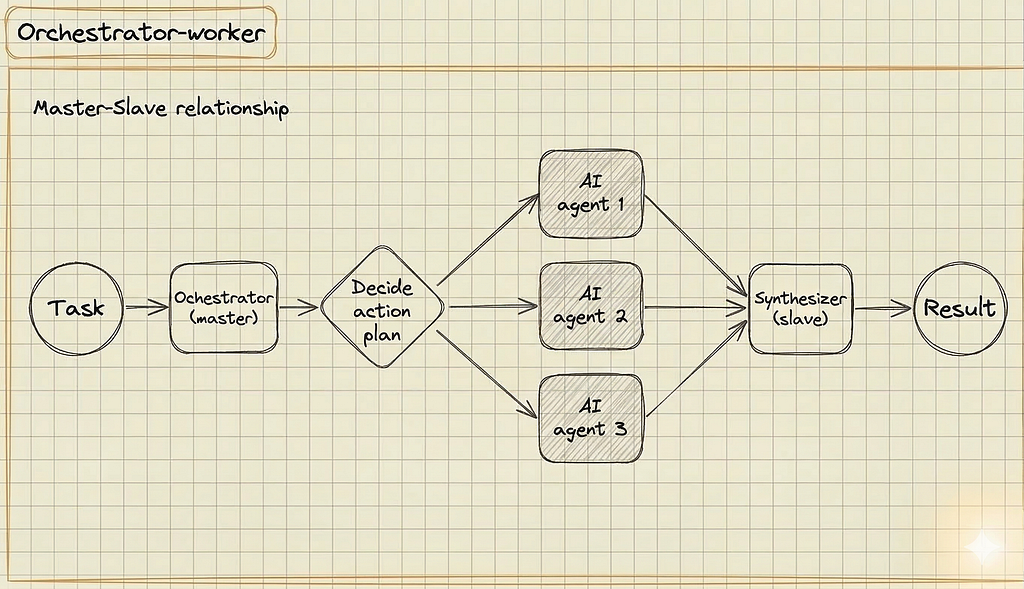
— How it works: An Orchestrator agent decides how to split the work based on context. It delegates sub-tasks to specialized Worker agent, and a Synthesizer agent merges the final output.
— Real-World Example: A vacation planner bot. A user says: “Plan a 3-day trip to Rome.” The Orchestrator agent dynamically decides it needs to book flights, find a hotel, and create an itinerary, delegating each to worker AI agents on the fly.
— When to use it: Deploy this pattern when you simply cannot predict the user’s path. The Orchestrator figures out how to solve the problem and delegates tasks dynamically.
Use Cases by Complexity:
— Simple: Dynamic trip planner
— Intermediate: Open-ended data research bot
— Advanced: Stock predictor
5. Evaluator-Optimizer: The Automated Code Review
LLMs make mistakes. The Evaluator-Optimizer pattern is an automated QA loop. It forces the system to double-check its own homework before showing it to a human.

— How it works: A Generator AI agent attempts the task. Instead of sending the solution directly to the user, it passes it to an Evaluator AI agent. If it fails, the Evaluator kicks it back with explicit feedback.
— Real-World Example: Hotel Review Summarizer. A Generator LLM drafts a summary from 500 guest reviews and saves it to S3. An AI Validator then triggers to compare the summary against the raw text, catching factual hallucinations (like a nonexistent pool) or missed critical details (like bedbugs). If the summary is inaccurate, it loops back to the Generator with specific feedback to be fixed
— When to use it: This is essential whenever accuracy is non-negotiable. Use this automated QA loop for generating code, database queries, or long-form summaries where hallucinations are disastrous.
Use Cases by Complexity:
— Simple: Outbound email tone checker
— Intermediate: Long-form summary creation (Evaluator verifies the summary didn’t hallucinate facts from the source text)
— Advanced: Automated code review and patching
Start Simple. Mix and Match.
It’s easy to read about AI architecture and immediately want to build a complex Orchestrator swarm. But more often than not, a simple Prompt Chain is all you need to get the job done.
These patterns are meant to be mixed and matched. In fact, Workflow 5 (Evaluator-Optimizer) is the one pattern every single AI application should have built-in. At the end of the day, building reliable AI isn’t just about generating cool text; it’s about making sure the system behaves safely and predictably. Validating the LLM’s output before it hits your users is the best way to turn a fragile prototype into a rock-solid product.
What’s Next?
Understanding these workflows is just the foundation. Up next, I’ll be diving into advanced prompt engineering, defending against AI attacks, and the exact roadmap to transition from a casual “vibe coder” into a highly-paid AI Engineer.
If there’s anything specific you’d like to see covered, reach out to me.
Cheers!
The End of Vibe Coding: 5 AI Engineering Workflows for Production was originally published in Level Up Coding on Medium, where people are continuing the conversation by highlighting and responding to this story.