NO, we DON’T need UserContentController! We don’t need that Webkit MessageHandler postMessage!

I have seen solutions online using webkit post message like what we had in my previous article SwiftUI: Webview ↔ JavaScript. Two-Way Communication for handling file/image selection and
This is STUPID! (I am sorry if you are the one written it this way! I wasn’t trying to be offensive to YOU! But i am currently in this situation where the company I work for was like we are using AI, we are using AIDD, and we get this awesome spec generated by xxx, and you are a piece of **** if you don’t use AI, and this is what they came up with.)
Why?
- We Need to inject javascript to the web side. For both intercepting the presentation and sending the selected data to it.
- The injected script depends on whether if the web side present the file dialog with JavaScript or input
This can get SUPER complex!
For example, for sending data, we will first need to convert it to base64 string on the app side, the web side will then convert that to a file url, create a form data, assign it and blah….
For intercepting, maybe that is an Input Change listener, maybe that is overwrite a specific javascript function. How are you going to extract the accepted content type? Are you going to write a different version for EVERY SINGLE WEBSITE?
Let’s be smart (or please allow me to act as if I were smart) here and check it out!
Also, feel free to grab the little demo from my GitHub!
Set Up
Obviously, a WebView is not enough! A super WebPage to get us started!
struct ContentView: View {
    @State private var webpage: WebPage?
    @State private var url: URL? = Self.imageUploadWeb
    private static let imageUploadWeb = URL(
        string: "https://www.remove.bg/upload"
    )
    private static let fileUploadWeb = URL(
        string: "https://www.sejda.com/pdf-editor"
    )
    var body: some View {
        VStack(alignment: .leading, spacing: 24) {

            if let webpage = self.webpage {
                WebView(webpage)
                    .webViewContentBackground(.hidden)
                    .overlay(content: {
                        if webpage.isLoading {
                            ProgressView()
                                .controlSize(.large)
                        }
                    })
            } else {
                Text("Web page is going somewhere else...")
            }
        }
        .onAppear {
            self.initWebpage()
        }
    }

    private func initWebpage() {
        var configuration = WebPage.Configuration()

        var navigationPreference = WebPage.NavigationPreferences()

        navigationPreference.allowsContentJavaScript = true
        navigationPreference.preferredHTTPSNavigationPolicy = .keepAsRequested
        navigationPreference.preferredContentMode = .mobile
        configuration.defaultNavigationPreferences = navigationPreference


        let page = WebPage(
            configuration: configuration,
        )
        self.webpage = page

        guard let url = self.url else {
            return
        }

        page.load(URLRequest(url: url))
    }
}
Solution
WebPage.DialogPresenting’s handleFileInputPrompt(parameters:initiatedBy:) for SwiftUI,
WKUIDelegate’s webView(_:runOpenPanelWith:initiatedByFrame:) for UIKit.
Done!
Actual Implementation
No, we are not done yet…
There are actually couple little points I would like to share! (If not, I probably won’t even bother writing this article!)
First of all, let’s create an Observable class conforming to the WebPage.DialogPresenting and assign it as the dialogPresenter while creating the webpage.
@Observable
class DialogPresenter: WebPage.DialogPresenting {
    var allowMultiSelection = false
    var allowDirectory = false
    var allowedFileTypes: [UTType] = []

    var presentFileImporter: Bool = false
    var fileURLs: [URL]? = nil

    var presentPhotoPicker: Bool = false
    var pickedItem: PhotosPickerItem? = nil

    func handleFileInputPrompt(
        parameters: WKOpenPanelParameters,
        initiatedBy frame: WebPage.FrameInfo
    ) async -> WebPage.FileInputPromptResult {
        print(#function)
        print(parameters)

        // more to do
        return .cancel
    }

}

struct ContentView: View {

    @State private var dialogPresenter = DialogPresenter()

    private func initWebpage() {
        // ...

        let page = WebPage(
            configuration: configuration,
            dialogPresenter: self.dialogPresenter
        )
        // ...
    }

}
Of course, we will be adding more! NOW!
WKOpenPanelParameters
First of all, let’s take a look at this WKOpenPanelParameters. We need to know what files/images, the web is asking for!
BUT WAIT!
This WKOpenPanelParameters only has
- allowsMultipleSelection: A Boolean value that indicates whether the file upload control supports multiple files, and
- allowsDirectories: A Boolean value that indicates whether the file upload control supports the selection of directories.
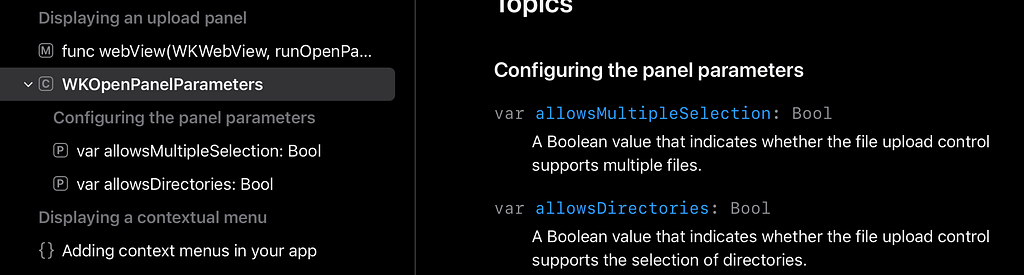
??? ARE YOU SERIOUS? (I don’t mean you reading this…)
This cannot be true! If this is true, when can this thing ever be useful!!!
Now, since this is WKOpenPanelParameters is just an NSObject, let’s see what keys are actually available!
extension NSObject {
    var keys: [String] {
        var count: UInt32 = 0
        // Get a list of properties for the class
        let properties = class_copyPropertyList(type(of: self), &count)
        var keys = [String]()

        for i in 0..<count {
            guard let property = properties?[Int(i)] else { continue }
            // Get the name of each property
            guard
                let keyName = NSString(
                    cString: property_getName(property),
                    encoding: String.Encoding.utf8.rawValue
                ) as String?
            else { continue }
            keys.append(keyName)
        }

        // Free the memory allocated by class_copyPropertyList
        free(properties)
        return keys
    }
}
And if we log out parameters.keys, here is what we have.
["_acceptedMIMETypes", "_acceptedFileExtensions", "_allowedFileExtensions", "allowsMultipleSelection", "allowsDirectories", "_apiObject", "hash", "superclass", "description", "debugDescription"]
Seems like we do have something useful!
Let’s give it a quick print
print("_acceptedMIMETypes: ", parameters.value(forKey: "_acceptedMIMETypes") as? NSArray ?? [])
print("_acceptedFileExtensions: ", parameters.value(forKey: "_acceptedFileExtensions") as? NSArray ?? [])
print("_allowedFileExtensions: ", parameters.value(forKey: "_allowedFileExtensions") as? NSArray ?? [])
And for my imageUploadWeb URL above, we will get something like following if we click on that upload image button. (Am i giving this site a free advertising…?)

_acceptedMIMETypes:  (
    "image/jpeg",
    "image/png",
    "image/webp"
)
_acceptedFileExtensions:  (
    ".jpg",
    ".jpeg",
    ".png",
    ".webp"
)
_allowedFileExtensions:  (
    jpg,
    jpeg,
    jpe,
    png,
    webp
)
Create UTTypes
Now that we get a little more useful information, we can create some UTTypes!
UTType can be created from either mime type or extensions, so which one are we going to use?
All three.
Because! Sometimes, depending on the website, one is specified but not other, for example, for that fileUploadWeb URL I had, it will give empty for mime types, but have .pdf for the rest two.
private func getUTTypes(_ parameters: WKOpenPanelParameters) -> [UTType] {
    let acceptedMimeTypes =
        parameters.value(forKey: "_acceptedMIMETypes") as? [String] ?? []
    var allowedTypes = acceptedMimeTypes.map({ UTType(mimeType: $0) })
        .filter({ $0 != nil }).map({ $0! })

    if !allowedTypes.isEmpty {
        return allowedTypes
    }
    let acceptedFileExtensions =
        parameters.value(forKey: "_acceptedFileExtensions") as? [String]
        ?? []

    allowedTypes = acceptedFileExtensions.map({
        UTType(filenameExtension: $0)
    })
    .filter({ $0 != nil }).map({ $0! })

    if !allowedTypes.isEmpty {
        return allowedTypes
    }

    let allowedFileExtensions =
        parameters.value(forKey: "_allowedFileExtensions") as? [String]
        ?? []

    allowedTypes = allowedFileExtensions.map({
        UTType(filenameExtension: $0)
    })
    .filter({ $0 != nil }).map({ $0! })

    if !allowedTypes.isEmpty {
        return allowedTypes
    }

    return parameters.allowsDirectories
        ? [.directory, .fileURL] : [.fileURL]
}
FileImporter vs PhotoPicker
If the web is asking for some image, obviously it makes more sense to present a photo picker instead of a file importer!
self.allowedFileTypes = self.getUTTypes(parameters)

if !self.allowedFileTypes.isEmpty,
    self.allowedFileTypes.allSatisfy({ $0.conforms(to: .image) })
{
    self.presentFileImporter = false
    self.presentPhotoPicker = true
} else {
    self.presentPhotoPicker = false
    self.presentFileImporter = true
}
And in our view.
VStack{}
.photosPicker(
    isPresented: self.$dialogPresenter.presentPhotoPicker,
    selection: self.$dialogPresenter.pickedItem
)
.fileImporter(
    isPresented: self.$dialogPresenter.presentFileImporter,
    allowedContentTypes: self.dialogPresenter.allowedFileTypes,
    allowsMultipleSelection: self.dialogPresenter
        .allowMultiSelection,
    onCompletion: { result in
        switch result {
        case .success(let url):
            self.dialogPresenter.fileURLs = url
        case .failure(let error):
            print("fail to import file: \(error)")
        }
    }
)
WAIT
Obviously, user needs a little more time to actually picker the file or the image!
And fortunately this handleFileInputPrompt(parameters:initiatedBy:) is asynchronous.
However, unfortunately, the present picker or the file importer modifiers are not!
So! We are polling!
private func waitForFileSelection() async {
    while self.presentFileImporter {
        if !self.presentFileImporter {
            break
        }
        try? await Task.sleep(for: .milliseconds(20))
    }
}

private func waitForImageSelection() async {
    while self.presentPhotoPicker {
        if !self.presentPhotoPicker {
            break
        }
        try? await Task.sleep(for: .milliseconds(20))
    }

    // ...  a little more
}
Convert Image to URL
When using fileImporter, the result is an array of URLs, but for photoPicker, we get a PhotosPickerItem instead. A custom Transferable to get the data, and then write it to some temporary file.
struct TransferableImage: Transferable {
    let image: UIImage

    enum TransferError: Error {
        case importFailed
    }

    static var transferRepresentation: some TransferRepresentation {
        DataRepresentation(importedContentType: .image) { data in
            guard let uiImage = UIImage(data: data) else {
                throw TransferError.importFailed
            }
            return TransferableImage(image: uiImage)
        }
    }
}

private func waitForImageSelection() async {
    while self.presentPhotoPicker {
        if !self.presentPhotoPicker {
            break
        }
        try? await Task.sleep(for: .milliseconds(20))
    }

    if let pickedItem = self.pickedItem,
        let uiImage = try? await pickedItem.loadTransferable(
            type: TransferableImage.self
        )?.image, let pngData = uiImage.pngData()
    {
        let temporaryURL = URL.temporaryDirectory.appendingPathComponent(
            "image.png"
        )
        if FileManager.default.fileExists(atPath: temporaryURL.path) {
            try? FileManager.default.removeItem(at: temporaryURL)
        }
        do {
            try pngData.write(to: temporaryURL)
            self.fileURLs = [temporaryURL]
        } catch (let error) {
            print("error writing image to file: \(error)")
        }
    }
}
Return File URLs
We are now ready to return something more useful than that cancel in our handleFileInputPrompt(parameters:initiatedBy:).
func handleFileInputPrompt(
    parameters: WKOpenPanelParameters,
    initiatedBy frame: WebPage.FrameInfo
) async -> WebPage.FileInputPromptResult {

    self.fileURLs = nil
    self.pickedItem = nil

    self.allowMultiSelection = parameters.allowsMultipleSelection
    self.allowDirectory = parameters.allowsDirectories

    // hidden keys not exposed as a public API
    self.allowedFileTypes = self.getUTTypes(parameters)

    if !self.allowedFileTypes.isEmpty,
        self.allowedFileTypes.allSatisfy({ $0.conforms(to: .image) })
    {
        self.presentFileImporter = false
        self.presentPhotoPicker = true
        await self.waitForImageSelection()
    } else {
        self.presentPhotoPicker = false
        self.presentFileImporter = true
        await self.waitForFileSelection()
    }

    if let fileURLs = self.fileURLs {
        return .selected(fileURLs)
    } else {
        return .cancel
    }
}
DONE!
Full Code Snippet
For your (or my own) reference!
import PhotosUI
import SwiftUI
import UniformTypeIdentifiers
import WebKit

struct ContentView: View {

    @State private var dialogPresenter = DialogPresenter()
    @State private var webpage: WebPage?
    @State private var url: URL? = Self.imageUploadWeb

    @State private var imageUpload: Bool = true

    private static let imageUploadWeb = URL(
        string: "https://www.remove.bg/upload"
    )
    private static let fileUploadWeb = URL(
        string: "https://www.sejda.com/pdf-editor"
    )

    var body: some View {
        NavigationStack {
            VStack(alignment: .leading, spacing: 24) {
                Toggle("Upload Image", isOn: $imageUpload)
                    .onChange(
                        of: self.imageUpload,
                        {
                            self.url =
                                self.imageUpload
                                ? Self.imageUploadWeb : Self.fileUploadWeb
                            guard let url = self.url else {
                                return
                            }
                            self.webpage?.load(URLRequest(url: url))
                        }
                    )
                if let webpage = self.webpage {
                    WebView(webpage)
                        .webViewContentBackground(.hidden)
                        .overlay(content: {
                            if webpage.isLoading {
                                ProgressView()
                                    .controlSize(.large)
                            }
                        })
                } else {
                    Text("Web page is going somewhere else...")
                }
            }
            .photosPicker(
                isPresented: self.$dialogPresenter.presentPhotoPicker,
                selection: self.$dialogPresenter.pickedItem
            )
            .fileImporter(
                isPresented: self.$dialogPresenter.presentFileImporter,
                allowedContentTypes: self.dialogPresenter.allowedFileTypes,
                allowsMultipleSelection: self.dialogPresenter
                    .allowMultiSelection,
                onCompletion: { result in
                    switch result {
                    case .success(let url):
                        self.dialogPresenter.fileURLs = url
                    case .failure(let error):
                        print("fail to import file: \(error)")
                    }
                }
            )
            .padding()
            .frame(maxWidth: .infinity, maxHeight: .infinity)
            .background(.yellow.opacity(0.1))
            .onAppear {
                self.initWebpage()
            }
            .navigationTitle("Webview File/Image Upload")
            .navigationBarTitleDisplayMode(.inline)
        }
    }

    private func initWebpage() {
        var configuration = WebPage.Configuration()

        var navigationPreference = WebPage.NavigationPreferences()

        navigationPreference.allowsContentJavaScript = true
        navigationPreference.preferredHTTPSNavigationPolicy = .keepAsRequested
        navigationPreference.preferredContentMode = .mobile
        configuration.defaultNavigationPreferences = navigationPreference

        let page = WebPage(
            configuration: configuration,
            dialogPresenter: self.dialogPresenter
        )
        self.webpage = page

        guard let url = self.url else {
            return
        }

        page.load(URLRequest(url: url))
    }
}

extension NSObject {
    var keys: [String] {
        var count: UInt32 = 0
        // Get a list of properties for the class
        let properties = class_copyPropertyList(type(of: self), &count)
        var keys = [String]()

        for i in 0..<count {
            guard let property = properties?[Int(i)] else { continue }
            // Get the name of each property
            guard
                let keyName = NSString(
                    cString: property_getName(property),
                    encoding: String.Encoding.utf8.rawValue
                ) as String?
            else { continue }
            keys.append(keyName)
        }

        // Free the memory allocated by class_copyPropertyList
        free(properties)
        return keys
    }
}

struct TransferableImage: Transferable {
    let image: UIImage

    enum TransferError: Error {
        case importFailed
    }

    static var transferRepresentation: some TransferRepresentation {
        DataRepresentation(importedContentType: .image) { data in
            guard let uiImage = UIImage(data: data) else {
                throw TransferError.importFailed
            }
            return TransferableImage(image: uiImage)
        }
    }
}

@Observable
class DialogPresenter: WebPage.DialogPresenting {
    var allowMultiSelection = false
    var allowDirectory = false
    var allowedFileTypes: [UTType] = []

    var presentFileImporter: Bool = false
    var fileURLs: [URL]? = nil

    var presentPhotoPicker: Bool = false
    var pickedItem: PhotosPickerItem? = nil

    func handleFileInputPrompt(
        parameters: WKOpenPanelParameters,
        initiatedBy frame: WebPage.FrameInfo
    ) async -> WebPage.FileInputPromptResult {

        self.fileURLs = nil
        self.pickedItem = nil

        self.allowMultiSelection = parameters.allowsMultipleSelection
        self.allowDirectory = parameters.allowsDirectories

        // hidden keys not exposed as a public API
        self.allowedFileTypes = self.getUTTypes(parameters)

        if !self.allowedFileTypes.isEmpty,
            self.allowedFileTypes.allSatisfy({ $0.conforms(to: .image) })
        {
            self.presentFileImporter = false
            self.presentPhotoPicker = true
            await self.waitForImageSelection()
        } else {
            self.presentPhotoPicker = false
            self.presentFileImporter = true
            await self.waitForFileSelection()
        }

        if let fileURLs = self.fileURLs {
            return .selected(fileURLs)
        } else {
            return .cancel
        }
    }

    private func getUTTypes(_ parameters: WKOpenPanelParameters) -> [UTType] {
        let acceptedMimeTypes =
            parameters.value(forKey: "_acceptedMIMETypes") as? [String] ?? []
        var allowedTypes = acceptedMimeTypes.map({ UTType(mimeType: $0) })
            .filter({ $0 != nil }).map({ $0! })

        if !allowedTypes.isEmpty {
            return allowedTypes
        }
        let acceptedFileExtensions =
            parameters.value(forKey: "_acceptedFileExtensions") as? [String]
            ?? []

        allowedTypes = acceptedFileExtensions.map({
            UTType(filenameExtension: $0)
        })
        .filter({ $0 != nil }).map({ $0! })

        if !allowedTypes.isEmpty {
            return allowedTypes
        }

        let allowedFileExtensions =
            parameters.value(forKey: "_allowedFileExtensions") as? [String]
            ?? []

        allowedTypes = allowedFileExtensions.map({
            UTType(filenameExtension: $0)
        })
        .filter({ $0 != nil }).map({ $0! })

        if !allowedTypes.isEmpty {
            return allowedTypes
        }

        return parameters.allowsDirectories
            ? [.directory, .fileURL] : [.fileURL]
    }

    private func waitForFileSelection() async {
        while self.presentFileImporter {
            if !self.presentFileImporter {
                break
            }
            try? await Task.sleep(for: .milliseconds(20))
        }
    }

    private func waitForImageSelection() async {
        while self.presentPhotoPicker {
            if !self.presentPhotoPicker {
                break
            }
            try? await Task.sleep(for: .milliseconds(20))
        }

        if let pickedItem = self.pickedItem,
            let uiImage = try? await pickedItem.loadTransferable(
                type: TransferableImage.self
            )?.image, let pngData = uiImage.pngData()
        {
            let temporaryURL = URL.temporaryDirectory.appendingPathComponent(
                "image.png"
            )
            if FileManager.default.fileExists(atPath: temporaryURL.path) {
                try? FileManager.default.removeItem(at: temporaryURL)
            }
            do {
                try pngData.write(to: temporaryURL)
                self.fileURLs = [temporaryURL]
            } catch (let error) {
                print("error writing image to file: \(error)")
            }
        }
    }
}
Thank you for reading!
That’s it for this article!
Happy uploading files and images!
SwiftUI: Handle WebView File/Image Upload was originally published in Level Up Coding on Medium, where people are continuing the conversation by highlighting and responding to this story.