No Keyboard extension + Open Main App Only On First Record + No Mic Running ALL TIME + Auto Back / Home Behavior without Private APIs
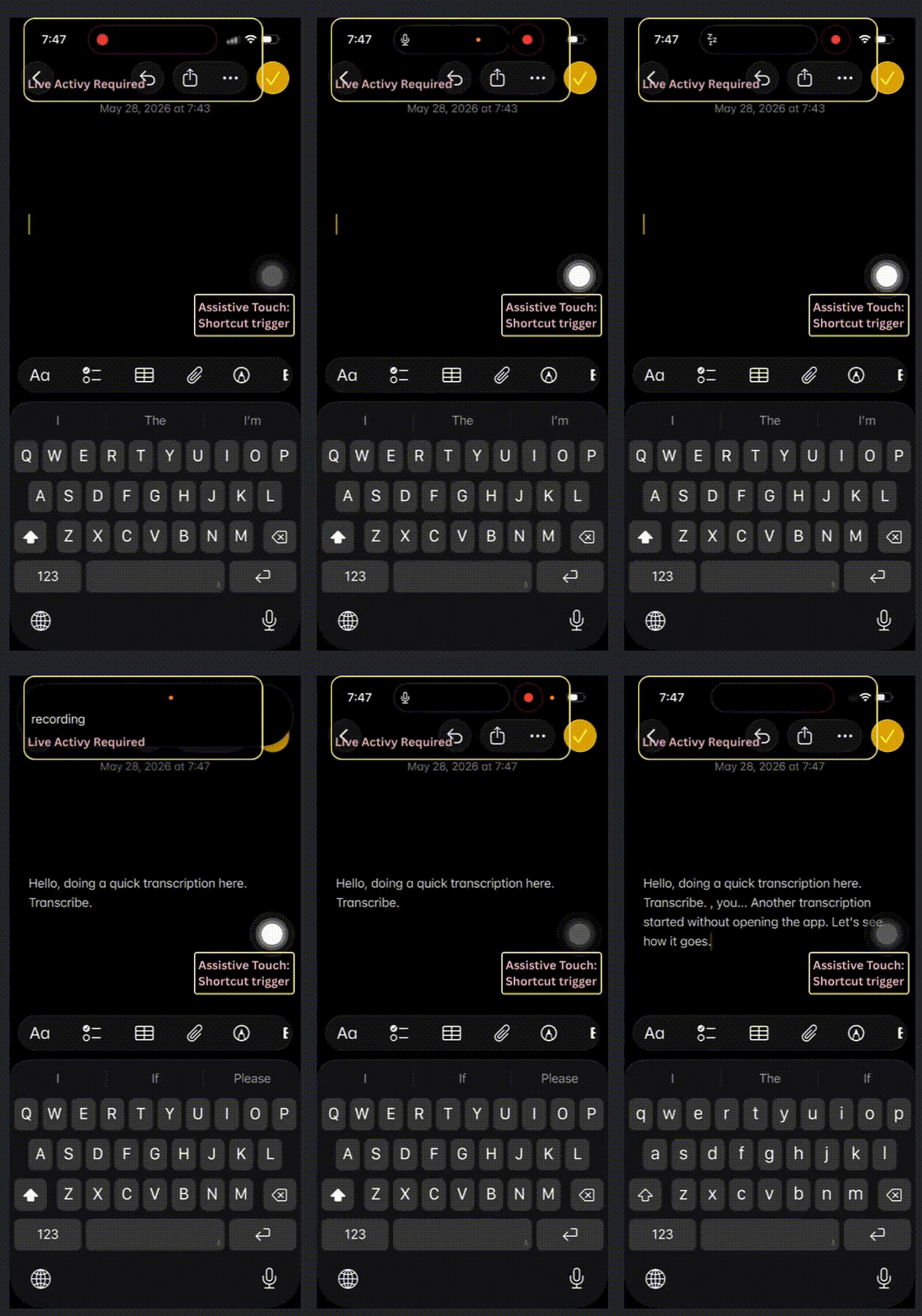
Full App on GitHub!
If you have any experience making (or using) a dictation app that is trying to replace the system one, you might know that
- they all start with a keyboard extension,
- they all try to open up the main app and upon 26.4, an annoying screen telling you to tap the back button to go back to the previous screen,
- they all leave the mic running at background,
- and blah!
Can we do better than that?
I think I recently save a video on Twitter about some app (Whisper Flow?) seems to be able to dictate without opening the app? Or no more the back to the previous app behavior?
I am not sure their exact behavior since I have no interest in downloading random apps, and of course, I won’t know how they have achieved it.
However, I do find a really interesting/alternative way of making a dictation app that
- We don’t use Keyboard extension (Honestly speaking, system keyboard just have way too many privileges that custom ones cannot even get close to it, especially in terms of the auto correction! That’s why I really want to avoid using it.)
- We only Open Main App Only On First Record
- We do NOT leave the Mic Running ALL TIME just to avoid open up the main app
- We can automatically navigate back to the previous app (or go back to the home screen if the recording does not start within an app) without private APIs nor trying to match bundle Id with custom URL schemes!
Draw back?
- Need to set up shortcuts and assistive touches
- Use need to paste manually
Still Sounds pretty nice, right? (I know, I am pretty satisfied with it!)
Grab it from GitHub (if you don’t mind) and let’s check it out together!
(PS: One of those time I am enforcing a AGPL license. So that those ANNOYING commercial apps can get their ****!!!! away! Unless they want to open-source their source code!)
Basic Idea
- AudioRecordingIntent: An app intent that starts, stops or otherwise modifies audio recording state.
- Expose the App Intents with AppShortcut
- Create custom Shortcut within the shortcut app wrapping the shortcut above so that we can chain them together with native iOS system actions
- Link shortcut with Assistive Touches
Yap! Surprising simple (idea itself, yes, implementation, not really…)
For the actual dictation part, Honestly speaking, I have written (more than) enough about making dictations (Speech to text) and audio capturing,
- purely on device with SpeechAnalyzer(Speech-To-Text With SpeechAnalyzer), what I will be using here), or
- with 3rd party APIs such as Deepgram or ElevenLabs(Off-Device Speech To Text).
Please allow me to assume you get a chance to read either one of those based on your needs so I can fly those through!
My Struggle / Attention / Important Points
Let me put it here out front in case you get tired of reading the full article!
AudioRecordingIntent is NOT Magic
AudioRecordingIntent
An app intent that starts, stops or otherwise modifies audio recording state.
So we don’t need to open up the container app any more!?
NOOOOO!
It is not a magic permission that lets apps secretly start microphone capture from a cold/background state.
What we are not allowed to do
- Call try self.audioSession.setActive(true) from the background.
What we CAN do
- Call try audioEngine.start() from the background.
That is, as long as the audio session is active, we can start and stop the mic/engine in the background, without having to open up the container app!
HOWEVER, in addition to starting the capturing within the perform of this intent (obviously), we will also HAVE To start a Live Activity, otherwise, the audio recording will STOP.
App Intent Open App Behavior CACHE
Since we only have to open up the container app when the audio session is not active, we might want a flag to check within our AudioRecordingIntent and decide whether if we want to bring the container app to foreground or not, right?
Unfortunately, implementing this behavior is not straightforward! NOT AT ALL!
Try 1: use continueInForeground and put everything into ONE intent.
func perform() async throws -> some IntentResult {
    if !activityManager.audioSessionActivated {
        try await continueInForeground()
    }
    activityManager.startRecordingActivity()
    return .result()
}
As I have mentioned, we will provide the intents as shortcuts, and eventually wrap those with system actions in the shortcut app to create anther custom shortcut (Actually two shortcuts).
The way we wrote perform above will make the system try to bring our app to the foreground EVERY SINGLE TIME. Due to the caching behavior.
Try 2: what about separate the AudioRecordingIntent into two,
- one for bringing the app to foreground and start, and
- one will return an OpenIntent Result if activityManager.audioSessionActivated is false, otherwise start directly?
struct StartRecordingIntent: AudioRecordingIntent,LiveActivityIntent {
    static let title: LocalizedStringResource = "Record"
    static let supportedModes: IntentModes = [.background]

    @Dependency var activityManager: ActivityManager

    @MainActor
    func perform() async throws -> some IntentResult & OpensIntent {
        if !activityManager.audioSessionActivated {
            return .result(opensIntent: StartRecordingForegroundIntent())
        }

        activityManager.startRecordingActivity()
        return .result()
    }
}

struct StartRecordingForegroundIntent: AudioRecordingIntent,LiveActivityIntent {
    init() {}

    static let title: LocalizedStringResource = "Record"
    static let supportedModes: IntentModes = [.foreground(.immediate)]

    @Dependency var activityManager: ActivityManager

    @MainActor
    func perform() async throws -> some IntentResult {
        activityManager.startRecordingActivity()
        return .result()
    }
}
YES, if you are ONLY launching the shortcut provided by the app directly.
NO if you are (and we will) wrap our shortcut into another one created from the Shortcut app. It will always, again, try to open up the main app!
Then how are we going to implement this? We will see in 3 seconds! (Okay, may a teeny tiny bit longer…)
Set Up
Okay, enough text! I hate reading text! Code/screenshots are better!
Add Capabilities / Info
Background Mode with Audio checked

Mic permission

Support Live Activity
Add Supports Live Activities and set the value to YES.

(Yes, No App Group needed. Not like the keyboard extension)
Add Live Activity (Widget Extension)
Honestly speaking, I am not planning on putting anything useful in within the live activity UI because everything will and have to go through the shortcut.
Even in that case, we still need the widget extension for it, otherwise, the Activity.request(...) might fail…
So!
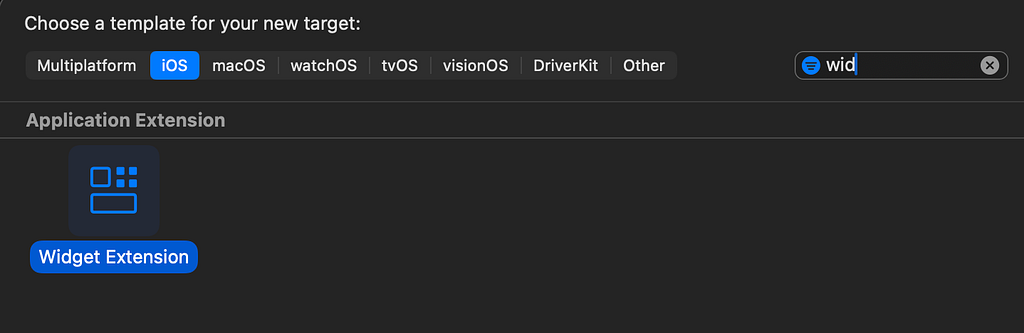
Add in the widget extension.
Some Random ActivityAttributes (since we don’t have to display anything anyway…)
nonisolated enum DictationState: String, Codable {
    case idle
    case recording
    case finalizing
    case error
}

nonisolated
struct DictationAttributes: ActivityAttributes {

    // dynamic data
    public struct ContentState: Codable, Hashable {
        var state: DictationState
        var lastUpdated: Date
        var message: AttributedString?
    }
}
And a WidgetConfiguration for it.
struct LiveActivity: Widget {
    var body: some WidgetConfiguration {
        ActivityConfiguration(for: DictationAttributes.self) { context in
            Text("placeholder")
        } dynamicIsland: { context in
            return createDynamicIsland(context: context)
        }
    }

    func createDynamicIsland(context: ActivityViewContext<DictationAttributes>)
        -> DynamicIsland
    {
        let contentState = context.state

        return DynamicIsland {
            Text("Placeholder")
        } compactLeading: {
        } compactTrailing: {
        } minimal: {
        }
    }

}
Want a little more details? Present Live Data with Live Activity (Widget)!
Almost Set Up
As I have mentioned above, I have written (more than) enough about making dictations (Speech to text) and audio capturing that really makes me want to categorize those as set up as well. However, there are indeed couple minor but important changes we have here specific to our scenario/use case here! A dictation app that is possibly running in the background and indeed wants to start the mic without bringing the app to the foreground whenever possible (ie: when audio session is already activated).
Audio Capturer
import AVFAudio

nonisolated class AudioCapturer: @unchecked Sendable {
    private let audioQueue = DispatchQueue(
        label: "AudioCapturer",
        qos: .userInitiated
    )

    private(set) var audioSessionActivated = false

    private var audioEngine = AVAudioEngine()

    private let bufferSize: UInt32 = 1024

    private let audioSession: AVAudioSession = AVAudioSession.sharedInstance()

    init() {
        self.startObservingInterruption()
        self.startObservingRouteChange()
    }

    func startCapturing(
        onBuffer: @escaping (AVAudioPCMBuffer) -> Void,
    ) throws {

        try audioQueue.sync {

            if Self.getRecordingPermission() != .granted {
                throw TranscriptionError.micPermissionDenied
            }

            try audioSession.setCategory(
                .record,
                mode: .default,
                options: []
            )

            if !self.audioSessionActivated {
                try self.audioSession.setActive(true, options: [])
                self.audioEngine = AVAudioEngine()
                self.audioSessionActivated = true
            }

            let inputNode = audioEngine.inputNode

            if !inputNode.isEnabled {
                // if input is not enabled, it usually mean the session get's deactivated
                self.audioSessionActivated = false
                throw TranscriptionError.micInputNotAvailable
            }

            let format = inputNode.outputFormat(forBus: 0)

            inputNode.removeTap(onBus: 0)
            inputNode.installTap(
                onBus: 0,
                bufferSize: self.bufferSize,
                format: format
            ) { (buffer: AVAudioPCMBuffer, _: AVAudioTime) in
                onBuffer(buffer)
            }
            try audioEngine.start()
        }
    }


    // MARK: - Stop Capture
    func stopCapturing(fullTearDown: Bool = false) {
        audioQueue.sync {
            self._stopCapturing(fullTearDown: fullTearDown)
        }
    }

    private func _stopCapturing(fullTearDown: Bool) {
        self.audioEngine.inputNode.removeTap(onBus: 0)
        self.audioEngine.stop()
        if fullTearDown {
            self.audioEngine.reset()
            try? self.audioSession.setActive(false)
            self.audioSessionActivated = false
        }
    }
}

// MARK: - Static implementations
nonisolated extension AudioCapturer {
    public static func getRecordingPermission()
        -> AVAudioApplication.recordPermission
    {
        return AVAudioApplication.shared.recordPermission
    }

    @discardableResult
    public static func requestRecordPermission() async -> Bool {
        // not throwing here because this is intended to be called to prompt for permission instead of showing error
        return await AVAudioApplication.requestRecordPermission()
    }
}


// MARK: - Interruption Monitoring
nonisolated extension AudioCapturer {

    private func startObservingInterruption() {
        Task {
            for await _ in NotificationCenter.default.notifications(
                named: AVAudioSession.interruptionNotification,
                object: AVAudioSession.sharedInstance()
            ) {
                self.stopCapturing(fullTearDown: true)
            }
        }
    }

    private func startObservingRouteChange() {
        Task {
            for await notification in NotificationCenter.default.notifications(
                named: AVAudioSession.routeChangeNotification,
                object: AVAudioSession.sharedInstance()
            ) {

                guard let userInfo = notification.userInfo,
                    let reasonValue = userInfo[
                        AVAudioSessionRouteChangeReasonKey
                    ] as? UInt,
                    let reason = AVAudioSession.RouteChangeReason(
                        rawValue: reasonValue
                    )
                else {
                    return
                }
                guard
                    reason == .oldDeviceUnavailable
                        || reason == .noSuitableRouteForCategory
                        || reason == .routeConfigurationChange
                        || reason == .wakeFromSleep || reason == .unknown
                else {
                    return
                }
                self.stopCapturing(fullTearDown: true)
            }
        }
    }
}

nonisolated extension AVAudioInputNode {

    // When the engine renders to and from an audio device, the AVAudioSession category and the availability of hardware determines whether an app performs input (for example, input hardware isn’t available in tvOS).
    // Check the input node’s input format (specifically, the hardware format) for a nonzero sample rate and channel count to see if input is in an enabled state.
    var isEnabled: Bool {
        let inputFormat = self.inputFormat(forBus: 0)
        if inputFormat.sampleRate.isZero || inputFormat.sampleRate.isNaN {
            return false
        }
        if inputFormat.channelCount == 0 {
            return false
        }
        return true
    }
}
As I have mentioned, the only time we will need to open up the main app when using the AudioRecordingIntent is when activating the AVAudioSession. That’s why when we stop the mic, we keep the session active unless it is a fullTearDown.
Audio Transcriber
I am using the onDevice one here, but if you like, you can also plug in those 3rd party API instead using what we had in Off-Device Speech To Text.
@preconcurrency import Speech
import SwiftUI

enum TranscriptionError: LocalizedError {
    case micPermissionDenied
    case micInputNotAvailable
    case transcriberNotAvailable

    var errorDescription: String? {
        switch self {
        case .micInputNotAvailable:
            "Microphone input is not available."
        case .micPermissionDenied:
            "Microphone permission is denied."
        case .transcriberNotAvailable:
            "Transcriber is not available on the given device."
        }
    }
}

nonisolated extension Error {
    var isCancellationError: Bool {
        return self is CancellationError
    }
}
nonisolated extension Locale {
    static let enUS = Locale(identifier: "en-US")
}

// MARK: Main Implementation
// https://developer.apple.com/documentation/speech/speechtranscriber
@Observable
nonisolated class AudioTranscriber {

    private(set) var isAvailable: Bool = false
    private(set) var initialized: Bool = false

    let audioCapturer: AudioCapturer

    private var analyzer: SpeechAnalyzer?

    private var transcriber: SpeechTranscriber?

    // for audio engine to use when capturing input
    private var bestAvailableAudioFormat: AVAudioFormat? = nil

    // for real time transcribing
    nonisolated
        private var inputStream: AsyncStream<AnalyzerInput>
    nonisolated
        private var inputContinuation: AsyncStream<AnalyzerInput>.Continuation

    // https://developer.apple.com/documentation/speech/speechtranscriber/preset
    private let preset: SpeechTranscriber.Preset =
        .timeIndexedProgressiveTranscription

    private var locale: Locale = .enUS

    private var audioConverter: AVAudioConverter?

    private var resultTask: Task<Void, Error>?

    private var isTranscribing = false

    private var speechConverter: AVAudioConverter?

    private var pendingBuffers: [AVAudioPCMBuffer] = [] {
        didSet {
            self.streamBufferIfNeeded()
        }
    }

    private var isYieldingBuffer = false
    private var converterSetupFailed = false

    private var onResult: ((SpeechTranscriber.Result) -> Void)?
    private var onError: ((Error) -> Void)?

    init() {
        defer {
            logInfo("transcriber init finished")
            initialized = true
        }
        self.isAvailable =
            AVAudioSession.sharedInstance().isInputAvailable
            && SpeechTranscriber.isAvailable

        (self.inputStream, self.inputContinuation) = AsyncStream<AnalyzerInput>
            .makeStream()

        self.audioCapturer = AudioCapturer()

        if !self.isAvailable {
            logError("transcriber not available")
            return
        }

        Task { [weak self] in
            guard let self else {
                return
            }

            let userPreference = Locale.preferredLocales.first ?? .enUS
            if let locale = await SpeechTranscriber.supportedLocale(
                equivalentTo: userPreference
            ) {
                self.locale = locale
            } else {
                logError("locale \(userPreference) not supported")
                return
            }
            let transcriber = SpeechTranscriber(
                locale: locale,
                preset: self.preset
            )
            self.transcriber = transcriber
            self.setupResultTask(transcriber: transcriber)

            // To delay or prevent unloading an analyzer’s resources by caching them for later use by a different analyzer instance
            // we can select a SpeechAnalyzer.Options.ModelRetention option and create the analyzer with an appropriate SpeechAnalyzer.Options object.
            // we can also add/remove module after analyzer creation using analyzer.setModules
            let analyzer = SpeechAnalyzer(
                modules: [transcriber],
                options: .init(
                    priority: .userInitiated,
                    modelRetention: .processLifetime
                )
            )
            self.analyzer = analyzer

            do {
                try await AssetInventory.reserve(locale: locale)
                self.bestAvailableAudioFormat =
                    await SpeechAnalyzer.bestAvailableAudioFormat(
                        compatibleWith: [
                            transcriber
                        ])

                try await analyzer.prepareToAnalyze(
                    in: self.bestAvailableAudioFormat,
                    withProgressReadyHandler: nil
                )

                let installed = (await SpeechTranscriber.installedLocales)
                    .contains(
                        locale
                    )

                if !installed {
                    if let installationRequest =
                        try await AssetInventory.assetInstallationRequest(
                            supporting: [
                                transcriber
                            ])
                    {
                        try await installationRequest.downloadAndInstall()
                    }
                }

                // set up finished after starting transcribing
                if self.isTranscribing {
                    logInfo("Start transcribing in init")
                    try await analyzer.start(inputSequence: inputStream)
                    self.streamBufferIfNeeded()
                }
            } catch (let error) {
                logError(
                    "Error setting up transcriber: \(error.localizedDescription)"
                )
            }
        }

    }

    deinit {
        self.resultTask?.cancel()
        self.audioCapturer.stopCapturing(fullTearDown: true)
        Task { [weak self] in
            await self?.finishAnalysisSession()
        }
    }

    // At the return of the finish(after:) method or any other ones that finish the analysis session,
    // the modules’ (SpeechTranscriber, and etc.) result streams will have ended and the modules will not accept further input from the input sequence.
    // The analyzer will not be able to resume analysis with a different input sequence and will not accept module changes; most methods will do nothing.
    private func finishAnalysisSession() async {
        self.inputContinuation.finish()
        // To end an analysis session, we must use one of the analyzer’s finish methods or parameters, or deallocate the analyzer.
        await self.analyzer?.cancelAndFinishNow()
    }

    // for real time transcription
    func startRealTimeTranscription(
        onResult: @escaping (SpeechTranscriber.Result) -> Void,
        onError: @escaping (Error) -> Void,
        onStart: @escaping () -> Void,
        retry: Int = 0
    ) {
        self.onResult = onResult
        self.onError = onError

        self.inputContinuation.finish()

        Task.detached(
            priority: .userInitiated,
            operation: { [weak self] in
                guard let self else {
                    return
                }
                do {
                    if let analyzer, self.initialized {
                        // a new inputStream is required after finishing the previous one
                        let (inputStream, inputContinuation) = AsyncStream<
                            AnalyzerInput
                        >
                        .makeStream()
                        self.inputStream = inputStream
                        self.inputContinuation = inputContinuation
                        try await analyzer.finalize(through: nil)
                        try await analyzer.start(inputSequence: inputStream)
                        logInfo("Start analyzer in function")
                    }
                    try self.audioCapturer
                        .startCapturing(
                            onBuffer: { buffer in
                                self.pendingBuffers.append(buffer)
                            }
                        )
                    logInfo("audioCapturer started")
                    self.isTranscribing = true
                    onStart()
                } catch (let error) {
                    // max 3 times
                    if retry > 3 {
                        onError(error)
                    } else {
                        logError(
                            "Error in startRealTimeTranscription: \(error.localizedDescription). Retrying..."
                        )
                        try? await Task.sleep(
                            for: .milliseconds(50 * pow(2, Double(retry)))
                        )
                        // for some reason, following error will occur some times on first start on the audio engine.
                        // - The operation couldn’t be completed. (com.apple.coreaudio.avfaudio error 2003329396)
                        // and if we try to call engine.start() again, everything will work fine.
                        // At the point of this error, session is already activated
                        self.startRealTimeTranscription(
                            onResult: onResult,
                            onError: onError,
                            onStart: onStart,
                            retry: retry + 1
                        )
                    }
                }
            }
        )
    }

    private func setupResultTask(
        transcriber: SpeechTranscriber
    ) {
        self.resultTask = Task { [weak self] in
            guard let self else {
                return
            }
            do {
                for try await result in transcriber.results {
                    guard !Task.isCancelled else {
                        return
                    }
                    onResult?(result)
                }
            } catch (let error) {
                if error.isCancellationError {
                    return
                }
                guard !Task.isCancelled else {
                    return
                }
                onError?(error)
                try? await self.finalizePreviousTranscribing()
            }
        }
    }

    private func streamBufferIfNeeded() {
        guard !pendingBuffers.isEmpty, isTranscribing, !self.isYieldingBuffer,
            self.initialized
        else {
            return
        }
        self.isYieldingBuffer = true
        while !self.pendingBuffers.isEmpty {
            let buffer = self.pendingBuffers.removeFirst()
            let processed = self.processBuffer(buffer)
            let input: AnalyzerInput = AnalyzerInput(
                buffer: processed
            )
            inputContinuation.yield(input)
            if self.pendingBuffers.isEmpty {
                break
            }
        }

        self.isYieldingBuffer = false
    }

    private func streamRemainingBuffers() async {
        // Wait until current sending finishes
        while self.isYieldingBuffer {
            try? await Task.sleep(for: .milliseconds(1))
            if !self.isYieldingBuffer {
                break
            }
        }

        // If anything still queued, flush it
        self.streamBufferIfNeeded()
    }

    // Important:
    // Use Finalize to ensure the previous sequence’s input is fully consumed
    // instead of finish(after:) method (or any other ones that finish the analysis session).
    //
    // Reason:
    // At the return of the finish(after:) method or any other ones that finish the analysis session,
    // the modules’ (SpeechTranscriber, and etc.) result streams will have ended and the modules will not accept further input from the input sequence.
    // The analyzer will not be able to resume analysis with a different input sequence and will not accept module changes; most methods will do nothing.
    // That is, we cannot reuse those SpeechModule or SpeechAnalyzer for any further transcribing tasks anymore!
    func finalizePreviousTranscribing() async throws {
        self.audioCapturer.stopCapturing()
        await self.streamRemainingBuffers()
        // When nil, finalizes up to and including the last audio the analyzer has taken from the input sequence, and
        try await self.analyzer?.finalize(through: nil)
        self.inputContinuation.finish()
        self.isTranscribing = false
        self.speechConverter = nil
        self.onResult = nil
        self.onError = nil
        self.isYieldingBuffer = false
        self.converterSetupFailed = false
    }

    private func trySetupConverter(
        inputFormat: AVAudioFormat,
        outputFormat: AVAudioFormat
    ) -> Bool {
        // Speech downsample converter: de-noised 48 kHz mono → 16 kHz
        guard
            let converter = AVAudioConverter(
                from: inputFormat,
                to: outputFormat
            )
        else {
            logError("fail to set up converter")
            self.converterSetupFailed = true
            return false
        }
        self.speechConverter = converter
        self.converterSetupFailed = false

        return true
    }

    private func processBuffer(
        _ pcmBuffer: AVAudioPCMBuffer
    ) -> AVAudioPCMBuffer {
        if self.speechConverter == nil, !self.converterSetupFailed,
            let format = self.bestAvailableAudioFormat
        {
            let _ = trySetupConverter(
                inputFormat: pcmBuffer.format,
                outputFormat: format
            )
        }
        guard
            let converter = self.speechConverter
        else {
            return pcmBuffer
        }

        let ratio =
            converter.outputFormat.sampleRate / converter.inputFormat.sampleRate
        let outputCapacity = AVAudioFrameCount(
            (Double(pcmBuffer.frameLength) * ratio).rounded(.up) + 32
        )
        guard
            let outputBuffer = AVAudioPCMBuffer(
                pcmFormat: converter.outputFormat,
                frameCapacity: outputCapacity
            )
        else {
            logError("fail to create output buffer")
            return pcmBuffer
        }

        final class FedFlag: @unchecked Sendable { var value = false }
        let fed = FedFlag()
        var convertError: NSError?
        let status = converter.convert(
            to: outputBuffer,
            error: &convertError,
            withInputFrom: { _, outStatus in
                if fed.value {
                    outStatus.pointee = .noDataNow
                    return nil
                }
                fed.value = true
                outStatus.pointee = .haveData
                return pcmBuffer
            }
        )
        if status == .error {
            logError(
                "fail to convert: \(convertError, default: "unknown Error")"
            )
            return pcmBuffer
        }
        guard outputBuffer.frameLength > 0 else {
            logError("Invalid outputBuffer frame length ")
            return pcmBuffer
        }
        return outputBuffer
    }
}
Almost the same as what we had in Speech-To-Text With SpeechAnalyzer except for we have a pendingBuffers and streamBufferIfNeeded. This is because when the app launched from the app intent, the transcriber init might need a little time to, for example, download assets. However, I don’t want to wait for it to finish before starting the audio capturing so I am having a pendingBuffers to keep what ever is coming in.
Activity Manager
I know, I am almost at the point of categorizing everything into set up…
An Activity Manager to start/stop transcribing using the functions above and start/update/stop live activities accordingly, because, again, when using AudioRecordingIntent, we have to start a Live Activity and keep it active as long as we are recording audio. Otherwise, the audio recording stops.
import ActivityKit
import Speech
import SwiftUI

typealias DictationActivity = Activity<DictationAttributes>
typealias DictationContentState = DictationAttributes.ContentState
typealias DictationActivityContent = ActivityContent<DictationContentState>

extension DictationActivity {
    var dictationState: DictationState {
        return self.content.state.state
    }
}

@Observable
final class ActivityManager: @unchecked Sendable {

    private(set) var activeActivity: DictationActivity?

    @ObservationIgnored
    private var activityListUpdateTask: Task<Void, Error>?

    private let transcriber = AudioTranscriber()

    private(set) var transcription: AttributedString = AttributedString()

    private var simulatePaste: (() -> Void)?

    var audioSessionActivated: Bool {
        return self.transcriber.audioCapturer.audioSessionActivated
    }

    @ObservationIgnored
    private var singleActivityUpdateTask:
        (Task<Void, Error>, Task<Void, Error>)?

    init() {
        logInfo("ActivityManager init")
        self.loadActivity()
        self.observeActivityListUpdate()
    }

    deinit {
        self.activityListUpdateTask?.cancel()
        self.singleActivityUpdateTask?.0.cancel()
        self.singleActivityUpdateTask?.1.cancel()
    }

    private func loadActivity() {
        var all = DictationActivity.activities
        guard !all.isEmpty else {
            self.activeActivity = nil
            self.cancelObserveSingleActivityUpdateTask()
            return
        }
        let activeActivity = all.removeFirst()
        all.forEach({ activity in
            self.endActivity(activity, dismissalPolicy: .immediate)
        })

        if activeActivity.dictationState == .recording
            || activeActivity.dictationState == .finalizing
        {
            self.activeActivity = activeActivity
            self.observeActiveActivityUpdate()
        } else {
            self.activeActivity = nil
            self.cancelObserveSingleActivityUpdateTask()
        }

    }

    func startRecordingActivity() {
        guard ActivityAuthorizationInfo().areActivitiesEnabled else {
            logError("ActivityAuthorizationInfo disabled")
            return
        }

        guard self.transcriber.isAvailable else {
            logError("transcriber not available")
            return
        }

        logInfo("startRecordingActivity")

        let attributes = DictationAttributes()
        self.transcription = AttributedString()
        self.simulatePaste = simulatePaste

        do {
            self.endCurrentActivity()
            let activity = try Activity.request(
                attributes: attributes,
                content: .init(
                    state: .init(
                        state: .starting,
                        lastUpdated: Date(),
                        message: nil
                    ),
                    staleDate: nil
                ),
                pushType: nil
            )
            self.activeActivity = activity
            self.observeActiveActivityUpdate()

            self.transcriber.startRealTimeTranscription(
                onResult: { [weak self] result in
                    guard let self else {
                        return
                    }
                    logInfo(
                        "\(String(result.text.characters)): \(result.isFinal)"
                    )
                    if result.isFinal,
                        self.activeActivity?.dictationState == .recording
                            || self.activeActivity?.dictationState
                                == .finalizing
                    {
                        self.transcription.append(result.text)
                        logInfo("\(String(self.transcription.characters))")
                    }
                    if let activeActivity, activity.id == activeActivity.id {
                        // to update updateDate
                        self.updateActivity(
                            activeActivity,
                            state: .init(
                                state: .recording,
                                lastUpdated: Date(),
                                message: result.text
                            )
                        )
                    }
                },
                onError: { [weak self] error in
                    guard let self else {
                        return
                    }
                    logError(
                        "error in transcriber callback: \(error.localizedDescription)"
                    )
                    if let activeActivity {
                        // to update updateDate
                        self.updateActivity(
                            activeActivity,
                            state: .init(
                                state: .error,
                                lastUpdated: Date(),
                                message: AttributedString(
                                    error.localizedDescription
                                )
                            )
                        )
                    }
                },
                onStart: { [weak self] in
                    guard let self else {
                        return
                    }
                    logInfo("transcriber started")
                    if let activeActivity {
                        self.updateActivity(
                            activeActivity,
                            state: .init(
                                state: .recording,
                                lastUpdated: Date(),
                                message: nil
                            )
                        )
                    }
                }
            )

            logInfo("activity started")
        } catch (let error) {
            logError("Error in startActivity: \(error)")
        }
    }

    func stopRecordingActivity() async -> AttributedString? {
        guard let activeActivity else {
            return nil
        }
        do {
            self.updateActivity(
                activeActivity,
                state: .init(
                    state: .finalizing,
                    lastUpdated: Date(),
                    message: "Finalizing..."
                )
            )

            try await self.transcriber.finalizePreviousTranscribing()
            // a little wait to see if there is more transcript coming in

            try? await Task.sleep(for: .milliseconds(10))
            // ...saving pasteboard failed with error: Error Domain=PBErrorDomain Code=11 "The pasteboard name com.apple.UIKit.pboard.general is not valid." UserInfo={NSLocalizedDescription=The pasteboard name com.apple.UIKit.pboard.general is not valid.}
            // Due to app in background (regardless of background processing mode is enabled or not)
            // UIPasteboard.general.string = "\(self.transcription)"

            self.updateActivity(
                activeActivity,
                state: .init(
                    state: .idle,
                    lastUpdated: Date(),
                    message: "Finished: " + self.transcription
                )
            )
            let transcription = self.transcription
            self.transcription = .init()
            return transcription
        } catch (let error) {
            logError(
                "Error stopping transcription: \(error.localizedDescription)"
            )
            return nil
        }
    }

    private func updateActivity(
        _ activity: DictationActivity,
        state: DictationContentState
    ) {
        guard
            activity.activityState != .ended
                || activity.activityState != .dismissed
        else {
            return
        }

        Task {
            await activity.update(
                DictationActivityContent(
                    state: state,
                    staleDate: nil
                ),
                alertConfiguration: nil
            )
        }
    }

    func endCurrentActivity() {
        DictationActivity.activities.forEach {
            self.endActivity($0, dismissalPolicy: .immediate)
        }
        self.cancelObserveSingleActivityUpdateTask()
        self.activeActivity = nil
    }

    func endActivity(
        _ activity: DictationActivity,
        dismissalPolicy: ActivityUIDismissalPolicy
    ) {
        Task {
            // Always include an updated Activity.ContentState to ensure the Live Activity shows the latest and final content update after it ends
            await activity.end(
                activity.content,
                dismissalPolicy: dismissalPolicy
            )
        }
    }

    private func setActivity(_ activity: DictationActivity) {
        if self.activeActivity == nil, activity.activityState != .dismissed {
            self.activeActivity = activity
            return
        }
        guard activity.id == self.activeActivity?.id else {
            return
        }
        self.activeActivity = activity
    }

    private func observeActivityListUpdate() {
        self.activityListUpdateTask?.cancel()
        self.activityListUpdateTask = nil

        self.activityListUpdateTask = Task { [weak self] in
            for await activity in DictationActivity.activityUpdates {
                if self?.activeActivity == nil,
                    activity.activityState != .dismissed
                {
                    self?.activeActivity = activity
                    self?.observeActiveActivityUpdate()
                    return
                }

                guard self?.activeActivity?.id == activity.id else {
                    continue
                }
                if activity.activityState != .dismissed {
                    self?.activeActivity = activity
                } else {
                    self?.activeActivity = nil
                    self?.cancelObserveSingleActivityUpdateTask()
                }
            }
        }
    }

    private func cancelObserveSingleActivityUpdateTask() {
        self.singleActivityUpdateTask?.0.cancel()
        self.singleActivityUpdateTask?.1.cancel()
        self.singleActivityUpdateTask = nil
    }

    private func observeActiveActivityUpdate() {
        self.cancelObserveSingleActivityUpdateTask()

        guard let activity = activeActivity else {
            return
        }

        if activity.activityState == .dismissed {
            return
        }

        let stateTask: Task<Void, Error> = Task { [weak self, activity] in
            for await activityState in activity.activityStateUpdates {
                logInfo("activityStateUpdates: \(activityState)")
                self?.setActivity(activity)
            }
        }

        let contentTask: Task<Void, Error> = Task { [weak self, activity] in
            for await contentState in activity.contentUpdates {
                logInfo("contentState update: \(contentState)")
                self?.setActivity(activity)
            }
        }

        self.singleActivityUpdateTask = (stateTask, contentTask)
    }
}
App Intents
We will have two here, one for starting, one for stoping.
Start Recording Intent
As I have mentioned, I struggled fair a bit on the best way to implementing a starting intent…Due to the annoying caching behavior on whether if the intent will open up the container app or not.
I have already shared with you the versions that cannot achieve what I want so here is the version that DO.
import AppIntents

// App Intent to start recording from background
struct StartRecordingIntent: AudioRecordingIntent, LiveActivityIntent {

    static let title: LocalizedStringResource = "Record"
    static let supportedModes: IntentModes = [.background]

    @Dependency var activityManager: ActivityManager

    @MainActor
    func perform() async throws -> some IntentResult & ReturnsValue<Bool> {
        if !activityManager.audioSessionActivated {
            return .result(value: false)
        }
        activityManager.startRecordingActivity()
        return .result(value: true)
    }
}

// App Intent to start recording from foreground. Required for activating audio session
struct StartRecordingForegroundIntent: AudioRecordingIntent, LiveActivityIntent
{
    static let title: LocalizedStringResource = "Record(Foreground)"
    static let supportedModes: IntentModes = [.foreground(.immediate)]

    @Parameter
    var appBundleId: String?

    @Dependency var activityManager: ActivityManager

    // true: if app bundle id is not nil -> short cut open the app.
    // false: app bundle id  is nil or empty -> short cut open home
    @MainActor
    func perform() async throws -> some IntentResult & ReturnsValue<Bool> {
        activityManager.startRecordingActivity()
        return .result(
            value: appBundleId != nil
                && appBundleId?.trimmingCharacters(in: .whitespacesAndNewlines)
                    .isEmpty == false
        )
    }
}
Note that we are returning couple Boolean here from the perform function.
StartRecordingIntent
- true if the recording can be started directly from it (in the background) and does
- false if main app needs to be opened, ie: audio session is not activated yet.
StartRecordingForegroundIntent
- true if the previous app does exist, ie: the recording intent is called when some other app is opened
- false if there is no previous app, for example, when called directly from the Home screen.
As we will see in couple seconds, we COULD check this directly within the shortcut app when wrapping the shortcuts we will provide with the system actions. However, writing a logic check in swift is just a lot easier…(I hate low code/no code platforms)
Stop Recording Intent
This one is simple.
import AppIntents

struct StopRecordingIntent: LiveActivityIntent {

    static let title: LocalizedStringResource = "Stop"
    @Dependency var activityManager: ActivityManager

    @MainActor
    func perform() async throws -> some IntentResult & ReturnsValue<String?> {
        let result = await activityManager.stopRecordingActivity()
        if let result {
            let string = String(result.characters)
            logInfo("result: \(string)")
            return .result(value: string)
        }
        return .result(value: nil)
    }
}
Returning the transcribed string here.
Why cannot we just copy and paste?
- We don’t have access to the UIPasteboard when the app is in the background
- There is no API for pasting
And, as we will see when making the shortcut, there isn’t even a system action for pasting/inserting text.
You could combine the idea above with a keyboard extension, sharing the result using App Group, and inserting text with the keyboard extension. However, as I said, I want to use the system keyboard so out of scope for me here.
Register Dependency
@main
struct DictationWithoutOpenMainAppApp: App {

    private let activityManager: ActivityManager

    init() {
        let manager = ActivityManager()
        self.activityManager = manager
        AppDependencyManager.shared.add(dependency: manager)
    }

    var body: some Scene {
        WindowGroup {
            ContentView()
                .environment(activityManager)
        }
    }
}
Set up ShortCut
Three steps
- Expose intents above as short cuts
- Create two new shortcuts wrapping shortcuts in step 1 with system actions
- set the shortcuts to be some assistive touches
AppShortcutsProvider
import AppIntents

struct ShortcutsProvider: AppShortcutsProvider {
    static var appShortcuts: [AppShortcut] {
        AppShortcut(
            intent: StartRecordingIntent(),
            phrases: [
                "Start dictation in  \(.applicationName)"
            ],
            shortTitle: "Record",
            systemImageName: "microphone"
        )
        AppShortcut(
            intent: StartRecordingForegroundIntent(),
            phrases: [
                "Start dictation in  \(.applicationName)"
            ],
            shortTitle: "Record(Foreground)",
            systemImageName: "microphone"
        )
        AppShortcut(
            intent: StopRecordingIntent(),
            phrases: [
                "Stop dictation in  \(.applicationName)"
            ],
            shortTitle: "Stop",
            systemImageName: "stop.fill"
        )
    }
}
And updateAppShortcutParameters on App Launch.
@main
struct DictationWithoutOpenMainAppApp: App {
    private let activityManager: ActivityManager
    init() {
        ShortcutsProvider.updateAppShortcutParameters()
        // ... Dependency set up above
    }

    // ...
}
Give the app a run so the shortcuts above can show up in the shortcut app.
Create Custom Shortcut
The one wrapping start.
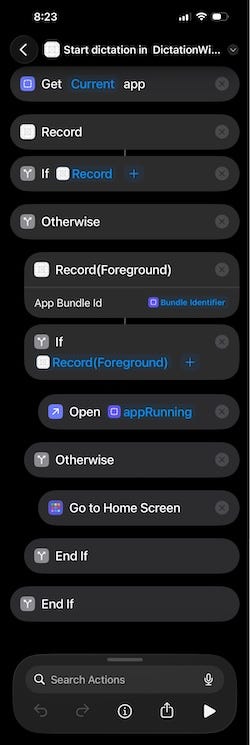
Oh yes, pretty long.
We first get the current app (I set it to a variable appRunning) that the shortcut is ran from, try to start recording in the background, if cannot, use the Record(Foreground) shortcut, after finish, either open up the original app or go back to the home screen depending on whether if there is indeed an actual app running when starting the shortcut.
As I have mentioned, if we combine the two start recording intent into one, or having the first (background) recording intent returning another open intent, the system will cache the opening behavior and just keep open the main app even when it is not necessary.
The one wrapping stop.
This one simple, our Stop Dictation shortcut followed by a copy to clipboard passing in the return value from our intent.

I bet you don’t want to drag and drop and configure those manually by yourself, so I have created couple signed the .shortcut files and uploaded to my GitHub that you can just import!
(Or if you are using the demo code I have, there are couple Share link set up for those files in the main app that you can just tap and open those in the Shortcuts App.)
Link Shortcut with Assistive Touch
I am using assistive touch because I found it to be the most convenient way to trigger those shortcuts, but you can use control center, side button or whatever.
Open up the Settings App.
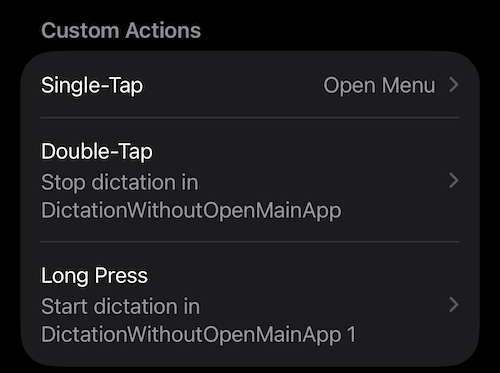
Choose Accessibility > Touch (under Physical and Motor) > AssistiveTouch (the first thing)
I have set those to be custom actions for Double Tap and long press.
Test Time!
Assuming that you have already call the await AudioCapturer.requestRecordPermission() some where in the app so that we do have the recording permission.
Close the app, or even shut it down for the best result and let’s long press the assistive touch to start!
Unfortunately Gif doesn’t have sound, but you can realize (hopefully) that I am talking from that little Dynamic Island updates!
Thank you for reading.
That’s it for this article!
Again, feel free to grab it from my GitHub and give it a try yourself!
Grab it from GitHub (if you don’t mind) and let’s check it out together!
Happy dictating!
Swift/iOS: A Better(?) Way to Make A Dictation App was originally published in Level Up Coding on Medium, where people are continuing the conversation by highlighting and responding to this story.