Forget the demos. Here’s what Cursor and Claude Code actually change — and what they don’t — when you’re shipping real systems.
I Thought AI Would Make Me 10x Faster. Here’s What Actually Happened.
Six months ago I was convinced AI coding tools would cut my development time in half. I had watched the demos. I had seen the threads. I installed Cursor, set up Claude Code, and dove into a production pipeline project handling millions of records per day.
Three weeks in, I had a complicated relationship with my AI assistant.
Some days it saved me an hour of work before lunch. Other days I spent 40 minutes untangling confidently generated code that looked right, passed a surface-level read, and broke in production in ways that took an afternoon to debug. I started keeping notes. After six months, here is the honest picture.
The Demo vs. The Reality
Every AI coding demo looks the same. A developer types a vague prompt, a full application materializes in seconds, and the audience applauds. It is impressive. It is also completely divorced from how production engineering actually works.
Real production code does not live in a single file. It has dependencies, conventions, legacy constraints, and five engineers with different opinions on how something should be done. Into that context you drop an AI assistant, and suddenly the question is not “can it generate code?” but “how do I actually integrate this into how I work?”
The mindset shift that made these tools useful for me: stop thinking of them as code generators. Start thinking of them as a very fast, syntactically fluent collaborator who needs clear direction and careful review.
What AI Assistance Is Genuinely Good At
1. Boilerplate Elimination — But Only the Right Kind
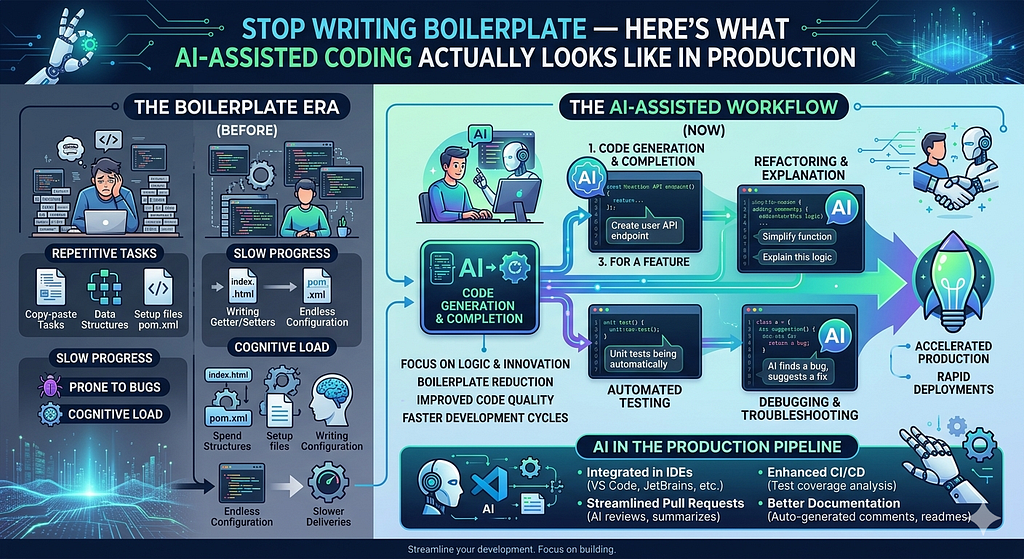
AI tools are genuinely fast at generating repetitive structural code. Database schemas, CRUD skeletons, test scaffolding, parsers for well-known formats. The kind of code where the pattern is well established and the main cost is typing it out.
Here is a real example. I needed a schema definition and basic reader for a JSON data feed. I gave the AI the sample JSON and asked for a typed reader with basic validation:
# Prompt: Write a typed dataclass reader for this JSON structure
# with validation for required fields

import json
from dataclasses import dataclass
from typing import Optional
from datetime import datetime

@dataclass
class OrderRecord:
    order_id: str
    customer_id: str
    total_amount: float
    order_date: str
    status: str
    notes: Optional[str] = None

    def validate(self):
        if not self.order_id:
            raise ValueError("order_id is required")
        if self.total_amount < 0:
            raise ValueError(f"Invalid amount: {self.total_amount}")
        if self.status not in ("pending", "confirmed", "shipped", "cancelled"):
            raise ValueError(f"Unknown status: {self.status}")

def load_order(raw: dict) -> OrderRecord:
    record = OrderRecord(
        order_id=raw.get("order_id", ""),
        customer_id=raw.get("customer_id", ""),
        total_amount=float(raw.get("total_amount", 0)),
        order_date=raw.get("order_date", ""),
        status=raw.get("status", ""),
        notes=raw.get("notes")
    )
    record.validate()
    return record
Testing it:
sample = {
    "order_id": "ORD-1042",
    "customer_id": "CUST-88",
    "total_amount": 149.99,
    "order_date": "2024-04-23",
    "status": "confirmed"
}

order = load_order(sample)
print(order)
Output:
OrderRecord(order_id='ORD-1042', customer_id='CUST-88', total_amount=149.99,
            order_date='2024-04-23', status='confirmed', notes=None)
This took about 90 seconds to generate and review. Writing it from scratch would have taken 15 minutes. That is where AI tools genuinely earn their reputation.
Where they fall short is the moment domain knowledge enters the picture. The AI had no idea that in my system, orders with status “confirmed” must have a non-null customer_id, or that total_amount above a certain threshold triggers a secondary approval workflow. That logic I wrote myself. The AI gave me the skeleton. I gave it the meaning.
2. Test Generation — The Most Underrated Use Case
Given a function and a clear prompt, AI tools generate edge-case test scaffolding faster than any human. On a recent validation module I prompted:
# Write pytest unit tests for the load_order function above.
# Cover: empty input, missing required fields, invalid status,
# negative amount, and a fully valid record.
Generated output:
import pytest

def test_valid_order():
    data = {
        "order_id": "ORD-001",
        "customer_id": "CUST-01",
        "total_amount": 99.99,
        "order_date": "2024-04-23",
        "status": "pending"
    }
    order = load_order(data)
    assert order.order_id == "ORD-001"
    assert order.total_amount == 99.99

def test_missing_order_id():
    data = {
        "order_id": "",
        "customer_id": "CUST-01",
        "total_amount": 99.99,
        "order_date": "2024-04-23",
        "status": "pending"
    }
    with pytest.raises(ValueError, match="order_id is required"):
        load_order(data)

def test_invalid_status():
    data = {
        "order_id": "ORD-002",
        "customer_id": "CUST-01",
        "total_amount": 50.00,
        "order_date": "2024-04-23",
        "status": "unknown_status"
    }
    with pytest.raises(ValueError, match="Unknown status"):
        load_order(data)

def test_negative_amount():
    data = {
        "order_id": "ORD-003",
        "customer_id": "CUST-01",
        "total_amount": -10.00,
        "order_date": "2024-04-23",
        "status": "pending"
    }
    with pytest.raises(ValueError, match="Invalid amount"):
        load_order(data)
Running the tests:
pytest test_orders.py -v

test_orders.py::test_valid_order          PASSED
test_orders.py::test_missing_order_id     PASSED
test_orders.py::test_invalid_status       PASSED
test_orders.py::test_negative_amount      PASSED

4 passed in 0.12s
The AI covered the obvious cases in seconds. I then added three more tests it had no way to know about: what happens when total_amount exceeds the approval threshold, what happens when order_date is in the future, and a specific edge case that had caused a production bug the previous quarter. That 20% I wrote myself is where the real business logic lives.
3. Refactoring Narration
Ask the AI to explain what a piece of legacy code does before you refactor it. On old codebases this is quietly invaluable.
# Prompt: Explain what this function does, step by step

def proc(d, cfg, flag=False):
    r = []
    for x in d:
        if x[cfg['k']] in cfg['v'] or flag:
            t = {**x, 'ts': x.get('ts', cfg['def'])}
            if t['ts'] is None:
                continue
            r.append(t)
    return sorted(r, key=lambda i: i['ts'])
AI explanation:
This function filters a list of records (d) based on a config dict (cfg):
- It keeps records where the value at key cfg['k'] is in the allowed list cfg['v'],
  OR where the override flag is True
- For each kept record, it sets a 'ts' field to either the record's own 'ts'
  or a default from cfg['def'] if 'ts' is missing
- Records where 'ts' is still None after that are dropped entirely
- Finally it returns the surviving records sorted by 'ts' ascending
You now have a readable mental model in 30 seconds. More usefully, you can immediately spot where the AI’s explanation diverges from your expectations. That divergence is a signal. It tells you exactly where the hidden assumptions and the risky logic live before you touch a single line.
Where AI Tools Quietly Break Down
Confident Use of Deprecated APIs
Here is something that actually happened. I asked for help generating a data transformation using a popular processing library. The output was clean, readable, and used an API that had been deprecated two major versions ago.
# AI generated this -- looks perfectly reasonable
result = df.map(lambda x: transform(x)).toDF()
# This API was removed in version 3.x
# Fails silently in some environments, raises AttributeError in others
It ran fine in my local environment which had an older version pinned. It failed in production running a newer runtime. Tracing that back took two days.
The fix is simple but easy to forget:
# Always verify against your pinned version
# requirements.txt: pyspark==3.4.1

# Correct API for 3.x
result = df.rdd.map(lambda x: transform(x)).toDF(schema)
Rule I now follow without exception: check every generated API call against the version pinned in your dependencies file. The AI has no awareness of what version you are running.
The Context Window Problem
# You paste this function and ask for help
def calculate_discount(order):
    return order.total * get_discount_rate(order.tier)
The AI gives you a reasonable looking implementation of get_discount_rate. But it does not know that in your codebase get_discount_rate already exists in utils/pricing.py, that it handles three edge cases specific to your business, and that your version has been tuned over two years of production incidents. You get a plausible replacement for something that did not need replacing.
The discipline this demands is scoping your prompts deliberately. Before prompting, identify the minimal relevant context and include it explicitly:
# Much better prompt context
# Here is calculate_discount and the existing get_discount_rate it calls.
# I want to add support for a new tier called 'enterprise'.
# Do not change get_discount_rate -- only modify calculate_discount.

def get_discount_rate(tier):
    # existing implementation -- do not touch
    rates = {"standard": 0.0, "premium": 0.10, "vip": 0.20}
    return rates.get(tier, 0.0)

def calculate_discount(order):
    return order.total * get_discount_rate(order.tier)
Now the AI works within the right boundaries instead of inventing its own.
A Workflow That Actually Works
After six months of iteration here is the loop I have settled into:
Step 1: Write the signature and docstring yourself. Do not start with a blank prompt. Write the function name, parameters, return type, and a clear description of what the function should and should not do. This forces clarity before any code is written and gives the AI the context it needs.
Step 2: Prompt with context, not just a task. Include adjacent functions, relevant types, and constraints that are not obvious from the code itself.
Step 3: Read the output like a code reviewer. Does the logic match your domain model? Does it handle edge cases you know exist in your data? Does it use the right API version?
Step 4: Iterate with inline comments. Add # This should also handle the case where X is null directly in the code and ask for a revision. Inline comments as prompts are more precise than follow-up messages because they are anchored to the exact line in question.
Step 5: Write the tests you know the AI cannot. Let it scaffold the obvious cases. You write the tests for the business rules, the edge cases from past incidents, and the things that broke last quarter.
The Honest ROI
On a recent six-week sprint building a complex multi-tier processing system, AI assistance saved roughly 30 to 35 percent of raw coding time. That number is real.
But here is what that number does not show. The ROI came almost entirely from mechanical work: scaffolding, test structure, repetitive transformations. The thinking work took exactly as long as it always did. Architecture decisions, edge case identification, domain rule encoding. Maybe longer, because staying alert to confidently generated code that looks right but is not requires active attention.
AI coding tools are not a substitute for engineering judgment. They are leverage on the parts of engineering that do not require it. The clearer you are on which parts those are, the more value you will extract.
The Bottom Line
The engineers getting the most out of these tools are not the ones prompting the hardest. They are the ones who figured out where the boundary is between what the AI can own and what only they can own.
Find that boundary in your own work. Use the tool aggressively on one side of it. Do not let it near the other side without close supervision.
That is the whole game.
Sainath Udata is a Data Engineer and ML Architect building production data systems at scale. He designs and ships end-to-end ML pipelines processing millions of records daily, working across PySpark, LightGBM, Azure Databricks, and MS SQL Server.
He writes about the parts of ML engineering that tutorials skip — production pipelines, debugging with SHAP, parsing at scale, and building systems that survive without you, etc.,
Connect or follow along:
LinkedIn : https://www.linkedin.com/in/sainath-udata/
GitHub : https://github.com/sainathudata/
Substack : https://substack.com/@sainathudata
Medium: https://medium.com/@sainath.udata
Stop Writing Boilerplate — Here’s What AI-Assisted Coding Actually Looks Like in Production was originally published in Level Up Coding on Medium, where people are continuing the conversation by highlighting and responding to this story.