DATABASE MIGRATIONS & DEVOPS
A practical workflow using Docker, Liquibase, and GitHub Actions to catch database migration issues before they reach your CI pipeline.
A small change in your development workflow can eliminate many migration failures before they ever reach your CI pipeline.
We’ve all had that “Friday afternoon” moment. You’ve just finished a feature, your Liquibase changesets look clean, and the local tests are green. You push the code, merge the PR, and head out — only to get a Slack notification ten minutes later that the main build is red.
The culprit? A “Database Migration Failed” error.
Usually it’s something small: a missing NOT NULL constraint on a column that already has data in higher environments, or a subtle ordering issue where Table A tries to reference Table B before Table B actually exists.
The frustrating part isn’t the fix — it’s that we didn’t catch it sooner.
The reason this happens so often is what I call local database drift. Most of us develop against a database that has been sitting on our machines for months. It’s seen plenty of manual tweaks, half-finished features, and experimental indexes. It’s a “warm” environment.
Our CI pipelines, however, start with a cold, empty database.
If your migration relies on a state that only exists on your laptop, CI is going to fail every time.
I got tired of being the person who broke the build, so I started forcing my migrations to run against a completely fresh, disposable Docker container before I ever hit git push.
It’s a small shift in the workflow, but it reduced our “migration failed in CI” incidents dramatically.
Here’s how I set it up and why it’s worth the extra thirty seconds of effort.
Why migrations fail more often than regular code
If you’ve worked with database migrations long enough, you’ve probably seen at least one deployment fail because of something small — a missing index, an incorrect constraint, or a migration ordering issue.
Application code is easy to test locally. Developers run unit tests, integration tests, or simply start the application and verify behavior.
Database migrations are different.
Many developers run migrations against a local database that has been evolving for months or even years. Tables are added, altered, or sometimes manually adjusted during development. Over time, the schema drifts away from the original baseline.
Then CI runs migrations on a completely fresh database.
That’s when problems appear.
A migration might assume a table already exists, or that a column was created by a previous migration that was never actually executed locally. Sometimes the issue is even simpler — the SQL generated by Liquibase doesn’t behave exactly the way the developer expected.
The important lesson here is simple.
Migrations should always be tested against a clean database state.
That’s where Docker becomes extremely useful.
Using disposable databases for migration validation
Instead of relying on a long-running local database, I started spinning up a temporary database container whenever I wanted to validate migrations.
The idea is simple.
Start a clean database container. Run Liquibase migrations against it. If everything works, discard the container.
Each validation run begins with an empty database, which mirrors how CI pipelines and new environments behave. In practice, this single change catches far more migration issues than most teams expect.
It also creates a much tighter feedback loop. Developers can verify migrations locally before committing code.
Here’s what that workflow looks like in practice.
What the migration validation workflow looks like
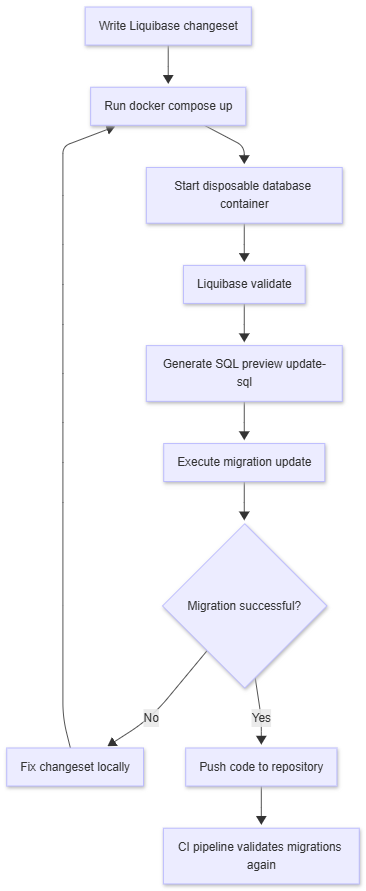
This simple loop catches most migration issues before they ever reach CI.
Organizing the project structure
For this setup, I usually keep the Liquibase configuration separate from the application code. That makes it easier to reuse the same migrations locally and in CI pipelines.
A typical structure looks like this:
liquibase-demo
│
├── docker-compose.yml
│
├── liquibase
│   ├── liquibase.properties
│   └── changelog
│       ├── db.changelog-master.yaml
│       └── changes
│           ├── 001-create-customer-table.yaml
│           └── 002-add-email-index.yaml
The docker-compose.yml file handles infrastructure, while the Liquibase directory contains the migrations and configuration.
Local Docker architecture
The local setup itself is intentionally simple. Docker Compose runs two containers: one for the database and one for Liquibase. The Liquibase container mounts the changelog files from the developer’s machine and executes the migrations against the database container.
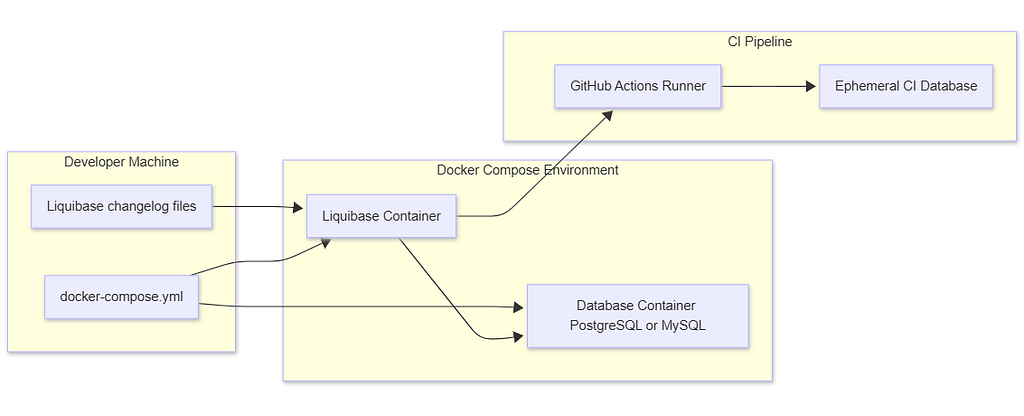
With this architecture, migrations always run in a predictable environment.
Running Liquibase with Docker Compose
The Docker Compose setup runs two containers: PostgreSQL and Liquibase
services:

  db:
    image: postgres:15

    environment:
      POSTGRES_DB: appdb
      POSTGRES_USER: appuser
      POSTGRES_PASSWORD: apppass

    ports:
      - "5432:5432"

    healthcheck:
      test: ["CMD-SHELL", "pg_isready -U appuser"]
      interval: 5s
      timeout: 3s
      retries: 20

  liquibase:
    image: liquibase/liquibase:latest

    depends_on:
      db:
        condition: service_healthy

    volumes:
      - ./liquibase/changelog:/liquibase/changelog
      - ./liquibase/liquibase.properties:/liquibase/liquibase.properties

    working_dir: /liquibase/changelog

    entrypoint: ["/bin/sh","-c"]

    command: >
      liquibase --defaults-file=/liquibase/liquibase.properties validate &&
      liquibase --defaults-file=/liquibase/liquibase.properties update-sql &&
      liquibase --defaults-file=/liquibase/liquibase.properties update
The commands are chained using &&, which ensures that each step only runs if the previous one succeeds. If validate, update-sql, or update fails, the container exits immediately. In that case, you can inspect the container logs to see which step failed and why.
Once this configuration runs, Docker starts PostgreSQL and waits for the database to become ready. Liquibase then validates the changelog, generates SQL, and executes the migrations.
You can find more details about Liquibase commands in the official documentation:
https://docs.liquibase.com/commands/home.html
Liquibase configuration
Liquibase connects to the database container using a simple configuration file.
changeLogFile=db.changelog-master.yaml
url=jdbc:postgresql://db:5432/appdb
username=appuser
password=apppass
logLevel=info
Because both containers share the same Docker network, the hostname db resolves automatically.
Running migration validation locally
Once everything is set up, validating migrations becomes a single command.
docker compose up --abort-on-container-exit
Liquibase first validates the changelog structure, then generates the SQL preview, and finally executes the migrations.
If something fails, the developer sees the error immediately.
Adding migration validation to CI
Even when developers validate migrations locally, CI should still execute migrations as a final safeguard.
Here is a simple GitHub Actions example.
name: Liquibase Migration Validation

on:
  pull_request:
    branches:
      - main

jobs:
  validate-migrations:
    runs-on: ubuntu-latest

    services:
      postgres:
        image: postgres:15
        env:
          POSTGRES_DB: appdb
          POSTGRES_USER: appuser
          POSTGRES_PASSWORD: apppass
        ports:
          - 5432:5432
        options: >-
          --health-cmd="pg_isready -U appuser"
          --health-interval=10s
          --health-timeout=5s
          --health-retries=5

    steps:
      - name: Checkout repository
        uses: actions/checkout@v4

      - name: Install Liquibase
        uses: liquibase/setup-liquibase@v1

      - name: Validate changelog
        run: liquibase validate

      - name: Preview SQL
        run: liquibase update-sql

      - name: Apply migrations
        run: liquibase update
This ensures that every pull request runs migrations against a clean database environment.
Final Thoughts
Database migrations are one of those things that seem simple — until they break something important.
Validating migrations locally using Docker creates a faster feedback loop for developers and significantly reduces CI failures.
The setup itself is lightweight: Docker Compose, Liquibase, and a disposable database container.
Catching migration problems locally is far easier than fixing them in CI.
If your team uses Liquibase or similar migration tools, adding a lightweight local validation step can prevent many migration failures before they ever impact your CI pipeline.
If you enjoyed this, let’s connect on LinkedIn
Resources
- Liquibase. “Database Schema Migration: Understand, Optimize, Automate.” Liquibase Guides.
- Liquibase. “State vs. Migration-Based Database Deployments: Best Practices for Modern Releases.” Liquibase Blog, 2026.
- Docker, Inc. “Docker Compose Documentation.”
- GitHub. “GitHub Actions Documentation.”
- Liquibase. “Liquibase Commands Reference.” Liquibase Docs.
- Liquibase GitHub Actions. “Liquibase Validate Action.” GitHub Repository.
- Rohith Menon. “Test Liquibase Migration Changes in the Local Environment Using Docker.” dev.to, 2019.
- Reddit. “Database migrations with postgres & liquibase from a “.sql” file.” r/kubernetes, 2019.
- Broadleaf Commerce. “Managing Database Versions and Migrations with Liquibase.” Broadleaf Docs.
- Liquibase. “Azure DevOps to GitHub Actions: Database CI/CD Migration Guide.” Liquibase Guides.
Stop Breaking Your CI: Validate Liquibase Migrations Locally Using Docker was originally published in Level Up Coding on Medium, where people are continuing the conversation by highlighting and responding to this story.