I built a “chat with your photos” agent with no embedding model, no vector database, and no vision LLM in the indexing loop. It runs on a laptop, the index is a CSV, and on the queries I actually want to ask, it outperforms a traditional RAG implementation.
This post is about why those three pieces — the defaults a “chat with your X” tutorial would insist on — turned out to be the wrong tools for this job, and what the right ones look like.
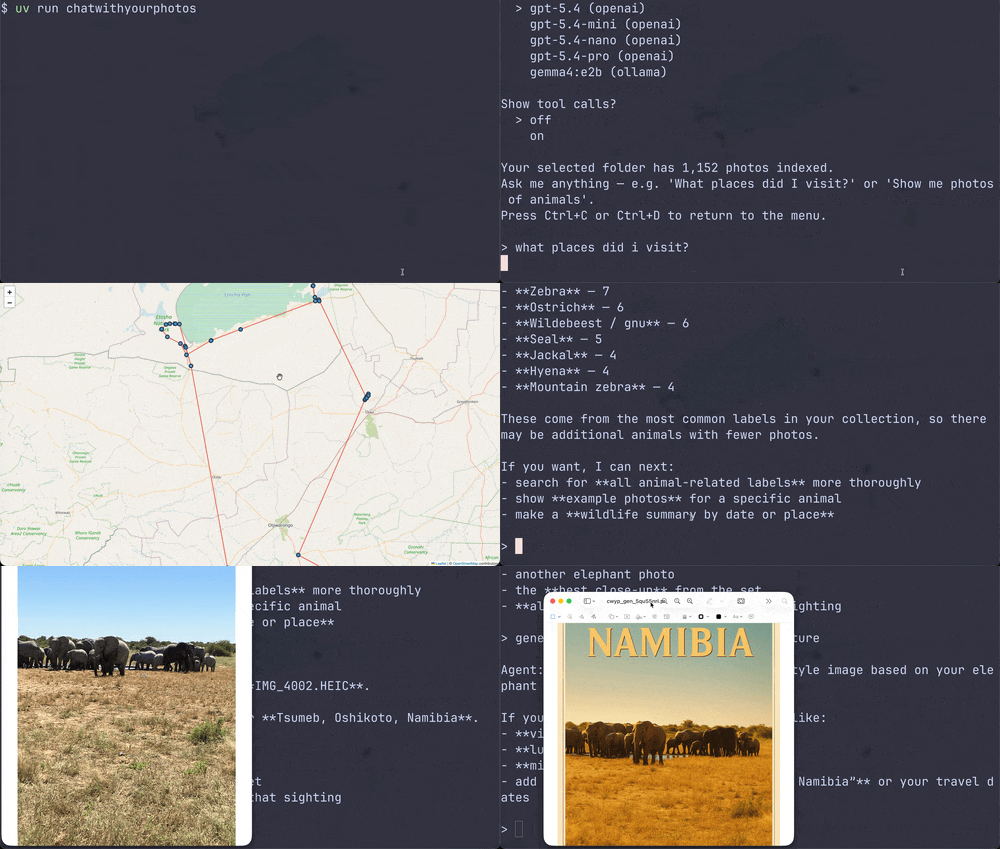
The case study is a small terminal agent called Chat with Your Photos, which I built after coming back from a Namibia holiday with more than a thousand photos and no good way to dig through them. You point it at a folder on your disk, it indexes every image once, and from then on you can ask it anything in plain English — ”What places did I visit?”, ”Show me the elephants from the Namibia trip”, ”Draw a trajectory map of that holiday” — and it answers in the terminal, opening photos or maps in your default viewer when it makes sense. It’s the same shape of problem Google now ships as Ask Photos in Google Photos, just running entirely on your own machine.
Two design choices replaced the obvious RAG pipeline:
1. The query layer doesn’t need RAG. Most “chat with your X” questions are structured queries — filters, ranges, counts, group-bys — wearing a natural-language costume. An LLM steering a handful of tools over a tabular index will beat an LLM retrieving from a vector store on those questions: simpler, cheaper, and more accurate.
2. The index layer doesn’t need a vision LLM. A classical ViT classifier is enough to populate a tag-shaped column, and it’s orders of magnitude faster (and free to run locally) than captioning every image with a vision model. The vision LLM only earns its keep at query time, when you actually need a sentence about a specific image.
Neither claim is novel in isolation. For text corpora, the community has been chipping at RAG-as-default for a while — Andrej Karpathy’s “LLM wiki” gist is one well-known articulation of the same instinct: let the LLM navigate a hand-shaped index instead of retrieving from an opaque vector store. RAG still wins for genuinely fuzzy semantic search over long-form text; a structured index wins when the questions decompose into filters and lookups. The interesting work is picking the right one per use case, not picking a side.
Photos are a case where I think the choice is still unsettled — the muscle memory is to treat them like documents (caption, embed, retrieve), and I want to show that for a photo library the index side of that debate is the clear winner. A side-effect falls out of skipping both defaults: with no embedding step and no per-image LLM call, the whole pipeline collapses to something you can run on a laptop. Point the agent at Ollama and nothing leaves your machine.
The Problem with the Obvious Approach
When you hear “chat with your photos,” the textbook architecture practically writes itself: caption every image with a vision LLM, embed the captions, dump them into a vector database, and retrieve the top-k results for every user query. RAG. Embeddings. Chroma or Pinecone. The works.
I started down that road and then stopped, because almost none of the queries I actually wanted to ask are semantic search queries.
- “How many photos did I take in the last 7 days?”
- “What countries did I visit this year?”
- “Show me everything from the Mallorca trip.”
- “Draw a trajectory map of my Namibia holiday.”
These aren’t fuzzy-similarity questions. They’re structured queries over metadata: dates, GPS coordinates, place names, labels. Vector similarity is not just unnecessary here — it’s the wrong tool. You don’t want the “most semantically similar” photo to “the last 7 days.” You want a date filter.
And even if the user’s search query is just “elephant”, the LLM will simply look at the unique labels in the photo collection, extract labels related to “elephant” and filter for those labels. Therefore, the agent can also be used for semantic search.
The RAG-Free Index
The index is a CSV. One row per photo. Nine columns: relative path, label, description, timestamp, latitude, longitude, country, region, city. It lives in a hidden folder inside the photo directory, so it travels with the photos — no database to run, no embeddings service to call, no index to rebuild when an embedding model changes.
What turns that CSV into something an LLM can actually use is the set of tools the agent is given. Each one is a pandas operation with a docstring; together they form a small navigation surface over the index:
- get_collection_overview — total photos, date range, list of countries. The agent’s first move when it needs to ground itself in what’s actually in the library.
- get_locations — counts grouped by country, region, or city. Answers “What places did I visit?” in one call.
- get_label_distribution — the most common labels, paginated. The key tool for “semantic” queries: when a user asks about “elephants”, the agent reads this list, finds related labels (“African elephant”, “tusker”, …), and feeds them to the filter.
- filter_photos — the workhorse. Combinable filters on location substring, label keyword, and date range, sorted by timestamp. Most concrete questions (“show me the Mallorca trip”, “what did I shoot last July”) bottom out here.
- get_photos_by_date — same idea, narrowed to a single day.
- create_trajectory_map — renders a Folium map of a filtered subset and opens it in the browser. The one tool that produces an artifact rather than text.
- display_photo / describe_photo — drill into one image. describe_photo is the only place a vision LLM gets invoked, and only on the specific photo the agent decided was worth looking at; the resulting sentence is written back to the CSV so the next call is free.
The shape of a typical session falls out of these tools naturally. The agent reads the overview, runs one or two filters to narrow from a thousand photos to a handful, then either reports back in text or hands off to display_photo / create_trajectory_map for the visual answer. It’s how a human would search their library: scan the metadata, narrow down, then look at what survived the filter. Each row is small enough that the surviving subset fits comfortably in the agent’s context window, so there is no “retrieved top 5, missed the right one” failure mode — the agent is reasoning over the actual rows, not over a ranked similarity list.
The Indexing Bottleneck
Of course, that CSV has to come from somewhere. EXIF gives you timestamps and GPS for free. GPS coordinates go through reverse_geocoder and pycountry to become country/region/city. Fast.
The expensive part is labeling: what’s actually in the photo?
The obvious move is to send each image to a vision LLM and ask for a label and a one-sentence description. It works, the output is great, and it is painfully slow for any non-trivial collection. For my 1,000 Namibia photos, even at a few seconds per image, you’re staring at a progress bar long enough to question your life choices. And if you’re using a hosted API, you’re paying per image.
So I added a second path: a classical ViT classifier.
Specifically, vit_base_patch16_224.augreg_in21k from timm, trained on ImageNet-21k — about 21,000 classes covering animals, plants, objects, scenes, vehicles, food, you name it. It’s a pure image classifier: forward pass, argmax, done. No token generation, no decoder loop, no API round trip. It runs on CPU in a fraction of a second per image, and on GPU it’s a blur.
The trade-off is honest: ImageNet-21k gives you a single class label per image, not a free-form caption. So the description column is empty when you index with the ViT, and only populated when the agent calls describe_photo on a specific image and an LLM has to fill it in on demand. In practice, the label alone — “African elephant”, “Mediterranean coastline”, “espresso” — is enough for most queries the agent ever needs to make. The full caption is a click away when it matters.
This turned indexing from an hours-long, API-bill-shaped operation into a quick local job. It’s the kind of speedup that changes what you actually do with the tool. Reindexing your photos isn’t a project anymore; it’s something you can run while making coffee (it took around 3 minutes for my 1,000 photos on my MacBook Air).
Takeaways
Profile the queries before choosing retrieval. Before reaching for embeddings, look at what users will actually ask. If the questions decompose into filters, ranges, group-bys, and counts, the right primitive is a structured index and a small set of pandas-shaped tools — not a vector store. Save RAG for the parts of the problem where similarity actually is the right relation (and even then, consider whether a label-distribution lookup gets you most of the way there).
Use the cheapest model that produces the column you need. A classifier isn’t a worse vision-LLM; it’s a different tool. For a tag-shaped column in a tag-shaped index, a 21k-class ImageNet ViT is fast, free, runs locally, and good enough that the vision LLM only has to show up when the user drills into a specific image. Match model class to column shape.
Both heuristics generalize past photos. Anywhere you’re tempted to do an LLM pass over every row of a corpus at index time, ask whether a smaller model writes a column that’s good enough — and whether the query layer above it really needs vectors, or just needs to know the schema.
The code is on GitHub if you want to see what those two heuristics look like in practice on a real corpus.
Skip the Vector DB: AI Engineering Lessons from a Local Photo Agent was originally published in Level Up Coding on Medium, where people are continuing the conversation by highlighting and responding to this story.