If you’ve been running Docker containers locally and know your way around AWS basics, Amazon Elastic Container Service (ECS) is the natural next step. It takes the containers you already know and handles the hard parts — scheduling, scaling, networking, and deployment — without forcing you to manage a Kubernetes cluster. This post walks through the core concepts, launch types, and the patterns you’ll actually use in production.
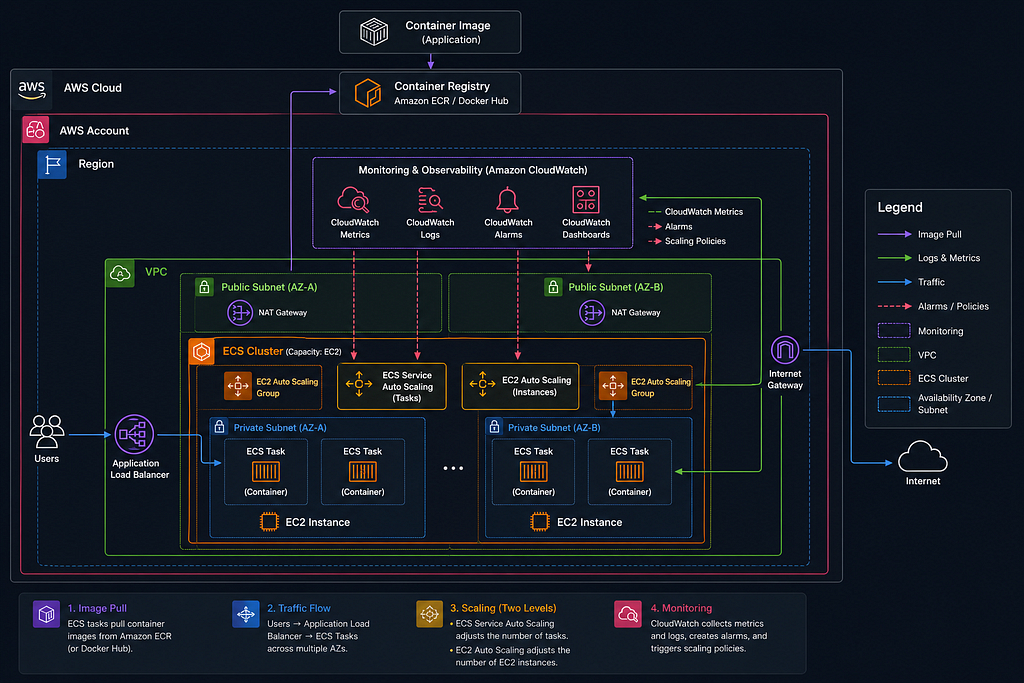
What ECS Actually Does
ECS is a container orchestrator. You tell it what to run (a Docker image), how to run it (CPU, memory, environment variables, ports), and how many copies to keep alive — and ECS handles the rest.
At its core, ECS is built around four concepts:
Cluster: A logical grouping of compute capacity. Think of it as the “where.” It can be backed by EC2 instances you manage, Fargate (serverless), or even on-premises hardware via ECS Anywhere.
Task Definition: A blueprint for your container(s). This is where you specify the Docker image, resource requirements, environment variables, port mappings, logging config, and IAM permissions. It’s versioned, so you can roll back.
Task: A running instance of a task definition. A task can include one or more containers (sidecars are common — think logging agents or proxy processes). Tasks are ephemeral; they run, finish, and stop.
Service: A long-running manager that ensures a desired number of tasks stay running. If a task crashes, the service replaces it. Services also integrate with load balancers and handle rolling deployments.
Fargate vs. EC2 Launch Types
This is the first real decision you’ll make, and it shapes how you think about everything else.
Fargate
With Fargate, you don’t provision or manage any EC2 instances. AWS handles the underlying compute entirely. You define your task’s CPU and memory, and Fargate provisions exactly what’s needed. You pay per task, per second of runtime.
Fargate is the right default for most workloads. It eliminates the AMI patching, capacity planning, and cluster autoscaling complexity that comes with EC2. The tradeoff is cost at a large scale; running your own EC2 fleet is often cheaper.
EC2 Launch Type
With EC2, you register instances into your cluster and ECS schedules containers onto them using a bin-packing algorithm. You have more control (custom instance types, GPU workloads, specific kernel configurations), but you’re responsible for managing the fleet.
Use EC2 when you need GPU instances (e.g., ML inference), require specific networking configurations like enhanced networking, or are running at a scale where the cost difference is meaningful.
Task Definitions in Practice
Here’s a stripped-down task definition in JSON to make the concepts concrete:
json
{
  "family": "web-api",
  "networkMode": "awsvpc",
  "requiresCompatibilities": ["FARGATE"],
  "cpu": "512",
  "memory": "1024",
  "executionRoleArn": "arn:aws:iam::123456789:role/ecsTaskExecutionRole",
  "taskRoleArn": "arn:aws:iam::123456789:role/myAppTaskRole",
  "containerDefinitions": [
    {
      "name": "web-api",
      "image": "123456789.dkr.ecr.us-east-1.amazonaws.com/web-api:latest",
      "portMappings": [{ "containerPort": 8080 }],
      "environment": [
        { "name": "ENV", "value": "production" }
      ],
      "secrets": [
        { "name": "DB_PASSWORD", "valueFrom": "arn:aws:secretsmanager:..." }
      ],
      "logConfiguration": {
        "logDriver": "awslogs",
        "options": {
          "awslogs-group": "/ecs/web-api",
          "awslogs-region": "us-east-1",
          "awslogs-stream-prefix": "ecs"
        }
      }
    }
  ]
}
A few things worth noting here:
- Two IAM roles: executionRoleArn is used by ECS itself to pull images and write logs. taskRoleArn is granted to your running application code to call AWS services like S3 or DynamoDB. Don't conflate them.
- Secrets vs. environment variables: Sensitive values should come from AWS Secrets Manager or SSM Parameter Store via the secrets block. They get injected as environment variables at runtime without ever appearing in plaintext in your task definition.
- awsvpc network mode: Required for Fargate, optional for EC2. Each task gets its own ENI and private IP, which simplifies security group rules significantly.
Services and Deployments
An ECS Service wraps a task definition and keeps it running. The key configuration options:
- Desired count: How many task instances to maintain simultaneously?
- Deployment type: The default is rolling update — ECS replaces old tasks with new ones gradually. You can also use blue/green deployments via CodeDeploy for zero-downtime swaps.
- Health check grace period: Time ECS waits before checking if newly launched tasks are healthy. Set this too low and ECS will kill tasks during startup.
For rolling updates, two parameters control the behavior:
- minimumHealthyPercent: ECS won't kill old tasks until this percentage of total capacity is healthy. Set to 100 if you want zero downtime.
- maximumPercent: How far above the desired count ECS can scale during deployment. At 200%, it can launch a full second set of tasks before tearing down the old ones.
Networking: ALB Integration
Most production ECS services sit behind an Application Load Balancer. The integration works at the target group level — each task registers itself as a target when it starts and deregisters when it stops.
For Fargate with awsvpc networking, each task gets its own IP. The ALB routes directly to task IPs, not to instance ports. This means you can run multiple tasks on the same "instance" without port conflicts.
A common pattern is to use path-based routing on the ALB to direct traffic to different ECS services — /api/* goes to your API service, /static/* goes elsewhere. This lets you run multiple microservices behind a single load balancer.
Auto Scaling
ECS services support two layers of scaling:
Service Auto Scaling adjusts the desired task count based on metrics like CPU utilization, memory utilization, or custom CloudWatch metrics (including ALB request count per target). Target tracking policies are the easiest to configure — you say “keep average CPU at 60%” and ECS handles the scaling math.
Cluster Auto Scaling (EC2 launch type only) handles scaling the underlying EC2 instances. It uses a Capacity Provider that links to an Auto Scaling Group and adds or removes instances based on task placement pressure.
With Fargate, you only deal with service-level scaling since the compute layer is abstracted away.
ECR: Where Your Images Live
ECS pulls images from container registries. In AWS, that’s typically Amazon ECR (Elastic Container Registry). ECR integrates natively — IAM permissions are used instead of Docker login tokens, and images stay within the AWS network.
A typical CI/CD workflow looks like:
- Build and tag the image: docker build -t web-api:$GIT_SHA .
- Push to ECR: docker push 123456789.dkr.ecr.us-east-1.amazonaws.com/web-api:$GIT_SHA
- Update the task definition with the new image URI
- Deploy a new service revision
Avoid using :latest in production task definitions. Tag by git commit SHA or semantic version so you can trace exactly what's running and roll back to a specific version.
Common Gotchas
Container exits vs. task failure: If your container process exits with code 0, ECS considers the task successful and won’t restart it (for services, it will start a replacement). If it exists, non-zero, ECS marks it as failed. Make sure your entrypoint doesn’t swallow signals: use exec form in your Dockerfile (CMD ["node", "server.js"], not CMD "node server.js").
VPC and subnet placement: Fargate tasks run in subnets you specify. If your task needs to pull from ECR or call AWS APIs, it either needs a public IP (in a public subnet) or a NAT gateway (in a private subnet). Forgetting this is a common cause of tasks failing to start.
CloudWatch log group must exist: The awslogs driver won't create the log group for you by default. Pre-create it with the right retention settings, or add awslogs-create-group: "true" to your log configuration.
Task stopped reasons: When tasks stop unexpectedly, check the stopped reason in the ECS console or via describe-tasks. Common reasons are OutOfMemory (raise your memory limit), Essential container in task exited (look at container exit codes), and health check failures.
When to Use ECS vs. EKS
ECS is the right choice when you want container orchestration without Kubernetes complexity. It’s tightly integrated with AWS services, has a gentler learning curve, and is entirely managed. EKS is worth the overhead when you need Kubernetes-specific tooling, have workloads that span clouds, or are migrating an existing Kubernetes setup.
For most teams building on AWS from scratch, ECS is the faster path to production.
Covering Up
ECS is powerful precisely because it’s focused. It does container orchestration well, integrates cleanly with the AWS ecosystem, and stays out of your way when things are working. Start with Fargate, get comfortable with task definitions and service configuration, then layer in auto scaling and blue/green deployments as your needs grow.
The mental model shift from “I run Docker containers” to “I define desired state and ECS enforces it” is the key thing to internalize. Once that clicks, the rest follows naturally.
Running Containers at Scale with AWS ECS was originally published in Level Up Coding on Medium, where people are continuing the conversation by highlighting and responding to this story.