
Every React app will need AI features within 18 months. The question isn't whether — it's how to build them without turning your codebase into a tangled mess of API calls and loading spinners.
Most “React + AI” tutorials stop at calling the OpenAI API with fetch(). That’s not AI integration — that’s an API call with a bigger bill.
In this article, we’re going to build 3 real AI features in React — streaming chat, semantic search, and AI-powered form validation — with clean, typed patterns you can copy into your projects today. Full TypeScript, production-ready hooks, backend routes, and the cost math nobody else shows you.
Section 1: Architecture — Where AI Fits in a React App
Before writing a single component, get the architecture right. AI features fail in production due to poor architecture, not bad prompts.
The Three-Layer Pattern
Every AI interaction flows through these three layers. Your React components never talk to LLM providers directly. Here’s the expanded version:
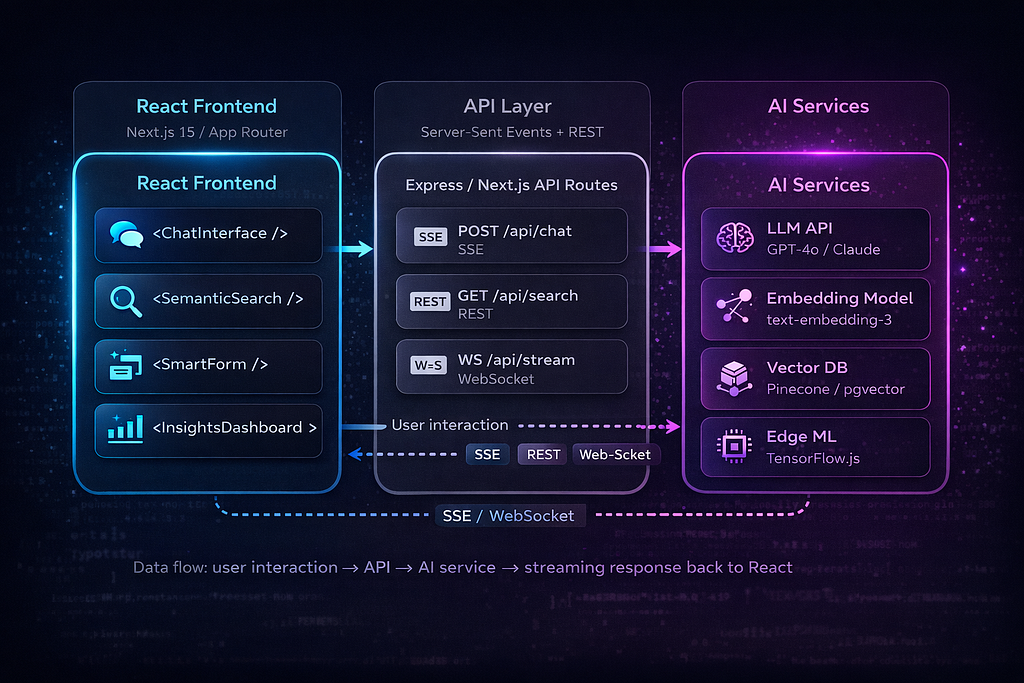
Key Architectural Decisions
Never call AI APIs directly from the frontend. Always proxy through your API layer. Your OpenAI/Anthropic API key in client-side code is a security disaster. But beyond that, the API layer gives you rate limiting, cost tracking, response caching, and prompt injection filtering — none of which belong in a React component.
Use Server-Sent Events (SSE) for streaming — not WebSockets. LLM streaming is unidirectional: the server pushes tokens to the client. SSE handles this natively over HTTP, works with CDNs and load balancers out of the box, and auto-reconnects on failure. WebSockets are overkill unless you need bidirectional real-time communication.
Implement a cost tracking middleware. Every AI API call should be logged with the token count and estimated cost. You will forget this, deploy to production, and get a $2,000 bill on day three. Build cost tracking from day one.
Cache aggressively. Same prompt = same response for deterministic queries. Use Redis for shared cache across server instances, or even localStorage for client-side caching of embedding results. Embedding calls are particularly cacheable — the same input always produces the same vector. In production, we typically see 30–60% cache hit rates on AI endpoints, which translates directly to 30–60% cost savings.
In our experience building AI-integrated web applications at Intuz, the API layer is where most teams underinvest. They spend weeks on the chat UI and skip rate limiting entirely. Don't be that team.
Let’s build all three patterns.
Section 2: Pattern 1 — Streaming AI Chat
Most chat implementations break in production because they treat LLM responses like REST calls. A production chat component needs streaming, cancellation, error recovery, and complex message state — all happening simultaneously.
We’ll build this in three pieces: the backend SSE endpoint, a reusable custom hook, and the chat UI component.
Backend: The SSE Endpoint
// app/api/chat/route.ts (Next.js App Router)
import Anthropic from '@anthropic-ai/sdk';
import { NextRequest } from 'next/server';
const anthropic = new Anthropic();
export async function POST(req: NextRequest) {
  const { messages } = await req.json();
const encoder = new TextEncoder();
  const stream = new ReadableStream({
    async start(controller) {
      try {
        const response = anthropic.messages.stream({
          model: 'claude-sonnet-4-20250514',
          max_tokens: 1024,
          messages: messages.map(
            ({ role, content }: { role: string; content: string }) => ({
              role,
              content,
            })
          ),
        });
response.on('text', (text) => {
controller.enqueue(
encoder.encode(`data: ${JSON.stringify({ token: text })}\n\n`)
);
}); response.on('end', () => {
controller.enqueue(encoder.encode('data: [DONE]\n\n'));
controller.close();
}); response.on('error', (error) => {
controller.enqueue(
encoder.encode(
`data: ${JSON.stringify({ error: error.message })}\n\n`
)
);
controller.close();
});
} catch (error) {
controller.enqueue(
encoder.encode(
`data: ${JSON.stringify({ error: 'Stream initialization failed' })}\n\n`
)
);
controller.close();
}
},
}); return new Response(stream, {
headers: {
'Content-Type': 'text/event-stream',
'Cache-Control': 'no-cache',
Connection: 'keep-alive',
'X-Accel-Buffering': 'no', // Disable nginx buffering
},
});
}The X-Accel-Buffering: no header is easy to miss. Without it, nginx (which sits in front of most Next.js deployments) buffers the entire SSE response before forwarding it, completely killing the streaming effect.
The Custom Hook: useStreamingChat
This is the core abstraction. Extract all streaming logic into a reusable hook so any component can become AI-powered.
// hooks/useStreamingChat.ts
import { useReducer, useCallback, useRef } from 'react';
// -- Types --
interface Message {
  id: string;
  role: 'user' | 'assistant';
  content: string;
  status: 'complete' | 'streaming' | 'error';
  timestamp: number;
}
type ChatAction =
  | { type: 'ADD_MESSAGE'; message: Message }
  | { type: 'APPEND_TOKEN'; id: string; token: string }
  | { type: 'SET_STATUS'; id: string; status: Message['status'] }
  | { type: 'CLEAR' };
interface ChatState {
  messages: Message[];
  isStreaming: boolean;
  error: Error | null;
}
// -- Reducer --
function chatReducer(state: ChatState, action: ChatAction): ChatState {
switch (action.type) {
case 'ADD_MESSAGE':
return {
...state,
messages: [...state.messages, action.message],
isStreaming: action.message.status === 'streaming',
error: null,
};
case 'APPEND_TOKEN':
return {
...state,
messages: state.messages.map((msg) =>
msg.id === action.id
? { ...msg, content: msg.content + action.token }
: msg
),
};
case 'SET_STATUS':
return {
...state,
messages: state.messages.map((msg) =>
msg.id === action.id ? { ...msg, status: action.status } : msg
),
isStreaming: action.status === 'streaming',
error:
action.status === 'error'
? new Error('Generation failed')
: state.error,
};
case 'CLEAR':
return { messages: [], isStreaming: false, error: null };
default:
return state;
}
}
// -- Hook --
export function useStreamingChat(endpoint: string = '/api/chat') {
  const [state, dispatch] = useReducer(chatReducer, {
    messages: [],
    isStreaming: false,
    error: null,
  });
  const abortRef = useRef<AbortController | null>(null);
  const sendMessage = useCallback(
    async (content: string) => {
      // 1. Add user message
      const userMsg: Message = {
        id: crypto.randomUUID(),
        role: 'user',
        content,
        status: 'complete',
        timestamp: Date.now(),
      };
      dispatch({ type: 'ADD_MESSAGE', message: userMsg });
      // 2. Create placeholder for assistant response
      const assistantId = crypto.randomUUID();
      dispatch({
        type: 'ADD_MESSAGE',
        message: {
          id: assistantId,
          role: 'assistant',
          content: '',
          status: 'streaming',
          timestamp: Date.now(),
        },
      });
      // 3. Set up abort controller for cancellation
      abortRef.current = new AbortController();
      try {
        const response = await fetch(endpoint, {
          method: 'POST',
          headers: { 'Content-Type': 'application/json' },
          body: JSON.stringify({
            messages: [...state.messages, userMsg].map(
              ({ role, content }) => ({ role, content })
            ),
          }),
          signal: abortRef.current.signal,
        });
if (!response.ok) throw new Error(`HTTP ${response.status}`);
if (!response.body) throw new Error('No response body');// 4. Read the stream
const reader = response.body.getReader();
const decoder = new TextDecoder();
        while (true) {
          const { done, value } = await reader.read();
          if (done) break;
const chunk = decoder.decode(value, { stream: true });
const lines = chunk.split('\n'); for (const line of lines) {
if (line.startsWith('data: ')) {
const data = line.slice(6);
if (data === '[DONE]') break; try {
const parsed = JSON.parse(data);
if (parsed.token) {
dispatch({
type: 'APPEND_TOKEN',
id: assistantId,
token: parsed.token,
});
}
if (parsed.error) {
throw new Error(parsed.error);
}
} catch (parseErr) {
if (data.trim()) {
dispatch({
type: 'APPEND_TOKEN',
id: assistantId,
token: data,
});
}
}
}
}
} dispatch({
type: 'SET_STATUS',
id: assistantId,
status: 'complete',
});
} catch (err: unknown) {
if (err instanceof Error && err.name === 'AbortError') {
dispatch({
type: 'SET_STATUS',
id: assistantId,
status: 'complete',
});
} else {
dispatch({
type: 'SET_STATUS',
id: assistantId,
status: 'error',
});
}
}
},
[endpoint, state.messages]
); const cancelStream = useCallback(() => {
abortRef.current?.abort();
}, []); return {
messages: state.messages,
isStreaming: state.isStreaming,
error: state.error,
sendMessage,
cancelStream,
};
}The hook exposes a clean API:
- sendMessage(content: string) — send a user message and start streaming
- cancelStream() — abort generation mid-stream
- messages: Message[] — full conversation history
- isStreaming: boolean — whether a response is currently generating
- error: Error | null — last error, if any
Why useReducer instead of useState? Chat state involves multiple interdependent updates: adding messages, appending tokens, and changing status flags. With useState, you hit stale closures and race conditions when streaming — the setMessages callback captures the old array while tokens are still arriving. useReducer gives you a single dispatch that handles all state transitions atomically, and the reducer always receives the current state.
Frontend: The Chat Component
// components/AIChat.tsx
import { useState, useRef, useEffect, memo } from 'react';
import { useStreamingChat } from '../hooks/useStreamingChat';
import ReactMarkdown from 'react-markdown';
const MessageBubble = memo(function MessageBubble({
  message,
}: {
  message: { role: string; content: string; status: string };
}) {
  return (
    <div
      className={`message ${message.role}`}
      style={{ contentVisibility: 'auto' }}
    >
      {message.role === 'assistant' ? (
        <ReactMarkdown>{message.content}</ReactMarkdown>
      ) : (
        <p>{message.content}</p>
      )}
      {message.status === 'streaming' && (
        <span className="cursor-blink" aria-label="Generating response">
          |
        </span>
      )}
      {message.status === 'error' && (
        <span className="error-badge">Failed to generate — try again</span>
      )}
    </div>
  );
});
export function AIChat() {
const { messages, isStreaming, error, sendMessage, cancelStream } =
useStreamingChat();
const [input, setInput] = useState('');
const bottomRef = useRef<HTMLDivElement>(null); useEffect(() => {
bottomRef.current?.scrollIntoView({ behavior: 'smooth' });
}, [messages]); const handleSubmit = (e: React.FormEvent) => {
e.preventDefault();
if (!input.trim() || isStreaming) return;
sendMessage(input.trim());
setInput('');
};return (
<div className="chat-container">
<div className="messages" role="log" aria-live="polite">
{messages.map((msg) => (
<MessageBubble key={msg.id} message={msg} />
))}
<div ref={bottomRef} />
</div>
      <form onSubmit={handleSubmit} className="chat-input-form">
        <input
          value={input}
          onChange={(e) => setInput(e.target.value)}
          placeholder="Ask anything..."
          disabled={isStreaming}
          aria-label="Chat message input"
        />
        {isStreaming ? (
          <button type="button" onClick={cancelStream} className="btn-cancel">
            Stop
          </button>
        ) : (
          <button type="submit" disabled={!input.trim()} className="btn-send">
            Send
          </button>
        )}
      </form>
    </div>
  );
}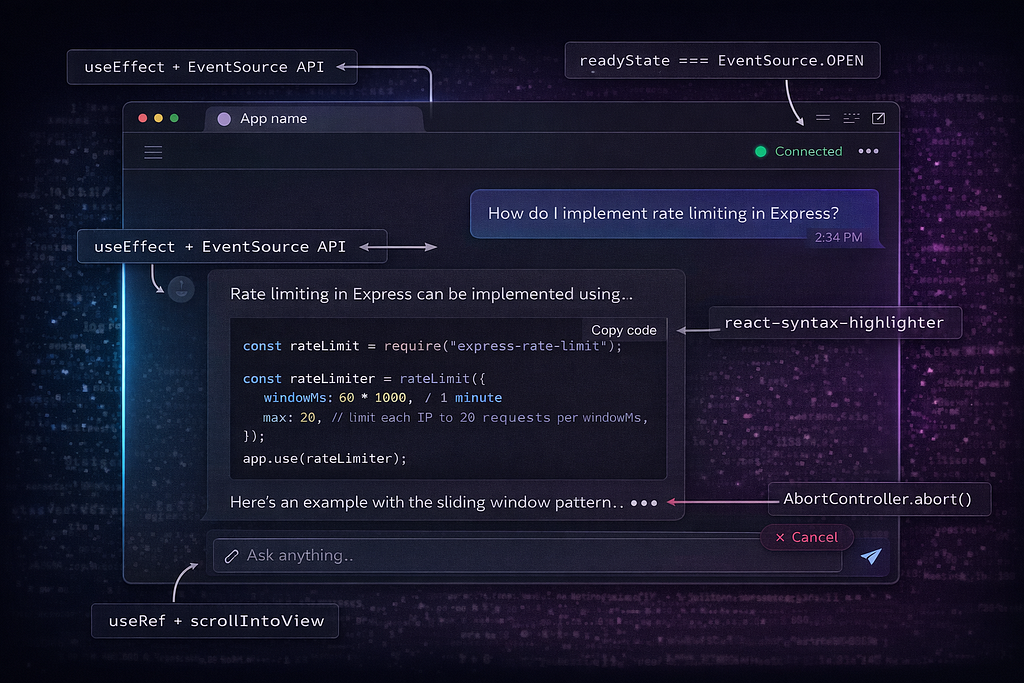
A few decisions worth calling out:
contentVisibility: ‘auto’ on message bubbles. When streaming 500+ tokens into a Markdown renderer, every token triggers a re-render of the entire message content. CSS containment tells the browser that off-screen messages don’t need layout recalculation. This alone can cut rendering time by 40–60% in long conversations.
The AbortController pattern lets users cancel a generation mid-stream. When the user hits “Stop,” the fetch is aborted, which closes the SSE connection, which triggers req.on(‘close’) on the server (if using Express) or the ReadableStream cleanup (if using Next.js). Without this cleanup chain, you’re paying for tokens nobody will ever read.
Memo on MessageBubble prevents re-rendering every message in the conversation when a single token arrives. Only the actively streaming message re-renders. In a conversation with 50 messages, this is the difference between smooth and janky.
Shortcut: If you’re on Next.js and want to skip writing the hook from scratch, the Vercel AI SDK (v4+) provides useChat and streamText that handle SSE transport, message state, and cancellation out of the box. The patterns above are framework-agnostic and give you full control when you need it.
Section 3: Pattern 2 — Semantic Search with Hybrid Scoring
Traditional search is string matching. Type “machine learning deployment,” and you only get results containing those exact words. You miss every article about “MLOps,” “model serving,” or “inference pipelines” — all semantically identical.
Pure semantic search fixes that — but introduces a new problem. Search for “React 19” and semantic search returns results about “Vue 3” and “Angular 17” because they’re all semantically similar (frontend framework versions). You lose exact-match precision.
The solution: a hybrid search that combines semantic similarity with keyword matching. Research from both Weaviate and Pinecone shows that hybrid search achieves 15–30% better precision than either approach alone.
Here’s how to build it.
Backend: Hybrid Search with pgvector
// app/api/search/route.ts
import { NextRequest, NextResponse } from 'next/server';
import OpenAI from 'openai';
import { Pool } from 'pg';
const openai = new OpenAI();
const pool = new Pool({ connectionString: process.env.DATABASE_URL });
export async function POST(req: NextRequest) {
  const { query } = await req.json();
  if (!query?.trim()) return NextResponse.json([]);
try {
// Step 1: Generate embedding for the user's search query
const embeddingRes = await openai.embeddings.create({
model: 'text-embedding-3-small',
input: query,
});
const queryEmbedding = embeddingRes.data[0].embedding;// Step 2: Run hybrid search — vector similarity + full-text keyword
const { rows } = await pool.query(
`
WITH semantic AS (
SELECT id, title, snippet,
1 - (embedding <=> $1::vector) AS semantic_score
FROM documents
ORDER BY embedding <=> $1::vector
LIMIT 20
),
keyword AS (
SELECT id, title, snippet,
ts_rank(search_vector, plainto_tsquery('english', $2))
AS keyword_score
FROM documents
WHERE search_vector @@ plainto_tsquery('english', $2)
ORDER BY keyword_score DESC
LIMIT 20
)
SELECT
COALESCE(s.id, k.id) AS id,
COALESCE(s.title, k.title) AS title,
COALESCE(s.snippet, k.snippet) AS snippet,
(COALESCE(s.semantic_score, 0) * 0.7 +
COALESCE(k.keyword_score, 0) * 0.3) AS score,
CASE
WHEN s.id IS NOT NULL AND k.id IS NOT NULL THEN 'both'
WHEN s.id IS NOT NULL THEN 'semantic'
ELSE 'keyword'
END AS source
FROM semantic s
FULL OUTER JOIN keyword k ON s.id = k.id
ORDER BY score DESC
LIMIT 10
`,
[JSON.stringify(queryEmbedding), query]
);
    return NextResponse.json(rows);
  } catch (error) {
    console.error('Search error:', error);
    return NextResponse.json(
      { error: 'Search failed' },
      { status: 500 }
    );
  }
}
The 0.7 * semantic_score + 0.3 * keyword_score weighting is a strong default. Tune it based on your content type: documentation search benefits from higher keyword weight (users search for exact function names), while product catalogs benefit from heavier semantic weight (users describe what they want in natural language).
Frontend: The Search Component
// components/SemanticSearch.tsx
import { useState, useCallback, useRef } from 'react';
interface SearchResult {
  id: string;
  title: string;
  snippet: string;
  score: number;
  source: 'semantic' | 'keyword' | 'both';
}
function useSemanticSearch(endpoint: string = '/api/search') {
const [results, setResults] = useState<SearchResult[]>([]);
const [isSearching, setIsSearching] = useState(false);
const debounceRef = useRef<ReturnType<typeof setTimeout>>();
const abortRef = useRef<AbortController>();const search = useCallback(
(query: string) => {
if (debounceRef.current) clearTimeout(debounceRef.current);
abortRef.current?.abort();
      if (!query.trim()) {
        setResults([]);
        setIsSearching(false);
        return;
      }
setIsSearching(true);
      // 300ms debounce — fast enough to feel responsive,
      // slow enough to avoid hammering the embedding API
      debounceRef.current = setTimeout(async () => {
        abortRef.current = new AbortController();
        try {
          const res = await fetch(endpoint, {
            method: 'POST',
            headers: { 'Content-Type': 'application/json' },
            body: JSON.stringify({ query }),
            signal: abortRef.current.signal,
          });
if (!res.ok) throw new Error(`HTTP ${res.status}`);
const data: SearchResult[] = await res.json();
setResults(data);
} catch (err: unknown) {
if (err instanceof Error && err.name !== 'AbortError') {
console.error('Search failed:', err);
setResults([]);
}
} finally {
setIsSearching(false);
}
}, 300);
},
[endpoint]
); return { results, isSearching, search };
}// Highlight matching query terms in the snippet
function highlightTerms(text: string, query: string): JSX.Element {
const terms = query.toLowerCase().split(/\s+/).filter(Boolean);
const regex = new RegExp(`(${terms.join('|')})`, 'gi');
const parts = text.split(regex);
  return (
    <>
      {parts.map((part, i) =>
        terms.includes(part.toLowerCase()) ? (
          <mark key={i}>{part}</mark>
        ) : (
          <span key={i}>{part}</span>
        )
      )}
    </>
  );
}
export function SemanticSearch() {
  const { results, isSearching, search } = useSemanticSearch();
  const [query, setQuery] = useState('');
return (
<div className="search-container">
<div className="search-input-wrapper">
<input
type="text"
placeholder="Search by meaning, not just keywords..."
value={query}
onChange={(e) => {
setQuery(e.target.value);
search(e.target.value);
}}
aria-label="Semantic search"
/>
{isSearching && <span className="search-spinner" />}
</div>
      {results.length > 0 && (
        <ul className="search-results" role="listbox">
          {results.map((result) => (
            <li key={result.id} className="search-result-item">
              <div className="result-header">
                <h4>{result.title}</h4>
                <span
                  className={`relevance-badge ${
                    result.score > 0.8
                      ? 'high'
                      : result.score > 0.5
                        ? 'medium'
                        : 'low'
                  }`}
                >
                  {Math.round(result.score * 100)}% match
                </span>
              </div>
              <p className="result-snippet">
                {highlightTerms(result.snippet, query)}
              </p>
              <span className={`result-source ${result.source}`}>
                {result.source === 'both'
                  ? 'Semantic + Keyword match'
                  : result.source === 'semantic'
                    ? 'Semantic match'
                    : 'Keyword match'}
              </span>
            </li>
          ))}
        </ul>
      )}
{query.trim() && !isSearching && results.length === 0 && (
<p className="no-results">
No results found. Try describing what you're looking for differently.
</p>
)}
</div>
);
}
Key Design Decisions
pgvector vs. dedicated vector databases. If you’re already on PostgreSQL, pgvector is the pragmatic choice. It stores embeddings alongside your relational data — no separate infrastructure. Pinecone and Weaviate offer better performance at massive scale (10M+ documents), but for most apps under 1M documents, pgvector with an HNSW index is fast enough and operationally simpler.
Embeddings are generated at index time, not query time (for your documents). When a document is created or updated, generate its embedding and store it. The only real-time embedding call is for the user’s search query — one API call per search, ~50ms with text-embedding-3-small.
The AbortController on every search cancels in-flight requests when the user types a new character. Without this, fast typers trigger 5–10 concurrent searches, and results arrive out of order — the response from “ma” overwrites the response from “machine learning.”
Why highlighting terms matters. Users need visual confirmation that the search understood their query. Highlighting matching terms in results is a trivial addition that significantly improves perceived search quality.
Section 4: Pattern 3 — AI-Powered Form Validation
This is the most underrated AI feature in web apps. Standard validation checks structure: is this an email? Is this field required? Is this number in range?
AI validation checks meaning:
- “Describe your project” field — is this a real project description, or is it spam/gibberish?
- Address fields — normalize “123 Main St Apt 4B” vs. “123 Main Street, Apartment 4B” and catch impossible addresses
- Product descriptions — does this match brand guidelines? Is it the right category?
- Support tickets — auto-categorize as billing, technical, or account issue based on content
The best part: it costs roughly $0.001 per validation call. That’s ~$1 per 1,000 form submissions.
Backend: Validation Endpoint with Structured Output
// app/api/validate/route.ts
import { NextRequest, NextResponse } from 'next/server';
import Anthropic from '@anthropic-ai/sdk';
const anthropic = new Anthropic();
interface ValidationRequest {
  field: string;
  value: string;
  rules: string;
  context?: Record<string, string>;
}
export async function POST(req: NextRequest) {
const { field, value, rules, context }: ValidationRequest =
await req.json();// Skip AI validation for very short inputs — not enough signal
if (value.length < 10) {
return NextResponse.json({
valid: true,
suggestions: [],
corrected: value,
});
}
  try {
    const message = await anthropic.messages.create({
      model: 'claude-sonnet-4-20250514',
      max_tokens: 256,
      messages: [
        {
          role: 'user',
          content: `Validate this form field and respond ONLY with JSON.
Field: "${field}"
Value: "${value}"
Validation rules: ${rules}
${context ? `Other form fields: ${JSON.stringify(context)}` : ''}Respond in this exact JSON format:
{
"valid": boolean,
"suggestions": ["list of improvement suggestions if invalid"],
"corrected": "corrected version of the input, or original if valid",
"category": "auto-detected category if applicable"
}
Be strict but practical. Flag spam, gibberish, and off-topic content.
Do not flag minor grammar issues as invalid.`,
        },
      ],
    });
    const textContent = message.content.find((c) => c.type === 'text');
    if (!textContent || textContent.type !== 'text') {
      throw new Error('No text response');
    }
    const result = JSON.parse(textContent.text);
    return NextResponse.json(result);
  } catch (error) {
    // AI validation failure should never block the form
    return NextResponse.json({
      valid: true,
      suggestions: [],
      corrected: value,
    });
  }
}
Notice the fallback in the catch block: if the AI call fails, we return { valid: true }. AI validation is an enhancement, not a gate. Never block form submission because an AI service is down.
The Validation Hook: Integrated with react-hook-form
// hooks/useAIValidation.ts
import { useCallback, useRef, useState } from 'react';
import {
  UseFormReturn,
  FieldValues,
  Path,
} from 'react-hook-form';
interface AIValidationResult {
  valid: boolean;
  suggestions: string[];
  corrected: string;
  category?: string;
}
export function useAIValidation<T extends FieldValues>(
form: UseFormReturn<T>,
endpoint: string = '/api/validate'
) {
const [validations, setValidations] = useState<
Record<string, AIValidationResult>
>({});
const [isValidating, setIsValidating] = useState(false);
const debounceTimers = useRef<Record<string, ReturnType<typeof setTimeout>>>(
{}
);
const cache = useRef<Map<string, AIValidationResult>>(new Map());
  const validateField = useCallback(
    (field: Path<T>, rules: string, context?: Record<string, string>) => {
      const value = form.getValues(field) as string;
      if (debounceTimers.current[field]) {
        clearTimeout(debounceTimers.current[field]);
      }
if (!value || value.length < 10) return;
      const cacheKey = `${String(field)}:${value}`;
      if (cache.current.has(cacheKey)) {
        const cached = cache.current.get(cacheKey)!;
        setValidations((prev) => ({ ...prev, [field]: cached }));
        if (!cached.valid) {
          form.setError(field, {
            type: 'ai',
            message: cached.suggestions[0] || 'AI validation failed',
          });
        }
        return;
      }
debounceTimers.current[field] = setTimeout(async () => {
setIsValidating(true);
try {
const res = await fetch(endpoint, {
method: 'POST',
headers: { 'Content-Type': 'application/json' },
body: JSON.stringify({ field, value, rules, context }),
});if (!res.ok) return;
          const result: AIValidationResult = await res.json();
          cache.current.set(cacheKey, result);
          setValidations((prev) => ({ ...prev, [field]: result }));
          if (!result.valid) {
            form.setError(field, {
              type: 'ai',
              message: result.suggestions[0] || 'Please review this field',
            });
          } else {
            form.clearErrors(field);
          }
        } catch {
          // AI validation failure = silent pass
        } finally {
          setIsValidating(false);
        }
      }, 800);
    },
    [form, endpoint]
  );
return { validations, isValidating, validateField };
}Using It in a Form Component
Here’s how to wire AI validation alongside standard React Hook Form rules:
// components/ProjectRequestForm.tsx
import { useForm } from 'react-hook-form';
import { useAIValidation } from '../hooks/useAIValidation';
interface ProjectForm {
  name: string;
  email: string;
  description: string;
  budget: string;
}
export function ProjectRequestForm() {
const form = useForm<ProjectForm>();
const { validations, isValidating, validateField } = useAIValidation(form);
const { register, handleSubmit, formState: { errors } } = form; const onSubmit = (data: ProjectForm) => {
console.log('Submitted:', data);
};return (
<form onSubmit={handleSubmit(onSubmit)}>
{/* Standard validation — regex handles structure */}
<div className="field-group">
<label htmlFor="email">Email</label>
<input
id="email"
{...register('email', {
required: 'Email is required',
pattern: {
value: /^[^\s@]+@[^\s@]+\.[^\s@]+$/,
message: 'Invalid email format',
},
})}
/>
{errors.email && (
<span className="error">{errors.email.message}</span>
)}
</div>
      {/* AI validation — LLM checks meaning */}
      <div className="field-group">
        <label htmlFor="description">Describe your project</label>
        <textarea
          id="description"
          {...register('description', {
            required: 'Description is required',
            minLength: {
              value: 20,
              message: 'Please provide more detail',
            },
          })}
          onBlur={() =>
            validateField(
              'description',
              'Must be a genuine project description. Reject spam, gibberish, and placeholder text.',
              { budget: form.getValues('budget') }
            )
          }
          rows={5}
        />
        {errors.description && (
          <span className="error">{errors.description.message}</span>
        )}
        {validations.description?.suggestions?.length > 0 && (
          <ul className="ai-suggestions">
            {validations.description.suggestions.map((s, i) => (
              <li key={i}>{s}</li>
            ))}
          </ul>
        )}
        {isValidating && (
          <span className="validating-indicator">Analyzing...</span>
        )}
      </div>
<button type="submit">Submit Request</button>
</form>
);
}
The pattern highlights:
Validation triggers on onBlur, not onChange. AI calls cost money. You don’t want to send a validation request on every keystroke — that turns a $1/month feature into a $50/month feature. Blur-based validation fires once when the user moves to the next field.
800ms debounce as a safety net. Even with blur-based triggering, the debounce prevents duplicate calls when the user quickly tabs out and back.
Graceful fallback to regex. The catch block is intentionally empty. If the AI API is slow, rate-limited, or down, the form still works with the standard React Hook Form validation rules registered via register(). AI validation is additive, never blocking.
Cache by field+value. The useRef-based cache stores results keyed to field:value. If a user types a description, deletes it, and types the same thing again, you don’t hit the API twice. In production, consider an LRU cache with a size limit of 100–200 entries.
Section 5: Cost Management — The Part Nobody Talks About
AI features are expensive if you’re careless. A naive implementation can rack up thousands in API costs in a single week. Here’s the reality.
Cost Per Feature (1,000 Daily Active Users)
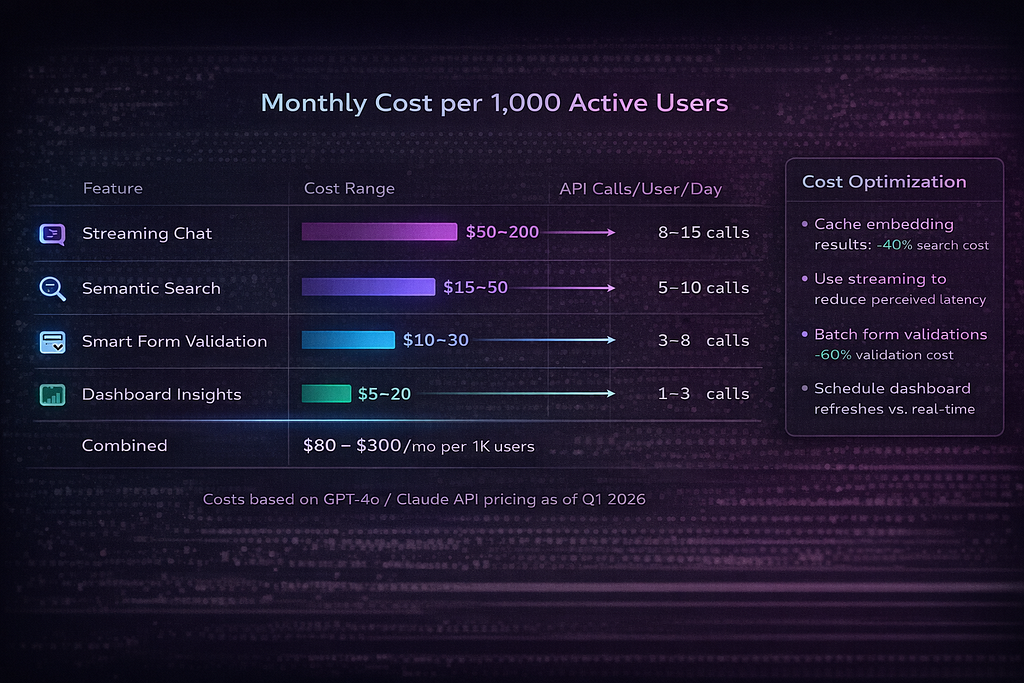
Streaming Chat — 5–15 messages per user per day — $50–200/month per 1,000 users
Semantic Search — 10–30 queries per user per day — $15–50/month per 1,000 users
Form Validation — 2–5 validations per user per day — $10–30/month per 1,000 users
Dashboard Insights — 1–3 requests per user per day — $5–20/month per 1,000 users
Total: $80–300/month per 1,000 DAU
These assume current pricing for text-embedding-3-small ($0.02/1M tokens) and Claude Sonnet / GPT-4o-mini rates. Manageable — but only if you implement cost controls.
5 Cost Control Patterns
1. Prompt caching — hit rate: 30–60%. Cache responses for identical prompts. Embedding calls are the most cacheable (same input = same vector, always). Use Redis for shared cache across server instances, or a Service Worker for client-side embedding caching.
// middleware/costTracker.ts
import { NextRequest, NextResponse } from 'next/server';
import { Redis } from 'ioredis';
const redis = new Redis(process.env.REDIS_URL!);
interface CostLog {
  endpoint: string;
  model: string;
  inputTokens: number;
  outputTokens: number;
  estimatedCost: number;
  userId: string;
  timestamp: number;
}
// Cost per 1M tokens (update with current pricing)
const COST_TABLE: Record<string, { input: number; output: number }> = {
'claude-sonnet-4-20250514': { input: 3.0, output: 15.0 },
'gpt-4o-mini': { input: 0.15, output: 0.6 },
'text-embedding-3-small': { input: 0.02, output: 0 },
};
export async function trackCost(log: CostLog) {
  const dailyKey = `cost:${log.userId}:${new Date().toISOString().slice(0, 10)}`;
await redis.lpush('cost:log', JSON.stringify(log));const dailySpend = await redis.incrbyfloat(
dailyKey,
log.estimatedCost
);
await redis.expire(dailyKey, 86400 * 7);
  if (dailySpend > 5.0) {
    console.warn(
      `[COST ALERT] User ${log.userId} daily spend: $${dailySpend.toFixed(2)}`
    );
  }
return dailySpend;
}
export function estimateCost(
  model: string,
  inputTokens: number,
  outputTokens: number
): number {
  const rates = COST_TABLE[model] || { input: 1, output: 5 };
  return (
    (inputTokens / 1_000_000) * rates.input +
    (outputTokens / 1_000_000) * rates.output
  );
}
2. Model routing — save 80%. Use GPT-4o-mini or Claude Haiku for simple tasks (form validation, classification, short summaries). Reserve GPT-4o or Claude Sonnet for complex tasks (multi-turn chat, data analysis). A simple router based on task type cuts costs dramatically.
3. Token budgets — per-user daily limits. Set a daily token budget per user in your middleware. When they hit the limit, degrade gracefully: disable the chat feature but keep search working, or switch to a cheaper model.
4. Streaming cancellation — stop paying for unread tokens. When a user navigates away or clicks “Stop,” abort the stream on both the client (AbortController) and the server (close the LLM connection). Without server-side cleanup, you’re paying for every token until the response completes — even though nobody’s reading it.
5. Batch embedding — cheaper + faster. When indexing documents, embed in batches of 100 instead of one at a time. The OpenAI embedding API accepts arrays, and batching reduces both cost (fewer API calls) and latency (one network round trip vs. 100).
Section 6: Production Checklist
Before shipping AI features to real users, run through this:
- Rate limiting per user (not just per IP — one user behind a VPN shouldn’t drain your budget)
- Cost alerts (notify Slack/PagerDuty when daily spend exceeds your threshold)
- Prompt injection defense (never pass raw user input directly into system prompts — sanitize and template)
- Fallback UI when AI is unavailable (don’t crash, degrade gracefully — show cached results, disable AI features, fall back to regex validation)
- A/B test AI features (some users may prefer the non-AI experience — measure actual engagement, not assumed value)
- GDPR compliance (don’t send PII to AI APIs without explicit user consent — strip names, emails, and addresses from prompts when possible)
- Monitor latency (track p95 for every AI endpoint — alert when latency degrades beyond 3 seconds)
- Log all prompts + responses (essential for debugging hallucinations, tracking costs, and improving prompt quality over time)
Whether you’re adding AI features to an existing app or building from scratch, these patterns keep costs predictable and user experience consistent.
Closing
Three patterns, three hooks, three backend routes. Let’s recap what we built.
Streaming chat solves the biggest UX challenge in AI applications — latency. LLMs are slow. Users hate spinners. By streaming tokens through SSE, managing state with useReducer, and giving users a cancel button, you turn a 5-second wait into an experience that feels instantaneous. The useStreamingChat hook encapsulates all of this complexity behind a clean API.
Semantic search with hybrid scoring combines the best of two worlds. Vector similarity finds results that match by meaning (“budget laptop” matches “affordable notebook”), while keyword matching preserves exact-match precision (“React 19” doesn’t return Angular results). The 70/30 weighting with pgvector gives you a single PostgreSQL deployment that handles both — no separate vector database infrastructure to manage.
AI-powered form validation is the sleeper feature most teams overlook. For $0.001 per validation, you get spam detection, content categorization, and meaning-based validation that regex simply cannot do. Integrated with react-hook-form and triggered on blur rather than keystrokes, it adds intelligence without adding cost.
The developer’s job is changing. AI features are becoming as expected as responsive design was 10 years ago. The gap between “app with AI” and “app without AI” is widening every month, and users are starting to notice the difference.
But the winners won’t be developers who build the most impressive AI demos. They’ll be the ones who build AI features that are fast (streaming, not spinners), cheap (cached, rate-limited, model-routed), and gracefully degradable (the app works fine when the AI service doesn’t). The production checklist matters as much as the cool code.
Start with streaming chat — it’s the most visible win and the most forgiving to implement. Get it into production, measure engagement, and use that data to justify expanding into semantic search and AI validation. You don’t need to ship all three at once.
Every code example in this article is production-tested TypeScript you can drop into a Next.js or Express project today. Full code examples are available as a GitHub Gist — check the comments for the link.
Written by Pratik K Rupareliya, Co-Founder & Head of Strategy at Intuz — building React, Next.js, and AI-powered web applications for enterprise clients.
Building an AI-powered web app? → Book a free 30-minute architecture review
React + AI: Building Intelligent Web Applications in 2026 was originally published in Level Up Coding on Medium, where people are continuing the conversation by highlighting and responding to this story.