No Code Token Creator
 Nitro Neuron4 min read·Just now
--
Solforge (accessible at https://v0-solforge.vercel.app/index.html) is a sleek, no-code web application designed to let anyone create SPL tokens on the Solana blockchain in seconds. Built as a straightforward decentralized application (dApp), it targets memecoin enthusiasts, project founders, developers, and crypto newcomers who want to launch a token without writing smart contracts or dealing with complex command-line tools.
In an ecosystem where launching a token on Solana can feel intimidating for non-technical users, Solforge positions itself as an accessible “token forger” – simple, fast, and transparent about costs and controls.
First Impressions and User Interface
The site opens to a clean, modern interface with a dark/light-friendly aesthetic typical of Solana dApps. The layout follows a logical, step-by-step wizard format divided into clearly numbered sections, making the process feel guided rather than overwhelming.
- Header: Features the “Solforge” branding, a “Connect Wallet” button (supporting Phantom and other Solana wallets), and a “Disconnect” option once linked.
- Main Content: Split into form inputs on the left (or center) and a live preview panel on the side. This real-time preview is one of the standout UX elements – as you type the token name, symbol, or adjust supply, the preview updates instantly, showing how your token will appear.
- Visual Style: Minimalist with good use of whitespace, numbered steps, drag-and-drop zones, and subtle animations. It feels professional yet approachable, avoiding the clutter common in many crypto tools.
- Overall, the UI scores high on intuitiveness. Even first-time users can navigate it without tutorials, thanks to inline tips and recommendations (e.g., “Revoke Mint Authority – recommended for trust”).
- Core Features and Workflow
- Solforge streamlines SPL token creation into a six-step flow:
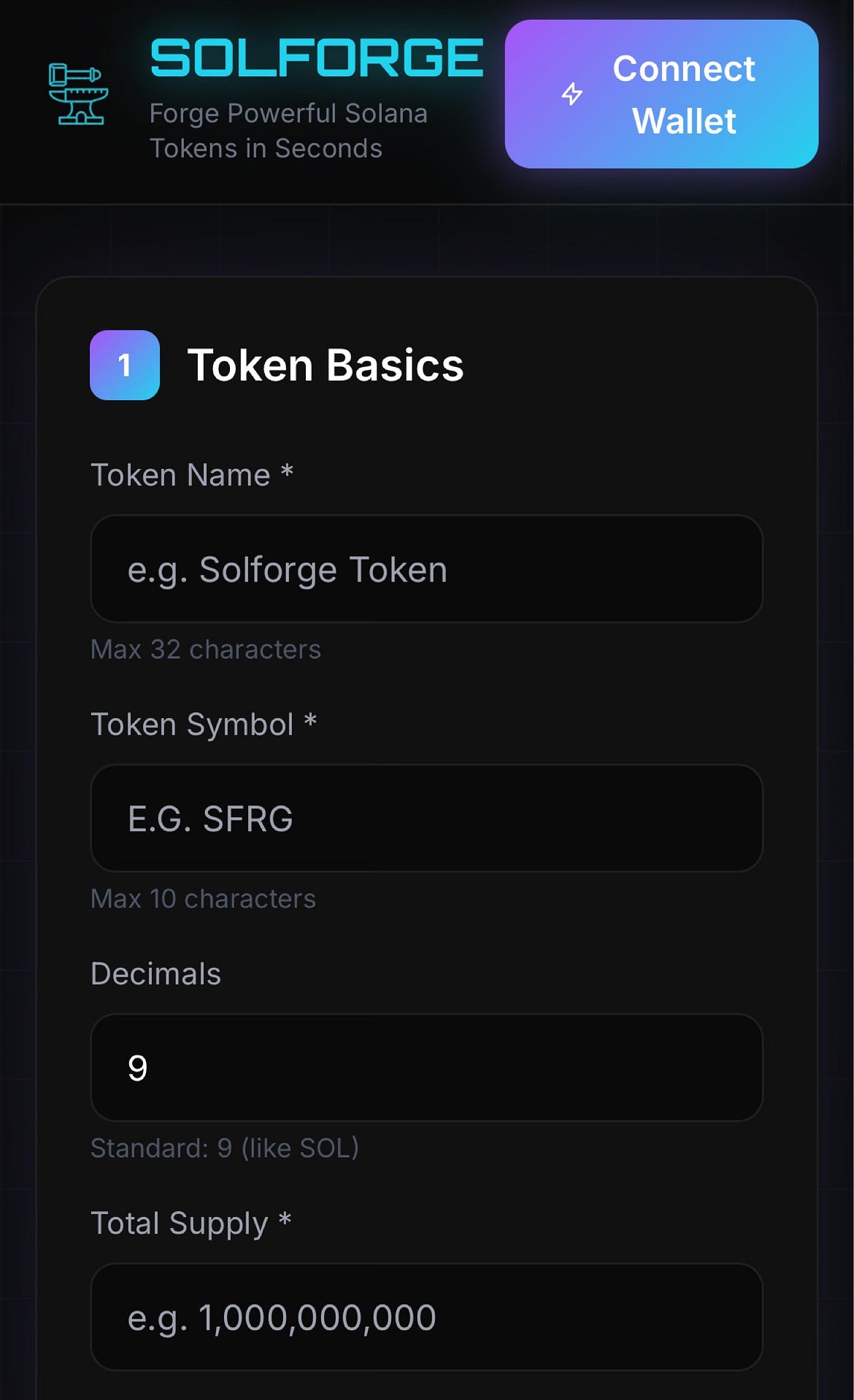
Token Basics
- Users input:
- Token Name (max 32 characters)
- Symbol (max 10 characters)
- Decimals (default 9, standard for most Solana tokens)
- Total Supply
Token Image & Metadata
- A prominent drag-and-drop area accepts PNG, JPG, or GIF files (max 5MB). It recommends square images (512x512px ideal for marketplaces). There’s also an advanced option to upload custom metadata JSON for more control over off-chain details like description or external links.
Authority Controls (Critical for security and trust)
Checkboxes let you decide:
- Revoke Mint Authority (highly recommended – prevents further minting after launch)
- Revoke Freeze Authority (prevents freezing token accounts)
- Make Metadata Immutable (locks metadata so it can’t be changed later)
- Keep Update Authority (advanced toggle for those who want ongoing control)
- These options are a major strength. Many rushed memecoin launches fail to revoke authorities, leading to rug-pull accusations. Solforge makes best practices easy and visible.
Live Preview
- A dynamic sidebar or panel displays your token’s details in real time, including authority status. This helps catch mistakes before signing transactions.
Fee Breakdown & Review
- Transparent costing:
- Network + Token Creation: 0.3 SOL
- Platform Fee: 0.1 SOL
- Total: 0.4 SOL
- It clearly notes that users will sign two transactions (one for the platform fee, one for actual token creation). At current SOL prices, this is a modest ~$60 – $80 depending on market rates – competitive with other no-code tools but not the absolute cheapest.
Forge My Token
- Once everything is filled and the wallet is connected, clicking this button triggers the process. Creation typically takes 10 – 30 seconds.
- The entire flow feels polished and minimizes errors through validation (e.g., character limits) and helpful quick tips displayed on the page.
Who Is It For?
- Memecoin Creators: Fastest path to launching a fun token with custom image and metadata.
- Beginners: No coding, no CLI, no need to understand Metaplex or Token-2022 extensions deeply.
- Small Projects: Ideal for testing ideas or community tokens before scaling to more advanced launches.
- Not For: Large-scale utility tokens needing complex logic (e.g., taxes, reflections, or custom programs). This is purely for standard SPL tokens.
- It democratizes token creation in the same way tools like Pump.fun simplified memecoin launches, but with more control over authorities and metadata upfront.
Strengths
- Speed and Simplicity: True to its tagline – “Create Solana Tokens in Seconds.” The guided interface reduces the barrier significantly compared to using Solana CLI or full SDKs.
- Transparency: Clear fee breakdown, authority recommendations, and live preview build user confidence.
- Best Practices Encouraged: Default recommendations for revoking mint/freeze and making metadata immutable help create “fair launch” style tokens.
- Mobile-Friendly: The responsive design works reasonably well on desktop and tablets (though wallet interactions are smoother on desktop).
- Low Friction: No account signup required beyond a Solana wallet.
Comparison to Alternatives
In the crowded Solana token launcher space, Solforge stands out for its clean UI and authority controls. Tools like Pump.fun focus on bonding curves and fair launches for memecoins, while others emphasize liquidity pool integration. Solforge is more “pure” – it creates the token itself with full control, leaving users to handle liquidity (e.g., via Raydium) afterward.
It’s simpler than full no-code platforms that bundle everything (token + pool + marketing), making it lighter and potentially more reliable for just the minting step.
Verdict
Solforge earns a strong 8.5/10 as a no-code SPL token creator. It delivers exactly what it promises: a fast, intuitive way to forge Solana tokens with sensible defaults and clear options for security-conscious users.
For anyone wanting to launch a memecoin, community token, or test project without technical hurdles, it’s an excellent choice. The live preview, authority toggles, and transparent fees make it feel trustworthy and professional.
If you’re in the Solana ecosystem and tired of wrestling with code or expensive services, head to https://v0-solforge.vercel.app/index.html, connect your wallet, and start forging. Just remember the golden rule of crypto: only invest what you can afford to lose, and always review transactions carefully.
Whether you’re a seasoned degen or a curious newcomer, Solforge lowers the barrier to token creation in a meaningful way – turning “I wish I could launch a token” into “Done in under a minute.”