Agents working together to solve complex problems
Part 3 of my series on Agentic AI. Last time, we explored the anatomy of AI agents — their planning, memory, and tool use capabilities. This time: what happens when multiple specialized agents collaborate to tackle complex problems. Follow along for more deep dives into building AI systems that work as teams.
The Jack-of-All-Trades Problem
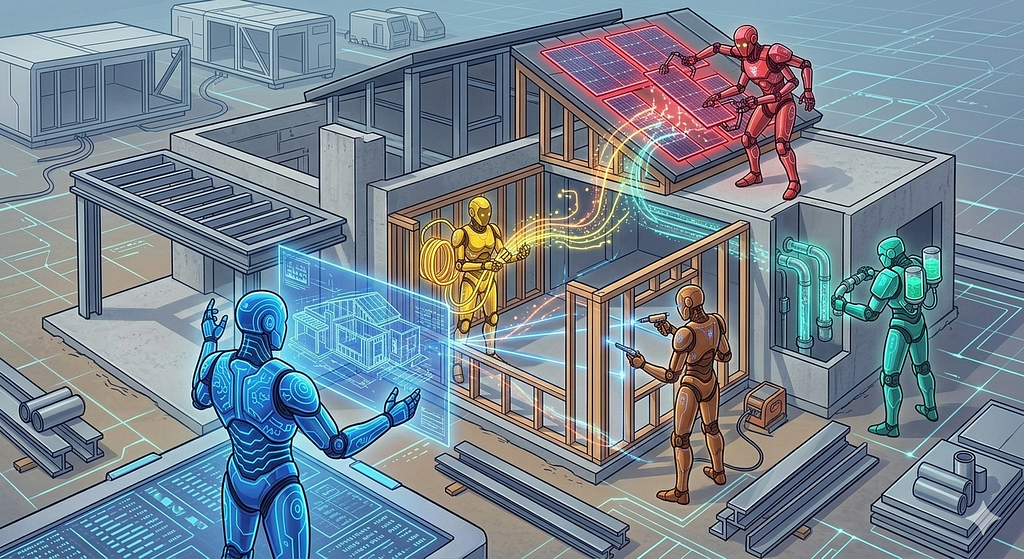
You know what’s impressive? A skilled carpenter building a house alone. You know what’s risky? That same carpenter doing the electrical work. Will it pass inspection? What about the plumbing — will those pipes hold up in five years? The HVAC system? The foundation engineering?
A jack-of-all-trades can do many things, but rarely matches the expertise of specialists. You want a licensed electrician wiring your house, a master plumber on your pipes, and a structural engineer checking your foundation. Each brings deep knowledge that a generalist simply can’t match.
Single AI agents face the same limitation. They can do remarkable things, but they’re fundamentally constrained by what one “person” can accomplish. The real power emerges when multiple agents work together, each bringing specialized expertise to solve problems no single agent could handle alone.
But here’s where it gets interesting: unlike a construction crew with a foreman calling the shots, multi-agent AI systems don’t always have someone in charge. Sometimes they negotiate. Sometimes they compete. Sometimes they just figure it out as they go.
Consider a customer service system deployed at a major telecom company. Five specialized agents working together: one triages incoming requests, another searches the knowledge base, a third crafts responses, a fourth decides if a human is needed, and a fifth learns from every interaction to improve the system. Together, they handle complex customer interactions that would overwhelm a single agent, maintaining response quality while dramatically reducing costs.
According to Gartner, by 2028, agentic AI will autonomously handle 68% of customer service interactions. That’s not just automation — that’s collaboration at scale.
Why One Agent Isn’t Enough
Let’s be honest: asking a single AI agent to handle everything is like asking one person to be a doctor, lawyer, accountant, and chef all at once. Sure, they might be competent at each, but they’ll never match the expertise of specialists.
The problem is fundamental: specialization versus generalization. A general-purpose agent has broad knowledge but shallow expertise. A specialized agent has deep knowledge but narrow scope. You need both.
According to recent market data, 66.4% of organizations building agentic AI systems are using multi-agent designs. This isn’t a nice-to-have anymore — it’s becoming the standard architecture pattern.
But before you rush to build a 10-agent system, understand this: multi-agent systems are more expensive, more complex, and harder to debug than single agents. The question isn’t whether to use multiple agents. It’s whether the benefits justify the costs for your specific use case.
The Three Coordination Patterns
When you have multiple agents working together, someone or something needs to decide who does what. There are three main patterns, each with different tradeoffs.
Pattern 1: Hierarchical (Boss-Worker)
Think traditional org chart. One “manager” agent delegates tasks to specialist “worker” agents. The manager decides who does what, workers report back with results, manager synthesizes the final answer.
Consider a research agent system. The manager agent receives a query like “What are the latest developments in quantum computing?” It delegates to a search agent to find recent papers, a summarization agent to condense the findings, and a fact-checking agent to verify claims. The manager then synthesizes everything into a final report.
This works well when you have a clear workflow and well-defined roles. It fails when the manager becomes a bottleneck or when workers can’t adapt to unexpected situations.
GitHub Copilot Workspace uses this pattern. A planning agent breaks down requirements and delegates to implementation agents that write code, generate tests, and check quality. The hierarchical structure makes it easy to understand what’s happening at each step.
Pattern 2: Peer-to-Peer (Collaborative)
No boss. Agents negotiate and collaborate as equals, like a team of consultants working on a project. They figure out who should do what through discussion and consensus.
Imagine a code review system where a security agent checks for vulnerabilities, a performance agent analyzes efficiency, a style agent checks formatting, and a documentation agent verifies comments. When they disagree — say, the security agent wants to block a request but the performance agent wants to allow it for speed — they negotiate based on confidence scores and priority rules.
This works well when expertise is distributed and there’s no clear hierarchy. It fails when coordination overhead slows everything down or agents reach deadlock.
In practice, peer-to-peer patterns are more common in research than production systems. The coordination complexity makes them harder to deploy and debug at scale.
Pattern 3: Market-Based (Auction)
Agents bid for tasks based on their capabilities and current workload. Highest bidder or best fit gets the work. It’s an economic model for agent coordination.
A new task arrives: “Analyze customer sentiment from 10,000 reviews.” Agents bid based on their current load, specialized capabilities, and estimated completion time. The agent with the best bid gets the task and receives priority points as payment.
This works well for dynamic load balancing with heterogeneous agents. It fails when the auction mechanism adds too much overhead or agents game the system.
Market-based patterns are elegant in theory but rare in production. The auction overhead and unpredictable behavior make them impractical for most use cases.
What Actually Gets Used
In practice, hierarchical patterns dominate production systems because they’re easier to reason about, debug, and maintain. When you’re on call at 3 AM trying to figure out why your multi-agent system is failing, you’ll appreciate the simplicity of a clear hierarchy.
Real-World Scenario: Customer Service Multi-Agent System
Let me walk you through how this actually works in practice. This is based on a composite of several real deployments in the telecommunications and e-commerce industries.
The Agents:
- Triage Agent: The Triage Agent is the first contact. It classifies incoming issues into categories: billing, technical support, account management, and product questions. It uses a fine-tuned classifier trained on two years of historical tickets and achieves 94% classification accuracy.
- Knowledge Agent: The Knowledge Agent searches three sources simultaneously: documentation, past ticket resolutions, and internal wiki. It returns the top five most relevant results with confidence scores, typically completing searches in under 200 milliseconds.
- Resolution Agent: The Resolution Agent crafts responses using the knowledge context. It generates three candidate responses, ranks them by confidence, and selects the best one. The entire generation process takes about 800 milliseconds.
- Escalation Agent: The Escalation Agent is the gatekeeper. It analyzes the proposed response and decides whether to send it or escalate to a human. It uses a confidence threshold of 85% — anything below that gets human review.
- Learning Agent: The Learning Agent runs asynchronously. It analyzes outcomes like customer satisfaction scores, resolution time, and escalation rate, then fine-tunes the other agents’ models. This continuous learning loop improves system performance over time.
The Flow:
A customer message arrives: “My bill is $50 higher than last month and I don’t know why.”
The triage agent classifies it as BILLING with 94% confidence. The knowledge agent searches and finds three relevant articles about billing changes and two similar past tickets. The resolution agent generates a response: “I can see your bill increased due to the premium channel package added on January 15. Here’s the breakdown…”
The escalation agent checks the confidence score: 89%, above the threshold. The response is sent automatically in 12 seconds total. The learning agent tracks the customer satisfaction score and whether they replied with more questions.
The Results:
The system handles 65% of interactions without human intervention, with an average response time of 12 seconds compared to 4 minutes with human agents. Customer satisfaction scores 4.2 out of 5, slightly below the 4.5 for human agents, but the cost savings are substantial — about 60% reduction in support costs.
But here’s the interesting part: the 35% that get escalated aren’t failures. They’re the complex, nuanced, emotionally charged interactions that humans are still better at handling. The agents aren’t replacing humans — they’re filtering out the routine stuff so humans can focus on the hard problems.
This is the real value of multi-agent systems: not replacing human expertise, but augmenting it by handling the predictable cases and escalating the edge cases.
Communication Protocols: How Agents Talk
The hardest part of multi-agent systems isn’t the agents themselves — it’s getting them to communicate effectively. You need a protocol, a common language, a way for agents to share information without stepping on each other’s toes.
Shared Memory: The Simple Approach
All agents read and write to a common database. It’s simple to implement and easy to understand. Agents see updates immediately, and there’s no message passing overhead.
But it’s like everyone shouting in the same room. Race conditions everywhere. Lock contention. Agents overwriting each other’s data. It works for 2–3 agents. With 10 agents, it’s chaos.
Early multi-agent systems used Redis as shared memory. It worked until it didn’t. The moment you scale beyond a handful of agents, you hit contention issues that are hard to debug and harder to fix.
Message Passing: The Organized Approach
Agents send structured messages to each other. More organized, clearer responsibilities, explicit communication.
Each message contains sender ID, recipient ID, message type, payload, and timestamp. Agents publish messages to a queue, and recipients consume them asynchronously.
class Agent:
    def send_message(self, to_agent, message_type, payload):
        message = {
            "from": self.id,
            "to": to_agent,
            "type": message_type,
            "payload": payload,
            "timestamp": datetime.now()
        }
        self.message_queue.publish(message)

    def receive_message(self):
        message = self.message_queue.consume(self.id)
        if message:
            self.handle_message(message)
This is like email versus shouting. More civilized, but slower. You get clear ownership and no race conditions, but you pay for it with latency and complexity.
The tradeoff is worth it for most production systems. The added latency is typically 10–50 milliseconds, which is acceptable for most use cases. The clarity and debuggability are invaluable when things go wrong.
Event Bus: The Scalable Approach
Agents publish events to a central bus, and other agents subscribe to events they care about. It’s decoupled, scalable, and flexible.
When the triage agent classifies a message, it publishes a “MessageClassified” event. The knowledge agent subscribes to these events and automatically starts searching when one arrives. The resolution agent subscribes to “KnowledgeRetrieved” events and starts generating responses.
Kafka is the common choice here. Events are immutable, ordered, and persistent. You can replay them for debugging or reprocessing.
The downside is eventual consistency and harder debugging. When something goes wrong, tracing the event flow through multiple subscribers can be challenging. You need good observability tools to make this work in production.
Promise/Work Pattern: The Resilient Approach
This pattern is gaining traction for complex, long-running multi-agent workflows. Here’s how it works.
An agent declares a desired state by creating a Promise: “I promise to analyze this document.” The system breaks this down into Work units: extract text, summarize content, fact-check claims, generate report.
Other agents claim Work units they can handle. Agent B claims text extraction. Agent C claims summarization. Agent D claims fact-checking. Agent A claims report generation.
A controller monitors progress. Work 1 completes. Work 2 completes. Work 3 fails and gets retried. Work 4 waits for Work 3. The Promise updates its status: IN_PROGRESS, 75% complete, ETA 2 minutes.
Why this is interesting: agents don’t need to know about each other. They just claim work they can do. Work can be retried if an agent fails. You get clear state tracking at every step. You can add more workers without changing coordination logic.
You can implement this with Kubernetes custom resources, Kafka topics, a dedicated promise server with REST API, or Redis pub/sub for lightweight coordination.
The tradeoff is infrastructure complexity. You need a controller to manage reconciliation, persistent storage for Promise and Work state, and retry logic for failed work. But you get reliability and observability in return.
For complex workflows where reliability matters more than simplicity, it’s worth it. For simpler use cases, message passing or event bus is probably sufficient.
How Promise/Work Works:
Agent A: "I promise to analyze this document" (creates Promise)
System: Creates Work objects for subtasks
Agent B: Claims "extract text" Work
Agent C: Claims "summarize" Work
Agent D: Claims "fact-check" Work
Controller: Monitors progress, retries failures
Promise: Updates status as Work completes
Implementation Options:
- Kubernetes CRDs (custom resources)
- Kafka topics (promises and work as events)
- Dedicated promise server (REST API + database)
- Redis with pub/sub for lightweight coordination
- Whatever fits your infrastructure
Why This Is Interesting:
- Decoupled: Agents don’t need to know about each other
- Resilient: Work can be retried if agent fails
- Observable: Clear state tracking at every step
- Scalable: Add more workers without changing coordination
- Flexible: Multiple ways to implement the pattern
The Tradeoff: More infrastructure complexity
- Need a controller to manage reconciliation
- Need persistent storage for Promise/Work state
- Need to handle partial failures and retries
- But you get reliability and observability in return
Which one is actually used in production? Probably depends on the use case. Promise/Work is gaining traction for complex, long-running multi-agent workflows.
Role Specialization: Dividing the Work
The tradeoff is infrastructure complexity. You need a controller to manage reconciliation, persistent storage for Promise and Work state, and retry logic for failed work. But you get reliability and observability in return.
By Domain
Each agent has specialized knowledge in a specific domain: legal, medical, technical, financial. Clear boundaries, deep expertise, easy to add new domains. But agents can’t help each other, and there are potential gaps between domains.
LegalTech companies use domain-specialized agents for contract review, due diligence, and compliance checking. Each agent is trained on domain-specific data and uses domain-specific tools. When you need to review a contract, you know exactly which agent to call.
The downside is rigidity. If a task spans multiple domains, you need explicit coordination logic to handle the handoffs.
By Function
Each agent has a role in the workflow: planning, execution, verification, reporting. Clear workflow, sequential process, easy to understand. But you get bottlenecks at each stage and can’t parallelize easily.
This is the GitHub Copilot Workspace pattern. The planning agent breaks down requirements, the execution agent writes code, the testing agent generates tests, and the review agent checks quality. The sequential flow makes it easy to understand what’s happening at each step.
The downside is latency. Each stage must complete before the next begins, which adds up quickly in a multi-stage workflow.
By Capability
Each agent has different tools and capabilities: search (web scraping), analysis (data processing), writing (content generation). Complementary skills, can work in parallel, flexible composition. But coordination overhead increases and potential conflicts arise.
Most production systems use capability-based specialization because it’s the most flexible. You can compose agents in different ways for different tasks, and agents can work in parallel when their capabilities don’t conflict.
The downside is coordination complexity. You need explicit logic to decide which agents to invoke and in what order.
The Sweet Spot: 3–5 Agents
More agents means more coordination overhead. There’s a sweet spot, and it’s smaller than you think.
With 2 agents, coordination is simple and minimal. With 3–5 agents, you get good balance — enough specialization to matter, not so much that coordination dominates. With 5–7 agents, it’s complex but still tractable. With 10+ agents, coordination becomes a nightmare.
For most use cases, 3–5 specialized agents is optimal. More than that, and you’re spending more time coordinating than executing.
This mirrors human team dynamics. Research on team size consistently shows that 5–7 people is optimal for most tasks. The same principle applies to agent teams.
The Coordination Challenge
Multi-agent systems fail in predictable ways. Here are the four big problems and how to solve them.
Problem 1: Conflicting Decisions
Two agents disagree on the answer. The security agent says “block this request.” The performance agent says “allow it for speed.” Who’s right?
You have four options.
- Voting: majority wins, but requires an odd number of agents.
- Confidence scores: highest confidence wins, but requires calibrated confidence.
- Priority hierarchy: security beats performance beats cost, but requires clear priorities.
- Human arbitration: escalate to a human for the final decision, but adds latency.
In practice, most systems use confidence scores with a priority hierarchy as a tiebreaker. If confidence scores are close (within 10 percentage points), the priority hierarchy decides. If one agent has significantly higher confidence (more than 20 percentage points), it wins regardless of priority.
This works well because it balances agent expertise with organizational priorities.
Problem 2: Circular Dependencies
Agent A needs output from Agent B. Agent B needs output from Agent A. Deadlock.
The planning agent needs a cost estimate from the execution agent. The execution agent needs a plan from the planning agent. You’re stuck.
Three solutions: build a dependency graph and detect cycles before execution. Use timeouts to break deadlock after N seconds. Use iterative refinement — start with estimates, refine over time.
The dependency graph approach is best because it prevents the problem rather than recovering from it. Before executing any workflow, build a directed graph of agent dependencies. If you detect a cycle, either break it by providing default values or reject the workflow as invalid.
This adds upfront complexity but saves you from debugging deadlocks in production.
Problem 3: Resource Contention
Five agents all calling the OpenAI API, hitting the rate limit of 100 requests per minute. Who gets priority?
You need a resource manager. Options include a centralized resource manager agent that allocates quota, a token bucket where each agent gets a fixed quota, a priority queue where critical agents go first, or backpressure that slows down when approaching limits.
Token bucket is simplest and works well for most cases. Each agent gets a fixed quota per minute. If they exceed it, requests are queued or rejected. Critical agents get larger quotas.
The key insight is that resource contention is inevitable in multi-agent systems. Plan for it from the start rather than discovering it in production.
Problem 4: Failure Handling
The knowledge agent crashes. The resolution agent is waiting for search results. What happens?
Don’t wait forever — use timeouts. Use cached data or default responses as fallbacks. Implement circuit breakers to stop calling failed agents. Retry with exponential backoff — try again, but not immediately.
This is where the Promise/Work pattern shines. It has built-in retry logic and failure isolation. When a Work unit fails, it’s automatically retried with exponential backoff. If it fails three times, it’s marked as permanently failed and the Promise is updated accordingly.
For simpler systems, explicit timeout and retry logic in each agent is sufficient. Set timeouts to 2–3x the expected latency, and retry up to 3 times with exponential backoff.
Implementation: Building Your First Multi-Agent System
Let’s build a simple customer service system with three agents using LangGraph. This is a working example that demonstrates the core concepts — you can adapt for your needs.
The Setup
from langgraph.graph import StateGraph, END
from langchain_openai import ChatOpenAI
from typing import TypedDict, Annotated
import operator

class AgentState(TypedDict):
    message: str
    category: str
    context: list[str]
    response: str
    confidence: float
    should_escalate: bool

# Initialize LLM
llm = ChatOpenAI(model="gpt-4", temperature=0)
The Agents
def triage_agent(state: AgentState) -> AgentState:
    """Classify the incoming message"""
    prompt = f"""Classify this customer message into one category:
    BILLING, TECHNICAL, ACCOUNT, PRODUCT

    Message: {state['message']}

    Return only the category name."""

    category = llm.invoke(prompt).content.strip()
    return {**state, "category": category}

def knowledge_agent(state: AgentState) -> AgentState:
    """Search for relevant information"""
    # In production, this would search a vector database
    # For demo, we'll use mock data
    knowledge_base = {
        "BILLING": [
            "Billing cycles run from 1st to last day of month",
            "Premium packages add $20/month",
            "Refunds take 5-7 business days"
        ],
        "TECHNICAL": [
            "Restart your device first",
            "Check cable connections",
            "Update firmware to latest version"
        ],
        "ACCOUNT": [
            "Password resets take 5 minutes",
            "Account changes require verification",
            "Contact info updates are immediate"
        ],
        "PRODUCT": [
            "New features released monthly",
            "Product documentation at docs.example.com",
            "Feature requests via support portal"
        ]
    }

    context = knowledge_base.get(state['category'], [])
    return {**state, "context": context}

def resolution_agent(state: AgentState) -> AgentState:
    """Generate response and confidence score"""
    prompt = f"""Generate a helpful customer service response.

    Message: {state['message']}
    Category: {state['category']}
    Context: {', '.join(state['context'])}

    Provide:
    1. A helpful response
    2. Confidence score (0-100)

    Format: RESPONSE|||CONFIDENCE"""

    result = llm.invoke(prompt).content
    response, confidence = result.split('|||')

    return {
        **state,
        "response": response.strip(),
        "confidence": float(confidence.strip()),
        "should_escalate": float(confidence.strip()) < 85
    }
The Workflow
# Build the graph
workflow = StateGraph(AgentState)

# Add nodes
workflow.add_node("triage", triage_agent)
workflow.add_node("knowledge", knowledge_agent)
workflow.add_node("resolution", resolution_agent)

# Add edges
workflow.set_entry_point("triage")
workflow.add_edge("triage", "knowledge")
workflow.add_edge("knowledge", "resolution")
workflow.add_edge("resolution", END)

# Compile
app = workflow.compile()

# Run
result = app.invoke({
    "message": "My bill is $50 higher than last month",
    "category": "",
    "context": [],
    "response": "",
    "confidence": 0.0,
    "should_escalate": False
})

print(f"Category: {result['category']}")
print(f"Response: {result['response']}")
print(f"Confidence: {result['confidence']}")
print(f"Escalate: {result['should_escalate']}")
This is a minimal working example. In production, you’d add error handling, logging, metrics, retry logic, and proper knowledge base integration. But this gives you the basic structure to build on.
The key insight is that LangGraph makes the workflow explicit and visual. You can see exactly how agents connect and what data flows between them. This makes debugging and maintenance much easier than implicit coordination.
Monitoring Multi-Agent Systems
You can’t manage what you can’t measure. Multi-agent systems need observability at three levels.
Agent-Level Metrics
Track each agent individually. Latency: how long does this agent take? Measure p50, p95, and p99. Success rate: what percentage of tasks complete successfully? Cost per task: how much does this agent cost to run? Error types: what kinds of errors does it encounter?
For example: Triage Agent — 150ms p95 latency, 98% success rate, $0.01 per task, 2% timeout errors.
These metrics tell you which agents are bottlenecks and which are reliable. If the triage agent has 98% success rate but the resolution agent has 85%, you know where to focus optimization efforts.
System-Level Metrics
Track the entire workflow. End-to-end latency: how long from request to response? Overall success rate: what percentage of requests are handled successfully? Escalation rate: how often do we need humans? Cost per request: total cost across all agents.
For example: 2.3 seconds p95 end-to-end latency, 94% overall success rate, 6% escalation rate, $0.08 per request.
These metrics tell you if the system as a whole is meeting SLAs. If end-to-end latency is 2.3 seconds but your SLA is 2 seconds, you need to optimize.
Coordination Metrics
Track how agents work together. Handoff time: how long between agents? Conflict rate: how often do agents disagree? Retry rate: how often do we retry failed work? Bottleneck identification: which agent is the slowest?
For example: 50ms average handoff time, 2% conflict rate, 5% retry rate, bottleneck is the knowledge agent at 800ms.
These metrics tell you where coordination overhead is coming from. If handoff time is 50ms and you have 5 agents, that’s 200ms of pure coordination overhead. If the knowledge agent is consistently the bottleneck, you might need to optimize it or add more instances.
What to Alert On
Not everything needs an alert. Focus on what matters.
Alert when success rate drops below 90% — something is broken. Alert when latency exceeds 5 seconds — users will notice. Alert when cost exceeds $0.50 per request — budget problem. Alert when escalation rate goes above 40% — agents aren’t helping enough.
These thresholds are examples. Tune them based on your actual requirements and SLAs. The key is to alert on symptoms (user-visible problems) rather than causes (individual agent failures). Let your monitoring system correlate causes for you.
The Economics: Is It Worth It?
Let’s talk money. Multi-agent systems cost more than single agents. Is the extra cost justified?
The Costs
More agents means more API calls means more money. A single agent makes one LLM call per request. A multi-agent system with five agents makes five LLM calls per request. If each call costs $0.02, that’s $0.02 versus $0.10 per request — a five times increase.
Coordination overhead means more latency. A single agent responds in 500ms. A multi-agent system takes 2000ms — four times slower. For some use cases, this latency is acceptable. For others, it’s a deal-breaker.
Complexity means more maintenance. A single agent is one codebase, one deployment, one monitoring dashboard. A multi-agent system is five codebases, five deployments, and complex orchestration. This translates to more engineering time and higher operational costs.
The Benefits
Better accuracy through specialization. A single agent achieves 85% accuracy. A multi-agent system achieves 92% accuracy — seven percentage points improvement. This might not sound like much, but in high-volume systems, it’s the difference between thousands of errors and hundreds.
Higher throughput through parallelization. A single agent handles 100 requests per minute. A multi-agent system handles 300 requests per minute — three times the throughput. This matters when you’re scaling to millions of requests per day.
More maintainable through separation of concerns. A single agent is 5000 lines of code that’s hard to modify. A multi-agent system is five agents times 1000 lines each — easier to modify individual agents without breaking the whole system.
The Math
Let’s say a single agent costs $0.02 per interaction with 85% accuracy. A multi-agent system costs $0.10 per interaction with 92% accuracy.
If accuracy matters — customer service, medical diagnosis, legal advice — the extra cost is worth it. If accuracy doesn’t matter much — simple FAQs, basic routing — a single agent is fine.
Here’s a break-even analysis. Assume the cost of an error is $50 due to customer churn or rework. The single agent error rate is 15%, so expected cost per interaction is $7.50. The multi-agent error rate is 8%, so expected cost per interaction is $4.00. That’s $3.50 in savings per interaction. The extra cost is $0.08 per interaction. Net benefit: $3.42 per interaction.
At 10,000 interactions per month, that’s $34,200 per month in value. At 100,000 interactions per month, that’s $342,000 per month. The ROI is clear when errors are expensive.
But if errors cost $5 instead of $50, the math changes. Single agent expected cost: $0.75. Multi-agent expected cost: $0.40. Savings: $0.35. Extra cost: $0.08. Net benefit: $0.27 per interaction. At 10,000 interactions per month, that’s $2,700 per month — still positive, but much less compelling.
The numbers will vary for your use case, but the principle holds: if accuracy matters and errors are expensive, multi-agent systems pay for themselves. If errors are cheap or rare, single agents are more cost-effective.
The Tradeoffs: When to Use Multi-Agent Systems
Multi-agent systems aren’t always the answer. Here’s when they make sense and when they don’t.
When Multi-Agent Makes Sense
Use multi-agent systems for complex workflows with clear specialization. Customer service with distinct triage, search, and resolution steps is a perfect fit. Each agent can be optimized for its specific task, and the workflow is naturally sequential.
Use them for high-value interactions worth the extra cost. Medical diagnosis, legal advice, and financial planning justify higher costs because accuracy improvement directly impacts outcomes. A 7% improvement in diagnostic accuracy could mean lives saved. A 7% improvement in FAQ accuracy just means slightly fewer confused users.
Use them when you need high accuracy and reliability. Compliance checking and security analysis benefit from multiple agents cross-checking each other. The redundancy catches errors that a single agent might miss.
Use them when you have the engineering resources to maintain them. Large tech companies with dedicated AI teams can handle the ongoing maintenance and tuning. Startups with two engineers probably can’t.
When Single Agent Is Better
Use a single agent for simple, straightforward tasks. Basic FAQs and simple routing don’t need the overhead of coordination. If your workflow is “classify and respond,” a single agent is sufficient.
Use them for cost-sensitive applications. High-volume, low-value interactions can’t justify a five times cost increase. If you’re processing millions of requests per day at $0.02 each, adding $0.08 per request is $80,000 per million requests. That adds up fast.
Use them for low latency requirements. Real-time chat and instant responses can’t afford multi-agent coordination latency. If your SLA is 500ms and multi-agent coordination adds 1500ms, you’re out of luck.
Use them when you have a small team with limited resources. Startups and small companies don’t have bandwidth to maintain complex systems. A single well-tuned agent is better than a poorly maintained multi-agent system.
The Reality
Most organizations start with a single agent, see what works, identify bottlenecks, then evolve to multi-agent as needs grow.
Don’t try to build a 10-agent system on day one. Start with one agent, add a second when you have a clear need, add a third when coordination is manageable.
Incremental evolution beats big-bang architecture. You learn what works, what doesn’t, and where specialization actually helps. You avoid over-engineering and premature optimization.
This is the same principle that applies to microservices. Start with a monolith, identify service boundaries through real usage, then split when the benefits justify the costs. Multi-agent systems follow the same pattern.
Multi-Agent Systems Don’t Happen in a Vacuum
Before you start building a multi-agent system, let’s be realistic about the constraints you’re working within.
You’re also dealing with latency requirements that might not tolerate multi-agent coordination overhead. You’re dealing with cost constraints that might not justify five times the API calls. You’re dealing with team size constraints that might not support maintaining five separate agents.
The goal isn’t to build the most sophisticated multi-agent system possible. It’s to solve your specific problem with the simplest architecture that meets your requirements.
When you’re choosing between single agent and multi-agent, consider accuracy requirements alongside latency, cost, and maintainability. When you’re designing agent specialization, think about your team’s ability to maintain separate codebases. When you’re implementing coordination, balance reliability with complexity.
Small, intentional decisions add up. Start simple, measure everything, and add complexity only when the benefits are clear.
Making It Real: Implementation Roadmap
Don’t try to build everything at once. Here’s a realistic timeline.
Week 1: Start with a single agent. Build one agent that handles the entire workflow. Understand the problem space. Identify bottlenecks and specialization opportunities. This gives you a baseline to measure against.
Week 2: Identify specialization opportunities. Which parts of the workflow are distinct? Where would specialized expertise help? What are the handoff points? Document these before writing any code. The clearer your specialization boundaries, the easier the implementation.
Week 3: Add a second agent. Pick the clearest specialization — usually triage or knowledge retrieval. Implement handoff logic. Test coordination. Make sure the two-agent system works better than the single agent. If it doesn’t, you’ve learned something valuable about your problem space.
Week 4: Add coordination logic. Implement proper error handling. Add retry logic. Add timeouts. Handle the failure cases you discovered in week 3. This is where you learn that coordination is harder than it looks.
Week 5: Add monitoring and observability. Implement agent-level metrics, system-level metrics, and coordination metrics. Build dashboards. Set up alerts. You can’t optimize what you can’t measure.
Week 6: Optimize based on metrics. Identify bottlenecks. Tune timeouts and thresholds. Improve handoff efficiency. This is where you see the real gains. The first version is never optimal — optimization comes from measurement and iteration.
This is a journey, not a sprint. Don’t try to build a 10-agent system on day one. Master the basics before adding complexity.
What’s Next: Agent Memory and State
Multi-agent systems are just the beginning. In the next article, we’ll dive deep into agent memory systems — how agents remember context, learn from interactions, and maintain state across conversations.
We’ll cover short-term memory for conversation context, long-term memory for learned patterns, and the tradeoffs between different storage approaches. We’ll show you how to build agents that get smarter over time, not just agents that execute predefined workflows.
Because the real power of agentic AI isn’t just coordination — it’s learning.
Resources
Here are the tools and frameworks to get started.
LangGraph is graph-based agent orchestration from LangChain. It’s good for complex workflows with conditional branching. Documentation at github.com/langchain-ai/langgraph. Start here if you want explicit workflow control.
AutoGen is Microsoft’s multi-agent framework. It’s good for conversational agents with back-and-forth dialogue. Documentation at github.com/microsoft/autogen. Start here if you want agents that negotiate and collaborate.
CrewAI is role-based agent teams. It’s good for hierarchical workflows with clear roles. Documentation at github.com/joaomdmoura/crewAI. Start here if you want simple role-based coordination.
For monitoring, use standard observability tools like Prometheus for metrics, Grafana for dashboards, and Jaeger for distributed tracing. Multi-agent systems are just distributed systems — use the same tools you’d use for microservices.
For research, read “Multi-Agent Systems: A Modern Approach to Distributed Artificial Intelligence” by Gerhard Weiss. It’s the foundational text on coordination patterns and communication protocols. Dense but comprehensive.
References
- Gartner (2024). “Predicts 2024: Customer Service and Support Technology.” Gartner Research. Prediction: By 2028, agentic AI will autonomously handle 68% of customer service interactions, up from less than 10% in 2023.
- Gartner (2024). “Market Guide for Agentic AI Platforms.” Gartner Research. Reports that 66.4% of organizations implementing agentic AI systems are using multi-agent architectures rather than single-agent designs.
- Weiss, Gerhard (Ed.) (1999). “Multi-Agent Systems: A Modern Approach to Distributed Artificial Intelligence.” MIT Press. ISBN: 978–0262232036. Foundational text on agent coordination patterns, communication protocols, and distributed AI architectures.
- GitHub (2024). “GitHub Copilot Workspace Technical Architecture.” GitHub Engineering Blog. Details the hierarchical multi-agent pattern used in Copilot Workspace with planning, implementation, testing, and review agents.
- LangChain (2024). “LangGraph Documentation: Multi-Agent Workflows.” LangChain Documentation. Available at: https://github.com/langchain-ai/langgraph. Framework documentation for building graph-based multi-agent systems.
- Microsoft Research (2023). “AutoGen: Enabling Next-Gen LLM Applications via Multi-Agent Conversation.” Microsoft Research. Available at: https://github.com/microsoft/autogen. Framework for building conversational multi-agent systems.
- Hackman, J. Richard (2002). “Leading Teams: Setting the Stage for Great Performances.” Harvard Business Review Press. Research on optimal team size showing 5–7 members is ideal for most collaborative tasks.
- Apache Software Foundation (2024). “Apache Kafka Documentation: Event-Driven Architecture.” Available at: https://kafka.apache.org/documentation/. Documentation on event bus patterns for distributed systems and agent communication.
- Kubernetes (2024). “Custom Resources and Controllers.” Kubernetes Documentation. Available at: https://kubernetes.io/docs/concepts/extend-kubernetes/api-extension/custom-resources/. Documentation on Promise/Work pattern implementation using Kubernetes CRDs.
- CrewAI (2024). “CrewAI Documentation: Role-Based Agent Teams.” Available at: https://github.com/joaomdmoura/crewAI. Framework for building hierarchical multi-agent systems with role-based specialization.
Series Navigation
Previous Article: The Anatomy of an AI Agent: Planning, Memory, and Tool Use
Coming Up: Building your first production agent, Promise/Work orchestration patterns, agent security and governance, cost optimization strategies
About the Author: Daniel Stauffer is an Enterprise Architect specializing in AI systems and platform engineering. He’s passionate about building systems that augment human capability without destroying the planet.
Multi-Agent Systems: When AI Agents Collaborate was originally published in Level Up Coding on Medium, where people are continuing the conversation by highlighting and responding to this story.