Your agent forgets everything between conversations. It re-discovers the same information, makes the same mistakes, and never learns. Here’s how to fix that.
Part 6 of my series on Agentic AI. Last time, we explored the Promise/Work pattern — Kubernetes-style orchestration for reliable, long-running agent workflows. This time: memory. The thing that, in my experience, makes the biggest practical difference between an agent people tolerate and one they actually want to use again. Follow along for more deep dives into building AI systems that actually work.
The Goldfish Problem
A customer service agent I helped build last year handles about 500 conversations a day. Resolves billing issues, answers product questions, and escalates the tricky stuff to humans. The team was happy with it — and honestly, so was I.
Then a customer — let’s call her Jane — contacted support about a duplicate charge on her credit card. The agent walked through diagnostics, found the issue (payment gateway timeout caused a retry), issued a refund, and confirmed resolution. Clean interaction. Good outcome.
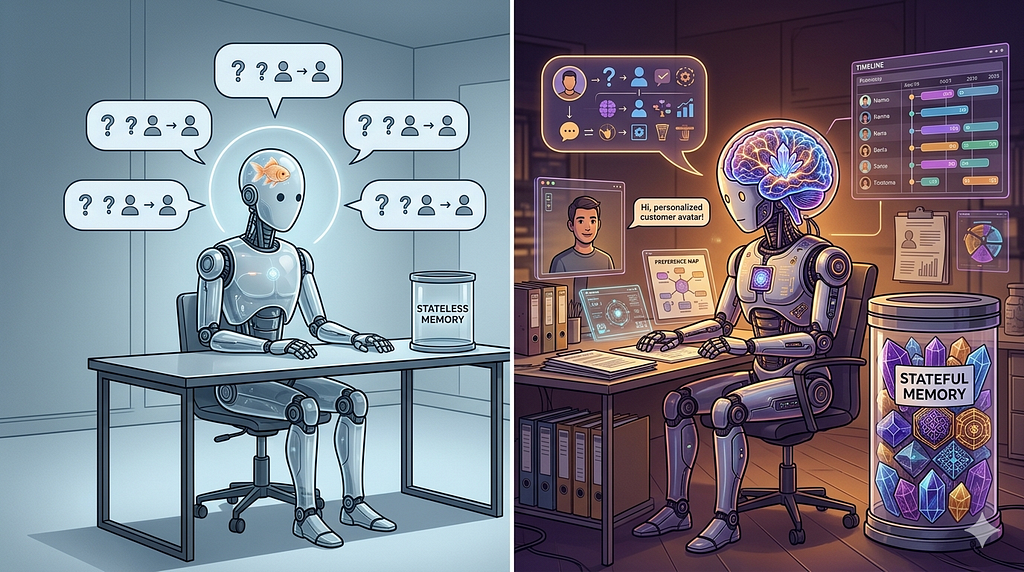
Two weeks later, Jane contacts support again. Related issue — another duplicate charge, same card, same root cause. The agent has no memory of the previous conversation. It asks the same diagnostic questions. Requests the same account verification. Walks through the same troubleshooting steps from scratch.
Jane’s response, verbatim from the transcript: “I already explained all of this two weeks ago. Why do I have to go through this again?”
Because the agent is a goldfish. Every conversation starts from zero. Context window opens, conversation happens, context window closes, everything evaporates. The agent doesn’t know Jane, doesn’t know her history, doesn’t know that this is the same root cause as last time — something that could be resolved in 30 seconds instead of 10 minutes.
For simple stateless tasks — translate this text, extract data from this PDF — that’s fine. But for anything that benefits from continuity? Customer relationships, ongoing projects, iterative analysis? The lack of memory keeps agents feeling like chatbots. I’ve watched users lose patience with agents that are technically capable but can’t remember what happened yesterday. The capability is there; the continuity isn’t.
Your doctor remembers your history. Your lawyer remembers your case. Their value isn’t just knowledge — it’s accumulated context about you specifically. That context makes them faster and more effective with every visit. We should probably expect the same from agents that handle ongoing relationships.
The Three Types of Agent Memory
Agent memory maps loosely to how human memory works, organized by duration and purpose. The analogy isn’t perfect — human memory is far messier and more interconnected — but it’s a useful starting framework.
Working memory is the agent’s current context — the conversation happening right now, the task being executed, the immediate inputs and outputs. This is the LLM’s context window. Fast, high-fidelity, temporary. When the conversation ends, working memory is gone.
The context window is the hard constraint. GPT-4 Turbo gives you 128K tokens. Claude gives you 200K tokens. That sounds like a lot, but for an agent processing a 50-page contract while referencing company policies and previous analyses, it fills up faster than you’d expect. And longer context windows don’t solve the underlying problem — they just push it further out. You still can’t fit a year of customer interactions into a single context window, no matter how big it gets.
Short-term memory persists across a single session or task but not indefinitely. Think of it as a scratchpad — intermediate results, working hypotheses, partial analyses. An agent analyzing a codebase might store “files examined so far” and “patterns identified” in short-term memory so it doesn’t re-examine the same files.
Implementation is straightforward: a key-value store (Redis, DynamoDB) keyed by session ID with a TTL. When the session ends or the TTL expires, the memory is cleaned up. Nothing fancy here.
class ShortTermMemory:
    def __init__(self, store, ttl_seconds=3600):
        self.store = store
        self.ttl = ttl_seconds

    async def remember(self, session_id: str, key: str, value: any):
        await self.store.set(
            f"stm:{session_id}:{key}",
            json.dumps(value),
            ex=self.ttl
        )

    async def recall(self, session_id: str, key: str) -> any:
        data = await self.store.get(f"stm:{session_id}:{key}")
        return json.loads(data) if data else None

    async def get_all(self, session_id: str) -> dict:
        keys = await self.store.keys(f"stm:{session_id}:*")
        result = {}
        for key in keys:
            short_key = key.split(":")[-1]
            result[short_key] = await self.recall(session_id, short_key)
        return result
Long-term memory persists indefinitely and is where agent intelligence accumulates over time. Learned facts, user preferences, resolved issues, successful strategies, and domain knowledge that builds up interaction by interaction. This is the layer that, when it works well, makes an agent feel like it actually knows what it’s doing.
This is where vector databases come in.
Vector Databases: The Long-Term Memory Store
Long-term memory needs to be searchable by meaning, not just by keyword. When a customer says, “I had that billing problem again,” the agent needs to find the previous billing conversation — even if the exact words were completely different.
Vector databases store information as high-dimensional embeddings — numerical representations of meaning. When you store “Customer reported duplicate charge on credit card ending in 4521, resolved by issuing refund on March 3,” the embedding captures the semantic content. Later, when the agent searches for “billing issue with the card ending in 4521,” the vector database returns the relevant memory because the meaning overlaps, even though the surface-level wording doesn’t.
I’ll be honest: the first time I saw this work in practice — a query with zero keyword overlap returning exactly the right memory — it felt a little like magic. It’s not, obviously. It’s math. But it’s the kind of math that makes you rethink what “search” means.
from chromadb import Client
from openai import OpenAI

class LongTermMemory:
    def __init__(self):
        self.chroma = Client()
        self.collection = self.chroma.get_or_create_collection("agent_memory")
        self.openai = OpenAI()

    def store(self, memory_id: str, content: str, metadata: dict):
        """Store a memory with semantic embedding."""
        self.collection.add(
            ids=[memory_id],
            documents=[content],
            metadatas=[metadata]
        )

    def recall(self, query: str, n_results: int = 5,
               filters: dict = None) -> list[dict]:
        """Retrieve memories by semantic similarity."""
        results = self.collection.query(
            query_texts=[query],
            n_results=n_results,
            where=filters  # e.g., {"customer_id": "cust_123"}
        )
        return [
            {"content": doc, "metadata": meta, "relevance": dist}
            for doc, meta, dist in zip(
                results["documents"][0],
                results["metadatas"][0],
                results["distances"][0]
            )
        ]
# Usage
memory = LongTermMemory()
# Store a resolved interaction
memory.store(
    memory_id="interaction_20260315_001",
    content="Customer Jane Smith reported duplicate charge of $49.99 on "
            "credit card ending 4521. Root cause: payment gateway timeout "
            "caused retry. Resolved by issuing refund. Customer satisfied.",
    metadata={
        "customer_id": "cust_123",
        "type": "support_resolution",
        "category": "billing",
        "date": "2026-03-15",
        "outcome": "resolved"
    }
)
# Later: recall relevant memories for a new interaction
memories = memory.recall(
    query="billing problem with card 4521",
    filters={"customer_id": "cust_123"}
)
# Returns the stored interaction with high relevance score
The major vector databases for production use: ChromaDB (lightweight, good for prototyping), Pinecone (managed service, scales well), Weaviate (open source, supports hybrid search), Qdrant (open source, high performance), and pgvector (PostgreSQL extension — probably the most pragmatic choice if you’re already on Postgres and don’t want another database in your stack).
For most teams starting out, ChromaDB for development and Pinecone or pgvector for production is a reasonable path. I’d caution against spending too much time on the storage layer early on. The memory architecture — what you store, when you retrieve it, how you rank it — matters more than which database you pick. You can swap the backend later without rethinking the whole system.
Memory Architecture: Putting It Together
A production agent memory system combines all three types with a retrieval layer that decides what to inject into the context window for each interaction. This is the part that took us the longest to get right — not because the code is complicated, but because the tuning is subtle.
class AgentMemorySystem:
    def __init__(self, short_term, long_term):
        self.short_term = short_term
        self.long_term = long_term

    async def build_context(self, session_id: str,
                            current_input: str,
                            user_id: str) -> str:
        """Build memory context for the current interaction."""

        # 1. Get short-term memory (current session)
        session_context = await self.short_term.get_all(session_id)

        # 2. Retrieve relevant long-term memories
        relevant_memories = self.long_term.recall(
            query=current_input,
            n_results=5,
            filters={"customer_id": user_id}
        )

        # 3. Format for injection into prompt
        context_parts = []

        if session_context:
            context_parts.append(
                "## Current Session Context\n" +
                "\n".join(f"- {k}: {v}" for k, v in session_context.items())
            )

        if relevant_memories:
            context_parts.append(
                "## Relevant History\n" +
                "\n".join(
                    f"- [{m['metadata'].get('date', 'unknown')}] "
                    f"{m['content']}"
                    for m in relevant_memories
                )
            )

        return "\n\n".join(context_parts)

    async def save_interaction(self, session_id: str,
                                user_id: str,
                                summary: str,
                                metadata: dict):
        """Save interaction to both short-term and long-term memory."""
        # Short-term: update session context
        await self.short_term.remember(
            session_id, "last_interaction", summary
        )

        # Long-term: persist for future recall
        self.long_term.store(
            memory_id=f"interaction_{session_id}_{datetime.utcnow().isoformat()}",
            content=summary,
            metadata={"customer_id": user_id, **metadata}
        )
The retrieval layer is where most teams stumble, ourselves included. The naive approach — dump every relevant memory into the context window — sounds reasonable until you try it. Context windows are finite and expensive. Injecting 50 memories when only 3 are relevant wastes tokens and can actually degrade the model’s output. Irrelevant memories introduce noise that the model has to filter through, and it doesn’t always filter well.
Effective retrieval combines relevance scoring (vector similarity), recency weighting (recent memories tend to be more applicable), and importance filtering (not all memories carry equal weight). A customer’s billing history from last week matters more than their product browsing from six months ago.
Getting this balance right is more art than science — I wish I had a clean formula to share, but in practice it’s been a lot of iterating with real usage data and adjusting weights until the agent’s responses feel appropriately informed without being cluttered.
RAG: Teaching Agents to Look Things Up
Everything we’ve covered so far — vector databases, memory retrieval, context building — is actually part of a broader pattern that the industry has settled on calling Retrieval-Augmented Generation, or RAG. I’ve been describing the pieces without naming the whole, so let’s fix that.
RAG boils down to this: instead of expecting the LLM to know everything from its training data, you give it a way to look things up before it responds. The agent gets a question, goes and finds relevant information from external sources, then writes a response informed by what it found. Think of it as the difference between answering from memory and answering with your notes open in front of you.
The basic pipeline has three stages. You take your knowledge — documents, past interactions, policies, whatever your agent needs access to — and break it into chunks. Each chunk gets embedded into a vector and stored. When a query comes in, you embed it the same way and search for the most similar chunks. Then you feed those chunks into the LLM’s prompt alongside the user’s question, and the model writes a response informed by the retrieved material.
That’s the textbook version. In practice, every stage has decisions that can quietly make or break the system.
Chunking: Where Most RAG Systems Silently Fail
Chunking is how you break source documents into pieces small enough to embed and retrieve. It’s mechanical work, but the choices here ripple downstream in ways that aren’t obvious until retrieval starts misbehaving. I’ve seen teams spend weeks tuning their retrieval ranking when the real problem was that their chunks were wrong.
Chunk too large and you waste context window space on irrelevant paragraphs that happened to be near the relevant one. Too small and you lose the surrounding context that gives a passage meaning — a sentence about “the refund policy” doesn’t tell you much without the paragraph explaining which products it applies to.
For most use cases, 200–500 token chunks with 50–100 tokens of overlap between adjacent chunks is a reasonable starting point. The overlap matters — it prevents information from being split across chunk boundaries where neither chunk captures the full thought. But these numbers aren’t universal. Dense technical documentation might need smaller chunks. Conversational transcripts might work better with larger ones. We ended up with different chunk sizes for different document types in the same system, which felt messy but worked better than a single size for everything.
from langchain.text_splitter import RecursiveCharacterTextSplitter

def chunk_document(text: str, doc_type: str = "general") -> list[str]:
    """Chunk a document with type-aware sizing."""
    configs = {
        "general":       {"chunk_size": 400, "chunk_overlap": 80},
        "technical_docs": {"chunk_size": 300, "chunk_overlap": 60},
        "transcripts":   {"chunk_size": 600, "chunk_overlap": 120},
        "policy":        {"chunk_size": 350, "chunk_overlap": 70},
    }
    config = configs.get(doc_type, configs["general"])

    splitter = RecursiveCharacterTextSplitter(
        chunk_size=config["chunk_size"],
        chunk_overlap=config["chunk_overlap"],
        separators=["\n\n", "\n", ". ", " ", ""]
    )
    return splitter.split_text(text)
The separator hierarchy in that splitter is doing more work than it looks. It tries to split on paragraph breaks first, then sentence boundaries, then words — preserving as much semantic coherence as possible within each chunk. Splitting mid-sentence is a last resort, and when it happens, it usually means your chunk size is too small for the content.
Hybrid Search: When Vectors Aren’t Enough
Pure semantic search has a blind spot that bit us in production. A customer asks about “order #A1234” and the vector search returns memories about orders in general — semantically similar, but not the specific order the customer is asking about. The embedding captures the concept of orders but loses the specific identifier.
Hybrid search addresses this: combining vector similarity with traditional keyword matching. The vector component finds semantically relevant results, and the keyword component ensures exact matches on identifiers, product names, error codes — the specific tokens that need to match literally.
class HybridRAGRetriever:
    def __init__(self, vector_store, keyword_index):
        self.vector_store = vector_store
        self.keyword_index = keyword_index

    def retrieve(self, query: str, n_results: int = 5,
                 vector_weight: float = 0.6) -> list[dict]:
        """Combine semantic and keyword search results."""
        # Semantic search
        vector_results = self.vector_store.query(
            query_texts=[query], n_results=n_results * 2
        )

        # Keyword search (BM25 or similar)
        keyword_results = self.keyword_index.search(
            query, top_k=n_results * 2
        )

        # Merge with reciprocal rank fusion
        scores = {}
        for rank, doc_id in enumerate(vector_results["ids"][0]):
            scores[doc_id] = scores.get(doc_id, 0) + (
                vector_weight / (rank + 1)
            )
        for rank, doc_id in enumerate(keyword_results["ids"]):
            scores[doc_id] = scores.get(doc_id, 0) + (
                (1 - vector_weight) / (rank + 1)
            )

        # Return top results by combined score
        ranked = sorted(scores.items(), key=lambda x: x[1], reverse=True)
        return ranked[:n_results]
Reciprocal rank fusion — despite the name — is just a weighted merge of two ranked lists. Each result gets a score based on its position in each list, and the combined scores determine the final ranking. The vector_weight parameter controls the balance — 0.6 means you lean slightly toward semantic relevance, which is usually what you want, but for queries heavy on identifiers or codes, you might push it toward 0.4 to favor keyword matches.
Weaviate and some of the newer Elasticsearch configurations support hybrid search natively, which saves you from building the merge logic yourself. If you’re starting fresh and know you’ll need hybrid search — and for most agent use cases, you will — it’s worth picking a store that handles it out of the box.
Common RAG Failure Modes
I should be upfront about where RAG goes wrong, because the demos always look great and production is where you find the bodies.
Retrieval noise is the most common issue. The system retrieves chunks that are semantically adjacent to the query but not actually useful. An agent asked about “refund processing time” retrieves chunks about refund policies, refund eligibility, how to submit a refund request, the history of the refund program — all related, none answering the actual question. The model then generates a response that sounds confident but pulls from the wrong chunks. Users don’t always notice, which is arguably worse than an obvious failure.
Lost context from bad chunking is sneakier. A policy document says “Refunds are processed within 5 business days” in one paragraph and “except for international transactions, which take 10 business days” in the next. If those land in different chunks and only the first one gets retrieved, the agent gives an incomplete answer with full confidence. Overlap helps, but it doesn’t eliminate this entirely.
Context window stuffing happens when you retrieve too many chunks and the model struggles to synthesize them. There’s research suggesting that LLMs pay less attention to information in the middle of long contexts — the “lost in the middle” problem. Retrieving 20 chunks when 3 would suffice doesn’t just waste tokens; it can actively degrade response quality.
The mitigation for all three is the same unglamorous work: test with real queries, review what gets retrieved, and iterate. Log your retrievals. Look at what the model actually used versus what you gave it. Adjust chunk sizes, retrieval counts, and ranking weights based on observed failures. There’s no configuration you can set once and forget — at least, I haven’t found one yet.
Memory Consolidation: The Forgetting Problem
Agents that remember everything eventually drown in their own memories. A customer service agent that stores every interaction verbatim will accumulate thousands of memories per customer after a year. Retrieving from that volume is slow, expensive, and noisy — most of those memories aren’t relevant to whatever the customer is asking about right now.
Human memory handles this through consolidation — compressing many specific memories into general knowledge. You don’t remember every meal you’ve ever eaten, but you know what foods you like. You don’t remember every commute, but you know which route has the least traffic on Tuesdays. (Okay, maybe that’s just me.)
Agent memory consolidation works on a similar principle. Periodically, the system reviews stored memories and compresses them into higher-level summaries. The tricky part is deciding what to keep and what to compress — get it wrong and you lose details that turn out to matter later.
async def consolidate_memories(self, user_id: str,
                                older_than_days: int = 30):
    """Compress old detailed memories into summaries."""
    old_memories = self.long_term.recall(
        query="*",
        filters={
            "customer_id": user_id,
            "date": {"$lt": (datetime.utcnow() - timedelta(days=older_than_days)).isoformat()}
        },
        n_results=100
    )

    if len(old_memories) < 10:
        return  # Not enough to consolidate

    # Use LLM to summarize
    memory_texts = [m["content"] for m in old_memories]
    summary = await self.llm.summarize(
        f"Summarize these {len(memory_texts)} customer interactions "
        f"into key facts, preferences, and patterns:\n\n" +
        "\n---\n".join(memory_texts)
    )

    # Store consolidated memory
    self.long_term.store(
        memory_id=f"consolidated_{user_id}_{datetime.utcnow().isoformat()}",
        content=summary,
        metadata={
            "customer_id": user_id,
            "type": "consolidated",
            "source_count": len(old_memories),
            "date": datetime.utcnow().isoformat()
        }
    )

    # Archive (don't delete) original memories
    for memory in old_memories:
        self.long_term.update_metadata(
            memory["id"], {"archived": True}
        )
After consolidation, instead of 200 individual interaction records, the agent has a consolidated profile: “Jane Smith is a long-term customer (3 years). She primarily contacts support about billing issues (60% of interactions). She prefers email communication. She has had 3 duplicate charge issues, all caused by payment gateway timeouts. She responds well to proactive communication about resolution timelines.”
That single consolidated memory is more useful than 200 individual records for most interactions. It gives the agent a working understanding of the customer rather than a pile of disconnected facts. And it keeps the retrieval set manageable — the agent can pull one consolidated profile plus a handful of recent interactions, rather than sifting through hundreds of entries.
One caveat: we archive the originals rather than deleting them. We learned the hard way that consolidated summaries sometimes lose details that matter — a specific product version mentioned in passing, a workaround the customer already tried. Keeping the originals archived means you can drill back into them when the summary isn’t enough.
The Privacy and Ethics Dimension
Agent memory raises privacy questions that most implementations gloss over — or, more commonly, don’t think about until a customer asks.
What data should agents remember? Customer preferences and interaction history are useful and generally expected. But should an agent remember that a customer mentioned a medical condition during a support call? Should it remember financial details shared in passing? The answer depends on your domain, your regulatory environment, and your users’ expectations. It’s worth having that conversation explicitly with your team rather than letting the defaults decide for you. We didn’t have it early enough on one project, and had to retroactively audit six months of stored memories.
GDPR’s right to be forgotten applies directly to agent memory. If a user requests data deletion, you need to be able to purge their memories from your vector database — including any consolidated summaries that reference them. This is harder than it sounds in practice. Vector embeddings don’t have clean deletion semantics; you can’t just remove a row and call it done. You need metadata-based filtering to identify and remove all memories associated with a user, and you need to verify that consolidated summaries don’t retain information from deleted source memories. I’m not sure anyone has a truly elegant solution for this yet.
Transparency matters too. Users should know what the agent remembers about them. Consider providing a “what do you know about me?” capability that surfaces stored memories in plain language. This builds trust and gives users a sense of control over their data — even if most of them never use it.
Memory access controls are equally important, though easier to get right. A customer service agent shouldn’t have access to memories from the sales agent’s interactions unless explicitly authorized. Implement memory scoping — each agent or agent type gets access to specific memory namespaces, not the entire store. This limits blast radius if something goes wrong and keeps data access aligned with least privilege.
When Memory Isn’t Worth It
Not every agent needs long-term memory. The complexity and cost are real, and they’re only justified when continuity creates measurable value.
Agents that tend to benefit from memory: customer service (relationship continuity), personal assistants (preference learning), code review agents (codebase knowledge accumulation), research agents (building on previous findings), compliance agents (regulatory history tracking).
Agents that usually don’t need it: one-shot translation, simple data extraction, stateless API calls, single-use analysis tasks. If every interaction is independent and context from previous interactions wouldn’t improve outcomes, skip the memory system. A stateless agent is easier to build, test, deploy, and debug — and there’s real value in that simplicity.
The litmus test I use: would a human expert be better at this task if they remembered previous interactions? If yes, your agent probably needs memory. If no, keep it simple. If you’re not sure — and that’s a legitimate answer — start without memory and add it when you see users hitting the same walls Jane did.
What to Build Monday Morning
Week 1: Start with short-term memory — it’s the easiest win. Add a Redis-backed session store to your existing agent. Store intermediate results and conversation context. This alone eliminates the “I already told you that” problem within a single session.
Week 2: Add basic long-term memory with ChromaDB. Store interaction summaries after each conversation. Retrieve relevant memories at the start of each new conversation. Inject them into the system prompt. It won’t be perfect — the relevance ranking will need tuning — but even a rough version is a noticeable improvement over nothing.
Week 3: Add metadata filtering. Scope memories by user, by topic, by date. This prevents irrelevant memories from polluting the context and gives you the hooks you’ll need for privacy compliance later.
Week 4: Measure the impact. Compare agent performance (resolution time, customer satisfaction, accuracy) with and without memory. If memory improves outcomes, invest in consolidation and scaling. If it doesn’t, simplify. Not every system needs this, and it’s better to find that out in week 4 than in month 6.
The goal isn’t to build a perfect memory system on the first pass. It’s to give your agent enough context to be useful across interactions — to stop being a goldfish and start being something that actually learns from experience.
Resources:
- ChromaDB Documentation
- Pinecone: Vector Database for AI
- LangChain Memory Documentation
- Letta (formerly MemGPT): Long-Term Memory for LLMs
- Building Effective Agents — Anthropic
- pgvector: Vector Similarity Search for PostgreSQL
Series Navigation
Previous Article: The Promise/Work Pattern: Kubernetes-Style Orchestration for AI (Part 5)
Next Article: Agentic AI ROI: Why 79% of Organizations Are Adopting Agents (Part 7 — Series Finale, Coming soon!)
Coming Up: The series finale — the business case for agentic AI, adoption metrics, and ROI analysis
This is Part 6 of the Agentic AI series. Read Part 1: From Chatbots to Co-Workers, Part 2: The Anatomy of an AI Agent, Part 3: Multi-Agent Systems, Part 4: Building Your First Agentic AI System, and Part 5: The Promise/Work Pattern.
About the Author: Daniel Stauffer is an Enterprise Architect who builds production AI systems with memory that actually works. He believes the difference between a demo agent and a production agent is remembering what happened yesterday.
Tags: #AgenticAI #AIAgents #VectorDatabases #RAG #RetrievalAugmentedGeneration #LLM #ProductionAI #AgentMemory #ChromaDB #Pinecone #MachineLearning
Memory Systems for AI Agents: Beyond Context Windows was originally published in Level Up Coding on Medium, where people are continuing the conversation by highlighting and responding to this story.