Managing Paystack Subscriptions in Next.js: Callbacks, Webhooks, and Multi-Project Routing
 Elijah Soladoye10 min read·Just now
--
Webhooks are great. They’re the “right” way to handle payment events, and for good reason: Paystack fires a POST to your server the moment something happens, your server reacts, and the user never has to be in the loop for that part. Most production apps use both: webhooks for background events like renewals and failed charges, and the callback for the initial payment confirmation when the user returns to your app. They complement each other well.
But here’s the thing: Paystack gives you one webhook URL per business. That’s perfectly fine for most setups. The problem only shows up when you want to plug multiple projects into the same Paystack business account. Say you’re running a SaaS product, a client’s store, and a side project all under one account. You can’t point them all at different webhook URLs. Only one gets the events.
The other scenario is local development. You can’t give Paystack http://localhost:3000. You could spin up ngrok or a similar tunnel, but that's an extra dependency, an extra setup step, and sometimes you just don't want to bother.
So what do you do?
You poll. You verify. You use Paystack’s API directly and let your server drive the conversation instead of waiting to be called.
This post walks through exactly that: managing subscription plans, triggering subscriptions, handling callbacks, and verifying payments, all without relying on a webhook. At the end, we’ll also cover how you can bring webhooks back into the picture cleanly when you need to serve multiple platforms from one business account.
The Mental Model Shift
With webhooks, Paystack talks to you. Without them, you talk to Paystack.
Instead of reacting to events, you verify payment status after the user returns from the checkout flow. It’s a pull model, not a push model. Less elegant in theory, but completely reliable in practice and it works everywhere.
Step 1: Managing Plans
Before you can trigger a subscription, you need a plan. Plans define the billing cycle and amount. You can create them from the Paystack dashboard, but if you want to manage them programmatically, here’s how.
Creating a Plan
// lib/paystack.ts
const PAYSTACK_SECRET = process.env.PAYSTACK_SECRET_KEY!;

export async function createPlan(name: string, amount: number, interval: "monthly" | "annually") {
  const res = await fetch("https://api.paystack.co/plan", {
    method: "POST",
    headers: {
      Authorization: `Bearer ${PAYSTACK_SECRET}`,
      "Content-Type": "application/json",
    },
    body: JSON.stringify({
      name,
      amount: amount * 100, // Paystack works in kobo/cents
      interval,
    }),
  });

  const data = await res.json();
  if (!data.status) throw new Error(data.message);

  // Save to your database
  await db.plan.create({
    data: {
      name: data.data.name,
      paystackPlanId: data.data.id,       // Paystack's internal numeric ID — used for updates
      planCode: data.data.plan_code,      // e.g. PLN_xxxxxxxxxx — used when initializing transactions
      amount: data.data.amount,
      interval: data.data.interval,
    },
  });

  return data.data;
}
The two fields worth saving are plan_code and id. You'll reference plan_code when initializing transactions, and id when making updates via the API.
Updating a Plan
export async function updatePlan(planId: number, updates: { name?: string; amount?: number }) {
  const res = await fetch(`https://api.paystack.co/plan/${planId}`, {
    method: "PUT",
    headers: {
      Authorization: `Bearer ${PAYSTACK_SECRET}`,
      "Content-Type": "application/json",
    },
    body: JSON.stringify({
      ...updates,
      ...(updates.amount && { amount: updates.amount * 100 }),
    }),
  });

  const data = await res.json();
  if (!data.status) throw new Error(data.message);

  await db.plan.update({
    where: { paystackPlanId: planId },
    data: { ...updates },
  });

  return data.data;
}
Deleting a Plan
Paystack does not expose a DELETE endpoint for plans. If you want to stop a plan from accepting new subscriptions, the practical approach is to remove it from your UI and stop passing its plan_code in new transactions. Any active subscriptions on that plan will continue to bill until cancelled individually. You can also delete the plan from your own database to keep things clean.
export async function archivePlan(planId: number) {
  // Remove from your DB — Paystack has no delete endpoint for plans
  await db.plan.delete({
    where: { paystackPlanId: planId },
  });
}
Step 2: Initializing a Subscription
Paystack subscriptions are tied to a customer and a plan. The flow starts by initializing a transaction with a plan parameter. When the customer pays, Paystack automatically creates the subscription on the backend.
// lib/paystack.ts
export async function initializeSubscription(email: string, planCode: string) {
  const res = await fetch("https://api.paystack.co/transaction/initialize", {
    method: "POST",
    headers: {
      Authorization: `Bearer ${PAYSTACK_SECRET}`,
      "Content-Type": "application/json",
    },
    body: JSON.stringify({
      email,
      amount: 0, // Paystack ignores this when a plan is attached
      plan: planCode,
      // callback_url — fully qualified url, e.g. https://example.com/api/paystack/callback
      // Use this to override the callback url provided on the dashboard for this transaction
      callback_url: `${process.env.NEXT_PUBLIC_BASE_URL}/api/paystack/callback`,
    }),
  });

  const data = await res.json();
  if (!data.status) throw new Error(data.message);
  return data.data; // { authorization_url, access_code, reference }
}
In your Next.js route handler:
// app/api/subscribe/route.ts
import { NextRequest, NextResponse } from "next/server";
import { initializeSubscription } from "@/lib/paystack";

export async function POST(req: NextRequest) {
  const { email, planCode } = await req.json();

  const session = await initializeSubscription(email, planCode);

  return NextResponse.json({ url: session.authorization_url });
}
On the frontend, redirect the user:
const res = await fetch("/api/subscribe", {
  method: "POST",
  body: JSON.stringify({ email: user.email, planCode: "PLN_xxxxxxxxxxxx" }),
  headers: { "Content-Type": "application/json" },
});

const { url } = await res.json();
window.location.href = url;
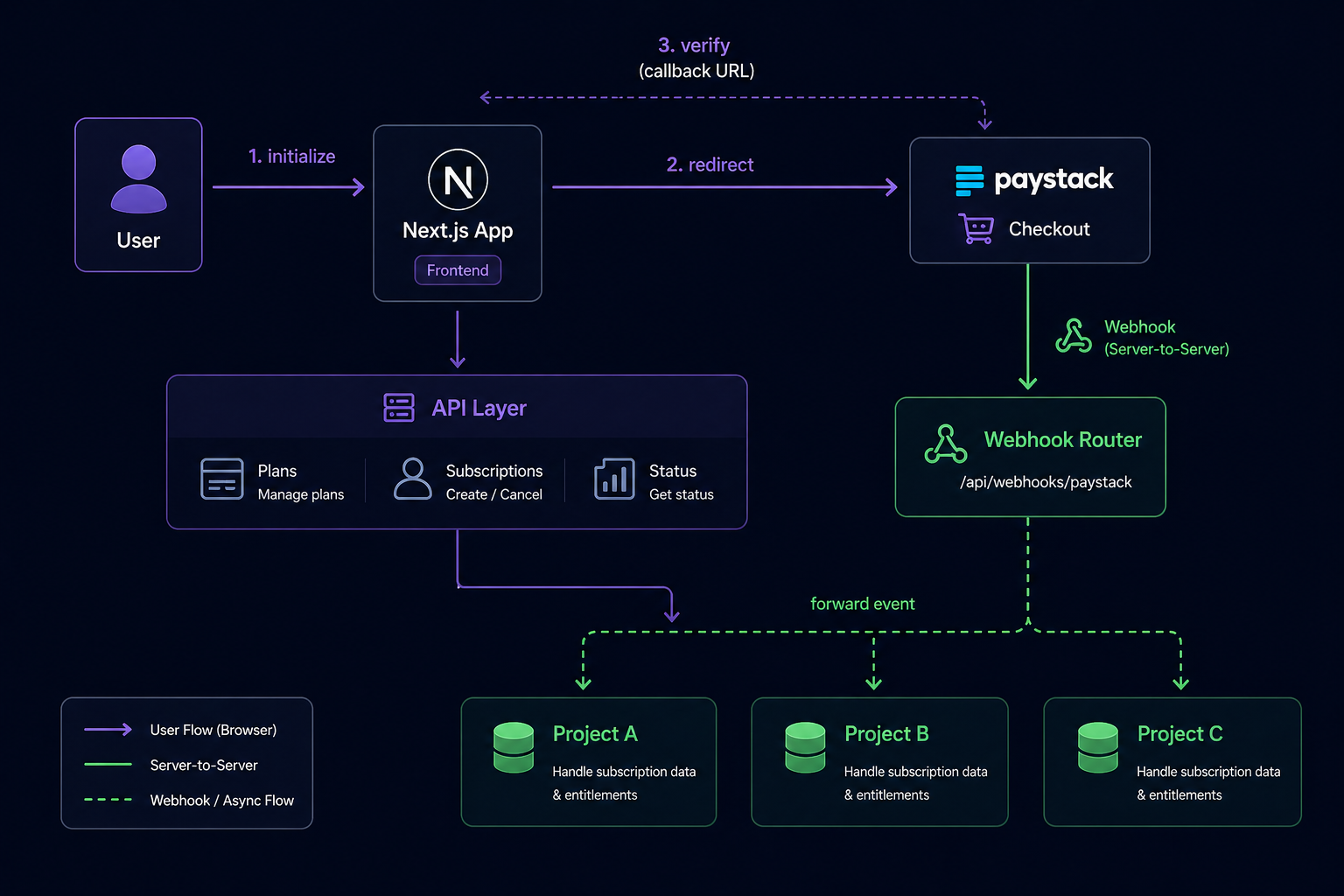
The user goes to Paystack’s hosted checkout page, pays, and gets redirected back to your callback_url.
Step 3: Handling the Callback
This is the core of the no-webhook approach. When Paystack redirects the user back to your app, it appends a reference query param to the URL. You use that reference to verify the transaction server-side and confirm it succeeded.
// lib/paystack.ts
export async function verifyTransaction(reference: string) {
  const res = await fetch(`https://api.paystack.co/transaction/verify/${reference}`, {
    headers: {
      Authorization: `Bearer ${PAYSTACK_SECRET}`,
    },
  });

  const data = await res.json();
  if (!data.status) throw new Error(data.message);
  return data.data;
}
// app/api/paystack/callback/route.ts
import { NextRequest, NextResponse } from "next/server";
import { verifyTransaction } from "@/lib/paystack";
export async function GET(req: NextRequest) {
const reference = req.nextUrl.searchParams.get("reference");
if (!reference) {
return NextResponse.redirect(new URL("/error", req.url));
}
const transaction = await verifyTransaction(reference);
if (transaction.status !== "success") {
return NextResponse.redirect(new URL("/payment/failed", req.url));
}
const { id, reference: txRef, customer, plan_object, subscription } = transaction;
// Save the transaction record
await db.transaction.create({
data: {
paystackTransactionId: id, // Paystack's numeric transaction ID
reference: txRef, // e.g. "T_xxxxxxxxxx"
amount: transaction.amount,
status: transaction.status,
email: customer.email,
customerCode: customer.customer_code, // e.g. "CUS_xxxxxxxxxx"
},
});
// Save or update the subscription record
await db.subscription.upsert({
where: { email: customer.email },
create: {
email: customer.email,
customerCode: customer.customer_code,
paystackSubscriptionId: subscription.id, // Paystack's numeric subscription ID
subscriptionCode: subscription.subscription_code, // e.g. "SUB_xxxxxxxxxx" — used for enable/disable calls
emailToken: subscription.email_token, // required to cancel or re-enable the subscription
planCode: plan_object.plan_code,
status: "active",
},
update: {
status: "active",
planCode: plan_object.plan_code,
paystackSubscriptionId: subscription.id,
subscriptionCode: subscription.subscription_code,
emailToken: subscription.email_token,
},
});
return NextResponse.redirect(new URL("/dashboard", req.url));
}One important note: always verify on the server, never on the client. The reference param in the URL is not a confirmation of payment. Anyone can craft a URL with a reference. The server-side verify call is what actually confirms money moved.
Step 4: Managing Active Subscriptions
Once a user has a subscription, you’ll need to fetch its status, cancel it, or re-enable it. Paystack exposes all of this through their Subscriptions API. The two key pieces you saved in the previous step, subscriptionCode and emailToken, are what make these operations possible.
Fetch a Subscription
export async function getSubscription(subscriptionCode: string) {
  const res = await fetch(`https://api.paystack.co/subscription/${subscriptionCode}`, {
    headers: { Authorization: `Bearer ${PAYSTACK_SECRET}` },
  });

  const data = await res.json();
  if (!data.status) throw new Error(data.message);
  return data.data;
}
Cancel (Disable) a Subscription
export async function cancelSubscription(subscriptionCode: string, emailToken: string) {
  const res = await fetch("https://api.paystack.co/subscription/disable", {
    method: "POST",
    headers: {
      Authorization: `Bearer ${PAYSTACK_SECRET}`,
      "Content-Type": "application/json",
    },
    body: JSON.stringify({
      code: subscriptionCode,
      token: emailToken,
    }),
  });

  const data = await res.json();
  if (!data.status) throw new Error(data.message);

  await db.subscription.update({
    where: { subscriptionCode },
    data: { status: "cancelled" },
  });

  return data.data;
}
The emailToken is a value Paystack generates when the subscription is created and also sends to the customer's email address. You saved it during the callback step. This token is required to disable a subscription. It's Paystack's way of ensuring cancellations are intentional and not something that can be triggered silently on the server without the customer's knowledge.
Re-enable a Subscription
export async function enableSubscription(subscriptionCode: string, emailToken: string) {
  const res = await fetch("https://api.paystack.co/subscription/enable", {
    method: "POST",
    headers: {
      Authorization: `Bearer ${PAYSTACK_SECRET}`,
      "Content-Type": "application/json",
    },
    body: JSON.stringify({
      code: subscriptionCode,
      token: emailToken,
    }),
  });

  const data = await res.json();
  if (!data.status) throw new Error(data.message);

  await db.subscription.update({
    where: { subscriptionCode },
    data: { status: "active" },
  });

  return data.data;
}
Step 5: Checking Subscription Status on the Fly
Because you’re not receiving webhook events, your database state can drift from Paystack’s truth, especially when renewal payments succeed or fail. To stay accurate, add a sync check whenever it matters, such as on dashboard load or before gating a feature.
// app/api/subscription/status/route.ts
import { NextRequest, NextResponse } from "next/server";
import { getSubscription } from "@/lib/paystack";

export async function GET(req: NextRequest) {
  const user = await getSessionUser(req); // however you do auth

  const dbSub = await db.subscription.findUnique({ where: { email: user.email } });
  if (!dbSub) return NextResponse.json({ active: false });

  const paystackSub = await getSubscription(dbSub.subscriptionCode);

  const isActive = paystackSub.status === "active";

  if (dbSub.status !== paystackSub.status) {
    await db.subscription.update({
      where: { email: user.email },
      data: { status: paystackSub.status },
    });
  }

  return NextResponse.json({ active: isActive, subscription: paystackSub });
}
This keeps your records reasonably fresh without needing webhooks at all.
Using Webhooks Across Multiple Platforms
Once you’re ready to bring webhooks back into the picture, the one-slot limitation doesn’t have to be a blocker. The fix is to build your own webhook router: a single endpoint you give to Paystack, which then fans out every event to whichever projects need it.
Paystack --> https://your-router.com/webhook --> Project A
                                              --> Project B
                                              --> Project C
Your router verifies the Paystack signature once, then forwards the payload to each downstream service. But here’s something easy to miss: your downstream projects (Project A, B, C) are now accepting POST requests from your router, not from Paystack directly. That means anyone who discovers those URLs can send them arbitrary payloads. You need a way for each project to confirm that the request actually came from your router and not from somewhere else.
The simplest way to do this is a shared secret. Each project gets its own secret token, and the router includes it as a header when forwarding events. The downstream project checks for that header before processing anything.
On the router side, store each project’s secret and include it in the forwarded request:
// router/app/api/webhook/route.ts
import crypto from "crypto";
import { NextRequest, NextResponse } from "next/server";

const targets = [
  {
    url: process.env.PROJECT_A_WEBHOOK_URL!,
    secret: process.env.PROJECT_A_WEBHOOK_SECRET!, // a strong random string you generate and share
  },
  {
    url: process.env.PROJECT_B_WEBHOOK_URL!,
    secret: process.env.PROJECT_B_WEBHOOK_SECRET!,
  },
];

export async function POST(req: NextRequest) {
  const rawBody = await req.text();
  const signature = req.headers.get("x-paystack-signature");

  // Verify this request genuinely came from Paystack
  const hash = crypto
    .createHmac("sha512", process.env.PAYSTACK_SECRET_KEY!)
    .update(rawBody)
    .digest("hex");

  if (hash !== signature) {
    return new NextResponse("Unauthorized", { status: 401 });
  }

  const event = JSON.parse(rawBody);

  // Forward to each project, attaching their individual secret
  await Promise.allSettled(
    targets.map(({ url, secret }) =>
      fetch(url, {
        method: "POST",
        headers: {
          "Content-Type": "application/json",
          "x-webhook-secret": secret, // downstream project will verify this
        },
        body: JSON.stringify(event),
      })
    )
  );

  return new NextResponse("OK", { status: 200 });
}
On each downstream project, verify the secret before touching the payload, then use the metadata to confirm the event belongs to that project:
// project-a/app/api/webhook/route.ts
import { NextRequest, NextResponse } from "next/server";

export async function POST(req: NextRequest) {
  const secret = req.headers.get("x-webhook-secret");

  if (!secret || secret !== process.env.WEBHOOK_SECRET) {
    return new NextResponse("Unauthorized", { status: 401 });
  }

  const event = await req.json();

  // Confirm this event was initiated by this project
  const { projectId, userId } = event.data.metadata;

  if (projectId !== process.env.PROJECT_ID) {
    // Not meant for us — acknowledge and move on
    return new NextResponse("OK", { status: 200 });
  }

  // Now it's safe to process, and we already have userId without a DB lookup
  switch (event.event) {
    case "charge.success":
      // handle successful charge for userId
      break;
    case "subscription.disable":
      // handle subscription cancelled for userId
      break;
    case "invoice.payment_failed":
      // handle failed renewal for userId
      break;
  }

  return new NextResponse("OK", { status: 200 });
}
The WEBHOOK_SECRET in each project is a strong random string you generate yourself, for example with openssl rand -hex 32, and set in that project's environment variables. The router holds its own copy of the same value in PROJECT_A_WEBHOOK_SECRET. They never need to leave your infrastructure.
This way, even if someone discovers your webhook URL, they can’t do anything with it without the secret. Each project gets its own secret so a leak in one doesn’t compromise the others. And because projectId and userId travel on every event inside the metadata, each project can ignore events that don't belong to it and process the ones that do without any extra database calls to figure out context.
This also solves the local development problem cleanly. The router lives in a real deployed environment, while local dev continues to use the callback-and-verify flow described above.
Wrapping Up
The callback-and-verify flow is the backbone of everything covered here: initialize the transaction, let Paystack handle the checkout, verify on return, and save what matters. Everything else, plan management, subscription control, status syncing, is just straightforward REST calls. This approach works well on its own for local development without tunnels, and for cases where you want to keep things simple without wiring up background event handling.
When you do add webhooks for background events like renewals and failed charges, the router pattern handles the one-slot limitation cleanly, letting each project receive only what it needs.
The two approaches work well together. Start with the callback flow, add webhooks when the use case calls for it. I hope this helps 🎉.