The internet feels instant — you click a link, a page loads, you send a message and it arrives. But underneath all of that, devices are constantly breaking data into small pieces, sending them across unpredictable networks, and reassembling them perfectly on the other side. The protocol that makes this reliable is TCP. This article breaks down exactly how it works — from establishing a connection to every field inside a TCP segment.
TCP stands for Transmission Control Protocol.
TCP handles the process of transmitting data. So, the Transport layer is responsible to transmit data from source to destination.
A protocol is a set of rules that define how data is communicated between devices.
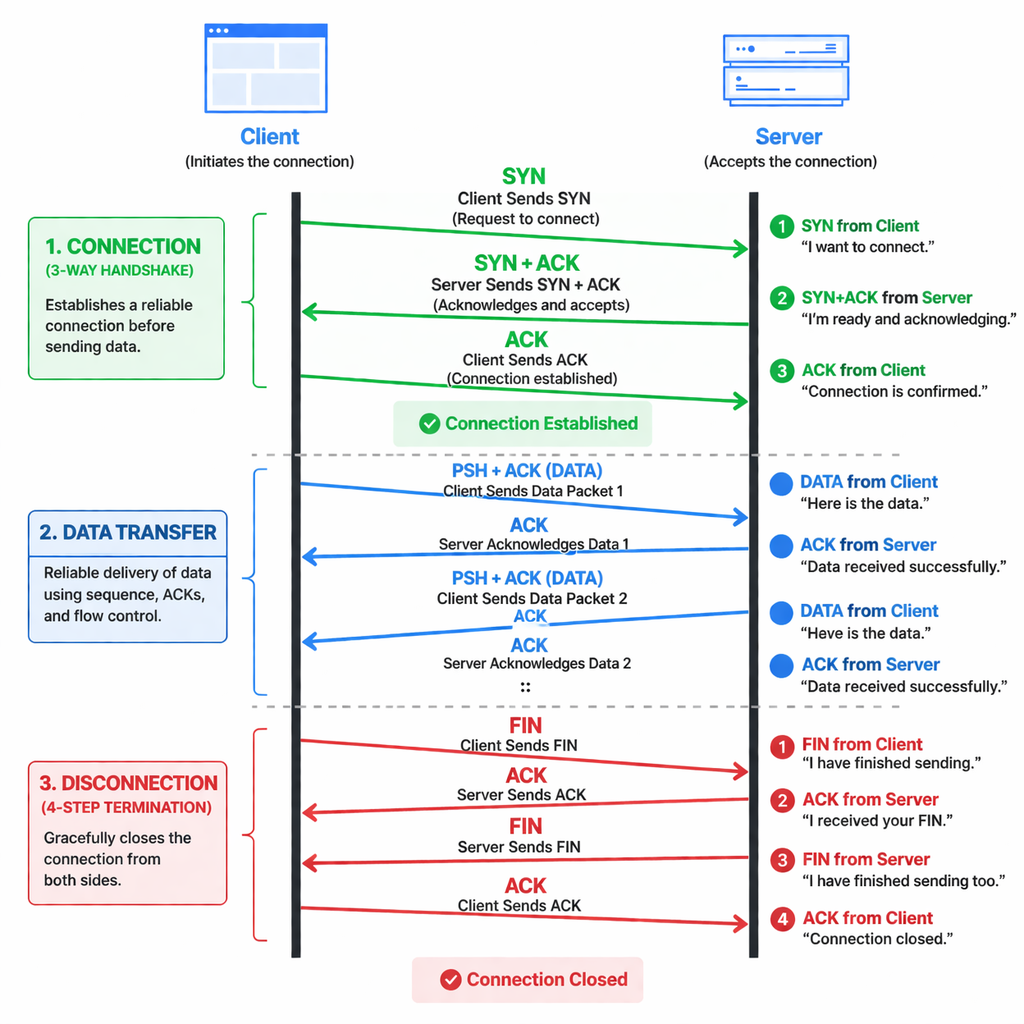
TCP communication steps:
- Connect → 3-way handshake
- Transfer Data
After the connection is established:
- TCP splits data into packets
- Assigns sequence numbers
- Waits for ACKs
- Retransmits any lost packets. - Disconnect → 4-step termination
4 step need to terminate the connection, because TCP is full-duplex (both sides send independently). So each side must close separately.
In every single request sender send TCP segment (Header + Data) to the receiver.
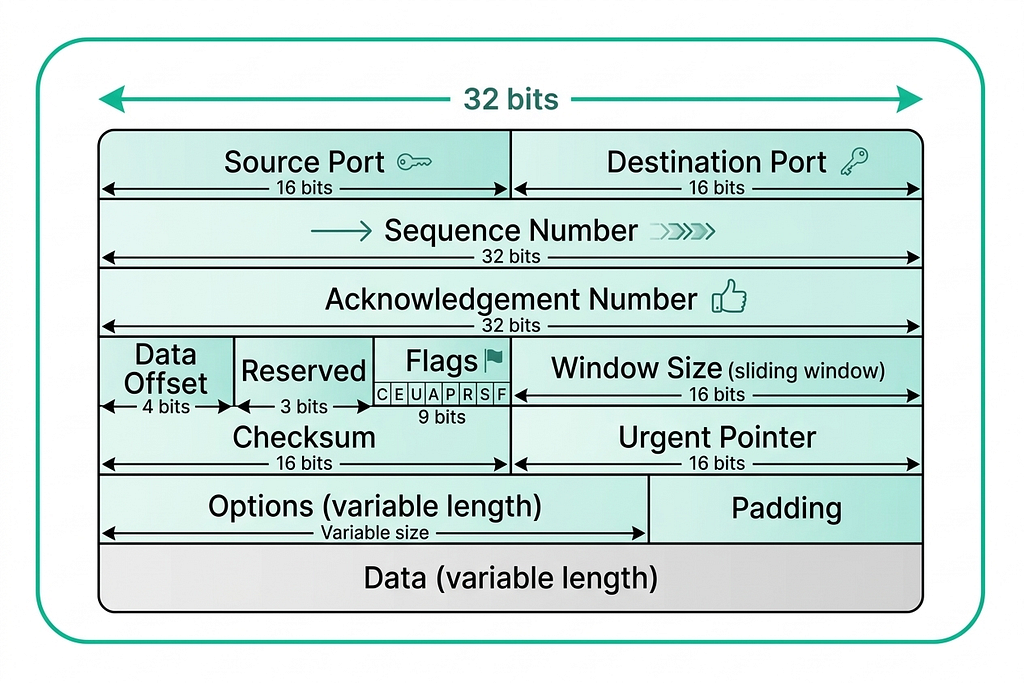
Port
A port is a logical number used to identify a specific application or service on a computer.
:: How many ports are possible?
Ports are based on a 16-bit number in TCP (also in UDP).
Total possible ports — 2¹⁶ = 65536. So, the range is — 0 to 65535.
Every network communication has 2 ports:
- Source Port → sender application
- Destination Port → receiver application
:: How many applications can run at a time?
In theory: Up to one app per port. So, Max ≈ 65535 apps using TCP at same time (practically much less).
Types of Ports:
- Well-Known Ports (0–1023)
- Reserved for standard services
- Managed by Internet Assigned Numbers Authority
- Examples: 80 → HTTP, 443 → HTTPS, 22 → SSH - Registered Ports (1024–49151)
- Used by applications
- Can be registered
- Examples: 3306 → MySQL, 5432 → PostgreSQL - Dynamic / Private Ports (49152–65535)
- Used temporarily by clients
- Also called ephemeral ports
- Example: Browser automatically picks one
When our app (browser, Go program, etc.) creates a connection using TCP we didn’t specify a source port OS automatically assigns an ephemeral port.
OS looks at the ephemeral port range and picks a port that is:
- Not currently in use
- Available for that protocol
Sequence Number
Ports tell us where data should go. But once a connection is established and data starts flowing, TCP needs a way to keep track of what was sent and in what order — that’s where sequence numbers come in.
A sequence number is a number assigned to each byte (or segment) of data sent in TCP. It represents the position of this data in the full stream.
Example
If client sends: “Hello World”
TCP might send:
- Packet 1 → Seq = 1000 → “Hello”
- Packet 2 → Seq = 1005 → “ World”
Why 1005? Because:
- “Hello” = 5 bytes
- Next sequence = 1000 + 5
:: Why do we need Sequence Number?
- Maintain Order
Packets can arrive out of order. Sequence number helps reassemble data correctly. - Detect Missing Data
If a sequence is missing receiver knows something is lost. - Enable Retransmission
Sender can resend only missing parts.
Without sequence numbers TCP cannot guarantee ordered and reliable delivery.
:: How is Initial Sequence Number (ISN) selected?
At the start of connection (during handshake):
- Client chooses a random number
- Server also chooses a random number
Then sequence increases by number of bytes sent.
Acknowledgment Number
The sender assigns sequence numbers to track what it sent. The receiver, in turn, uses acknowledgment numbers to tell the sender exactly what it received — and what to send next.
I have received everything up to this number, now I expect this next.
Example:
Client sends:
- Seq = 1000 → “Hello” (5 bytes)
Server replies:
- ACK = 1005
Meaning: I received bytes up to 1004, now send from 1005.
Data Offset
With sequencing and acknowledgment handled, TCP now needs to structure the segment itself cleanly — starting with knowing where the header ends and the actual data begins.
It indicates the size of the TCP header.
:: Why is it needed?
TCP header is variable size (it may include options). So receiver must know where the Header ends.
Header ends here → Data starts here
- It is a 4-bit field in TCP header.
- Value is measured in 32-bit words (4 bytes)
Header Size = Data Offset × 4 bytes
Using this formula receiver knows the header size. That results everything after that = data.
Min and Max Data Offset:
Header structure:
Fixed Header (20 bytes) + [ Options + Padding ]
TCP header cannot be smaller than 20 bytes. Because mandatory fields take 20 bytes.
So, Minimum Data Offset = 5 (20÷4).
Data Offset field size is 4 bits. So, Maximum Data Offset = 15 (2⁴ — 1)
So, Maximum TCP header size = 15×4 = 60 bytes.
Reserved
They are unused bits in the TCP header and reserved for future features.
:: If they are unused why they are part of the TCP header?
When TCP was designed, engineers anticipated that the protocol might need new flags or control functions later. By reserving these bits, future protocols could use them without creating an entirely new, incompatible header format.
Flag
TCP defines nine control flags, each flag corresponds to a specific bit position, and different combinations (like SYN+ACK) are formed by setting multiple bits to 1.
Some are familiar — like SYN, ACK, and FIN — while others handle congestion control and urgent data flow.
Here’s what each flag does:
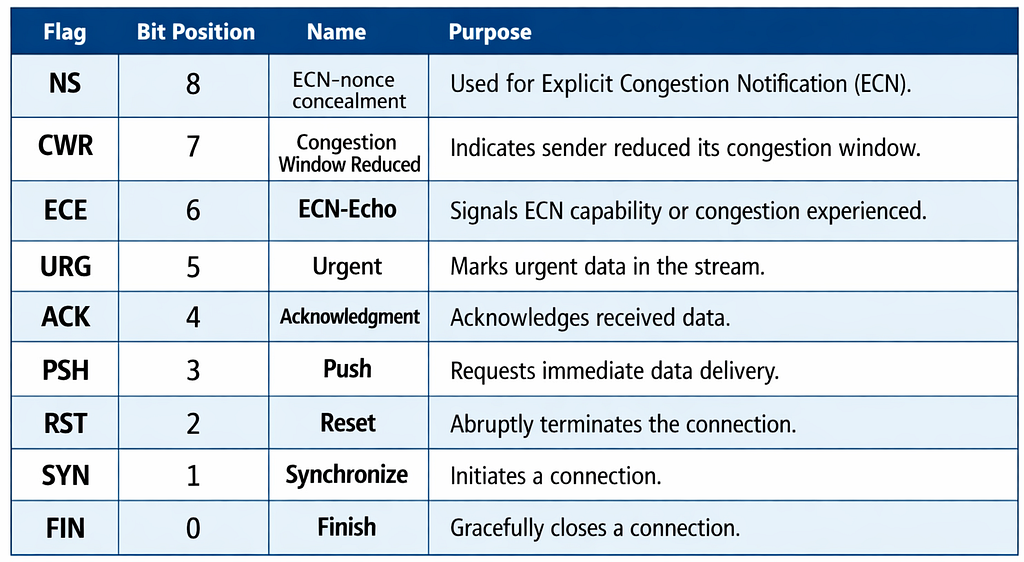
Example:
| Flag      | Bit Pattern |
| --------- | ----------- |
| SYN       | 00000010    |
| ACK       | 00010000    |
| FIN       | 00000001    |
| SYN + ACK | 00010010    |
| FIN + ACK | 00010001    |
Window Size
It means how much data the sender is allowed to send without waiting for acknowledgment.
Let’s say — Window size = 5000 bytes.
It means sender can:
- Send 5000 bytes continuously
- Then must wait for ACK
Checksum
This is the error detection mechanism of TCP.
During transmission bits can change or data may get corrupted.
Checksum helps to detect whether data is correct or corrupted.
If error found, packet is discarded and retransmission happens.
Urgent Pointer
It indicates the position of high-priority data in the stream.
It is used only when the URG flag = 1. It was designed for priority data transmission, but is rarely used today as modern applications handle such logic at the application layer.
:: Why was it used?
It was designed for immediate processing of critical data.
Example use cases:
- Interrupt signals (like Ctrl+C in terminal)
- Real-time commands in remote login (Telnet)
So receiver can process urgent data before normal data.
Options
Used to extend functionality, such as MSS, window scaling, timestamps.
MSS (Maximum Segment Size):
MSS defines the maximum amount of data (payload) a TCP segment can carry (MSS only limits data size, not full packet size).
Don’t send data bigger than this.
During the TCP three-way handshake, the Maximum Segment Size (MSS) is mutually established as a minimum of the values announced by the client and server (min[client MSS, server MSS]).
Window Scaling:
Think of Window Scaling as a way to fix a “speed limit” problem that was built into the internet 40 years ago.
Increase how much data can be in transit at once (using multiplication).
When TCP was first designed, it used a 16-bit number to tell the sender how much data it could handle at once.
- Mathematically, a 16-bit number can only go up to 65,535 bytes (about 64 KB).
- In the 1980s, 64 KB was huge. But today, on a high-speed fiber connection, 64 KB is tiny.
Imagine you are sending letters to a friend.
- The Rule:
- You can only send 10 letters at a time.
- After sending some letters, your friend replies (ACK).
- Then you can send more. - The Problem: If your friend lives next door, the wait is short. But if your friend lives in another country, it takes days for that postcard to arrive.
- The Result: Even if you have 1,000 letters ready to go, you are stuck sitting by the mailbox doing nothing. Your “speed” isn’t limited by how fast you write; it’s limited by how much you are allowed to send before you have to stop and wait.
Window Scaling fixes this by changing the rule (introducing a multiplier). Instead of changing “send 10 letters,” it keeps the 10 but says: Send 10 letters × 2ⁿ.
So if n = 4, the real window size becomes 10 × 16 = 160 letters at once — far more data in transit, far less waiting.
This is how modern TCP handles high-speed connections without redesigning the entire protocol.
Timestamps:
Timestamps let TCP track time, so it can adapt to network delays and avoid confusion from old data.
:: Why it is used?
- Measure RTT (Round Trip Time)
- Detect old or duplicate packets
Padding
Extra bytes added to the TCP header to make its size a multiple of 4 bytes.
TCP header must be a multiple of 4 bytes (32 bits). But ‘Options’ can be any length (not always multiple of 4).
Padding fills the “gap” with zeros so the header ends precisely on a 32-bit boundary, allowing the Data Offset field to correctly point to the start of the data.
Reference: Concepts and structure inspired by TCP In Details .
Inside TCP: The Protocol That Keeps the Internet Reliable was originally published in Level Up Coding on Medium, where people are continuing the conversation by highlighting and responding to this story.