Security-first. Local Docker setup. Unlimited LLM usage. And the one tool that made it 10x more useful.
Most people assume running a serious AI agent costs a fortune.
They’re wrong.
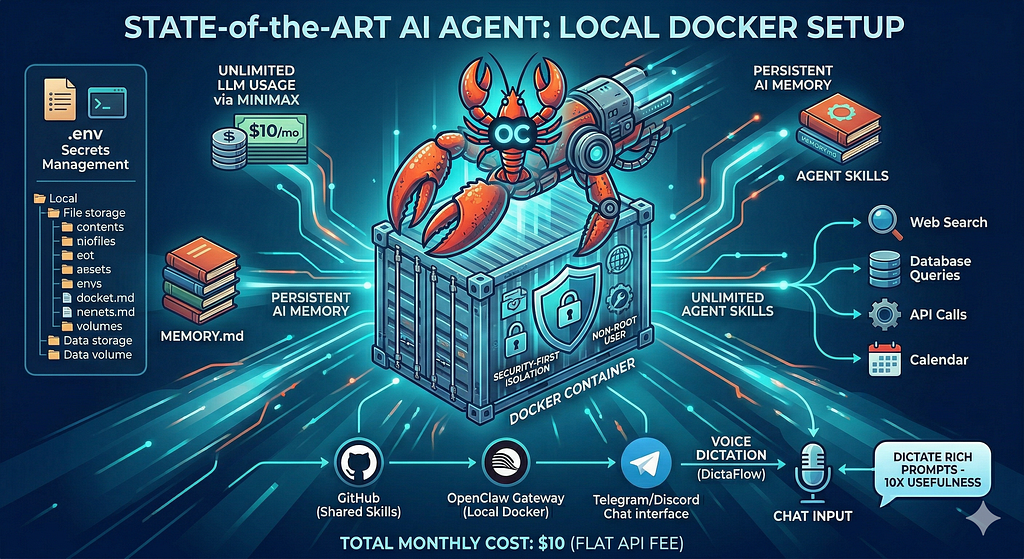
I’ve been running a fully capable, always-on, memory-enabled AI agent for under $10 a month. It handles research, drafts content, manages context across sessions, connects to external tools, and remembers everything I’ve ever told it. It runs in a Docker container on my own hardware. My data never leaves my control. And it costs less than a streaming subscription.
Here’s the full setup.
The Stack
Three components, total:
- OpenClaw — the agent runtime
- MiniMax — the LLM (unlimited usage, flat $10/month)
- Docker — local container with security hardening
That’s it. No cloud vendor lock-in. No per-token billing surprises. No data leaving your machine unless you want it to.
What OpenClaw Actually Is
OpenClaw is an open-source AI agent gateway. You install it, point it at any LLM provider, connect it to a chat surface (Telegram, Discord, Signal, WhatsApp — your choice), and you have a persistent AI agent that remembers context across sessions.
The difference between OpenClaw and just using ChatGPT in a browser:
- Persistent memory. The agent writes notes to files between sessions. It remembers decisions, context, preferences. Ask it something next week and it knows what you were working on last week.
- Skills. You extend the agent with custom tools. Web search. Database queries. API calls. Calendar access. Each skill is a directory with a markdown file describing when and how to use it. The agent routes to skills automatically.
- Your infrastructure. It runs where you run it. Docker locally. Railway in the cloud. A Raspberry Pi in your closet. The agent is yours.
Install it:
npm install -g openclaw
openclaw gateway start
That’s a running agent. Now let’s make it cost $10/month and actually secure.
The $10/Month LLM: MiniMax
MiniMax offers something most LLM providers don’t: a flat monthly subscription with nearly unlimited API usage.
For $10/month you get nearly unlimited calls to their flagship model. No per-token billing. No surprise invoice at the end of the month. No throttling after you hit some soft cap.
For an always-on agent that might handle dozens of requests per day, per-token billing adds up fast. MiniMax’s flat rate changes the economics completely.
OpenClaw supports MiniMax out of the box. Set it in your config:
{
  "agents": {
    "defaults": {
      "model": "minimax/MiniMax-27"
    }
  }
}
Or set it via environment variable:
OPENCLAW_MODEL=minimax/MiniMax-27
MINIMAX_API_KEY=your_key_here
MiniMax 2.7 is a serious model. 1 million token context window. Strong reasoning. Fast. It handles everything from quick questions to long-document analysis without breaking a sweat.
At $10/month flat, the ROI conversation becomes very short.
Running It in Docker (The Right Way)
Running OpenClaw in Docker gives you two things: portability and isolation. But Docker out of the box isn’t secure. You have to set it up intentionally.
Here’s the Dockerfile:
FROM node:22-slim
# Create non-root user
RUN groupadd -r openclaw && useradd -r -g openclaw -d /home/openclaw -m openclaw
# Install OpenClaw
RUN npm install -g openclaw
# Set up workspace directory
RUN mkdir -p /data && chown openclaw:openclaw /data
USER openclaw
WORKDIR /home/openclaw
EXPOSE 8080
CMD ["openclaw", "gateway", "start", "--home", "/data/.openclaw", "--workspace", "/data/workspace", "--foreground"]
And the docker-compose.yml:
version: "3.8"
services:
  openclaw:
    build: .
    restart: unless-stopped
    ports:
      - "127.0.0.1:8080:8080"   # localhost only -- not exposed to the internet
    volumes:
      - openclaw-data:/data      # persistent memory lives here
    environment:
      - OPENCLAW_MODEL=minimax/MiniMax-Text-01
      - OPENCLAW_KEY=${OPENCLAW_KEY}
      - MINIMAX_API_KEY=${MINIMAX_API_KEY}
      - OPENCLAW_TELEGRAM_TOKEN=${TELEGRAM_TOKEN}
    security_opt:
      - no-new-privileges:true   # container can't escalate privileges
    read_only: true              # root filesystem is read-only
    tmpfs:
      - /tmp                     # temporary files go to memory, not disk
    cap_drop:
      - ALL                      # drop all Linux capabilities
    cap_add:
      - NET_BIND_SERVICE         # only add back what's needed
volumes:
  openclaw-data:
    driver: local
A few things worth calling out:
127.0.0.1:8080:8080 -- This binds the port to localhost only. The agent is not accessible from outside your machine. If you want remote access, use a reverse proxy (Caddy or nginx) with TLS, not by exposing the Docker port directly.
no-new-privileges: true -- Prevents any process inside the container from gaining elevated permissions, even if it tries.
read_only: true -- The container filesystem is read-only. The only writable location is the named volume at /data. This limits what any malicious code running inside the container could do.
cap_drop: ALL -- Docker containers inherit Linux capabilities by default. Most of them are unnecessary for an AI agent. Drop them all, add back only what's actually needed.
Non-root user — The agent runs as openclaw, not root. If the container is ever compromised, the blast radius is much smaller.
Secrets Management
Never put secrets in your Dockerfile or docker-compose.yml. Use a .env file:
# .env (never commit this)
OPENCLAW_KEY=your_anthropic_or_openai_key
MINIMAX_API_KEY=your_minimax_key
TELEGRAM_TOKEN=your_telegram_bot_token
Add .env to .gitignore before you create the file. Not after.
echo ".env" >> .gitignore
Docker Compose reads .env automatically. Your secrets stay local.
Persistent Memory on a Named Volume
The named volume openclaw-data is where everything that matters lives:
/data/
  workspace/
    SOUL.md       <- the agent's personality
    USER.md       <- who you are, your context
    MEMORY.md     <- long-term memory (agent-maintained)
    skills/       <- your custom tools
    memory/       <- daily session notes
  .openclaw/
    openclaw.json <- gateway config
    agents/
      main/
        sessions/ <- full chat history
Because it’s a Docker named volume, it persists across container restarts, rebuilds, and even if you update the Docker image. Your agent’s memory is preserved.
This is the part people miss when they think about running AI locally. It’s not just about keeping data off the cloud. It’s about having an agent that accumulates context over months and becomes genuinely more useful over time.
The Security Model (Simply Put)
Here’s the actual threat model you’re protecting against with this setup:
External access: Binding to 127.0.0.1 means the agent is only reachable from your machine. No internet exposure without your explicit action.
Container escape: Read-only filesystem + dropped capabilities + non-root user makes container escape much harder. If something goes wrong inside the container, it can’t write to your host filesystem or gain elevated access.
Secrets exposure: Environment variables from .env mean API keys aren't baked into your image. You could push the image to a public registry and your keys would still be safe.
Data at rest: Because your agent’s memory lives on a Docker volume (on your local machine), it never touches a third-party server. Your conversation history stays yours.
LLM API calls: The only external network call is to MiniMax’s API for inference. If you’re uncomfortable with that, you can swap MiniMax for a locally-running model via Ollama and get to $0/month — though you trade quality for privacy.
The One Thing That Made This Setup 10x More Useful
Here’s something I didn’t expect: the biggest friction point with an always-on AI agent isn’t the setup. It’s the input.
Typing is slow. When you’re in a flow state, stopping to type a 3-paragraph context dump to your agent breaks your concentration. You end up writing shorter, worse prompts. The agent gets less context. The answers get worse.
Dictation fixed this.
I started using DictaFlow — a dictation app that lets you speak to your agent instead of type. You hold a key, talk, and the transcription shows up instantly wherever your cursor is. Your Telegram chat with the agent, your notes app, anywhere.
The difference is hard to overstate. A thought that would take 2 minutes to type takes 15 seconds to say. More importantly, you say things you would never bother typing. More context, more nuance, more natural conversation. The agent’s responses got noticeably better almost immediately, just because the prompts got richer.
I now dictate probably 80% of my messages to the agent. Research requests, context updates, instructions for skills — all voice. It feels less like using a tool and more like thinking out loud to someone who actually helps.
If you’re building an agent setup like this, add dictation. It’s not optional. It’s the interface layer that makes the whole thing feel alive.
Monthly Cost Breakdown
ComponentCostMiniMax unlimited API$10/monthDocker (local machine)$0OpenClaw$0 (open source)Telegram bot$0DictaFlow dictationfree tier availableTotal$10/month
If you’re running this on a cloud VM (say, a $4/month DigitalOcean droplet), add that. You’re at $14/month for a cloud-hosted, always-on, memory-enabled AI agent with state-of-the-art inference.
Getting Started
# 1. Install Docker Desktop (mac/windows) or Docker Engine (linux)
# 2. Clone or create your project directory
mkdir my-agent && cd my-agent
# 3. Create your .env file
cat > .env << 'EOF'
MINIMAX_API_KEY=your_key
TELEGRAM_TOKEN=your_bot_token
EOF
# 4. Add .gitignore
echo ".env" > .gitignore
# 5. Create docker-compose.yml (paste from above)
# 6. Launch
docker compose up -d
# 7. Check logs
docker compose logs -f
Your agent is running. Message your Telegram bot. It responds.
Now go customize SOUL.md in the volume to give it a personality. Add a skill or two. Let it run for a week and watch MEMORY.md fill up.
The Real Value
The $10/month number is real and it matters for adoption. But the actual value isn’t the cost.
It’s the compounding.
An AI agent that runs continuously, remembers everything, and gets better input from dictation doesn’t just save time linearly. It becomes a persistent thinking partner that knows your projects, your context, your history. After a month it’s useful. After three months it’s indispensable.
That’s what you’re actually building. The $10/month just means the cost is low enough that you’ll leave it running long enough to find out.
OpenClaw is open source. Find it at openclaw.ai. MiniMax subscriptions at minimaxi.com. If you want faster input, try DictaFlow — it’s what changed how I actually use all of this.
I’m Running a State-of-the-Art AI Agent for $10 a Month. Here’s Exactly How. was originally published in Level Up Coding on Medium, where people are continuing the conversation by highlighting and responding to this story.