Ice‑keeper keeps Apache Iceberg tables healthy by detecting maintenance needs from metadata and running targeted ops, visible in Superset.

Introduction
At the Canadian Centre for Cyber Security (CCCS) we rely heavily on Iceberg tables. Apache Iceberg can feel like a cloud data warehouse if you keep the tables healthy. Many teams new to Iceberg-based architectures are surprised to learn that regular maintenance is required to preserve performance and control storage growth; snapshots accumulate, orphan files linger, and small files degrade scan performance unless they are periodically cleaned up.
Ice‑keeper automates these essential maintenance tasks. It discovers tables, evaluates configuration from table properties, parallelizes work across large inventories, and records every action in a journal for full auditability. It runs wherever Spark and Iceberg run, requires no additional services, and is easy to schedule.
What Is Ice‑keeper
Ice‑keeper is a command line tool that automates Iceberg table maintenance. It wraps Iceberg’s maintenance procedures and orchestrates them across many tables, applying user-defined rules stored in Iceberg tblproperties. Ice‑keeper can discover new tables, expire old snapshots, clean orphan files, rewrite manifests, enforce lifecycle retention, and optionally optimize partitions.
Because it depends only on Spark and Iceberg, installation is trivial. If you already query or write Iceberg tables with Spark, you can run Ice‑keeper immediately.
Deployment
Ice‑keeper runs as:
- a simple CLI tool
- a scheduled job using Airflow, cron, Azure DevOps pipelines, or similar
Nothing else is required. For example:
./ice-keeper discover --catalog dev_catalog --schema jcc
All Spark resources (executor count, driver memory, concurrency, and so on) are set with command line flags. This makes Ice‑keeper portable between cloud clusters, local Spark, and containerized environments.
Table Discovery and the Maintenance Schedule
Ice‑keeper maintains a table called maintenance_schedule, which contains the operational configuration for every tracked Iceberg table. It is populated using:
./ice-keeper discover --catalog dev_catalog
The discover action:
- scans catalogs and schemas
- adds new tables
- removes entries for tables that no longer exist
- synchronizes table owner overrides from Iceberg tblproperties
Table owners can opt in or out of any maintenance feature by setting or unsetting properties such as:
ALTER TABLE dev_catalog.jcc.cyber_detections
SET TBLPROPERTIES ('ice-keeper.should-expire-snapshots'='false');
This gives platform administrators centralized visibility while giving table owners full control.
Maintenance Capabilities
Snapshot Expiration
Ice‑keeper runs Iceberg’s expire_snapshots procedure to remove old snapshots and delete their unneeded data and metadata files. This keeps metadata small and prevents storage growth from abandoned snapshots.
Expiration is controlled by:
- ice-keeper.retention-days-snapshots
- ice-keeper.retention-num-snapshots
Table owners can tune these individually.
Remove Orphan Files
Orphan files are files present in object storage but not referenced by any snapshot. They accumulate when writer tasks fail and can consume significant storage. Ice‑keeper removes them by running Iceberg’s remove_orphan_files procedure.
To improve performance, Ice‑keeper can use Azure Blob Inventory as the source of existing file paths. When inventory data is available, Ice‑keeper builds a view containing the list of files and passes it to the Iceberg procedure using the file_list_view attribute, avoiding expensive directory listings.
If configured, Ice‑keeper also removes empty directories. When using inventory data, it can determine which folders contain no remaining files and include them in the same file_list_view input so the procedure can delete them without scanning storage. This approach makes cleanup fast and scalable.
Rewrite Manifests
Ice‑keeper can run the rewrite_manifest procedure, which reorganizes manifest files to keep metadata performant. This helps reduce planning time and metadata I/O.
Lifecycle Enforcement
Ice‑keeper can automatically delete old data by applying a retention rule:
DELETE FROM table
WHERE ingestion_time < current_date() - INTERVAL 'N' DAY
This is controlled with:
- ice-keeper.should-apply-lifecycle
- ice-keeper.lifecycle-max-days
- ice-keeper.lifecycle-ingestion-time-column
Optimization (Binpack, Sort, Z‑order)
Ice‑keeper can optionally optimize unhealthy partitions using Iceberg rewrite procedures. Strategies include:
- binpack
- sort
- zorder(col1, col2)
These strategies are driven by metadata diagnostics written into the partition_health table. You can dive deeper in this article Keeping Iceberg Tables Healthy with Ice‑keeper.
Performance and Parallelism
Ice‑keeper is built to handle large inventories of tables. It supports:
- configurable concurrency via --concurrency
- running maintenance on hundreds of tables in parallel
- Spark executor configuration for each action type
- stable operation even on large metadata sets (e.g., disabling broadcast joins for orphan cleanup)
Some Iceberg operations run on Spark workers and parallelize very well (orphan clean up), Others place more load on the driver (snapshot expiration). Ice‑keeper exposes resource flags for each action so you can tune them independently.
The Journal: Transparent Maintenance
Every Ice‑keeper action writes a row to the journal table, including:
- start time and end time
- execution time
- SQL statement executed
- status and any exception details
- identity of the executor
- files deleted, added, or rewritten
- manifest counts
- bytes processed
- orphan file counts
This provides a complete operational audit trail.
Observability Through Superset
Ice‑keeper exposes three tables that make monitoring straightforward:
- maintenance_schedule
- partition_health
- journal
These can be visualized with Superset dashboards. For example:
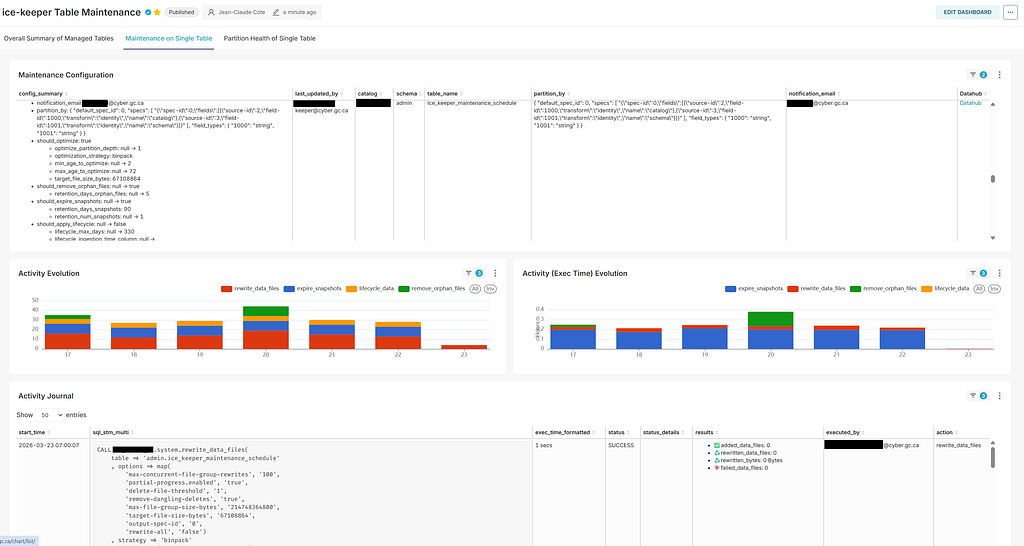
The dashboard provides a single place to observe configuration, activity over time, and detailed logs of every maintenance procedure Ice‑keeper executes.
Configuration Through Table Properties
Ice‑keeper is fully configured via Iceberg tblproperties, such as:
- ice-keeper.should-expire-snapshots
- ice-keeper.retention-days-snapshots
- ice-keeper.should-remove-orphan-files
- ice-keeper.retention-days-orphan-files
- ice-keeper.should-optimize
- ice-keeper.optimization-strategy
- ice-keeper.optimization-target-file-size-bytes
- ice-keeper.should-apply-lifecycle
These are synchronized into the maintenance_schedule table during discovery.
Conclusion
Iceberg delivers warehouse-grade semantics on cloud object storage, but only when tables are kept healthy. Ice‑keeper provides a simple and reliable way to automate core Iceberg maintenance routines using fact-based diagnostics and lifecycle signals drawn directly from table metadata. It handles discovery, expiration, orphan cleanup, manifest rewrite, lifecycle deletion, and optional optimization, all through a small set of CLI actions.
Rewrites and maintenance operations are partition scoped, which reduces runtime, preserves ingestion parallelism, and makes retries and audits straightforward. Every action is captured in the journal table, and the maintenance_schedule and partition_health tables make the entire system transparent. When visualized in Superset, these tables provide a clear operational control plane for data engineering teams.
Ice‑keeper is easy to deploy, easy to operate, and scales to large catalogs. For data engineers, it turns Iceberg maintenance into a low-touch background process that keeps data layout consistent and performant across the lake.
Ice‑keeper: Automated Table Maintenance for Apache Iceberg was originally published in Level Up Coding on Medium, where people are continuing the conversation by highlighting and responding to this story.