I Passed the Claude Architect Exam – Here’s the SKILL.md Framework You Can Use to Learn and Pass Too
A step-by-step guide to building your own Claude skill, from someone who used one to pass the exam
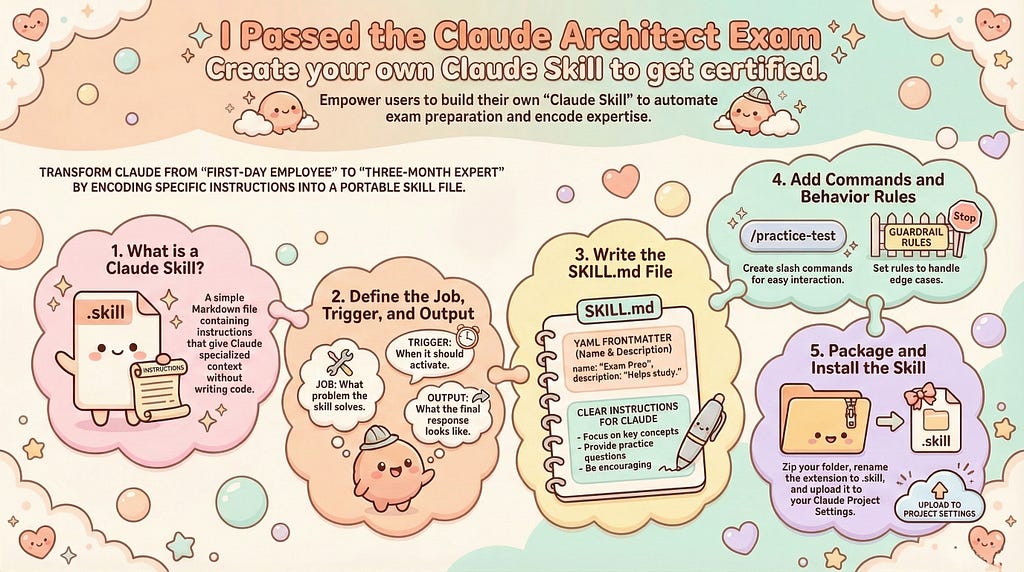
Picture a new employee on their first day. They are smart, capable, and eager to help. But they do not know your workflows, your preferences, your terminology, or the specific problems you face every Tuesday at 9am. So you spend the first weeks explaining context before every request. You remind them of the same background details repeatedly. You answer the same questions about how your team operates.
Now picture that same employee three months later. They remember everything. They anticipate your needs. They know when to ask questions and when to act. The difference between those two versions of the same person is not intelligence. It is context.
A skill gives your AI the context it needs to stop being the first-day employee and start being the three-month one.
This article provides a detailed breakdown of what Claude Skills actually are and how to effectively deploy them in your own projects.
What a Skill Actually Is
A skill is a markdown file with a name, a description, and a set of instructions. That is it. There is no code to write, no model to train, no API to configure. You write what you want the AI to behave like, save it as a .skill file, and install it in a Claude Project. From that point on, every conversation in that Project has access to the specialist you built.
The reason this matters more than it sounds is something psychologists call the expertise transfer problem. As Herbert Simon’s research on expert cognition showed, deep knowledge does not transfer automatically from person to person. It has to be structured, contextualised, and made retrievable on demand. A skill does exactly that. It encodes expertise into a reusable format so the AI can apply it consistently, every time, without you re-explaining the context from scratch.
Download examprep-guide skill from below link (only for reference):
claude-ai/claude-architect-exam at main · sarveshtalele/claude-ai
or
View the examprep-guide-skill.md file
claude-ai/claude-architect-exam/examprep-guide-skill.md at main · sarveshtalele/claude-ai
The examprep-guide skill, which we will use as the example throughout this guide, encodes the knowledge of a good study coach: how to assess where you are, how to build a study plan that fits your schedule, how to run diagnostic tests, and how to adjust the plan as you progress. That knowledge lives in a single markdown file that anyone can install and start using in minutes.
Don’t know How to create a Claude Skill?
Refer below step by step UI guide for creating a Claude Skill.
How to Create a your own custom Skill in Claude? - Sarvesh Talele
Step 1: Decide What Your Skill Should Do
The most common mistake people make when building a skill is starting too broad. “Help me be more productive” is not a skill. “Run a daily planning session that asks about my three priorities, checks my calendar summary, and gives me a focused task order” is a skill.
A good skill has a specific job, a clear trigger, and a predictable output format. Ask yourself three questions before you write a single line. What specific problem does this solve? When should the AI use this instead of its default behaviour? What should the output look and feel like?
For the examprep-guide skill, those answers were clear. The problem was that studying for a technical certification without a personalised system wastes time on things that do not matter and neglects things that do. The trigger is any mention of exam prep, practice tests, or study plans. The output is a combination of diagnostic scores, structured weekly schedules, and curated resource lists, all personalised to the user’s role and the official exam domains.
Once you can answer those three questions for your own idea, you are ready to write.
Step 2: Write Your SKILL.md File
Open a text editor and create a file called SKILL.md. The file starts with a YAML frontmatter block at the very top, wrapped in triple dashes. The frontmatter needs two fields: name and description.
The name must not contain reserved words. “claude” is reserved, so claude-prep-guide would fail on install. The examprep-guide skill uses examprep-guide as its name. Keep it short, lowercase, and hyphenated.
The description is the most important part of the entire file. This is what the AI reads to decide whether to use your skill at all. Make it specific and a little pushy. Do not just describe what the skill does. Tell the AI exactly when to use it. The examprep-guide description says to trigger on phrases like “exam prep,” “practice test,” “study plan,” and “Anthropic certification,” and to trigger even if the user does not name the skill explicitly.
After the frontmatter, write your instructions in plain markdown. The structure that works best follows a simple pattern: an overview table of commands at the top, then a detailed section for each command explaining what to ask, what to do with the answer, and what format to output.
Each command in the examprep-guide skill follows this pattern. The /profile section explains exactly what five questions to ask, what to do when a PDF is attached, and what the output card should look like. The /practice-test section specifies how many questions per batch, how to score, when to show feedback, and exactly what the diagnostic report should contain. Every command is a self-contained instruction set.
This level of specificity is not overengineering. It is the difference between an AI that guesses what you want and one that reliably delivers what you need. As Daniel Kahneman’s work on System 1 and System 2 thinking reminds us, human cognition defaults to fast, pattern-matching shortcuts. An AI without specific instructions does the same, defaulting to the most statistically common version of whatever you asked for. Specific instructions override that default and produce the output you actually designed.
Step 3: Add Slash Commands for Each Major Function
Slash commands are the user-facing interface of your skill. They give users a clear vocabulary for what they can ask for, and they give the AI a clean trigger to follow the right set of instructions.
For each major function in your skill, define a command name starting with a / and write a section in the SKILL.md that tells the AI exactly what to do when that command is typed.
The examprep-guide skill has six commands. /profile collects background information. /practice-test delivers the diagnostic. /prep-plan generates the full roadmap. /weekly-plan creates the week’s schedule. /resources lists all study materials. /score-check runs a progress quiz and adjusts the plan.
The trick to writing good command sections is to include three things: what to ask or present, how to process the input, and what the output should look like including format and tone. The examprep-guide uses structured ASCII output blocks with clear labels and emoji indicators so the output is scannable and consistent every time.
When you write your own commands, keep the output format in the instructions. If your skill generates reports, specify whether they use headers or prose. If it asks questions, specify whether to ask all at once or one at a time. These details feel small but they compound. A skill that always behaves the same way builds the kind of trust that makes you reach for it automatically, the same way you reach for the colleague you know will always give you a straight answer.
Step 4: Add Behaviour Rules at the End
After your commands, add a short section called Skill Behaviour Rules. This is a numbered list of the most important constraints and defaults for how the skill should operate.
The examprep-guide has nine rules. Always start with /profile if no background exists. Always read an attached PDF immediately. Personalise examples to the user’s role. Track diagnostic scores across the session. Show the 720 target score in every output. If no PDF is attached, use default weightings and note it. If the exam is two weeks away, compress the plan. If the diagnostic score is above 80%, skip the foundation phase.
These rules are your guardrails. They make the skill resilient to edge cases without requiring you to write instructions for every possible situation. Think of them the way Marcus Aurelius thought about his Meditations, as reminders of principles to return to when things get complicated, not as rigid scripts to follow mechanically.
Step 5: Package and Install
Once your SKILL.md is written, package it. Create a folder with the same name as your skill, put the SKILL.md inside it, and compress the folder as a .zip file. Rename the .zip extension to .skill. That is your installable file.
To install, open Claude.ai, create or open a Project, go to Settings, find the Skills section, and upload the .skill file. Add a short system prompt to your Project instructions that lists the available commands and tells the AI to use your skill for relevant requests.
From that point, every conversation in the Project has access to your specialist. You can share the .skill file with colleagues, teammates, or anyone facing the same problem you built the skill to solve.
The Deeper Point About What Skills Make Possible
There is a concept in cognitive science called distributed cognition, the idea that human intelligence does not live only in the brain but spreads across tools, environments, and other people. Your calendar is part of how you think about time. Your notebook is part of how you think through problems. Your trusted colleague is part of how you make hard decisions.
Skills extend this distribution into your AI. The examprep-guide skill does not just save time. It encodes a way of thinking about exam preparation, a structured, diagnostic, adaptive approach, and makes that thinking available to anyone who installs it. The next person who sits down to prepare for the same certification starts from a better position than you did, not because they are smarter, but because the accumulated understanding of what good preparation looks like is already there, ready to be used.
That is what building a skill actually means. You are not just automating a task. You are making expertise portable.
The examprep-guide skill is available as a .skill file for the Claude Certified Architect Foundations certification. Use it as a template or as a starting point for your own skill. The full SKILL.md is readable, editable, and free to adapt. Start with a problem you solve repeatedly, write the instructions you wish someone had given you the first time, and package it for everyone who comes after you.
If this guide helped you, share it with one person who is building with AI and has not yet discovered what a skill can do.
If this guide helped you automate a tedious task today, there’s more where that came from. Follow Sarvesh Talele here on Medium for practical, step-by-step AI guides that actually make a difference in your workflow.
I Passed the Claude Architect Exam — Here’s the SKILL.md was originally published in Level Up Coding on Medium, where people are continuing the conversation by highlighting and responding to this story.