Build a real authenticated web app with HTMX 2.0, FastAPI, and Auth0 — no React, no JavaScript framework, no node_modules. Just Python and HTML

I know, I know. Put the pitchfork down. Hear me out. React is incredible for genuinely complex UIs — think Figma, Notion, Google Docs. But somewhere along the way, we started using it for everything. A marketing page with a contact form? React. A simple dashboard that shows some data? React. An internal tool used by three people? React, with Redux, with a custom hooks library, with a 400mb node_modules folder that takes 45 seconds to install and has 47 known vulnerabilities according to npm audit
This tutorial is about a different approach. You’ll build a Personal Bookmark Manager — a real, production-ready web app where users can sign in, save URLs with titles and tags, and search their bookmarks live as they type. No full-page refreshes, no janky loading states where thing feels instant too. And the frontend? JUST HTML
The Stack:
- FastAPI — Python web framework, genuinely fast, genuinely pleasant to use
- HTMX 2.0 — makes HTML interactive without writing JavaScript.14kb. No build step. Beat React in GitHub stars gained in 2024.
- SQLModel — database models that are also Pydantic models (it’s as good as it sounds)
- Auth0 — handles login/signup/logout so you don’t have to
- Tailwind CSS via CDN — looks good, zero build step
- uv — Python package management that doesn't make you want to quit tech
By the end you’ll have a working app you can actually deploy and use
Before We Write Code: The Full Picture
here’s the full picture of what the finished app does:
User Visits App → Sees Login Page → Clicks “Sign In” → Redirected to Auth0 → Returns Authenticated → Sees Bookmark Dashboard → Adds Bookmark → Live Search Filtering → Deletes Bookmark → Logs Out → Back to Login Page
The key architectural decision that makes this whole thing work: FastAPI returns HTML, not JSON. This is the opposite of how React apps work — and it’s what makes HTMX possible. xHere is how app gonna work at high level 👇
┌──────────────────────────────────────────────────────────┐
│                    BROWSER                               │
│                                                          │
│   HTML page + HTMX 2.0 (16kb, no build step)             │
│        │                                                 │
│        │  hx-post, hx-get, hx-delete                     │
│        │  (HTTP requests triggered by user actions)      │
└────────┼─────────────────────────────────────────────────┘
         │
         ▼
┌──────────────────────────────────────────────────────────┐
│                   FASTAPI BACKEND                        │
│                                                          │
│   Routes receive requests                                │
│        │                                                 │
│        ├──► Auth0 session check (is this user logged in?)│
│        │                                                 │
│        ├──► SQLModel queries (read/write SQLite DB)      │
│        │                                                 │
│        └──► Returns HTML fragments (not JSON)            │
│             HTMX swaps them into the page                │
└──────────────────────────────────────────────────────────┘
         │
         ▼
┌──────────────────────────────────────────────────────────┐
│                   AUTH0                                  │
│                                                          │
│   Handles login, signup, social providers                │
│   Issues tokens, manages sessions                        │
│   Your app never stores passwords                        │
└──────────────────────────────────────────────────────────┘
All those instant updates without full page reloads are powered by HTMX. Every piece of data is owned by the logged-in user, isolated from everyone else’s bookmarks, thanks to Auth0. FastAPI and SQLModel handle the backend. With that let’s get started
Setting Up the Development Environment
Before building the app, let’s ensure your environment is ready. We’ll install a minimal Python toolchain to run the FastAPI server and integrate Auth0 authentication
Prerequisites:
- Python 3.12 or higher installed
- uv installed — if you don't have it yet, run curl -LsSf https://astral.sh/uv/install.sh | sh (Mac/Linux) or check astral.sh/uv for Windows
- An Auth0 account — free tier is plenty, sign up here
- Basic Python knowledge — you don’t need to know FastAPI or HTMX beforehand
Note:
If you’ve been using pip and venv manually, uv is about to make you feel like you've been carrying groceries by hand when there was a car in the driveway the whole time
uv is a Python package manager written in Rust. It installs packages 10-100x faster than pip, manages virtual environments automatically, and handles your pyproject.toml properly. It's become the de facto standard in Python projects in 2025-2026. We're using it here because there's genuinely no reason not to
Part 1 — Setting Up the Project
Let’s create the base project structure, install dependencies, and prepare the environment required to run the FastAPI application locally.
Creating the Project Structure
We’ll start by creating a clean project scaffold using uv, which will manage dependencies and project metadata.
uv init bookmarks
cd bookmarks
This creates a pyproject.toml, a README.md, and a main.py. We'll replace main.py's contents entirely in a later step
Now install all the dependencies in one shot:
uv add fastapi uvicorn[standard] sqlmodel authlib itsdangerous jinja2 python-multipart python-dotenv httpx
Here’s what each package does — and why it’s in this list:
fastapi — Web framework handling routing, request lifecycle, and dependency injection
uvicorn[standard] — ASGI server that runs the application with improved performance and websocket support
sqlmodel — ORM layer combining SQLAlchemy (database) and Pydantic (validation)
authlib — OAuth2 / OIDC client used to integrate the Auth0 login flow.
itsdangerous — Cryptographically signs session cookies used by Starlette middleware
jinja2 — Server-side HTML templating for rendering dynamic fragments.
python-multipart — Enables parsing of HTML form submissions
httpx — Async HTTP client — used by authlib internally to communicate with Auth0's endpoints
uv add automatically creates and activates a virtual environment in .venv/ and pins all versions in uv.lock. No manual venv creation, no pip install -r requirements.txt . Dance .
Your Project Structure
Let’s lay out the initial project structure. This gives us clear separation between application logic, templates and authentication components
mkdir templates templates\partials static && type nul > main.py && type nul > models.py && type nul > database.py && type nul > auth.py && type nul > .env && type nul > .gitignore
type nul > static\style.css && type nul > templates\base.html && type nul > templates\login.html && type nul > templates\dashboard.html && type nul > templates\partials\bookmark_list.html && type nul > templates\partials\bookmark_card.html
Your final layout should look like this:
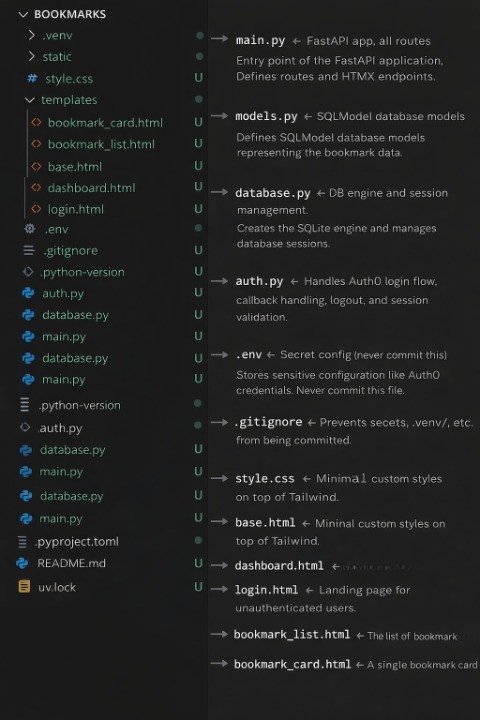
The partials/ folder is where HTMX's magic lives. When a user adds a bookmark or searches, FastAPI renders just those partial templates and sends back a tiny HTML fragment — not a full page reload. HTMX drops it into the right div. FastAPI's template docs cover the full Jinja2 integration
Also quicky Add .env and .venv to .gitignore right now before you forget:
# .gitignore
.env
.venv/
__pycache__/
*.db
Part 2 — Auth0 Configuration
Auth0 shapes your entire data model — every bookmark needs an owner_id, every route needs to check if someone's logged in. Configure it first so the rest of the code makes sense
1) Setting Up Your Auth0 Application
Log in to your Auth0 dashboard and follow these steps:
Create the Application:
- Go to Applications → Applications → Create Application
- Name: Bookmark Manager
- Type: Regular Web Application (not SPA — we’re doing server-side sessions, not frontend tokens)
- Click Create
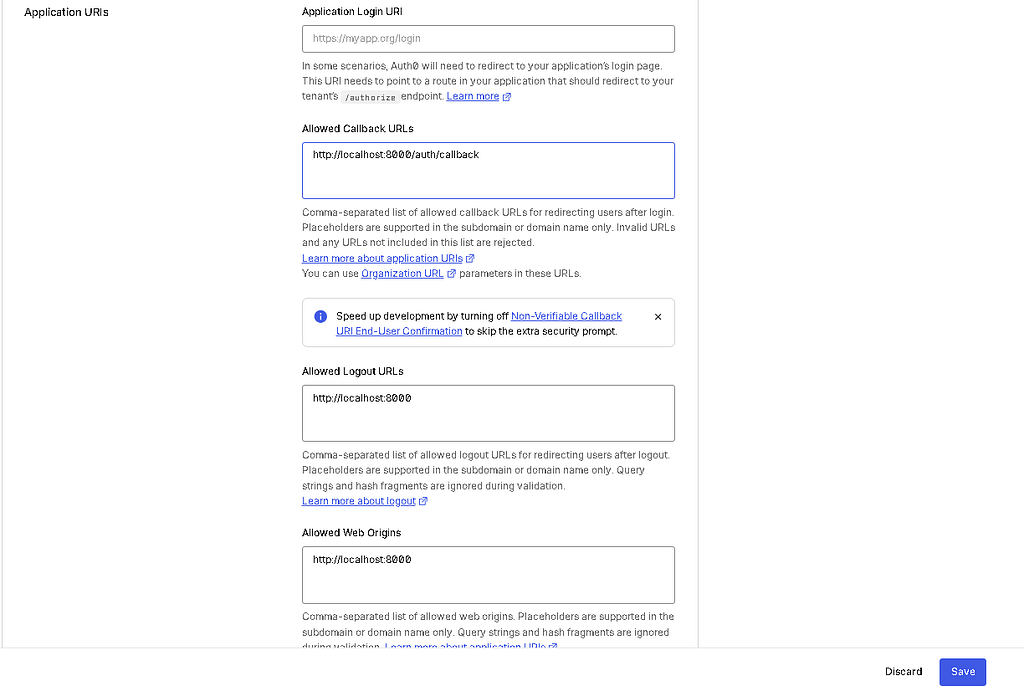
Configure Allowed URLs: On the application settings page:
- Allowed Callback URLs: http://localhost:8000/auth/callback
- Allowed Logout URLs: http://localhost:8000
- Allowed Web Origins: http://localhost:8000
- Application Login URI — leave blank
Hit Save Changes
2) Grab Your Credentials
From the same settings page only, note down your:
- Domain (looks like your-tenant_id.us.auth0.com)
- Client ID
- Client Secret (The Client Secret is not base64 encoded)
3) Filling In Your .env File
# .env
AUTH0_DOMAIN=your-tenant.us.auth0.com
AUTH0_CLIENT_ID=your_client_id_here
AUTH0_CLIENT_SECRET=your_client_secret_here
AUTH0_CALLBACK_URL=http://localhost:8000/auth/callback
APP_SECRET_KEY=your-very-long-random-secret-key-here
For APP_SECRET_KEY, generate a proper random value — don't just type something. Run this in your terminal:
python -c "import secrets; print(secrets.token_hex(32))"
This key signs your session cookies — if someone gets it, they can forge sessions and log in as any user. Treat it like a password
Never hardcode credentials. Never commit .env In production, use environment variables set directly in your hosting platform (DigitalOcean App Platform, Railway, Render — they all have a UI for this). See Auth0's security best practices for the full picture
Part 3 — The Database Models
This is where SQLModel earns its place. Normally with SQLAlchemy you’d define a model for the database, then a separate Pydantic schema for request validation, then write code to convert between them. SQLModel collapses all of that into one class
Before writing the model, let’s define what data a bookmark should store:
1) A URL (the thing being saved)
2) A title (human-readable name)
3) Tags (comma-separated string for now — simple is fine)
4) A created date (set automatically)
5) An owner_id — the Auth0 user's sub claim, a unique string like auth0|abc123def456
The owner_idfield is the critical one. It’s how we make sure user A can’t see user B’s bookmarks. Every query that reads bookmarks will filter by owner_id = current_user["sub"]
— — — — — — — — — — — — — — — —
Now, SQLModel lets you have one base class with shared fields, then extend it. This way your database table, your form input validation, and your public response object can all share the same field definitions without copy-pasting.
Here’s the small concept to understand first — the difference between a table=True model and a plain model:
# This becomes an actual SQL table
class Bookmark(SQLModel, table=True):
    id: int | None = Field(default=None, primary_key=True)

# This is just a Pydantic validation model — no table
class BookmarkCreate(SQLModel):
    url: str
    title: str
table=True tells SQLModel to register this class with SQLAlchemy and create a real table for it. Without it, it's just a Pydantic model used for validation. You'll use BookmarkCreate to validate what comes in from the form, and Bookmark to read and write to the database.
With that mental model in place, here’s the full models.py:
https://medium.com/media/a89857a016dcbd9dc8a2077cacd8d848/hrefThe owner_id field has index=True. This means SQLite will create a B-tree index on that column, making WHERE owner_id = ? queries fast even with thousands of bookmarks. Small detail, correct habit
Part 4 — Database Setup
The database module has one job: create the engine (the database connection) and provide a get_session dependency that FastAPI can inject into route functions
The concept here is to understand that SQLModel sessions. A session is a unit of work — you open one, do your reads/writes, commit, and close it. FastAPI’s dependency injection system makes this clean: you declare session: Session = Depends(get_session) in any route, and FastAPI automatically provides a fresh session per request and closes it when the request is done
With that mental model in place, here’s the full database.py
https://medium.com/media/3df9fd39281f1ab27958985b23e028af/hrefFurther reading: FastAPI’s dependency injection guide is essential reading. The Depends() pattern is used everywhere in FastAPI — understanding it unlocks the whole framework
Part 5 — Auth0 Integration
With the flow clear, we can now implement authentication in auth.py
This file handles everything authentication-related from the login redirect, callback handler, logout route, and small helper utilities used across the application to read the current session
Before writing it, here’s the full Auth0 flow explained:
User clicks "Sign In"
      │
      ▼
FastAPI redirects them to Auth0's login page
(https://your-tenant.auth0.com/authorize?...)
      │
      ▼
User logs in at Auth0 (email/password, Google, GitHub, whatever)
      │
      ▼
Auth0 redirects back to your /auth/callback URL
with a short-lived "authorization code" in the URL
      │
      ▼
FastAPI exchanges that code for an ID token
(a JWT containing the user's name, email, unique sub ID)
      │
      ▼
FastAPI stores minimal user info in a signed session cookie
(just sub, name, email — not the full token)
      │
      ▼
User is now logged in. Every subsequent request carries
the session cookie. FastAPI reads it to know who they are.
The authlib library handles the OAuth2 redirect dance. You configure it once, and then the whole flow is just two function calls: authorize_redirect() to send the user to Auth0, and authorize_access_token() to exchange the code for user info on the way back
One important pattern below — get_current_user vs require_user. Some routes (like the homepage) want to check if someone's logged in and handle both cases. Others (like saving a bookmark) should fail immediately if there's no session
Now let’s work on the auth.py
https://medium.com/media/d107e735b3d1b130a3db14b06c590f8e/hrefNotice that this file does not declare FastAPI route decorators. Instead, it exposes async handler functions that are wired into routes from main.py. This keeps authentication logic isolated from application routing
Part 6 — The FastAPI Application
Now everything comes together. main.py is where routes live, the app is configured, and all the pieces connect
Before the routes, the app needs two pieces of middleware:
1) SessionMiddleware →SessionMiddleware signs and reads the cookie that stores the logged-in user. Since middleware wraps request handling, it must be registered before routes that access request.session
2) StaticFiles —> serves your CSS from the /static folder
Let’s start by setting up the application and middleware inside main.py. We’ll then continue adding routes to this same file as we build the rest of the app
https://medium.com/media/c573268b49363fb79950eb99eb8cd340/hrefAt this stage, the FastAPI application is initialized with session support, static file serving, and template rendering configured. A startup hook also ensures database tables are created automatically when the server launches
Now the routes. There are two types here: page routes (return full HTML pages) and HTMX routes (return HTML fragments that get swapped into an existing page) Understanding this distinction is key: full pages are for navigation, fragments are for everything that happens without a page reload
Continuing for page Routes inside main.py:
https://medium.com/media/151a54def28e6eed529e7f5b777104be/hrefNice, with navigation and authentication routes in place, the application can now render full pages based on login state
Now the HTMX routes — the interesting part. These routes return HTML fragments, not full pages. HTMX swaps them into the DOM.
Continuing inside main.py:
https://medium.com/media/50ee9e98d9d29adade45308fd825609f/hrefNotice that every HTMX route starts by checking get_current_user. If the user isn't logged in (session expired, cookie tampered), they get a 401. This is our security boundary
Once a user is authenticated, the next layer of protection is authorization ensuring they can only act on resources they own.
On the 403 check in delete: This is the authorization check most tutorials skip. Authentication (“are you logged in?”) and authorization (“are you allowed to do this specific thing?”) are different. You need both. A logged-in user shouldn’t be able to delete someone else’s bookmark by changing the ID in the URL. Always verify ownership on write operations
We’ve been building main.py incrementally throughout this section. If you prefer to see the complete file in one place, you can view the full version here: Main.py
Part 7 — The HTML Templates
With backend routes and authentication fully wired, we can now move to the frontend layer. In this project, the interface is rendered on the server instead of being built as a separate single-page application. Each template returns a complete HTML page when needed, and HTMX adds interactivity by sending small background requests and updating only the relevant parts of the screen
The Base Layout (templates/base.html)
Every page extends this. It loads HTMX 2.0, Tailwind CSS, and sets up the page shell. Doing it once here means you never think about it again
A small but important HTMX 2.0 detail: you must explicitly update your CDN to [email protected] (e.g., 2.0.4) to leave the legacy 1.9.x branch.
Beyond the version bump, HTMX 2.0 introduces a major breaking change: DELETE requests now use query parameters instead of a form body. This aligns with strict HTTP specs, so your backend must now look for data in the URL. If you need to keep the old behavior, you can revert it via the methodsThatUseUrlParams config
We’ll start with the shared base layout defined in templates/base.html
https://medium.com/media/9e415ee7475687429e438b27c562c56e/hrefThe Login Page (templates/login.html)
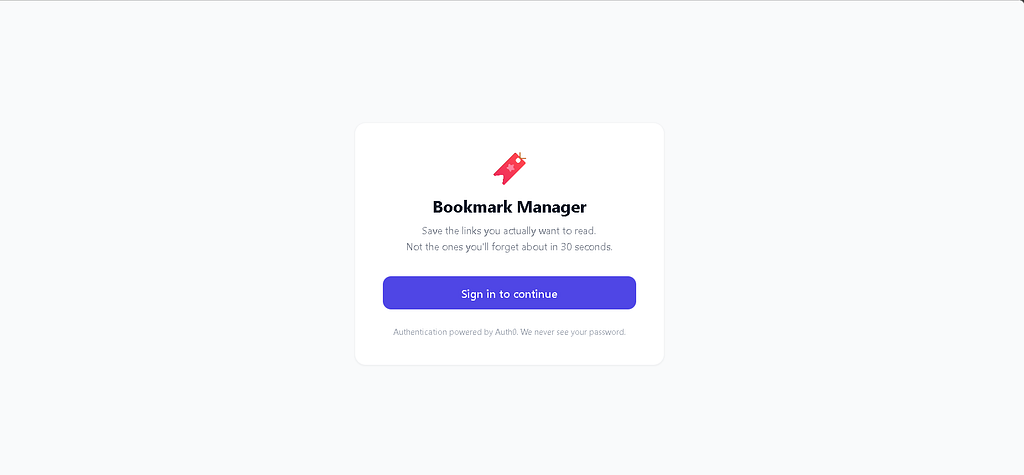
Clean, minimal, does one thing. The only interactive element is the “Sign In” link, which hits /auth/login, which redirects to Auth0
https://medium.com/media/63955f1d345c079bcea924c962856d3c/hrefHere how your Login-In Page should look like in final app:
The Dashboard (templates/dashboard.html)
This is the main page. It renders once on load with the user’s current bookmarks, then HTMX handles all updates from there without reloading the page.
Before looking at the full template, here’s the HTMX pattern for the search input in isolation — it’s worth understanding before seeing it in context:
<!--
    hx-get="/bookmarks/search"    → Send GET to this URL
    hx-trigger="keyup changed delay:300ms"
                                  → Trigger on keyup, but wait 300ms after the user
                                    stops typing before sending the request.
                                    "changed" means don't fire if the value didn't change.
    hx-target="#bookmark-list"    → Put the response inside this element
    hx-swap="innerHTML"           → Replace its contents (not the element itself)
    name="q"                      → The input value is sent as ?q=...
-->
<input
    type="search"
    name="q"
    hx-get="/bookmarks/search"
    hx-trigger="keyup changed delay:300ms"
    hx-target="#bookmark-list"
    hx-swap="innerHTML"
    placeholder="Search bookmarks..."
/>
The delay:300ms is the key detail. Without it, every single keypress fires a request to the server. With it, HTMX waits until the user pauses for 300ms — so fast typists only trigger one request at the end of their word, not one per letter. This is called debouncing and it's one line of HTMX
Now the full templates/dashboard.html:
https://medium.com/media/a20809684a13a28e17643a88d06de55a/hrefHere this is the dashboard you creating:

The Bookmark List Partial (templates/partials/bookmark_list.html)
This is the fragment FastAPI returns after adding a bookmark or searching. HTMX swaps it into #bookmark-list. It's intentionally minimal — just a loop over bookmarks, with a nice empty state
https://medium.com/media/83e5dc95147b3f4de2f7736b7c99819f/hrefThe Bookmark Card Partial (templates/partials/bookmark_card.html)
A single bookmark. The delete button is where HTMX 2.0’s changed DELETE behavior matters
HTMX 2.0 now follows the HTTP spec: DELETE sends data as URL query params. Our FastAPI route uses bookmark_id from the URL path (/bookmarks/{bookmark_id})https://medium.com/media/8f5a04fc300c012725d5f19505b31f35/href

Part 8 — Final Touches: Static CSS
Tailwind handles almost everything. This file just covers the HTMX loading state — a subtle opacity fade while a request is in flight:
https://medium.com/media/90f9735ec24f3dd21301e89a98431fdc/hrefPart 9 — Running the App
Start the server:
uv run uvicorn main:app --reload
uv run automatically uses the virtual environment uv created. --reload restarts the server on file changes
Open http://localhost:8000. You should see the login page. Click "Sign in to continue" — you'll be redirected to Auth0's hosted login page
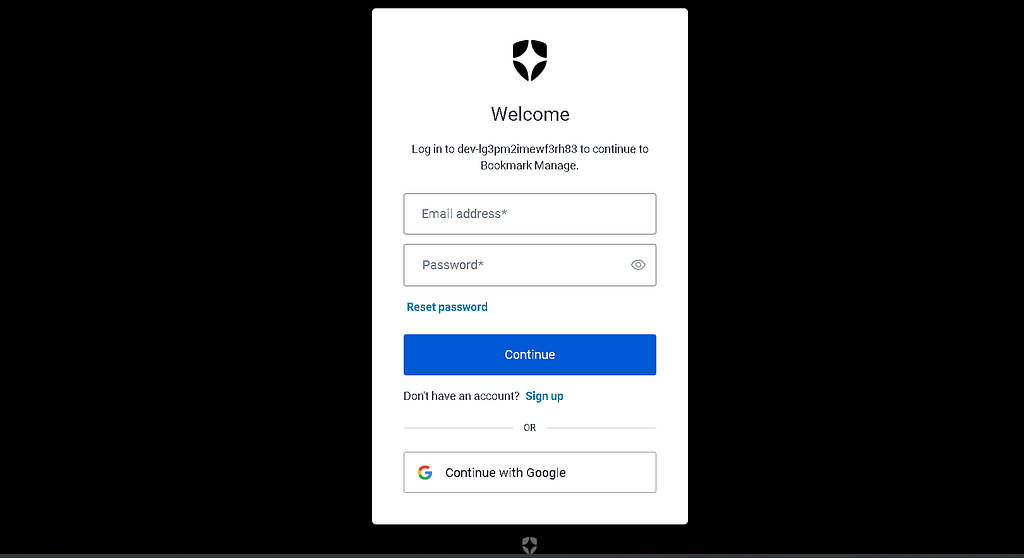
After logging in, Auth0 redirects you back to http://localhost:8000/auth/callback, which:
- Exchanges the code for your user info
- Stores it in the session
- Redirects you to /dashboard
You should now see your empty dashboard. Try adding a bookmark — paste any URL, give it a title, add some tags, and hit Save. The bookmark appears instantly without a page refresh
Then try the search box — start typing a tag or a title. The list filters in real time as you type, 300ms after each keystroke
Conclusion
This bookmark manager is a small project, but it shows how far you can get without reaching for a full SPA setup. HTMX is not a silver bullet and it definitely won’t replace React in complex, highly stateful apps. But for CRUD-heavy interfaces like this one — forms, lists, search, quick updates — it keeps things refreshingly simple. You write HTML, return HTML, and move on with your life.
FastAPI + SQLModel is one of the cleanest Python backend stacks available. They make the backend feel equally straightforward
Auth0 removes an entire class of authentication problems. Auth0 means you never store a password, never write a registration flow, never implement “forgot password.” Those problems are permanently someone else’s problem. For any app where you need real user accounts, this is the right call.
🔗 Project & Connect
You can find the complete source code on **GitHub → here**
If you’re building something similar or have questions, feel free to reach out on my Instagram
Thanks for reading 🙂
I Ditched React and Built a Full-Stack App With Zero JavaScript was originally published in Level Up Coding on Medium, where people are continuing the conversation by highlighting and responding to this story.