I Built My Own Swing Trade Journal Because Everything Else Was Wrong
 GoatFace2 min read·Just now
--
I’ve been swing trading Canadian stocks for a while. Nothing crazy — retail trader, my own money, my own decisions.
At some point I decided I needed to actually track what I was doing. Not just watch the numbers, but keep a real record. Entries, exits, what I was still holding, how I was actually performing over time.
So I went looking for a journal.
What I found was either too complicated, subscription-based, or just not built for how a Canadian retail trader actually thinks. Most felt designed for someone trading 50 positions a day on a professional desk — not someone like me managing a handful of swing trades on the side.
I didn’t want a subscription. I didn’t want my data in someone’s cloud. I just wanted a spreadsheet that worked.
So I built one.
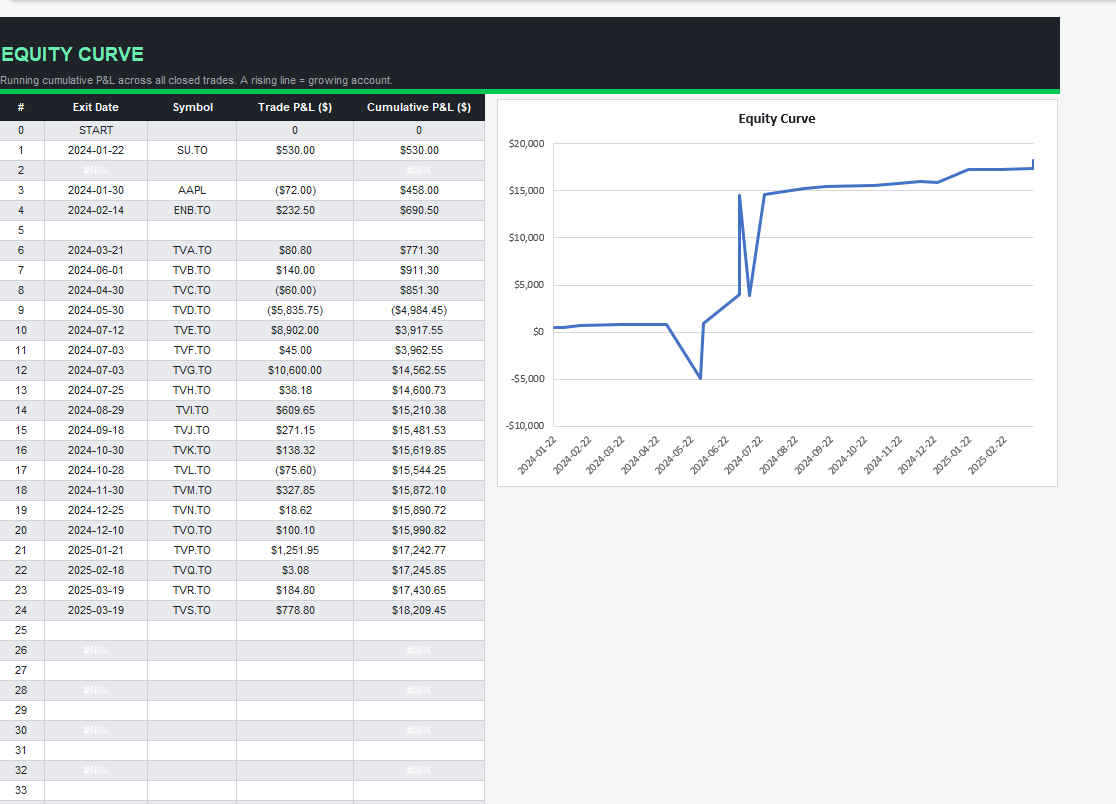
It tracks open and closed positions, automatically calculates P&L, win rate, R-multiple, and days held on every trade. There’s a performance dashboard that updates as you add trades, a monthly breakdown so you can find which months you trade best, and an equity curve chart that shows your running profit and loss over time. Works for TSX and US stocks.
No account. No internet. Just a file on your computer.
I’ve been using it myself ever since. It’s not fancy. It just works.
I put it on Gumroad for $14 CAD in case anyone else finds it useful.
Lesley Ancion is an indie developer and maker from Sundre, Alberta, building practical tools under the Goatface Tech brand.