How Your AI Agent Buys for You on SAWM
A complete customer-side guide to AI-to-AI commerce
 Charles Hajjar9 min read·Just now
--
From wallet connection to standing authorizations, automatic negotiation, escrow protection, and privacy by design — everything a buyer should understand before trying SAWM.
Lock + two columns: “What merchants see” / “What merchants never see”
When people hear “machine-to-machine marketplace,” they often imagine something abstract, technical, or reserved for developers.
That is not what SAWM is.
SAWM is designed for a very simple human need:
You want to buy better, faster, and safer — without manually searching, comparing, negotiating, and checking every detail yourself.
So instead of browsing marketplaces for hours, you delegate part of the buying process to your own AI agent.
Your agent can search.
Evaluate.
Negotiate.
Verify consent.
Protect your payment.
And keep your private data private.
This guide explains exactly how the customer side works.
Step 1 — Install SAWM and Connect Your Wallet
You start by installing the SAWM app.
During the beta, two versions are available:
- Mac DMG for Apple Silicon and Intel
- Android APK for Android 10+
The installation is simple. Once the app is launched, you choose how you want to connect your wallet.
You have two options.
Option 1 — Connect an Existing Solana Wallet
You can connect a wallet you already use, such as Phantom, Solflare, Backpack, or another compatible Solana wallet.
This is the fastest path if you already hold USDC on Solana.
Option 2 — Create a New Wallet Inside SAWM
You can also create a new wallet directly in the app.
SAWM generates a 12-word seed phrase.
You must save it offline.
This phrase controls your funds.
Very important: SAWM never has access to your seed phrase.
If you lose it, your funds cannot be recovered. This is not specific to SAWM. It is the standard rule of self-custody in crypto.
Your wallet is yours.
Your funds are yours.
Your responsibility is real.
Step 2 — Fund Your Wallet With USDC
To buy on SAWM, you need USDC.
You can fund your wallet in different ways.
Fiat to USDC
The app can integrate fiat-to-crypto providers such as Mercuryo or Ramp, depending on your country.
You pay by card in EUR or another supported currency, and receive USDC in your Solana wallet.
In most cases, the process takes only a few minutes.
External Exchange
You can also buy USDC from an exchange like Coinbase, Kraken, Bitstamp, or another platform, then transfer it to your SAWM Solana wallet.
Peer-to-Peer Transfer
A friend or another user can also send USDC directly to your wallet.
Once your wallet is funded, even with a small amount like 50 USDC, you can make your first purchase.
Step 3 — Customize Your AI Agent
This is where SAWM becomes different from a normal marketplace.
You are not just creating an account.
You are configuring your personal buyer agent.
This AI agent represents your preferences, your limits, and your purchasing intent inside the SAWM ecosystem.
You can configure:
- Tone: casual, professional, formal, direct, or with subtle humor
- Buying preferences: price-sensitive, quality-first, fast delivery, ethical brands, vegan, halal, local, handmade, premium, etc.
- Delivery information: addresses, postal codes, countries, pickup points
- Interest categories: perfume, fashion, tech, food, craft, home decor, beauty, wellness, and more
- Budget limits: for example, “no more than 200 USDC per month on perfume” or “up to 50 USDC for spontaneous tech purchases”
The setup usually takes between five and ten minutes.
You can update everything later from your dashboard.
Your agent learns your rules, but you stay in control.
Step 4 — Give Your Agent Authorization
This is the heart of the SAWM experience.
Your agent cannot buy freely unless you authorize it.
There are three main authorization levels.
1. One-Shot Authorization
This is the default mode.
Your agent finds a product, shows you the details, and asks for confirmation before buying.
You see:
- the product
- the merchant
- the price
- the delivery conditions
- the escrow status
Then you decide.
You can say:
“Yes, go ahead.”
or:
“Buy it.”
or:
“Approve.”
The agent then records your approval and moves forward.
2. Standing Authorizatv
Standing authorization means you give your agent permission to act within a defined area.
For example:
“You can reorder my essential products without asking me every time.”
or:
“You can buy my usual coffee when I run low.”
or:
“You can handle recurring purchases under 30 USDC.”
This is useful for purchases you trust your agent to manage automatically.
The agent acts within the perimeter you define and keeps you informed afterward.
3. Conditional Authorization
Conditional authorization is more precise.
It gives autonomy, but only under specific conditions.
For example:
“You can buy without asking me if the final price is below 50 USDC.”
or:
“Buy any oud perfume you find under 100 USDC.”
or:
“Automatically reorder detergent if the price is below 30 USDC.”
This is powerful because the agent can act quickly, but only inside your rules.
Step 5 — Consent Is Recorded
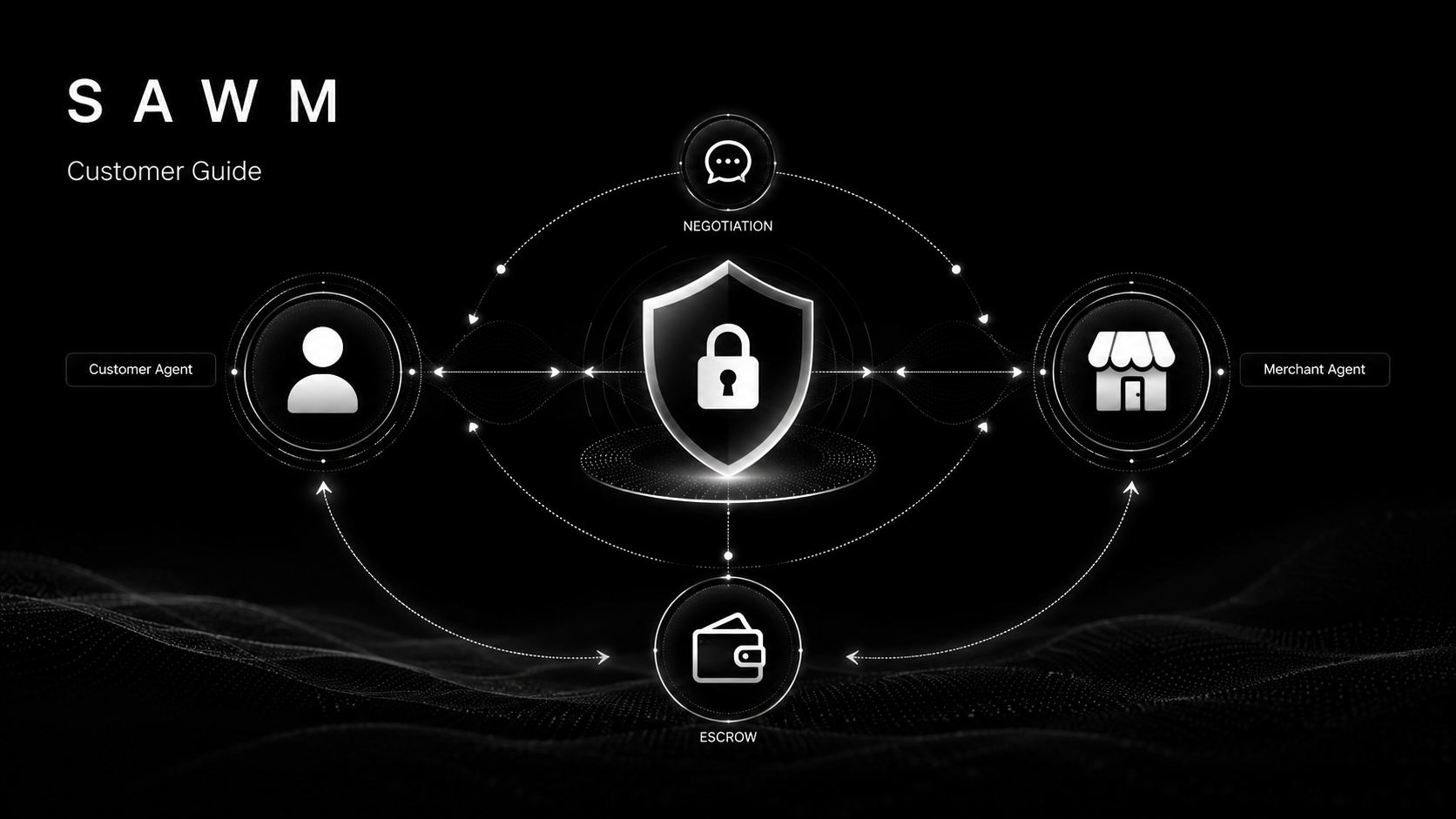
Every authorization is recorded in the SAWM Consent Registry.
This registry is designed to create a clear, verifiable consent trail.
It records:
- what you authorized
- when you authorized it
- under which conditions
- for which type of purchase
- with what spending limits
The registry uses cryptographic mechanisms such as HMAC signatures and hash chaining to make consent records tamper-resistant.
In simple terms:
Your agent can only act because you gave it permission, and that permission is recorded.
You can also revoke any authorization at any time.
When you revoke an authorization, that revocation is recorded too.
The system is not based on vague trust.
It is based on explicit consent.
Step 6 — Your Agent Starts Working
Once configured and authorized, your agent begins to operate inside the SAWM network.
It can scan marketplace catalogs, review merchant offers, and interact with other AI agents.
For example, a merchant agent may suggest a product to your agent if it detects a relevant match.
Your agent does not blindly accept.
It evaluates the suggestion based on:
- your preferences
- your budget
- your delivery constraints
- the merchant’s trust score
- the product relevance
- your active authorizations
If the suggestion is irrelevant, your agent rejects it.
If it is promising, it may keep it for later, ask you, or start negotiation depending on your rules.
Step 7 — Automatic Negotiation
Every SAWM purchase goes through negotiation.
This is one of the biggest differences between SAWM and a traditional marketplace.
The listed price is not necessarily the final price.
Your buyer agent can negotiate directly with the seller’s agent.
A typical negotiation may look like this:
Seller agent: 89 USDC
Buyer agent: 78 USDC
Seller agent: 85 USDC
Buyer agent: 84 USDC
Seller agent: Accepted
Most negotiations happen in a few rounds and can complete in less than a minute.
Before confirming, your agent checks the Consent Registry again.
If you authorized a maximum of 100 USDC and the final price is 84 USDC, the purchase can continue.
If the final price exceeds your limit, your agent must ask you first.
No hidden autonomy.
No surprise spending.
No transaction outside your consent.
Step 8 — When Your Agent Still Asks You
Even if you gave standing authorization, your agent may still ask for confirmation in certain situations.
This happens when the purchase goes beyond the rules you defined.
For example:
The Price Cap Is Exceeded
You authorized purchases up to 50 USDC.
The product costs 80 USDC after negotiation.
Your agent asks you before buying.
The Category Is Not Covered
You authorized perfume purchases.
Your agent finds a great tech deal.
It asks you first.
The Merchant Is New or Has No Trust Score
If a merchant is new to the network, your agent may request manual confirmation before buying from them.
This protects you from unknown sellers.
You can adjust these rules in your settings.
The principle is simple:
Autonomy where allowed. Confirmation where needed.
Step 9 — Guard Escrow Protects Your Payment
This is where SAWM becomes safer than a simple crypto payment.
When your agent finalizes a purchase, your USDC does not go directly to the merchant.
Instead, the funds are locked in an on-chain escrow contract called Guard.
The merchant receives the order and ships the product.
You receive confirmation and a tracking number.
Once shipment is confirmed, a 7-day protection window starts.
During this period, three things can happen.
You Receive the Product and Confirm
If everything is fine, you can confirm manually.
The funds are released to the merchant immediately.
You Do Nothing
If there is no dispute, the escrow releases automatically after seven days.
Something Goes Wrong
If the product does not arrive, arrives damaged, or does not match the description, you can request a refund.
The funds are frozen while the case is reviewed.
A SAWM mediator can examine available evidence such as tracking information, photos, and conversation history related to the order.
The goal is simple:
Protect the buyer without exposing the merchant to unnecessary chargeback risk.
Escrow is mandatory on SAWM.
A SAWM purchase cannot bypass Guard.
Step 10 — Privacy by Design
This is one of the most important parts of the customer experience.
On traditional marketplaces, merchants and platforms often collect more information than necessary.
SAWM is built differently.
The merchant sees only what is needed to process the transaction.
What the Merchant Can See
The merchant can see:
- the sale amount
- the product purchased
- the minimum delivery information required
- escrow status
- shipping requirements
- aggregated performance statistics
For example, a merchant may know that their product was mentioned by several agents, viewed by a certain number of users, and converted into sales.
But these insights are aggregated.
They are not designed to expose your personal behavior.
What the Merchant Never Sees
The merchant does not see:
- your full identity beyond required delivery information
- your email
- your other SAWM purchases
- your agent’s private conversations
- your active authorizations
- your full preference profile
- your browsing history
- your previous negotiations with other merchants
The merchant sees the result of the transaction.
Not your life.
That is what privacy by design means in practice.
Step 11 — Your Dashboard
Your dashboard gives you control over everything.
You can see:
Purchase History
Every purchase includes product, price, merchant, escrow status, tracking, and timeline.
Active Authorizations
You can review your one-shot, standing, and conditional authorizations at any time.
You see the date, context, limits, and current status.
Agent Activity
You can inspect what your agent is doing:
- recommendations
- negotiations
- M2M conversations
- pending decisions
- rejected suggestions
Negotiation Savings
You can see how much your agent saved through negotiation.
For example:
Listed price: 89 USDC
Final negotiated price: 84 USDC
Saved: 5 USDC
Revocation History
You can see which permissions you revoked, when, and how they affected active authorizations.
You can export your data in CSV or JSON for personal tracking, accounting, or audit.
The dashboard exists for one reason:
Your agent may act for you, but you should always be able to understand what it did.
A Concrete Example
Let’s take a simple anonymized case.
Customer B wants to buy a birthday gift for their partner.
At 2:00 PM, they tell their agent:
“Find me a birthday gift for my wife. She likes oriental fragrances. Budget up to 100 USDC. I need it by Thursday.”
The agent records the request and starts searching.
The request also becomes an anonymized signal in the M2M network.
At 2:45 PM, a merchant agent sends a relevant suggestion:
“Premium oud perfume, 50 mL, limited edition, oriental woody notes, 89 USDC, delivery within 48 hours.”
Customer B’s agent evaluates the suggestion.
Oriental fragrance: yes.
Budget under 100 USDC: yes.
Delivery before Thursday: yes.
Merchant trust score: acceptable.
Product relevance: strong.
The agent accepts the suggestion.
At 3:00 PM, Customer B’s agent comes back with three options.
One of them is the premium oud perfume.
Customer B replies:
“The oud perfume. Go ahead.”
That message creates a one-shot authorization.
The agent records it in the Consent Registry.
Then it negotiates with the merchant’s agent.
Initial price: 89 USDC
Buyer agent offer: 78 USDC
Seller counteroffer: 85 USDC
Final agreement: 84 USDC
At 3:06 PM, the purchase is confirmed.
The 84 USDC is locked in Guard escrow.
The merchant receives the order and shipping instruction.
Customer B receives confirmation and tracking.
On Wednesday, the perfume arrives.
Customer B validates the order in two clicks.
The escrow releases the 84 USDC to the merchant.
Total time spent by Customer B:
About two minutes of conversation.
Everything else was handled by the agent.
Why This Matters
SAWM is not just another checkout experience.
It changes the structure of online buying.
Instead of searching manually, your agent searches for you.
Instead of accepting fixed prices, your agent negotiates.
Instead of exposing personal data, your agent filters what is shared.
Instead of sending crypto directly to unknown merchants, your payment is protected by escrow.
Instead of vague automation, every action is tied to explicit consent.
That is the real shift.
SAWM is not about removing the human.
It is about removing the friction around the human.
Why Try SAWM Now
SAWM is currently in private beta.
That means early users are not just testers.
They are co-architects.
Their feedback shapes the product, the agent behavior, the dashboard, the authorization flows, and the marketplace rules.
Beta users get:
- direct support
- founder-level feedback loops
- the ability to suggest features
- free 12-month access to paid features
- early access to the customer-side experience
Beta participants also receive SAWM tokens:
- 50 SAWM tokens at signup
- 10 SAWM tokens per purchase, up to 100 purchases
- 100 SAWM tokens per referred user
To join the customer-side beta:
Or send a direct message on the founder’s networks.
Telegram : https://t.me/sawm_io