
How Two Machines That Have Never Met Agree on a Secret: TLS and the Protocol Behind Every Secure Request
Every time you send something sensitive over the internet, it travels through hardware you have never seen, owned by companies you have never heard of, passing through countries you may not even know about. Routers, ISPs, backbone networks, cloud gateways. A dozen strangers between you and your destination.
And yet somehow, none of them can read it.
That is not luck. That is TLS, and the reason it works is one of the most elegant ideas in modern engineering. It is a protocol that lets two machines that have never spoken before agree on a shared secret, over a completely public network, in plain sight of anyone watching, without that secret ever traveling across the wire.
Most engineers know TLS as “the thing that makes the padlock appear.” This article is about what is actually happening underneath: the threat it was built to solve, the exact sequence of messages that run before your data moves, and the mathematics that makes it unbreakable.
First, let’s understand the problem
Before we talk about any solution, we need to feel the problem properly. Because TLS is not just “encryption.” It is solving something more subtle than that.
When your client sends data to a server, think about what actually happens physically. The request does not teleport. It hops through routers, crosses ISP infrastructure, travels through backbone networks, and eventually reaches the server. None of that infrastructure belongs to you. You have zero control over it, zero visibility into it.
And here is the uncomfortable part: every single hop along that path is a machine that, in theory, can see your traffic. If you are sending plain text, a router somewhere in the middle could read it, change a value before forwarding it on, or pretend to be your server and collect whatever you send.
This is called a man-in-the-middle attack, and it is not some exotic hacking scenario. On an open Wi-Fi network, someone at the next table with a laptop and freely available software can intercept everything you send over plain HTTP. The attacker does not need special skills. They just need to be somewhere between you and the server.
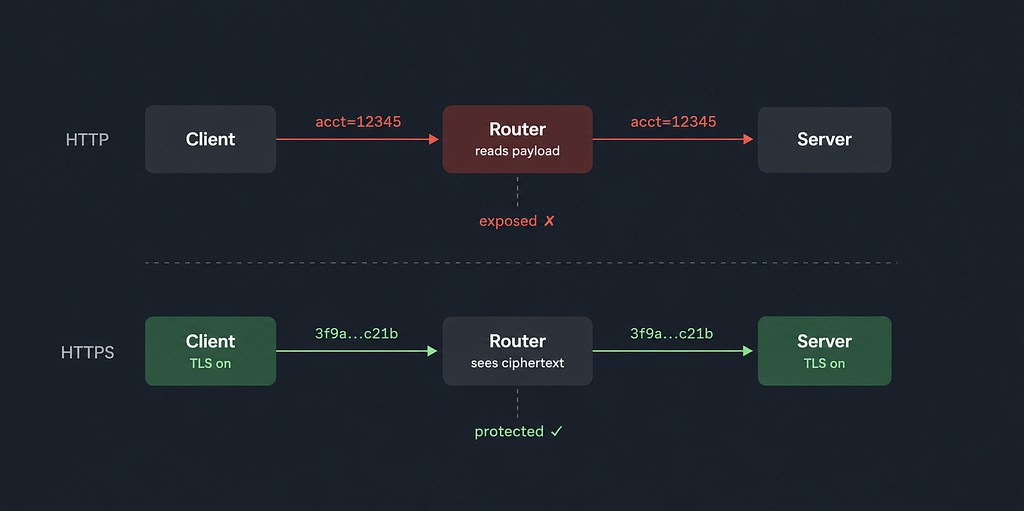
Without any protection, that router sees the raw payload. It can read it, log it silently, alter a field and pass it on, or respond itself while pretending to be the server. Your client has no way to detect that any of this happened. With TLS in place, the same router sees only encrypted bytes it cannot read or usefully modify. The network did not become safe. TLS just made it irrelevant.
So the problem is real. Now let’s think about what we actually need to fix it.
What we need
If you think about it carefully, there are three separate things you need to guarantee before you can safely send anything sensitive.
You need to know you are actually talking to the right server, not an imposter. You need the data to be unreadable to anything sitting between you and the server. And you need to know the data arrives exactly as you sent it, with any modification detectable on arrival.
Remove any one of these and the others fall apart. Encrypting data for an imposter is worse than useless. Authenticating a server but sending everything in plain text solves nothing. All three have to hold at once.
Now here is the real challenge: both machines need to establish all three guarantees between themselves, over a network that might be hostile, having never communicated before, with no secret shared in advance. That is the core problem TLS exists to solve.
How TLS solves it
TLS does not solve everything at once. It works in three phases, one building on the previous, and each phase solves exactly one of the problems we named.
The first phase establishes identity: is this actually the right server? The second phase establishes a shared secret: how do we agree on an encryption key without sending it over the wire? The third phase puts that key to work: encrypt everything, fast, and verify every message.
Let’s walk through each one.
Step 1: Proving the server is really who it says it is
When your browser connects to api.example.com, the server says "yes, I am api.example.com." But any server can say that. You need a way to verify the claim without trusting the server to tell the truth about itself.
The solution is to involve a third party that both sides already trust. This is what a Certificate Authority does.
A CA, such as DigiCert, Let’s Encrypt, or GlobalSign, is in the business of verifying that a particular public key genuinely belongs to a particular domain. When a server operator wants a TLS certificate, they generate a key pair, keep the private key on their server, and submit the public key together with their domain name to a CA. The CA then issues a challenge: place this specific file at this URL, or add this record to your DNS. If the operator can do it, they demonstrably control the domain. The CA is satisfied. It issues a signed certificate: a document that binds the domain name to the public key and stamps that binding with the CA’s own cryptographic signature.
Think of it like a notarized document. The CA is saying: “I have personally verified that whoever controls this domain presented this public key. I am signing my name to that.”
Now, here is the clever part. Your browser does not need to call DigiCert at connection time to verify the signature. It already has DigiCert’s public key stored locally.
Every browser and operating system ships with a pre-installed list of trusted CA public keys, called the root store. Before you open a single connection, your device already holds something like this:
Trusted CA public keys (pre-installed):
  Let's Encrypt ISRG Root X1
  DigiCert Global Root G2
  GlobalSign Root CA
  ... ~150 more
These are baked into Chrome, Firefox, Safari, Windows, macOS, Linux, iOS, and Android.
The important mental shift here: the browser trusts CA public keys, not server public keys. It has no idea what api.example.com's public key is before connecting. That key gets introduced during the handshake, vouched for by a CA the browser already trusts.
So when the server sends its certificate, the browser does one thing:
verify(certificate.signature, CA_public_key)
If that passes, one fact is established: this public key belongs to api.example.com. Not because the server said so. Because a CA the browser already trusts signed that statement.
No network call. No CA contact. The whole check is local math, done in milliseconds. The CA did its job when it issued the certificate. At connection time it is completely out of the picture.
One last thing worth knowing: the certificate itself is entirely public. Anyone can download it. Run openssl s_client -connect google.com:443 and Google's certificate prints in full. That is by design. The public key is meant to be public. Only the private key must stay secret, and that never leaves the server.

The handshake: what the actual messages look like
Before the first message is sent, the state between client and server is:
encryption:   none
trust:        none
shared key:   none
Client Hello
The client sends the first message. It contains:
- the TLS version it supports
- a list of cipher suites it can use
- its ephemeral public key A
At this point there is still no trust and no shared key. The client is simply introducing itself and starting the negotiation.
Server Hello
The server responds with:
- its chosen cipher suite
- its own ephemeral public key B
- its certificate (domain + server public key + CA signature)
- a signature over the handshake, computed with its own private key
This is the first moment the browser sees the server’s public key. It arrives inside the certificate, alongside the CA signature that proves it belongs to this domain.
Browser verifies
The browser now checks the certificate using the CA public key it already has locally:
verify(certificate.signature, CA_public_key)  →  valid
domain matches?                               →  yes
certificate expired?                          →  no
Identity confirmed.
Why an attacker cannot fake this
An attacker could intercept the handshake and send their own FAKE_PUBLIC_KEY. But they cannot produce a valid CA signature over it. Only the CA holds the private key needed to create that signature. The browser's verification fails, and the connection is killed before anything sensitive is exchanged.
The trust model in one sentence: “I do not know you, but I trust DigiCert, and DigiCert says you are api.example.com."
Finished
Both sides derive session keys from the shared secret, and each sends a Finished message: a hash over the entire handshake transcript. This confirms that nothing was tampered with in any of the preceding messages.
Application data then starts flowing encrypted. The entire exchange in TLS 1.3 completes in one round trip. TLS 1.2 required two.

Step 2: Agreeing on a secret key without ever sending it
The handshake showed us that both sides exchanged public keys A and B. But how do two public values produce a shared secret that an attacker cannot derive? This is the part that feels like a magic trick when you first encounter it.
The answer is Diffie-Hellman key exchange, and the insight behind it is genuinely beautiful.
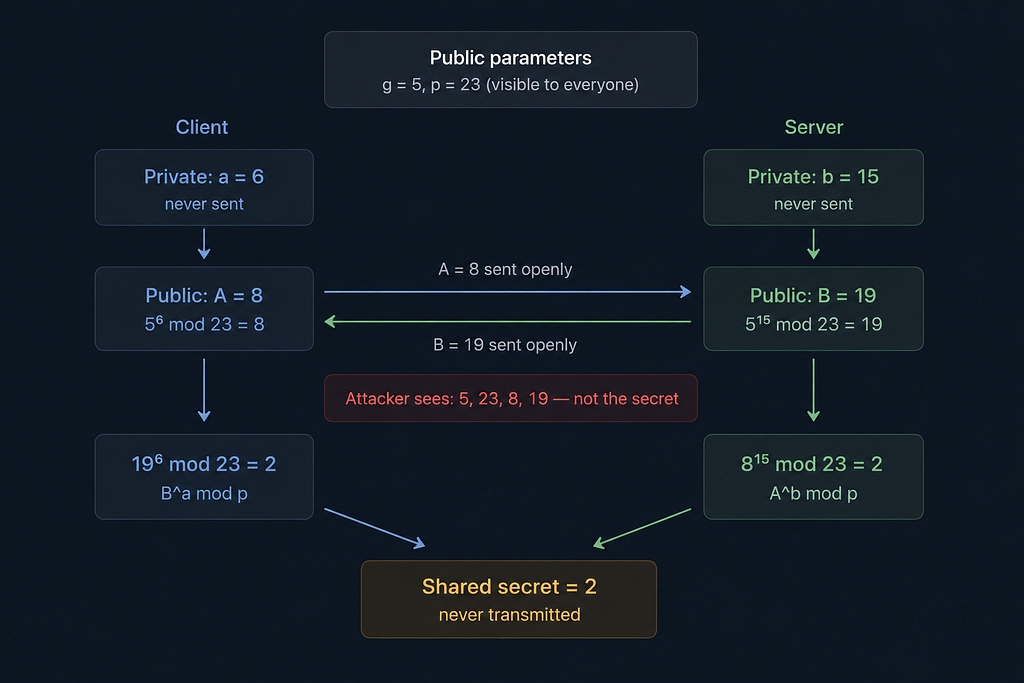
Both sides start by agreeing on two numbers that are completely public. Anyone can see them, including an attacker. Call them g (a small number, like 2 or 5) and p (a very large prime). These are just the starting parameters, and their being public is fine.
Now each side picks a private number that they never share with anyone. The client picks a. The server picks b. Each one then does a calculation using their private number and the public parameters:
- The client computes A = g^a mod p and sends A to the server.
- The server computes B = g^b mod p and sends B to the client.
The attacker on the wire now has g, p, A, and B. But not a or b.
Here comes the magic. The client takes B and raises it to the power of its own private a:
B^a mod p = (g^b mod p)^a mod p
There is a rule in modular arithmetic that the inner mod p is redundant when there is already a mod p on the outside. It simplifies cleanly:
(g^b mod p)^a mod p = g^(b*a) mod p
The server does the same thing in the other direction, taking A and raising it to its own private b:
A^b mod p = g^(a*b) mod p
And here is the key observation: b*a and a*b are the same number. So both sides computed the same result. They both hold g^(ab) mod p. Neither side transmitted it. It was never on the wire.
Let’s run the actual numbers so this feels real. Both sides agree on g = 5 and p = 23.
The client picks a = 6. Computes 5^6 mod 23 = 8. Sends 8.
The server picks b = 15. Computes 5^15 mod 23 = 19. Sends 19.
The attacker sees: 5, 23, 8, 19. That is everything that crossed the wire.
The client takes B = 19 and computes 19^6 mod 23 = 2.
The server takes A = 8 and computes 8^15 mod 23 = 2.
Both got 2. The shared secret is 2. The attacker has no idea.
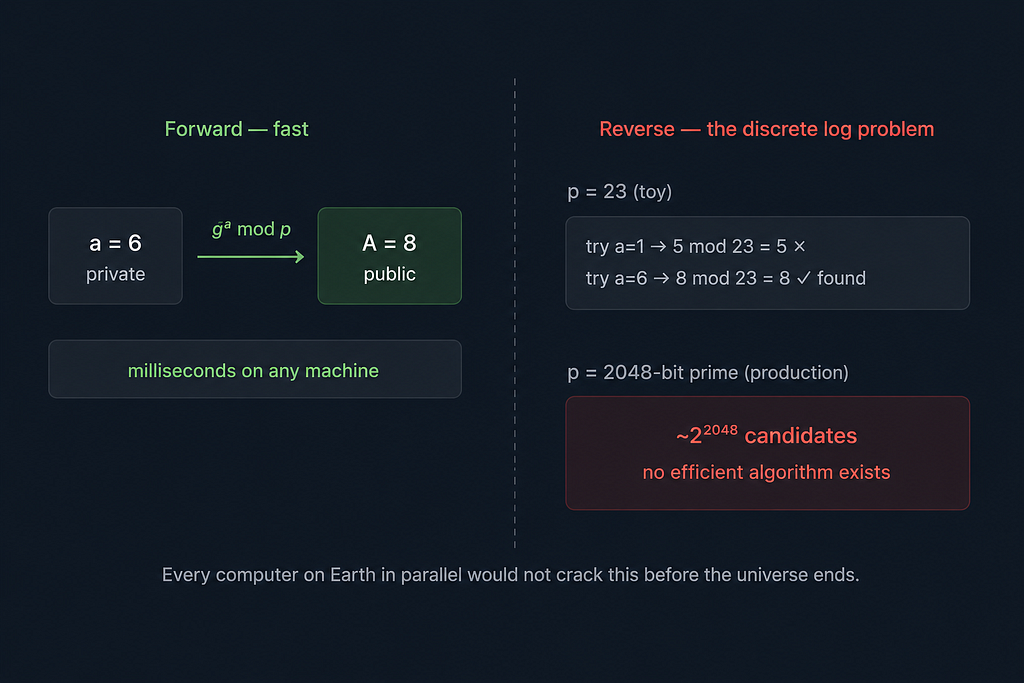
You might be thinking: with these small numbers, could the attacker not just try every possible value of a until they find one where 5^a mod 23 = 8? Yes, they could. It would take a fraction of a second.
But TLS does not use p = 23. It uses primes that are 2048 bits long. Written out in decimal, that is roughly 617 digits. The number of possible values for a is around 2 to the power of 2048. To recover a from A, you have to solve what mathematicians call the discrete logarithm problem: given g, p, and A, find a. Computing A from a is fast. Finding a from A, going in reverse, has no known efficient algorithm for large primes. The best-known classical attack, the number field sieve, is so computationally expensive that every computer on Earth running in parallel for longer than the age of the universe would not crack it.
Step 3: Encrypting everything with the shared secret
With a shared secret that both sides hold and nobody else can derive, the expensive work is done. TLS now uses that secret to derive actual encryption keys through a key derivation function called HKDF, and from here, everything is encrypted with AES-GCM.
AES-GCM is a symmetric cipher, meaning both sides use the same key. It is orders of magnitude faster than all the asymmetric math we just did, which is exactly why the handshake exists: do the expensive work once, agree on a key, then use the fast cipher for everything that follows.
There is one more thing AES-GCM gives you. It attaches an authentication tag to every single message it encrypts. If even one bit of a message is changed in transit, the tag fails when the receiver checks it and the message is rejected entirely. This is where the integrity guarantee comes from. Not policy, not trust. Math.
One last detail that matters more than it seems: TLS 1.3 generates fresh Diffie-Hellman key pairs for every session. So even if someone compromises your server’s long-term private key years from now, they still cannot decrypt past sessions. The ephemeral keys that produced those session secrets are gone. This is called forward secrecy, and it is why the “E” in ECDHE matters.
Stepping back
If you have followed all of this, you now understand something that most engineers treat as a black box. Here is the full picture from start to finish.
- The server gets a certificate. Long before any user connects, the server operator generates a key pair and submits the public key to a Certificate Authority. The CA verifies the operator actually controls the domain, then signs a certificate binding that domain to that public key. The server installs the certificate and keeps the private key. The CA is now out of the story entirely.
- The client opens the connection. The browser sends a Client Hello with the TLS version it supports, its list of accepted cipher suites, and its ephemeral Diffie-Hellman public key. It does all of this in one message, without waiting for a response first.
- The server responds with everything. The Server Hello contains the server’s own ephemeral public key, the certificate from the CA, and a signature over the handshake computed with its private key. That signature proves the server genuinely holds the key the certificate claims it does.
- The browser verifies identity locally. It looks up the CA’s public key from its own root store, checks the signature on the certificate, confirms the domain matches, and confirms the certificate has not expired. No network call is made. The entire check happens in milliseconds using keys the browser has carried since it was installed.
- Both sides independently compute the shared secret. Using the other side’s public key and their own private value, both sides run the Diffie-Hellman calculation and arrive at the same number. The secret was never transmitted. An attacker watching every packet still cannot derive it, because reversing the calculation requires solving the discrete logarithm problem at 2048-bit scale, which is computationally out of reach.
- The handshake closes and encryption begins. Both sides send a Finished message, a hash over the full handshake transcript, confirming nothing was altered in flight. From this point, all application data is encrypted with AES-GCM. Every message carries an authentication tag, so any modification in transit is detected and rejected at the receiving end.
None of this required the two machines to have ever met before. The trust was bootstrapped from a key your browser already held. The secret was established from math that an eavesdropper cannot reverse. And the cipher makes tampering detectable on every single message.
How Two Machines That Have Never Met Agree on a Secret: TLS and the Protocol Behind Every Secure… was originally published in Level Up Coding on Medium, where people are continuing the conversation by highlighting and responding to this story.
