How to track your finances the right way
 Felipe Almeida3 min read·1 hour ago
--
Income, expenses, recurring transactions, and categories
Have you ever opened your banking app at the end of the month and had absolutely no idea where the money went? You check the balance, you see a number, and your brain just goes blank trying to explain how it got that low.
That's not a you problem. That's a visibility problem.
Knowing your bank balance is not the same as understanding your finances. Your balance is just a snapshot. It doesn't tell you what came in, what went out, or whether last month was better or worse than the one before. To actually understand your money, you need to track it consistently, and with some structure.
That's exactly what TrackFi is built for. Let me walk you through how it works.
Starting with a transaction
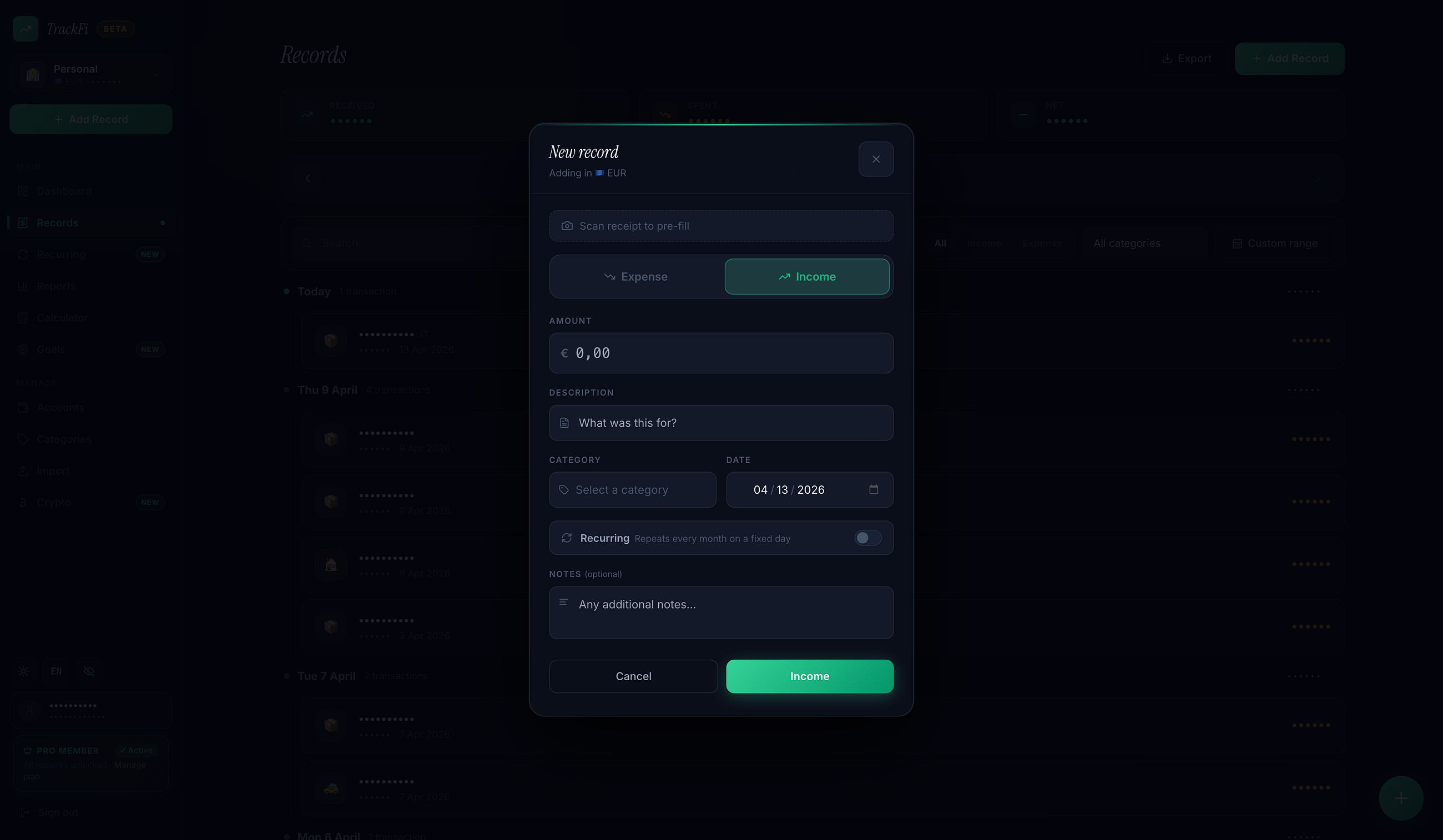
Every entry in TrackFi is a transaction. It can be income or an expense, and you add them manually as they happen (or whenever works for you).
Let's say you just paid for Netflix. You'd add a new transaction, set the type to "expense", type in the amount, pick a date, and assign it to a category — something like "Subscriptions" or "Entertainment". That's it. Thirty seconds, maybe less.
Now say your salary just hit. Same idea: add a transaction, set it as income, enter the amount, and tag it with a category like "Salary". Done.
Over time, these entries stack up into a real picture of your financial life. This is where the fun begins — because now you can actually see patterns instead of just guessing.
Why categories matter
Categories are what turn a list of transactions into something useful. Without them, you've got numbers. With them, you've got answers.
When you assign every expense to a category — Groceries, Rent, Transport, Eating Out — TrackFi can show you how much you're spending in each area. That's when things get interesting. Most people are surprised to see how much they spend on food, or subscriptions they forgot about, once it's all laid out clearly.
You can create your own categories in TrackFi, so they match how you actually think about your money. There's no rigid system you have to fit into.
Recurring transactions save you a ton of time
Here's the thing about fixed expenses: they happen every month without you having to think about them. Rent, Netflix, your gym membership. So why would you log them manually every single time?
In TrackFi, you can mark a transaction as recurring. You set it once — amount, category, frequency — and it'll keep showing up automatically. No more forgetting to log your rent. No more wondering if you already counted that subscription or not.
On the free plan, you can set up to 3 recurring transactions, which covers most of the basics. If you've got a more complex setup — multiple subscriptions, loan payments, regular transfers — the Pro plan gives you unlimited recurring entries.
Keeping your accounts in order
When you log a transaction, it's tied to an account. On the free plan, you start with one account, which is perfect if you just want to track everything flowing through your main checking account.
If you're on Pro and have multiple accounts — a savings account, a credit card, maybe a separate account for business expenses — you can create all of them in TrackFi. Each transaction gets linked to the right account, so nothing gets mixed up and you always know where things stand.
So now what?
The hardest part of tracking your finances isn't the app, it's just starting. Once you add your first few transactions and see how easy it is, it really does become a habit.
If you haven't already, give TrackFi a try at trackfi.me. It's free to start, no credit card needed, and you can sign in with Google in seconds.