How Order Types Work on Pacifica
--
Whether you’re new to perpetual futures or a seasoned on-chain trader, knowing how to place the right order at the right time can be the difference between a clean entry and a costly mistake. This guide breaks down every order type available on Pacifica and when to use each one.
Why Order Types Matter
Imagine wanting to buy BTC at $60,000, but by the time you click “buy,” the price has already jumped to $62,000. Or picture setting a stop-loss to protect your position, only to have it execute at a far worse price than you intended. These scenarios aren’t hypothetical, they happen every day to traders who don’t fully understand the tools at their disposal.
Order types are your primary interface with the market. They determine how your trade gets executed, when it gets filled, and at what price. On Pacifica, a high-performance perpetual DEX built for an agentic trading future, you have a robust suite of order types designed to give you precision and control. Let’s walk through all of them.
The Core Order Types
1. Market Order
A Market Order is the simplest and most immediate order type. When you place a market order, you’re telling Pacifica: “Fill me now, at whatever the best available price is.”
Market orders prioritize speed of execution over price certainty. They’re ideal when:
- You want to enter or exit a position immediately
- The market is moving fast and you can’t afford to wait
- You’re closing a position in a rapidly deteriorating situation
The downside is that you give up control over the exact price. In a volatile or thin market, you might experience slippage meaning your fill price could be slightly worse than the price you saw when you placed the order.
It is best used when speed matters more than price such as during sudden news events, emergency stop-outs, or fast-moving breakouts.
2. Limit Order
A Limit Order lets you specify the exact price at which you want to buy or sell. Your order sits on the order book and waits until the market reaches your target price or until you cancel it.
- Buying with a limit order: Your order fills at your specified price or lower (better for you)
- Selling with a limit order: Your order fills at your specified price or higher (better for you)
It is best used when you have a target entry or exit in mind and you’re willing to wait for the market to come to you. Limit orders are also typically eligible for maker fee rebates on Pacifica, since they add liquidity to the order book rather than remove it. All limit orders on Pacifica come with Time-In-Force (TIF) settings that control how long your order remains active. More on those below.
3. Stop Market Order
A Stop Market Order is a market order that only activates when the price reaches a specific trigger level called the stop price.
Think of it as a sleeping market order that wakes up when conditions are met.
Two primary use cases:
A. Stop-Loss: You’re longing BTC from $80,000. You place a Stop Market sell order with a stop price of $77,000. If BTC drops to $77,000, your position is automatically closed at market limiting your loss.
B. Breakout Entry: You believe BTC will rally sharply if it breaks above $85,000 resistance. You set a Stop Market buy at $85,001. Once triggered, you’re in the trade automatically, no need to watch the screen.
The risk: In fast-moving or gapping markets, the actual fill price may be significantly worse than the stop trigger price. This is the nature of “market” execution.
4. Stop Limit Order
A Stop Limit Order combines the trigger logic of a stop order with the price control of a limit order. You set two prices:
- Stop Price: The trigger when the market hits this, your order activates
- Limit Price: The worst price at which you’re willing to be filled
For example, you want to exit a long position if BTC drops to $57,000, but you won’t accept a fill below $56,500. You set a Stop Limit with stop = $57,000 and limit = $56,500. When BTC hits $57,000, a limit order at $56,500 is placed. If the market is moving too fast and drops past $56,500 before your order fills it won’t fill at all.
The compromise is greater price certainty, but the risk that your order may not fill at all in fast-moving markets.
Time-in-Force: How long does your order live?
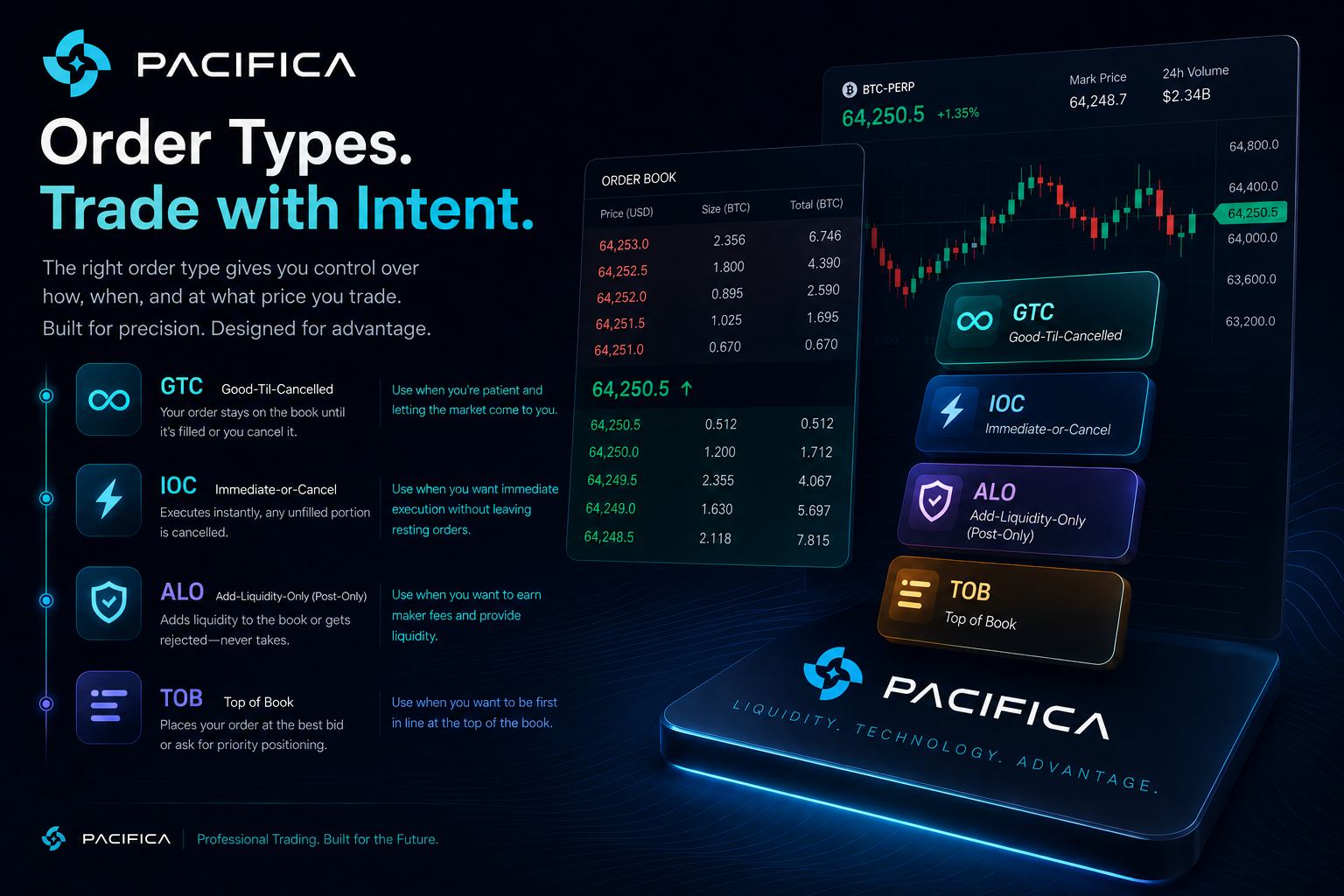
Every limit order on Pacifica carries a Time-In-Force instruction that determines its lifespan and matching behavior. There are four options:
* GTC — Good-Til-Cancelled
This is the default and most commonly used setting. A GTC order stays on the order book indefinitely until it either gets fully filled or you manually cancel it. It doesn’t expire overnight or at the end of a trading session.
You’re patient, targeting a specific price, and happy to let the order rest until the market comes to you. It is best used when you’re patient, targeting a specific price, and willing to let the market come to you.
* IOC — Immediate-or-Cancel
An IOC order attempts to fill immediately at your specified price or better. Any portion of the order that cannot be filled right away is automatically cancelled, it does not sit on the order book.
Example: You place an IOC limit buy for 1 BTC at $80,000. If only 0.6 BTC is available at that price at that moment, you’ll get 0.6 BTC and the remaining 0.4 BTC order is cancelled.
This works best when you want immediate partial or full execution and don’t want a leftover order hanging on the book. On Pacifica, IOC orders (like GTC) are subject to a ~200ms processing delay to protect liquidity providers.
* ALO — Add-Liquidity-Only (Post-Only)
An ALO order, also known as Post-Only, guarantees that your order will only be added to the order book, it will never immediately match against an existing order. If your limit price would cause an immediate match (i.e. you’d be the taker), the order is rejected rather than filled.
Why use ALO? On Pacifica, maker orders (orders that add liquidity) pay lower fees or in some cases earn rebates.
Most effective when you’re a fee-conscious trader, a market maker, or focused on always adding liquidity instead of taking it.
* TOB (Top of Book)
This is Pacifica’s most interesting time-in-force setting and one you won’t find on most exchanges.
TOB is a smarter version of ALO. When an ALO order would normally get cancelled because it crosses the book, TOB reprices it instead. It automatically places the order at the best available bid or ask one tick away from crossing, rather than rejecting the order entirely.
It is best used when you want to queue at the front of the line with a competitive price, useful for active traders and those with high-frequency strategies.
Final Thoughts
Order types go beyond technical execution, they are strategic instruments. Stop Limit orders help manage downside while limiting slippage exposure. ALO orders optimize cost by ensuring you consistently provide liquidity. And understanding when to deploy a Market Order and when to avoid it is critical to navigating thin or volatile order books effectively.
Pacifica is built for traders who take precision seriously. Now that you know the full toolkit, use it wisely.🫡
Trade on Pacifica: pacifica.fi
Read the full docs: docs.pacifica.fi