Member-only story
How I Built a Fully Automated Document Management System with Paperless-NGX
 Tural Ali12 min read·Just now
--
Managing paper and digital documents for a family of four across multiple countries and languages was becoming unmanageable. Tax documents in German, medical records in English, contracts scattered across three email accounts, and a growing pile of physical papers that I could never find when I needed them.
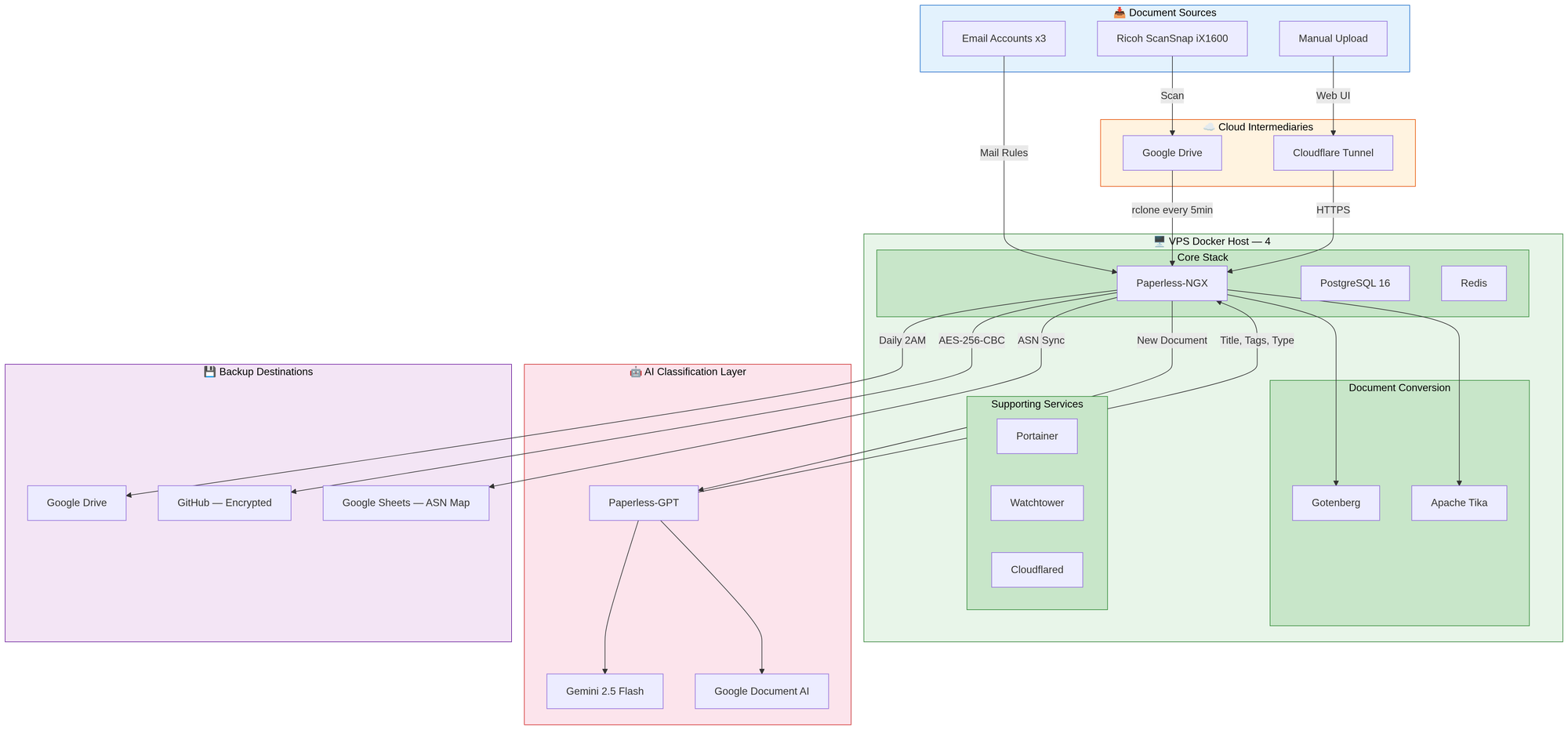
I spent weeks building a fully automated document management system that now handles 900+ documents with zero daily effort. This post walks you through the entire setup — from the scanner on my desk to the encrypted backups on GitHub — with every configuration file and script you need to build it yourself.
The Problem
Our household generates a surprising amount of paperwork. Insurance letters, tax assessments, medical bills, employment contracts, kindergarten registrations, vehicle documents — all in different languages, arriving through different channels, belonging to different family members.
Before this setup, my “system” was:
- A physical folder that was always full and never organized
- Email attachments scattered across three accounts
- A phone full of photos of documents “I’ll file later”
- No way to search for anything — I had to remember where I put it
I needed a system that could:
- Ingest documents from email, scanner, and manual upload…