Oasis introduced the framework for runtime off-chain logic (ROFL) to help build and run apps off-chain while ensuring privacy and maintaining trust with on-chain verifiability. For most people, this explainer video would be enough. But for developers and dApp builders, who want to try things out themselves, a deeper dive is worth it.
In this tutorial, I will demonstrate how to build and deploy a trustless Eliza agent with Oasis ROFL.
Objective
The objective is to have a working Eliza agent running inside a ROFL Trusted Execution Environment (TEE). I will also show how to get it registered and validated as a trustless agent in the ERC-8004 registry. The agent’s code will be fully auditable, and anyone can verify the authenticity of the origin of the deployed instance, which is immutable and tamper-proof.
Prerequisites
Refer to the prerequisite section in the ROFL quickstart tutorial for setup details.
So, right now, we need these to get started.
- Docker (or Podman) with credentials. It can be on docker.io, ghcr.io, or any other public OCI registry.
- Oasis CLI and at least 120 TEST tokens in your wallet. Since we are building in the testnet environment, you can get these tokens for free from the official faucet.
- Node.js 22+. It is for Eliza and helper scripts.
- OpenAI API key
- RPC URL. It is to access the ERC-8004 registry (e.g. Infura).
- Pinata JWT. It is to store agent information in IPFS.
- At least 2 GiB of memory and 10 GB of storage.
Eliza Agent Creation
The first step is to initialize a project using the ElizaOS CLI. Next, prepare it for ROFL.
# Install bun and ElizaOS CLI
bun --version || curl -fsSL https://bun.sh/install | bash
bun install -g @elizaos/cli

# Create and configure the agent
elizaos create -t project rofl-eliza
# 1) Select Pqlite database
# 2) Select the OpenAI model and enter your OpenAI key

# Test the agent locally
cd rofl-eliza
elizaos start
# Visiting http://localhost:3000 with your browser should open Eliza UI
Containerize
In this step, you will need to containerize both the app and the ERC-8004 wrapper.
You will notice that the Eliza agent startup wizard has already generated:
- Dockerfile — this packs your agent into a container.
- docker-compose.yaml — this automatically configures, connects, and manages the interdependent postgres and elizaos containers.
The next step is to make some changes to docker-compose.yaml.
- In the PostgreSQL section, you need to replace relative image: ankane/pgvector:latest with image: docker.io/ankane/pgvector:latest.
- You need to name the elizaos image with a corresponding absolute path, e.g. image: docker.io/YOUR_USERNAME/elizaos:latest.
- You need to register the Eliza agent as a trustless agent in the ERC-8004 registry using the rofl-8004 snippet. Ensure that the environment variables are mapped as is.
docker-compose.yaml
  rofl-8004:
    image: ghcr.io/oasisprotocol/rofl-8004@sha256:f57373103814a0ca4c0a03608284451221b026e695b0b8ce9ca3d4153819a349
    platform: linux/amd64
    environment:
      - RPC_URL=${RPC_URL}
      - PINATA_JWT=${PINATA_JWT}
    volumes:
      - /run/rofl-appd.sock:/run/rofl-appd.sock
The validation flow looks something like this:
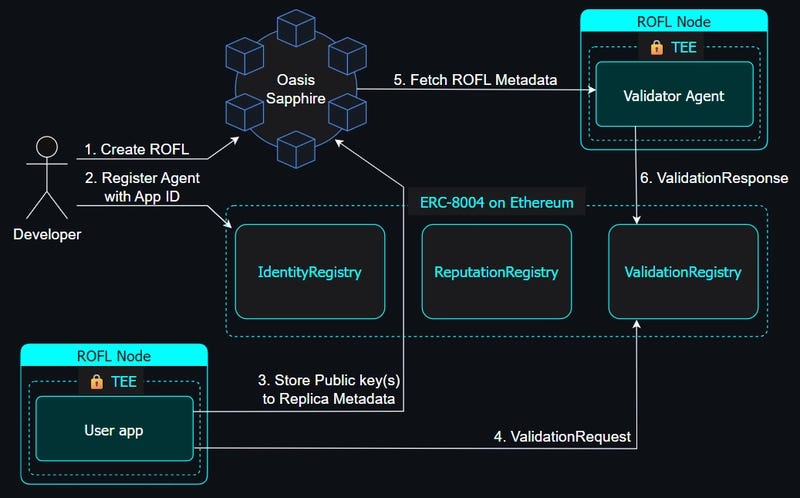
Once you have edited docker-compose.yaml, it is time to build and push.
docker compose build
docker compose push
If you are looking for full verifiability, you need to pin the digest by appending image: …@sha256:… to all images in docker-compose.yaml.
Init & Create
Once all previous steps are complete, you will find that the agent is running in a container within a TEE. In this setup, ROFL handles the startup attestation of the container and the secrets in the form of environment variables. As a result, the TEE is completely transparent to the Eliza agent app.
oasis rofl init
oasis rofl create --network testnet
You can check out on-chain activity and app details in the Oasis Explorer.
Build ROFL bundle
This is where the memory and storage prerequisites come in handy.
First, you need to update the resources section.
rofl.yaml
resources:
  memory: 2048
  cpus: 1
  storage:
    kind: disk-persistent
    size: 10000
Now, you can build the ROFL bundle by invoking this command.
oasis rofl build
Secrets
In this step, we take care of encryption. It involves:
- End-to-end encrypting of OPENAI_API_KEY and storing it on-chain.
- Providing the RPC_URL and PINATA_JWT values for ERC-8004 registration.
echo -n "<your-openai-key-here>" | oasis rofl secret set OPENAI_API_KEY -
echo -n "https://sepolia.infura.io/v3/<YOUR_KEY>" | oasis rofl secret set RPC_URL -
echo -n "<your-pinata-key-here>" | oasis rofl secret set PINATA_JWT -
Then comes the important step of storing the secrets as well as the previously built enclave identities on-chain.
oasis rofl update
Deploy
This completes the building of the Eliza agent. Now, we need to deploy it to an ROFL provider.
oasis rofl deploy
The Oasis-maintained provider is selected on Testnet, which rents a node for 1 hour by default. You can extend the rental period for more hours, say for 6 hours, by invoking oasis rofl machine top-up — term hour — term-count 6 command.
Test
You have successfully built and deployed your very own Eliza agent. You can test if it is running properly with this CLI check.
# Show machine details (state, proxy URLs, expiration).
oasis rofl machine show
A successful agent boot means the Proxy: section will show the URL where the agent is accessible. So, for example, if it shows:
Proxy:
  Domain: m1058.opf-testnet-rofl-25.rofl.app
  Ports from compose file:
    3000 (elizaos): https://p3000.m1058.opf-testnet-rofl-25.rofl.app
In this case, the app would be accessible at https://p3000.m1058.opf-testnet-rofl-25.rofl.app.
ERC-8004 Registration and Validation
This is not an automatic step and needs to be completed to get this Eliza agent registered and validated as a trustless agent in the ERC-8004 registry. When you are running the agent for the first time, the rofl-8004 service will derive the Ethereum address for registering it. To go ahead, you will need to fund that account with some ETH to pay for the gas fees.
Use this command to fetch your app logs.
oasis rofl machine logs
The Please top it up line will show the derived address. After funding it, your agent is registered and validated, and ready to go.
Please note: All logs here are accessible to the app admin, as they are stored unencrypted on the ROFL node. So, remember not to put any private information here.
Demo
This guide shows how you can build your own agent, but if you need to check out a full-fledged demo of how it looks and works, there is an example in the official Oasis repository.
Trustless Agent Demo
For a quick chat with the Oasis engineering team for help with specific issues, you can drop your comments in the dev-central channel in the official Discord.
Originally published at https://dev.to on May 28, 2026.
Guide To Deploying A Trustless Eliza Agent With Oasis ROFL was originally published in Coinmonks on Medium, where people are continuing the conversation by highlighting and responding to this story.