A version string is not just information — it’s a direct line to every public exploit ever written against that software.
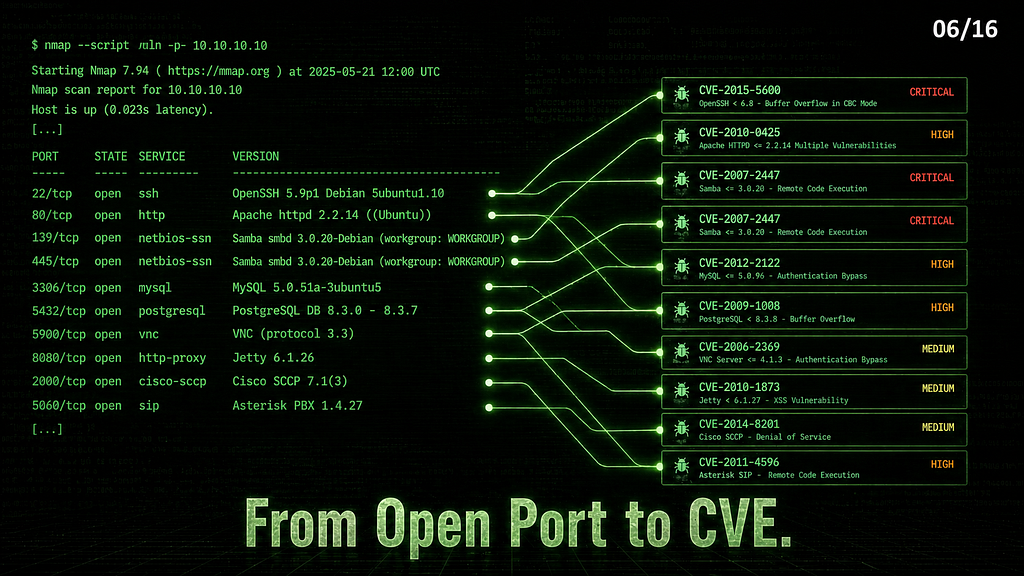
Series: Nmap — The Tool You Think You Know | Part 6 of 16
You’ve been scanning and collecting version strings since Part 1 — vsftpd 2.3.4, libssh 0.8.3, Haraka 2.8.8, SMBv1 from Part 5. Now what do you do with them?
This is the gap nobody maps out clearly. You have version information but no workflow for turning it into findings. This article builds that workflow end-to-end — from version string to CVE to verified exploitable finding — using four real lab targets and showing exactly where Nmap does the heavy lifting.
Step 1 — Extract Version Strings
Everything starts here. You cannot look up CVEs without exact version numbers.
nmap -sV -p 21,22,25,80,139,445 <TARGET_IP>
Output from four real lab targets:
# FTP lab
21/tcp open  ftp     vsftpd 2.3.4
# SSH lab
22/tcp open  ssh     libssh 0.8.3 (protocol 2.0)
# SMTP lab
25/tcp open  smtp    Haraka smtpd 2.8.8
# Samba lab
139/tcp open  netbios-ssn Samba smbd 3.X - 4.X (workgroup: WORKGROUP)
445/tcp open  netbios-ssn Samba smbd 3.X - 4.X (workgroup: WORKGROUP)
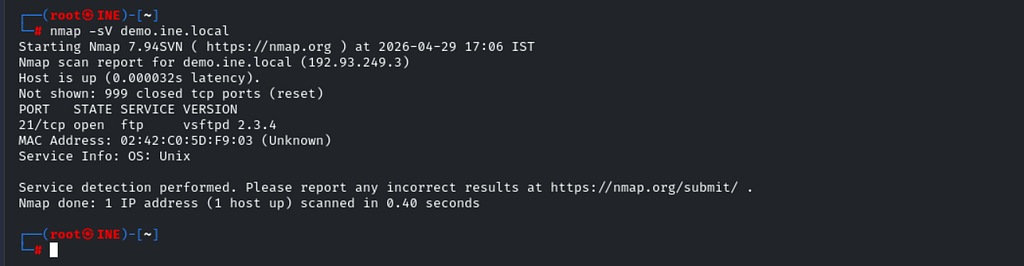
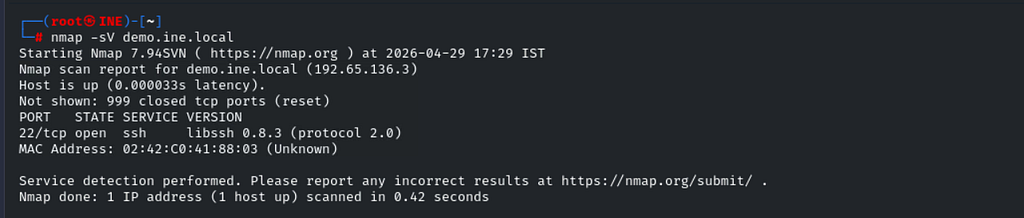
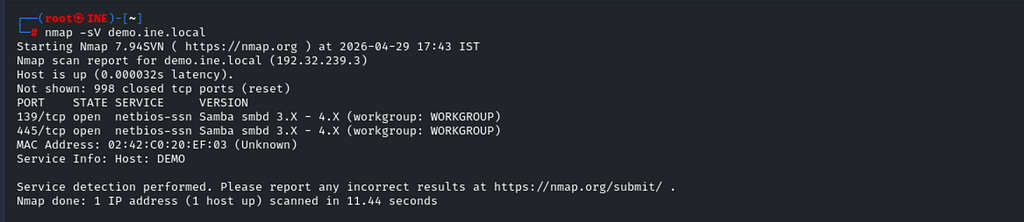

Three exact versions, one vague range. Note the Samba output — 3.X - 4.X is useless for CVE lookup. When -sV returns a range, you need another approach to pin the exact version. For Samba, smbclient fills the gap:
smbclient -L demo.ine.local
IPC$ IPC IPC Service (Samba 4.1.17)
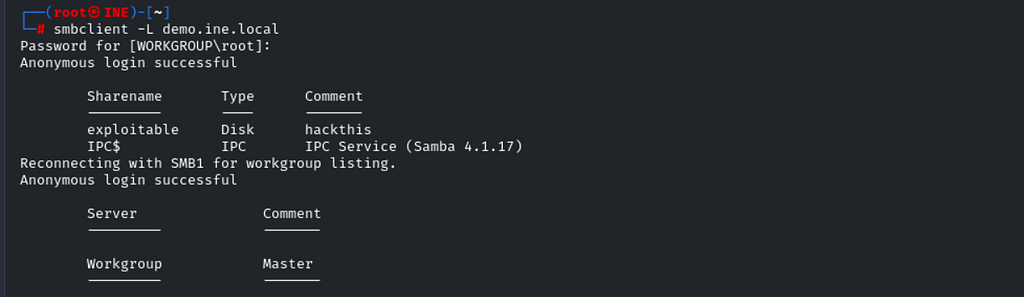
Samba 4.1.17 — Now you have something to work with. Always cross-reference version detection with service-specific tools when -sV returns a range.
The -sV intensity flags:
--version-light — fewer probes, faster, sufficient for most services. Try this first.
--version-all — all probes, slower, use when you get a vague or partial version string.
Step 2 — --script vulners — Automated CVE Lookup
Before manually searching NVD or ExploitDB, let Nmap do the first pass. vulners takes version strings from -sV output and queries the Vulners.com CVE database automatically.
nmap --script vulners -sV -p 21 <TARGET_IP>
Important constraint: vulners queries an external API over the internet. In restricted lab environments or air-gapped networks, it returns no output — not because nothing is vulnerable, but because the outbound connection is blocked. This is a common point of confusion.
When vulners is available and outbound connectivity exists, output looks like this — shown here against these same service versions on an internet-connected machine:
21/tcp open  ftp  vsftpd 2.3.4
| vulners:
|   cpe:/a:beasts:vsftpd:2.3.4:
|     CVE-2011-2523  10.0  vsftpd 2.3.4 backdoor (CVE-2011-2523)
|     CVE-2011-0762   4.0  DoS via crafted glob expression
22/tcp open  ssh  libssh 0.8.3
| vulners:
|   cpe:/a:libssh:libssh:0.8.3:
|     CVE-2018-10933  9.8  Authentication bypass
|     CVE-2019-14889  8.8  Arbitrary command execution
25/tcp open  smtp  Haraka smtpd 2.8.8
| vulners:
|   cpe:/a:haraka:haraka:2.8.8:
|     CVE-2016-1000282  9.8  Remote command execution via attachment
CVE IDs and CVSS scores in the scan output — before you’ve touched a single manual lookup tool. Focus on scores ≥ 7.0 first. Scores below 5.0 on obscure modules are lower priority.
If vulners is silent, move directly to Step 3.
Step 3 — --script vuln — Active Local Verification
Where vulners looks things up remotely, --script vuln actively probes the service using Nmap's built-in NSE vulnerability scripts. No internet required — everything runs locally. It covers fewer CVEs but confirms them with actual evidence rather than version matching alone.
nmap --script vuln -sV <TARGET_IP>
FTP lab — vsftpd 2.3.4:
21/tcp open  ftp  vsftpd 2.3.4
| ftp-vsftpd-backdoor:
|   VULNERABLE:
|   vsFTPd version 2.3.4 backdoor
|     State: VULNERABLE (Exploitable)
|     IDs:  BID:48539  CVE:CVE-2011-2523
|       vsFTPd version 2.3.4 backdoor, this was reported on 2011-07-04.
|     Disclosure date: 2011-07-03
|     Exploit results:
|       Shell command: id
|       Results: uid=0(root) gid=0(root) groups=0(root)
|     References:
|       https://github.com/rapid7/metasploit-framework/blob/master/modules/exploits/unix/ftp/vsftpd_234_backdoor.rb
|       https://cve.mitre.org/cgi-bin/cvename.cgi?name=CVE-2011-2523
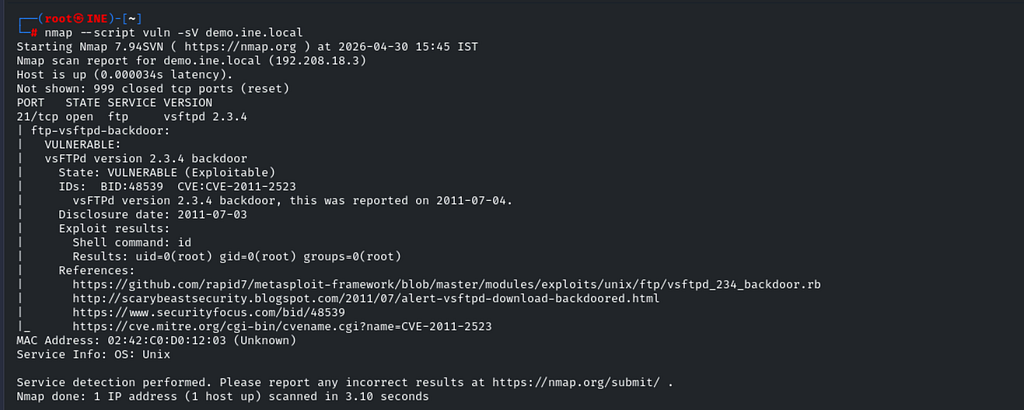
This is as definitive as Nmap output gets. State: VULNERABLE (Exploitable) — not just a version match, but active confirmation. The script executed id on the target and got back uid=0(root). Root shell confirmed from the scan output alone, before touching Metasploit.
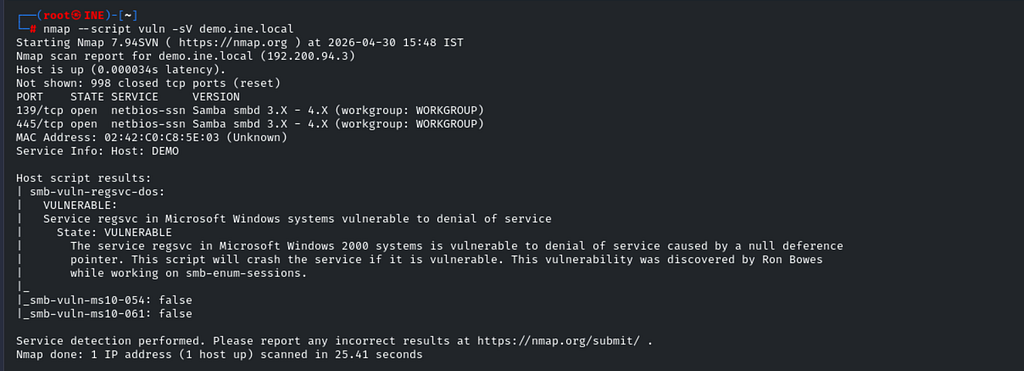
Samba lab:
| smb-vuln-regsvc-dos:
|   VULNERABLE:
|   Service regsvc in Microsoft Windows systems vulnerable to denial of service
|     State: VULNERABLE
SMTP lab — Haraka 2.8.8:
| smtp-vuln-cve2010-4344:
|_  The SMTP server is not Exim: NOT VULNERABLE
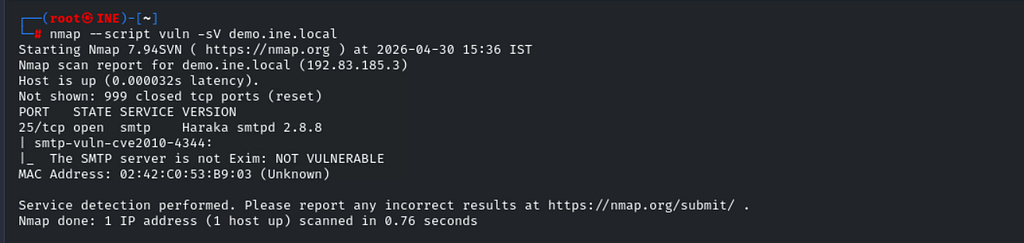
NOT VULNERABLE is a valid and useful result. It tells you the script ran, the service responded, and this specific CVE doesn't apply. Not every --script vuln run returns a finding — clean results are expected on patched or non-matching services.
SSH lab — libssh 0.8.3:
--script vuln Returned no output for libssh — no dedicated NSE script exists for CVE-2018-10933 in this Nmap version. Silent output here means "no matching local script," not "not vulnerable." This is where searchsploit picks up.
--script vulners vs --script vuln — The Difference
Both look for vulnerabilities, but they work completely differently.
--script vulners — queries the external vulners.com API. Takes your version strings and returns a list of matching CVEs with scores. Internet-dependent, passive, broad coverage. Tells you what might be vulnerable based on the version.
--script vuln — runs Nmap's local NSE scripts. Actively probes the service. No internet required. Narrower coverage but actively confirms findings with real probe results. Tells you what is vulnerable with evidence.
Use both — they catch different things. In restricted environments, --script vuln is all you have. On internet-connected boxes, run vulners first for breadth, then --script vuln for confirmation.
Step 4 — searchsploit — Find Public Exploits
Once you have a CVE or a version string, searchsploit tells you whether a public exploit exists and whether it's been integrated into Metasploit.
searchsploit vsftpd 2.3.4
vsftpd 2.3.4 - Backdoor Command Execution           | unix/remote/49757.py
vsftpd 2.3.4 - Backdoor Command Execution (Metasploit) | unix/remote/17491.rb
searchsploit libssh
libSSH - Authentication Bypass                      | linux/remote/45638.py
LibSSH 0.7.6/0.8.4 - Unauthorized Access            | linux/remote/46307.py
searchsploit haraka 2.8
Haraka < 2.8.9 - Remote Command Execution | linux/remote/41162.py



Reading searchsploit output — what matters:
Path prefix — unix/remote/, linux/remote/ means network-exploitable. linux/local/ means you need existing access first — lower immediate value.
.rb extension — Metasploit module. One use command away from exploitation.
.py / .pl — standalone script. May need modification, but usable directly.
Version range in title — Haraka < 2.8.9 With our target running 2.8.8 — confirmed in range.
The libssh result is worth examining closely. LibSSH 0.7.6/0.8.4 - Unauthorized Access — Our target is 0.8.3, which falls between those versions. Check the exploit script itself to confirm the exact affected range before assuming it applies.
Step 5 — Manual CVE Research
searchsploit tells you that exploits exist. NVD tells you whether you should care about them.
NVD — nvd.nist.gov
Search by CVE ID. For each high-scoring finding, check:
- CVSS score — base score and vector string
- Attack vector — Network (N) is remote, Local (L) requires existing access
- Authentication required — None (N) is unauthenticated; required raises the bar
- Affected versions — confirm your exact version is in the range
CVE-2011–2523 (vsftpd backdoor) — CVSS 10.0, Attack Vector: Network, Authentication: None. Every box checked. Highest priority finding possible.
CVE-2018–10933 (libssh auth bypass) — CVSS 9.8, Attack Vector: Network, Authentication: None. Same profile — highest priority.
ExploitDB — exploit-db.com
Same database as searchsploit but with full exploit code, analysis, and sometimes proof-of-concept screenshots. Use it when you need to understand what an exploit does before running it.
Step 6 — Verify Before Reporting
A CVE in vulners output or a searchsploit hit is not confirmation of vulnerability. It's a lead. Verify before it goes into a report.
Version range check — confirm the exact version is within the affected range stated in the CVE. Haraka < 2.8.9 With the target running 2.8.8 — confirmed in range. LibSSH 0.7.6/0.8.4 With target running 0.8.3 — check the NVD entry for the full range.
Attack prerequisites — does the CVE require local access? Existing authentication? A specific configuration flag is enabled? Each prerequisite reduces exploitability.
Backport patches — Debian and Ubuntu frequently backport security fixes without updating the upstream version number. A package showing OpenSSH 5.9p1 with a suffix 5ubuntu1.10 may have CVE-2015-5600 already patched. This .10 means it's the 10th update to that package — more updates mean more backported fixes.
# Confirm patched version if you have shell access
dpkg -l | grep openssh
apt-cache show openssh-server | grep Version
Without shell access, the package suffix is your best indicator. Flag it as “likely patched — verify on exploitation” rather than dropping it from the report entirely.
--script vuln confirmation — when a dedicated NSE script exists and returns VULNERABLE (Exploitable) with actual command output, that's your strongest evidence. The vsftpd id result showing uid=0(root) is reportable on its own.
The Complete Workflow
1. nmap -sV
        → Extract exact version strings
        → Cross-reference with service tools when -sV returns ranges
2. nmap --script vulners -sV
        → Auto CVE lookup (internet-connected only)
        → Prioritize CVSS ≥ 7.0
3. nmap --script vuln -sV
        → Active local confirmation
        → No internet required
        → VULNERABLE (Exploitable) = strongest evidence
4. searchsploit <service> <version>
        → Find public exploits
        → .rb = Metasploit ready
        → remote/ = network exploitable
5. nvd.nist.gov
        → Verify CVSS vector
        → Confirm attack vector and auth requirements
        → Confirm version range
6. Verify
        → Version in affected range?
        → Prerequisites met?
        → Backport patches possible?
7. Document
        → CVE ID + CVSS score + attack vector
        → Evidence (scan output or exploit result)
        → Recommendation
Every version string feeds into step 2. By the time your scan finishes, you have a preliminary vulnerability list ready before manually touching the target.
A Note on Responsible Disclosure
--script vuln with the vsftpd backdoor script didn't just detect the vulnerability — it exploited it and returned a root shell, automatically, as part of the scan. In a real engagement, this means your scan report already contains proof-of-exploitation evidence. In an unauthorized context, that same scan just became unauthorized access to a computer system.
The line between detection and exploitation is thin with some NSE scripts. Always have written permission, scoped to include vulnerability verification, before running --script vuln against anything you care about.
What’s Next
You have version strings, CVEs, confirmed findings, and public exploits identified. The recon-to-exploit chain is complete — everything from here is execution.
In Part 7, we connect Nmap directly to Metasploit. The XML output you’ve been saving with -oA since Part 1 feeds directly into Metasploit's database — no rescanning, no copy-pasting, just a direct pipeline from Nmap discovery to Metasploit exploitation.
Part 7← Link will be live once published
🔒 Legal reminder: Vulnerability research and exploitation against systems you don’t own or have explicit written authorization to test is illegal. The vsftpd example above executed code on a target — that is exploitation, not just detection. Always operate within authorized scope.
Part of the series: Nmap — The Tool You Think You Know
From Open Port to CVE: The Recon-to-Exploit Workflow was originally published in Level Up Coding on Medium, where people are continuing the conversation by highlighting and responding to this story.