In one of my recent blog posts, I discussed coupling and cohesion and why loose coupling combined with high cohesion is so crucial in software design [1]. Building on that foundation, I now want to introduce a microfrontend architecture that my team and I implemented for a customer to enable loose coupling and independent deployment a couple of years ago.
The core idea is that each team in the organization owns a specific domain, and each domain contributes plugins to a host system. This host system represents one of the main systems in the landscape — essentially a core domain. Other teams either extend this core domain with new features or provide entry points into other systems.

Importantly, the architecture is not limited to a single host system. There can be multiple host systems, and therefore multiple core teams, each responsible for its own core domain and the plugins that integrate with it.
In a nutshell, this architecture intentionally aligns system design with team structure: stream‑aligned domain teams deliver features by plugging into a platform‑like host system through well‑defined, stable contracts. It closely follows the key patterns and interaction modes described in Team Topologies.
1. Architecture
The Microfrontend-Plugin architecutre contains a frontend shell that dynamically loads and wires MFEs (microfrontends) at runtime.
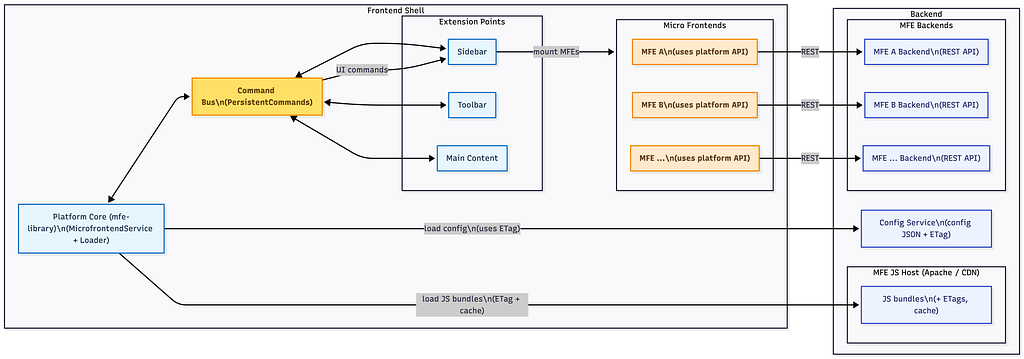
In the backend, two main components work together. First, the Config Serverprovides configuration for each MFE, including the application-id, the URL of the JS bundles, a description/metadata, and settings that define whether an MFE is available at runtime or must be explicitly enabled by the user.
Second, an Apache Http Serveracts as the MFE JS host. It serves the JS bundles for each MFE and uses ETags (entity tags), which are essentially hashes of the bundle contents. The frontend shell uses these ETags to determine whether an MFE’s version has changed or not and to leverage browser caching effectively, avoiding unnecessary bundle downloads when nothing has changed.
In the frontend shell, the central piece is the mfe-library. On startup, the MfeLoader fetches the configuration from the Config Server, using ETags to detect changes and support caching. It then evaluates which MFEs are available or enabled according to that configuration, loads the referenced JS bundles from Apache, and adds these MFEs via the custom element Web API [2] into the application by injecting script tags for the bundles.
Each microfrontend uses a shared mfe-apiinstead of talking directly to the shell. Communication between MFEs and the shell is handled via a Command Buswhich supports persistent commands and decouples MFEs from one another. MFEs interact with the shell exclusively by sending and receiving commands over this bus, rather than relying on direct references or tight integration.
The shell exposes extension points such as the Sidebar, Toolbar, and Main Content. MFEs send UI-related commands through the Command Busto render or update content in these extension points. This allows independently developed features to plug into a cohesive UI while remaining isolated at the implementation level.
It is important to understand that a microfrontend, in this architecture, is not just a main.js file injected into the host with a script tag. Each MFE comes with its own backend (typically a dedicated REST API) and its own CI/CD pipeline. It is a separate product in its own right and can run completely standalone. In some cases, this independence is explicitly desired: the MFE is integrated into the host system for convenience and unified UX, but it also remains a fully independent application outside of that host.
1.1 The MFE in more detail
The following diagram shows some libraries that are necessary for the communication between the Host and the MFE.
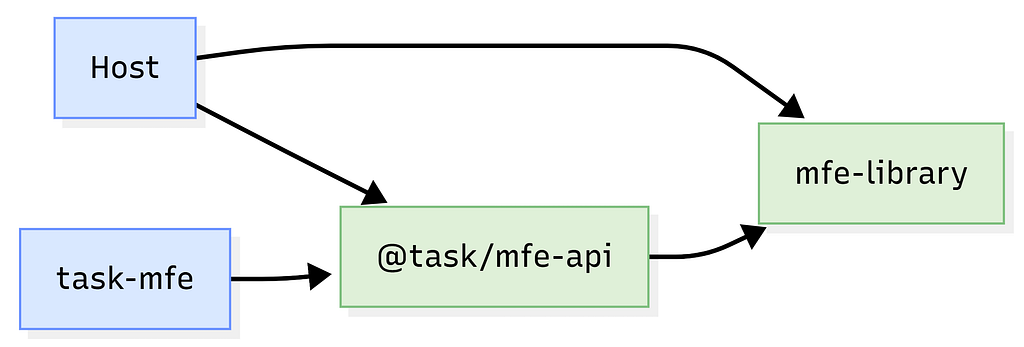
mfe-library is a shared, framework-agnostic library that defines all generic commands, events, and base types used across multiple micro frontends and hosts. It contains the common messaging primitives and utilities that are not specific to any particular domain, so different MFEs and host applications can all build on the same foundation.
@task/mfe-api is a domain-specific API package for the “task” micro frontend. It builds on mfe-library and defines all task-related host events and commands, as well as the extension points needed to plug the task MFE into the host. Both the host and the task-mfe depend on this package to share a consistent contract for task functionality.
The host application and task-mfe each use @task/mfe-api for task-specific communication and also depend on mfe-library for the generic messaging infrastructure. The host integrates the MFE via the extension points from @task/mfe-api, translates its internal actions into host events, and reacts to commands. The MFE implements the UI and logic, sending commands and handling events strictly through the shared API and library.
1.2 CQRS pattern
CQRS (Command Query Responsibility Segregation) is an architectural pattern that separates:
- Commands: operations that change state (create/update/delete data).
- Queries: operations that read data.
Instead of one unified model handling both reads and writes, CQRS uses different models or paths optimized for each. This allows better scalability, performance, and flexibility, but adds complexity and is typically used in larger or more complex systems.
Inspired by CQRS, communication within the microfrontend architecture is based on a clear separation of events and commands. The host sends events to the microfrontend to notify it about state changes, including the relevant updated data. The microfrontend sends commands to the host either to execute operations via a predefined REST layer or to instruct the host shell to perform a specific action.
The following code illustrates some examples of such state changes: whenever the selected task changes or the navigation within a task is updated, the MFE is notified accordingly. The detailed mechanics of this communication will be covered in the implementation section; for now, the focus is on conveying the core idea of this pattern.
export abstract class HostEvent {
  readonly type: string;
}

export enum TaskEventType {
  TaskSelectionChanged = 'task-selection-changed',
  TaskNavigationChanged = 'task-navigation-changed',
}

export interface TaskSelectionChangedEvent extends HostEvent {
  type: TaskEventType.TaskSelectionChanged;
  payload: TaskSelectionChange; // tasks, tab-names
}

export interface TaskNavigationChangedEvent extends HostEvent {
  type: TaskEventType.TaskNavigationChanged;
  payload: TaskNavigationChange; // navigate-right, navigate-left
}
In contrast to events, which only notify about state changes, commands instruct the host to perform an operation. There are two types of commands: persistent commands, which trigger operations that modify or store data, and transientcommands, which initiate temporary actions that do not result in lasting state changes.
export abstract class MicrofrontendCommand {
    readonly mfeId: string;
    readonly type: string;
    readonly isPermanent: boolean;

    constructor(mfeId: string, type: string) {
        this.mfeId = mfeId;
        this.type = type;
    }
}

export interface IMicrofrontendCommand {
    readonly mfeId: string;
}

export const mfeCustomEventName = 'microfrontend-command';
Persistent commands are cached within the microfrontend architecture and can be replayed. To distinguish them at runtime, each command is assigned a unique name, referred to as its type.
The following code snippet defines the command used to embed the MFE into the host. It specifies the customElementName, the targetcontainer in which the element should be rendered, and an optional, typed payloads that can include a name or any other data required during startup.
export class EmbedWebcomponentCommand extends PermanentCommand {
    static readonly TYPE: string = 'embed-webcomponent';

    /** The name of the registered custom element */
    readonly customElementName: string;

    /** The name of the target position in the host system */
    readonly target: string;

    /** Additional payload passed to the host system embedding the webcomponent */
    readonly payload?: any;

    constructor(command: IEmbedWebcomponentCommand) {
        super(command.mfeId, EmbedWebcomponentCommand.TYPE);
        this.customElementName = command.customElementName;
        this.target = command.target;
        this.payload = command.payload;
    }
}

interface IEmbedWebcomponentCommand extends IMicrofrontendCommand {
    /** The name of the registered custom element */
    readonly customElementName: string;

    /** The name of the target position in the host system */
    readonly target: string;

    /** Additional payload passed to the host system embedding the webcomponent */
    readonly payload?: any;
}
Transient commands, on the other hand, are not cached and therefore cannot be replayed.
Consider the OpenDialogCommand as an example: it carries the callbacks that define the operations to perform, the data required by the dialog, and the labels for the confirm and cancel buttons.
export class OpenDialogCommand extends TransientCommand {
    static readonly TYPE: string = 'dialog-open';

    readonly onConfirm: () => void;
    readonly onCancel: () => void;
    readonly title: string;
    readonly message: string;
    readonly confirmButtonText: string;
    readonly cancelButtonText: string;

    constructor(command: IOpenDialogCommand) {
        super(command.mfeId, OpenDialogCommand.TYPE);
        this.onConfirm = command.onConfirm;
        this.onCancel = command.onCancel;
        this.title = command.title;
        this.message = command.message;
        this.confirmButtonText = command.confirmButtonText;
        this.cancelButtonText = command.cancelButtonText;
    }
}

interface IOpenDialogCommand extends IMicrofrontendCommand {
    readonly onConfirm: () => void;
    readonly onCancel: () => void;
    readonly title: string;
    readonly message: string;
    readonly confirmButtonText: string;
    readonly cancelButtonText: string;
}
1.3 Command Bus
Now let’s look at how the communication channel — the command bus — between the host and the MFE is established.
To initiate it, the MFE dispatches a custom event that contains the operation to perform, in this case adding (registering) the MFE. The AddMfeCommand includes the MFE’s id and version, as well as two functions: hostEventHandler for handling events coming from the host, and setMfeCommandHandler for registering the callback that the MFE will use to send commands back to the host:
const addMfeCommand = new AddMfeCommand({
    mfeId,
    mfeVersionInfo,
    hostEventHandler: (event: HostEvent): void => {
        this.ngZone.run(() => this.hostEvents$.next(event);
    },
    setMfeCommandHandler: (mfeCommandHandler): void => {
        this.mfeCommandHandler$.next(mfeCommandHandler);
    },
});

document.dispatchEvent(
    new CustomEvent<AddMfeCommand>(
        mfeCustomEventName,
        {detail: listenerAddCommand},
    ),
);
And on the other side, the host a event listener is defined that listens to all the events that are send by the MFE. The Host registers the MFE as listener.
document.addEventListener(mfeCustomEventName, this.handleMicrofrontendCustomEvent.bind(this));

private handleMicrofrontendCustomEvent(event: Event): void {
    const customEvent = event as CustomEvent<AddMfeCommand>;
    if (customEvent == null || customEvent.detail == null) {
        return;
    }

    const microfrontendCommand = customEvent.detail;

    try {
        this.registerMfeAsListener(microfrontendCommand);
    } catch (err) {
        console.error(`MfeAddCommand cannot be processed! ${JSON.stringify(customEvent)}`, <Error>err);
    }
}
1.4 Advantages of This Design
Loose coupling & independent deployment: Each MFE is its own bundle, deployed on its own schedule. The shell is stable and only talks to MFEs via configuration and a defined command interface.
Runtime extensibility: New MFEs and features can be added or discovered at runtime without redeploying the shell, by using configuration and command contracts instead of changing shell code.
Fault isolation: If an MFE fails, others keep working. Problematic MFEs can be disabled or reconfigured without changing the shell, which still controls layout and styling with predefined regions (sidebar, header, main, etc.).
Testability: The shell’s extension points can be tested with fake commands, and each MFE can be tested separately by mocking the host and MicrofrontendService, resulting in simpler, more focused tests.
1.5 Disadvantages of This Design
Code duplication/Larger bundles: The implementation predates Webpack Module Federation, so there is no single shared bundle of the `mfe-library`. Instead, both the host and each MFE bundle their own copy. This means code is duplicated across bundles, and objects from one bundle cannot be reliably checked with `instanceof` against classes from another.
Harder debugging and error analysis: When the same logical library exists in multiple versions, stack traces and logs can be confusing. Subtle bugs can appear only when a specific combination of host-version + MFE-version interacts.
Versioning of events and commands: MFEs may run with older versions of the mfe-library, so events and commands must remain backward compatible. Properties on events and commands are never renamed or removed, as that would be a breaking change for older MFEs. For new features, we either introduce a new command type or extend existing commands with additional, optional properties.
1.6 Implementation
This architecture is bundler-agnostic and does not rely on Module Federation. The core of the library — events, commands, and the command bus — is also framework-agnostic, so it can be used with any common JavaScript framework such as React, Vue, Angular, and others.
In this specific case, the customer primarily uses Angular, so the implementation is built around Angular’s Dependency Injection. Angular components are exposed as Web Components via Angular Elements, and ngx-build-plus [3] is used to produce single, self-contained bundles for each micro frontend.
2. Case Study: Early Implementation (Pre–Module Federation)
This micro frontend architecture was implemented before Webpack’s Module Federation existed. That context shaped several important design decisions and lessons learned.
2.1 Duplicate library instances & command identification
The host and each MFE both bundled their own copy of mfe-library, so multiple independent instances of the same library ran at runtime. Because of this instanceof checks across host/MFE boundaries were unreliable: an object created in an MFE was not an instance of the host’s version of the same class.
Solution: each command type was given a unique, stable identifier (e.g., a string or symbol), and the shell routed commands based on this ID and their payload shape, not on class identity.
This naturally led to treating commands as data contracts (ID + schema) rather than concrete class instances, keeping shell and MFEs loosely coupled.
2.2 Decoupling mfe-library from a single host
Initially, mfe-library was tightly coupled to one specific host (host-specific types, services, and assumptions baked in). When additional hosts wanted to adopt the same micro frontend model, this coupling became a blocker.
Refactor:
— Extracted host-agnostic interfaces and extension points.
— Used inversion of control: hosts provide their own adapters/services via configuration or DI.
— Removed direct imports of host-specific code from the library.
This made the library reusable across multiple hosts without forcing them into one host’s architecture.
2.3 Preserving state on refresh: RegisterWebcomponentCommand
Another practical issue was state restoration on page refresh:
Some MFEs were not mounted immediately when the shell loaded. Instead, they were only attached when the user clicked a specific button (lazy / on-demand mounting).
After a full page refresh, the shell had no built-in knowledge that a given MFE had previously been opened, so it started from a “clean” state.
Users, however, expected the UI to come back in the same state as before the refresh, including which MFEs were mounted.
To solve this, a RegisterWebcomponentCommandwas introduced:
An MFE sends RegisterWebcomponentCommand to the shell when it is attached (or when its web component is registered). The shell records this registration (e.g., in its own state/store or persisted storage like localStorage or session data). On page load/refresh, the shell replays this information to reattach or remount the relevant MFEs so the UI reflects the user’s previous state.
2.4 Shadow DOM: opt-in encapsulation with practical limits
Another important lesson was how to balance Shadow DOM usage with existing libraries and integration needs:
Some web components benefited from Shadow DOM’s style and DOM encapsulation, but not all could use it safely in practice. The mfe-library therefore does not enable Shadow DOM by default; each web component can opt in.
Several commonly used libraries did not work correctly inside a shadow root:
- drag-and-drop libraries relied on global document queries or event handlers that do not see into Shadow DOM.
- dropdown implementations assumed direct access to the DOM structure or global event bubbling.
In addition, certain external components that dynamically load additional JavaScript and then enhance DOM elements (e.g., by querying the document and attaching behavior) failed when those elements were rendered inside Shadow DOM, because they were effectively invisible to these scripts.
We made this work in practice by actively adapting the ecosystem around us:
- Contributing pull requests to third-party libraries to improve or add Shadow DOM support.
- Reimplementing or wrapping certain behaviors ourselves when upstream changes were not feasible.
- Patching some components at runtime to enhance or adjust the DOM so that external scripts could still interact correctly with elements inside Shadow DOM.
This approach allowed us to retain the benefits of Shadow DOM where needed, without giving up compatibility with existing tools and UI libraries.
Summing Up
This architecture has evolved into a contract‑driven micro frontend platform built around a plugin system and a command bus.
The plugin system lets MFEs be discovered, loaded, and placed into predefined regions at runtime, enabling independent deployment and runtime extensibility with minimal changes to the shell. The command bus provides a stable integration layer: MFEs and hosts communicate via commands identified by unique IDs and defined payloads, rather than shared classes.
The mfe-librarywas refactored from a host-specific utility into a host-agnostic library, with host behavior provided through interfaces and adapters. Shadow DOM is available as an opt-in per component, balancing encapsulation with compatibility for existing drag‑and‑drop, dropdown, and third‑party scripts — sometimes requiring PRs, custom wrappers, or runtime patches.
Overall, explicit contracts, runtime configuration, and clear separation between shell and MFEs have enabled independent deployments, extensibility, fault isolation, and practical integration with real‑world libraries.
Links
[1] https://javascript.plainenglish.io/clean-frontend-architecture-coupling-and-cohesion-d252fe0b6140
[2] https://developer.mozilla.org/en-US/docs/Web/API/Web_components/Using_custom_elements
[3] https://github.com/manfredsteyer/ngx-build-plus
From Monolith to Microfrontends: Designing a Domain-Based Plugin System was originally published in Level Up Coding on Medium, where people are continuing the conversation by highlighting and responding to this story.