From Confusion to Automation: My First Odoo WhatsApp API Integration
 Imade Money2 min read·Just now
--
Today I finally connected WhatsApp Business API with Odoo, and honestly, the process taught me a lot more than I expected.
At first, I thought integrating WhatsApp with Odoo would simply place a WhatsApp icon on the website for customers to message directly. But once I started exploring the setup, I realized Odoo WhatsApp integration goes much deeper than that.
I worked through:
- Meta Developers setup
- App ID configuration
- Access Tokens
- WhatsApp Business Account setup
- Phone Number IDs
- WhatsApp Cloud API integration
- Odoo template automation
There were moments where things felt confusing, especially understanding the difference between normal WhatsApp chat widgets and actual WhatsApp Business API automation. But step by step, it started making sense.
What impressed me most was discovering how powerful Odoo automation can be when connected to WhatsApp.
Now businesses can:
- automate customer notifications
- send appointment reminders
- automate CRM follow-ups
- send order confirmations
- create personalized WhatsApp workflows
- improve customer communication directly from Odoo
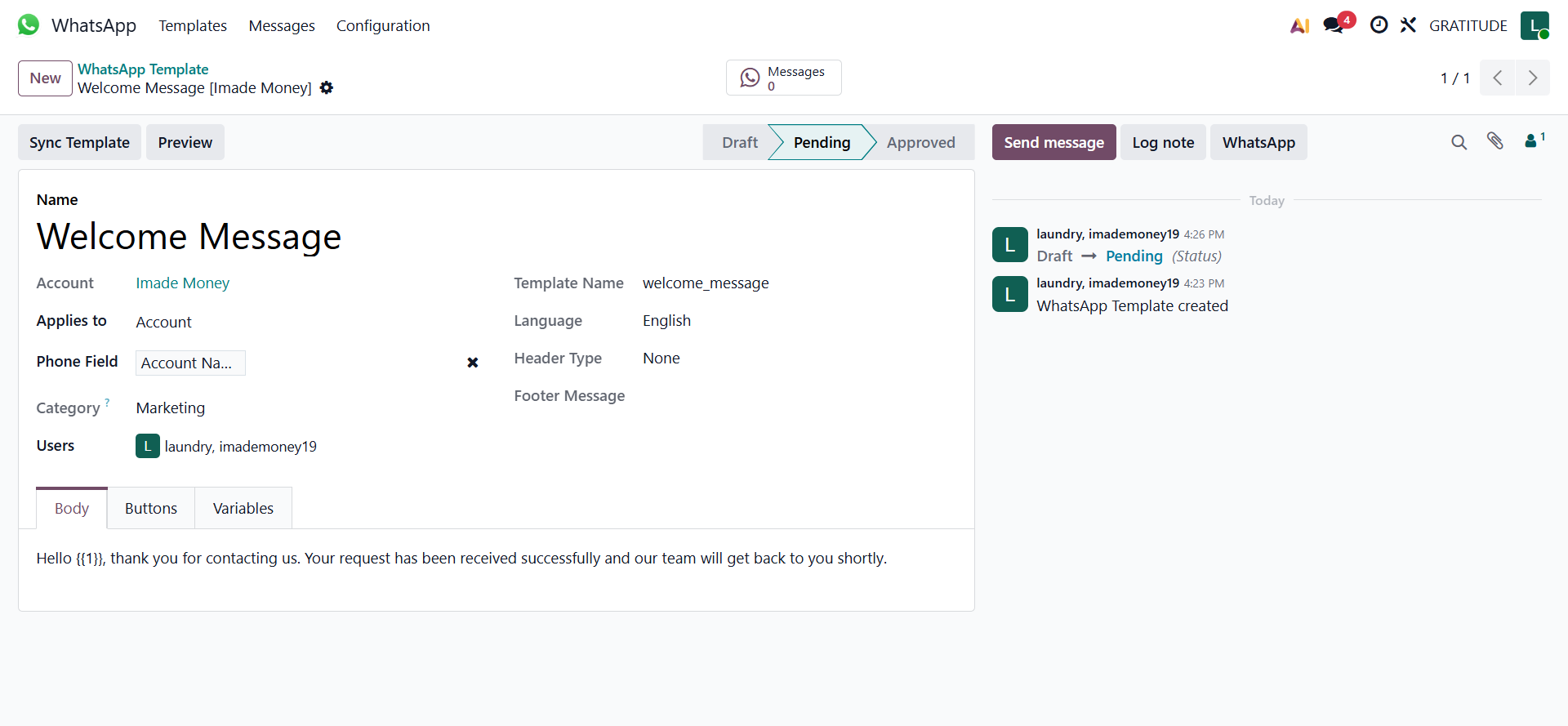
I also created my first automated WhatsApp template inside Odoo with quick reply actions for customer interaction.
Seeing the template preview finally work after configuring the Meta API setup felt rewarding because it transformed the integration from “just configuration” into a real business communication workflow.
This experience showed me that modern ERP systems are no longer just about management dashboards. They are becoming complete customer communication ecosystems.
And honestly, this is only the beginning.
Click here to connect your whatsapp to odoo today!!!!11