Background
In today’s article, I’m going to introduce two important components on the Microsoft Foundry platform: Foundry IQ and Foundry Agent Service, and how to connect them so that Foundry IQ provides a knowledge layer for the Agent. If you have questions about:
- What is Foundry IQ? What’s its value?
- How to connect Foundry IQ and Foundry Agent?
Then this article will definitely answer your doubts!
Foundry IQ
First, let me clarify that Foundry IQ itself is not a service, but rather a data flow built around Azure AI Search using various services on Azure. Its core components include:
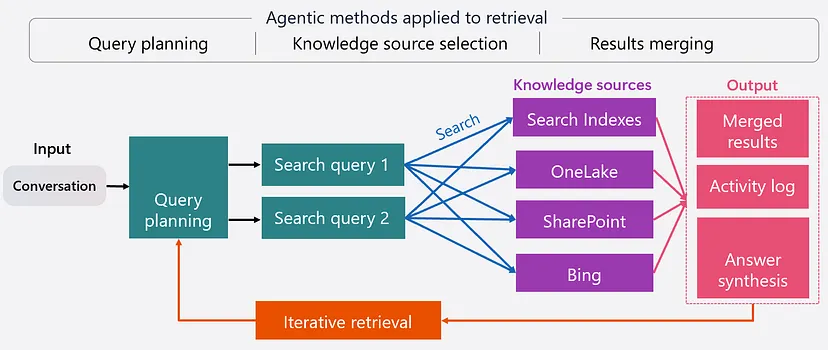
- Knowledge source: It tells Foundry IQ where to find data sources. It can be a Search Index, a SharePoint document, a OneLake data lake, or even an external web search engine.
- Knowledge base: It can encapsulate multiple downstream Knowledge source and is configured with LLM models on Foundry.
- Agentic Retrieval Engine: Based on the large model configured in the Knowledge base, it can achieve intelligent retrieval, which is Agentic Retrieval. It can create a global plan for the retrieval statement—for example, breaking down a complex retrieval statement into multiple smaller statements, executing them in parallel, and then synthesizing the results!
So, the Agent only needs to communicate with the Knowledge base, without needing to communicate individually with each downstream Knowledge source. From this perspective, you can view Foundry IQ as the Agent's knowledge module.
Now let’s create a Foundry IQ data flow step by step.
Creating an Azure AI Search Index
For the case in this article, we’ll still use the familiar Azure AI Search Index as our data source.
from azure.search.documents.indexes.models import SearchIndex, SearchField, VectorSearch, VectorSearchProfile, HnswAlgorithmConfiguration, AzureOpenAIVectorizer, AzureOpenAIVectorizerParameters, SemanticSearch, SemanticConfiguration, SemanticPrioritizedFields, SemanticField
from azure.search.documents.indexes import SearchIndexClient
index = SearchIndex(
    name=index_name,
    fields=[
        SearchField(name="id", type="Edm.String", key=True, filterable=True, sortable=True, facetable=True),
        SearchField(name="page_chunk", type="Edm.String", filterable=False, sortable=False, facetable=False),
        SearchField(name="page_embedding_text_3_large", type="Collection(Edm.Single)", stored=False, vector_search_dimensions=3072, vector_search_profile_name="hnsw_text_3_large"),
        SearchField(name="page_number", type="Edm.Int32", filterable=True, sortable=True, facetable=True)
    ],
    vector_search=VectorSearch(
        profiles=[VectorSearchProfile(name="hnsw_text_3_large", algorithm_configuration_name="alg", vectorizer_name="azure_openai_text_3_large")],
        algorithms=[HnswAlgorithmConfiguration(name="alg")],
        vectorizers=[
            AzureOpenAIVectorizer(
                vectorizer_name="azure_openai_text_3_large",
                parameters=AzureOpenAIVectorizerParameters(
                    resource_url=aoai_endpoint,
                    deployment_name=aoai_embedding_deployment,
                    model_name=aoai_embedding_model
                )
            )
        ]
    ),
    semantic_search=SemanticSearch(
        default_configuration_name="semantic_config",
        configurations=[
            SemanticConfiguration(
                name="semantic_config",
                prioritized_fields=SemanticPrioritizedFields(
                    content_fields=[
                        SemanticField(field_name="page_chunk")
                    ]
                )
            )
        ]
    )
)
index_client = SearchIndexClient(endpoint=search_endpoint, credential=azure_credential)
index_client.create_or_update_index(index)
print(f"Index '{index_name}' created or updated successfully.")
Uploading Documents
Next, let me add some data to the Search Index we created above. Here we’re using an e-book from NASA about Earth. This JSON file is already chunked and vectorized. You can download it to see the content — I won’t display it here!
import requests
from azure.search.documents import SearchIndexingBufferedSender
url = "https://raw.githubusercontent.com/Azure-Samples/azure-search-sample-data/refs/heads/main/nasa-e-book/earth-at-night-json/documents.json"
documents = requests.get(url).json()
with SearchIndexingBufferedSender(endpoint=search_endpoint, index_name=index_name, credential=azure_credential) as client:
    client.upload_documents(documents=documents)
print(f"Documents uploaded to index '{index_name}' successfully.")
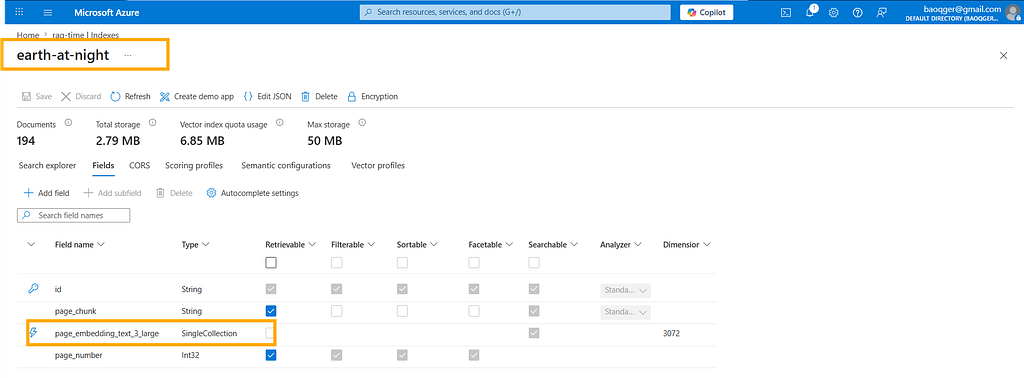
Here’s the Index we created: earth-at-night
Creating a Knowledge Source
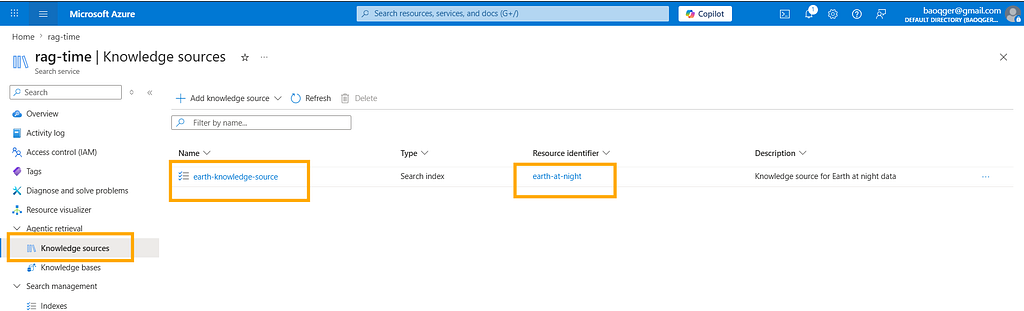
Now let’s create a Knowledge source based on the Search Index above. Note that Knowledge source itself doesn’t store data — it’s more like a pointer pointing to the actual data storage layer!
from azure.search.documents.indexes.models import SearchIndexKnowledgeSource, SearchIndexKnowledgeSourceParameters, SearchIndexFieldReference
from azure.search.documents.indexes import SearchIndexClient
ks = SearchIndexKnowledgeSource(
    name=knowledge_source_name,
    description="Knowledge source for Earth at night data",
    search_index_parameters=SearchIndexKnowledgeSourceParameters(
        search_index_name=index_name,
        source_data_fields=[SearchIndexFieldReference(name="id"), SearchIndexFieldReference(name="page_number")]
    ),
)
index_client = SearchIndexClient(endpoint=search_endpoint, credential=azure_credential)
index_client.create_or_update_knowledge_source(knowledge_source=ks)
print(f"Knowledge source '{knowledge_source_name}' created or updated successfully.")
Here’s the Knowledge source we created: earth-knowledge-source
Creating a Knowledge Base
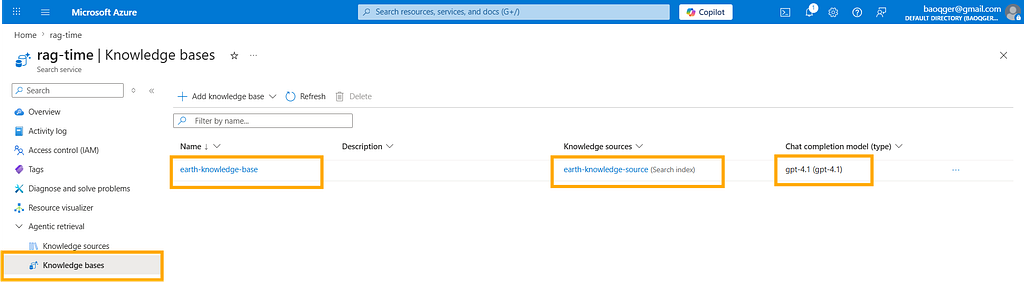
The Knowledge base, on one hand, encapsulates one or more downstream sources, and on the other hand, configures Azure OpenAI’s large model capabilities! The specific details are shown in the code below:
from azure.search.documents.indexes.models import KnowledgeBase, KnowledgeBaseAzureOpenAIModel, KnowledgeSourceReference, AzureOpenAIVectorizerParameters, KnowledgeRetrievalOutputMode, KnowledgeRetrievalLowReasoningEffort
from azure.search.documents.indexes import SearchIndexClient
aoai_params = AzureOpenAIVectorizerParameters(
    resource_url=aoai_endpoint,
    deployment_name=aoai_gpt_deployment,
    model_name=aoai_gpt_model
)
knowledge_base = KnowledgeBase(
    name=knowledge_base_name,
    models=[KnowledgeBaseAzureOpenAIModel(azure_open_ai_parameters=aoai_params)],
    knowledge_sources=[
        KnowledgeSourceReference(
            name=knowledge_source_name
        )
    ],
    output_mode=KnowledgeRetrievalOutputMode.ANSWER_SYNTHESIS,
    answer_instructions="Provide a 2 sentence concise and informative answer based on the retrieved documents."
)
index_client = SearchIndexClient(endpoint=search_endpoint, credential=azure_credential)
index_client.create_or_update_knowledge_base(knowledge_base)
print(f"Knowledge base '{knowledge_base_name}' created or updated successfully.")
Here’s the Knowledge base we created.
Agentic Retrieval Demo
With the Knowledge base ready, let’s see the intelligent retrieval effects of Agentic Retrieval in the next step.
from azure.search.documents.knowledgebases import KnowledgeBaseRetrievalClient
from azure.search.documents.knowledgebases.models import KnowledgeBaseRetrievalRequest, KnowledgeBaseMessage, KnowledgeBaseMessageTextContent, SearchIndexKnowledgeSourceParams
from azure.search.documents.indexes.models import KnowledgeRetrievalLowReasoningEffort
instructions = """
A Q&A agent that can answer questions about the Earth at night.
If you don't have the answer, respond with "I don't know".
"""
messages = [
    {
        "role": "system",
        "content": instructions
    }
]
agent_client = KnowledgeBaseRetrievalClient(endpoint=search_endpoint, knowledge_base_name=knowledge_base_name, credential=azure_credential)
query_1 = "What causes city lights to appear brighter from space during the holidays?"
messages.append({
    "role": "user",
    "content": query_1
})
req = KnowledgeBaseRetrievalRequest(
    messages=[
        KnowledgeBaseMessage(
            role=m["role"],
            content=[KnowledgeBaseMessageTextContent(text=m["content"])]
        ) for m in messages if m["role"] != "system"
    ],
    knowledge_source_params=[
        SearchIndexKnowledgeSourceParams(
            knowledge_source_name=knowledge_source_name,
            include_references=True,
            include_reference_source_data=True,
            always_query_source=True
        )
    ],
    include_activity=True,
    retrieval_reasoning_effort=KnowledgeRetrievalLowReasoningEffort
)
result = agent_client.retrieve(retrieval_request=req)
print(f"Retrieved content from '{knowledge_base_name}' successfully.")
The returned results include three contents:
response: The answer generated by the large model based on retrieval results for the user's question
activity: Each step broken down from the entire intelligent retrieval process
references: Relevant data documents retrieved from the data sources
So let’s take a specific look at what results the user’s question in the above example got. I’m most concerned about activity, and we can see that the entire query was split into two smaller queries, each retrieved, and then the results were merged.
[
  {
    "id": 0,
    "type": "modelQueryPlanning",
    "elapsed_ms": 1251,
    "input_tokens": 1682,
    "output_tokens": 69
  },
  {
    "id": 1,
    "type": "searchIndex",
    "elapsed_ms": 753,
    "knowledge_source_name": "earth-knowledge-source",
    "query_time": "2026-04-21T02:18:29.251Z",
    "count": 36,
    "search_index_arguments": {
      "search": "Causes of increased city light brightness from space during holidays",
      "source_data_fields": [
        {
          "name": "page_chunk"
        },
        {
          "name": "id"
        },
        {
          "name": "page_number"
        }
      ],
      "search_fields": [],
      "semantic_configuration_name": "semantic_config"
    }
  },
  {
    "id": 2,
    "type": "searchIndex",
    "elapsed_ms": 235,
    "knowledge_source_name": "earth-knowledge-source",
    "query_time": "2026-04-21T02:18:29.497Z",
    "count": 38,
    "search_index_arguments": {
      "search": "How holiday lighting affects satellite images of city lights",
      "source_data_fields": [
        {
          "name": "page_chunk"
        },
        {
          "name": "id"
        },
        {
          "name": "page_number"
        }
      ],
      "search_fields": [],
      "semantic_configuration_name": "semantic_config"
    }
  },
  {
    "id": 3,
    "type": "agenticReasoning",
    "reasoning_tokens": 46353,
    "retrieval_reasoning_effort": {
      "kind": "low"
    }
  },
  {
    "id": 4,
    "type": "modelAnswerSynthesis",
    "elapsed_ms": 2324,
    "input_tokens": 7705,
    "output_tokens": 98
  }
]
Connecting to Foundry Agent
Now let’s try to connect this Foundry IQ to Foundry Agent.
Creating a Secure MCP Connection
Foundry Agent and Knowledge base communicate through the MCP protocol. The Knowledge base exposes an MCP service to the outside based on a URL like this:
from dotenv import load_dotenv
from azure.identity import DefaultAzureCredential, get_bearer_token_provider
import os
load_dotenv(override=True)
search_endpoint = os.getenv("AZURE_SEARCH_SERVICE_ENDPOINT")
knowledge_base_name = os.getenv("KNOWLEDGE_BASE_NAME")
mcp_endpoint = f"{search_endpoint}/knowledgebases/{knowledge_base_name}/mcp?api-version=2025-11-01-Preview"
print(f"✅ MCP endpoint: {mcp_endpoint}")
Now the question is: how to securely access this MCP service? As an enterprise-level platform, Foundry Agent has very strict security requirements. We must establish a secure connection method.
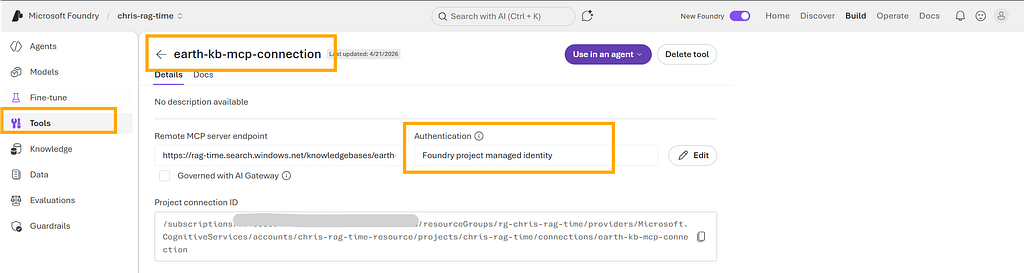
The specific approach is as follows: create a Remote Tool connection in the Foundry project. This connection requires using the Foundry project’s managed identity to authenticate with the MCP service, so that the Agent can securely read data from the Knowledge base through the MCP service.
import requests
from azure.identity import DefaultAzureCredential, get_bearer_token_provider
credential = DefaultAzureCredential()
bearer_token_provider = get_bearer_token_provider(
    credential, "https://management.azure.com/.default"
)
headers = {
    "Authorization": f"Bearer {bearer_token_provider()}",
}
FOUNDRY_ENDPOINT = os.environ["FOUNDRY_PROJECT_ENDPOINT"]
MODEL_DEPLOYMENT = os.environ.get("FOUNDRY_MODEL_DEPLOYMENT_NAME")
PROJECT_RESOURCE_ID = os.environ["FOUNDRY_PROJECT_RESOURCE_ID"]
PROJECT_CONNECTION_NAME = "earth-kb-mcp-connection"
conn_response = requests.put(
    f"https://management.azure.com{PROJECT_RESOURCE_ID}/connections/{PROJECT_CONNECTION_NAME}?api-version=2025-10-01-preview",
    headers=headers,
    json={
        "name": PROJECT_CONNECTION_NAME,
        "type": "Microsoft.MachineLearningServices/workspaces/connections",
        "properties": {
            "authType": "ProjectManagedIdentity",
            "category": "RemoteTool",
            "target": mcp_endpoint,
            "isSharedToAll": True,
            "audience": "https://search.azure.com/",
            "metadata": {"ApiType": "Azure"},
        },
    },
)
conn_response.raise_for_status()
print(f"✅ Project connection '{PROJECT_CONNECTION_NAME}' created")
Here’s the created Remote Tool connection:
Creating an Agent
Create a Foundry Agent: earth-at-night-agent, and configure the above Knowledge base's MCP service as a tool for it:
from azure.ai.projects import AIProjectClient
from azure.ai.projects.models import PromptAgentDefinition, MCPTool
project_client = AIProjectClient(
    endpoint=FOUNDRY_ENDPOINT, credential=credential
)
instructions = """
You are a helpful assistant that must use the knowledge base to answer all the questions from user.
You must never answer from your own knowledge under any circumstances.
Every answer must always provide annotations for using the MCP knowledge base tool
and render them as: `【message_idx:search_idx†source_name】`
If you cannot find the answer in the provided knowledge base you must respond with "I don't know".
"""
mcp_kb_tool = MCPTool(
    server_label="knowledge-base",
    server_url=mcp_endpoint,
    require_approval="never",
    allowed_tools=["knowledge_base_retrieve"],
    project_connection_id=PROJECT_CONNECTION_NAME,
)
agent = project_client.agents.create_version(
    agent_name="earth-at-night-agent",
    definition=PromptAgentDefinition(
        model=MODEL_DEPLOYMENT,
        instructions=instructions,
        tools=[mcp_kb_tool],
    ),
)
print(f"✅ Agent '{agent.name}' created (version={agent.version})")
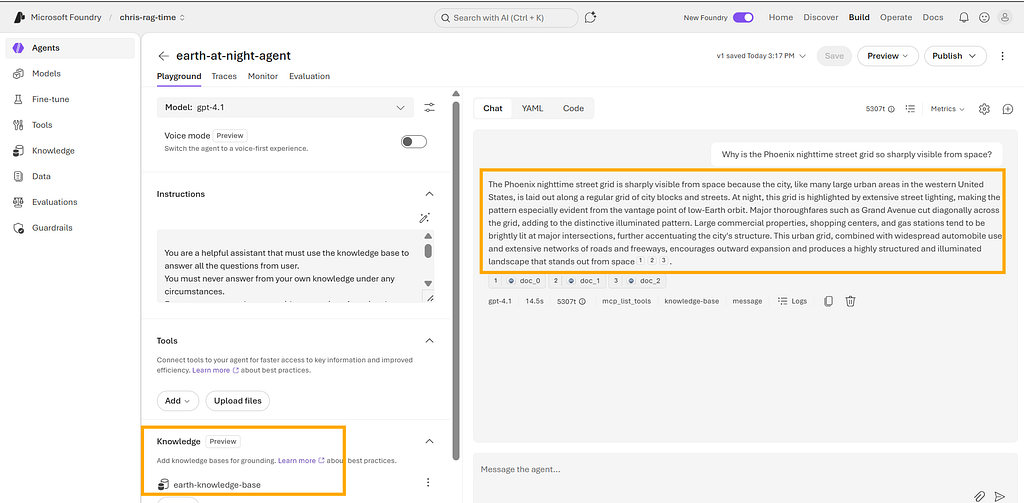
The system prompt requires the Agent to answer based on information in the Knowledge base. Let’s try it out.
Resolving MCP Access Permission Issues
On the Foundry interface, find this Agent and ask it a question. Obviously, we encountered an MCP service authentication issue, as shown below:
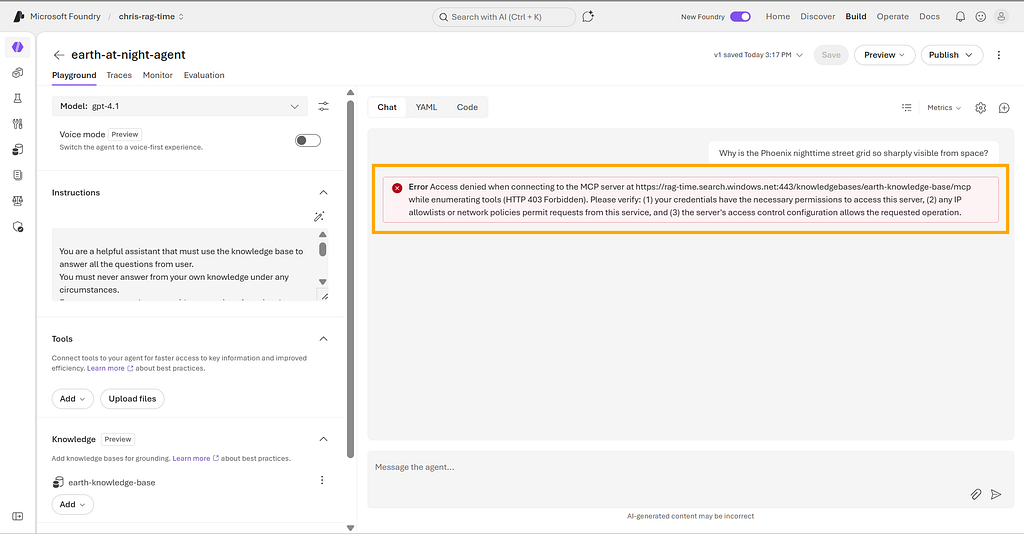
Let’s think about the cause of this problem: the Remote Tool connection created above requires using the Foundry project’s managed identity to authenticate with the MCP service, but obviously we haven’t added permissions for the Foundry project’s managed identity yet! This is the root cause.
The solution is also very direct: in the Azure AI Search service where the Knowledge base is located, add the Search Index Data Reader permission to the managed identity of the Foundry project where the Agent is located!
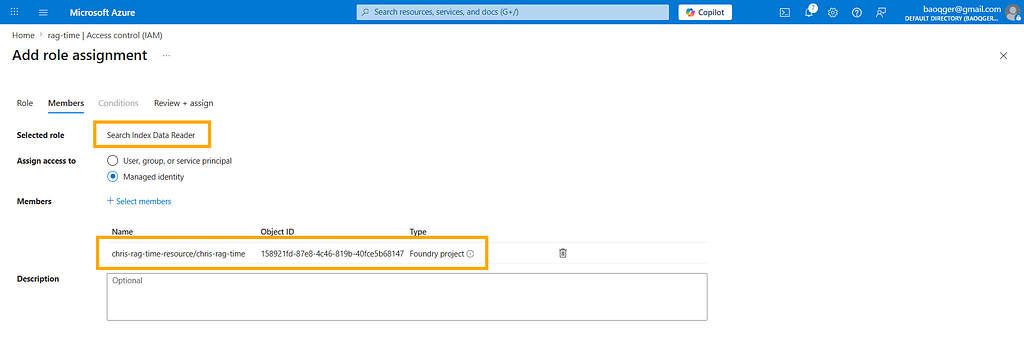
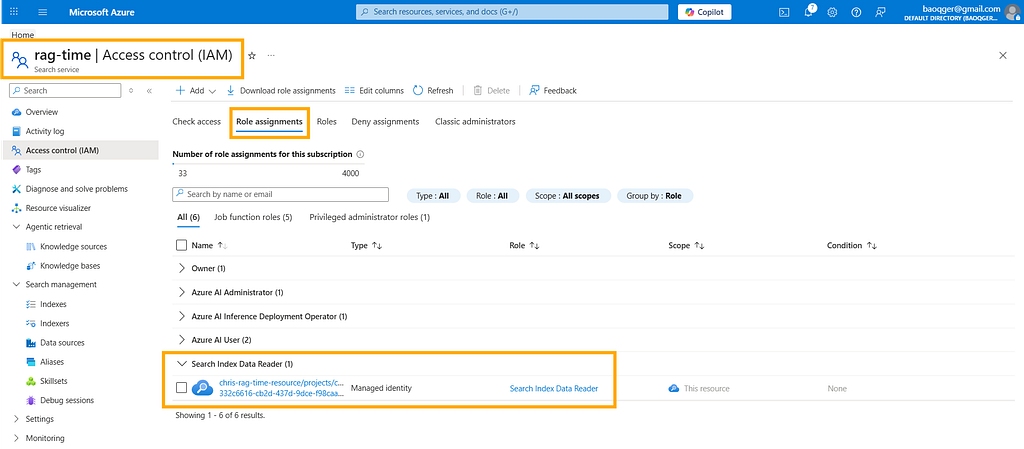
If you’re confused about how to manage permissions through RBAC on Azure, you can read my previous articles!
After resolving the above issue, let’s try again. This time, the Agent can engage in Q&A with users through the knowledge in the Knowledge base!
About the Author
I’m Chris Bao, a Microsoft Certified Trainer specializing in the Azure AI platform, proficient in various AI services and Agent development on the Azure platform.
I can provide training and consulting services for enterprises and individuals. For collaboration, please contact: [email protected]
Foundry IQ + Foundry Agent: From Knowledge Base to Enterprise-Level Agent was originally published in Level Up Coding on Medium, where people are continuing the conversation by highlighting and responding to this story.